

Introduction
EuroPips Pro MT4 is an automated Forex trading Expert Advisor (EA) designed to provide configurable trading strategies, technical indicator analysis, flexible lot sizing, and integrated risk management. The EA combines multiple technical indicators, including Envelopes, MACD, RSI, CCI, ADX, ATR, and Stochastic, to configure its trading strategy and market conditions.

tiple technical indicators, including Envelopes, MACD, RSI, CCI, ADX, ATR, and Stochastic, to configure its trading strategy and market conditions.
EuroPips Pro MT4 also provides customizable Take Profit, Stop Loss, trade multipliers, and holiday trading restrictions. Its money management options support high-risk configurations, percentage-based balance settings, and fixed initial lot sizing.
Understanding each input parameter is essential for configuring EuroPips Pro MT4 according to your trading objectives, account size, and preferred risk exposure.
EuroPips Pro MT4 Settings Explained
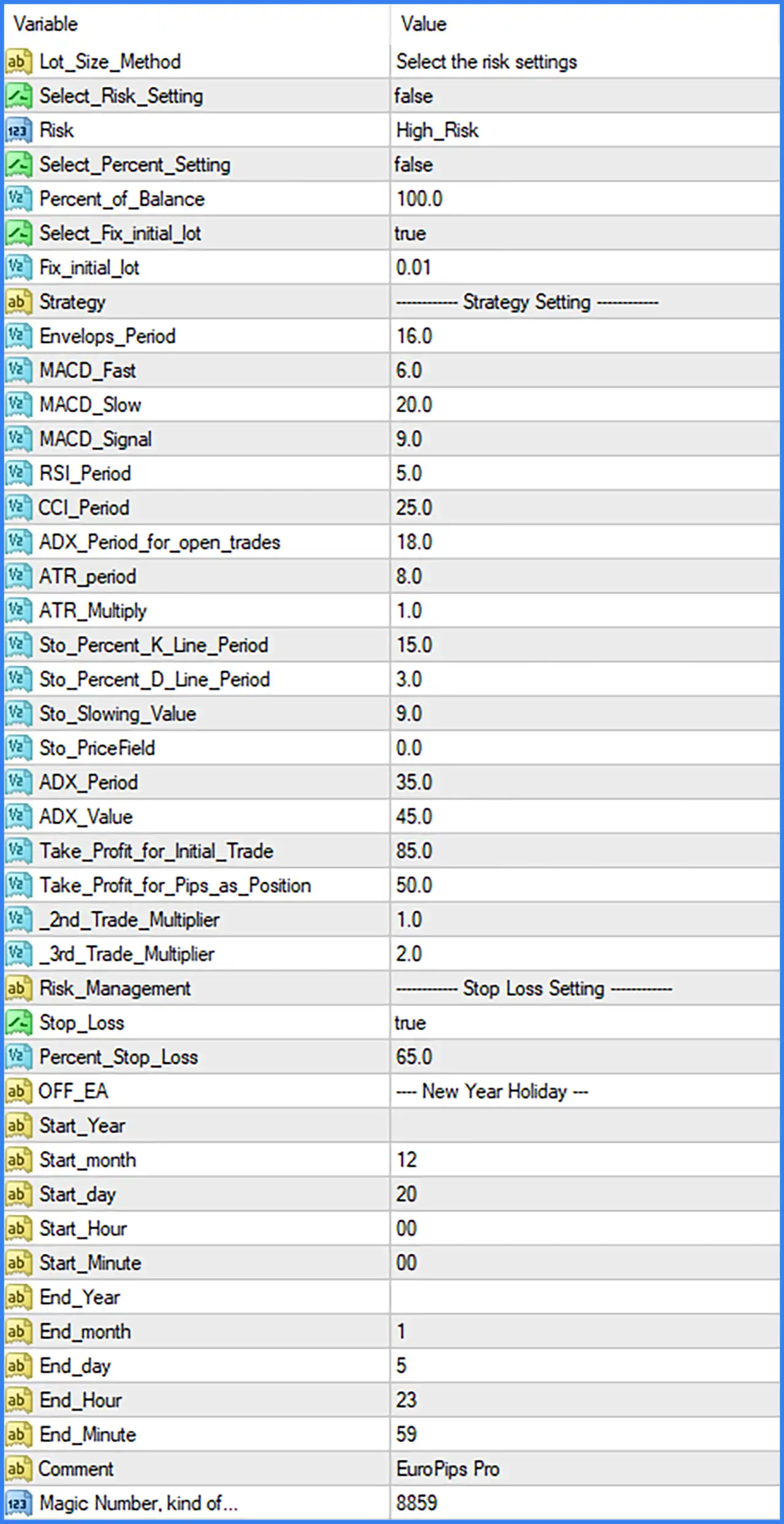
1. Lot Size and Risk Management Settings
🔹 Lot_Size_Method = Select the risk settings – Displays the lot sizing and risk configuration section, where traders can choose their preferred position-sizing method.
🔹 Select_Risk_Setting = false – Disables the dedicated risk-setting selection option, meaning the EA does not use this selection switch in its current configuration.
🔹 Risk = High_Risk – Selects the High_Risk profile, defining the risk category configured for the EA.
🔹 Select_Percent_Setting = false – Disables the percentage-based balance selection option.
🔹 Percent_of_Balance = 100.0 – Sets the balance percentage parameter to 100.0, representing the configured percentage value for balance-based position sizing.
🔹 Select_Fix_initial_lot = true – Enables the fixed initial lot selection, allowing the EA to use the configured initial lot size.
🔹 Fix_initial_lot = 0.01 – Sets the initial fixed trading volume to 0.01 lots for the EA's position-sizing configuration.
2. Trading Strategy and Technical Indicator Settings
🔹 Strategy = Strategy Setting – Identifies the strategy configuration section containing the technical indicator parameters used by EuroPips Pro MT4.
🔹 Envelops_Period = 16.0 – Sets the Envelopes indicator period to 16.0, controlling the calculation period used for the indicator's upper and lower boundaries.
🔹 MACD_Fast = 6.0 – Sets the fast MACD moving average period to 6.0, controlling the faster component of the MACD calculation.
🔹 MACD_Slow = 20.0 – Sets the slow MACD moving average period to 20.0, defining the slower component used to calculate the MACD difference.
🔹 MACD_Signal = 9.0 – Sets the MACD signal period to 9.0, determining the smoothing period of the MACD signal line.
🔹 RSI_Period = 5.0 – Sets the Relative Strength Index calculation period to 5.0, controlling how quickly the RSI responds to recent price movements.
🔹 CCI_Period = 25.0 – Sets the Commodity Channel Index period to 25.0, defining the number of periods used to measure price deviations from their statistical average.
🔹 ADX_Period_for_open_trades = 18.0 – Sets the ADX period to 18.0 for the trading-entry conditions, helping evaluate market trend strength when opening trades.
🔹 ATR_period = 8.0 – Sets the Average True Range calculation period to 8.0, measuring recent market volatility.
🔹 ATR_Multiply = 1.0 – Sets the ATR multiplier to 1.0, defining the multiplier applied to ATR-based calculations within the EA's strategy.
🔹 Sto_Percent_K_Line_Period = 15.0 – Sets the Stochastic %K calculation period to 15.0, determining the lookback period for the main Stochastic line.
🔹 Sto_Percent_D_Line_Period = 3.0 – Sets the Stochastic %D smoothing period to 3.0, controlling the calculation of the Stochastic signal line.
🔹 Sto_Slowing_Value = 9.0 – Sets the Stochastic slowing value to 9.0, controlling additional smoothing applied to the %K calculation.
🔹 Sto_PriceField = 0.0 – Sets the Stochastic price field parameter to 0.0, specifying the price-field selection used by the indicator.
🔹 ADX_Period = 35.0 – Sets the main ADX indicator period to 35.0, defining the calculation period used to evaluate trend strength.
🔹 ADX_Value = 45.0 – Sets the ADX threshold parameter to 45.0, establishing the configured trend-strength reference level for the strategy.
3. Take Profit and Trade Multiplier Settings
🔹 Take_Profit_for_Initial_Trade = 85.0 – Sets the Take Profit target for the initial trade to 85.0, defining its configured profit-taking level.
🔹 Take_Profit_for_Pips_as_Position = 50.0 – Sets the Take Profit parameter for positions to 50.0 pips, defining the configured pip-based profit target.
🔹 _2nd_Trade_Multiplier = 1.0 – Sets the second trade multiplier to 1.0, defining the volume multiplier applied to the second trade in the trading sequence.
🔹 _3rd_Trade_Multiplier = 2.0 – Sets the third trade multiplier to 2.0, configuring a multiplier of 2.0 for the third trade in the sequence.
4. Stop Loss and Risk Protection Settings
🔹 Risk_Management = Stop Loss Setting – Identifies the risk management section containing the Stop Loss configuration parameters.
🔹 Stop_Loss = true – Enables the Stop Loss functionality, allowing the EA to apply its configured stop-loss protection.
🔹 Percent_Stop_Loss = 65.0 – Sets the percentage-based Stop Loss parameter to 65.0, defining the configured percentage threshold for the EA's stop-loss management.
5. New Year Holiday Trading Settings
🔹 OFF_EA = New Year Holiday – Identifies the New Year Holiday section, which contains the date and time parameters for configuring the EA's holiday trading restriction period.
🔹 Start_Year = Not specified – No year value is displayed in the supplied Inputs, so the starting year must be checked in the EA configuration.
🔹 Start_month = 12 – Sets the holiday restriction starting month to December (month 12).
🔹 Start_day = 20 – Sets the holiday restriction starting day to the 20th, corresponding to December 20.
🔹 Start_Hour = 00 – Sets the holiday restriction starting hour to 00:00, meaning midnight.
🔹 Start_Minute = 00 – Sets the holiday restriction starting minute to 00, completing the starting time of 00:00.
🔹 End_Year = Not specified – No year value is displayed in the supplied Inputs, so the ending year must be checked in the EA configuration.
🔹 End_month = 1 – Sets the holiday restriction ending month to January (month 1).
🔹 End_day = 5 – Sets the holiday restriction ending day to the 5th, corresponding to January 5.
🔹 End_Hour = 23 – Sets the holiday restriction ending hour to 23:00.
🔹 End_Minute = 59 – Sets the holiday restriction ending minute to 59, completing the ending time of 23:59.
6. Trade Identification Settings
🔹 Comment = EuroPips Pro – Sets the trade comment to EuroPips Pro, allowing traders to identify orders associated with this Expert Advisor in the trading terminal.
🔹 Magic Number, kind of... = 8859 – Assigns Magic Number 8859 to the EA's trades, helping distinguish and manage its positions separately from other Expert Advisors or manual trades.
Conclusion
EuroPips Pro MT4 offers a configurable automated trading system that combines multiple technical indicators, flexible money management, and integrated Stop Loss and Take Profit parameters.
The supplied configuration uses a High_Risk profile, an initial fixed lot of 0.01, Envelopes Period 16.0, MACD settings of 6.0/20.0/9.0, and an RSI Period of 5.0. It also includes ADX, ATR, and Stochastic parameters for configuring its technical analysis.
For trade management, the EA uses an initial Take Profit of 85.0, a position Take Profit setting of 50.0 pips, and a Stop Loss percentage parameter of 65.0. The New Year Holiday settings define a restriction period from December 20 at 00:00 to January 5 at 23:59, with the years left unspecified in the supplied configuration.
Before using EuroPips Pro MT4 on a live trading account, traders should carefully review the High_Risk profile, percentage-based risk settings, trade multipliers, and Stop Loss configuration. Backtesting and demo testing are recommended to evaluate the strategy's behavior under different market conditions.