

Introduction to Dolphin EA MT4
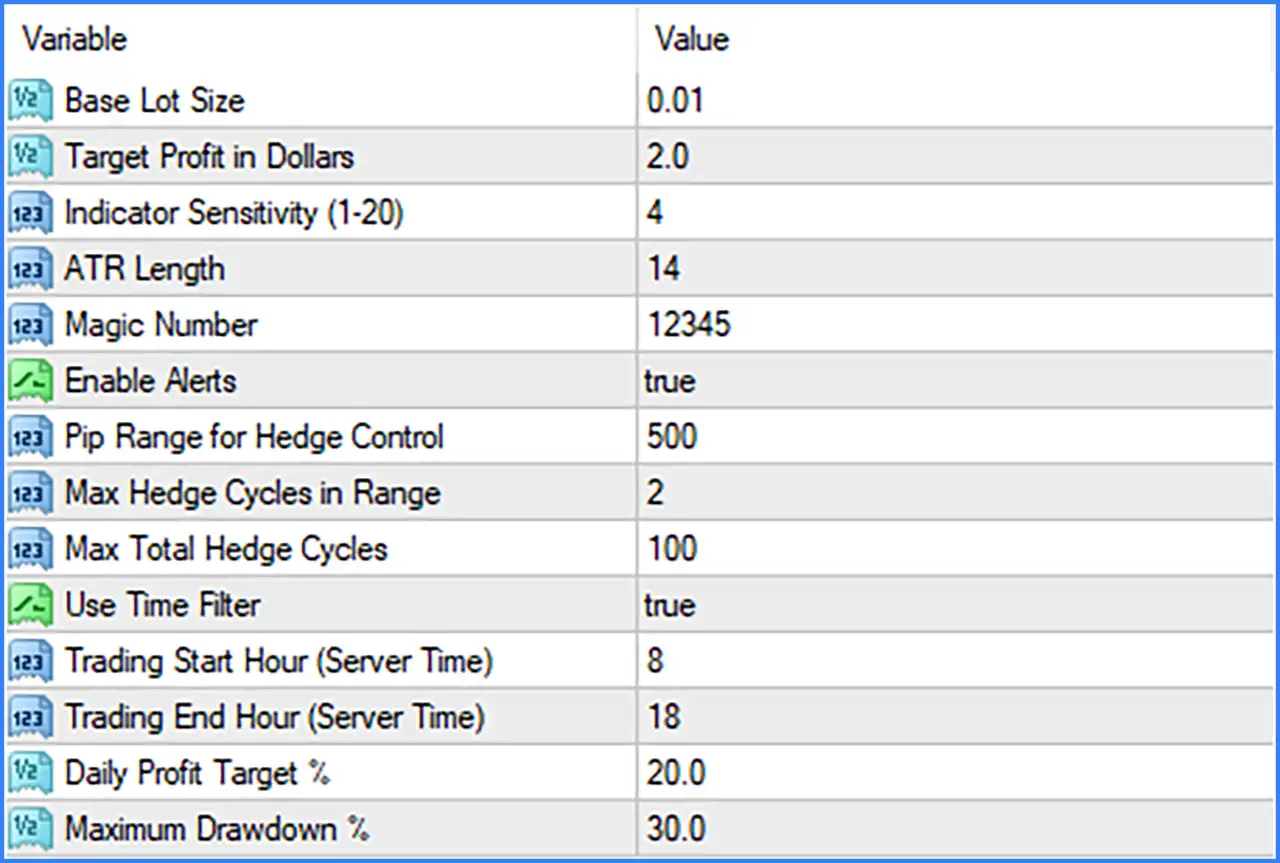
Dolphin EA MT4 is an automated trading Expert Advisor (EA) designed for the MetaTrader 4 platform. Its configuration includes adjustable lot sizing, profit targets, technical indicator sensitivity, ATR-based market analysis, and hedge management parameters.

The EA provides several risk management features, including maximum hedge cycle restrictions, daily profit targets, maximum drawdown limits, and configurable trading hours. It also supports optional alerts and time-based trading controls, allowing traders to customize its operating conditions according to their trading strategies.
Understanding these settings helps traders configure Dolphin EA MT4, manage trading exposure, and control its automated trading and hedging parameters more effectively.
Lot Size and Profit Target Settings
This section controls the initial trading volume and the monetary profit target used by the EA.
🔹 Base Lot Size = 0.01: Sets the initial trading volume to 0.01 lots, defining the default position size used by Dolphin EA MT4 when opening trades.
🔹 Target Profit in Dollars = 2.0: Sets the target profit to $2.0, establishing the configured monetary profit objective for the EA's trade management system.
Indicator and Market Analysis Settings
These parameters configure the EA's technical analysis sensitivity and Average True Range calculations.
🔹 Indicator Sensitivity (1-20) = 4: Sets the indicator sensitivity level to 4 within the available range of 1 to 20, controlling how sensitive the EA's indicator-based trading logic is to market conditions.
🔹 ATR Length = 14: Sets the Average True Range (ATR) calculation period to 14 candles, determining the historical price data used to measure market volatility and support the EA's trading calculations.
Trade Identification and Alert Settings
This section contains parameters for identifying EA positions and controlling trading notifications.
🔹 Magic Number = 12345: Assigns the Magic Number 12345 to trades opened by Dolphin EA MT4, allowing MetaTrader 4 to distinguish the EA's positions from manually opened trades and orders managed by other Expert Advisors.
🔹 Enable Alerts = true: Enables trading alerts, allowing the EA to provide notifications about relevant trading activities or events according to its internal alert functionality.
Hedge Management Settings
The Hedge Management section provides controls for configuring pip ranges and limiting the number of hedge cycles. These parameters help regulate the EA's hedging activity and manage the number of additional hedge operations.
🔹 Pip Range for Hedge Control = 500: Sets the pip range for hedge control to 500, defining the configured price-distance threshold used by the EA when managing its hedging operations.
🔹 Max Hedge Cycles in Range = 2: Limits the maximum number of hedge cycles within the specified pip range to 2, helping restrict repeated hedging activity within the same configured price interval.
🔹 Max Total Hedge Cycles = 100: Sets the maximum total number of hedge cycles to 100, establishing the overall configured limit for hedging operations managed by the EA.
Trading Time Filter Settings
The time filter allows traders to define specific trading hours based on the broker's server time. This feature helps restrict the EA's trading activity to a selected daily schedule.
🔹 Use Time Filter = true: Enables the trading time filter, allowing Dolphin EA MT4 to follow the configured starting and ending hours when managing its trading operations.
🔹 Trading Start Hour (Server Time) = 8: Sets the trading session starting hour to 08:00 according to the broker's server time, defining when the EA's configured trading window begins.
🔹 Trading End Hour (Server Time) = 18: Sets the trading session ending hour to 18:00 according to the broker's server time, defining when the EA's configured trading window finishes.
Risk Management Settings
These parameters provide additional controls for daily profit objectives and account drawdown restrictions.
🔹 Daily Profit Target % = 20.0: Sets the daily profit target to 20.0%, establishing the configured percentage-based profit objective for the trading day.
🔹 Maximum Drawdown % = 30.0: Sets the maximum drawdown threshold to 30.0%, defining the configured account drawdown limit used by the EA's risk management system.
Conclusion
Dolphin EA MT4 offers a configurable automated trading system with a focus on position sizing, technical indicator analysis, hedge cycle management, and account risk controls.
Its default configuration uses a 0.01-lot starting volume, a $2.0 profit target, Indicator Sensitivity of 4, and an ATR Length of 14. The hedge management system includes a 500-pip control range, a maximum of 2 hedge cycles within that range, and a maximum of 100 total hedge cycles.
Additionally, the EA provides a trading schedule from 08:00 to 18:00 broker server time, a daily profit target of 20.0%, and a maximum drawdown setting of 30.0%.