

Introduction to AiMaxPro EA MT4
AiMaxPro EA is an automated trading Expert Advisor (EA) designed for the MetaTrader 4 platform. Its configuration includes customizable timeframe settings, technical indicator parameters, economic news filters, position sizing, trading schedules, and automated trade management features.
The EA provides adjustable Period 1 and Period 2 values, Ratio parameters, news impact filters, maximum lot restrictions, Stop Loss (SL) and Take Profit (TP) targets, and trailing stop controls. It also includes trading-hour configurations and execution parameters to help traders customize its operation according to their trading preferences.
Understanding these settings allows traders to configure AiMaxPro EA more effectively, manage trading exposure, and adjust its behavior under different market conditions.
Timeframe and Indicator Settings
This section controls the trading timeframe and the numerical parameters used by the EA's internal market analysis.
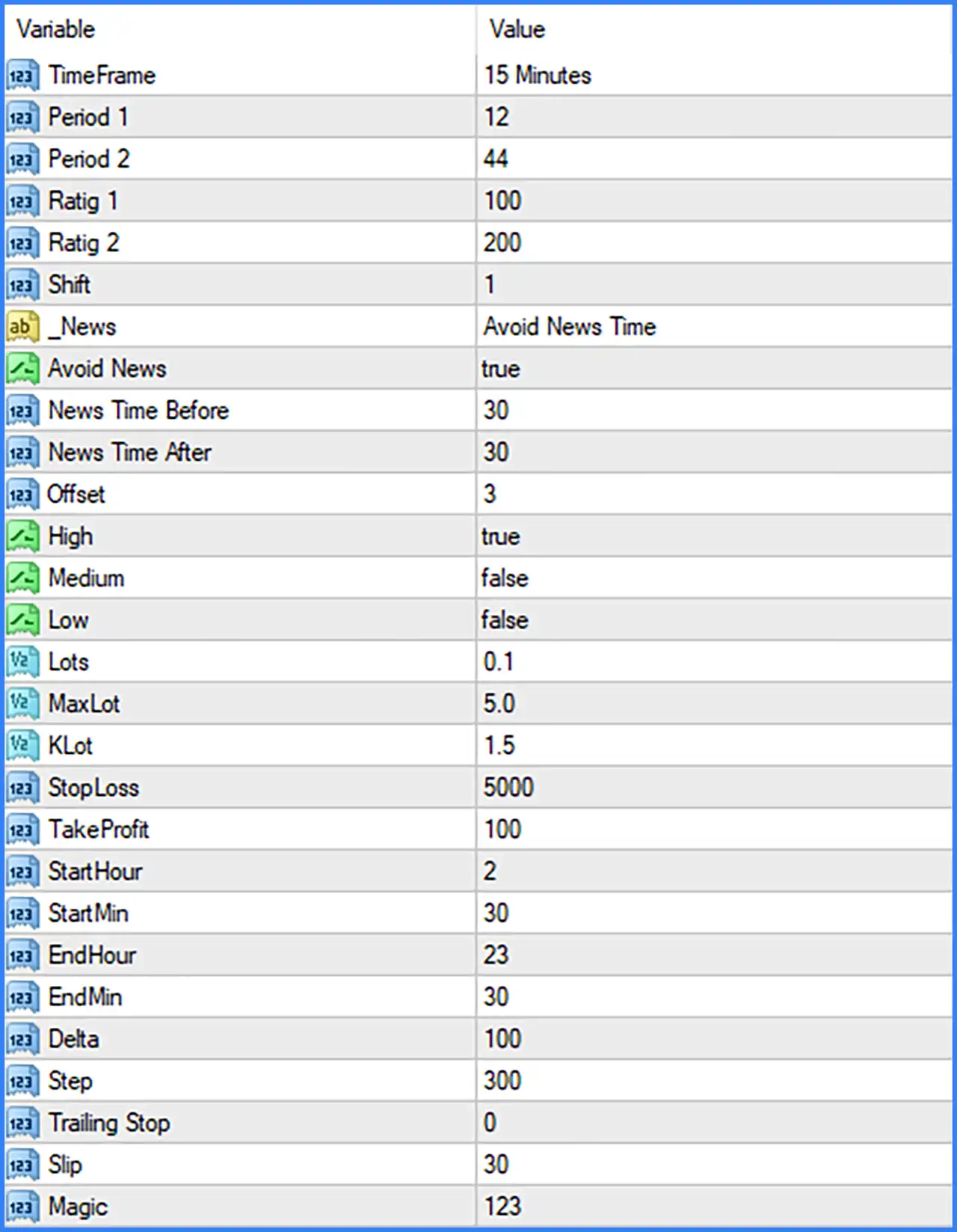
🔹 TimeFrame = 15 Minutes: Sets the trading timeframe to M15, meaning the EA uses 15-minute chart data as its configured timeframe for market analysis and trading operations.
🔹 Period 1 = 12: Sets the first indicator or calculation period to 12, defining the number of historical candles used by the corresponding internal calculation.
🔹 Period 2 = 44: Sets the second indicator or calculation period to 44, providing a longer calculation reference that may be used alongside Period 1 to evaluate market conditions.
🔹 Ratig 1 = 100: Sets the first Ratio parameter to 100, defining a numerical configuration value used by the EA's internal trading calculations.
🔹 Ratig 2 = 200: Sets the second Ratio parameter to 200, providing an additional numerical reference for the EA's internal strategy configuration.
🔹 Shift = 1: Sets the indicator shift to 1, specifying the calculation or reference candle offset used by the corresponding indicator-based logic.
Economic News Filter Settings
The News section provides controls for managing trading activity around scheduled economic announcements. These parameters allow traders to configure news avoidance periods and select which news-impact categories should be considered.
🔹 News = Avoid News Time: Selects the Avoid News Time mode, indicating that the EA is configured to use a news-avoidance approach rather than unrestricted trading around economic announcements.
🔹 Avoid News = true: Enables the economic news filter, allowing the EA to apply its configured restrictions around scheduled news events.
🔹 News Time Before = 30: Sets the pre-news avoidance period to 30 minutes, defining how long before a scheduled economic announcement the EA should avoid trading when the news filter is active.
🔹 News Time After = 30: Sets the post-news avoidance period to 30 minutes, defining how long after an economic announcement the EA should continue applying its news-related trading restriction.
🔹 Offset = 3: Sets the news-time offset to 3, providing a time adjustment value that may be used to synchronize economic event schedules with the broker's server time.
🔹 High = true: Enables the high-impact news category, allowing the EA to apply its news-filtering conditions to economic announcements classified as high impact.
🔹 Medium = false: Disables the medium-impact news category, meaning medium-impact economic announcements are not selected by this individual filter option.
🔹 Low = false: Disables the low-impact news category, meaning low-impact economic announcements are not selected by this individual filter option.
Lot Size and Risk Management Settings
This section controls position sizing, maximum trading volume, and lot calculation parameters.
🔹 Lots = 0.1: Sets the default trading lot size to 0.1 lots, defining the configured position volume used by the EA when opening trades.
🔹 MaxLot = 5.0: Sets the maximum permitted lot size to 5.0 lots, establishing an upper volume limit for the EA's position-sizing configuration.
🔹 KLot = 1.5: Sets the KLot multiplier to 1.5, providing a configurable coefficient that may influence how the EA calculates or adjusts trading volume.
Stop Loss and Take Profit Settings
These parameters define the primary exit targets used by AiMaxPro EA MT4 to manage trading positions.
🔹 StopLoss = 5000: Sets the Stop Loss parameter to 5000, defining the configured protective exit distance for an open trade. The exact unit and monetary risk depend on the EA's calculation method and broker specifications.
🔹 TakeProfit = 100: Sets the Take Profit parameter to 100, establishing the configured profit-target distance used when the EA manages and closes trading positions.
Trading Schedule Settings
The trading schedule parameters define the hours and minutes during which AiMaxPro EA MT4 is configured to operate.
🔹 StartHour = 2: Sets the trading start hour to 2, indicating that the configured trading schedule begins at 02:00 according to the time reference used by the EA.
🔹 StartMin = 30: Sets the trading start minute to 30, making the configured starting time 02:30.
🔹 EndHour = 23: Sets the trading end hour to 23, defining the hour at which the configured trading session finishes.
🔹 EndMin = 30: Sets the trading end minute to 30, making the configured ending time 23:30.
Trade Management and Execution Settings
This section contains additional parameters for managing trade spacing, trailing stop functionality, execution tolerance, and order identification.
🔹 Delta = 100: Sets the Delta parameter to 100, providing a numerical value that may be used by the EA's internal trading calculations or price-distance management logic.
🔹 Step = 300: Sets the trading Step parameter to 300, defining a configurable interval that may control the distance between trading actions or subsequent entries.
🔹 Trailing Stop = 0: Sets the trailing stop parameter to 0, indicating that trailing stop functionality is disabled or inactive under the default configuration, depending on the EA's internal implementation.
🔹 Slip = 30: Sets the permitted slippage parameter to 30, defining the maximum configured price deviation allowed during order execution according to the EA's slippage-handling logic.
🔹 Magic = 123: Assigns the Magic Number 123 to trades opened by AiMaxPro EA MT4, allowing MetaTrader 4 to identify and distinguish the EA's positions from manually opened trades or orders managed by other Expert Advisors.
Conclusion
AiMaxPro EA MT4 offers a flexible configuration system that combines timeframe selection, indicator parameters, economic news filtering, position sizing, and automated trade management.
Its default configuration uses the M15 timeframe, Period 1 of 12, Period 2 of 44, and Ratio values of 100 and 200. The EA also features a 0.1-lot default trading volume, a maximum lot setting of 5.0, and a KLot multiplier of 1.5.
For trade protection and profit management, the default StopLoss is 5000 and TakeProfit is 100, while the trailing stop is set to 0. The news filter is enabled for high-impact announcements, with 30 minutes before and after each event. Its configured trading schedule runs from 02:30 to 23:30.
Before deploying AiMaxPro EA MT4 on a live account, traders should carefully evaluate the relationship between lot sizing, maximum volume, Stop Loss, Take Profit, and the EA's trading schedule. Testing the default configuration on a demo account is recommended to understand its behavior under different market conditions.