
Introduction to FoldX EA MT4
FoldX EA MT4 is an automated trading Expert Advisor (EA) designed for the MetaTrader 4 platform. Its input configuration provides several adjustable parameters for trade execution, lot sizing, trading cycles, profit targets, and strategy-specific order management.

The EA features configurable lot sizing through the Lots and LotExponent parameters, pip-based trading distance, Turbo and NewCycle options, RSI period settings, and multiple trading strategy configurations. It also includes separate maximum trade limits and Magic Numbers for identifying different trading components, including HiLo and additional strategy groups.
Understanding these parameters helps traders customize FoldX EA, manage trading frequency, configure position sizing, and adjust its operation according to their trading objectives.
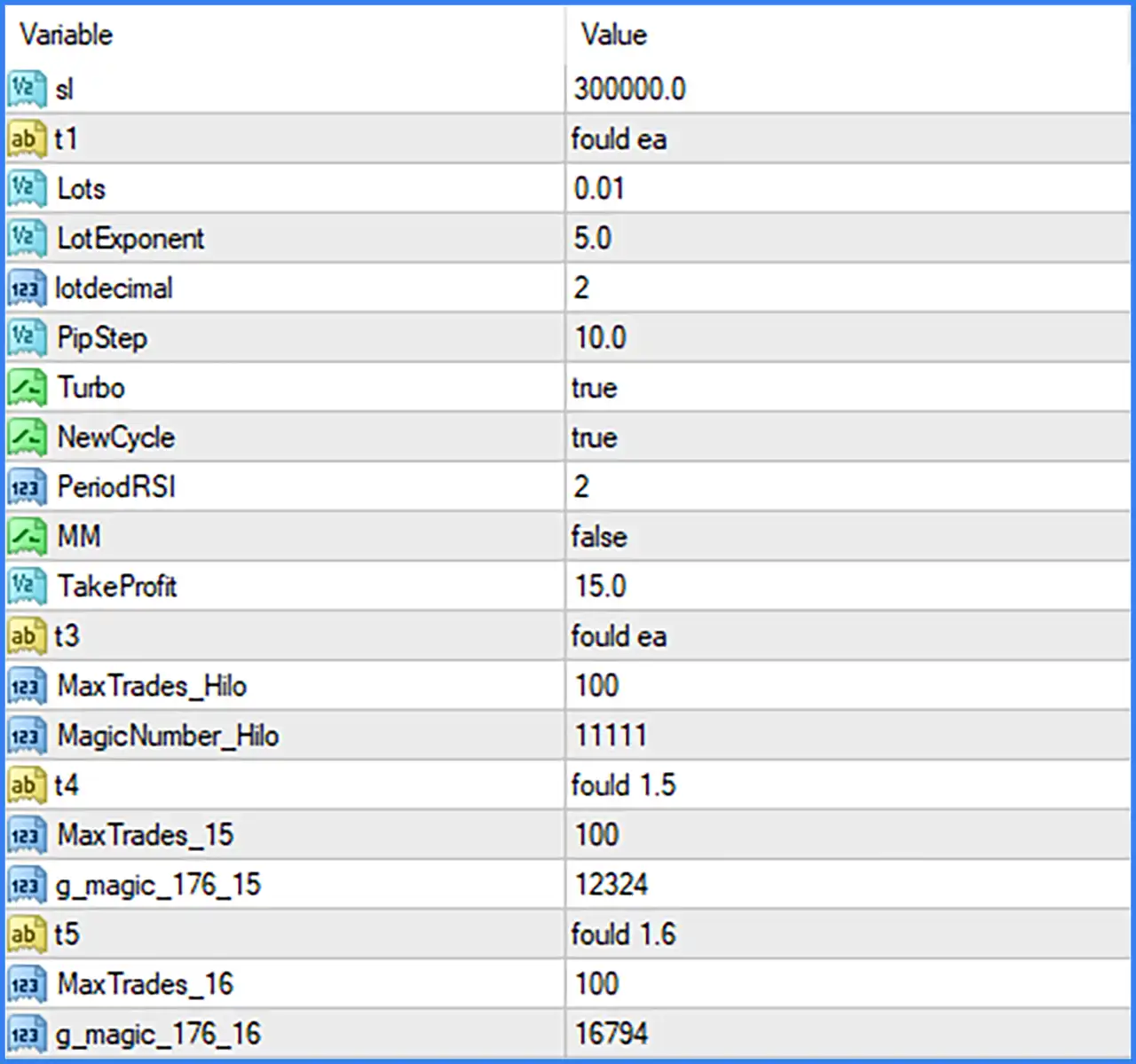
Main Trading and Lot Settings
This section contains the primary configuration parameters controlling trade sizing, trading distance, execution modes, and profit targets.
🔹 sl = 300000.0: Sets the parameter named sl to 300000.0. It may represent a stop-loss-related setting, but its exact function, unit, and calculation cannot be confirmed from the Inputs panel alone.
🔹 t1 = fould ea: Defines the first text-based configuration parameter with the value "fould ea". This appears to be an internal EA label or configuration identifier; its exact operational purpose requires the EA documentation.
🔹 Lots = 0.01: Sets the initial trading lot size to 0.01 lots, defining the default position volume used by FoldX EA MT4 when opening trades.
🔹 LotExponent = 5.0: Sets the lot exponent parameter to 5.0. This value may control how position volume changes as additional trades are opened, depending on the EA's internal lot-sizing algorithm.
🔹 lotdecimal = 2: Sets the lot decimal precision to 2, defining the number of decimal places used when calculating or normalizing trading lot sizes.
🔹 PipStep = 10.0: Sets the pip step parameter to 10.0, defining the configured price-distance interval that may be used to determine the spacing between trading entries or subsequent orders.
🔹 Turbo = true: Enables Turbo mode, activating the corresponding accelerated or alternative trading configuration implemented within the EA.
🔹 NewCycle = true: Enables the NewCycle option, allowing the EA to activate its new-cycle functionality according to its internal trading logic.
🔹 PeriodRSI = 2: Sets the RSI indicator calculation period to 2, providing a very short-term momentum measurement that may be used by the EA when evaluating trading conditions.
🔹 MM = false: Disables the MM option by default. If MM represents Money Management, this setting may control an alternative dynamic position-sizing function; its precise behavior depends on the EA implementation.
🔹 TakeProfit = 15.0: Sets the take-profit parameter to 15.0, defining the configured profit target used by the EA's trade management system. The exact unit and calculation method are not specified in the screenshot.
HiLo Strategy Settings
This section contains parameters associated with the HiLo trading component, including its configuration identifier, maximum trade limit, and Magic Number.
🔹 t3 = fould ea: Defines the third text-based configuration parameter with the value "fould ea". It appears to be an internal strategy or configuration label, although its exact function cannot be established from the displayed value.
🔹 MaxTrades_Hilo = 100: Sets the maximum trade limit for the HiLo component to 100, defining the configured upper limit for trades managed by this strategy.
🔹 MagicNumber_Hilo = 11111: Assigns the Magic Number 11111 to the HiLo trading component, allowing MetaTrader 4 to identify and distinguish its positions from trades opened by other strategies or Expert Advisors.
Additional Strategy Settings – Group 15
This section contains a separate configuration identifier, maximum trade limit, and Magic Number for an additional trading component.
🔹 t4 = fould 1.5: Defines the fourth text-based configuration parameter with the value "fould 1.5". The value may identify an internal strategy preset or configuration version, but its exact function is not documented in the Inputs panel.
🔹 MaxTrades_15 = 100: Sets the maximum trade limit for strategy group 15 to 100, controlling the configured number of trades that can be managed by this component.
🔹 g_magic_176_15 = 12324: Assigns the Magic Number 12324 to the corresponding strategy group, helping identify and separate its trading positions within the MetaTrader 4 terminal.
Additional Strategy Settings – Group 16
This section provides another set of configuration parameters for a separate trading component, including its identifier, trade limit, and Magic Number.
🔹 t5 = fould 1.6: Defines the fifth text-based configuration parameter with the value "fould 1.6". This appears to be an internal strategy identifier or preset value, although its precise operational meaning requires further documentation.
🔹 MaxTrades_16 = 100: Sets the maximum trade limit for strategy group 16 to 100, defining the configured upper trade limit for this component.
🔹 g_magic_176_16 = 16794: Assigns the Magic Number 16794 to the corresponding strategy group, allowing the EA to distinguish its positions from those managed by other trading components.