🔶 What is Dragon Ultra EA?
Dragon Ultra EA is an automated trading Expert Advisor (EA) developed for the MetaTrader 5 platform. The EA appears to use a grid or multi-order strategy combined with trailing stop management to capture price movements while controlling trade exposure. With configurable step distance, trailing stop parameters, and order limits, Dragon Ultra EA aims to balance trade opportunities with risk management.
🔶 Core Trading Parameters
| Parameter | Value | Explanation |
|---|---|---|
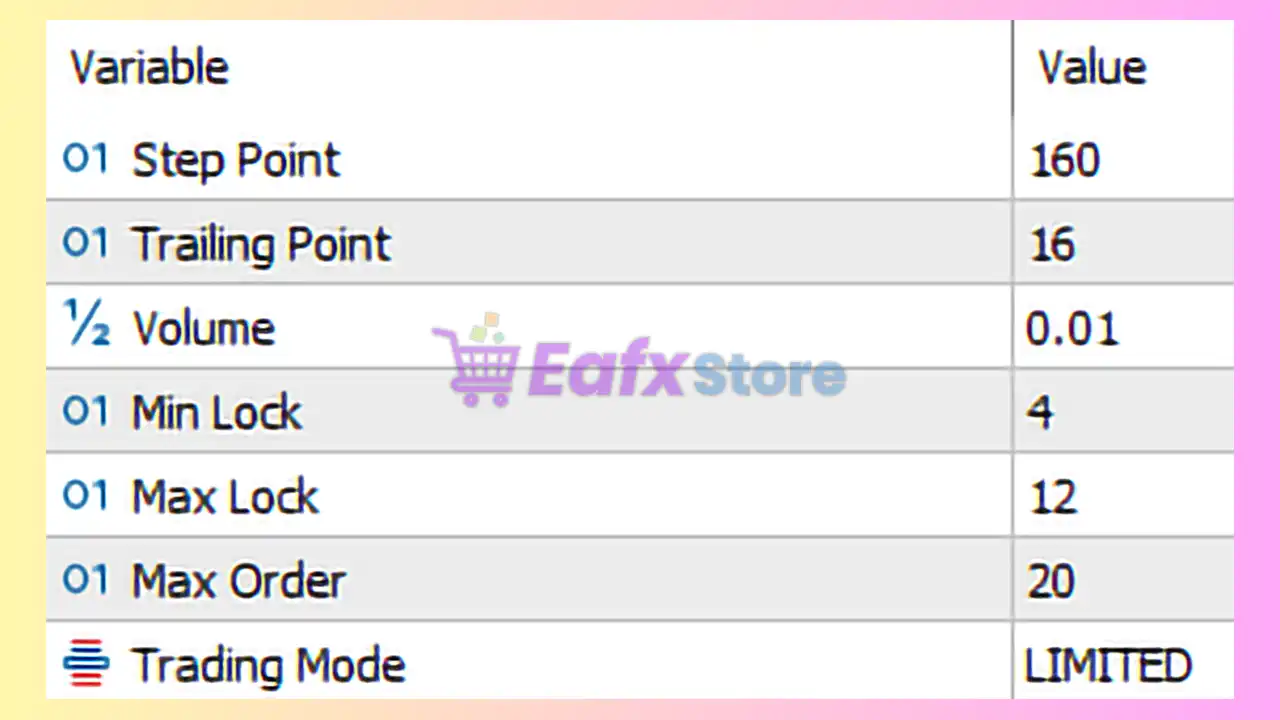
| Step Point | 160 | Defines the distance in points between each trade in the strategy. This value determines how far price must move before a new position is opened. |
| Trailing Point | 16 | Sets the trailing stop distance used to lock in profits once a trade becomes profitable. |
| Volume | 0.01 | Defines the lot size used for each trade. A small lot size helps reduce risk exposure. |
These parameters control the basic trade execution and profit management logic.
🔶 Order Management Settings
| Parameter | Value | Explanation |
|---|---|---|
| Min Lock | 4 | Minimum number of positions required before the EA begins applying lock or hedging logic. |
| Max Lock | 12 | Maximum number of locked positions allowed in the strategy cycle. |
| Max Order | 20 | Limits the total number of trades that the EA can open simultaneously. |
These limits help prevent excessive exposure and uncontrolled grid expansion.
🔶 Trading Mode
| Parameter | Value | Explanation |
|---|---|---|
| Trading Mode | Limited | Indicates that the EA operates with restrictions on the number of trades and positions to control risk. |
Limited trading mode is typically used to avoid aggressive order accumulation.
🔶 Strategy Overview
Dragon Ultra EA MT5 appears to operate using a multi-position grid trading approach. The EA opens new trades when the market moves a predefined distance (Step Point). As positions become profitable, the trailing stop feature secures profits by moving the stop loss closer to the market price.
The lock parameters suggest that the EA may use a hedging or locking system when multiple positions are open, helping stabilize floating drawdown.
Risk Management Perspective
Key safety mechanisms included in Dragon Ultra EA MT5:
- Defined spacing between grid trades (Step Point)
- Maximum number of open orders
- Trailing stop for profit protection
- Lock management to balance exposure
- Limited trading mode to prevent excessive risk
These features aim to maintain stability while still allowing the EA to capitalize on market fluctuations.
Recommended Trading Environment
To optimize performance when using Dragon Ultra EA MT5:
- Use a low-spread broker to minimize trading costs
- Run the EA on a VPS for stable connectivity
- Adjust lot size according to account balance
- Monitor grid expansion during volatile market conditions
These practices help ensure consistent execution and risk control.
Conclusion
Dragon Ultra EA MT5 is a structured automated trading system that combines grid-style trade entries with trailing stop profit protection and position locking. By limiting the number of trades and controlling order spacing, the EA aims to maintain a balanced approach between opportunity and risk.
When configured properly and used with disciplined risk management, Dragon Ultra EA MT5 can be an effective tool for automated trading within the MetaTrader 5 environment.