





EA New Player MT5 with SetFiles (Latest version) – GroupBuy
Select a variant to see availability.
EA New Player MT5: A Multi-Strategy EA with Transparent Logic
EA New Player is a unique Expert Advisor (EA) for MT5 that is built on seven different classic trading strategies. Unlike EAs that use AI, this advisor relies on time-tested technical analysis tools, which gives it transparent logic and simple settings. The EA is a versatile tool that can work stably in different market conditions by combining a portfolio of strategies and using strict filters for signal confirmation.
➡️ Vendor Website: View here
➡️ This is GroupBuy ==> How to Join
About the Author
This product is compiled by Vitali Vasilenka. This author has more than +5 years of experience working on MQL5 with many famous products such as EA New Player MT5, Pure AI MT5, Synthetic Metal MT5, AI Quantum Trading MT5 and other advisors. Among them, EA New Player is his best performing products.
Key Features of EA New Player for MT5
🔹 Multi-Strategy Portfolio System: Combines seven proven trading strategies to diversify risk and improve stability.
🔹 Transparent Indicator-Based Logic: Uses classic indicators instead of black-box systems for clarity and control.
🔹 Advanced Multi-Timeframe Analysis: Scans multiple timeframes to filter noise and enhance signal accuracy.
🔹 Automated Risk Management Framework: Maintains controlled exposure with disciplined execution rules.
🔹 Continuous Development and Updates: Regular improvements ensure adaptability to changing market conditions.
What is the EA New Player MT5 Trading Strategy?
🔹 Portfolio Diversification Approach: Distributes trades across multiple strategies to reduce dependency risks.
🔹 Indicator-Based Signal Confirmation: Uses structured technical analysis to validate entry and exit points.
🔹 Multi-Timeframe Filtering Logic: Aligns signals across different timeframes to improve trade precision.
🔹 Selective Trade Execution Model: Focuses on high-quality setups rather than frequent trading activity.
🔹 Adaptive Market Evaluation System: Adjusts behavior based on market structure and volatility conditions.
EA New Player MT5 Review
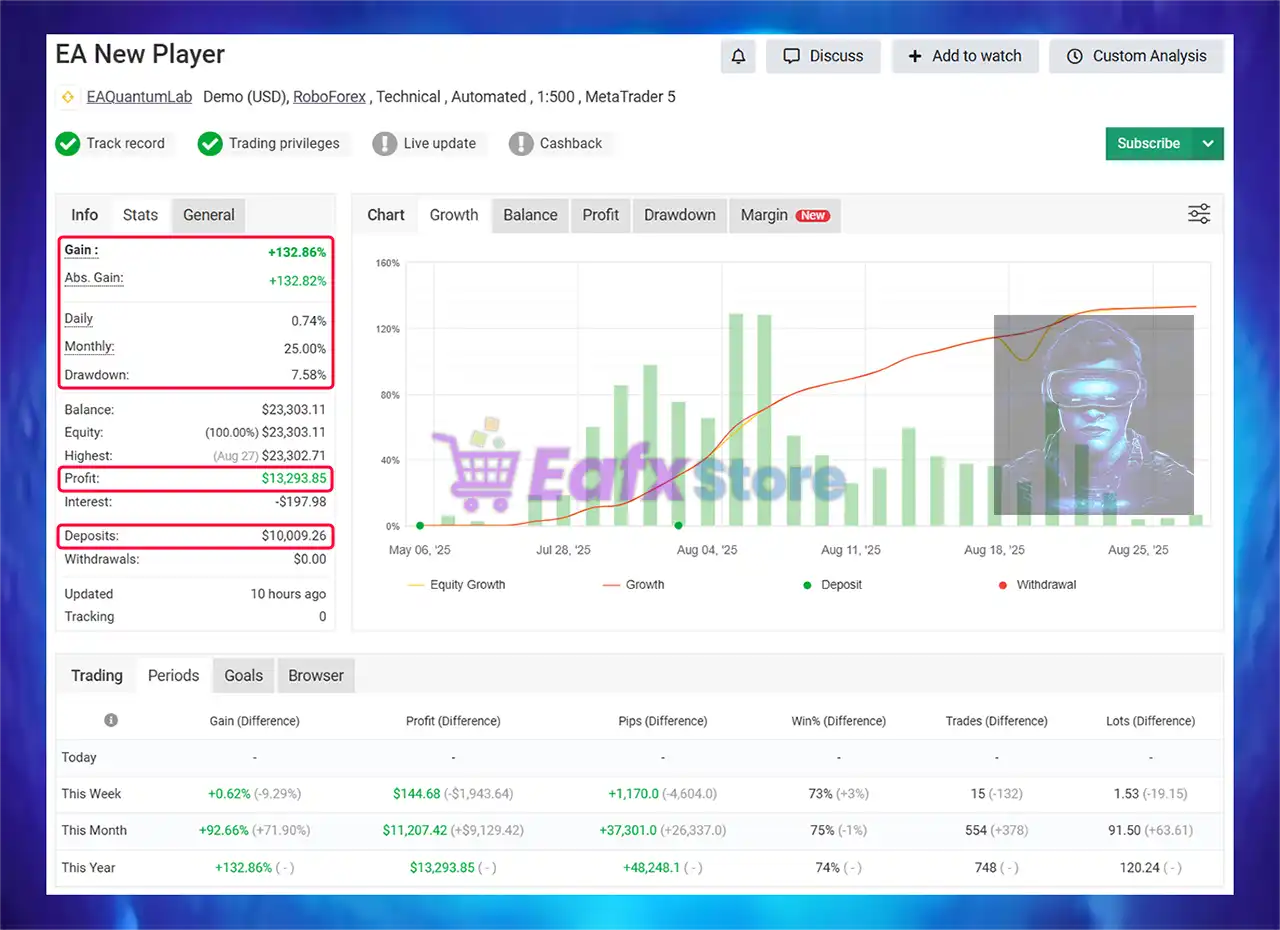
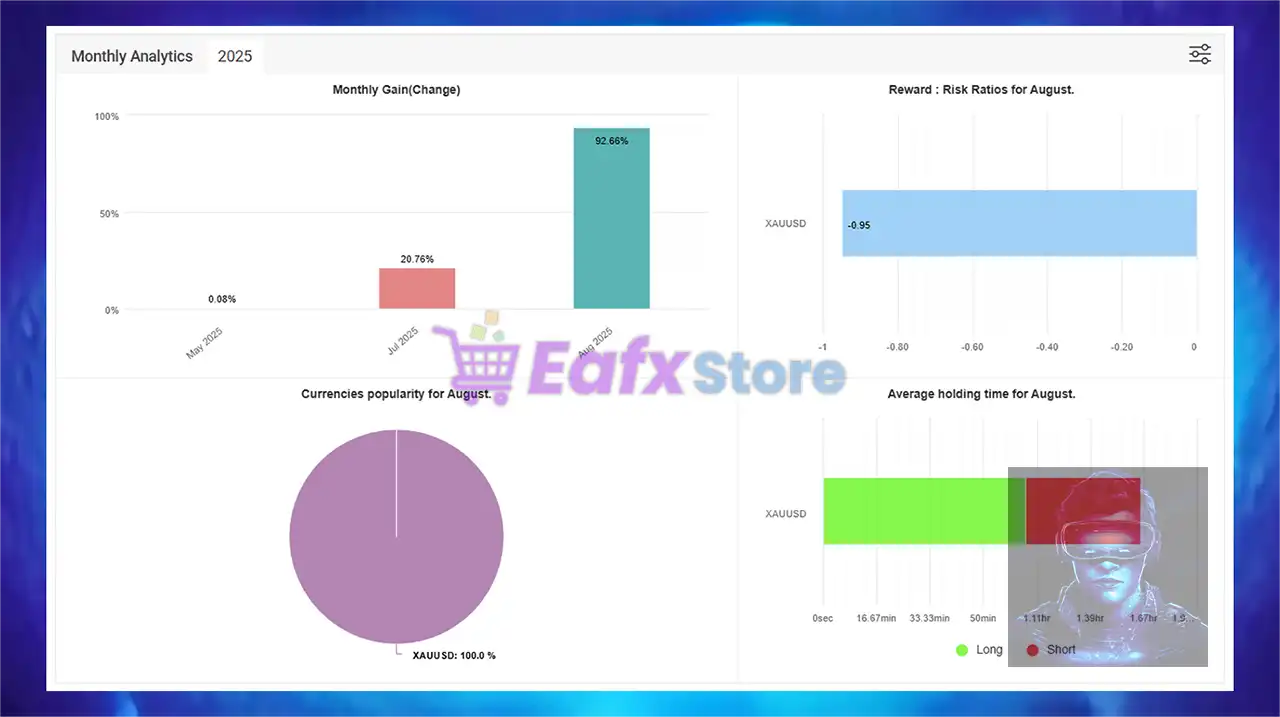
🔶 EA New Player shows impressive performance and is verified by MyFxBook. Advisor maintains strong stability when trading GOLD (XAUUSD) for 3 months of trading.
✅ Deposits: $10,000
✅ Total Gain: +132.86%
✅ Daily Return: 0.74%
✅ Monthly Return: 25.00%
✅ Maximum Drawdown: 7.58%
EA New Player Myfxbook Results
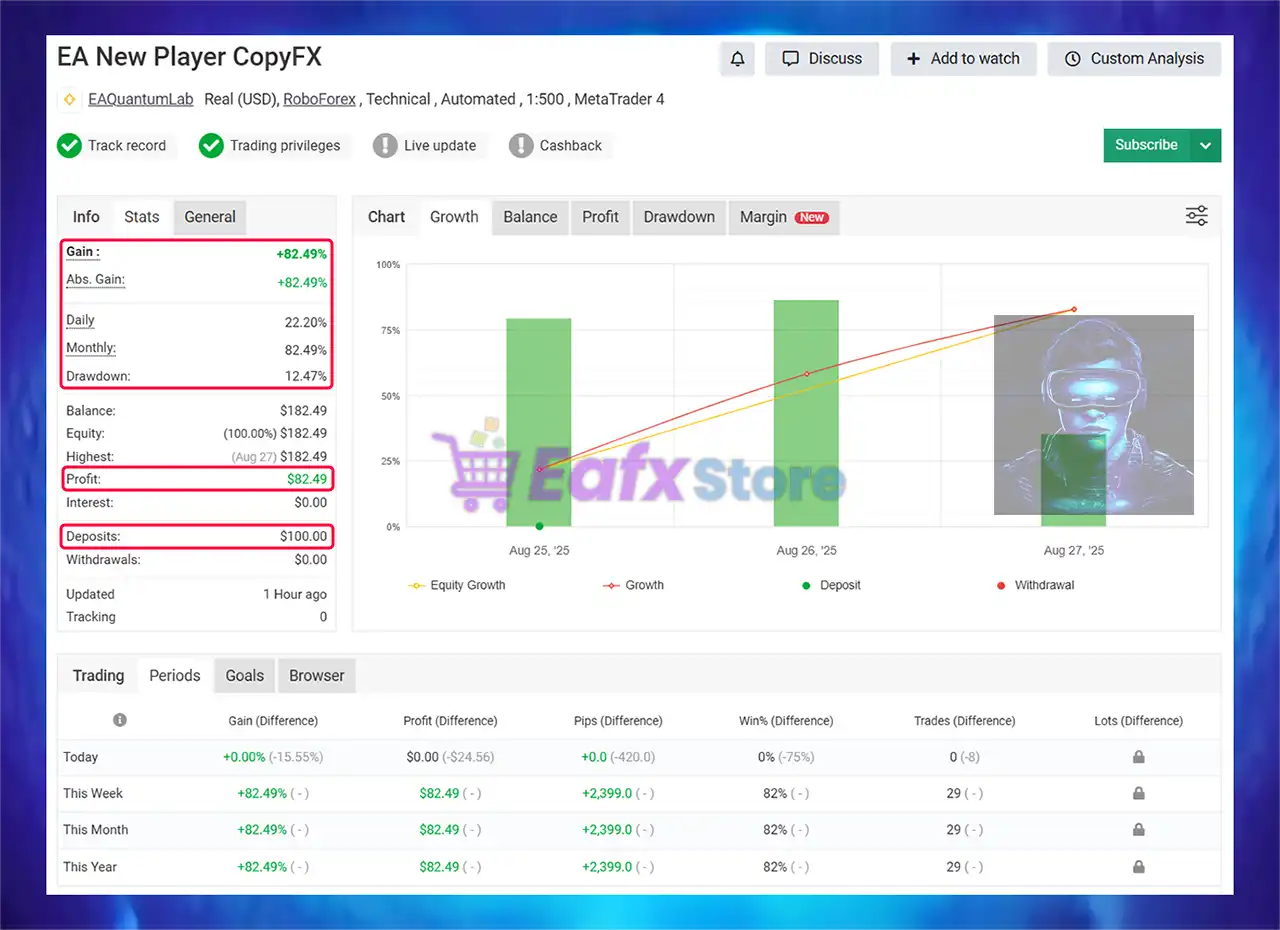
🔶 EA New Player shows impressive performance and is verified by Myfxbook. Advisor maintains strong stability when trading GOLD for 1 months of trading.
✅ Deposits: $100
✅ Total Gain: +82.49%
✅ Daily Return: 22.20%
✅ Monthly Return: 82.49%
✅ Maximum Drawdown: 12.47%
EA New Player MT5 Myfxbook Results
Why choose EA New Player MT5?
🔹 Designed for Long-Term Stability: Focuses on consistent growth instead of aggressive short-term gains.
🔹 Strong Risk Control Philosophy: Prioritizes capital preservation and disciplined execution.
🔹 Clear and Transparent Strategy Logic: Eliminates uncertainty with understandable trading rules.
🔹 Suitable for Serious Traders: Ideal for users seeking structured, low-stress automated trading.
🔹 Marketplace-Ready Solution: Combines automation, reliability and adaptability for sustainable performance.
Is EA New Player MT5 safe?
EA New Player MT5 shows significant potential in providing stable and reliable profits, making it a reliable tool in the forex market. The advisor is highly appreciated by the MQL5 community in many aspects and has won the trust of users.
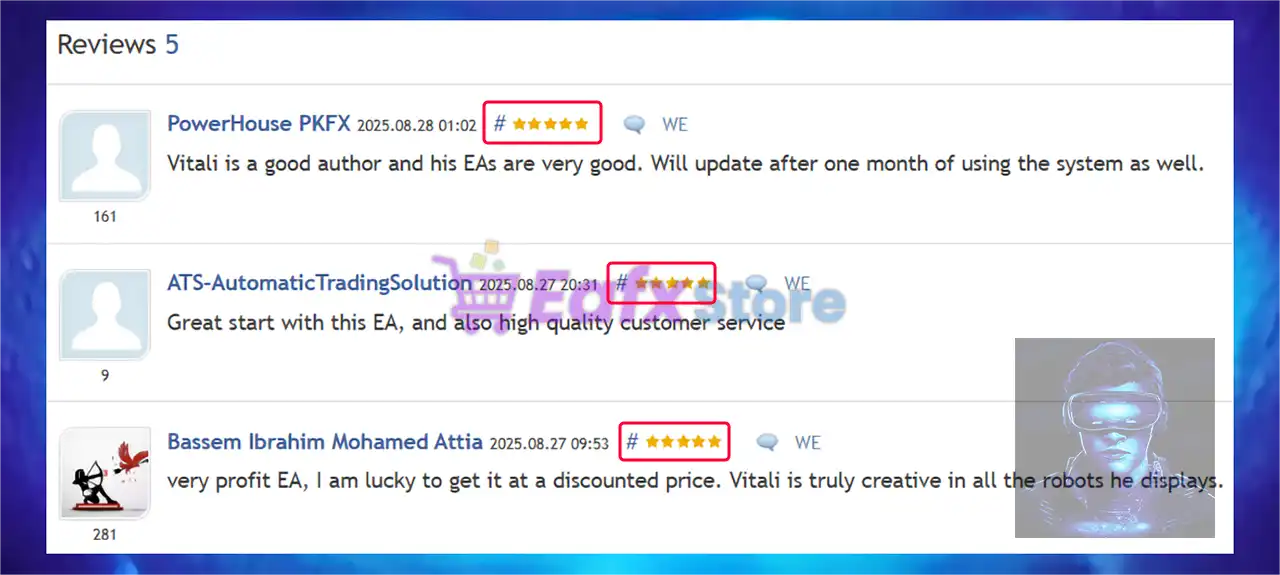
➡️ ATS-Automatic (2025.08.27): “Great start with this EA, and also high quality customer service.”
➡️ Bassem Ibrahim (2025.08.27): “Very profit EA, I am lucky to get it at a discounted price. Vitali is truly creative in all the robots he displays.”
➡️ Pavlos Papachronis (2025.08.27): “Started first week already done 50$ in 3 days with low dd! Very good EA! Seller support is awesome.”
➡️ Mmorris (2025.08.26): “So far the results look good and very promising. Support is great and keeping members up to date.”
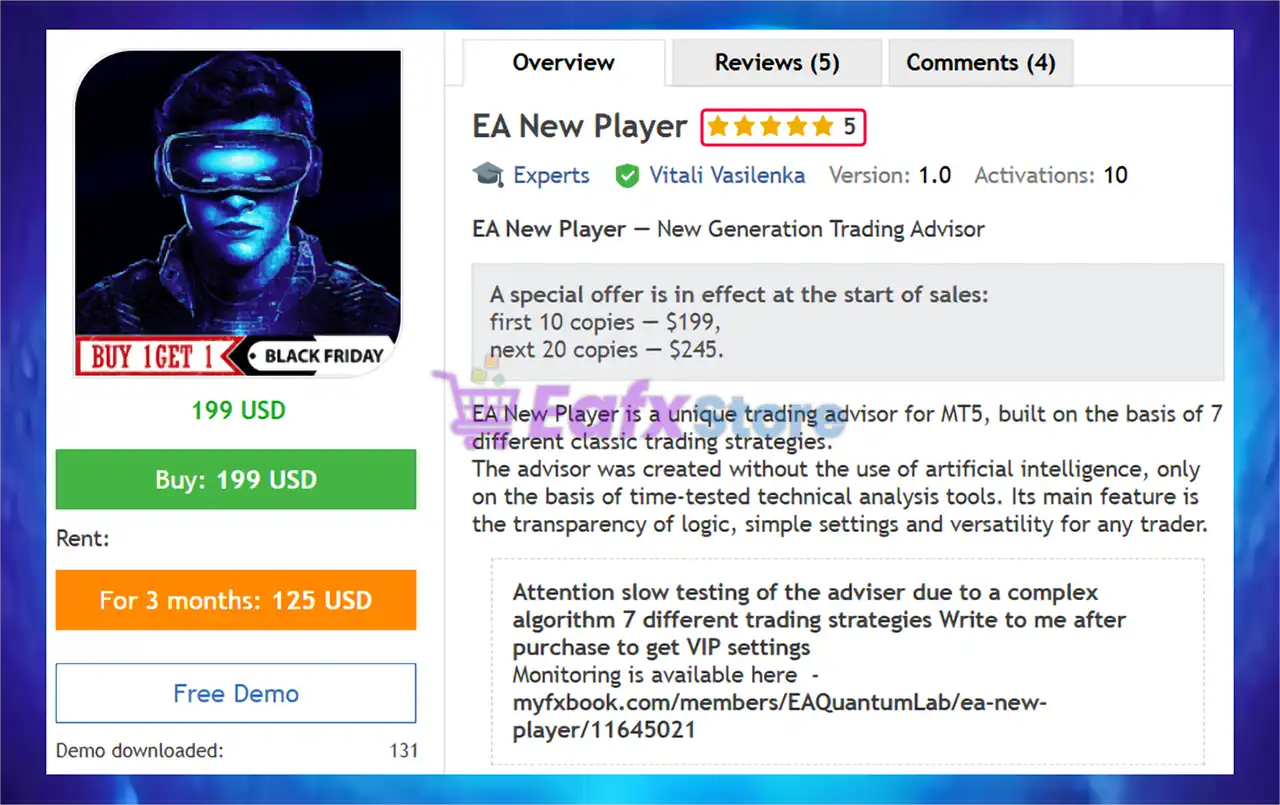
EA New Player MT5 is rated 5 stars by users
Recommended settings
Recommended settings and parameters to pay attention to from developers and experts:
| Features | Type |
|---|---|
| Trading platform | MetaTrader 5 (MT5) |
| Time frames | H1 (60 minute chart) |
| Currency pairs | XAUUSD, EURUSD, GBPUSD, AUDUSD, USDCAD, DE40, BTCUSD |
| Minimum / Recommended deposit | $500 (Recommend deposit: $1000 /0.01 lot) |
| Minimum / Recommended leverage | 1:30 or more |
| Account type | Any |
| Product type | Original version |
| Additional services | Unlock and Decompile |
| Recommended brokers | Exness Broker, Icmarkets Broker |
| Recommended VPS | MyfxVPS.com ( Blue VPS, Golden VPS). Lowest Latency, 2 week Free Trial, 100% Free for 12-18 Months. |
➡️ Reviewed by David Easton
Product Download Package?
The download package of the product suite includes:
1. Experts:
✅ Setting (If Any).docx
✅ Installation Guide.docx
2. SetFiles:
✅ EURUSD – H1 – low risk.set
✅ XAUUSD – H1 – low risk.set
✅ Btcusd – h1 – low risk.set
✅ Solusd – h1 – low risk.set
✅ Ethusd – h1 – low risk.set
✅ MT4 CENT – M15 – XAUSUD.set
✅ H1 XAUUSD – 3 dicimals.set
✅ MT4 XAUUSD M30.set
✅ EA New Player H1.set
Conclusion
In short, EA New Player is a powerful multi-strategy trading robot that combines seven proven strategies with strict signal confirmation and multi-timeframe analysis. Designed for Forex, Gold, indices, and crypto, it delivers high accuracy, stability and risk control. Verified on Myfxbook with impressive gains and low drawdown, this EA offers transparent, beginner-friendly settings while ensuring consistent long-term performance for traders seeking reliable automated profits.
🔢 EA New Player MT5 Settings Explained – Full Configuration Guide for Automated Trading
EA New Player MT5 is a powerful automated Forex trading robot for MetaTrader 5 that combines martingale recovery, multi-timeframe signal filtering, RSI analysis, Moving Average confirmation, Bollinger Bands and advanced custom indicators.
The EA is designed for traders who want flexible risk management, customizable strategy selection and intelligent market filtering. With built-in trailing stop systems and time-based trading controls, EA New Player MT5 provides a comprehensive solution for automated forex trading.

EA New Player MT5 Setting
🔢 EA New Player MT5 Complete Settings Explanation
Below are the details of the parameters in the advisor’s trading system settings table:
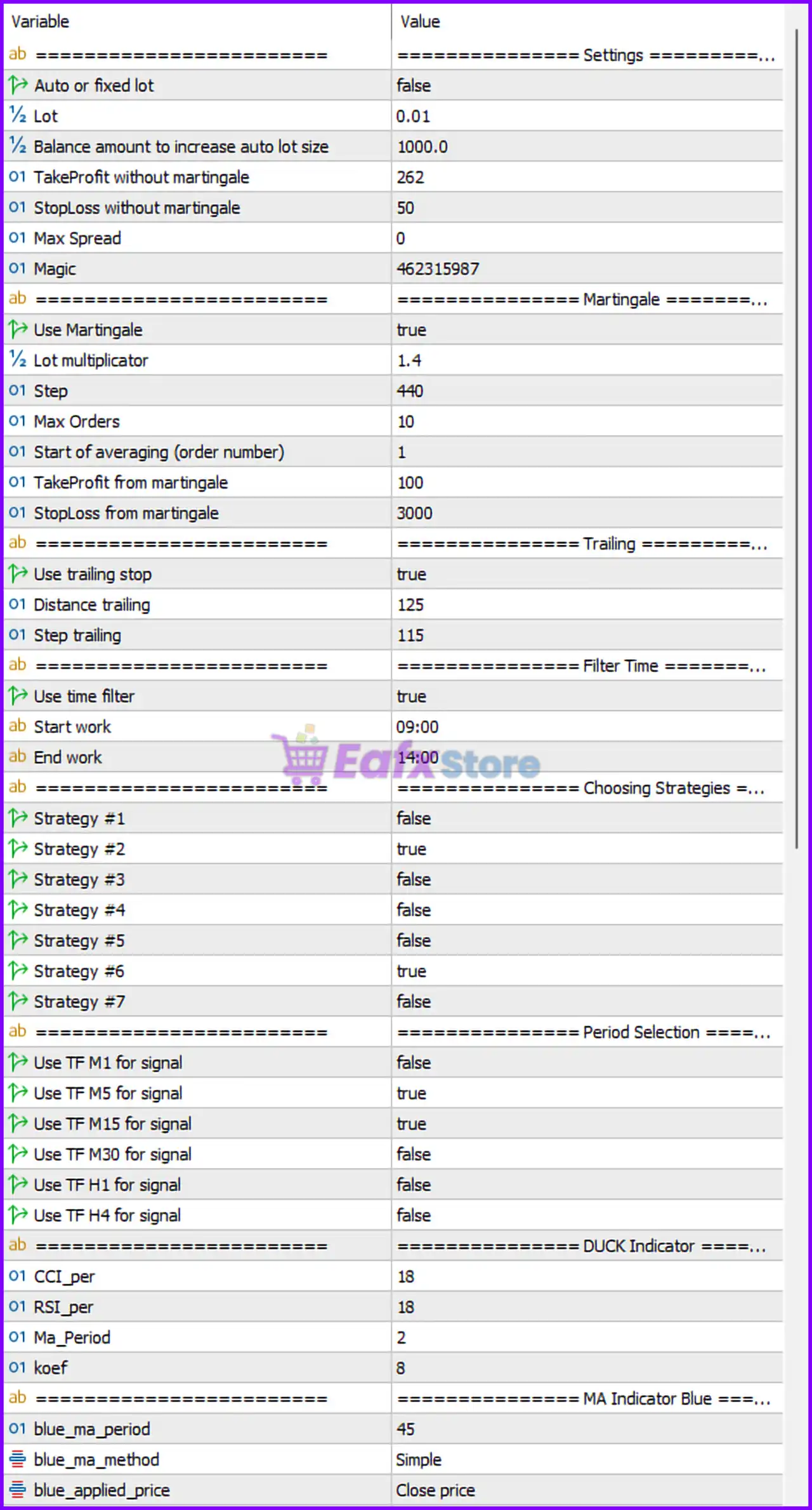
EA New Player MT5 Setting Panel
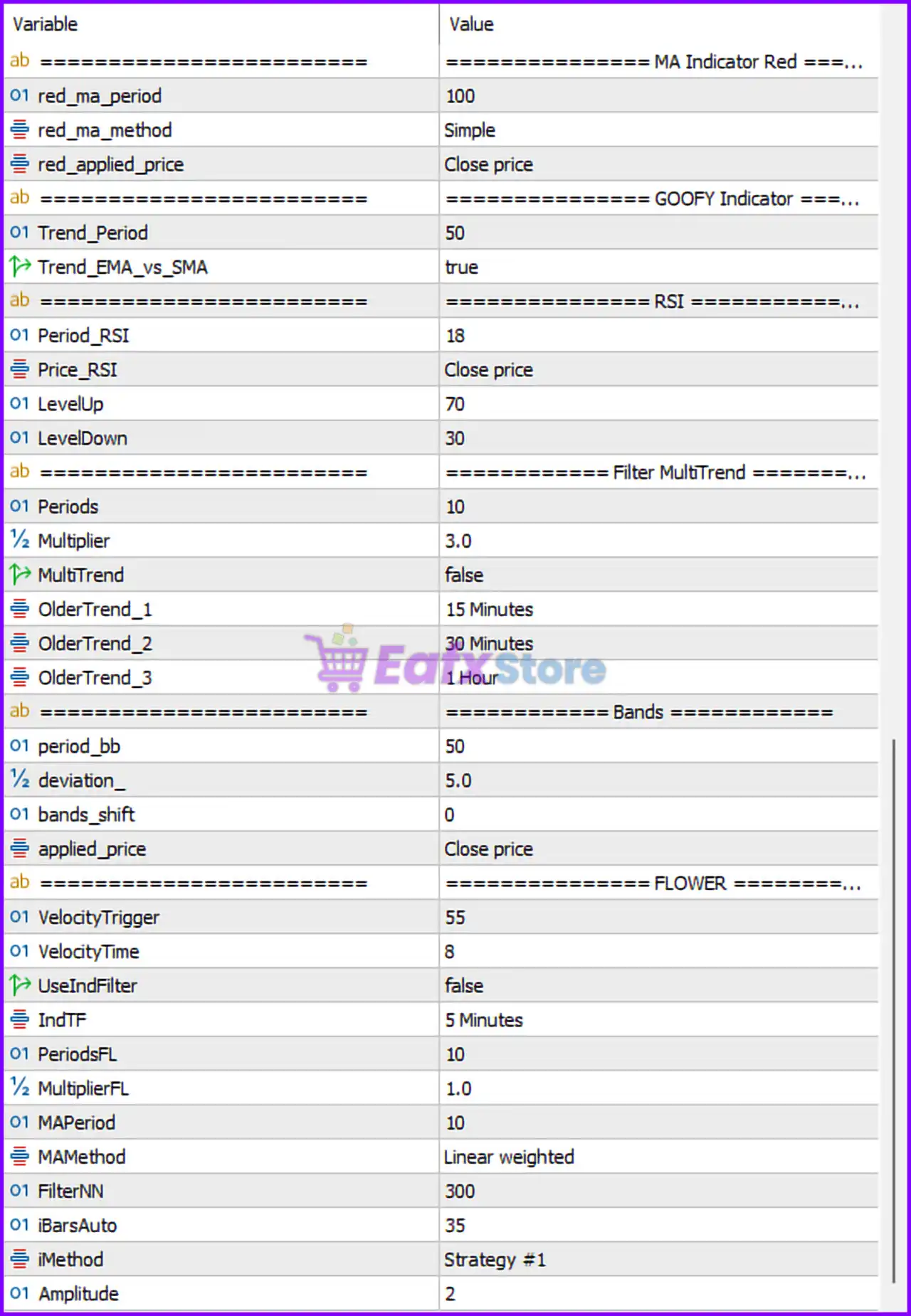
EA New Player Setting Panel
🔶 General Settings
🔹 Auto or fixed lot = false: Automatic lot sizing is disabled, so the EA uses a fixed trading lot size.
🔹 Lot = 0.01: Fixed lot size for every trade is set to 0.01.
🔹 Balance amount to increase auto lot size = 1000.0: Auto lot size increases for every 1000.0 balance increment.
🔹 TakeProfit without martingale = 262: Standard Take Profit without martingale is 262 points.
🔹 StopLoss without martingale = 50: Standard Stop Loss without martingale is 50 points.
🔹 Max Spread = 0: Maximum spread filter is disabled because the value is 0.
🔹 Magic = 462315987: Unique Magic Number assigned to EA trades is 462315987.
🔶 Martingale Settings
🔹 Use Martingale = true: Martingale recovery system is enabled.
🔹 Lot multiplicator = 1.4: Lot size multiplier for each martingale order is 1.4.
🔹 Step = 440: Distance between martingale orders is 440 points.
🔹 Max Orders = 10: Maximum allowed martingale orders is 10.
🔹 Start of averaging (order number) = 1: Averaging starts from order number 1.
🔹 TakeProfit from martingale = 100: Take Profit target for martingale trades is 100 points.
🔹 StopLoss from martingale = 3000: Stop Loss limit for martingale trades is 3000 points.
🔶 Trailing Stop Settings
🔹 Use trailing stop = true: Trailing Stop feature is activated.
🔹 Distance trailing = 125: Trailing Stop activation distance is 125 points.
🔹 Step trailing = 115: Trailing Stop adjustment step is 115 points.
🔶 Filter Time Settings
🔹 Use time filter = true: Time-based trading filter is enabled.
🔹 Start work = 09:00: Trading session starts at 09:00.
🔹 End work = 14:00: Trading session ends at 14:00.
🔶 Strategy Selection Settings
🔹 Strategy #1 = false: Strategy #1 is disabled.
🔹 Strategy #2 = true: Strategy #2 is enabled.
🔹 Strategy #3 = false: Strategy #3 is disabled.
🔹 Strategy #4 = false: Strategy #4 is disabled.
🔹 Strategy #5 = false: Strategy #5 is disabled.
🔹 Strategy #6 = true: Strategy #6 is enabled.
🔹 Strategy #7 = false: Strategy #7 is disabled.
🔶 Timeframe Signal Settings
🔹 Use TF M1 for signal = false: M1 timeframe signals are disabled.
🔹 Use TF M5 for signal = true: M5 timeframe signals are enabled.
🔹 Use TF M15 for signal = true: M15 timeframe signals are enabled.
🔹 Use TF M30 for signal = false: M30 timeframe signals are disabled.
🔹 Use TF H1 for signal = false: H1 timeframe signals are disabled.
🔹 Use TF H4 for signal = false: H4 timeframe signals are disabled.
🔶 DUCK Indicator Settings
🔹 CCI_per = 18: Commodity Channel Index period is set to 18.
🔹 RSI_per = 18: RSI period inside DUCK indicator is 18.
🔹 MA_Period = 2: Moving Average period used in DUCK indicator is 2.
🔹 koef = 8: Coefficient parameter value is 8.
🔶 MA Indicator Blue Settings
🔹 blue_ma_period = 45: Blue Moving Average period is 45.
🔹 blue_ma_method = Simple: Blue MA uses the Simple moving average method.
🔹 blue_applied_price = Close price: Blue MA calculations use the closing price.
🔶 MA Indicator Red Settings
🔹 red_ma_period = 100: Red Moving Average period is 100.
🔹 red_ma_method = Simple: Red MA uses the Simple moving average method.
🔹 red_applied_price = Close price: Red MA calculations use the closing price.
🔶 GOOFY Indicator Settings
🔹 Trend_Period = 50: Trend calculation period is 50.
🔹 Trend_EMA_vs_SMA = true: EMA versus SMA trend comparison is enabled.
🔶 RSI Settings
🔹 Period_RSI = 18: RSI indicator period is 18.
🔹 Price_RSI = Close price: RSI uses the closing price for calculations.
🔹 LevelUp = 70: RSI overbought level is 70.
🔹 LevelDown = 30: RSI oversold level is 30.
🔶 Filter MultiTrend Settings
🔹 Periods = 10: MultiTrend indicator period is 10.
🔹 Multiplier = 3.0: MultiTrend multiplier value is 3.0.
🔹 MultiTrend = false: MultiTrend filter is disabled.
🔹 OlderTrend_1 = 15 Minutes: First higher timeframe trend filter uses 15 Minutes.
🔹 OlderTrend_2 = 30 Minutes: Second higher timeframe trend filter uses 30 Minutes.
🔹 OlderTrend_3 = 1 Hour: Third higher timeframe trend filter uses 1 Hour.
🔶 Bollinger Bands Settings
🔹 period_bb = 50: Bollinger Bands period is 50.
🔹 deviation_ = 5.0: Bollinger Bands deviation value is 5.0.
🔹 bands_shift = 0: Bollinger Bands shift value is 0.
🔹 applied_price = Close price: Bollinger Bands calculations use the closing price.
🔶 FLOWER Indicator Settings
🔹 VelocityTrigger = 55: Velocity trigger threshold is 55.
🔹 VelocityTime = 8: Velocity calculation period is 8.
🔹 UseIndFilter = false: Indicator filter is disabled.
🔹 IndTF = 5 Minutes: Indicator timeframe is 5 Minutes.
🔹 PeriodsFL = 10: FLOWER indicator period is 10.
🔹 MultiplierFL = 1.0: FLOWER multiplier value is 1.0.
🔹 MAPeriod = 10: FLOWER Moving Average period is 10.
🔹 MAMethod = Linear weighted: FLOWER indicator uses the Linear Weighted moving average method.
🔹 FilterNN = 300: Neural network filter value is 300.
🔹 iBarsAuto = 35: Automatic bars calculation value is 35.
🔹 iMethod = Strategy #1: FLOWER indicator uses Strategy #1.
🔹 Amplitude = 2: Signal amplitude level is 2.
🔢 Conclusion
EA New Player MT5 is a sophisticated automated trading system that combines martingale recovery, indicator-based filtering, multi-timeframe analysis, and dynamic trend detection into a single Expert Advisor.
With configurable strategies, advanced technical indicators, and robust trade management tools, the EA provides traders with a flexible and intelligent solution for MetaTrader 5 automated trading.
🔢 FAQs
❓ What is EA New Player MT5?
EA New Player MT5 is an automated Forex Expert Advisor for MetaTrader 5 that uses technical indicators and martingale recovery strategies.
❓ Does EA New Player MT5 use martingale trading?
Yes, the EA includes a configurable martingale system with adjustable lot multipliers and recovery settings.
❓ Can EA New Player MT5 trade on multiple timeframes?
Yes, the EA supports multi-timeframe analysis including M5, M15, H1, and other selectable timeframes.
❓ Does EA New Player MT5 include trailing stop functionality?
Yes, the EA includes built-in trailing stop settings with adjustable trailing distance and step.
❓ Which indicators are included in EA New Player MT5?
The EA uses RSI, Moving Averages, Bollinger Bands, DUCK Indicator, GOOFY Indicator, and FLOWER Indicator for market analysis and trade execution.
User Reviews
Only logged in customers who have purchased this product may leave a review.
❓ What trading platform does EA New Player support?
EA New Player is designed for MetaTrader 5 (MT5) and works seamlessly with this platform.
❓ Which assets can EA New Player trade?
It supports a wide range of assets, including forex pairs (EURUSD, GBPUSD, AUDUSD, USDCAD), GOLD (XAUUSD), indices (DE40), and cryptocurrencies (BTCUSD).
❓ What is the minimum deposit required?
The EA requires a minimum deposit of $500, while the recommended deposit is $1,000 per 0.01 lot for optimal results.
❓ Which timeframe is best for EA New Player?
The EA is optimized for the H1 (60-minute) timeframe to balance accuracy and stability.
❓ What makes EA New Player different from AI-based EAs?
Unlike AI robots, EA New Player uses seven classic technical strategies with strict signal confirmation, ensuring transparent logic and easy settings.
❓ How does the multi-strategy portfolio work?
The EA combines trend, counter-trend, scalping, and swing strategies, activating trades only when at least two strategies confirm the same signal.
❓ Is EA New Player suitable for beginners?
Yes. It is ready-to-use out of the box with simple settings, while also offering enough flexibility for experienced traders.
❓ What is the typical drawdown of EA New Player?
Backed by Myfxbook verified results, the EA has shown a maximum drawdown between 7% – 12%, depending on account size and settings.
❓ Does EA New Player require complex optimization?
No. The EA is designed to work stably without complicated optimization, making setup fast and straightforward.
-
 Original price was: $500.00.$89.00Current price is: $89.00.
 -
 Original price was: $1,499.00.$199.00Current price is: $199.00.
 -
 Original price was: $3,999.00.$299.00Current price is: $299.00.
 -
 Price range: $60.00 through $599.00
-
 2
2 -
 0
0 -
 2
2 -
 3Price range: $89.00 through $599.00
There are no reviews yet.