

Introduction
Eternis MT4 is an automated Forex trading Expert Advisor (EA) designed with a combination of risk management tools, market filtering capabilities, and intelligent trading technologies. It incorporates News Filtering, Volatility Filtering, Neural Network technology, and Pattern Recognition to support its automated trading decisions.

Eternis MT4 provides configurable risk settings and flexible position sizing, allowing traders to adjust the trading environment according to their account size and risk preferences. Its integrated filtering features are designed to help evaluate market conditions and identify potential trading opportunities.
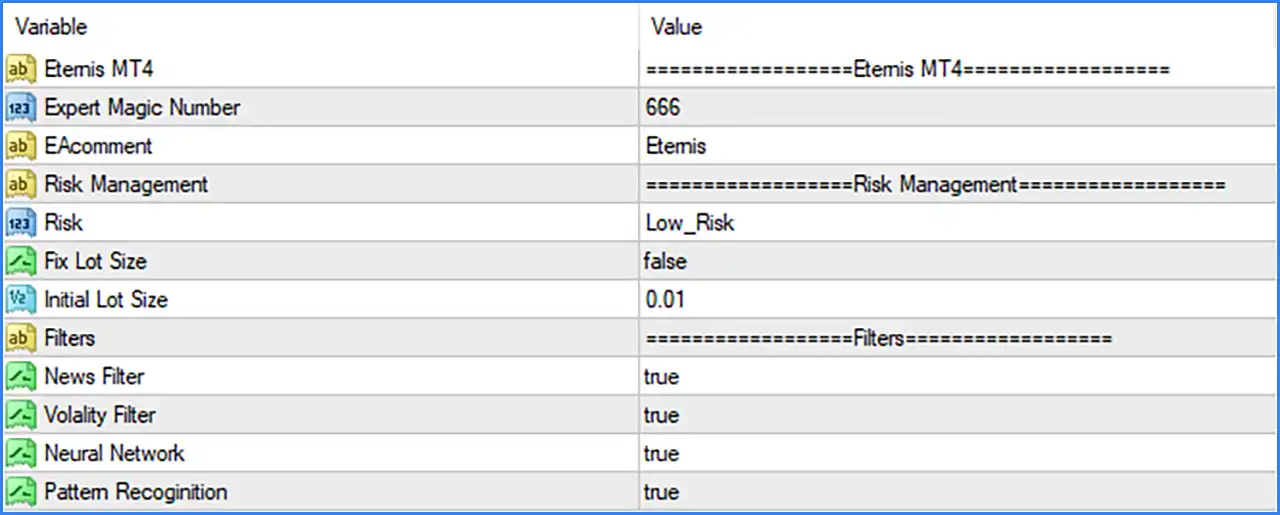
Below is a complete explanation of all available Eternis MT4 settings based on the supplied Inputs configuration.
Eternis MT4 Settings Explained
General Settings
🔹 Expert Magic Number = 666 – Assigns the Magic Number 666 to trades opened by Eternis MT4, allowing the EA to identify and distinguish its positions from other trading orders.
🔹 EAcomment = Eternis – Sets the order comment to "Eternis", helping traders identify trades generated by this Expert Advisor in the trading history and order list.
Risk Management Settings
🔹 Risk = Low_Risk – Selects the Low Risk trading profile, configuring the EA to use its low-risk money management mode.
🔹 Fix Lot Size = false – Disables the fixed lot size option, allowing the EA to use its alternative position sizing or money management logic instead of exclusively using a fixed volume.
🔹 Initial Lot Size = 0.01 – Sets the initial reference trading volume to 0.01 lots, providing the starting lot size for the EA's position sizing calculations.
Trading Filters and Intelligent Analysis
🔹 News Filter = true – Enables the economic news filter, allowing the EA to apply its news-related trading conditions when evaluating market opportunities.
🔹 Volality Filter = true – Enables the volatility filter, allowing Eternis MT4 to incorporate market volatility conditions into its trading decisions.
🔹 Neural Network = true – Activates the Neural Network feature, enabling the EA's integrated intelligent analysis component to contribute to its trading decision process.
🔹 Pattern Recognition = true – Enables Pattern Recognition functionality, allowing the EA to use its integrated pattern analysis component when evaluating potential trading opportunities.
Conclusion
Eternis MT4 combines automated trading functionality with risk management and intelligent market analysis features. Its configuration includes a Low_Risk profile, an initial lot size of 0.01, and Magic Number 666 for trade identification.
One of its notable characteristics is the activation of all four available trading filters and intelligent analysis features: News Filter, Volality Filter, Neural Network, and Pattern Recognition.
With these settings, Eternis MT4 provides a configurable trading environment designed to incorporate market conditions, pattern analysis, and risk management into its automated trading process.
Before running Eternis MT4 on a live account, traders should test its Low_Risk configuration, position sizing behavior, and filtering functionality on a demo account to evaluate its performance under different market conditions.