

Introduction
EA Top G MT4 is an automated Forex trading Expert Advisor (EA) designed to trade multiple currency pairs from a single chart using several integrated trading strategies. It combines flexible lot management, automated Take Profit settings, hedging capabilities, market condition filters, and account protection features.

One of its key advantages is the One Chart Setup functionality, which allows traders to manage multiple currency pairs through a single EA installation. EA Top G MT4 also provides five configurable trading strategies, smart lot multiplication, and optional trend confirmation to adapt its trading behavior to different market conditions.
The EA includes additional features such as news filtering, spread control, holiday trading, profit and loss monitoring, and account protection settings. Understanding each input is important for configuring EA Top G MT4 according to your trading strategy and risk management requirements.
EA Top G MT4 Settings Explained
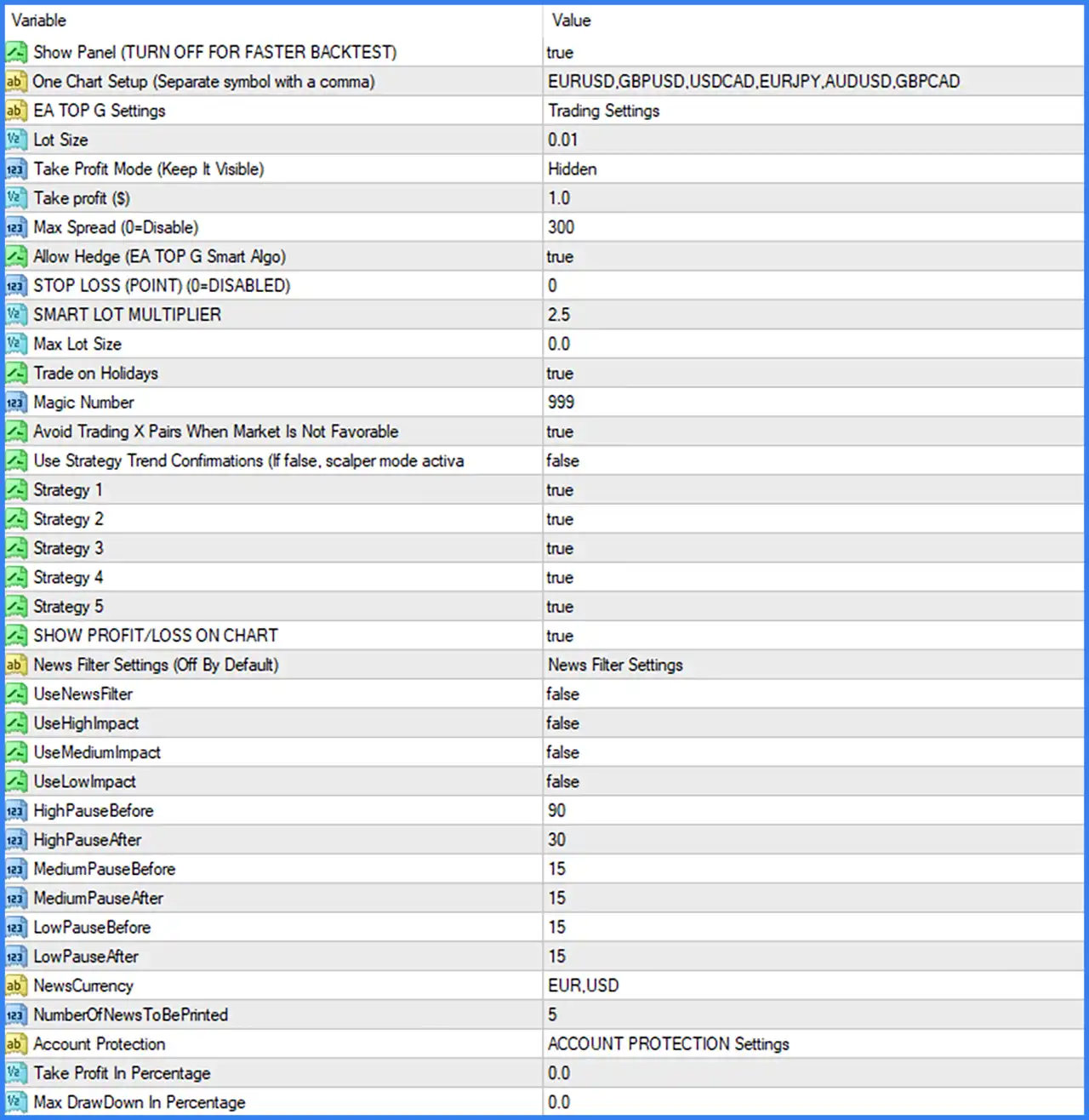
General and Trading Configuration
🔹 Show Panel (TURN OFF FOR FASTER BACKTEST) = true – Enables the EA information panel on the trading chart, displaying relevant trading information and statistics. Disabling it can improve backtesting speed.
🔹 One Chart Setup (Separate symbol with a comma) = EURUSD,GBPUSD,USDCAD,EURJPY,AUDUSD,GBPCAD – Defines the six currency pairs managed by the EA from a single chart: EURUSD, GBPUSD, USDCAD, EURJPY, AUDUSD, and GBPCAD.
🔹 EA TOP G Settings = Trading Settings – Section heading identifying the main trading configuration parameters.
🔹 Lot Size = 0.01 – Sets the initial trading volume to 0.01 lots for the EA's trading operations.
🔹 Take Profit Mode (Keep It Visible) = Hidden – Configures the Take Profit display mode to Hidden, controlling how the EA handles the visibility of Take Profit levels.
🔹 Take profit ($) = 1.0 – Sets the configured monetary Take Profit target to $1.0 according to the EA's profit management logic.
🔹 Max Spread (0=Disable) = 300 – Sets the maximum permitted spread to 300 points. The EA can use this threshold to avoid entering trades when spreads exceed the configured limit.
🔹 Allow Hedge (EA TOP G Smart Algo) = true – Enables hedging functionality, allowing the EA to manage opposing Buy and Sell positions according to its trading logic.
🔹 STOP LOSS (POINT) (0=DISABLED) = 0 – Disables the fixed Stop Loss setting because its value is configured to 0.
🔹 SMART LOT MULTIPLIER = 2.5 – Sets the smart lot multiplication factor to 2.5 for the EA's position sizing and trade management mechanism.
🔹 Max Lot Size = 0.0 – Sets the maximum lot size parameter to 0.0; the exact interpretation of this value should be confirmed in the EA documentation.
🔹 Trade on Holidays = true – Allows the EA to continue trading during holidays, subject to broker trading availability and the EA's other trading conditions.
🔹 Magic Number = 999 – Assigns Magic Number 999 to identify and distinguish trades generated by EA Top G MT4.
🔹 Avoid Trading X Pairs When Market Is Not Favorable = true – Activates the market condition filter for X currency pairs, helping the EA avoid trading when the market environment is considered unfavorable.
🔹 Use Strategy Trend Confirmations (If false, scalper mode activa...) = false – Disables the strategy trend confirmation function. According to the displayed description, setting this parameter to false activates scalper mode.
Strategy Selection Settings
🔹 Strategy 1 = true – Enables Strategy 1, allowing this trading strategy to participate in the EA's trading operations.
🔹 Strategy 2 = true – Enables Strategy 2, allowing the EA to use its second available trading strategy.
🔹 Strategy 3 = true – Enables Strategy 3 as part of the EA's multi-strategy trading system.
🔹 Strategy 4 = true – Activates Strategy 4, allowing this strategy to generate trading opportunities.
🔹 Strategy 5 = true – Enables Strategy 5, completing the five active strategy configurations in the supplied settings.
🔹 SHOW PROFIT/LOSS ON CHART = true – Displays trading profit and loss information directly on the chart, helping traders monitor account performance.
News Filter Settings
🔹 News Filter Settings (Off By Default) = News Filter Settings – Section heading containing the EA's economic news filtering parameters.
🔹 UseNewsFilter = false – Disables the overall news filter, meaning the EA does not currently apply its configured news restrictions.
🔹 UseHighImpact = false – Disables the specific filter for high-impact economic news events.
🔹 UseMediumImpact = false – Disables the specific filter for medium-impact economic news events.
🔹 UseLowImpact = false – Disables the specific filter for low-impact economic news events.
🔹 HighPauseBefore = 90 – Sets the trading pause period to 90 minutes before high-impact news when the corresponding news filter is enabled.
🔹 HighPauseAfter = 30 – Sets the trading pause period to 30 minutes after high-impact news when the corresponding news filter is enabled.
🔹 MediumPauseBefore = 15 – Configures a 15-minute trading pause before medium-impact news events.
🔹 MediumPauseAfter = 15 – Configures a 15-minute trading pause after medium-impact news events.
🔹 LowPauseBefore = 15 – Sets a 15-minute trading pause before low-impact news events.
🔹 LowPauseAfter = 15 – Sets a 15-minute trading pause after low-impact news events.
🔹 NewsCurrency = EUR,USD – Specifies EUR and USD as the currencies monitored by the EA's news filtering system.
🔹 NumberOfNewsToBePrinted = 5 – Sets the maximum number of upcoming news events to be displayed or printed by the EA.
Account Protection Settings
🔹 Account Protection = ACCOUNT PROTECTION Settings – Section heading containing the account-level profit target and drawdown protection parameters.
🔹 Take Profit In Percentage = 0.0 – Sets the account Take Profit percentage parameter to 0.0; its exact behavior at this value depends on the EA's internal account protection logic.
🔹 Max DrawDown In Percentage = 0.0 – Sets the maximum account drawdown percentage parameter to 0.0; the supplied configuration does not specify an active numerical drawdown limit.
Conclusion
EA Top G MT4 provides a flexible multi-currency trading system with five selectable strategies, smart lot management, optional hedging, and configurable account protection.
The supplied configuration enables six currency pairs: EURUSD, GBPUSD, USDCAD, EURJPY, AUDUSD, and GBPCAD. All five trading strategies are enabled, with an initial lot size of 0.01, a Smart Lot Multiplier of 2.5, a maximum spread setting of 300, and a monetary Take Profit target of $1.0.
The EA also supports news filtering and account protection, although both the overall news filter and its individual impact filters are currently disabled. The fixed Stop Loss is also disabled with a value of 0.
Before using EA Top G MT4 on a live trading account, traders should carefully evaluate the Smart Lot Multiplier of 2.5, the hedging functionality, and the account protection configuration. Demo testing and backtesting are recommended to assess its performance, exposure, and drawdown under different market conditions.