

Introduction
Albatross ver4 EA is an automated Forex trading Expert Advisor (EA) designed with configurable money management, dynamic lot sizing, volatility monitoring, and advanced trade management features. It provides flexible Buy and Sell execution, customizable Stop Loss (SL) and Take Profit (TP) levels, and two trailing mechanisms to manage open and pending trading positions.

Albatross ver4 EA MT4 also includes adjustable trading parameters such as Step Exponent, Lot Exponent, Level Start, and specialized JAW, TEETH, and LIPS settings. These inputs allow traders to customize the EA's trading behavior, position sizing, and risk management according to their trading preferences.
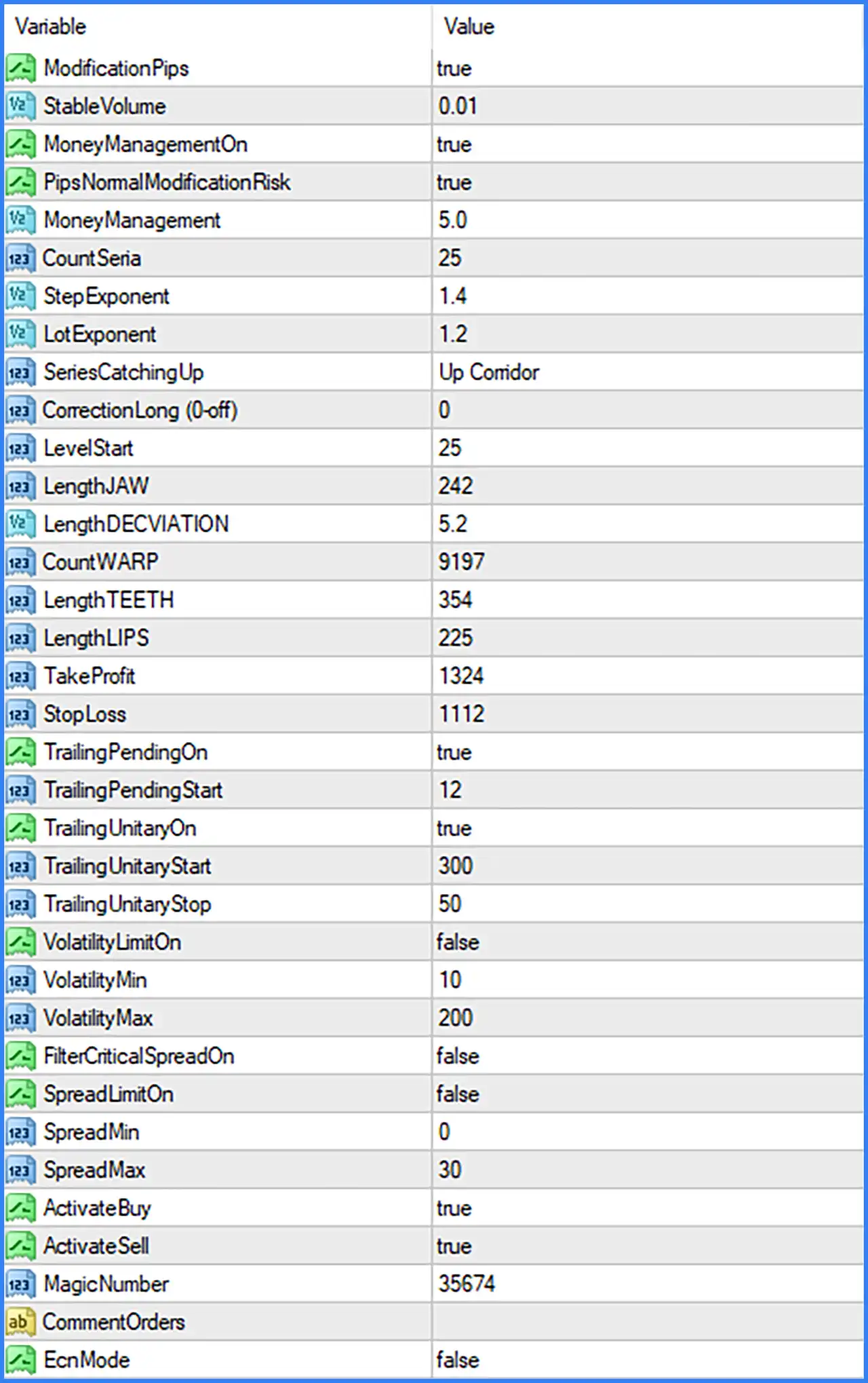
The following guide explains all available settings and their default values based on the supplied EA MT4 Inputs panel.
Albatross ver4 EA MT4 Settings Explained
Money Management Settings
🔹 ModificationPips = true – Enables pip-based modification of trading parameters, allowing the EA to adjust relevant order levels according to its internal pip management logic.
🔹 StableVolume = 0.01 – Sets the stable trading volume to 0.01 lots, providing a reference lot size for position management.
🔹 MoneyManagementOn = true – Activates the money management function, allowing the EA to manage trading volume according to its configured money management rules.
🔹 PipsNormalModificationRisk = true – Enables normal risk modification based on pip-related calculations, influencing how the EA adjusts its trading parameters.
🔹 MoneyManagement = 5.0 – Sets the money management parameter to 5.0, which is used by the EA's internal position sizing or risk calculation system.
🔹 CountSena = 25 – Sets the CountSena parameter to 25, controlling an internal counting or calculation setting used by the EA.
🔹 StepExponent = 1.4 – Defines the step progression exponent at 1.4, controlling how the EA calculates or adjusts distances between successive trading levels.
🔹 LotExponent = 1.2 – Sets the lot progression multiplier to 1.2, determining how trading volume can increase across successive positions.
Trading Strategy and Level Settings
🔹 SeriesCatchingUp = Up Comdor – Specifies the SeriesCatchingUp mode as Up Comdor, representing a selectable internal trading series configuration.
🔹 CorrectionLong (0-off) = 0 – Controls the long-position correction function, with 0 indicating that this feature is disabled.
🔹 LevelStart = 25 – Sets the starting trading level to 25, defining the initial reference level for the EA's internal level-based trading calculations.
🔹 LengthJAW = 242 – Sets the JAW length parameter to 242, controlling one of the EA's specialized calculation periods.
🔹 LengthDEVIATION = 5.2 – Defines the deviation parameter at 5.2, which is used in the EA's internal calculation and trading logic.
🔹 CountWARP = 9197 – Sets the WARP counting parameter to 9197, controlling a specific internal calculation or identification setting.
🔹 LengthTEETH = 354 – Sets the TEETH calculation length to 354, defining another period used by the EA's internal strategy configuration.
🔹 LengthLIPS = 225 – Sets the LIPS calculation length to 225, controlling the corresponding internal strategy calculation period.
Take Profit and Stop Loss Settings
🔹 TakeProfit = 1324 – Sets the Take Profit distance to 1324 points, defining the configured target distance for closing profitable trades.
🔹 StopLoss = 1112 – Sets the Stop Loss distance to 1112 points, establishing the configured loss limitation for individual trades.
Trailing Stop Settings
🔹 TrailingPendingOn = true – Enables trailing management for pending orders, allowing the EA to adjust relevant pending-order levels according to its internal trailing rules.
🔹 TrailingPendingStart = 12 – Sets the activation threshold for pending-order trailing to 12, determining when the trailing mechanism can begin operating.
🔹 TrailingUnitaryOn = true – Activates the unitary trailing function, allowing the EA to manage trailing adjustments for trading positions.
🔹 TrailingUnitaryStart = 300 – Sets the unitary trailing activation level to 300 points, defining the threshold at which this trailing mechanism starts.
🔹 TrailingUnitaryStop = 50 – Sets the unitary trailing stop distance to 50 points, defining the configured distance used when adjusting the protective stop level.
Volatility Filter Settings
🔹 VolatilityLimitOn = false – Disables the volatility limit filter, meaning the EA does not currently restrict trading based on the configured volatility range.
🔹 VolatilityMin = 10 – Defines the minimum permitted volatility threshold as 10 for use when the volatility filter is enabled.
🔹 VolatilityMax = 200 – Sets the maximum permitted volatility threshold to 200, establishing the upper boundary for the volatility filter.
Spread Filter Settings
🔹 FilterCriticalSpreadOn = false – Disables the critical spread filtering function, meaning this additional spread protection mechanism is inactive.
🔹 SpreadLimitOn = false – Disables the standard spread limit filter, allowing the EA to operate without applying this particular spread restriction.
🔹 SpreadMin = 0 – Sets the minimum spread parameter to 0, defining the lower boundary of the configured spread range.
🔹 SpreadMax = 30 – Sets the maximum spread threshold to 30 points, which can be used to restrict trading when the spread filter is activated.
Buy and Sell Trading Settings
🔹 ActivateBuy = true – Enables Buy trading, allowing Albatross ver4 EA MT4 to open and manage long positions when its trading conditions are satisfied.
🔹 ActivateSell = true – Enables Sell trading, allowing the EA to open and manage short positions according to its internal strategy.
Order Identification and Execution Settings
🔹 MagicNumber = 35674 – Assigns Magic Number 35674 to the EA's trades, helping distinguish its orders from manual trades and positions opened by other Expert Advisors.
🔹 CommentOrders = (Blank) – Leaves the order comment field empty, meaning no custom text is specified for identifying the EA's trading orders.
🔹 EcnMode = false – Disables ECN execution mode, indicating that the EA is configured to operate without its optional ECN-specific execution setting.
Conclusion
Albatross ver4 EA MT4 offers a configurable automated trading system with money management, adjustable position sizing, specialized strategy parameters, and multiple trade management mechanisms.
The supplied configuration uses a Stable Volume of 0.01 lots, a Step Exponent of 1.4, a Lot Exponent of 1.2, a Take Profit of 1324 points, and a Stop Loss of 1112 points. Both Buy and Sell trading are enabled, while pending-order trailing and unitary trailing are also activated.
The volatility and spread filters are currently disabled, providing additional configuration options for traders who want to apply market condition restrictions.
Before deploying Albatross ver4 EA on a live account, traders should carefully evaluate its lot progression, money management settings, and trading level parameters. Backtesting and demo testing are recommended to assess drawdown, position exposure, and overall trading behavior under different market conditions.