🧩 What is Infinity Trader EA?
The configuration window of Infinity Trader EA MT4 reveals a highly customizable algorithm designed for intraday and multi-session trading. The settings focus heavily on time filters, risk control, trend filtering, additional trade logic, and recovery mechanics—allowing users to fine-tune the EA for both conservative and advanced strategies.
📌📌📌Buy this unlimited Infinity Trader EA MT4 product here📌📌📌
🧩 Time Restriction Settings
The EA enables complete time-based control:
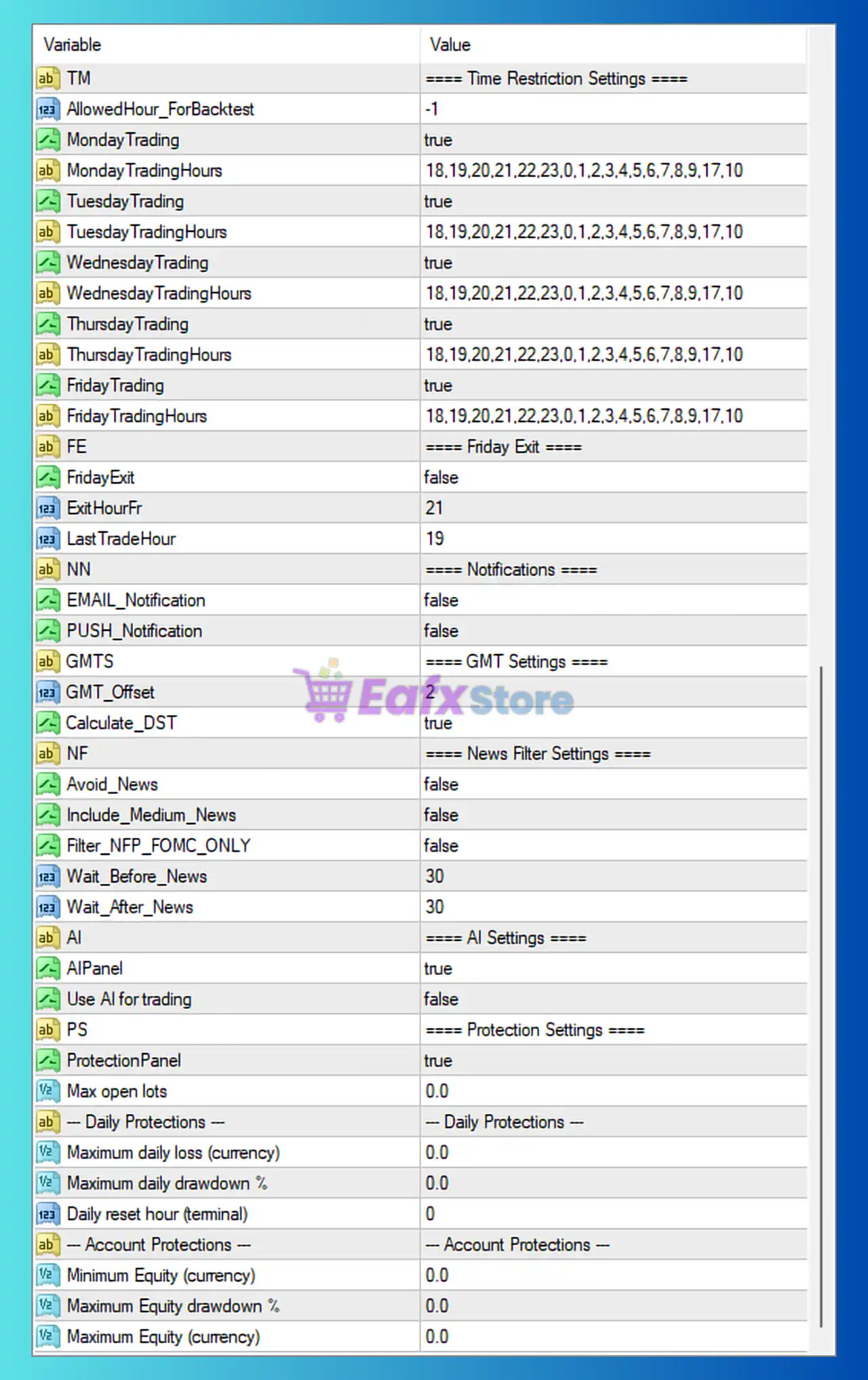
- Monday–Friday Trading = true: The EA is allowed to trade all week.
- Hour Filters (18,19,20,21,22,23,0,1,2…): Shows a wide session range covering late US session through Asian and part of European session.
- AllowedHour_ForBacktest = -1: No restriction during backtesting, ensuring cleaner optimization results.
These parameters indicate the EA is optimized for low-spread hours and high-volatility transitions, improving entry accuracy.
🧩 Friday Exit Settings
- FridayExit = false: The EA continues running on Fridays without forced shutdown.
- ExitHourFr / LastTradeHour = 21 / 19: If FridayExit were enabled, the EA would control final trade hours to avoid weekend gaps.
This flexibility suits traders who want more extended exposure through Friday sessions.
🧩 Notification Settings
- Email / Push Notifications = false: Disabled by default—users can enable these for remote trade monitoring.
🧩 GMT Settings
- GMT_Offset = 2
- Calculate_DST = true
These ensure accurate synchronization with the broker’s time, crucial for high-precision entry algorithms and session filters.
🧩 News Filter Settings
- Avoid_News = false
- Include_Medium_News = false
- Filter_NFP_FOMC_ONLY = false
The EA does not avoid news events by default. This implies the strategy is designed to withstand volatility or aims to capitalize on rapid price movements rather than avoiding them.
🧩 AI Settings
- AIPanel = true: Visual interface enabled.
- Use AI for Trading = false: Although AI panel exists, the EA does not use AI logic directly.
This suggests the EA has a hybrid structure—AI support tools are available, but core logic remains rule-based.
🧩 Protection Settings
All daily and account protections are set to 0, meaning:
- No built-in daily loss limits
- No daily drawdown caps
- No equity-based shutdown rules
This gives complete freedom but also implies the EA relies heavily on its own risk-controlled strategy rather than hard-stop protection.
🧩 Risk Management Settings
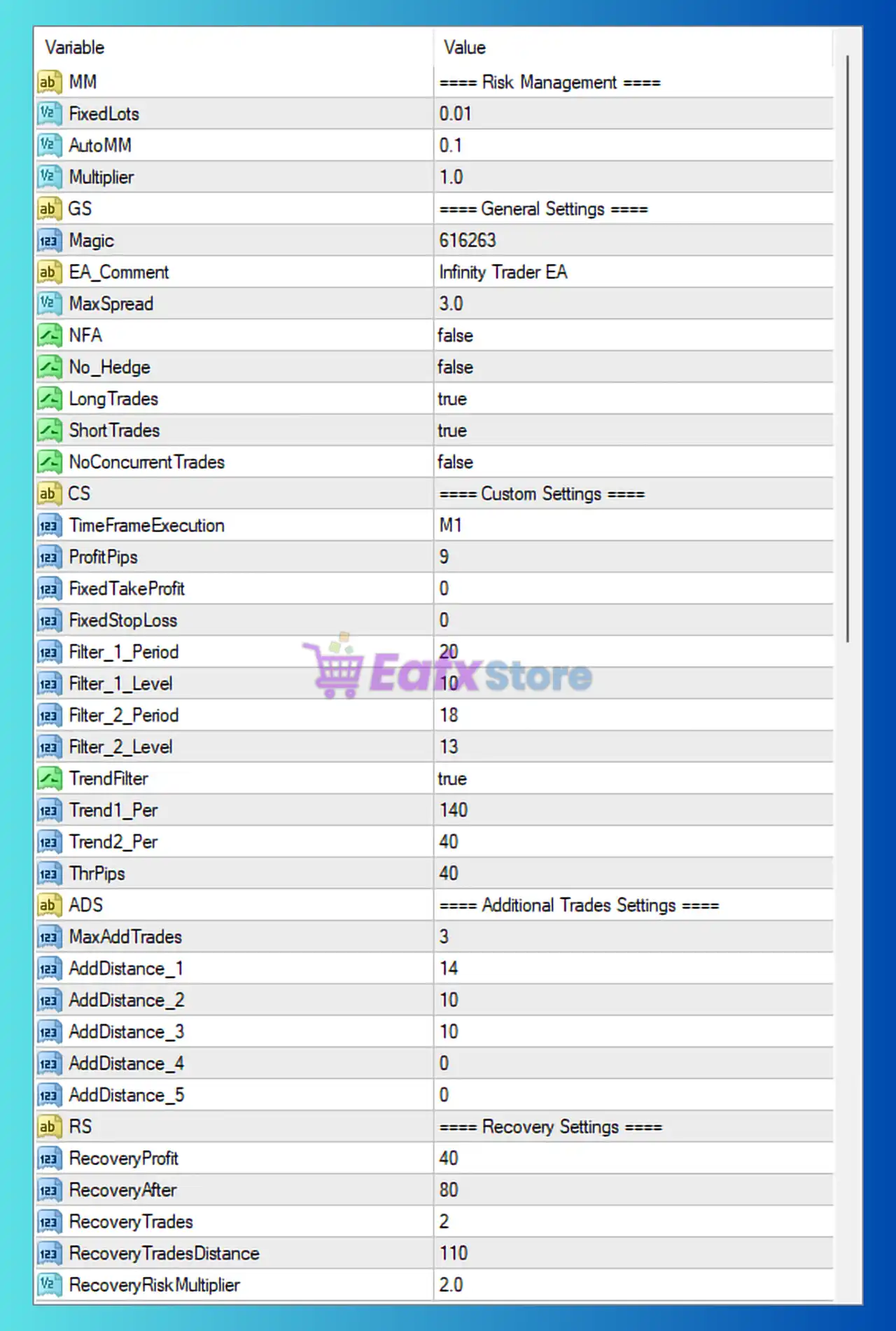
- FixedLots = 0.01
- AutoMM = 0.1
- Multiplier = 1.0
The EA supports fixed lot or automatic money management. With AutoMM active at 0.1, risk remains small and suitable for safer long-term operation.
🧩 General Settings
- MaxSpread = 3.0: Ensures trades are only opened in favorable low-cost conditions.
- LongTrades / ShortTrades = true: The EA trades both directions.
- No_Hedge = false: Hedging allowed depending on broker.
🧩 Custom Strategy Filters
✔ TimeframeExecution = M1
The EA operates on the 1-minute chart, meaning it is designed for scalping or fast trend detection.
✔ ProfitPips = 9
Take Profit target is very small—ideal for high-frequency trading.
✔ Multiple Custom Filters
- Filter_1 & Filter_2: Multi-period, multi-level filters enhance entry precision and reduce false signals.
- TrendFilters (true): Uses Trend1_Per (140) and Trend2_Per (40) to align entries with major and minor market direction.
This combination creates a multi-layer confirmation system to ensure disciplined, trend-aligned entries.
🧩 Additional Trades Settings
- MaxAddTrades = 3
- Grid expansion levels at: 14, 10, 10 pips
This is a controlled grid system—not too aggressive—and helps the EA optimize entries in pullback or reversal conditions.
🧩 Recovery Settings
Recovery mode is active:
- RecoveryProfit = 40
- RecoveryAfter = 80
- RecoveryTrades = 2
- RecoveryRiskMultiplier = 2.0
These parameters indicate a smart recovery mechanism, allowing the EA to recover from drawdowns using controlled lot-size scaling rather than dangerous martingale behavior.
⭐ Conclusion
The Infinity Trader EA reveal a sophisticated, session-aware trading system built for precision scalping and trend-aligned entries. Its combination of multi-layer filters, controlled grid expansion, and structured recovery logic creates a flexible yet disciplined trading environment. While protection parameters are set to zero, the EA balances risk through small default lot sizes, tight profit targets, and robust trend filtering. These settings position Infinity Trader EA as a powerful solution for traders seeking high-frequency, rule-based automation with customizable time filters and advanced recovery features.