🧩 What is ALL IN Trading System MT5?
ALL IN Trading System MT5 is an automated trading solution built for consistent Forex performance using structured indicator logic. It focuses on stability and adaptability by combining multi-layer trend detection with precise entry timing, while integrated risk management allows controlled Stop Loss (SL) and Take Profit (TP) handling, helping traders maintain disciplined and resilient automated trading.
🧩 General Settings – Core Trading Infrastructure
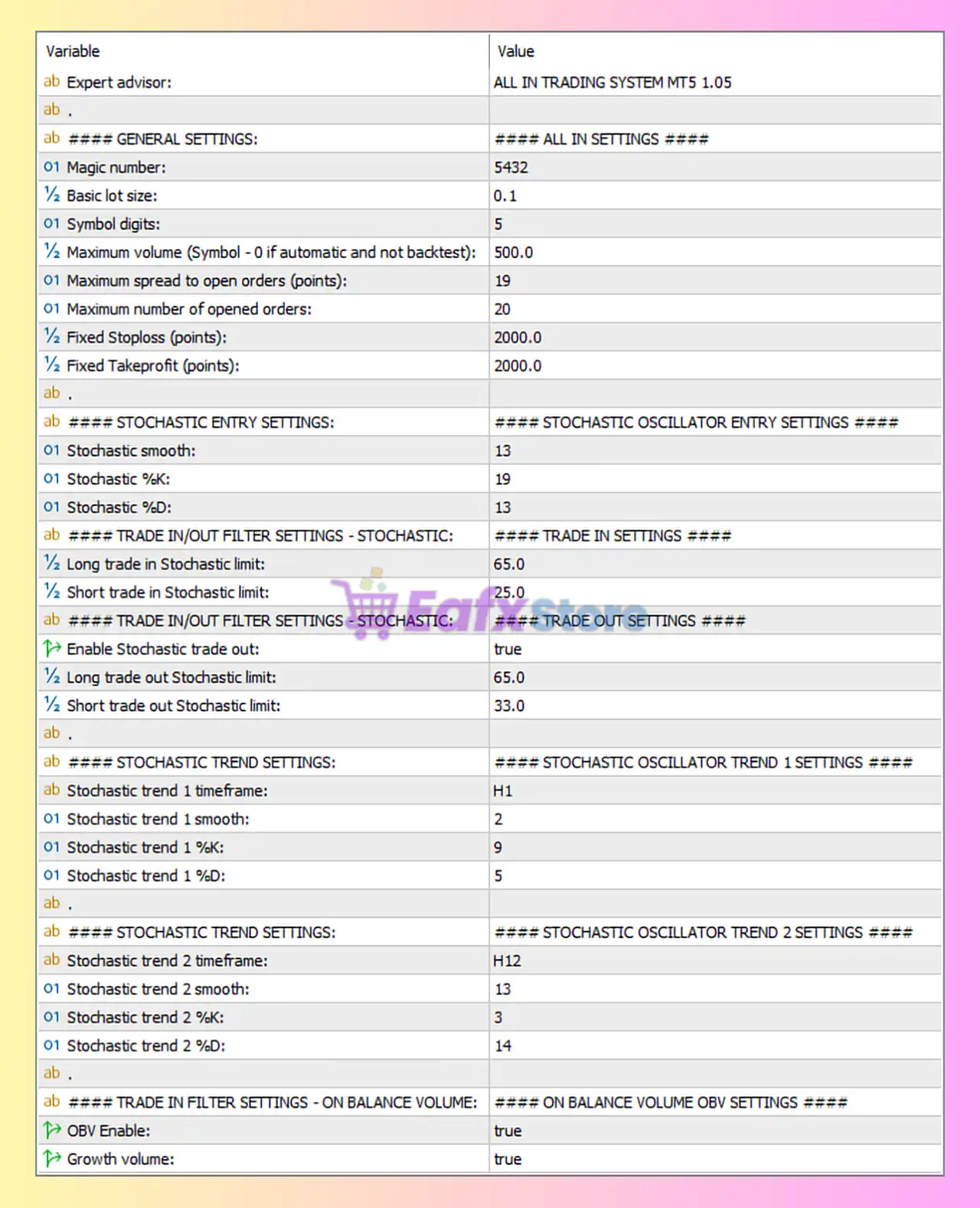
🔶 Expert Advisor: ALL IN TRADING SYSTEM MT5 1.05
- Confirms the EA version, important for backtesting consistency and update compatibility.
- Indicates a mature system with structured modules.
🔶 Magic Number = 5432
- Unique identifier for all EA-managed trades.
- Prevents interference with:
- Manual trades
- Other Expert Advisors
- Essential for stable multi-EA portfolio trading.
🔶 Basic Lot Size = 0.1
- Relatively large starting lot.
- Suggests the EA is designed for:
- Medium to large accounts
- Aggressive capital utilization
- ⚠️ Small accounts may face higher drawdown with this setting.
🔶 Symbol Digits = 5
- Optimized for 5-digit Forex brokers.
- Ensures correct pip and point calculations.
🔶 Maximum Volume (Symbol – 0 if automatic and not backtest) = 500.0
- Caps total trading exposure.
- Acts as a safety limit against runaway position sizing.
- Indicates grid or multi-order capability.
🔶 Maximum Spread to Open Orders (points) = 19
- Prevents trade entry during high spread conditions.
- Helps avoid:
- News spikes
- Low liquidity sessions
- Improves execution quality and cost control.
🔶 Maximum Number of Opened Orders = 20
- Confirms multi-order / scaling / grid-style logic.
- Increases market coverage but also raises margin and drawdown risk.
🔶 Fixed Stop Loss (points) = 2000
- Wide stop loss (~200 pips on 5-digit brokers).
- Designed to:
- Withstand market noise
- Allow recovery or trend continuation
- ⚠️ Requires disciplined risk management.
🔶 Fixed Take Profit (points) = 2000
- Symmetrical risk-reward structure (1:1).
- Suggests strategy relies on:
- High win rate
- Trade management rather than tight TP/SL
🧩 Stochastic Entry Settings – Primary Signal Generator
🔶 Stochastic Smooth = 13
- Heavy smoothing reduces false signals.
- Improves signal reliability in volatile markets.
🔶 Stochastic %K = 19
- Slower %K period.
- Filters out short-term market noise.
🔶 Stochastic %D = 13
- Smooth confirmation line.
- Strengthens entry accuracy.
✅ Overall, these values indicate a conservative and stable stochastic entry system.
🧩 Trade In Filters – Stochastic Conditions
🔶 Long Trade In Stochastic Limit = 65.0
- Long trades allowed when stochastic is below or near overbought threshold.
- Avoids buying at extreme tops.
🔶 Short Trade In Stochastic Limit = 25.0
- Short trades allowed near oversold zones.
- Prevents selling too late in bearish moves.
➡️ This creates zone-based entry filtering, reducing poor-quality trades.
🧩 Trade Out Filters – Stochastic Exit Logic
🔶 Enable Stochastic Trade Out = true
- Activates indicator-based exits.
- Trades are closed dynamically, not only by TP/SL.
🔶 Long Trade Out Stochastic Limit = 65.0
- Long trades exit as momentum weakens near upper zones.
🔶 Short Trade Out Stochastic Limit = 33.0
- Short trades exit earlier to protect profits.
✅ Improves profit protection and reduces drawdown during reversals.
🧩 Multi-Timeframe Stochastic Trend Filters
🔶 Stochastic Trend 1 (H1 Timeframe)
- Smooth = 2
- %K = 9
- %D = 5
➡️ Fast and responsive trend filter for intraday bias confirmation.
🔶 Stochastic Trend 2 (H12 Timeframe)
- Smooth = 13
- %K = 3
- %D = 14
➡️ Slow, higher-timeframe trend confirmation.
➡️ Prevents trading against the dominant market direction.
✅ Combining H1 + H12 creates strong trend alignment logic, increasing trade accuracy.
🧩 On-Balance Volume (OBV) Filter – Volume Confirmation
🔶 OBV Enable = true
- Activates volume-based trade filtering.
- Confirms whether price movement is supported by real market participation.
🔶 Growth Volume = true
- Trades only when volume shows growth.
- Helps avoid:
- False breakouts
- Low-liquidity traps
🔍 This is a powerful addition that improves signal quality and robustness.
🧩 Final Conclusion – Is ALL IN Trading System MT5 a Strong EA?
Based on the image, ALL IN Trading System MT5 is a complex, multi-layered Expert Advisor built around stochastic oscillators, multi-timeframe trend confirmation, volume analysis, and multi-order trade management.
✅ Strengths:
- Advanced stochastic logic with entry & exit filters
- Multi-timeframe trend confirmation (H1 + H12)
- OBV volume validation for higher accuracy
- Spread and exposure protection mechanisms
- Suitable for trending and semi-ranging markets
⚠️ Risks & Considerations:
- Large base lot size (0.1) may be risky for small accounts
- Up to 20 open orders increases margin usage
- Wide stop loss requires sufficient account balance
- Best used on low-spread, stable brokers