

Introduction
NorthEastWay MT4 is an automated trading Expert Advisor (EA) designed for the MetaTrader 4 platform. It features multi-currency trading configuration, flexible money management, averaging functionality, and grid-level trade management.

The EA provides configurable trading directions, allowing traders to select Long and Short positions. It also includes Recovery Mode and a Martin Ratio parameter to customize its averaging strategy, together with automatic lot sizing based on account equity.
Additionally, NorthEastWay MT4 offers customizable Magic Number management, currency-based position controls, and options for adjusting account capital references. These features provide flexibility for traders who want to configure automated trading and position management according to their preferred strategy.
NorthEastWay MT4 Settings Explained
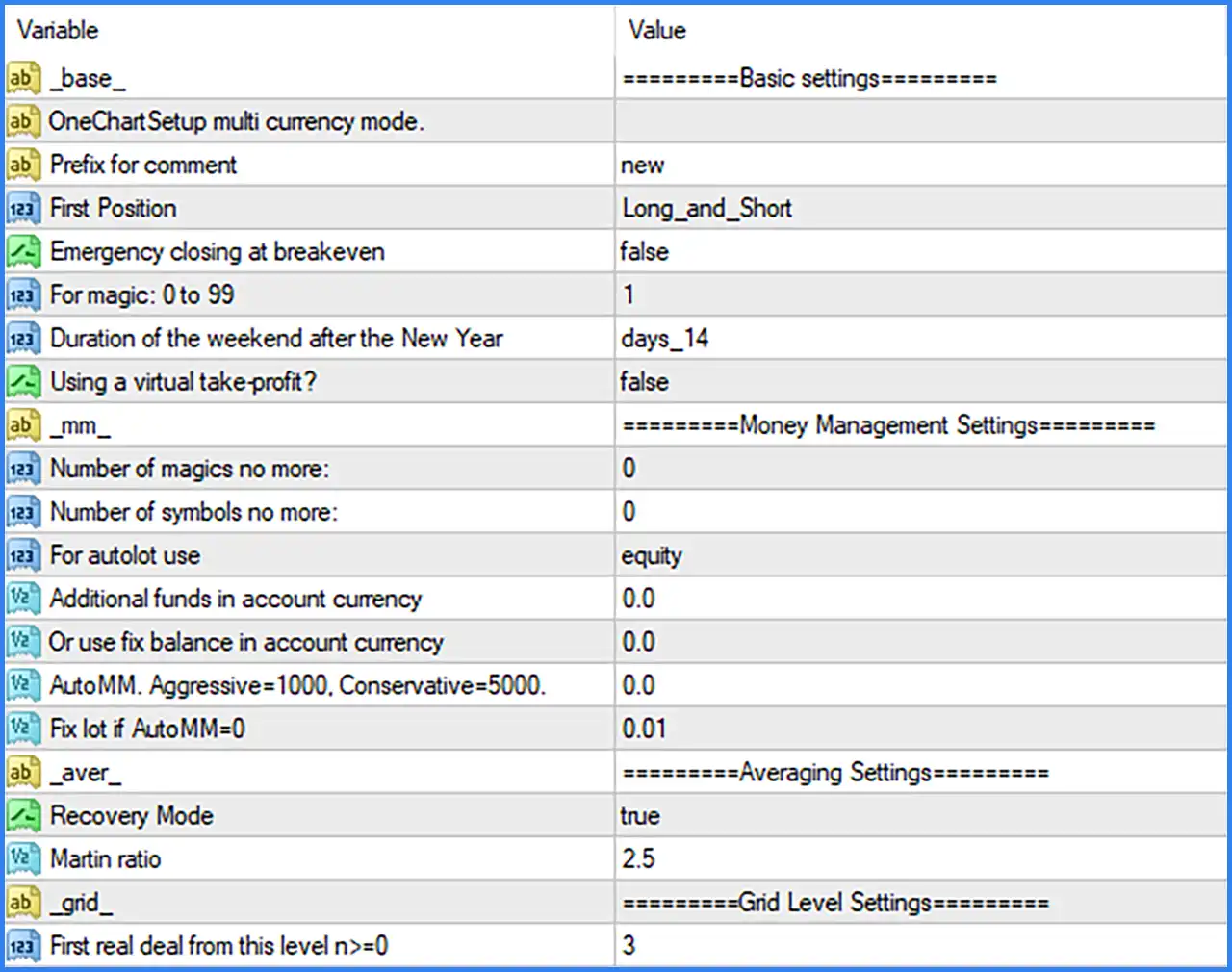
Basic Settings
🔹 base = Basic settings – Main configuration section containing the EA's general trading parameters, order direction, Magic Number settings, and New Year holiday configuration.
🔹 OneChartSetup multi currency mode – Identifies the multi-currency trading configuration, allowing the EA to operate with multiple currency pairs through one chart setup. The input screenshot does not display a specific value for this parameter.
🔹 Prefix for comment = new – Defines the prefix added to order comments as new, helping identify and distinguish trades opened by NorthEastWay MT4.
🔹 First Position = Long_and_Short – Allows the EA to consider both Long (Buy) and Short (Sell) positions for its initial trading direction.
🔹 Emergency closing at breakeven = false – Disables the emergency breakeven closing function. The EA will not activate this particular emergency closing option under the supplied configuration.
🔹 For magic: 0 to 99 = 1 – Sets the Magic Number configuration value to 1 within the specified 0–99 range, providing an identifier reference for the EA's trade management system.
🔹 Duration of the weekend after the New Year = days 14 – Sets the New Year weekend or holiday duration parameter to 14 days, defining the configured period for this special calendar-related trading setting.
🔹 Using a virtual take-profit? = false – Disables the virtual Take Profit option. The EA does not activate this optional virtual profit-target mechanism under the supplied configuration.
Money Management Settings
🔹 mm = Money Management Settings – Main section containing parameters for Magic Number limits, currency-pair limits, automatic lot sizing, account equity, and fixed lot configuration.
🔹 Number of magics no more = 0 – Sets the maximum number of Magic Numbers to 0. The exact interpretation of zero, such as unlimited or disabled restriction, depends on the EA's internal implementation.
🔹 Number of symbols no more = 0 – Sets the maximum number of trading symbols to 0. This parameter controls the symbol-count restriction, although the precise behavior of zero should be verified.
🔹 For autolot use = equity – Selects account equity as the reference for automatic lot-size calculations, allowing the EA to determine position volume based on the account's current equity.
🔹 Additional funds in account currency = 0.0 – Sets the additional capital adjustment to 0.0 in the account's deposit currency, meaning no extra funds are added to the automatic money management calculation through this parameter.
🔹 Or use fix balance in account currency = 0.0 – Sets the alternative fixed account balance reference to 0.0, indicating that no specific fixed balance amount is entered through this option.
🔹 AutoMM, Aggressive=1000, Conservative=5000 = 0.0 – Sets the AutoMM parameter to 0.0. The input description provides 1000 as the aggressive reference and 5000 as the conservative reference for the automatic money management configuration.
🔹 Fix lot if AutoMM=0 = 0.01 – Sets the fallback fixed lot size to 0.01 lots when the AutoMM value is 0, providing a predefined trading volume for the EA's position-sizing configuration.
Averaging Settings
🔹 aver = Averaging Settings – Main section containing the EA's averaging and recovery-related configuration parameters.
🔹 Recovery Mode = true – Enables Recovery Mode, allowing the EA to activate its configured recovery trading logic when managing positions according to its internal strategy.
🔹 Martin ratio = 2.5 – Sets the Martin Ratio parameter to 2.5, defining the configured multiplier for the EA's averaging or recovery position-sizing mechanism. If applied as a lot multiplier, subsequent position sizes may increase significantly.
Grid Level Settings
🔹 grid = Grid Level Settings – Main section containing parameters that control the EA's grid-level trading configuration.
🔹 First real deal from this level n>=0 = 3 – Sets the first real deal level to 3, defining the grid level from which the EA is configured to begin its real-deal trading operations according to its internal grid logic.
Conclusion
NorthEastWay MT4 provides a configurable automated trading system combining multi-currency settings, automatic money management, averaging, and grid-level position management.
The supplied configuration allows both Long and Short trading, uses equity as the automatic lot-sizing reference, and provides a fallback fixed lot size of 0.01 when AutoMM = 0.
Its Recovery Mode is enabled with Martin Ratio = 2.5, while the First Real Deal level is configured at 3. These parameters are important because they influence how the EA manages additional positions and recovery operations.
The EA also includes a virtual Take Profit option, emergency breakeven closing control, and customizable Magic Number and symbol restrictions.
Before deploying NorthEastWay MT4 on a live trading account, traders should carefully evaluate the averaging mechanism, Martin Ratio = 2.5, automatic lot calculation, and grid-level configuration. A multiplier of 2.5 can increase trading exposure rapidly if the EA applies it to successive positions.