

This guide walks through the inputs of Pip Locker Pro EA MT4 with the values recommended for live trading. The set files that come with the EA already contain these settings, so you can load them in one click and adjust only what your broker or account needs.
🔢 Pip Locker Pro EA – Complete Settings & Configuration Guide
Pip Locker Pro EA is an automated Forex trading Expert Advisor (EA) designed for MetaTrader platforms with a focus on pip locking, volatility-based trading, dynamic money management and customizable trading sessions.
The EA allows traders to optimize lot sizing, control spread conditions, manage risk automatically, and configure trading hours for better market precision and account protection.
🔢 Pip Locker Pro EA Settings Explained
Below are the details of the parameters in the advisor’s trading system settings table:
🔶 General Settings
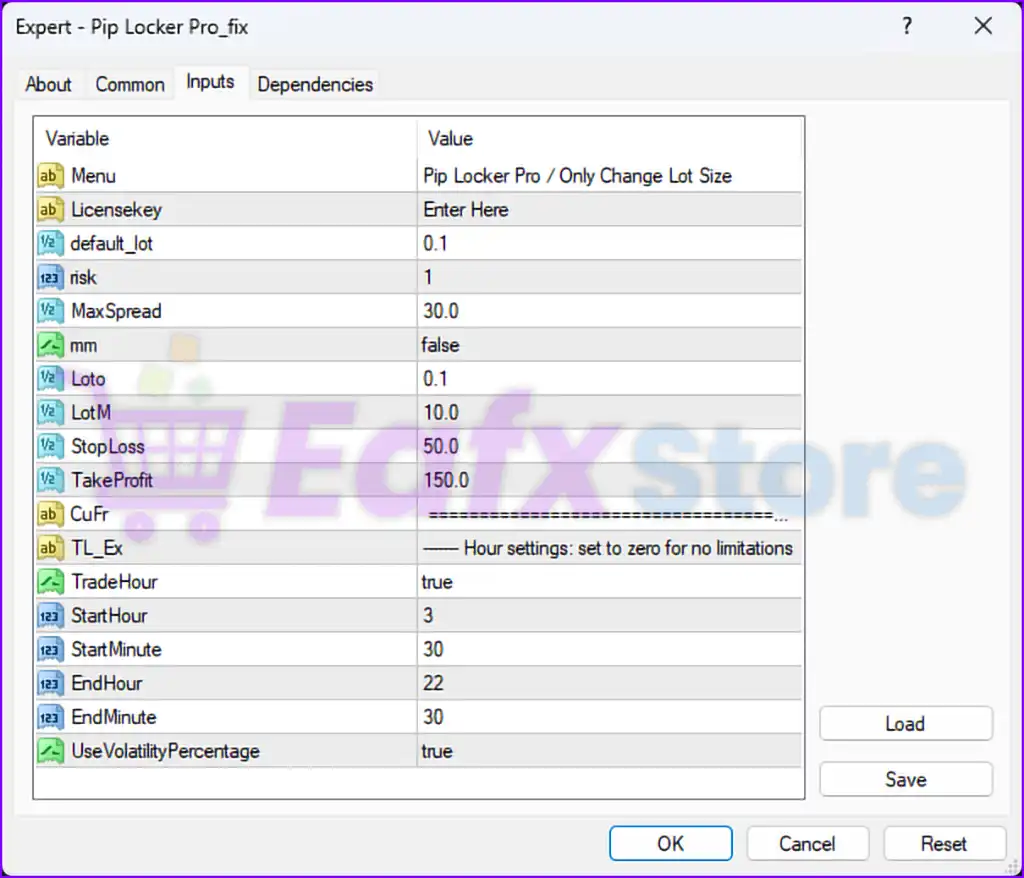
🔹 Menu = Pip Locker Pro / Only Change Lot Size — Displays the EA menu information and indicates that users mainly need to adjust lot size settings.
🔹 Licensekey = Enter Here — Field used for entering the activation or license key for the EA.
🔹 default_lot = 0.1 — Sets the default trading lot size to 0.1.
🔹 risk = 1 — Defines the general trading risk level as 1.
🔹 MaxSpread = 30.0 — Prevents trading when the market spread exceeds 30.0 points/pips.
🔶 Money Management Settings
🔹 mm = false — Disables automatic money management functionality.
🔹 Loto = 0.1 — Sets the initial lot size parameter to 0.1.
🔹 LotM = 10.0 — Defines the lot multiplier or scaling factor as 10.0.
🔶 Trade Protection Settings
🔹 StopLoss = 50.0 — Sets the Stop Loss level to 50.0 points/pips.
🔹 TakeProfit = 150.0 — Sets the Take Profit target to 150.0 points/pips.
🔶 Currency & Filter Settings
🔹 CuFr = ========================================== — Section separator for currency or filter-related parameters.
🔶 Hour Settings
🔹 TL_Ex = ----- Hour settings: set to zero for no limitations — Section header explaining trading hour restrictions.
🔹 TradeHour = true — Enables time-based trading restrictions.
🔹 StartHour = 3 — Trading session starts at hour 3.
🔹 StartMinute = 30 — Trading session starts at minute 30.
🔹 EndHour = 22 — Trading session ends at hour 22.
🔹 EndMinute = 30 — Trading session ends at minute 30.
🔶 Volatility Settings
🔹 UseVolatilityPercentage = true — Enables volatility percentage filtering for trade execution decisions.
🔢 Conclusion
Pip Locker Pro EA is a flexible automated trading robot that focuses on pip locking strategies, spread filtering, volatility analysis and customizable trading sessions.
With adjustable lot sizing, stop loss and take profit settings, as well as optional money management controls, the EA provides traders with a simple but effective framework for automated Forex trading on MetaTrader 4 platforms.
🔢 FAQs
❓ What is Pip Locker Pro EA?
Pip Locker Pro EA is an automated Forex trading Expert Advisor designed for pip locking and volatility-based trading strategies.
❓ Does Pip Locker Pro EA support automatic money management?
Yes, the EA includes money management functionality, although it is currently disabled with mm = false.
❓ Can Pip Locker Pro EA restrict trading hours?
Yes, the EA includes customizable trading session filters with start and end times.
❓ What is the default lot size in Pip Locker Pro EA?
The default trading lot size is set to 0.1.
❓ Does Pip Locker Pro EA include spread protection?
Yes, the EA prevents trading when the spread exceeds the configured MaxSpread = 30.0 setting.
Get Pip Locker Pro EA MT4
Download Pip Locker Pro EA MT4 with its set files, read the full product details and requirements here: Pip Locker Pro EA MT4 →