

Introduction
XM v3.6 EA is an automated trading Expert Advisor (EA) designed for the MetaTrader 4 platform. It provides multiple configurable trading strategies, flexible lot management, risk control, Martingale-based position sizing, and customizable trading schedules.
The EA features three independently configurable trading strategy sections, allowing traders to adjust initial lot sizes, lot multipliers, maximum open orders, Take Profit targets, and Trailing Stop parameters. It also includes account-based money management, maximum lot restrictions, per-currency-pair loss protection, and weekend trading controls.
Understanding the XM v3.6 EA settings helps traders customize automated trading behavior, manage position exposure, and configure trading operations according to their account size and risk management preferences.
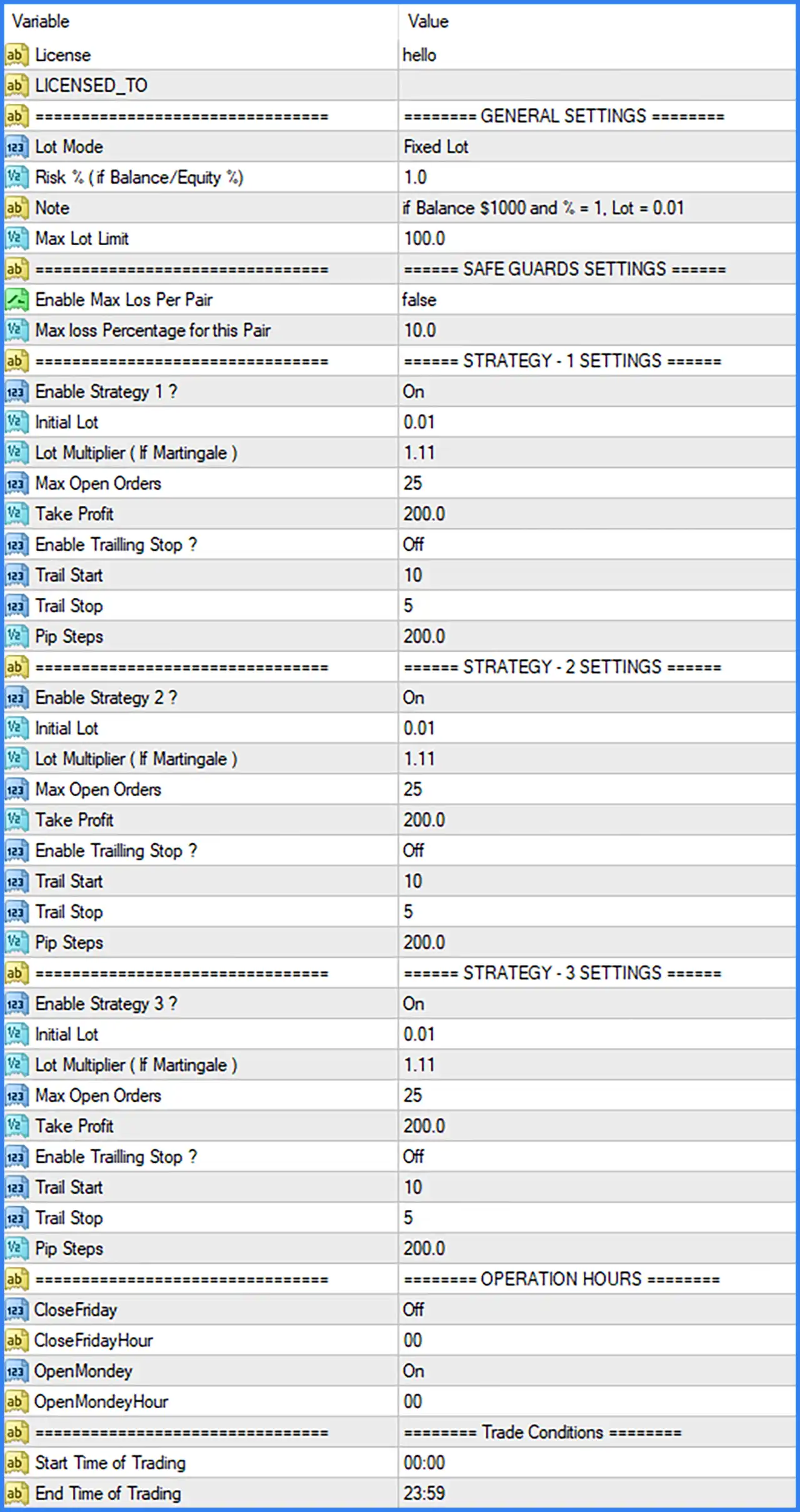
General Settings
🔹 Lot Mode = Fixed Lot: Selects Fixed Lot mode, allowing the EA to use a predefined trading volume rather than relying exclusively on automatic position sizing.
🔹 Risk % ( if Balance/Equity %) = 1.0: Sets the risk-based lot calculation parameter to 1.0%, defining the percentage value used by the EA when calculating trading volume based on account balance or equity.
🔹 Note = If Balance $1000 and % = 1, Lot = 0.01: Provides the developer's reference example for position sizing, indicating that a $1,000 account balance with a 1% setting corresponds to a 0.01-lot trading volume.
🔹 Max Lot Limit = 100.0: Sets the maximum permitted lot size to 100.0 lots, establishing an upper limit for trading volume generated by the EA.
Safe Guards Settings
🔹 Enable Max Los Per Pair = false: Disables the maximum loss protection for individual currency pairs, meaning this specific pair-level loss restriction is inactive under the default configuration.
🔹 Max loss Percentage for this Pair = 10.0: Sets the maximum loss threshold for an individual currency pair to 10.0%, defining the configured percentage limit when the pair-level loss protection is enabled.
Strategy 1 Settings
🔹 Enable Strategy 1 ? = On: Activates Strategy 1, allowing the first trading strategy to participate in the EA's automated trading operations.
🔹 Initial Lot = 0.01: Sets the initial trading volume for Strategy 1 to 0.01 lots, defining the starting position size for this strategy.
🔹 Lot Multiplier ( If Martingale ) = 1.11: Sets the Martingale lot multiplier to 1.11, determining the factor used to increase subsequent trading volumes when the strategy applies Martingale-based position sizing.
🔹 Max Open Orders = 25: Limits Strategy 1 to a maximum of 25 open orders, helping control the number of simultaneous positions managed by this strategy.
🔹 Take Profit = 200.0: Sets the Take Profit parameter to 200.0, defining the configured profit-taking target for trades generated by Strategy 1.
🔹 Enable Trailing Stop ? = Off: Disables Trailing Stop functionality for Strategy 1, meaning the strategy does not use its configured trailing parameters under the default settings.
🔹 Trail Start = 10: Sets the Trailing Stop activation threshold to 10, defining the profit distance required before the trailing mechanism begins operating when enabled.
🔹 Trail Stop = 5: Sets the trailing distance to 5, defining the distance maintained between the market price and the protective Stop Loss when Trailing Stop is activated.
🔹 Pip Steps = 200.0: Sets the pip step parameter to 200.0, defining the configured price-distance interval used by Strategy 1 when managing its trading entries.
Strategy 2 Settings
🔹 Enable Strategy 2 ? = On: Activates Strategy 2, allowing the second trading strategy to participate in the EA's automated trading operations.
🔹 Initial Lot = 0.01: Sets the initial trading volume for Strategy 2 to 0.01 lots, defining the starting position size for this strategy.
🔹 Lot Multiplier ( If Martingale ) = 1.11: Sets the Martingale lot multiplier to 1.11, determining how subsequent position sizes are increased when the Martingale mechanism is applied.
🔹 Max Open Orders = 25: Limits Strategy 2 to a maximum of 25 open orders, controlling the number of simultaneous trading positions managed by this strategy.
🔹 Take Profit = 200.0: Sets the Take Profit target to 200.0, defining the configured profit-taking level for trades opened through Strategy 2.
🔹 Enable Trailing Stop ? = Off: Disables the Trailing Stop function for Strategy 2, preventing the strategy from automatically adjusting its protective Stop Loss through the trailing mechanism.
🔹 Trail Start = 10: Sets the Trailing Stop activation threshold to 10, specifying the required profit distance before trailing protection begins when enabled.
🔹 Trail Stop = 5: Sets the trailing distance to 5, defining the configured distance used to follow favorable market movements and protect accumulated profits.
🔹 Pip Steps = 200.0: Sets the pip step parameter to 200.0, determining the configured price-distance interval used by Strategy 2 for its trading entry management.
Strategy 3 Settings
🔹 Enable Strategy 3 ? = On: Activates Strategy 3, allowing the third trading strategy to participate in the EA's automated trading operations.
🔹 Initial Lot = 0.01: Sets the initial trading volume for Strategy 3 to 0.01 lots, establishing the starting position size for this strategy.
🔹 Lot Multiplier ( If Martingale ) = 1.11: Sets the Martingale lot multiplier to 1.11, defining the position-size multiplication factor applied to subsequent trades when Martingale-based sizing is used.
🔹 Max Open Orders = 25: Limits Strategy 3 to a maximum of 25 open orders, controlling the number of simultaneous positions managed by the third strategy.
🔹 Take Profit = 200.0: Sets the Take Profit target to 200.0, defining the configured profit-taking parameter for trades generated by Strategy 3.
🔹 Enable Trailing Stop ? = Off: Disables Trailing Stop functionality for Strategy 3, meaning the strategy will not activate automatic trailing protection under the default configuration.
🔹 Trail Start = 10: Sets the Trailing Stop activation threshold to 10, specifying the required profit distance before trailing protection starts when enabled.
🔹 Trail Stop = 5: Sets the trailing distance to 5, defining how far the protective Stop Loss follows the market price when the trailing function is activated.
🔹 Pip Steps = 200.0: Sets the pip step parameter to 200.0, defining the configured price-distance interval used by Strategy 3 when managing trading entries.
Operation Hours Settings
🔹 CloseFriday = Off: Disables the automatic Friday closing function, meaning the EA does not activate this specific scheduled position-closing option under the default configuration.
🔹 CloseFridayHour = 00: Sets the Friday closing hour to 00:00, defining the configured hour at which the EA is scheduled to close positions if CloseFriday is enabled.
🔹 OpenMonday = On: Enables the Monday opening function, allowing the EA to activate its configured trading operations at the beginning of the trading week.
🔹 OpenMondayHour = 00: Sets the Monday opening hour to 00:00, defining the scheduled hour when the EA can resume its configured trading operations.
Trade Conditions Settings
🔹 Start Time of Trading = 00:00: Sets the permitted trading session starting time to 00:00, allowing the EA to begin opening trades from midnight according to the configured trading schedule.
🔹 End Time of Trading = 23:59: Sets the permitted trading session ending time to 23:59, allowing the EA to operate throughout almost the entire trading day when other trading conditions are satisfied.