


🔢 Aegis Quant Pro EA MT5 – Complete Settings Guide and Parameter Explanation
Aegis Quant Pro EA is a professional automated trading system designed with advanced risk management, ATR-based stop-loss calculations, session filtering, drawdown protection and dynamic position sizing.
The EA focuses on preserving capital while maintaining consistent trading performance through intelligent trade management and market session control.
🔢 Aegis Quant Pro EA MT5 Settings Overview
Below are the details of the parameters in the advisor’s trading system settings table:
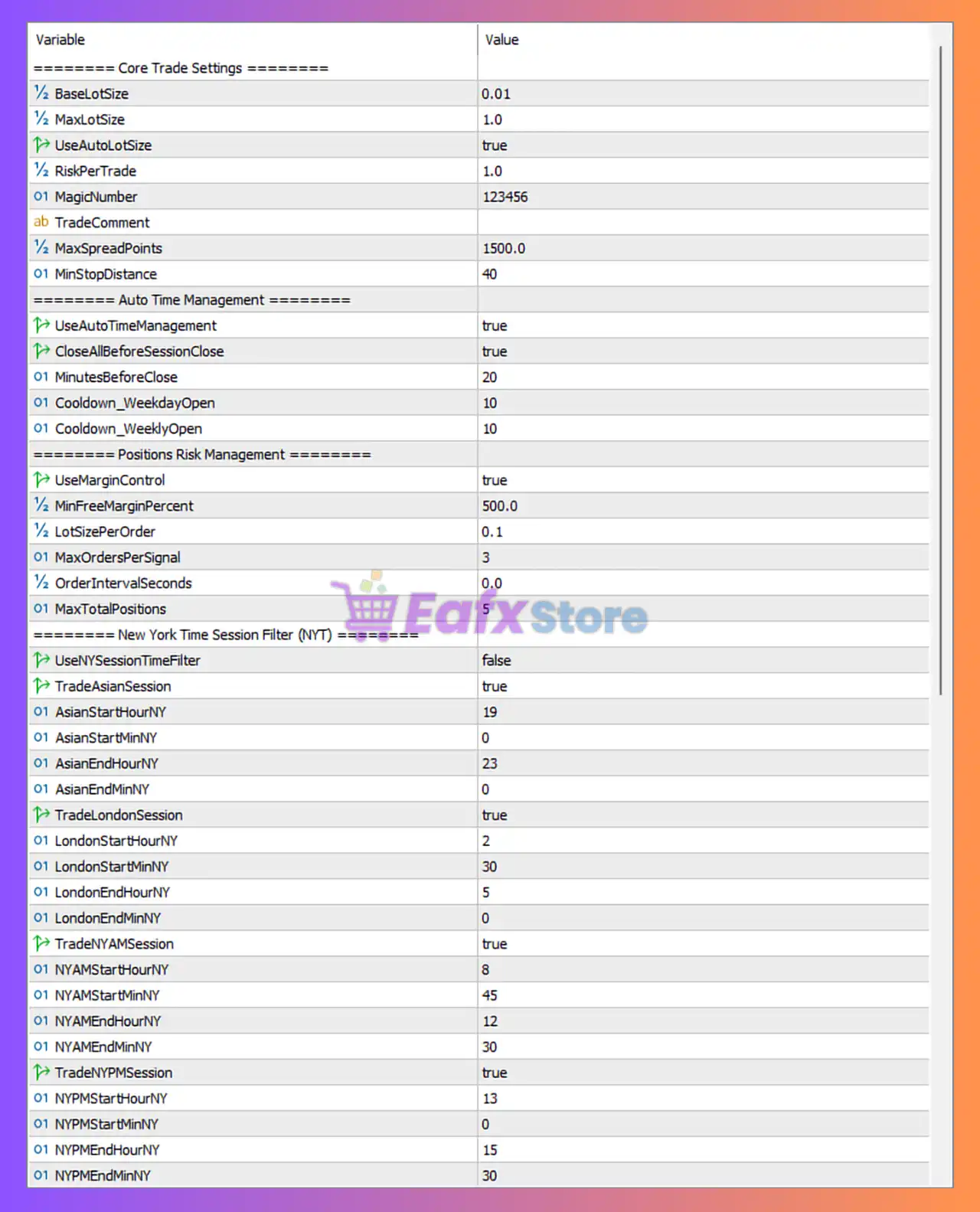
🔶 Core Trade Settings
🔹 BaseLotSize = 0.01 – Sets the minimum starting lot size used when opening positions.
🔹 MaxLotSize = 1.0 – Defines the maximum allowable lot size the EA can use.
🔹 UseAutoLotSize = true – Enables automatic lot size calculation based on account risk settings.
🔹 RiskPerTrade = 1.0 – Risks 1.0% of account equity per trade when auto lot sizing is active.
🔹 MagicNumber = 123456 – Unique identifier used by the EA to manage its own trades.
🔹 TradeComment = (blank) – Optional comment attached to orders opened by the EA.
🔹 MaxSpreadPoints = 1500.0 – Maximum allowable spread of 1500.0 points before new trades are blocked.
🔹 MinStopDistance = 40 – Minimum stop-loss distance required for trade placement.
🔶 Auto Time Management
🔹 UseAutoTimeManagement = true – Enables automated session and time-based trading management.
🔹 CloseAllBeforeSessionClose = true – Closes all active positions before the selected trading session ends.
🔹 MinutesBeforeClose = 20 – Closes trades 20 minutes before session shutdown.
🔹 Cooldown_WeekdayOpen = 10 – Waits 10 minutes after weekday market opening before trading.
🔹 Cooldown_WeeklyOpen = 10 – Applies a 10-minute delay after weekly market opening.
🔶 Positions Risk Management
🔹 UseMarginControl = true – Activates margin-based protection and position control.
🔹 MinFreeMarginPercent = 500.0 – Requires at least 500.0% free margin before allowing new positions.
🔹 LotSizePerOrder = 0.1 – Sets a default lot size of 0.1 per order under specific conditions.
🔹 MaxOrdersPerSignal = 3 – Allows a maximum of 3 orders for each trading signal.
🔹 OrderIntervalSeconds = 0.0 – No waiting period between orders.
🔹 MaxTotalPositions = 5 – Limits total simultaneous open positions to 5.
🔶 New York Time Session Filter (NYT)
🔹 UseNYSessionTimeFilter = false – Disables strict New York session filtering.
Asian Session
🔹 TradeAsianSession = true – Allows trading during the Asian session.
🔹 AsianStartHourNY = 19 – Asian session starts at 19:00 NY time.
🔹 AsianStartMinNY = 0 – Asian session starts at minute 00.
🔹 AsianEndHourNY = 23 – Asian session ends at 23:00 NY time.
🔹 AsianEndMinNY = 0 – Asian session ends at minute 00.
London Session
🔹 TradeLondonSession = true – Enables trading during the London session.
🔹 LondonStartHourNY = 2 – London session begins at 02:00 NY time.
🔹 LondonStartMinNY = 30 – London session begins at minute 30.
🔹 LondonEndHourNY = 5 – London session ends at 05:00 NY time.
🔹 LondonEndMinNY = 0 – London session ends at minute 00.
New York AM Session
🔹 TradeNYAMSession = true – Enables trading during the New York morning session.
🔹 NYAMStartHourNY = 8 – Session starts at 08:00 NY time.
🔹 NYAMStartMinNY = 45 – Session starts at minute 45.
🔹 NYAMEndHourNY = 12 – Session ends at 12:00 NY time.
🔹 NYAMEndMinNY = 30 – Session ends at minute 30.
New York PM Session
🔹 TradeNYPMSession = true – Enables trading during the New York afternoon session.
🔹 NYPMStartHourNY = 13 – Session starts at 13:00 NY time.
🔹 NYPMStartMinNY = 0 – Session starts at minute 00.
🔹 NYPMEndHourNY = 15 – Session ends at 15:00 NY time.
🔹 NYPMEndMinNY = 30 – Session ends at minute 30.
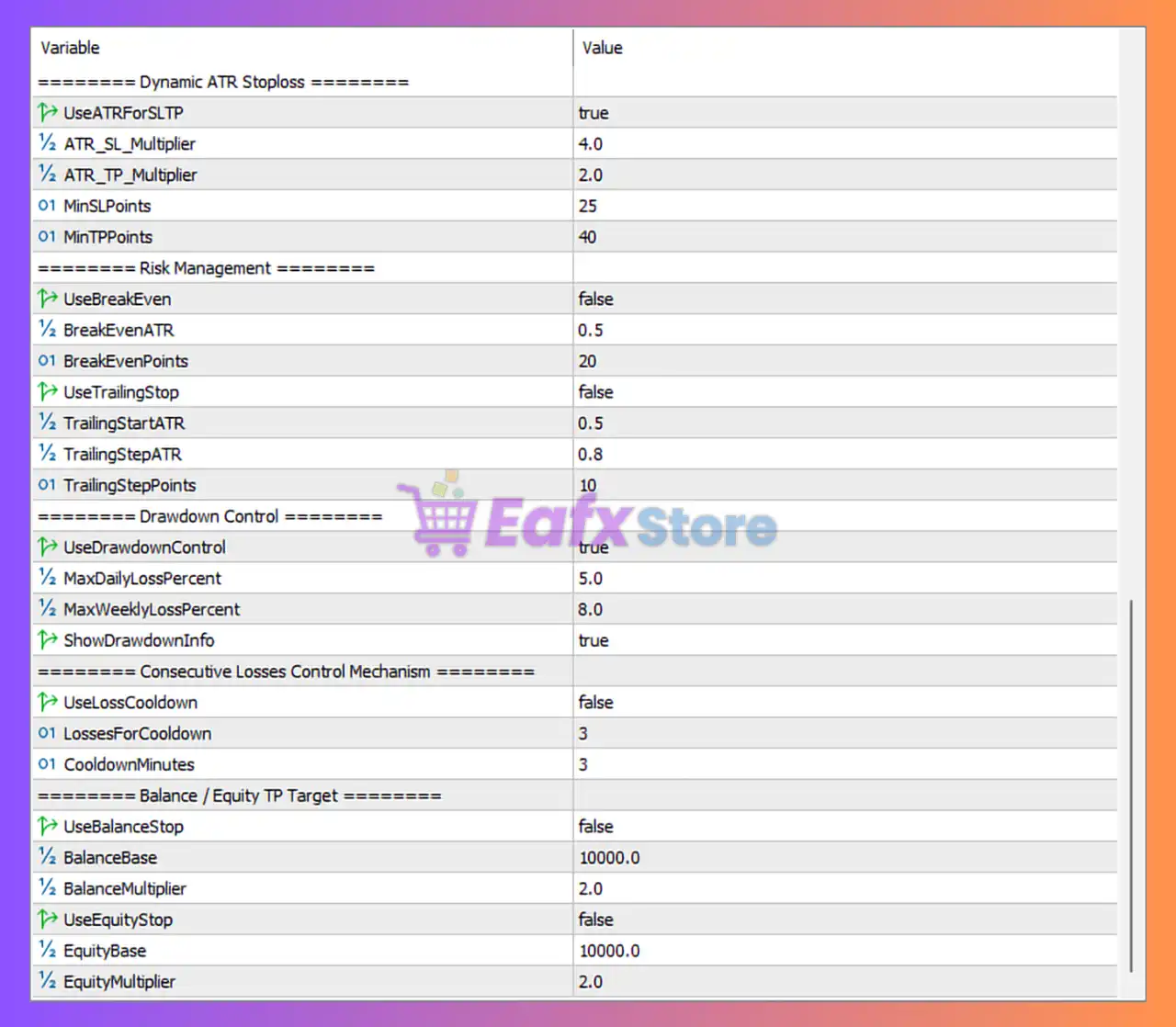
🔶 Dynamic ATR Stop Loss
🔹 UseATRforSLTP = true – Uses ATR calculations for stop-loss and take-profit placement.
🔹 ATR_SL_Multiplier = 4.0 – Stop loss equals 4.0 × ATR value.
🔹 ATR_TP_Multiplier = 2.0 – Take profit equals 2.0 × ATR value.
🔹 MinSLPoints = 25 – Minimum stop-loss distance is 25 points.
🔹 MinTPPoints = 40 – Minimum take-profit distance is 40 points.
🔶 Risk Management
🔹 UseBreakEven = false – Break-even functionality is currently disabled.
🔹 BreakEvenATR = 0.5 – Break-even would activate at 0.5 ATR if enabled.
🔹 BreakEvenPoints = 20 – Break-even offset value is 20 points.
🔹 UseTrailingStop = false – Trailing stop functionality is disabled.
🔹 TrailingStartATR = 0.5 – Trailing would begin at 0.5 ATR if enabled.
🔹 TrailingStepATR = 0.8 – Trailing adjustments would use 0.8 ATR increments.
🔹 TrailingStepPoints = 10 – Trailing stop update interval is 10 points.
🔶 Drawdown Control
🔹 UseDrawdownControl = true – Activates drawdown protection mechanisms.
🔹 MaxDailyLossPercent = 5.0 – Maximum daily loss limit is 5.0%.
🔹 MaxWeeklyLossPercent = 8.0 – Maximum weekly loss limit is 8.0%.
🔹 ShowDrawdownInfo = true – Displays drawdown information on the chart or panel.
🔶 Consecutive Losses Control Mechanism
🔹 UseLossCooldown = false – Consecutive-loss cooldown system is disabled.
🔹 LossesForCooldown = 3 – Cooldown would activate after 3 consecutive losses.
🔹 CooldownMinutes = 3 – Cooldown duration would be 3 minutes.
🔶 Balance / Equity TP Target
🔹 UseBalanceStop = false – Balance-based target protection is disabled.
🔹 BalanceBase = 10000.0 – Base balance reference is 10,000.0.
🔹 BalanceMultiplier = 2.0 – Balance target multiplier is 2.0.
🔹 UseEquityStop = false – Equity-based stop target is disabled.
🔹 EquityBase = 10000.0 – Base equity reference is 10,000.0.
🔹 EquityMultiplier = 2.0 – Equity target multiplier is 2.0.
🔢 Conclusion
Aegis Quant Pro is a sophisticated trading robot built around risk-first portfolio management, ATR-driven trade exits, strict drawdown protection and session-based execution control.
With features such as 1.0% risk per trade, 5.0% daily loss protection, 8.0% weekly loss protection, ATR-based SL/TP calculations, and multi-session trading support, the EA provides traders with a structured framework for maintaining discipline while pursuing long-term consistency in the Forex market.
🔢 FAQs
❓ What is the default risk per trade in Aegis Quant Pro EA MT5?
The EA is configured to risk 1.0% of account equity per trade when automatic lot sizing is enabled.
❓ Does Aegis Quant Pro EA MT5 use ATR for stop-loss calculations?
Yes, UseATRforSLTP = true with an ATR_SL_Multiplier of 4.0 and an ATR_TP_Multiplier of 2.0.
❓ How many positions can the EA open simultaneously?
The system limits itself to a maximum of 5 total open positions.
❓ What drawdown protection is included?
The EA includes a 5.0% daily loss limit and an 8.0% weekly loss limit through its drawdown control system.
❓ Can the EA trade multiple market sessions?
Yes, it can trade the Asian, London, New York AM, and New York PM sessions, each with individually configurable trading windows.



