


🔢 Msnr Low Drawdown Scalper EA MT5 – Complete Settings Guide and Parameter Explanation
Msnr Low Drawdown Scalper EA is an advanced automated trading system designed to capture market opportunities through trend analysis, breakout-retest logic, pullback entries, ATR-based risk management and dynamic position sizing.
The EA incorporates multiple layers of protection, including spread filters, trading session controls, break-even management, trailing stops, and daily drawdown limits, making it suitable for traders seeking controlled risk and low drawdown performance.

🔢 Msnr Low Drawdown Scalper EA MT5 Settings Overview
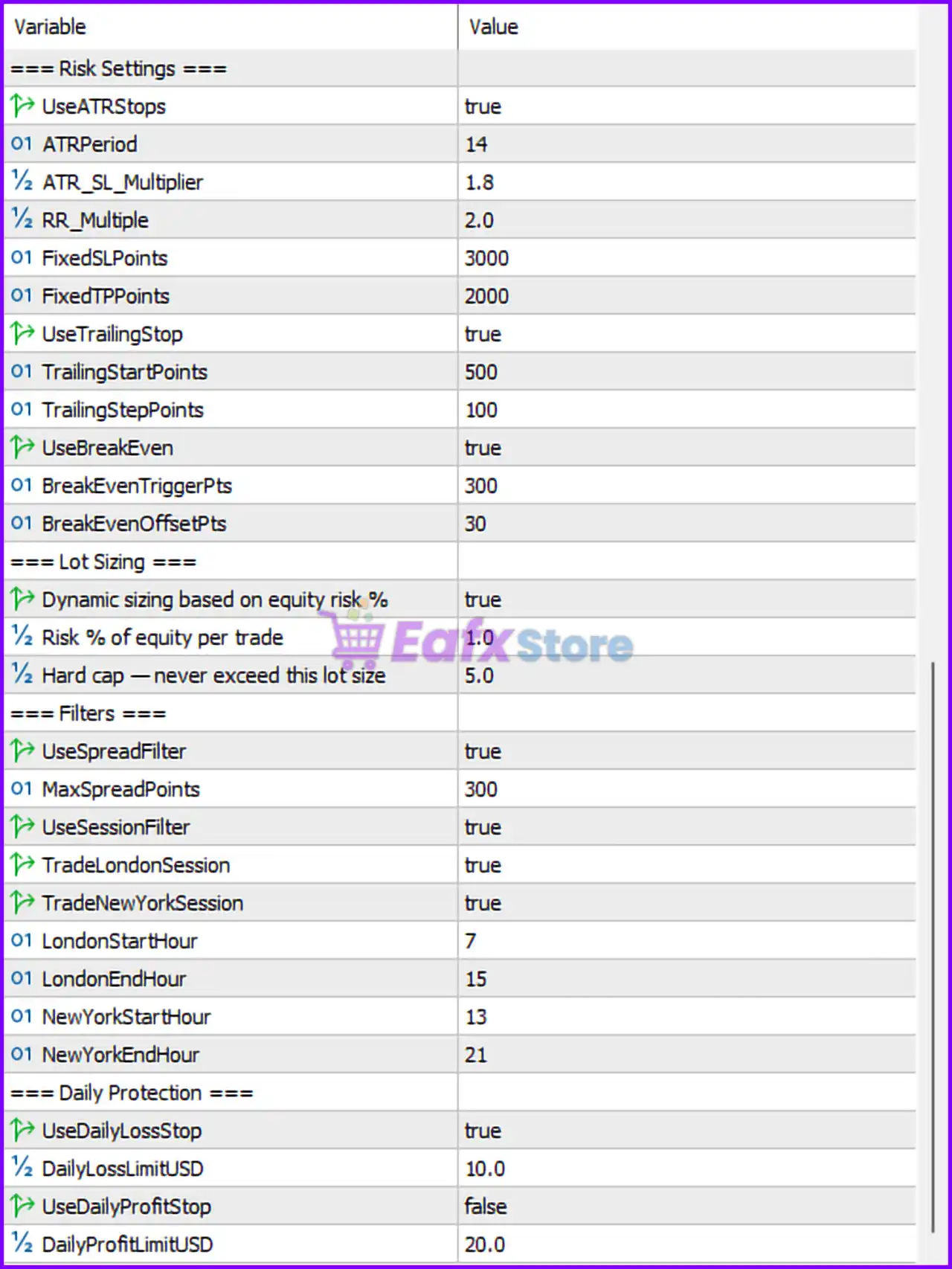
Below are the details of the parameters in the advisor’s trading system settings table:
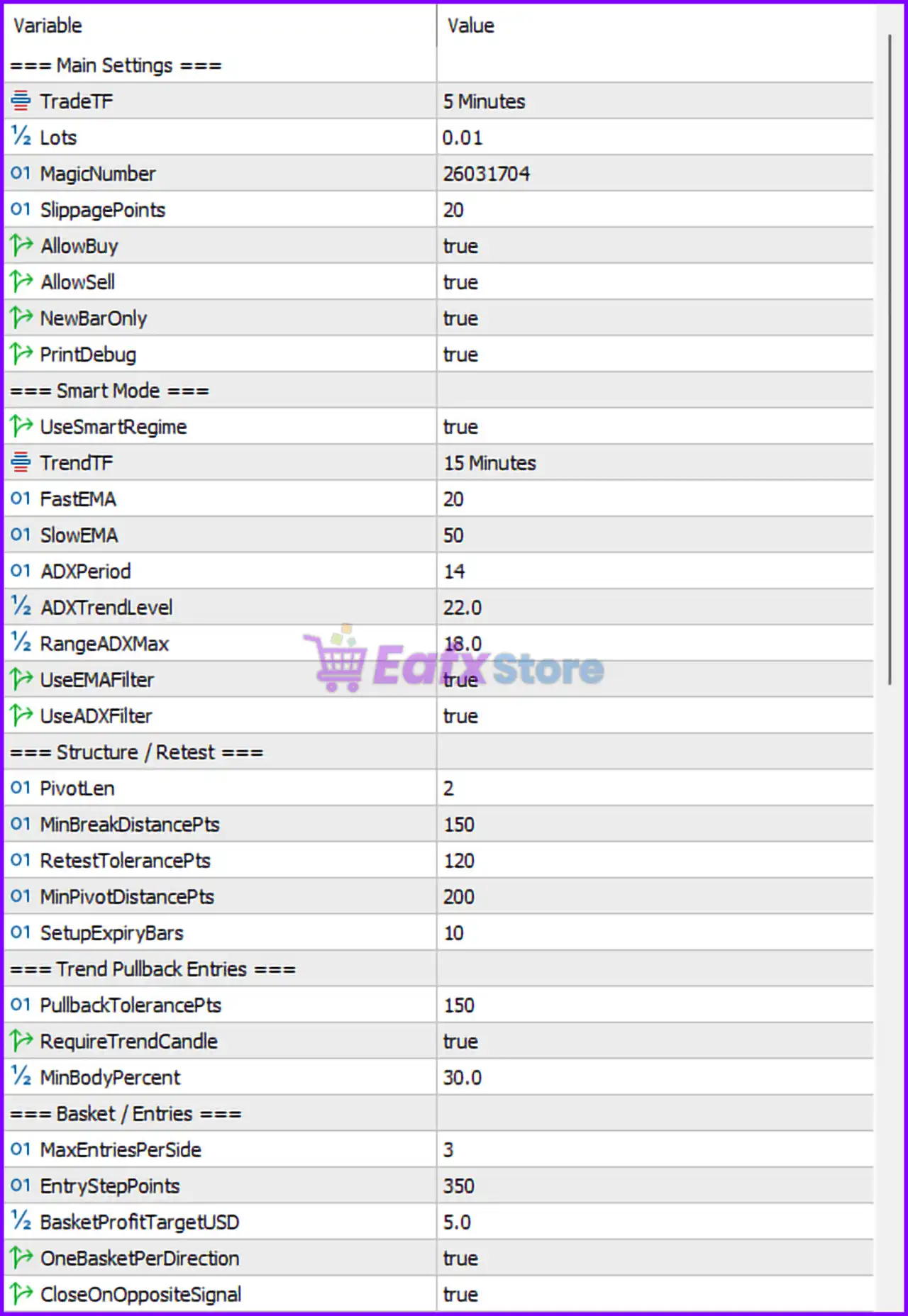
🔶 Main Settings
🔹 TradeTF = 5 Minutes – Defines the primary trading timeframe used for signal generation and execution.
🔹 Lots = 0.01 – Sets the default fixed lot size when dynamic risk sizing is disabled.
🔹 MagicNumber = 26031704 – Unique identifier used by the EA to manage its own positions.
🔹 SlippagePoints = 20 – Maximum allowed slippage during order execution.
🔹 AllowBuy = true – Enables BUY trade entries.
🔹 AllowSell = true – Enables SELL trade entries.
🔹 NewBarOnly = true – Executes trading logic only when a new candle forms.
🔹 PrintDebug = true – Enables detailed debugging information in the terminal logs.
🔶 Smart Mode Settings
🔹 UseSmartRegime = true – Activates intelligent market regime detection.
🔹 TrendTF = 15 Minutes – Higher timeframe used for trend confirmation.
🔹 FastEMA = 20 – Fast Exponential Moving Average period.
🔹 SlowEMA = 50 – Slow Exponential Moving Average period.
🔹 ADXPeriod = 14 – Average Directional Index calculation period.
🔹 ADXTrendLevel = 22.0 – Minimum ADX value required to classify the market as trending.
🔹 RangeADXMax = 18.0 – Maximum ADX value considered for range market conditions.
🔹 UseEMAFilter = true – Enables EMA trend direction filtering.
🔹 UseADXFilter = true – Enables ADX strength filtering.
🔶 Structure / Retest Settings
🔹 PivotLen = 2 – Number of candles used to identify pivot highs and lows.
🔹 MinBreakDistancePts = 150 – Minimum breakout distance required to validate a structure break.
🔹 RetestTolerancePts = 120 – Maximum distance allowed when validating a retest.
🔹 MinPivotDistancePts = 200 – Minimum distance between pivots for valid market structure.
🔹 SetupExpiryBars = 10 – Pending setup expires after 10 bars.
🔶 Trend Pullback Entries
🔹 PullbackTolerancePts = 150 – Maximum pullback distance allowed before entry.
🔹 RequireTrendCandle = true – Requires confirmation from a trend candle before entering.
🔹 MinBodyPercent = 30.0 – Minimum candle body size percentage required for validation.
🔶 Basket / Entries Settings
🔹 MaxEntriesPerSide = 3 – Maximum number of BUY or SELL positions allowed simultaneously.
🔹 EntryStepPoints = 350 – Distance between additional basket entries.
🔹 BasketProfitTargetUSD = 5.0 – Basket closes when cumulative profit reaches $5.00.
🔹 OneBasketPerDirection = true – Allows only one active basket for each trade direction.
🔹 CloseOnOppositeSignal = true – Closes positions when an opposite signal appears.
🔶 Risk Settings
🔹 UseATRStops = true – Enables ATR-based stop-loss calculations.
🔹 ATRPeriod = 14 – ATR calculation period.
🔹 ATR_SL_Multiplier = 1.8 – Stop-loss distance equals 1.8 × ATR.
🔹 RR_Multiple = 2.0 – Risk-to-reward ratio target of 1:2.
🔹 FixedSLPoints = 3000 – Fixed stop loss value when ATR stops are disabled.
🔹 FixedTPPoints = 2000 – Fixed take profit value when ATR targets are used.
🔹 UseTrailingStop = true – Enables trailing stop functionality.
🔹 TrailingStartPoints = 500 – Trailing stop activates after 500 points profit.
🔹 TrailingStepPoints = 100 – Stop loss moves in increments of 100 points.
🔹 UseBreakEven = true – Enables automatic break-even protection.
🔹 BreakEvenTriggerPts = 300 – Break-even activates after 300 points profit.
🔹 BreakEvenOffsetPts = 30 – Locks in 30 points beyond entry price.
🔶 Lot Sizing Settings
🔹 Dynamic sizing based on equity risk % = true – Uses risk-based lot sizing instead of fixed lots.
🔹 Risk % of equity per trade = 1.0 – Risks 1.0% of account equity per trade.
🔹 Hard cap — never exceed this lot size = 5.0 – Maximum allowable lot size is 5.0 lots.
🔶 Filter Settings
🔹 UseSpreadFilter = true – Enables spread protection filter.
🔹 MaxSpreadPoints = 300 – Trading is blocked if spread exceeds 300 points.
🔹 UseSessionFilter = true – Enables session-based trading control.
🔹 TradeLondonSession = true – Allows trading during the London session.
🔹 TradeNewYorkSession = true – Allows trading during the New York session.
🔹 LondonStartHour = 7 – London session trading begins at 07:00.
🔹 LondonEndHour = 15 – London session trading ends at 15:00.
🔹 NewYorkStartHour = 13 – New York session trading begins at 13:00.
🔹 NewYorkEndHour = 21 – New York session trading ends at 21:00.
🔶 Daily Protection Settings
🔹 UseDailyLossStop = true – Enables daily loss protection.
🔹 DailyLossLimitUSD = 10.0 – Trading stops after reaching a daily loss of $10.00.
🔹 UseDailyProfitStop = false – Daily profit target protection is disabled.
🔹 DailyProfitLimitUSD = 20.0 – Daily profit target is set to $20.00 if enabled.
🔢 Msnr Low Drawdown Scalper EA MT5 Configuration Summary
🔹 Trading Timeframe: M5
🔹 Trend Confirmation Timeframe: M15
🔹 Fast EMA: 20
🔹 Slow EMA: 50
🔹 ADX Period: 14
🔹 ADX Trend Level: 22.0
🔹 ATR Stop Multiplier: 1.8
🔹 Risk-to-Reward Ratio: 2.0
🔹 Risk Per Trade: 1.0%
🔹 Maximum Lot Size: 5.0
🔹 Maximum Entries Per Side: 3
🔹 Basket Profit Target: $5.00
🔹 Daily Loss Limit: $10.00
🔹 London Session: 07:00–15:00
🔹 New York Session: 13:00–21:00
🔹 Magic Number: 26031704
🔢 Conclusion
Msnr Low Drawdown Scalper EA combines trend-following filters, structure breakout validation, pullback entries, ATR-based risk management, dynamic lot sizing, and daily account protection into a comprehensive low-drawdown trading framework.
With configurable settings such as EMA 20/50 trend filters, ADX confirmation, ATR stop management, basket profit targets, and session-based execution, traders can tailor the EA to different market conditions while maintaining disciplined risk control.
🔢 FAQs
❓ What timeframe does Msnr Low Drawdown Scalper EA MT5 use?
The EA trades on the 5-Minute (M5) timeframe while using the 15-Minute (M15) timeframe for trend confirmation.
❓ How does the ATR stop-loss system work?
The EA calculates stop losses using ATR Period 14 and multiplies the ATR value by 1.8 to determine dynamic stop distances.
❓ Can the EA automatically adjust lot sizes?
Yes. Dynamic lot sizing is enabled and risks 1.0% of account equity per trade.
❓ What is the purpose of the basket profit target?
The EA can close all trades in a basket once the combined profit reaches $5.00.
❓ How does the daily loss protection feature work?
When daily losses reach $10.00, the EA stops opening new trades to help preserve account capital.



