


🔢 Mango MT5 – Complete Settings Guide and Parameter Explanation
Mango MT5 is an automated MetaTrader 5 Expert Advisor (EA) designed to trade using the Chaikin Oscillator (CHO), Moving Average (MA) filtering, trailing stop management and customizable time-based trading sessions.
The EA provides flexible risk management, trade execution controls, and visual interface customization, allowing traders to optimize performance according to their trading style and market conditions.

🔢 Mango MT5 Settings Overview
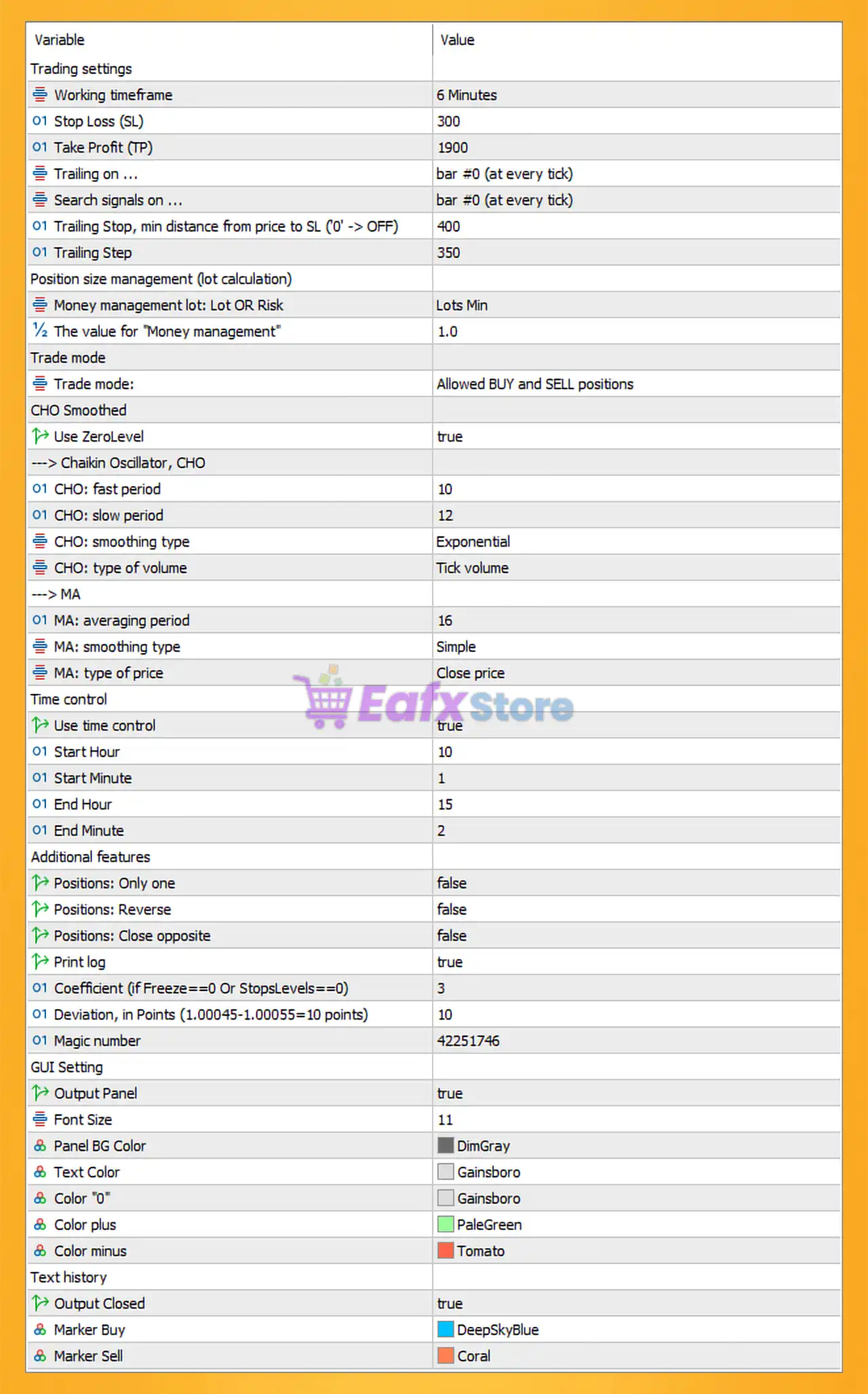
🔶 Trading Settings
🔹 Working timeframe = 6 Minutes – Defines the primary chart timeframe used by the EA for signal generation and trade execution.
🔹 Stop Loss (SL) = 300 – Sets a protective stop loss of 300 points for each trade.
🔹 Take Profit (TP) = 1900 – Sets the profit target at 1900 points before positions are automatically closed.
🔹 Trailing on = bar #0 (at every tick) – Updates trailing stop calculations continuously on every incoming market tick.
🔹 Search signals on = bar #0 (at every tick) – Searches for new trading signals in real-time using the current candle.
🔹 Trailing Stop, min distance from price to SL ('0' -> OFF) = 400 – Maintains a minimum distance of 400 points between the current price and the trailing stop.
🔹 Trailing Step = 350 – Moves the stop loss by 350 points whenever trailing stop conditions are met.
🔶 Position Size Management (Lot Calculation)
🔹 Money management lot: Lot OR Risk = Lots Min – Uses the minimum fixed lot sizing method rather than risk-based calculation.
🔹 The value for "Money management" = 1.0 – Defines the money management parameter value used by the selected lot-sizing method.
🔶 Trade Mode
🔹 Trade mode = Allowed BUY and SELL positions – Allows the EA to open both long and short trades.
🔶 CHO Smoothed Settings
🔹 Use ZeroLevel = true – Uses the Chaikin Oscillator zero line as part of the trade signal confirmation process.
Chaikin Oscillator (CHO)
🔹 CHO: fast period = 10 – Sets the fast EMA period of the Chaikin Oscillator to 10.
🔹 CHO: slow period = 12 – Sets the slow EMA period of the Chaikin Oscillator to 12.
🔹 CHO: smoothing type = Exponential – Uses Exponential Moving Average smoothing for oscillator calculations.
🔹 CHO: type of volume = Tick volume – Uses tick volume data when calculating the Chaikin Oscillator.
🔶 Moving Average (MA) Settings
🔹 MA: averaging period = 16 – Uses a 16-period moving average for trend filtering.
🔹 MA: smoothing type = Simple – Applies a Simple Moving Average (SMA) method.
🔹 MA: type of price = Close price – Calculates the moving average using candle closing prices.
🔶 Time Control Settings
🔹 Use time control = true – Enables trading session restrictions.
🔹 Start Hour = 10 – Trading begins at hour 10.
🔹 Start Minute = 1 – Trading begins at minute 01.
🔹 End Hour = 15 – Trading stops at hour 15.
🔹 End Minute = 2 – Trading stops at minute 02.
🔶 Additional Features
🔹 Positions: Only one = false – Allows more than one trade to be open simultaneously.
🔹 Positions: Reverse = false – Reverse trade logic is disabled.
🔹 Positions: Close opposite = false – Opposite positions are not automatically closed when new trades open.
🔹 Print log = true – Enables detailed activity logs in the Experts tab.
🔹 Coefficient (if Freeze==0 Or StopsLevels==0) = 3 – Safety coefficient used when broker stop-level restrictions are unavailable.
🔹 Deviation, in Points (1.00045-1.00055=10 points) = 10 – Maximum allowed execution slippage is 10 points.
🔹 Magic number = 42251746 – Unique trade identifier used by Mango MT5.
🔶 GUI Settings
🔹 Output Panel = true – Displays the EA information panel on the chart.
🔹 Font Size = 11 – Sets panel text size to 11.
🔹 Panel BG Color = DimGray – Uses DimGray as the panel background color.
🔹 Text Color = Gainsboro – Uses Gainsboro for standard panel text.
🔹 Color "0" = Gainsboro – Displays neutral values using Gainsboro color.
🔹 Color plus = PaleGreen – Displays positive values using PaleGreen color.
🔹 Color minus = Tomato – Displays negative values using Tomato color.
🔶 Text History Settings
🔹 Output Closed = true – Displays information about closed trades on the chart.
🔹 Marker Buy = DeepSkyBlue – Buy trade markers are displayed in DeepSkyBlue.
🔹 Marker Sell = Coral – Sell trade markers are displayed in Coral color.
🔢 Mango MT5 Configuration Summary
🔹 Timeframe: 6 Minutes
🔹 Stop Loss: 300 points
🔹 Take Profit: 1900 points
🔹 Trailing Stop Distance: 400 points
🔹 Trailing Step: 350 points
🔹 Money Management Mode: Lots Min
🔹 Money Management Value: 1.0
🔹 Trade Direction: BUY and SELL
🔹 CHO Fast Period: 10
🔹 CHO Slow Period: 12
🔹 MA Period: 16
🔹 Trading Session: 10:01 – 15:02
🔹 Slippage: 10 points
🔹 Magic Number: 42251746
🔢 Conclusion
Mango MT5 is a structured automated trading system that combines Chaikin Oscillator momentum analysis, Moving Average trend filtering, trailing stop management and time-controlled execution.
With settings such as CHO Fast Period 10, CHO Slow Period 12, MA Period 16, Stop Loss 300, and Take Profit 1900, the EA provides traders with a flexible framework for identifying opportunities while maintaining disciplined risk management. Proper optimization and backtesting are recommended before using the EA on a live account.
🔢 FAQs
❓ What indicator does Mango MT5 primarily use for trade signals?
Mango MT5 uses the Chaikin Oscillator (CHO) with additional Moving Average filtering to identify trading opportunities.
❓ Can Mango MT5 trade both BUY and SELL positions?
Yes. The current setting allows both BUY and SELL positions simultaneously.
❓ What is the purpose of Use ZeroLevel = true?
It enables the Chaikin Oscillator zero-line confirmation, helping filter trade entries based on momentum direction.
❓ Why is time control enabled?
The time filter restricts trading to the period between 10:01 and 15:02, helping avoid unwanted market sessions.
❓ What does the Magic Number 42251746 do?
It uniquely identifies all trades opened by Mango MT5, preventing conflicts with other Expert Advisors running on the same account.



