




🔢 Ai Captain EA MT5 Settings Explained – Complete Parameter Guide
Ai Captain EA MT5 is an automated MetaTrader 5 Expert Advisor designed with flexible risk management, customizable trading schedules, optional trailing stop protection, and adjustable lot control. It allows traders to configure percentage-based risk, trading days, position sizing, and notification preferences, making it suitable for both conservative and aggressive trading styles. Below is a complete SEO-friendly explanation of every available parameter shown in the settings panel.

🔢 Ai Captain EA MT5 Parameters Explained
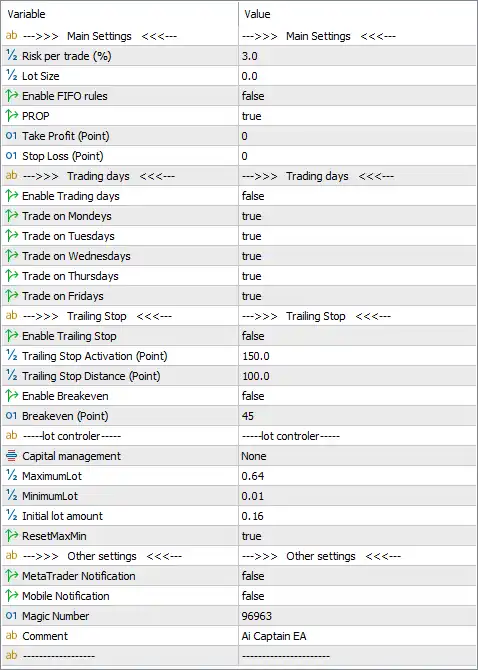
Below are the details of the parameters in the advisor’s trading system settings table:
🔶 Main Settings
🔹 Risk per trade (%) = 3.0 – Sets the maximum risk per trade to 3.0% of the trading capital.
🔹 Lot Size = 0.0 – Specifies the trading lot size; a value of 0.0 allows the EA to determine the lot size automatically according to its money management rules.
🔹 Enable FIFO rules = false – Disables FIFO (First In, First Out) compliance, allowing the EA to manage positions without FIFO restrictions.
🔹 PROP = true – Enables Prop Firm mode, optimizing the EA for proprietary trading firm requirements.
🔹 Take Profit (Point) = 0 – Sets the Take Profit target to 0 points, meaning no fixed Take Profit is applied unless managed by the EA's internal strategy.
🔹 Stop Loss (Point) = 0 – Sets the Stop Loss to 0 points, allowing the EA or other protection mechanisms to control exits.
🔶 Trading Days
🔹 Enable Trading days = false – Disables trading-day filtering, allowing the EA to ignore individual weekday settings.
🔹 Trade on Mondays = true – Allows trading on Monday.
🔹 Trade on Tuesdays = true – Allows trading on Tuesday.
🔹 Trade on Wednesdays = true – Allows trading on Wednesday.
🔹 Trade on Thursdays = true – Allows trading on Thursday.
🔹 Trade on Fridays = true – Allows trading on Friday.
🔶 Trailing Stop Settings
🔹 Enable Trailing Stop = false – Disables the automatic trailing stop function.
🔹 Trailing Stop Activation (Point) = 150.0 – Activates the trailing stop once the trade reaches 150.0 points in profit when enabled.
🔹 Trailing Stop Distance (Point) = 100.0 – Maintains a trailing distance of 100.0 points behind the current market price.
🔹 Enable Breakeven = false – Disables automatic Break-even protection.
🔹 Breakeven (Point) = 45 – Moves the Stop Loss to the entry price after 45 points of profit when Break-even is enabled.
🔶 Lot Controller
🔹 Capital management = None – No predefined capital management model is selected.
🔹 MaximumLot = 0.64 – Limits the maximum trading volume to 0.64 lots.
🔹 MinimumLot = 0.01 – Sets the minimum allowable trade size to 0.01 lots.
🔹 Initial lot amount = 0.16 – Opens the first position using 0.16 lots.
🔹 ResetMaxMin = true – Automatically resets the maximum and minimum lot calculations whenever required by the EA.
🔶 Other Settings
🔹 MetaTrader Notification = false – Disables push notifications through the MetaTrader platform.
🔹 Mobile Notification = false – Disables mobile device notifications.
🔹 Magic Number = 96963 – Assigns the unique Magic Number 96963 to identify and manage the EA's positions.
🔹 Comment = Ai Captain EA – Adds Ai Captain EA as the trade comment for every position opened by the Expert Advisor.
🔢 Conclusion
Ai Captain EA MT5 provides a flexible framework for automated trading with configurable risk management, trading schedules, lot sizing, and optional trade protection features. Its support for Prop Firm mode, customizable trailing stop settings, and adjustable capital management allows traders to adapt the EA to different account sizes, broker conditions, and trading objectives while maintaining consistent execution and effective risk control.
🔢 FAQs
❓ What does the Risk per Trade setting control in Ai Captain EA MT5?
It defines the percentage of account capital risked on each trade. In this configuration, the EA risks 3.0% per position.
❓ Can Ai Captain EA MT5 automatically calculate lot sizes?
Yes. With Lot Size = 0.0, the EA can determine the appropriate lot size automatically according to its internal money management rules.
❓ Does Ai Captain EA MT5 support Prop Firm accounts?
Yes. The PROP = true setting enables a trading mode designed for proprietary trading firm requirements.
❓ Can I enable Trailing Stop and Break-even protection?
Yes. Both features are available and can be activated by enabling Enable Trailing Stop and Enable Breakeven, using the configured activation and distance values.
❓ Why is the Magic Number important in Ai Captain EA MT5?
The Magic Number (96963) uniquely identifies all trades opened by the EA, ensuring it manages only its own positions without interfering with manual trades or other Expert Advisors.



