


Army Builder EA MT4 Settings Explained – Complete Configuration Guide
Army Builder EA is a fully automated MetaTrader 4 Expert Advisor designed for traders who want advanced martingale management, automated trailing stop control, trading session filtering and profit target management.
The EA combines flexible lot sizing with intelligent trade recovery features, making it suitable for aggressive as well as conservative trading strategies. Army Builder EA also includes built-in time management controls, debugging tools and daily profit reset functions for stable automated trading performance.

Army Builder EA MT4 Settings
Army Builder EA MT4 Full Settings Explanation
Below are the details of the parameters in the advisor’s trading system settings table:
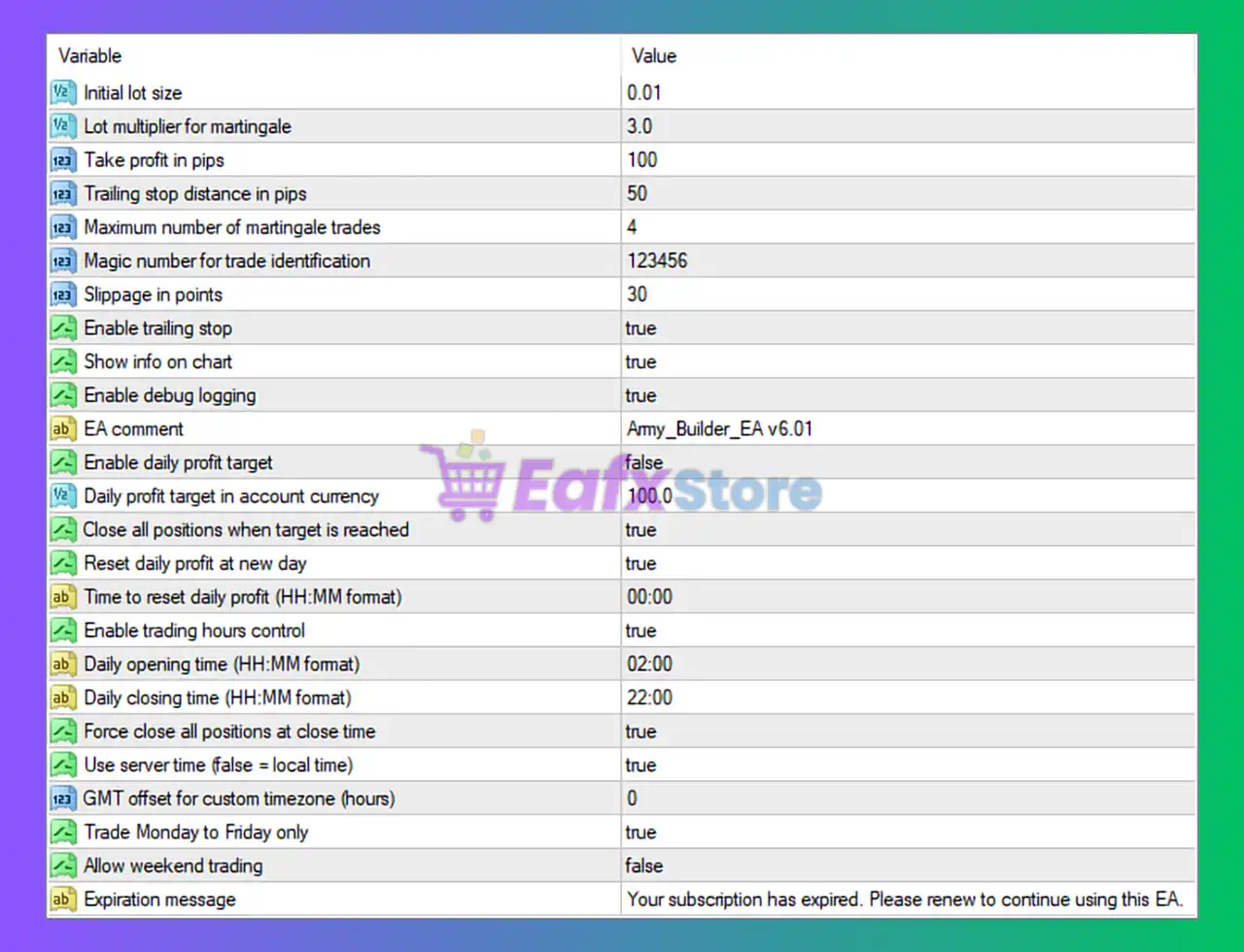
Army Builder EA MT4 Settings Panel
🔹 Initial lot size = 0.01: Sets the starting trading lot size to 0.01 lots.
🔹 Lot multiplier for martingale = 3.0: Multiplies the lot size by 3.0 after each martingale trade level.
🔹 Take profit in pips = 100: Sets the Take Profit target to 100 pips.
🔹 Trailing stop distance in pips = 50: Sets the trailing stop distance to 50 pips.
🔹 Maximum number of martingale trades = 4: Limits the martingale sequence to a maximum of 4 trades.
🔹 Magic number for trade identification = 123456: Unique Magic Number used by the EA to identify its own trades.
🔹 Slippage in points = 30: Maximum allowed slippage during order execution is 30 points.
🔹 Enable trailing stop = true: Activates the trailing stop functionality.
🔹 Show info on chart = true: Displays EA trading information directly on the chart.
🔹 Enable debug logging = true: Enables detailed logging for troubleshooting and monitoring EA activity.
🔹 EA comment = Army_Builder_EA v6.01: Adds the trade comment Army_Builder_EA v6.01 to opened positions.
🔹 Enable daily profit target = false: Disables the daily profit target feature.
🔹 Daily profit target in account currency = 100.0: Daily profit target is set to 100.0 account currency units.
🔹 Close all positions when target is reached = true: Automatically closes all trades when the daily profit target is achieved.
🔹 Reset daily profit at new day = true: Resets the daily profit counter at the beginning of each new trading day.
🔹 Time to reset daily profit (HH:MM format) = 00:00: Daily profit statistics reset at 00:00.
🔹 Enable trading hours control = true: Enables trading session scheduling control.
🔹 Daily opening time (HH:MM format) = 02:00: Trading begins daily at 02:00.
🔹 Daily closing time (HH:MM format) = 22:00: Trading stops daily at 22:00.
🔹 Force close all positions at close time = true: Closes all active trades automatically at the daily closing time.
🔹 Use server time (false = local time) = true: Uses broker server time instead of local computer time.
🔹 GMT offset for custom timezone (hours) = 0: GMT timezone offset is set to 0 hours.
🔹 Trade Monday to Friday only = true: Restricts trading to weekdays only.
🔹 Allow weekend trading = false: Disables trading activity during weekends.
🔹 Expiration message = Your subscription has expired. Please renew to continue using this EA.: Displays the EA expiration or subscription warning message.
Conclusion
Army Builder EA MT4 is a feature-rich automated trading system that combines martingale recovery, trailing stop management, session-based trading controls, and daily profit targeting into one flexible Expert Advisor. With advanced scheduling tools, debugging capabilities, and customizable risk settings, the EA is suitable for traders seeking structured and automated trading strategies on the MetaTrader 4 platform.



