


GhostyFX EA MT4 Settings Explained – Complete Configuration Guide
GhostyFX EA is an automated Forex trading Expert Advisor (EA developed for MetaTrader 4, featuring advanced trade management, averaging systems, trend filters, auto cut-loss protection, cooldown mechanisms and trading schedule controls.
The EA is designed to help traders automate market execution while maintaining strict risk management through spread filtering, trade timing and automatic loss control systems.
Installation Panel Parameters
Below are the details of the parameters in the advisor’s trading system settings table:
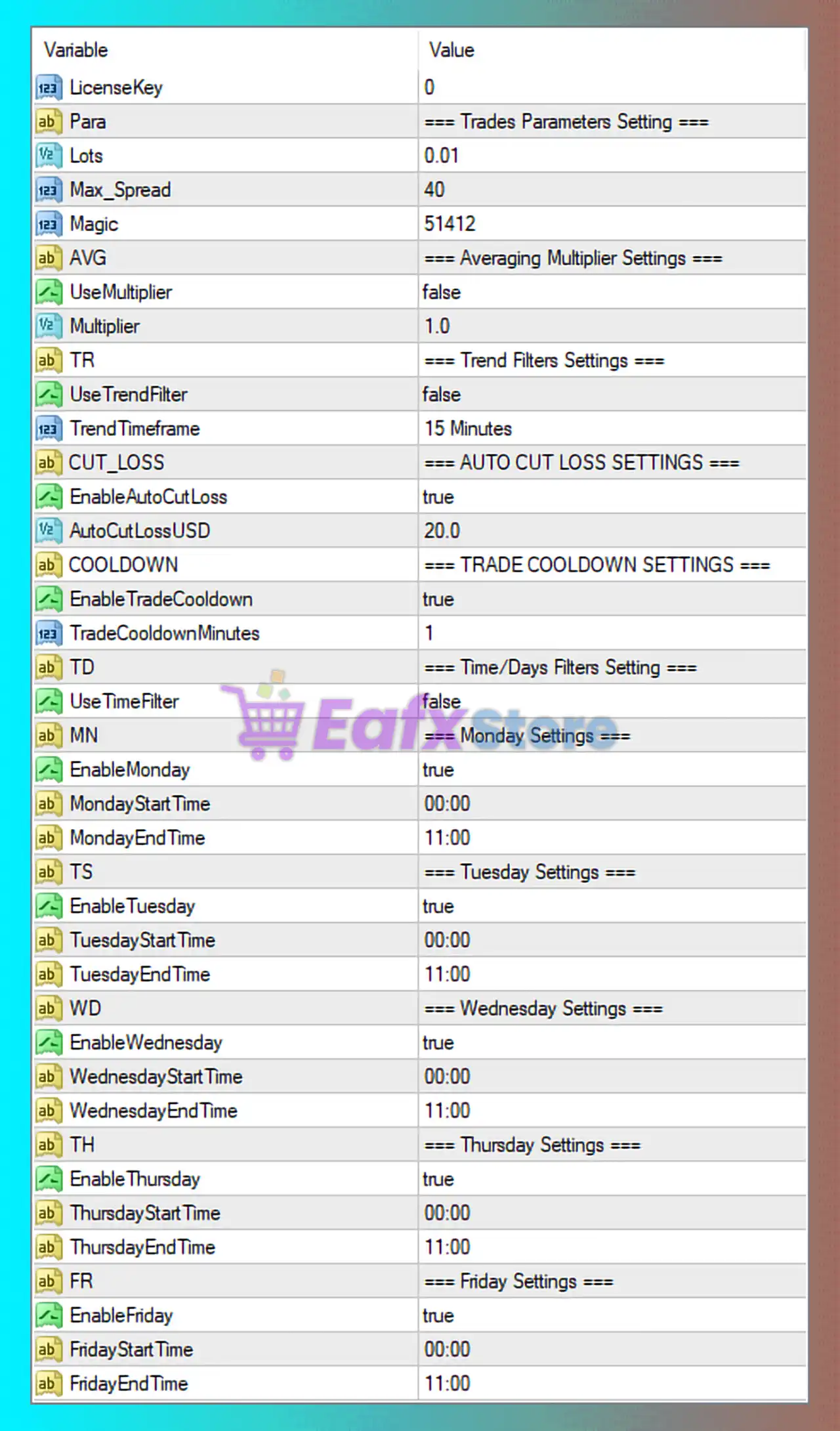
GhostyFX EA MT4 Full Settings Explanation
🔹 LicenseKey = 0: License authentication key for activating and validating the EA.
🔹 Para = === Trades Parameters Setting ===: Section title for general trading parameters.
🔹 Lots = 0.01: Sets the fixed trading lot size to 0.01.
🔹 Max_Spread = 40: Maximum allowed spread for opening trades is 40 points.
🔹 Magic = 51412: Unique Magic Number used by the EA to identify and manage its trades.
Averaging Multiplier Settings
🔹 AVG = === Averaging Multiplier Settings ===: Section title for averaging and multiplier settings.
🔹 UseMultiplier = false: Disables the lot multiplier or averaging multiplier system.
🔹 Multiplier = 1.0: Multiplier value is set to 1.0, meaning no lot size increase.
Trend Filter Settings
🔹 TR = === Trend Filters Settings ===: Section title for trend filter parameters.
🔹 UseTrendFilter = false: Disables the trend filtering system.
🔹 TrendTimeframe = 15 Minutes: Sets the trend analysis timeframe to 15 Minutes.
Auto Cut Loss Settings
🔹 CUT_LOSS = === AUTO CUT LOSS SETTINGS ===: Section title for automatic loss control settings.
🔹 EnableAutoCutLoss = true: Enables automatic cut-loss protection.
🔹 AutoCutLossUSD = 20.0: Automatically closes trades when losses reach $20.0.
Trade Cooldown Settings
🔹 COOLDOWN = === TRADE COOLDOWN SETTINGS ===: Section title for trade cooldown configuration.
🔹 EnableTradeCooldown = true: Activates the cooldown feature between trades.
🔹 TradeCooldownMinutes = 1: Sets cooldown duration to 1 minute between trades.
Time and Days Filter Settings
🔹 TD = === Time/Days Filters Setting ===: Section title for time and trading day controls.
🔹 UseTimeFilter = false: Disables the global trading time filter.
Monday Trading Settings
🔹 MN = === Monday Settings ===: Monday trading schedule configuration section.
🔹 EnableMonday = true: Enables trading on Monday.
🔹 MondayStartTime = 00:00: Trading starts on Monday at 00:00.
🔹 MondayEndTime = 11:00: Trading stops on Monday at 11:00.
Tuesday Trading Settings
🔹 TS = === Tuesday Settings ===: Tuesday trading schedule configuration section.
🔹 EnableTuesday = true: Enables trading on Tuesday.
🔹 TuesdayStartTime = 00:00: Trading starts on Tuesday at 00:00.
🔹 TuesdayEndTime = 11:00: Trading stops on Tuesday at 11:00.
Wednesday Trading Settings
🔹 WD = === Wednesday Settings ===: Wednesday trading schedule configuration section.
🔹 EnableWednesday = true: Enables trading on Wednesday.
🔹 WednesdayStartTime = 00:00: Trading starts on Wednesday at 00:00.
🔹 WednesdayEndTime = 11:00: Trading stops on Wednesday at 11:00.
Thursday Trading Settings
🔹 TH = === Thursday Settings ===: Thursday trading schedule configuration section.
🔹 EnableThursday = true: Enables trading on Thursday.
🔹 ThursdayStartTime = 00:00: Trading starts on Thursday at 00:00.
🔹 ThursdayEndTime = 11:00: Trading stops on Thursday at 11:00.
Friday Trading Settings
🔹 FR = === Friday Settings ===: Friday trading schedule configuration section.
🔹 EnableFriday = true: Enables trading on Friday.
🔹 FridayStartTime = 00:00: Trading starts on Friday at 00:00.
🔹 FridayEndTime = 11:00: Trading stops on Friday at 11:00.
Conclusion
GhostyFX EA MT4 is a powerful MetaTrader 4 trading robot that combines automated trading execution with practical risk management systems such as auto cut-loss protection, spread filtering, trade cooldowns, and trading schedule control. The EA allows traders to customize lot management, trend filtering, and daily trading sessions for optimized performance across different market conditions. Proper adjustment of spread limits, auto cut-loss values, and trading hours can significantly improve trading stability and risk control.
FAQs
❓ What is GhostyFX EA MT4?
GhostyFX EA MT4 is an automated Forex trading Expert Advisor designed for MetaTrader 4 with built-in risk management and trade filtering systems.
❓ Does GhostyFX EA MT4 include automatic cut-loss protection?
Yes, the EA includes an Auto Cut Loss feature that closes trades automatically after reaching a specified loss level.
❓ Can I control trading days and trading hours in GhostyFX EA MT4?
Yes, the EA allows traders to configure separate trading schedules for each weekday.
❓ What does the Trade Cooldown feature do?
The Trade Cooldown feature pauses trading for a specified number of minutes between trades to reduce overtrading.
❓ Does GhostyFX EA MT4 support trend filtering?
Yes, the EA includes an optional trend filter system with customizable timeframe settings.


