



🔢 Astro Scalper EA MT4 – Complete EA Settings Explanation
Astro Scalper EA is an automated Forex trading Expert Advisor designed for MetaTrader 4 platforms. The EA focuses on scalping strategies using customizable risk management, trailing stop control, spread filtering, drawdown protection and balance-based lot sizing.
With flexible trade execution parameters and advanced money management tools, Astro Scalper EA MT4 helps traders automate high-frequency market entries while maintaining controlled trading risk.
🔢 Astro Scalper EA MT4 Input Parameters Explained
Below are the details of the parameters in the advisor’s trading system settings table:
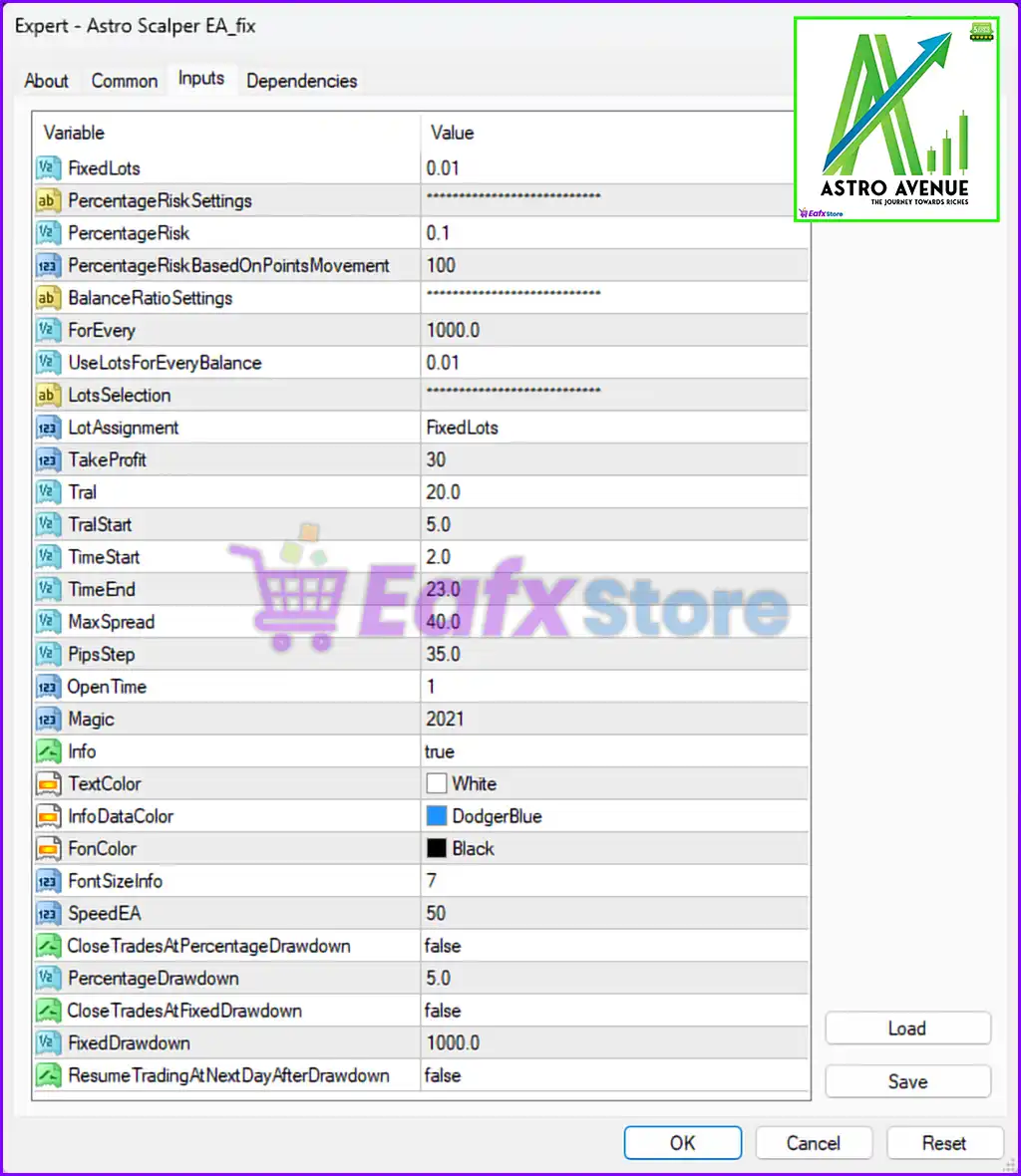
🔹 FixedLots = 0.01 — Defines the fixed trade lot size used when opening positions. A value of 0.01 represents micro lot trading.
🔹 **PercentageRiskSettings = ************************** — Section header used for grouping percentage-based risk management configurations within the EA.
🔹 PercentageRisk = 0.1 — Specifies the percentage of account balance risked per trade when percentage risk management is enabled.
🔹 PercentageRiskBasedOnPointsMovement = 100 — Determines the point movement value used for calculating percentage-based trading risk exposure.
🔹 **BalanceRatioSettings = ************************** — Internal configuration category for balance-to-lot ratio management settings.
🔹 ForEvery = 1000.0 — Defines the account balance interval used for dynamic lot size calculations. The EA adjusts calculations for every 1000.0 balance units.
🔹 UseLotsForEveryBalance = 0.01 — Specifies the lot size assigned for every configured balance ratio unit.
🔹 **LotsSelection = ************************** — Section header related to lot sizing method selection.
🔹 LotAssignment = FixedLots — Defines the active lot sizing mode. The value “FixedLots” means the EA uses a constant lot size instead of automatic scaling.
🔹 TakeProfit = 30 — Sets the Take Profit target used for automatically closing profitable trades at 30 pips or points.
🔹 Tral = 20.0 — Specifies the trailing stop distance used for protecting profits after the trade moves favorably.
🔹 TralStart = 5.0 — Defines the profit level at which the trailing stop system becomes active.
🔹 TimeStart = 2.0 — Determines the starting trading hour for automated trading operations.
🔹 TimeEnd = 23.0 — Specifies the ending trading hour after which the EA stops opening new trades.
🔹 MaxSpread = 40.0 — Sets the maximum allowable spread for opening trades. The EA avoids trading when spreads exceed 40.0.
🔹 PipsStep = 35.0 — Defines the minimum pip distance between trade entries or grid positions.
🔹 OpenTime = 1 — Determines the order opening timing parameter used internally by the EA trading logic.
🔹 Magic = 2021 — A unique Magic Number assigned to trades opened by Astro Scalper EA MT4 for trade identification and management.
🔹 Info = true — Enables the display of EA information panels and trading statistics on the MetaTrader chart.
🔹 TextColor = White — Specifies the text color used by the EA information display.
🔹 InfoDataColor = DodgerBlue — Defines the color used for displaying informational data values on the chart interface.
🔹 FonColor = Black — Sets the background or font-related color configuration for the EA display elements.
🔹 FontSizeInfo = 7 — Determines the font size used for displaying EA information and statistics on the chart.
🔹 SpeedEA = 50 — Specifies the internal execution or operational speed parameter used by the EA system.
🔹 CloseTradesAtPercentageDrawdown = false — Disables automatic trade closure when account drawdown reaches a percentage threshold.
🔹 PercentageDrawdown = 5.0 — Defines the percentage drawdown level used for risk protection if the percentage drawdown feature is enabled.
🔹 CloseTradesAtFixedDrawdown = false — Disables automatic trade closure based on a fixed drawdown amount.
🔹 FixedDrawdown = 1000.0 — Specifies the fixed drawdown value configured for account protection.
🔹 ResumeTradingAtNextDayAfterDrawdown = false — Disables automatic trading resumption on the next trading day after a drawdown event occurs.
🔢 Conclusion
Astro Scalper EA MT4 is a feature-rich automated trading system that combines scalping strategies, trailing stop management, spread control and advanced drawdown protection into a single Expert Advisor.
With customizable settings such as PercentageRisk, MaxSpread, TakeProfit, and FixedDrawdown, traders can adapt the EA to different market conditions and personal risk preferences. Understanding every parameter is essential for optimizing EA performance and maintaining disciplined automated Forex trading operations.
🔢 FAQs
❓ What is Astro Scalper EA MT4 used for?
Astro Scalper EA MT4 is an automated Forex trading Expert Advisor designed for scalping strategies on the MetaTrader 4 platform.
❓ What does FixedLots = 0.01 mean?
It means the EA opens trades using a fixed micro lot size of 0.01.
❓ Why is MaxSpread = 40.0 important?
The EA avoids opening trades when market spreads exceed 40.0, helping reduce trading costs during volatile conditions.
❓ What is the purpose of Magic = 2021?
Magic Number 2021 uniquely identifies trades opened by Astro Scalper EA MT4 for trade tracking and management.
❓ What does CloseTradesAtPercentageDrawdown = false represent?
It means the automatic drawdown protection based on percentage loss is currently disabled.



