


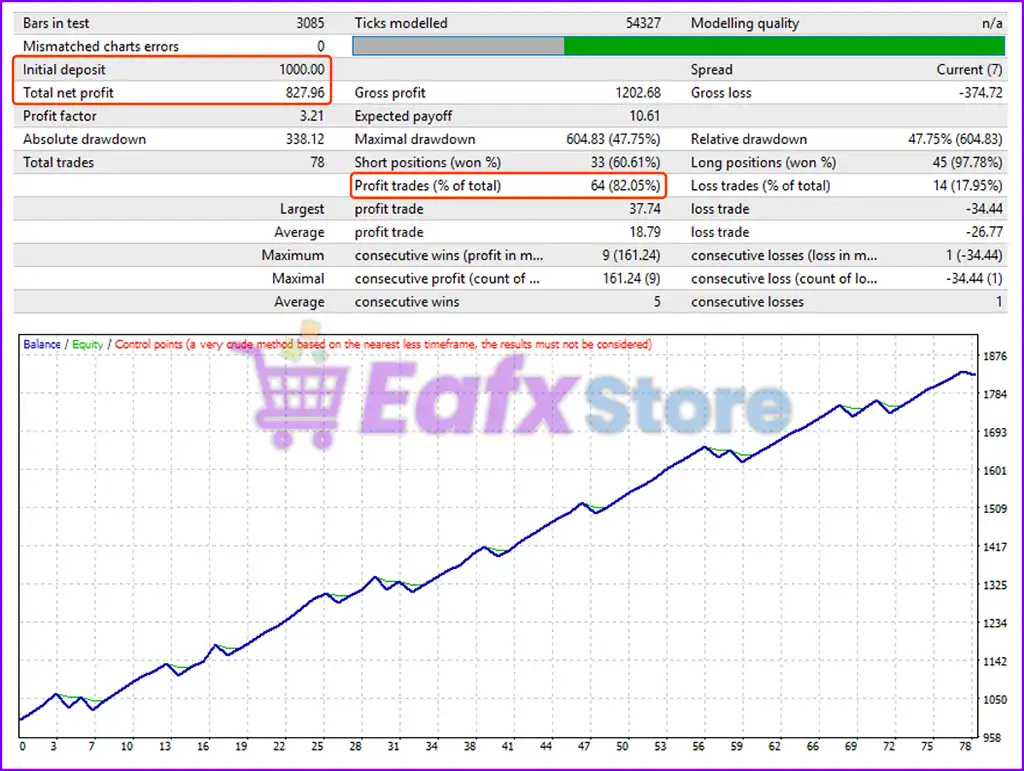
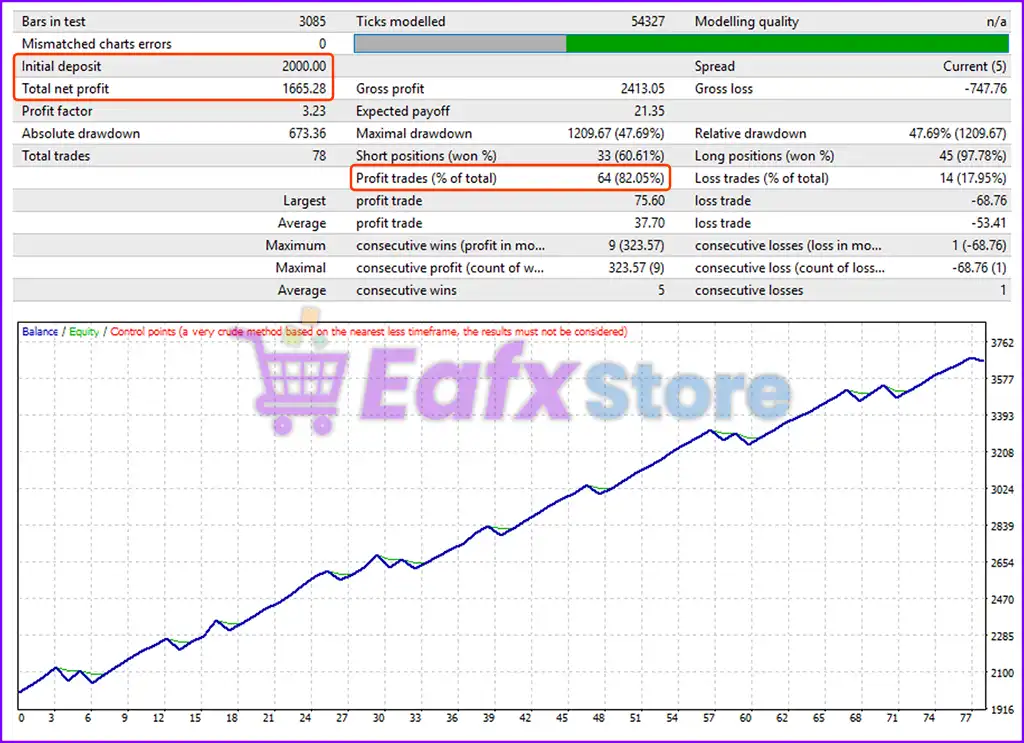
🔢 EA Quantom MT4 – Complete Settings & Input Parameters Guide
EA Quantom MT4 is a sophisticated grid and smart-trading Expert Advisor (EA) designed for MetaTrader 4. The EA combines multiple technical indicators including Moving Average, RSI, MACD, Bollinger Bands, CCI, and Stochastic strategies to automate Forex trading with advanced money management and smart grid execution.
With customizable entry filters, risk controls, exit management, and news filters, EA Quantom MT4 is suitable for traders seeking a highly flexible automated trading system.
🔢 EA Quantom MT4 Settings Explained
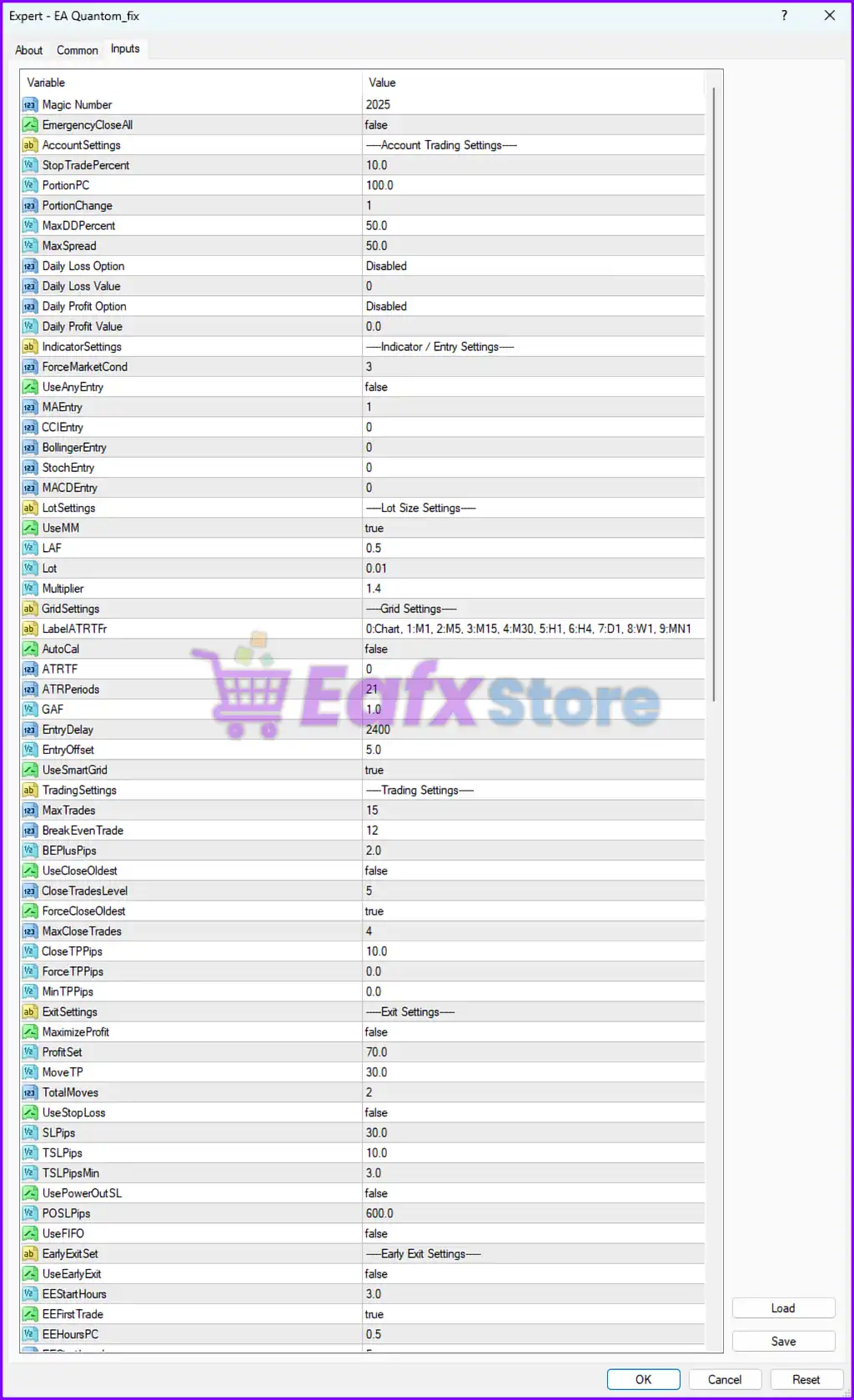
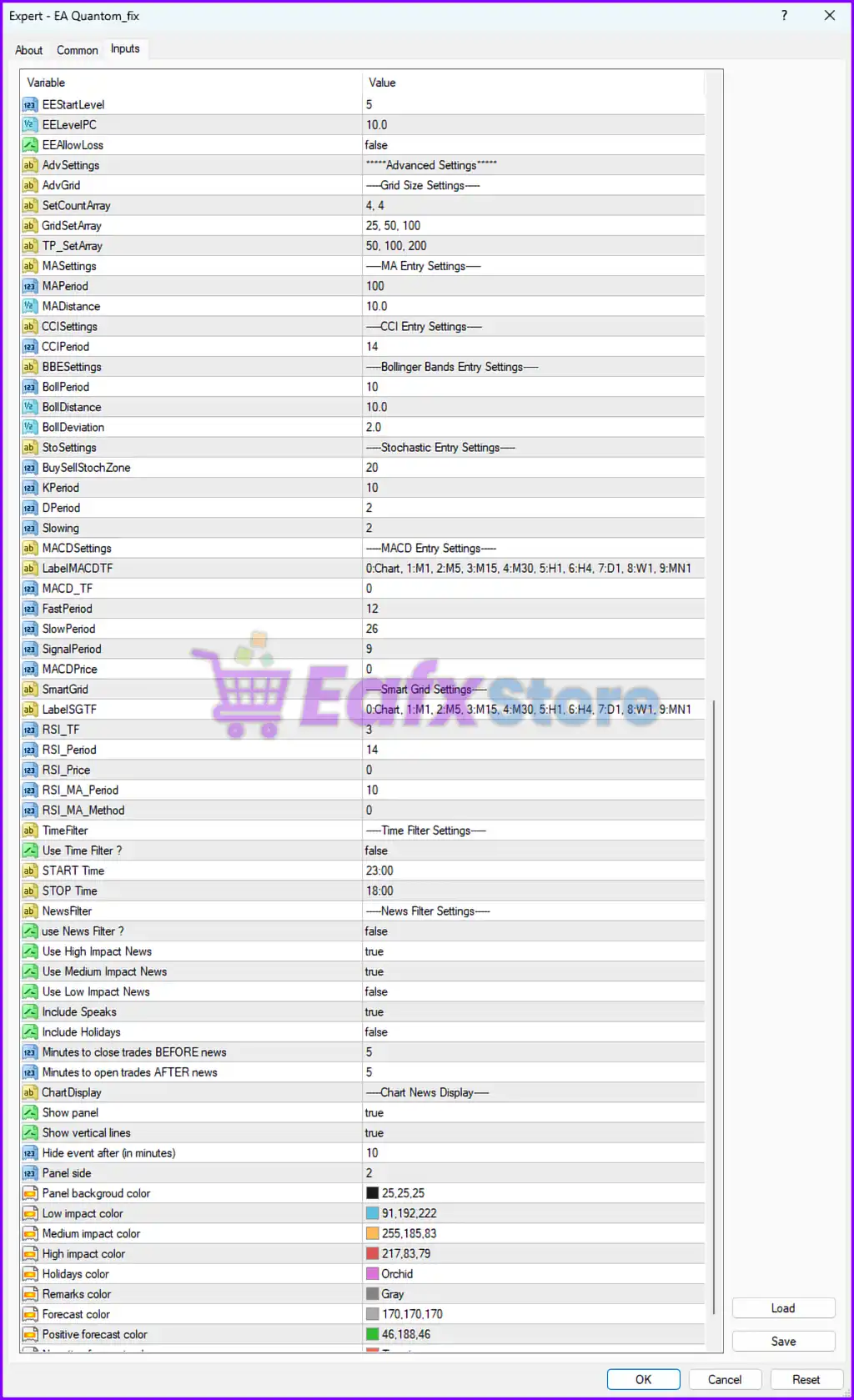
Below are the details of the parameters in the advisor’s trading system settings table:
🔶 General Trading Settings
🔹 Magic Number = 2025: Unique identifier 2025 used to manage and distinguish EA trades.
🔹 EmergencyCloseAll = false: Disables emergency closure of all open positions.
🔶 Account Trading Settings
🔹 StopTradePercent = 10.0: Stops trading when account drawdown reaches 10.0%.
🔹 PortionPC = 100.0: Uses 100.0% of the allocated account portion for trading.
🔹 PortionChange = 1: Defines the account allocation change factor as 1.
🔹 MaxDDPercent = 50.0: Maximum allowable drawdown percentage is 50.0%.
🔹 MaxSpread = 50.0: Prevents trading when spread exceeds 50.0.
🔹 Daily Loss Option = Disabled: Daily loss protection feature is disabled.
🔹 Daily Loss Value = 0: Daily loss threshold set to 0.
🔹 Daily Profit Option = Disabled: Daily profit target feature is disabled.
🔹 Daily Profit Value = 0.0: Daily profit target value set to 0.0.
🔶 Indicator / Entry Settings
🔹 ForceMarketCond = 3: Sets market condition mode to 3.
🔹 UseAnyEntry = false: Prevents random or unrestricted trade entries.
🔹 MAEntry = 1: Enables Moving Average entry logic using mode 1.
🔹 CCIEntry = 0: CCI entry filter disabled with value 0.
🔹 BollingerEntry = 0: Bollinger Bands entry filter disabled.
🔹 StochEntry = 0: Stochastic entry filter disabled.
🔹 MACDEntry = 0: MACD entry filter disabled.
🔶 Lot Size Settings
🔹 UseMM = true: Enables automatic money management.
🔹 LAF = 0.5: Lot adjustment factor configured at 0.5.
🔹 Lot = 0.01: Initial trading lot size set to 0.01.
🔹 Multiplier = 1.4: Lot multiplier for scaling positions is 1.4.
🔶 Grid Settings
🔹 LabelATRTFr = 0:Chart,1:M1,2:M5,3:M15,4:M30,5:H1,6:H4,7:D1,8:W1,9:MN1: Available ATR timeframe labels for grid calculations.
🔹 AutoCal = false: Automatic ATR grid calculation disabled.
🔹 ATRTF = 0: ATR timeframe uses current chart timeframe.
🔹 ATRPeriods = 21: ATR indicator period set to 21.
🔹 GAF = 1.0: Grid adjustment factor configured at 1.0.
🔹 EntryDelay = 2400: Delay between entries set to 2400.
🔹 EntryOffset = 5.0: Entry offset distance configured at 5.0.
🔹 UseSmartGrid = true: Enables smart grid trading system.
🔶 Trading Settings
🔹 MaxTrades = 15: Maximum simultaneous trades allowed is 15.
🔹 BreakEvenTrade = 12: Activates break-even after 12 trades.
🔹 BEPlusPips = 2.0: Adds 2.0 pips profit buffer to break-even.
🔹 UseCloseOldest = false: Disables automatic closing of oldest trades.
🔹 CloseTradesLevel = 5: Closes trades when level reaches 5.
🔹 ForceCloseOldest = true: Enables forced closure of oldest trades.
🔹 MaxCloseTrades = 4: Maximum trades closed simultaneously is 4.
🔹 CloseTPPips = 10.0: Close Take Profit distance set to 10.0 pips.
🔹 ForceTPPips = 0.0: Forced Take Profit disabled with value 0.0.
🔹 MinTPPips = 0.0: Minimum Take Profit distance set to 0.0.
🔶 Exit Settings
🔹 MaximizeProfit = false: Profit maximization mode disabled.
🔹 ProfitSet = 70.0: Profit target configured at 70.0.
🔹 MoveTP = 30.0: Moves Take Profit by 30.0 points/pips.
🔹 TotalMoves = 2: Maximum TP movement operations set to 2.
🔹 UseStopLoss = false: Stop Loss feature disabled.
🔹 SLPips = 30.0: Stop Loss distance configured at 30.0 pips.
🔹 TSLPips = 10.0: Trailing Stop Loss set to 10.0 pips.
🔹 TSLPipsMin = 3.0: Minimum trailing stop distance is 3.0.
🔹 UsePowerOutSL = false: Power-out Stop Loss feature disabled.
🔹 POSLPips = 600.0: Power-out Stop Loss distance configured at 600.0.
🔹 UseFIFO = false: FIFO order management disabled.
🔶 Early Exit Settings
🔹 UseEarlyExit = false: Early exit functionality disabled.
🔹 EEStartHours = 3.0: Early exit begins after 3.0 hours.
🔹 EEFirstTrade = true: Early exit applies to first trade.
🔹 EEHoursPC = 0.5: Early exit hour percentage configured at 0.5.
🔹 EEStartLevel = 5: Early exit activates at grid level 5.
🔹 EELevelPC = 10.0: Early exit percentage at level is 10.0.
🔹 EEAllowLoss = false: Prevents early exit while in loss.
🔶 Advanced Grid Size Settings
🔹 SetCountArray = 4, 4: Grid count array values configured as 4, 4.
🔹 GridSetArray = 25, 50, 100: Grid spacing values are 25, 50, and 100.
🔹 TP_SetArray = 50, 100, 200: Take Profit array levels configured at 50, 100, and 200.
🔶 Moving Average Entry Settings
🔹 MAPeriod = 100: Moving Average period set to 100.
🔹 MADistance = 10.0: MA distance filter configured at 10.0.
🔶 CCI Entry Settings
🔹 CCIPeriod = 14: Commodity Channel Index period set to 14.
🔶 Bollinger Bands Entry Settings
🔹 BollPeriod = 10: Bollinger Bands period configured at 10.
🔹 BollDistance = 10.0: Bollinger entry distance set to 10.0.
🔹 BollDeviation = 2.0: Bollinger Bands deviation configured at 2.0.
🔶 Stochastic Entry Settings
🔹 BuySellStochZone = 20: Stochastic buy/sell zone level set to 20.
🔹 KPeriod = 10: Stochastic K period configured at 10.
🔹 DPeriod = 2: Stochastic D period configured at 2.
🔹 Slowing = 2: Stochastic slowing parameter set to 2.
🔶 MACD Entry Settings
🔹 LabelMACDTF = 0:Chart,1:M1,2:M5,3:M15,4:M30,5:H1,6:H4,7:D1,8:W1,9:MN1: Available MACD timeframe labels.
🔹 MACD_TF = 0: MACD uses current chart timeframe.
🔹 FastPeriod = 12: MACD fast EMA period set to 12.
🔹 SlowPeriod = 26: MACD slow EMA period set to 26.
🔹 SignalPeriod = 9: MACD signal period configured at 9.
🔹 MACDPrice = 0: MACD price type uses default value 0.
🔶 Smart Grid RSI Settings
🔹 LabelSGTF = 0:Chart,1:M1,2:M5,3:M15,4:M30,5:H1,6:H4,7:D1,8:W1,9:MN1: Available Smart Grid timeframe labels.
🔹 RSI_TF = 3: RSI timeframe set to M15.
🔹 RSI_Period = 14: RSI period configured at 14.
🔹 RSI_Price = 0: RSI price type uses default mode 0.
🔹 RSI_MA_Period = 10: RSI Moving Average period set to 10.
🔹 RSI_MA_Method = 0: RSI MA calculation method uses mode 0.
🔶 Time Filter Settings
🔹 Use Time Filter ? = false: Disables time-based trading restrictions.
🔹 START Time = 23:00: Trading session starts at 23:00.
🔹 STOP Time = 18:00: Trading session stops at 18:00.
🔶 News Filter Settings
🔹 use News Filter ? = false: News filter disabled.
🔹 Use High Impact News = true: High-impact news events are monitored.
🔹 Use Medium Impact News = true: Medium-impact news events are monitored.
🔹 Use Low Impact News = false: Low-impact news filtering disabled.
🔹 Include Speaks = true: Includes speeches in news filtering.
🔹 Include Holidays = false: Holidays are excluded from filters.
🔹 Minutes to close trades BEFORE news = 5: Closes trades 5 minutes before news events.
🔹 Minutes to open trades AFTER news = 5: Resumes trading 5 minutes after news.
🔶 Chart News Display Settings
🔹 Show panel = true: Displays news panel on the chart.
🔹 Show vertical lines = true: Displays vertical news event lines.
🔹 Hide event after (in minutes) = 10: Hides events after 10 minutes.
🔹 Panel side = 2: News panel positioned on side 2.
🔹 Panel background color = 25,25,25: Sets chart panel background color.
🔹 Low impact color = 91,192,222: Color for low-impact news events.
🔹 Medium impact color = 255,185,83: Color for medium-impact news events.
🔹 High impact color = 217,83,79: Color for high-impact news events.
🔹 Holidays color = Orchid: Holiday event display color.
🔹 Remarks color = Gray: Remarks text color.
🔹 Forecast color = 170,170,170: Forecast value display color.
🔹 Positive forecast color = 46,188,46: Positive forecast event color.
🔢 Conclusion
EA Quantom MT4 is a highly advanced automated trading robot equipped with smart grid technology, multiple technical indicators, flexible risk management and sophisticated news filtering capabilities. With extensive customization options for entry logic, trade management, and account protection, the EA is suitable for traders looking for a powerful all-in-one MetaTrader 4 automation solution.
🔢 FAQs
❓ What is EA Quantom MT4?
EA Quantom MT4 is a smart grid Forex Expert Advisor for MetaTrader 4 that combines multiple technical indicators and automated risk management.
❓ Does EA Quantom MT4 support automatic money management?
Yes, the UseMM = true setting enables automatic lot size management based on account conditions.
❓ Can EA Quantom MT4 filter news events?
Yes, the EA includes built-in news filtering with support for high, medium, and low-impact news events.
❓ What indicators are used in EA Quantom MT4?
The EA supports Moving Average, RSI, MACD, Bollinger Bands, CCI, and Stochastic indicators.
❓ Does EA Quantom MT4 include smart grid trading?
Yes, the UseSmartGrid = true setting enables advanced smart grid trading functionality.



