




xBest EA MT4 v3.49 with SetFiles (Platform build 1471+)

Subscriptions for Special Plan
- 30 EA package is more economical!
- Special package with 99%
- Download 1 EA/Day

Subscriptions for Premium Membership
- Download Unlimited in 1 Year
- Get 100% Discount
- Get free access to all

Subscriptions for Gold Membership
- 1 Year Membership
- Get 100% Discount
- Access EA+Indicator+Course
Frequently bought together 🎁
Add these products to enhance your purchase




What is xBest EA MT4?
xBest EA is an advanced Expert Advisor (EA) designed for automated Forex trading with adaptive grid logic, smart indicators and professional risk management. Combining Martingale-based strategies, trend filters, and equity protection systems, the EA delivers stable execution, market adaptability, and controlled trading performance across dynamic market conditions.
Key Features of xBest EA MT4
🔹 Adaptive Grid Trading System: Uses intelligent Grid logic for flexible market trade management.
🔹 Advanced Risk Management Controls: Protects capital with equity stop and drawdown protection tools.
🔹 Smart Indicator-Based Filtering: Combines MA and HILO indicators for accurate trade confirmation.
🔹 Integrated News Filter Protection: Avoids high-impact market events using automated news filtering.
🔹 Dynamic Lot Management Engine: Supports adaptive lot scaling with customizable exposure settings.
🔹 Professional Automated Trade Execution: Designed for stable Forex trading with flexible strategies.
What is the xBest EA MT4 Trading Strategy?
🔹 Martingale Grid Trading Logic: Uses progressive lot scaling with controlled grid entry spacing.
🔹 Trend Confirmation Entry System: Filters trades using Moving Average (MA) and HILO market signals.
🔹 Break Even Protection Mechanism: Secures trades automatically once predefined profit levels are reached.
🔹 Equity And Drawdown Control: Monitors account risk using automated protection thresholds.
🔹 News And Time Filtering Strategy: Restricts trading during volatile economic market conditions.
🔹 Adaptive Multi-Condition Trading Logic: Performs efficiently in trending and ranging environments.
xBest EA MT4 Review
xBest EA backtest real trading results achieved impressive performance in 7 consecutive months of trading in 2025. The advisor maintained stability in volatile AUD/CAD market conditions, stabilized and achieved high profits even with small capital.
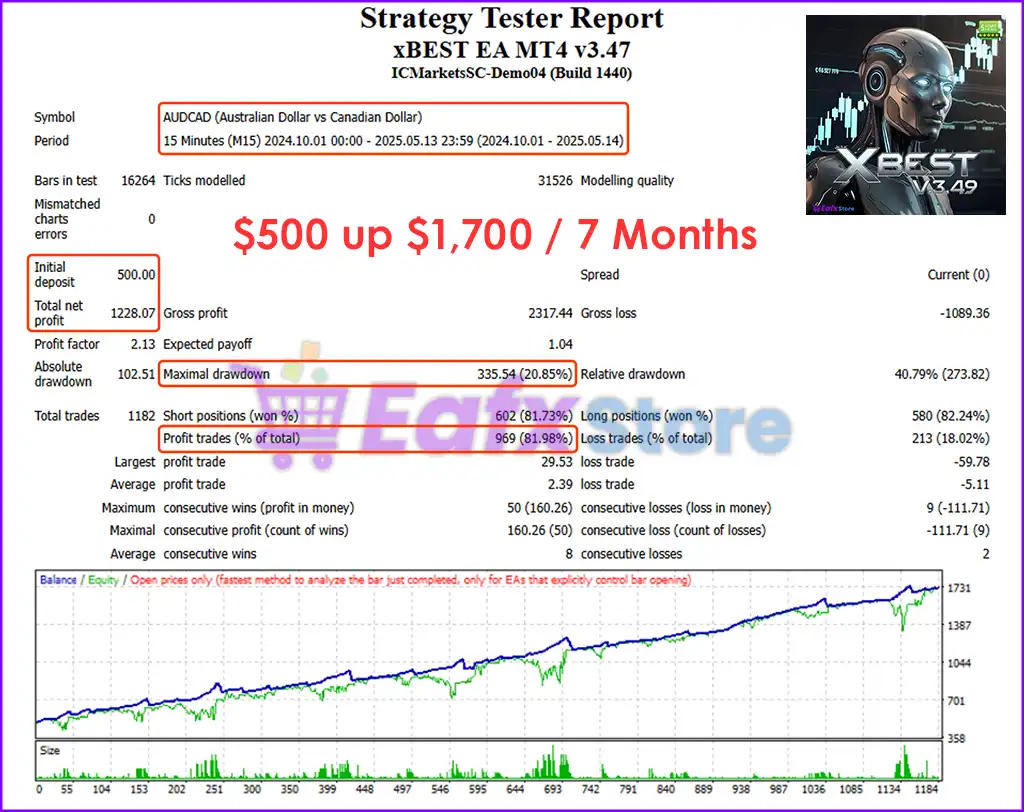
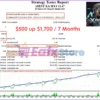
🔶 Traded on $500 capital for 7 months, and detailed profit parameters include:
✅ Initial Deposit: $500
✅ Total Net Profit: $1,228.07
✅ Win Rate: 81.98%
✅ Maximal Drawdown: 20.85%
xBest EA MT4 Backtest Trading Results
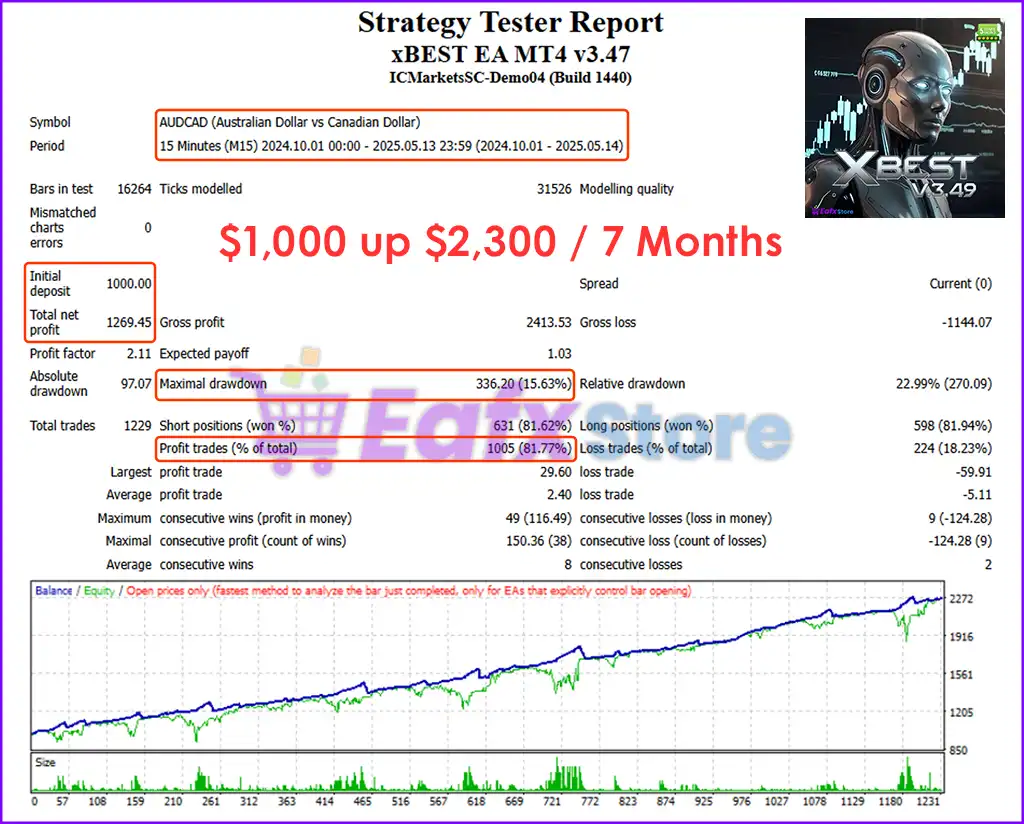
🔶 Traded on $1,000 capital for 7 months, and detailed profit parameters include:
✅ Initial Deposit: $500
✅ Total Net Profit: $1,269.45
✅ Win Rate: 81.77%
✅ Maximal Drawdown: 15.63%
xBest EA MT4 Backtest Results
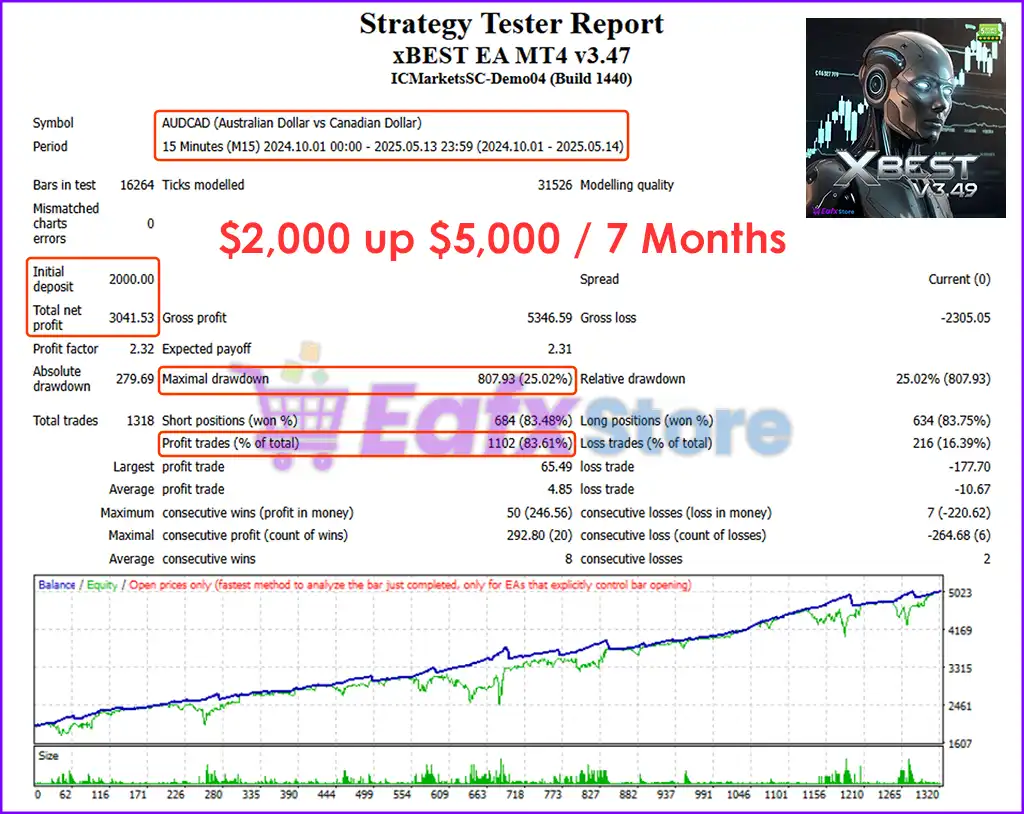
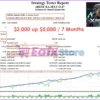
🔶 Traded on $2,000 capital for 7 months, and detailed profit parameters include:
✅ Initial Deposit: $2,000
✅ Total Net Profit: $3,041.53
✅ Win Rate: 83.61%
✅ Maximal Drawdown: 25.02%
xBest EA MT4 Backtests Trading Results
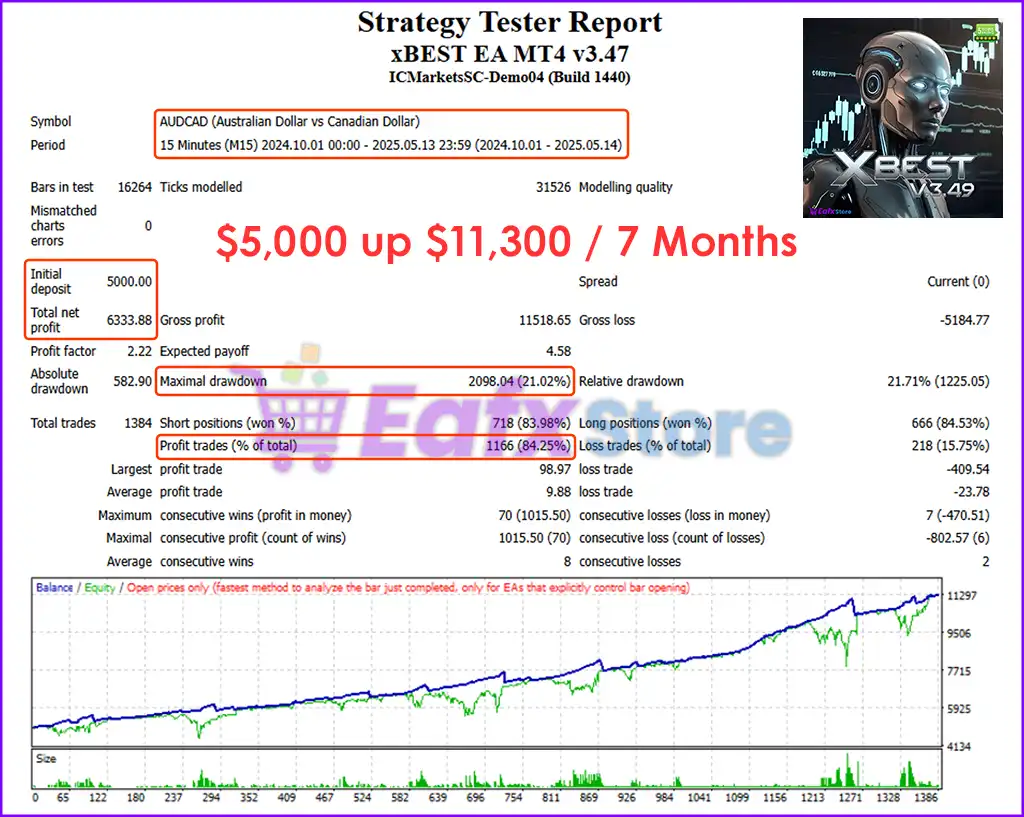
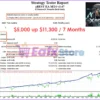
🔶 Traded on $5,000 capital for 7 months, and detailed profit parameters include:
✅ Initial Deposit: $5,000
✅ Total Net Profit: $6,333.88
✅ Win Rate: 84.25%
✅ Maximal Drawdown: 21.02%
xBest EA MT4 Backtests Results
Why choose xBest EA MT4?
🔹 Reliable Automated Forex Trading: Delivers stable execution with intelligent risk management tools.
🔹 Professional Grid Trading Features: Combines adaptive scaling with advanced safety protections.
🔹 Flexible Trading Style Compatibility: Suitable for both scalping and trend-following strategies.
🔹 Advanced Capital Protection System: Helps reduce drawdown with equity and spread filters.
🔹 User-Friendly Expert Advisor Setup: Easy to configure with detailed visual trading controls.
🔹 Marketplace-Optimized Trading Solution: Ideal for traders seeking resilient automated EA systems.
Recommended settings
Recommended settings and parameters to pay attention to from developers and experts:
| Features | Type |
|---|---|
| Trading platform | MetaTrader 4 (MT4) |
| Time frames | M5, M15, M30, H1 |
| Currency pairs | AUDCAD, EURUSD (Any) |
| Minimum / Recommended deposit | $500 |
| Minimum / Recommended leverage | 1:100 |
| Setup files | Available |
| Product type | NoDLL / Fix |
| Additional services | Unlock and Decompile |
| Recommended brokers | Exness Broker, Icmarkets Broker |
| Recommended VPS | MyfxVPS.com ( Blue VPS, Golden VPS). Lowest Latency, 2 week Free Trial, 100% Free for 12-18 Months. |
➡️ Reviewed by David Easton
Product Download Package?
The download package of the product suite includes:
1. Experts:
✅ xBest EA v3.49.ex4
2. SetFiles:
✅ Step lot.set
✅ FixLot.set
✅ Martingale.set
Conclusion: Unleash Precision and Control with xBest EA MT4
In short, xBest EA stands out as a next-generation grid trading solution, offering unmatched flexibility, smart automation, and robust capital protection for traders using MetaTrader 4. Whether you’re a cautious trader seeking stability or an aggressive strategist aiming for optimal profit, xBest EA adapts to your style with ease. Its intelligent Martingale grid algorithm, trend filters like EMA and HILO, and dual trading logic ensure consistent performance across volatile markets like AUDCAD and EURUSD.
🔢 xBest EA MT4 – Complete Settings & Input Parameters Guide
xBest EA MT4 is a powerful automated Forex trading robot for MetaTrader 4 that combines grid trading, martingale recovery, Moving Average filters, HILO trend confirmation, equity protection and advanced money management.
The EA is designed for traders who want flexible automation with customizable risk controls, spread filters, break-even protection and smart trade management features.

xBest EA MT4 Settings
🔢 xBest EA MT4 Settings Explained
Below are the details of the parameters in the advisor’s trading system settings table:
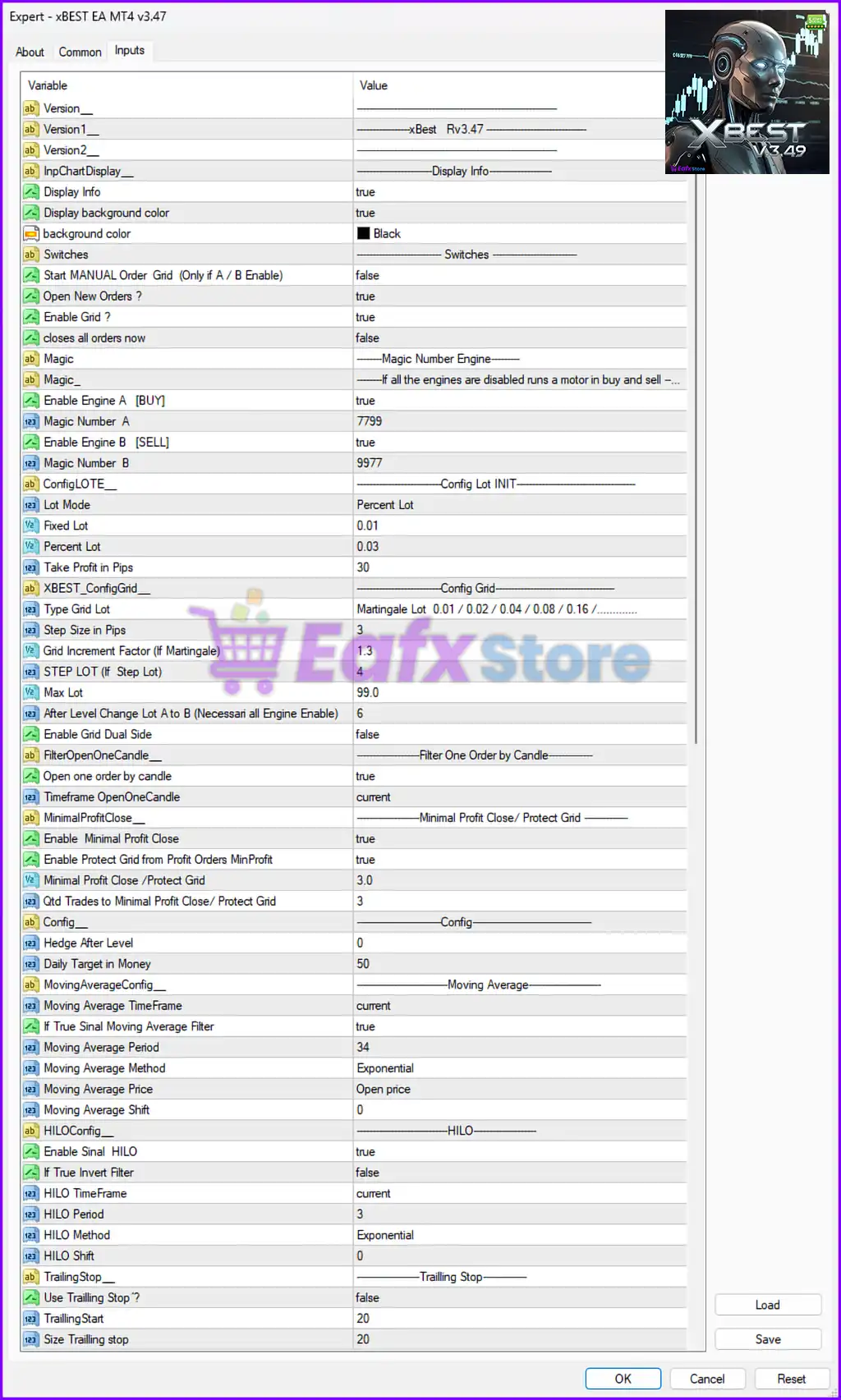
xBest EA MT4 Settings Panel
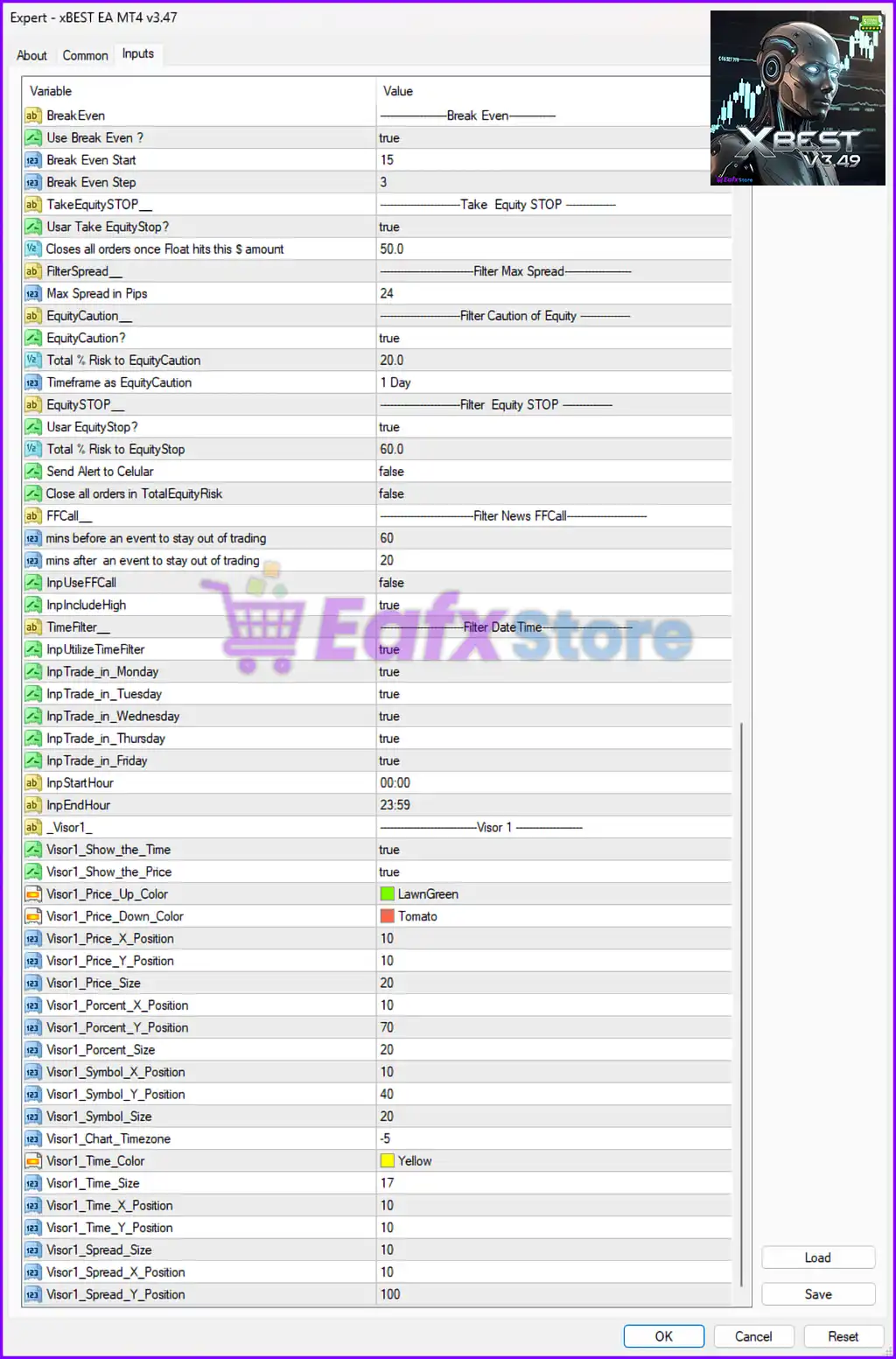
xBest EA Settings Panel
🔶 Version & Display Settings
🔹 Version_: Displays the EA version information section.
🔹 Version1_ = xBest Rv3.47: Shows the installed version as Rv3.47.
🔹 Version2_: Additional version separator or label field.
🔹 InpChartDisplay_ = Display Info: Section header for chart display configuration.
🔹 Display Info = true: Enables information display on the trading chart.
🔹 Display background color = true: Activates background color display for the EA panel.
🔹 background color = Black: Sets the EA dashboard background color to Black.
🔶 Main Trading Switches
🔹 Start MANUAL Order Grid (Only if A / B Enable) = false: Disables manual grid order initialization.
🔹 Open New Orders ? = true: Allows the EA to open new trading positions.
🔹 Enable Grid ? = true: Activates the grid trading system.
🔹 closes all orders now = false: Prevents immediate closing of all active trades.
🔶 Magic Number Engine Settings
🔹 Magic_: Section header for magic number configuration.
🔹 Enable Engine A [BUY] = true: Enables the Buy trading engine.
🔹 Magic Number A = 7799: Assigns magic number 7799 for Buy orders.
🔹 Enable Engine B [SELL] = true: Enables the Sell trading engine.
🔹 Magic Number B = 9977: Assigns magic number 9977 for Sell orders.
🔶 Lot Size & Money Management Settings
🔹 ConfigLOTE_ = Config Lot INIT: Section header for lot configuration.
🔹 Lot Mode = Percent Lot: Uses percentage-based lot sizing mode.
🔹 Fixed Lot = 0.01: Sets the fixed trading lot size to 0.01.
🔹 Percent Lot = 0.03: Sets the percentage lot calculation value to 0.03.
🔹 Take Profit in Pips = 30: Sets trade Take Profit target to 30 pips.
🔶 Grid Trading Settings
🔹 XBEST_ConfigGrid_ = Config Grid: Section header for grid configuration.
🔹 Type Grid Lot = Martingale Lot 0.01 / 0.02 / 0.04 / 0.08 / 0.16 / …: Uses Martingale lot progression for grid orders.
🔹 Step Size in Pips = 3: Sets the grid distance between orders to 3 pips.
🔹 Grid Increment Factor (If Martingale) = 1.3: Multiplies lot size by 1.3 for each new grid level.
🔹 STEP LOT (If Step Lot) = 4: Defines step lot increment level as 4.
🔹 Max Lot = 99.0: Limits maximum lot size to 99.0.
🔹 After Level Change Lot A to B (Necessari all Engine Enable) = 6: Changes lot mode after grid level 6.
🔹 Enable Grid Dual Side = false: Disables simultaneous Buy and Sell grid operation.
🔶 Candle Filter Settings
🔹 FilterOpenOneCandle_ = Filter One Order by Candle: Section header for candle filtering.
🔹 Open one order by candle = true: Restricts the EA to one order per candle.
🔹 Timeframe OpenOneCandle = current: Uses the current chart timeframe for candle filtering.
🔶 Profit Protection Settings
🔹 MinimalProfitClose_ = Minimal Profit Close / Protect Grid: Section header for profit protection.
🔹 Enable Minimal Profit Close = true: Enables closing trades at minimal profit levels.
🔹 Enable Protect Grid from Profit Orders MinProfit = true: Protects grid positions using minimum profit logic.
🔹 Minimal Profit Close / Protect Grid = 3.0: Sets minimum profit target to 3.0.
🔹 Qtd Trades to Minimal Profit Close / Protect Grid = 3: Applies protection after 3 trades.
🔶 Additional Configuration Settings
🔹 Config_ = Config: General configuration section.
🔹 Hedge After Level = 0: Hedge activation level set to 0.
🔹 Daily Target in Money = 50: Sets daily profit target to $50.
🔶 Moving Average Filter Settings
🔹 MovingAverageConfig_ = Moving Average: Section header for MA filter settings.
🔹 Moving Average TimeFrame = current: Uses the current timeframe for Moving Average calculations.
🔹 If True Sinal Moving Average Filter = true: Enables Moving Average signal filtering.
🔹 Moving Average Period = 34: Sets MA calculation period to 34.
🔹 Moving Average Method = Exponential: Uses Exponential Moving Average (EMA).
🔹 Moving Average Price = Open price: Uses Open price for MA calculations.
🔹 Moving Average Shift = 0: Sets MA shift value to 0.
🔶 HILO Filter Settings
🔹 HILOConfig_ = HILO: Section header for HILO indicator settings.
🔹 Enable Sinal HILO = true: Enables HILO signal confirmation.
🔹 If True Invert Filter = false: Disables inverted HILO filtering.
🔹 HILO TimeFrame = current: Uses current timeframe for HILO calculations.
🔹 HILO Period = 3: Sets HILO period to 3.
🔹 HILO Method = Exponential: Uses Exponential method for HILO.
🔹 HILO Shift = 0: Sets HILO shift value to 0.
🔶 Trailing Stop Settings
🔹 TrailingStop_ = Trailing Stop: Section header for trailing stop configuration.
🔹 Use Trailling Stop ? = false: Disables trailing stop functionality.
🔹 TraillingStart = 20: Starts trailing after 20 pips profit.
🔹 Size Trailling stop = 20: Sets trailing stop distance to 20 pips.
🔶 Break Even Settings
🔹 BreakEven_ = Break Even: Section header for break-even settings.
🔹 Use Break Even ? = true: Enables break-even functionality.
🔹 Break Even Start = 15: Activates break-even after 15 pips.
🔹 Break Even Step = 3: Sets break-even adjustment step to 3.
🔶 Equity Protection Settings
🔹 TakeEquitySTOP_ = Take Equity STOP: Section header for equity stop protection.
🔹 Usar Take EquityStop? = true: Enables equity-based stop system.
🔹 Closes all orders once Float hits this $ amount = 50.0: Closes all trades when floating profit reaches $50.0.
🔶 Spread Filter Settings
🔹 FilterSpread_ = Filter Max Spread: Section header for spread filtering.
🔹 Max Spread in Pips = 24: Prevents trading when spread exceeds 24 pips.
🔶 Equity Caution Settings
🔹 EquityCaution_ = Filter Caution of Equity: Section header for equity warning settings.
🔹 EquityCaution? = true: Enables equity caution monitoring.
🔹 Total % Risk to EquityCaution = 20.0: Triggers caution at 20% equity risk.
🔹 Timeframe as EquityCaution = 1 Day: Uses 1 Day timeframe for equity monitoring.
🔶 Equity Stop Settings
🔹 EquitySTOP_ = Filter Equity STOP: Section header for equity stop protection.
🔹 Usar EquityStop ? = true: Enables equity stop system.
🔹 Total % Risk to EquityStop = 60.0: Stops trading at 60% equity risk.
🔹 Send Alert to Celular = false: Disables mobile alert notifications.
🔹 Close all orders in TotalEquityRisk = false: Disables forced closure at total equity risk.
🔶 News Filter Settings
🔹 FFCall_ = Filter News FFCall: Section header for news filtering.
🔹 mins before an event to stay out of trading = 60: Stops trading 60 minutes before news events.
🔹 mins after an event to stay out of trading = 20: Stops trading 20 minutes after news events.
🔹 InpUseFFCal = false: Disables Forex Factory calendar filtering.
🔹 InpIncludeHigh = true: Includes high-impact news events in filtering.
🔶 Time Filter Settings
🔹 TimeFilter_ = Filter DateTime: Section header for time filtering.
🔹 InpUtilizeTimeFilter = true: Enables trading time filter.
🔹 InpTrade_in_Monday = true: Allows trading on Monday.
🔹 InpTrade_in_Tuesday = true: Allows trading on Tuesday.
🔹 InpTrade_in_Wednesday = true: Allows trading on Wednesday.
🔹 InpTrade_in_Thursday = true: Allows trading on Thursday.
🔹 InpTrade_in_Friday = true: Allows trading on Friday.
🔹 InpStartHour = 00:00: Trading starts at 00:00.
🔹 InpEndHour = 23:59: Trading ends at 23:59.
🔶 Visual Dashboard Settings
🔹 Visor1 = Visor 1: Section header for dashboard visualization.
🔹 Visor1_Show_the_Time = true: Displays time on the dashboard.
🔹 Visor1_Show_the_Price = true: Displays price information.
🔹 Visor1_Price_Up_Color = LawnGreen: Sets bullish price color to LawnGreen.
🔹 Visor1_Price_Down_Color = Tomato: Sets bearish price color to Tomato.
🔹 Visor1_Price_X_Position = 10: Sets price X-axis position to 10.
🔹 Visor1_Price_Y_Position = 10: Sets price Y-axis position to 10.
🔹 Visor1_Price_Size = 20: Sets displayed price font size to 20.
🔹 Visor1_Porcent_X_Position = 10: Sets percentage X-axis position to 10.
🔹 Visor1_Porcent_Y_Position = 70: Sets percentage Y-axis position to 70.
🔹 Visor1_Porcent_Size = 20: Sets percentage display size to 20.
🔹 Visor1_Symbol_X_Position = 10: Sets symbol X-axis position to 10.
🔹 Visor1_Symbol_Y_Position = 40: Sets symbol Y-axis position to 40.
🔹 Visor1_Symbol_Size = 20: Sets symbol display size to 20.
🔹 Visor1_Chart_Timezone = -5: Sets dashboard timezone offset to -5.
🔹 Visor1_Time_Color = Yellow: Sets clock display color to Yellow.
🔹 Visor1_Time_Size = 17: Sets time font size to 17.
🔹 Visor1_Time_X_Position = 10: Sets time X-axis position to 10.
🔹 Visor1_Time_Y_Position = 10: Sets time Y-axis position to 10.
🔹 Visor1_Spread_Size = 10: Sets spread display size to 10.
🔹 Visor1_Spread_X_Position = 10: Sets spread X-axis position to 10.
🔹 Visor1_Spread_Y_Position = 100: Sets spread Y-axis position to 100.
🔢 Conclusion
xBest EA MT4 is a feature-rich automated trading system that combines Grid trading, martingale recovery, Moving Average filtering, HILO confirmation, equity protection, spread filtering, and advanced dashboard visualization.
With highly customizable risk management and trade protection settings, xBest EA MT4 is suitable for traders seeking flexible automated Forex trading strategies on MetaTrader 4.
🔢 FAQs
❓ What is xBest EA MT4?
xBest EA MT4 is an automated Forex trading robot that uses grid, martingale, Moving Average, and HILO strategies for MetaTrader 4.
❓ Does xBest EA MT4 use Martingale trading?
Yes, the EA supports Martingale grid lot progression with customizable increment factors.
❓ Can I enable equity protection in xBest EA MT4?
Yes, the EA includes Equity Stop and Equity Caution features for account risk management.
❓ Does xBest EA MT4 include a news filter?
Yes, the EA has built-in news filtering options with configurable before-and-after event timing.
❓ Can I customize the dashboard display in xBest EA MT4?
Yes, the EA provides extensive dashboard customization including colors, positions, font sizes, and spread display settings.
User Reviews
Only logged in customers who have purchased this product may leave a review.
1. What is xBest EA MT4 and how does it work?
xBest EA MT4 is a fully automated grid trading Expert Advisor for MetaTrader 4, using a Martingale-based strategy combined with modern filters like MA, HILO, and candle logic to manage risk and maximize profitability.
2. What trading strategies does xBest EA support?
It supports both grid scalping and trend-following strategies, with features like dual-side trading, custom filters, and adjustable lot sizing. Traders can use it for short-term or swing trading approaches.
3. What currency pairs and timeframes are recommended?
The EA works best on AUDCAD and EURUSD, and is optimized for M5, M15, M30, and H1 timeframes.
4. What is the minimum deposit required to use xBest EA?
The minimum recommended deposit is $500, but performance scales well with higher capital, based on backtest results from $500 to $10,000.
5. How does xBest EA manage risk?
xBest EA includes robust capital protection tools like:
✅ Break Even mode.
✅ Stop trading if equity drops below $50 or 60%.
✅ Daily risk cap at 20% of capital.
✅ Equity and profit-based shutdown controls.
6. What is the average win rate and drawdown based on testing?
Based on 7-month backtests:
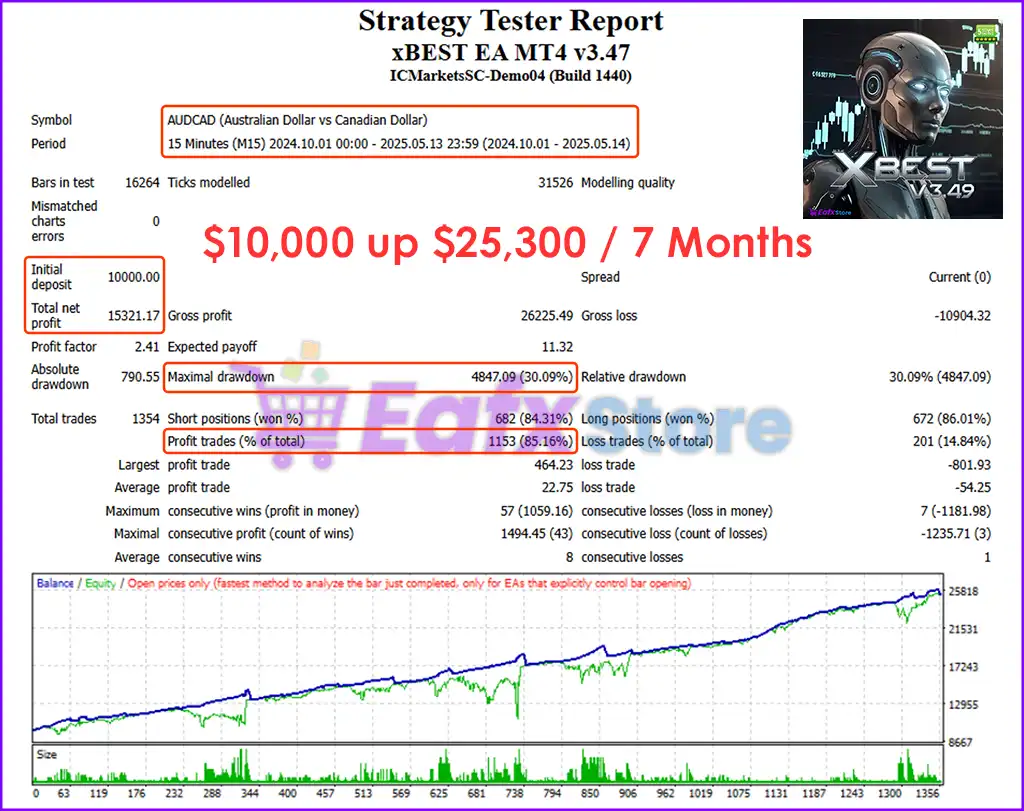
✅ Win rate ranges from 81.77% to 85.16%
✅ Maximum drawdown ranges from 15.63% to 30.09%
7. Can the EA trade both buy and sell at the same time?
Yes. It features dual-side trading logic with independent engines for long and short trades, allowing for diversified trading strategies.
8. Is xBest EA beginner-friendly?
While powerful, the EA includes user-friendly settings like fixed or percentage-based lot sizing, auto-stop, and daily targets, making it usable by both novice and advanced traders.
🔥 Get This EA for FREE with Our Membership! 🚀🚀
Unlock access to this EA, premium Indicators, and exclusive trading tools completely FREE with any of our Membership Plans! Thousands of traders already benefit from our VIP library—join them and level up your trading instantly. Choose Your Membership:
- SPECIAL – 1 Month Membership
- GOLD – 1 Year Membership
- PREMIUM – 1 Year Membership
-
 Original price was: $799.00.$69.00Current price is: $69.00.
 -
 Original price was: $1,699.00.$89.00Current price is: $89.00.
 -
 Original price was: $2,000.00.$89.00Current price is: $89.00.
 -
 Original price was: $2,000.00.$89.00Current price is: $89.00.
-
 1Original price was: $11,000.00.$89.00Current price is: $89.00.
 -
 0Original price was: $500.00.$69.00Current price is: $69.00.
 -
 3Original price was: $999.00.$69.00Current price is: $69.00.
 -
 3Original price was: $999.00.$69.00Current price is: $69.00.
There are no reviews yet.