

🔢 Xuber Forex EA MT4 – Complete EA Settings Explanation
Xuber Forex EA MT4 is an automated Forex trading Expert Advisor designed for MetaTrader 4 platforms. The EA provides automated trade execution with configurable lot sizing, spread filtering, stop-loss automation, trailing protection, and trade management controls. Designed for indices such as DE40 and US30, Xuber Forex EA MT4 helps traders automate market operations while maintaining structured risk and execution settings.
🔢 Xuber Forex EA MT4 Input Parameters Explained
Below are the details of the parameters in the advisor’s trading system settings table:
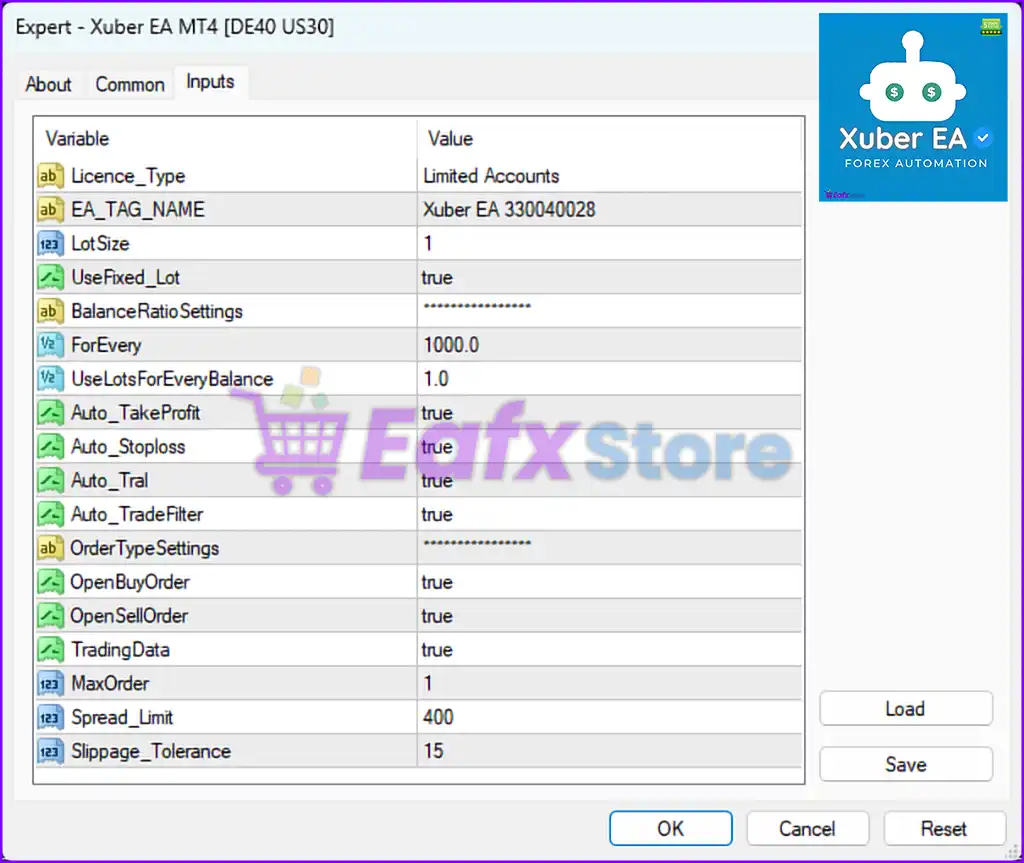
🔹 Licence_Type = Limited Accounts — Displays the EA license type indicating that the software is configured for limited account usage authorization.
🔹 EA_TAG_NAME = Xuber EA 330040028 — Defines the internal EA identification tag used for trade tracking and platform recognition.
🔹 LotSize = 1 — Specifies the default trade lot size used when opening positions. A value of 1 means the EA trades using 1 standard lot.
🔹 UseFixed_Lot = true — Enables fixed lot trading mode, meaning the EA uses a constant lot size instead of dynamic balance-based calculations.
🔹 **BalanceRatioSettings = ****************** — Section header grouping balance ratio and dynamic lot management configurations.
🔹 ForEvery = 1000.0 — Defines the account balance interval used for automatic lot scaling calculations.
🔹 UseLotsForEveryBalance = 1.0 — Specifies the lot size assigned for every 1000.0 balance units when balance ratio management is active.
🔹 Auto_TakeProfit = true — Enables the automatic Take Profit management system for closing profitable trades automatically.
🔹 Auto_Stoploss = true — Activates the automatic Stop Loss protection feature for controlling trading risk.
🔹 Auto_Tral = true — Enables the automatic trailing stop system used to lock in profits as the market moves favorably.
🔹 Auto_TradeFilter = true — Activates the automated trade filtering system to improve trade selection conditions.
🔹 **OrderTypeSettings = ****************** — Section header containing order type configuration and trade direction management settings.
🔹 OpenBuyOrder = true — Enables the EA to open automated BUY positions.
🔹 OpenSellOrder = true — Enables the EA to open automated SELL positions.
🔹 TradingData = true — Enables the display or processing of trading data and operational statistics within the EA.
🔹 MaxOrder = 1 — Limits the maximum number of simultaneously opened trades to 1 active order.
🔹 Spread_Limit = 400 — Defines the maximum spread value allowed for opening new trades. The EA avoids entering the market if the spread exceeds 400.
🔹 Slippage_Tolerance = 15 — Specifies the maximum acceptable slippage during order execution. Orders exceeding 15 slippage tolerance may be rejected.
🔢 Conclusion
Xuber Forex EA MT4 is a flexible automated trading system that combines trade filtering, trailing stop protection, automated risk management, and order control into a single Expert Advisor. With customizable settings such as LotSize, Spread_Limit, MaxOrder, and Slippage_Tolerance, traders can adapt the EA to different trading conditions and account management strategies. Understanding each parameter is essential for optimizing EA performance and maintaining disciplined automated trading operations.
🔢 FAQs
❓ What is Xuber Forex EA MT4 used for?
Xuber Forex EA MT4 is an automated trading Expert Advisor designed for MetaTrader 4 to trade Forex and index markets such as DE40 and US30.
❓ What does LotSize = 1 mean?
It means the EA opens trades using 1 standard lot as the default trading volume.
❓ Why is Auto_Stoploss set to true?
It enables the automatic Stop Loss protection system to help control potential trading losses.
❓ What is the purpose of MaxOrder = 1?
It limits the EA to maintaining only 1 active trade at a time for stricter risk management.
❓ What does Spread_Limit = 400 represent?
It defines the maximum allowable market spread before the EA blocks new trade entries to avoid unfavorable trading conditions.



