
🔢 Aurum AI MT5 Settings Guide – Full Parameter Explanation
Aurum AI MT5 is an advanced automated gold trading Expert Advisor (EA) developed for the MetaTrader 5 platform. The EA combines AI-driven trade execution, automated money management, recovery mode systems, and powerful news filtering features to optimize trading performance in volatile market conditions.
Aurum AI MT5 is designed for traders seeking controlled risk exposure, dynamic lot sizing, and intelligent trade management for XAUUSD and Forex markets.

🔢 Aurum AI MT5 Input Settings
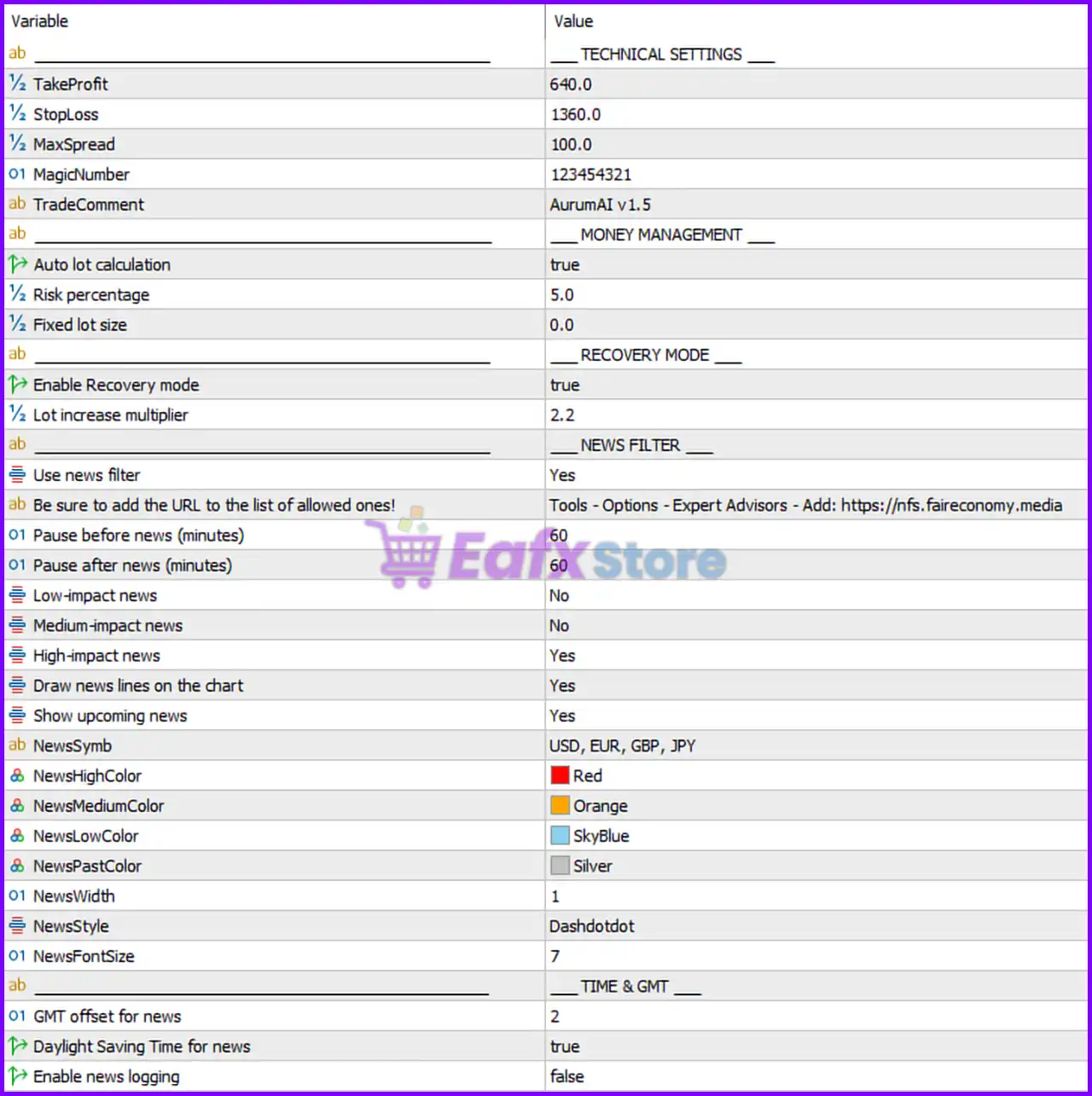
Below are the details of the parameters in the advisor’s trading system settings table:
🔶 Technical Settings
🔹 TakeProfit = 640.0: Sets the take-profit target at 640.0 points for each trade.
🔹 StopLoss = 1360.0: Defines the stop-loss protection level at 1360.0 points.
🔹 MaxSpread = 100.0: Maximum allowed spread for opening trades is 100.0.
🔹 MagicNumber = 123454321: Unique identifier used by Aurum AI MT5 to manage and track its trades.
🔹 TradeComment = AurumAI v1.5: Custom comment attached to all orders opened by the EA.
🔶 Money Management Settings
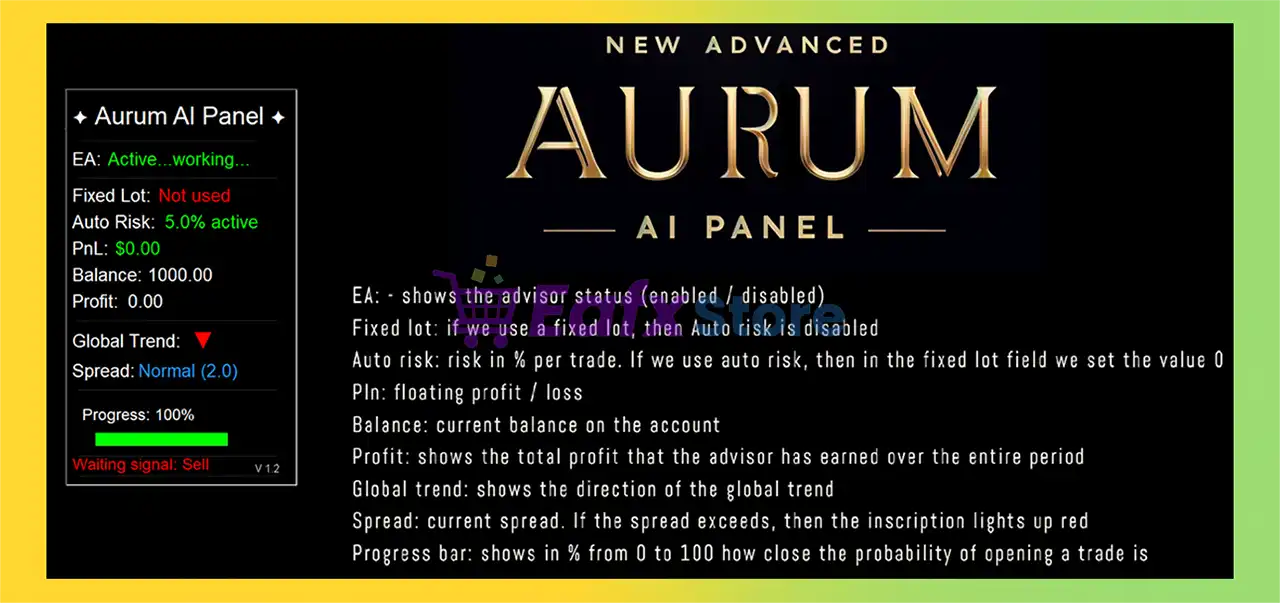
🔹 Auto lot calculation = true: Enables automatic lot size calculation based on account balance and risk percentage.
🔹 Risk percentage = 5.0: Sets trading risk exposure to 5.0% per trade.
🔹 Fixed lot size = 0.0: Fixed lot size is disabled because automatic lot calculation is enabled.
🔶 Recovery Mode Settings
🔹 Enable Recovery mode = true: Activates the recovery trading system to help recover previous losses.
🔹 Lot increase multiplier = 2.2: Multiplies lot sizes by 2.2 during recovery sequences.
🔶 News Filter Settings
🔹 Use news filter = Yes: Enables the integrated economic news filtering system.
🔹 Be sure to add the URL to the list of allowed ones! = Tools - Options - Expert Advisors - Add: https://nfs.faireconomy.media: Required URL setup for accessing economic calendar data.
🔹 Pause before news (minutes) = 60: Stops trading 60 minutes before scheduled news releases.
🔹 Pause after news (minutes) = 60: Resumes trading 60 minutes after news events.
🔹 Low-impact news = No: Low-impact economic news events are ignored.
🔹 Medium-impact news = No: Medium-impact economic news events are ignored.
🔹 High-impact news = Yes: High-impact economic news events are actively filtered.
🔹 Draw news lines on the chart = Yes: Displays news event markers directly on the trading chart.
🔹 Show upcoming news = Yes: Enables display of future scheduled news events.
🔹 NewsSymb = USD, EUR, GBP, JPY: News filter monitors economic releases related to USD, EUR, GBP, and JPY.
🔹 NewsHighColor = Red: High-impact news events are displayed in Red.
🔹 NewsMediumColor = Orange: Medium-impact news events are displayed in Orange.
🔹 NewsLowColor = SkyBlue: Low-impact news events are displayed in SkyBlue.
🔹 NewsPastColor = Silver: Past news events are displayed in Silver.
🔹 NewsWidth = 1: News line width on the chart is set to 1.
🔹 NewsStyle = Dashdotdot: News event lines use the Dashdotdot visual style.
🔹 NewsFontSize = 7: News display font size is configured at 7.
🔶 Time & GMT Settings
🔹 GMT offset for news = 2: Adjusts news timing using GMT offset value 2.
🔹 Daylight Saving Time for news = true: Enables automatic daylight saving time adjustment for news events.
🔹 Enable news logging = false: Disables logging of news events into EA records.
🔢 Conclusion
Aurum AI MT5 is a feature-rich automated trading robot built for traders who require advanced risk control, intelligent recovery strategies and professional-grade news filtering.
With automatic lot sizing, recovery mode, and customizable economic event protection, the EA offers a balanced approach between aggressive performance and account safety. Its flexible configuration makes it suitable for both retail traders and experienced algorithmic trading users.
🔢 FAQs
❓ What is Aurum AI MT5?
Aurum AI MT5 is an automated trading Expert Advisor for MetaTrader 5 that focuses on AI-assisted gold and Forex trading.
❓ Does Aurum AI MT5 support automatic lot sizing?
Yes, the EA includes automatic lot calculation based on account risk percentage.
❓ Can Aurum AI MT5 filter high-impact news events?
Yes, the EA includes an advanced news filter for high-impact economic events.
❓ What is the Recovery Mode in Aurum AI MT5?
Recovery Mode increases lot sizes using a multiplier system to recover previous trading losses.
❓ Which currencies are monitored by the news filter in Aurum AI MT5?
The EA monitors USD, EUR, GBP, and JPY economic news releases.