


ORIX MT5 Settings & Parameters Guide
ORIX MT5 is an automated trading system designed with comprehensive risk management, recovery controls, time-based trading filters, impulse and breakout detection, and an integrated economic news filter. Its Inputs provide detailed control over position sizing, risk per trade, Stop Loss, Take Profit, recovery multipliers, trading hours, market impulse conditions, breakout confirmation, and high-impact news protection. The supplied configuration is particularly structured around controlled entries, market-movement filters, and scheduled-news management.
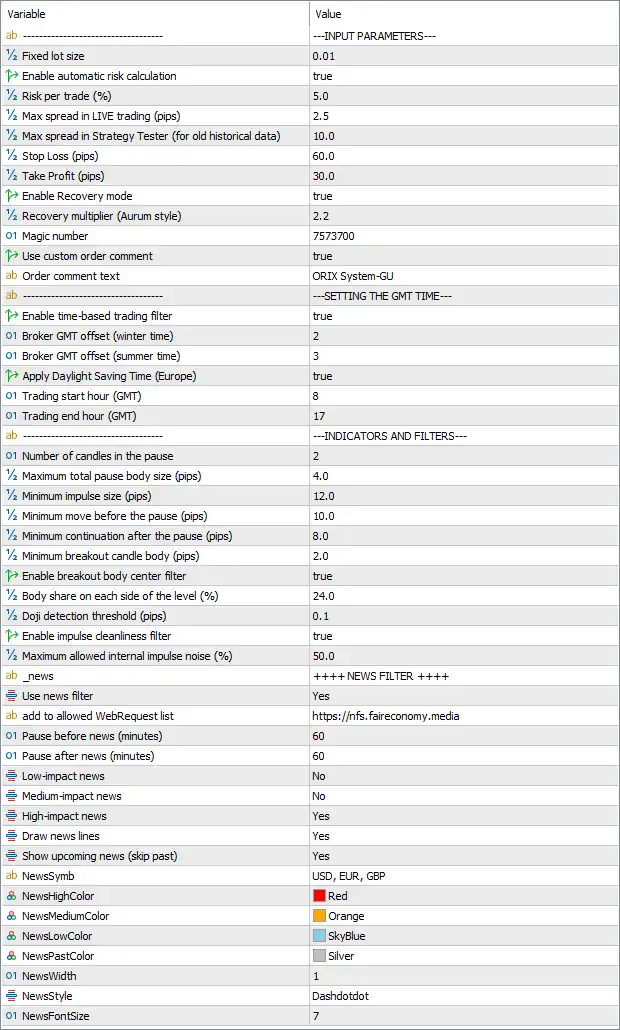
Input Parameters
🔹 Fixed lot size — 0.01: Sets the fixed trading volume to 0.01 lots when fixed-lot sizing is used.
🔹 Enable automatic risk calculation — true: Enables automatic risk-based position sizing, allowing the EA to calculate trade volume according to the configured risk parameters.
🔹 Risk per trade (%) — 5.0: Sets the configured risk level to 5.0% per trade when automatic risk calculation is active.
🔹 Max spread in LIVE trading (pips) — 2.5: Limits live trading to a maximum spread of 2.5 pips according to the EA's spread-filter calculation.
🔹 Max spread in Strategy Tester (for old historical data) — 10.0: Sets the maximum allowed spread to 10.0 pips when testing with older historical data in the Strategy Tester.
🔹 Stop Loss (pips) — 60.0: Sets the Stop Loss distance to 60.0 pips, providing a predefined loss-protection level.
🔹 Take Profit (pips) — 30.0: Sets the Take Profit target to 30.0 pips for applicable trades.
🔹 Enable Recovery mode — true: Enables the EA's Recovery mode, allowing its recovery-management logic to operate after qualifying losing trades.
🔹 Recovery multiplier (Auram style) — 2.2: Sets the recovery multiplier to 2.2, defining the configured position-size multiplication factor used by the recovery mechanism.
🔹 Magic number — 7573700: Assigns the unique Magic Number 7573700 to trades generated by ORIX MT5.
🔹 Use custom order comment — true: Enables the use of a customized order comment for trades opened by the EA.
🔹 Order comment text — ORIX System-GU: Sets the custom trade comment to "ORIX System-GU" for easier trade identification.
GMT Time Settings
🔹 Enable time-based trading filter — true: Activates the EA's time-based trading filter, allowing trading activity to be restricted to the configured GMT session.
🔹 Broker GMT offset (winter time) — 2: Sets the broker's winter-time GMT offset to 2, representing GMT+2.
🔹 Broker GMT offset (summer time) — 3: Sets the broker's summer-time GMT offset to 3, representing GMT+3.
🔹 Apply Daylight Saving Time (Europe) — true: Enables European Daylight Saving Time adjustment so the EA can switch between the configured winter and summer GMT offsets.
🔹 Trading start hour (GMT) — 8: Sets the beginning of the configured trading session to 08:00 GMT.
🔹 Trading end hour (GMT) — 17: Sets the end of the configured trading session to 17:00 GMT.
Indicators and Filters
🔹 Number of candles in the pause — 2: Configures the EA to use 2 candles for its pause condition following the relevant market signal or detected movement.
🔹 Maximum total pause body size (pips) — 4.0: Sets the maximum combined pause-candle body size to 4.0 pips.
🔹 Minimum impulse size (pips) — 12.0: Requires a minimum impulse movement of 12.0 pips for the corresponding impulse condition.
🔹 Minimum move before the pause (pips) — 10.0: Requires at least 10.0 pips of movement before the pause formation can satisfy the configured condition.
🔹 Minimum continuation after the pause (pips) — 8.0: Requires a minimum continuation movement of 8.0 pips after the pause.
🔹 Minimum breakout candle body (pips) — 2.0: Sets the minimum breakout-candle body size to 2.0 pips for breakout confirmation.
🔹 Enable breakout body center filter — true: Activates the breakout candle's body-center filter as an additional entry-condition check.
🔹 Body share on each side of the level (%) — 24.0: Sets the required body share on each side of the reference level to 24.0%.
🔹 Doji detection threshold (pips) — 0.1: Defines 0.1 pips as the configured threshold for identifying a Doji candle.
🔹 Enable impulse cleanliness filter — true: Activates the impulse-cleanliness filter to evaluate whether detected market impulses meet the EA's internal quality requirements.
🔹 Maximum allowed internal impulse noise (%) — 50.0: Allows a maximum internal impulse-noise level of 50.0% under the cleanliness filter.
News Filter
🔹 Use news filter — Yes: Enables the integrated economic news filter, allowing ORIX MT5 to manage trading around scheduled news events.
🔹 Add to allowed WebRequest list — https://nfs.faireconomy. media: Specifies https://nfs.faireconomy. media as the WebRequest source that can be added to the platform's allowed list for retrieving news information.
🔹 Pause before news (minutes) — 60: Configures the EA to pause trading 60 minutes before a qualifying news event.
🔹 Pause after news (minutes) — 60: Configures the EA to pause trading for 60 minutes after a qualifying news event.
🔹 Low-impact news — No: Disables the Low-Impact News category in the active news-filter configuration.
🔹 Medium-impact news — No: Disables the Medium-Impact News category in the active news-filter configuration.
🔹 High-impact news — Yes: Enables the High-Impact News category, allowing the EA to apply its configured news pause around high-impact events.
🔹 Draw news lines — Yes: Enables the display of vertical news-event lines on the trading chart.
🔹 Show upcoming news (skip past) — Yes: Displays upcoming news events while skipping past events from the chart's news display.
🔹 NewsSymb — USD, EUR, GBP: Configures the news filter to monitor economic events associated with USD, EUR, and GBP.
News Chart Display
🔹 NewsHighColor — Red: Sets the chart display color for High-Impact News events to Red.
🔹 NewsMediumColor — Orange: Sets the chart display color for Medium-Impact News events to Orange.
🔹 NewsLowColor — SkyBlue: Sets the chart display color for Low-Impact News events to SkyBlue.
🔹 NewsPastColor — Silver: Sets the chart display color for past news events to Silver.
🔹 NewsWidth — 1: Sets the width of the news-event lines to 1.
🔹 NewsStyle — Dashdot: Configures the news-event lines to use the Dashdot line style.
🔹 NewsFontSize — 7: Sets the news information display font size to 7.
Conclusion
The supplied ORIX MT5 configuration combines automated risk management with market-condition filters and scheduled-news protection. The EA uses Fixed lot size = 0.01, while automatic risk calculation is enabled with Risk per trade = 5.0%. Live trading is restricted to a maximum spread of 2.5 pips, while the Strategy Tester allows 10.0 pips for older historical data.
Trade management is configured with Stop Loss = 60.0 pips and Take Profit = 30.0 pips, while Recovery mode = true uses a 2.2 recovery multiplier. The EA identifies trades with Magic Number 7573700 and the custom comment "ORIX System-GU".
The time filter is enabled from 08:00 GMT to 17:00 GMT, with broker offsets of GMT+2 in winter and GMT+3 in summer, and European DST adjustment enabled. The indicator section uses multiple conditions, including a 12.0-pip minimum impulse, 10.0-pip minimum move before the pause, 8.0-pip minimum continuation, 2.0-pip minimum breakout candle body, and 50.0% maximum internal impulse noise.
The news system is enabled with 60 minutes before and 60 minutes after the event. In the supplied configuration, High-Impact News = Yes, while Low-Impact News = No and Medium-Impact News = No. News monitoring covers USD, EUR, and GBP, with chart visualization enabled through configurable colors, NewsWidth = 1, Dashdot style, and NewsFontSize = 7.
FAQs
❓ What is the risk per trade configured for ORIX MT5?
The supplied configuration has Enable automatic risk calculation = true and Risk per trade = 5.0%.
❓ What are the Stop Loss and Take Profit settings?
ORIX MT5 is configured with Stop Loss = 60.0 pips and Take Profit = 30.0 pips.
❓ Does ORIX MT5 use a recovery system?
Yes. Enable Recovery mode = true, with the Recovery multiplier = 2.2.
❓ What are the trading hours for ORIX MT5?
The time-based filter is enabled with Trading start hour = 8 GMT and Trading end hour = 17 GMT. The broker offsets are 2 in winter and 3 in summer, with European DST enabled.
❓ Which economic news events does ORIX MT5 filter?
The News Filter is enabled. High-impact news = Yes, while Low-impact news = No and Medium-impact news = No. The monitored currencies are USD, EUR, and GBP, with a 60-minute pause before and after qualifying news events.


