






Benefit EA MT4 v5.01 with SetFiles (Unlimited)

Subscriptions for Special Plan
- 30 EA package is more economical!
- Special package with 99%
- Download 1 EA/Day

Subscriptions for Premium Membership
- Download Unlimited in 1 Year
- Get 100% Discount
- Get free access to all

Subscriptions for Gold Membership
- 1 Year Membership
- Get 100% Discount
- Access EA+Indicator+Course
Frequently bought together 🎁
Add these products to enhance your purchase



What is Benefit EA MT4?
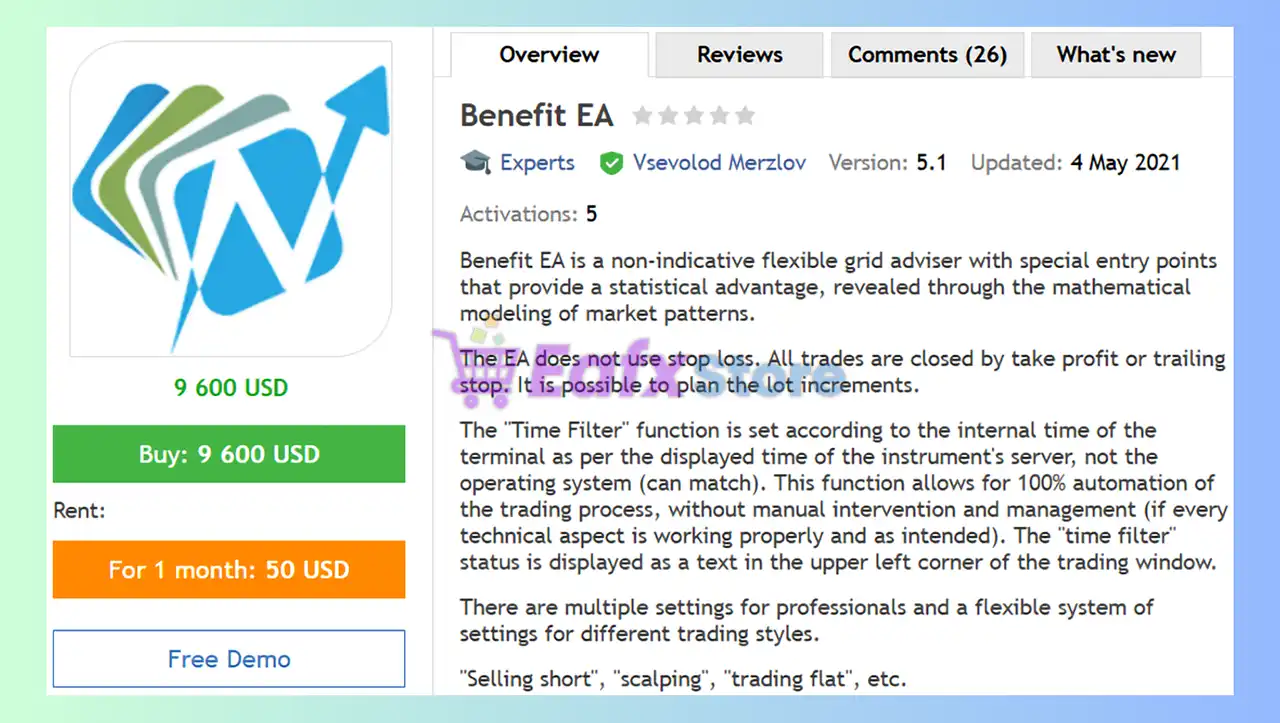
Benefit EA is a flexible Grid advisor that acts as a trading advisor built on a mathematical model of market dynamics. Each trade is meticulously terminated with a take profit or stop loss order to give traders the flexibility to scale lot sizes according to their trading skills.
🔶 Vendor Website: View here
About the Author
This product is compiled by Vsevolod Merzlov. This Russia author has more than +11 years of experience working on MQL5 with many famous products such as Benefit EA MT4, Benefit EA MT5 and other advisors. Among them, Benefit EA MT4 is his best performing products.
Key Features of Benefit EA for MT4
🔹 Market analysis system: Uses mathematical models to detect market patterns and provide a statistical edge.
🔹 No stop loss: All trades are closed with Take-profit (TP) or Trailing Stop.
🔹 Automatic trading: Automatically opens, closes, and manages trades based on specific entry points and risk management strategies.
🔹 Flexible customization: Allows users to customize settings to suit their own trading style and strategy.
Additional Features
🔹 Time filter: Allows filtering of trades based on specific time, ensuring complete automation of the trading process.
🔹 Trade notifications: Provides notifications on trade status, including when blocked.
🔹 Multi-asset trading capabilities: Can trade any asset on any time frame.
🔹 Disconnection handling: Handle disconnection situations appropriately so as not to affect the transaction process.
Benefit EA MT4 Review
Benefit EA has been verified profitable by MyFxBook in the long term and has achieved impressive returns. The advisor shows good Forex trading potential and high profit rate.
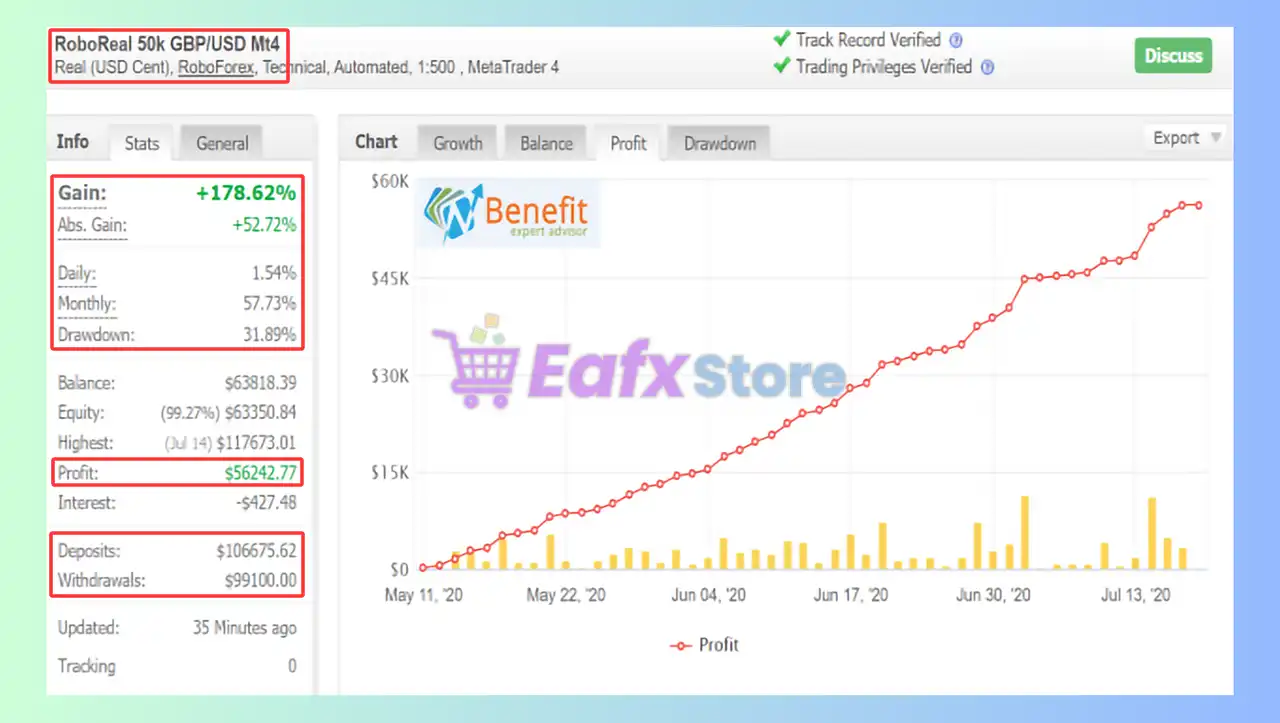
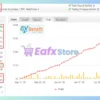
🔶 Traded with an initial deposit of $50K for 2 months, impressive performance trading GBPUSD only.
✅ Total Gain: +178.62%
✅ Average Daily Profit: 1.54%
✅ Average Monthly Profit: 57.73%
✅ Maximum Drawdown: 31.89%
BenefitEA MT4 Myfxbook
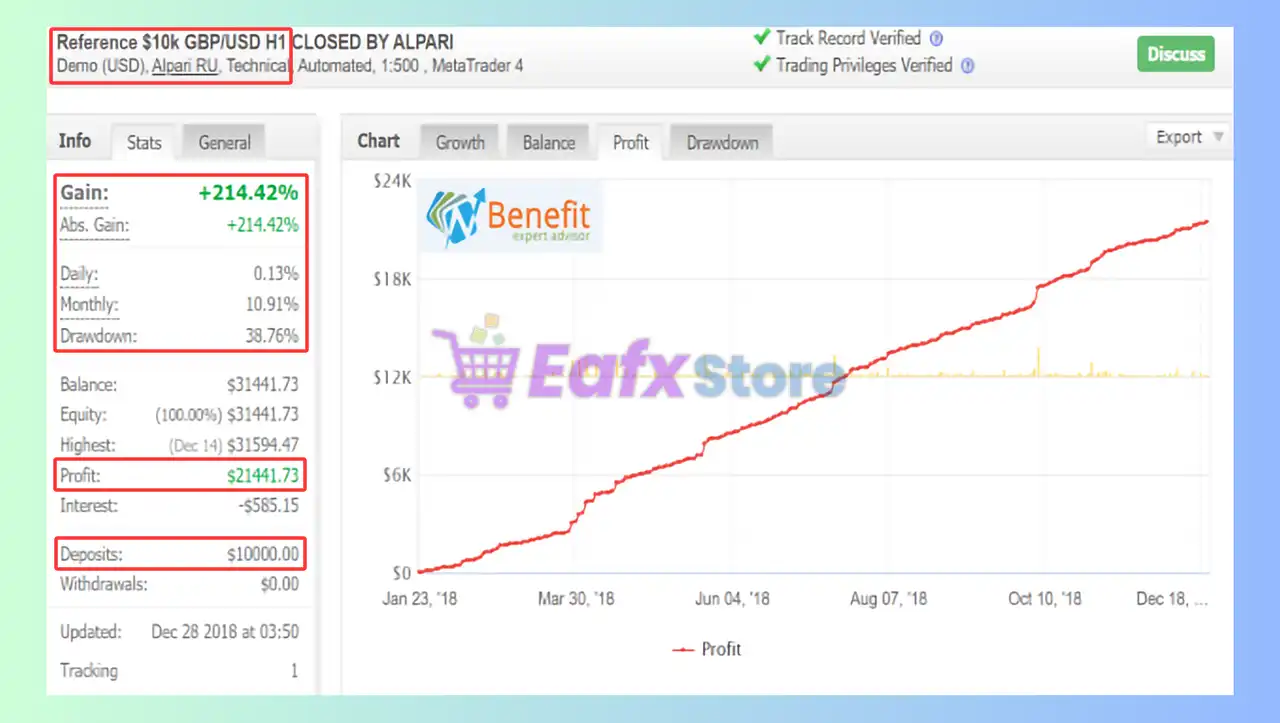
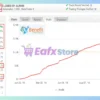
🔶 Traded with an initial deposit of $10K for 6 months, impressive performance trading GBPUSD H1 only.
✅ Total Gain: +214.42%
✅ Average Monthly Profit: 10.91%
✅ Maximum Drawdown: 38.76%
BenefitEA MT4 Myfxbook Results
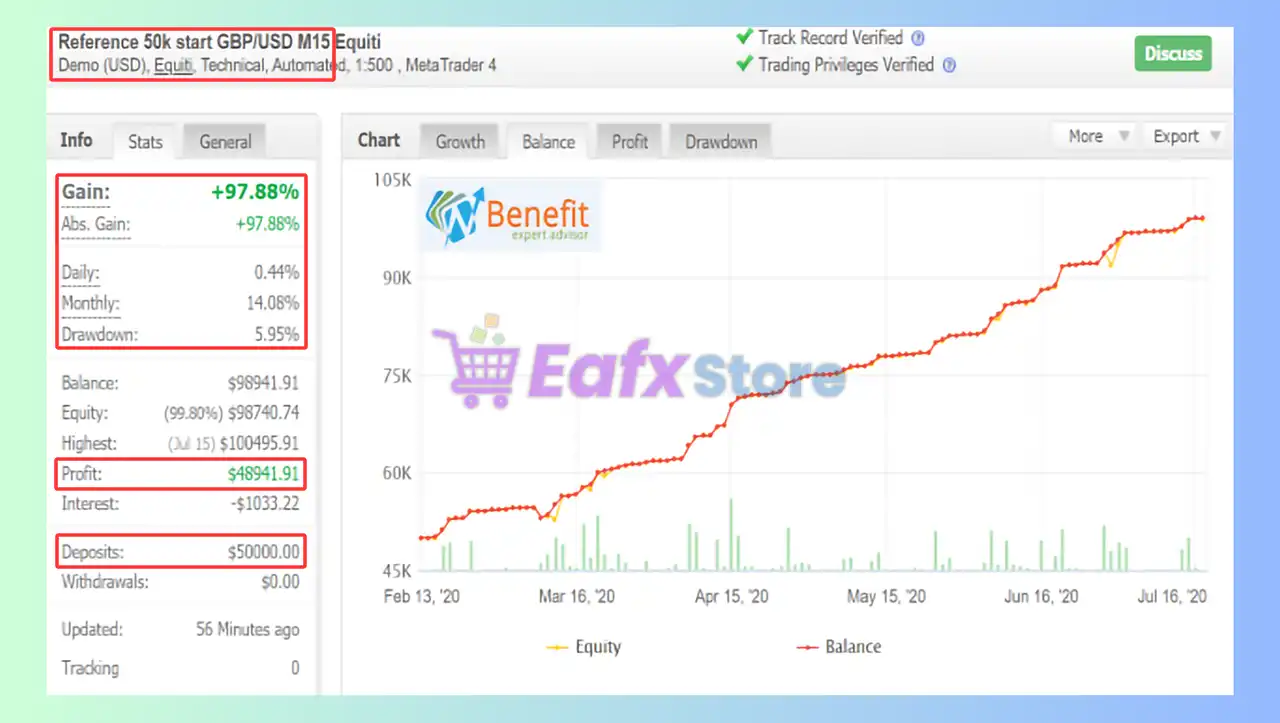
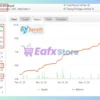
🔶 Traded with an initial deposit of $50K for 2 months, impressive performance trading GBPUSD M15 only.
✅ Total Gain: +97.88%
✅ Average Daily Profit: 0.44%
✅ Average Monthly Profit: 14.08%
✅ Maximum Drawdown: 5.95%
Benefit EA MT4 Myfxbook
Recommended Settings
Recommended settings and parameters to pay attention to from developers and experts:
| Features | Type |
|---|---|
| Trading platform | MetaTrader 4 (MT4) |
| Currency pairs | GBPUSD, USDJPY, EURUSD, EURJPY, USDCAD, USDCHF and AUDUSD |
| Minimum / Recommended leverage | 1:20 - 1:1000 |
| Time frames | M1, M5, M15, H1 |
| Minimum / Recommended deposit | $5,000 |
| Setup files | Available |
| Product type | NoDLL / Fix |
| Additional services | Unlock and Decompile |
| Recommended brokers | Exness Broker, Icmarkets Broker |
| Recommended VPS | MyfxVPS.com ( Blue VPS, Golden VPS). Lowest Latency, 2 week Free Trial, 100% Free for 12-18 Months. |
Product Download Package?
The download package of the product suite includes:
Experts
✅ Benefit EA v4.1_fix.ex4
✅ Benefit EA v5.01_fix.ex4
➡️ Reviewed by David Easton
SetFiles
✅ _Benefit-EA-USDJPY.set
✅ _Benefit_midRisk.set
✅ _BENEFIT conservative.set
✅ _Rama benefit.set
✅ _Benefit_5digit_shortFloat.set
✅ _BENEFIT_JAPAN.set
✅ _BENEFIT EA SET X.set
✅ _BENEFIT EA EURUSD M5.set
Conclusion
In short, Benefit EA combines mathematical precision with full automation to deliver consistent, data-driven trading performance. With no stop loss, smart TP and Trailing Stop management, and flexible customization, it adapts to any trading style or market condition. Proven by strong MyFxBook results, Benefit EA stands as a powerful, intelligent, and reliable solution for traders seeking sustainable profit growth.
🔢 Benefit EA MT4 Settings Guide
Benefit EA MT4 is an automated trading Expert Advisor built around a structured combination of time-based trading filters, Buy/Sell order management, Take Profit controls, trailing-stop logic, Risk Reduction System (RRS), dynamic lot expansion, step-based order distances, and customizable chart colors.
The supplied configuration is identified as BenefitEA_v5.01 60k set and includes Magic = 777, Max Trades = 25.0, Max Lot = 10.0, TP Buy/Sell = 50.0, RRS enabled, and separate Buy/Sell lot-expansion parameters. The EA also provides detailed trading windows from Monday through Friday, while Saturday and Sunday filters are disabled.
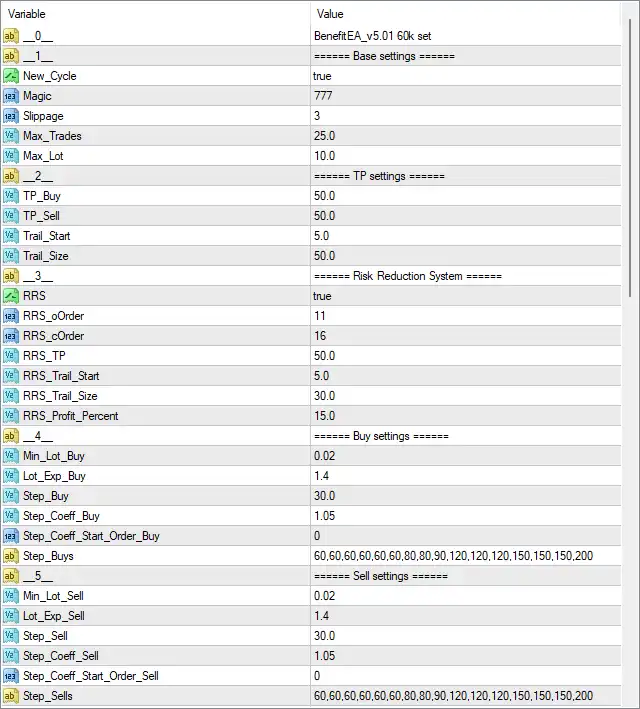
Benefit EA MT4 Settings Panel
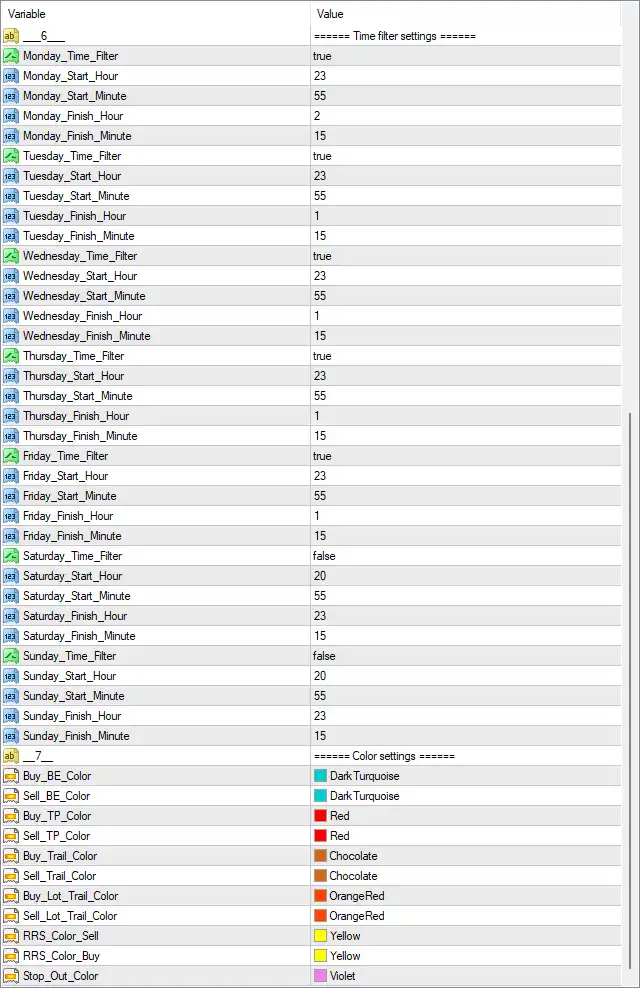
Benefit EA Settings Panel
🔢 Benefit EA MT4 Settings Explained
🔶 Time Filter Settings
🔹 Time filter settings — Defines the weekly schedule controlling when the EA is permitted to trade.
🔹 Monday_Time_Filter: true — Enables the Monday trading-time filter.
🔹 Monday_Start_Hour: 23 — Sets the Monday trading start hour to 23.
🔹 Monday_Start_Minute: 55 — Sets the Monday trading start minute to 55, producing a configured start time of 23:55.
🔹 Monday_Finish_Hour: 2 — Sets the Monday trading finish hour to 2.
🔹 Monday_Finish_Minute: 15 — Sets the Monday trading finish minute to 15, producing a configured finish time of 02:15.
🔹 Tuesday_Time_Filter: true — Enables the Tuesday trading-time filter.
🔹 Tuesday_Start_Hour: 23 — Sets the Tuesday trading start hour to 23.
🔹 Tuesday_Start_Minute: 55 — Sets the Tuesday trading start minute to 55, producing a configured start time of 23:55.
🔹 Tuesday_Finish_Hour: 1 — Sets the Tuesday trading finish hour to 1.
🔹 Tuesday_Finish_Minute: 15 — Sets the Tuesday trading finish minute to 15, producing a configured finish time of 01:15.
🔹 Wednesday_Time_Filter: true — Enables the Wednesday trading-time filter.
🔹 Wednesday_Start_Hour: 23 — Sets the Wednesday trading start hour to 23.
🔹 Wednesday_Start_Minute: 55 — Sets the Wednesday trading start minute to 55, producing a configured start time of 23:55.
🔹 Wednesday_Finish_Hour: 1 — Sets the Wednesday trading finish hour to 1.
🔹 Wednesday_Finish_Minute: 15 — Sets the Wednesday trading finish minute to 15, producing a configured finish time of 01:15.
🔹 Thursday_Time_Filter: true — Enables the Thursday trading-time filter.
🔹 Thursday_Start_Hour: 23 — Sets the Thursday trading start hour to 23.
🔹 Thursday_Start_Minute: 55 — Sets the Thursday trading start minute to 55, producing a configured start time of 23:55.
🔹 Thursday_Finish_Hour: 1 — Sets the Thursday trading finish hour to 1.
🔹 Thursday_Finish_Minute: 15 — Sets the Thursday trading finish minute to 15, producing a configured finish time of 01:15.
🔹 Friday_Time_Filter: true — Enables the Friday trading-time filter.
🔹 Friday_Start_Hour: 23 — Sets the Friday trading start hour to 23.
🔹 Friday_Start_Minute: 55 — Sets the Friday trading start minute to 55, producing a configured start time of 23:55.
🔹 Friday_Finish_Hour: 1 — Sets the Friday trading finish hour to 1.
🔹 Friday_Finish_Minute: 15 — Sets the Friday trading finish minute to 15, producing a configured finish time of 01:15.
🔹 Saturday_Time_Filter: false — Disables the Saturday trading-time filter.
🔹 Saturday_Start_Hour: 20 — Sets the Saturday start-hour parameter to 20.
🔹 Saturday_Start_Minute: 55 — Sets the Saturday start-minute parameter to 55.
🔹 Saturday_Finish_Hour: 23 — Sets the Saturday finish-hour parameter to 23.
🔹 Saturday_Finish_Minute: 15 — Sets the Saturday finish-minute parameter to 15.
🔹 Sunday_Time_Filter: false — Disables the Sunday trading-time filter.
🔹 Sunday_Start_Hour: 20 — Sets the Sunday start-hour parameter to 20.
🔹 Sunday_Start_Minute: 55 — Sets the Sunday start-minute parameter to 55.
🔹 Sunday_Finish_Hour: 23 — Sets the Sunday finish-hour parameter to 23.
🔹 Sunday_Finish_Minute: 15 — Sets the Sunday finish-minute parameter to 15.
🔶 Color Settings
🔹 Buy_BE_Color: DarkTurquoise — Sets the chart color for Buy break-even levels to DarkTurquoise.
🔹 Sell_BE_Color: DarkTurquoise — Sets the chart color for Sell break-even levels to DarkTurquoise.
🔹 Buy_TP_Color: Red — Sets the visual color of Buy Take Profit levels to Red.
🔹 Sell_TP_Color: Red — Sets the visual color of Sell Take Profit levels to Red.
🔹 Buy_Trail_Color: Chocolate — Sets the visual color of Buy trailing-stop levels to Chocolate.
🔹 Sell_Trail_Color: Chocolate — Sets the visual color of Sell trailing-stop levels to Chocolate.
🔹 Buy_Lot_Trail_Color: OrangeRed — Sets the visual color for Buy lot-trailing information to OrangeRed.
🔹 Sell_Lot_Trail_Color: OrangeRed — Sets the visual color for Sell lot-trailing information to OrangeRed.
🔹 RRS_Color_Sell: Yellow — Sets the chart color for Sell Risk Reduction System levels to Yellow.
🔹 RRS_Color_Buy: Yellow — Sets the chart color for Buy Risk Reduction System levels to Yellow.
🔹 Stop_Out_Color: Violet — Sets the chart color used to display Stop Out-related levels or information to Violet.
🔶 Base Settings
🔹 BenefitEA_v5.01 60k set — Identifies the supplied configuration preset as BenefitEA_v5.01 60k set.
🔹 New_Cycle: true — Enables the EA’s new-cycle function, allowing its internal trading cycle to operate according to the configured cycle-management logic.
🔹 Magic: 777 — Assigns 777 as the EA’s Magic Number, allowing MT4 to identify and manage Benefit EA trades separately from other positions.
🔹 Slippage: 3 — Sets the maximum configured execution slippage to 3.
🔹 Max_Trades: 25.0 — Sets the maximum number of trades to 25.0 according to the EA’s internal trade-management logic.
🔹 Max_Lot: 10.0 — Sets the maximum permitted lot size to 10.0 lots.
🔶 Take Profit Settings
🔹 TP settings — Defines the Take Profit and trailing parameters used for Buy and Sell positions.
🔹 TP_Buy: 50.0 — Sets the Take Profit value for Buy trades to 50.0.
🔹 TP_Sell: 50.0 — Sets the Take Profit value for Sell trades to 50.0.
🔹 Trail_Start: 5.0 — Sets the trailing-stop activation threshold to 5.0 according to the EA’s internal unit.
🔹 Trail_Size: 50.0 — Sets the trailing-stop size/distance to 50.0.
🔶 Risk Reduction System Settings
🔹 RRS: true — Enables the Risk Reduction System (RRS).
🔹 RRS_Order: 11 — Sets the RRS activation/order reference to 11, controlling when the Risk Reduction System is applied within the trade sequence.
🔹 RRS_Order: 16 — Sets the second RRS order/reference value to 16, according to the displayed configuration.
🔹 RRS_TP: 50.0 — Sets the RRS Take Profit parameter to 50.0.
🔹 RRS_Trail_Start: 5.0 — Sets the RRS trailing activation threshold to 5.0.
🔹 RRS_Trail_Size: 30.0 — Sets the RRS trailing distance/size to 30.0.
🔹 RRS_Profit_Percent: 15.0 — Sets the RRS profit percentage parameter to 15.0%.
Note: The screenshot displays two consecutive entries labeled RRS_Order, with values 11 and 16. Both values are retained exactly as shown rather than being omitted or combined.
🔶 Buy Settings
🔹 Buy settings — Defines the position-sizing and distance parameters for Buy-side trades.
🔹 Min_Lot_Buy: 0.02 — Sets the minimum Buy lot size to 0.02 lots.
🔹 Lot_Exp_Buy: 1.4 — Sets the Buy lot expansion/multiplication coefficient to 1.4.
🔹 Step_Buy: 30.0 — Sets the basic Buy order distance/step to 30.0.
🔹 Step_Coeff_Buy: 1.05 — Sets the Buy step multiplication coefficient to 1.05.
🔹 Step_Coeff_Start_Order_Buy: 0 — Sets the starting Buy order for applying the step coefficient to 0.
🔹 Step_Buys: 60,60,60,60,60,80,80,90,120,120,120,150,150,150,200 — Defines the complete Buy step sequence as 60, 60, 60, 60, 60, 80, 80, 90, 120, 120, 120, 150, 150, 150, 200.
🔶 Sell Settings
🔹 Sell settings — Defines the position-sizing and distance parameters for Sell-side trades.
🔹 Min_Lot_Sell: 0.02 — Sets the minimum Sell lot size to 0.02 lots.
🔹 Lot_Exp_Sell: 1.4 — Sets the Sell lot expansion/multiplication coefficient to 1.4.
🔹 Step_Sell: 30.0 — Sets the basic Sell order distance/step to 30.0.
🔹 Step_Coeff_Sell: 1.05 — Sets the Sell step multiplication coefficient to 1.05.
🔹 Step_Coeff_Start_Order_Sell: 0 — Sets the starting Sell order for applying the step coefficient to 0.
🔹 Step_Sells: 60,60,60,60,60,80,80,90,120,120,120,150,150,150,200 — Defines the complete Sell step sequence as 60, 60, 60, 60, 60, 80, 80, 90, 120, 120, 120, 150, 150, 150, 200.
🔶 Key Configuration Highlights
🔹 Magic Number: The EA uses Magic = 777 to identify its trades.
🔹 Maximum Trades: The configured maximum is 25.0 trades.
🔹 Maximum Lot: The maximum lot size is 10.0 lots.
🔹 Slippage: The configured execution slippage is 3.
🔹 New Cycle: New_Cycle = true, enabling the new-cycle function.
🔹 Take Profit: Both Buy and Sell trades use 50.0 Take Profit.
🔹 Trailing: The EA starts trailing at 5.0 with a trailing size of 50.0.
🔹 Risk Reduction System: RRS = true, with RRS_TP = 50.0, RRS_Trail_Start = 5.0, RRS_Trail_Size = 30.0, and RRS_Profit_Percent = 15.0.
🔹 Buy Lot Expansion: Buy positions use Min_Lot_Buy = 0.02 and Lot_Exp_Buy = 1.4.
🔹 Sell Lot Expansion: Sell positions use Min_Lot_Sell = 0.02 and Lot_Exp_Sell = 1.4.
🔹 Order Steps: Both Buy and Sell sides use Step = 30.0, Step Coefficient = 1.05, and Start Order = 0.
🔹 Step Sequence: Both sides use the same sequence: 60,60,60,60,60,80,80,90,120,120,120,150,150,150,200.
🔹 Weekday Filters: Monday through Friday filters are true, while Saturday and Sunday filters are false.
🔹 Weekday Trading Windows: Monday starts at 23:55 and finishes at 02:15; Tuesday through Friday start at 23:55 and finish at 01:15.
🔹 Weekend Parameters: Saturday and Sunday contain 20:55–23:15 settings, but their filters are disabled.
🔶 Risk Management Considerations
🔹 Lot Expansion: The Lot_Exp_Buy = 1.4 and Lot_Exp_Sell = 1.4 settings indicate that the EA has a mechanism for increasing position size according to its internal order-management logic.
🔹 Maximum Exposure: Max_Lot = 10.0 provides an upper lot-size parameter, while Buy and Sell minimum lots are both 0.02.
🔹 Trade Count: Max_Trades = 25.0 permits a substantial number of positions according to the EA’s internal rules.
🔹 Risk Reduction: The enabled RRS = true introduces a separate risk-management layer with 15.0% RRS profit percentage, 50.0 RRS TP, and 30.0 RRS trailing size.
🔹 Step Expansion: The Buy and Sell sequences progress from repeated 60 values toward 80, 90, 120, 150, and 200, providing increasingly larger order distances later in the displayed sequence.
🔹 Important Risk Note: Because the configuration contains lot expansion, up to 25 trades, and a maximum lot of 10.0, traders should carefully evaluate cumulative exposure and drawdown behavior through backtesting before using the settings on a live account.
🔢 Conclusion
Benefit EA MT4 is a highly configurable automated trading system that combines time-based trading restrictions, Buy/Sell position management, Take Profit and trailing controls, Risk Reduction System functionality, lot expansion, and detailed order-step sequences.
The displayed configuration uses Magic = 777, Slippage = 3, Max Trades = 25.0, and Max Lot = 10.0. Both Buy and Sell sides use a 0.02 minimum lot, 1.4 lot expansion coefficient, 30.0 step, and 1.05 step coefficient.
The EA’s Risk Reduction System is enabled, with RRS_Order values of 11 and 16, RRS_TP = 50.0, RRS_Trail_Start = 5.0, RRS_Trail_Size = 30.0, and RRS_Profit_Percent = 15.0. This makes the RRS configuration an important component of the overall trade-management structure.
The time-filter configuration enables Monday through Friday while disabling Saturday and Sunday. The weekday schedules are concentrated around the 23:55 start time, with Monday finishing at 02:15 and Tuesday through Friday finishing at 01:15.
Before using Benefit EA MT4 in a live environment, traders should pay particular attention to the 1.4 lot-expansion coefficient, 25.0 maximum trades, 10.0 maximum lot, RRS settings, and the detailed Buy/Sell step sequences. These parameters can substantially affect cumulative exposure when multiple positions are active. The exact units used for TP, trailing, steps, and RRS distances should also be verified from the EA documentation.
User Reviews
Only logged in customers who have purchased this product may leave a review.
❓ What makes Benefit EA MT4 different from other Grid trading EAs?
Benefit EA stands out because it uses a mathematical model of market dynamics to determine entry points, giving it a statistical edge. It’s fully automated, works without indicators, and uses Take Profit and Trailing Stop instead of traditional Stop Loss strategies.
❓ Does Benefit EA MT4 work on all brokers and account types?
Yes. Benefit EA MT4 is compatible with any broker and any account type, including Standard, ECN, and Raw Spread accounts. However, it performs best on hedging accounts with low spreads and fast execution speeds.
❓ What is the minimum deposit required to start trading with Benefit EA MT4?
The developer recommends a minimum deposit of $5,000, though it can technically run on smaller accounts. The amount depends on your risk tolerance, grid step settings, and leverage.
❓ Is it safe to use Benefit EA MT4 since it doesn’t use Stop Loss?
Although Benefit EA doesn’t use a fixed Stop Loss, all trades are managed with Take Profit and Trailing Stop, and the mathematical model helps avoid extreme drawdowns. Proper lot sizing and risk control are essential for safe operation.
❓ Which currency pairs and timeframes does Benefit EA MT4 perform best on?
The EA works best on GBPUSD, EURUSD, USDJPY, EURJPY, USDCAD, USDCHF, and AUDUSD across M1 to H1 timeframes. GBPUSD is the most recommended pair based on verified MyFxBook results.
❓ Can I customize settings in Benefit EA MT4?
Yes. Benefit EA is highly flexible—you can customize lot sizes, step coefficients, and risk parameters to match your personal trading style. It also includes a Time Filter for automated session-based trading.
❓ Does Benefit EA require constant monitoring?
No. The EA supports full automation and includes built-in logic to handle disconnection issues without affecting open trades. However, periodic monitoring is recommended for safety and optimization.
❓ What are the verified performance results of Benefit EA MT4?
According to MyFxBook verification, Benefit EA achieved over +214% total gain with a maximum drawdown below 39% in long-term tests. These results highlight its strong profitability potential and consistent performance.
❓ Can I use Benefit EA MT4 for both scalping and long-term trading?
Absolutely. The EA is designed for situational flexibility, supporting scalping, swing trading, and grid-based strategies. You can adapt parameters for short-term or long-term market conditions.
❓ Is Benefit EA MT4 suitable for beginners or only advanced traders?
Benefit EA MT4 is beginner-friendly thanks to its automatic trade management and flexible presets, but understanding grid trading and risk control is recommended for optimal use and safer results.
🔥 Get This EA for FREE with Our Membership! 🚀🚀
Unlock access to this EA, premium Indicators, and exclusive trading tools completely FREE with any of our Membership Plans! Thousands of traders already benefit from our VIP library—join them and level up your trading instantly. Choose Your Membership:
- SPECIAL – 1 Month Membership
- GOLD – 1 Year Membership
- PREMIUM – 1 Year Membership
-
 Original price was: $1,499.00.$199.00Current price is: $199.00.
 -
 Original price was: $3,999.00.$299.00Current price is: $299.00.
 -
 Price range: $60.00 through $599.00
 -
 Original price was: $329.00.$89.00Current price is: $89.00.
-
 1Original price was: $950.00.$59.00Current price is: $59.00.
 -
 2Original price was: $898.00.$59.00Current price is: $59.00.
 -
 1Original price was: $599.00.$69.00Current price is: $69.00.
 -
 0Original price was: $399.00.$59.00Current price is: $59.00.
There are no reviews yet.