


🔢 Bitcoin Xor AI EA MT5 – Complete Settings Guide and Parameter Explanation
Bitcoin Xor AI EA is an advanced automated Bitcoin trading Expert Advisor (EA) designed for MetaTrader 5. It combines AI-inspired price action analysis, configurable risk management, intelligent news filtering, holiday protection, and market condition monitoring to improve trading decisions.
The EA provides flexible controls for spread filtering, risk exposure, trading schedules, and economic event protection, making it suitable for traders who want a highly configurable Bitcoin trading system.

🔢 Bitcoin Xor AI EA MT5 Parameters Explained
🔄 Strategy Configuration (General Settings)
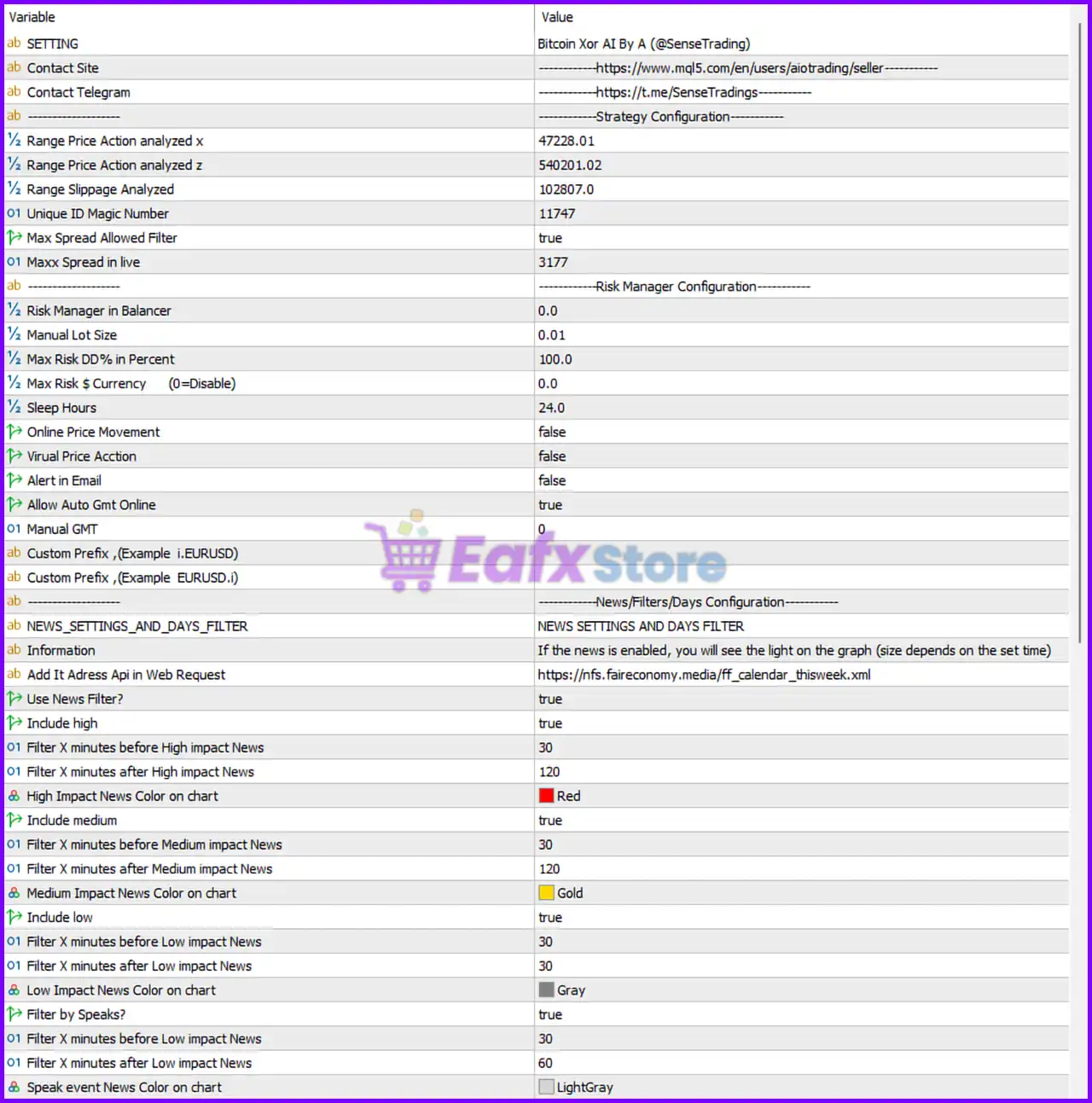
🔹 Range Price Action analyzed x = 47228.01 – Defines the X-axis range used by the EA when analyzing Bitcoin price action.
🔹 Range Price Action analyzed z = 540201.02 – Specifies the Z-axis analytical range used for market calculations.
🔹 Range Slippage Analyzed = 102807.0 – Sets the internal slippage analysis range used by the trading engine.
🔹 Unique ID Magic Number = 11747 – Unique identifier allowing the EA to manage only its own trades.
🔹 Max Spread Allowed Filter = true – Enables spread filtering before opening new positions.
🔹 Maxx Spread in live = 3177 – Maximum live spread allowed before new trades are blocked.
🔄 Risk Manager Configuration
🔹 Risk Manager in Balancer = 0.0 – Risk balancing function is disabled.
🔹 Manual Lot Size = 0.01 – Uses a fixed trading volume of 0.01 lots.
🔹 Max Risk DD% in Percent = 100.0 – Maximum allowable drawdown is set to 100.0%.
🔹 Max Risk $ Currency (0=Disable) = 0.0 – Currency-based risk limitation is disabled.
🔹 Sleep Hours = 24.0 – Defines a monitoring cycle of 24.0 hours.
🔹 Online Price Movement = false – Live online price movement monitoring is disabled.
🔹 Virtual Price Action = false – Virtual price action simulation is disabled.
🔹 Alert in Email = false – Email notifications are disabled.
🔹 Allow Auto GMT Online = true – Automatically detects broker GMT offset.
🔹 Manual GMT = 0 – Manual GMT adjustment is set to 0 when automatic detection is disabled.
🔹 Custom Prefix (Example i.EURUSD) = blank – Allows custom broker symbol prefixes if required.
🔹 Custom Prefix (Example EURUSD.i) = blank – Allows custom broker symbol suffixes if required.
🔄 News, Filters and Days Configuration
🔹 NEWS_SETTINGS_AND_DAYS_FILTER – Main section containing all news and trading day filters.
🔹 Information – Displays guidance about the built-in news filtering system.
🔹 Add It Address Api in Web Request = https://nfs.faireconomy.media/ff_calendar_thisweek.xml – XML news feed URL used by the EA.
🔹 Use News Filter? = true – Enables economic news filtering.
🔹 Include high = true – Filters high-impact news events.
🔹 Filter X minutes before High impact News = 30 – Stops trading 30 minutes before high-impact events.
🔹 Filter X minutes after High impact News = 120 – Resumes trading 120 minutes after high-impact news.
🔹 High Impact News Color on chart = Red – Displays high-impact news in Red.
🔹 Include medium = true – Enables medium-impact news filtering.
🔹 Filter X minutes before Medium impact News = 30 – Stops trading 30 minutes before medium-impact events.
🔹 Filter X minutes after Medium impact News = 120 – Waits 120 minutes after medium-impact news.
🔹 Medium Impact News Color on chart = Gold – Uses Gold color for medium-impact news.
🔹 Include low = true – Enables low-impact news filtering.
🔹 Filter X minutes before Low impact News = 30 – Stops trading 30 minutes before low-impact news.
🔹 Filter X minutes after Low impact News = 30 – Resumes trading 30 minutes afterward.
🔹 Low Impact News Color on chart = Gray – Displays low-impact events in Gray.
🔹 Filter by Speaks? = true – Enables filtering for speeches from central bank officials and policymakers.
🔹 Filter X minutes before Low impact News (Speeches) = 30 – Stops trading 30 minutes before speeches.
🔹 Filter X minutes after Low impact News (Speeches) = 60 – Waits 60 minutes after speeches.
🔹 Speak event News Color on chart = LightGray – Displays speech events in LightGray.
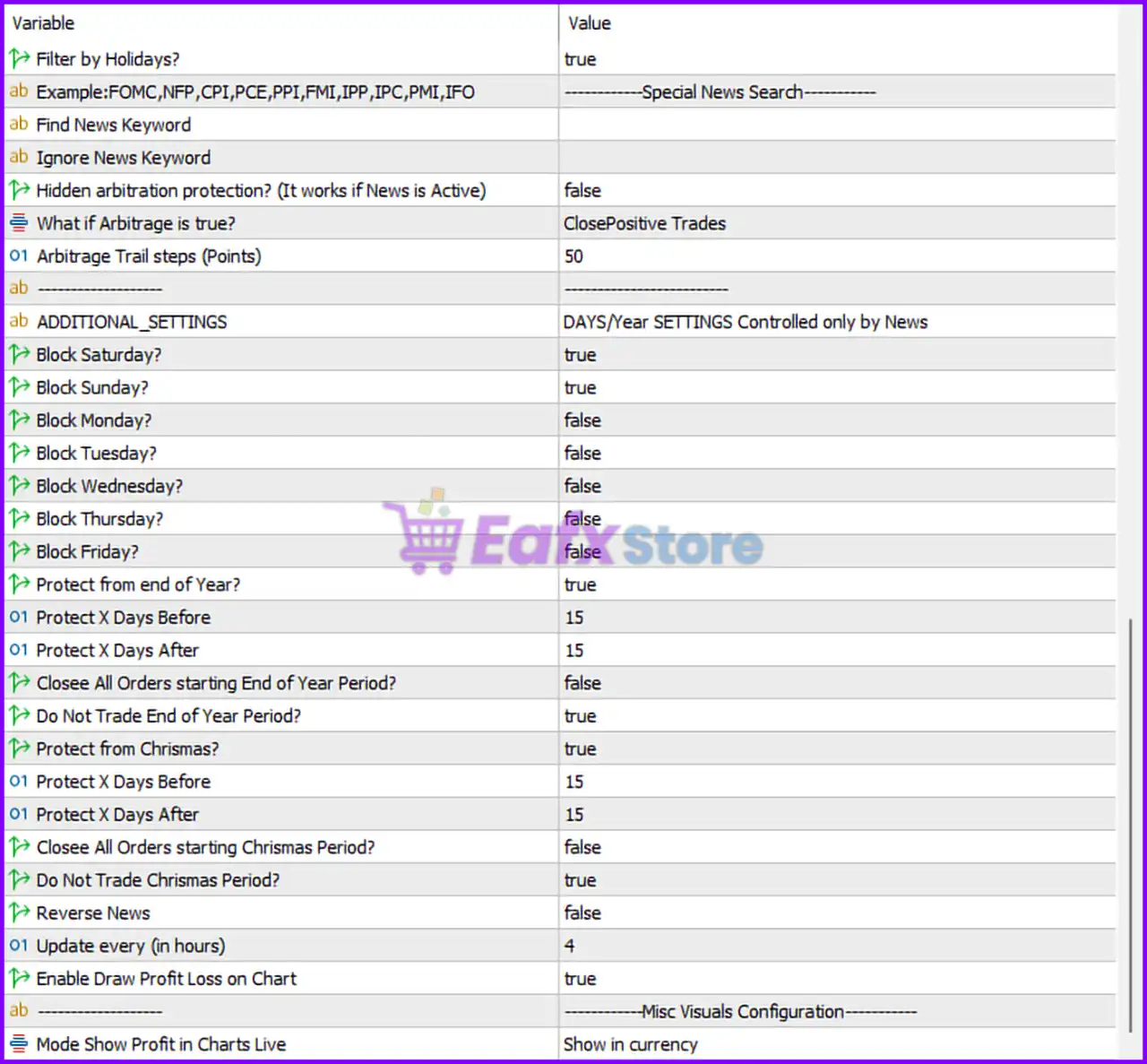
🔄 Holiday & Special News Protection
🔹 Filter by Holidays? = true – Enables holiday-based trading protection.
🔹 Example: FOMC, NFP, CPI, PCE, PPI, FMI, IPP, IPC, PMI, IFO – Examples of major economic events supported by the filter.
🔹 Find News Keyword = blank – Allows users to specify custom keywords for filtering.
🔹 Ignore News Keyword = blank – Allows selected keywords to be ignored.
🔄 Arbitrage Protection
🔹 Hidden arbitration protection? (It works if News is Active) = false – Hidden arbitrage protection is disabled.
🔹 What if Arbitrage is true? = ClosePositiveTrades – Positive positions are closed when arbitrage conditions occur.
🔹 Arbitrage Trail steps (Points) = 50 – Uses a 50-point trailing step during arbitrage management.
🔄 Additional Trading Settings
🔹 Block Saturday? = true – Trading is disabled on Saturday.
🔹 Block Sunday? = true – Trading is disabled on Sunday.
🔹 Block Monday? = false – Monday trading is allowed.
🔹 Block Tuesday? = false – Tuesday trading is allowed.
🔹 Block Wednesday? = false – Wednesday trading is allowed.
🔹 Block Thursday? = false – Thursday trading is allowed.
🔹 Block Friday? = false – Friday trading is allowed.
🔄 End of Year Protection
🔹 Protect from end of Year? = true – Enables year-end trading protection.
🔹 Protect X Days Before = 15 – Starts protection 15 days before year-end.
🔹 Protect X Days After = 15 – Continues protection 15 days after year-end.
🔹 Closee All Orders starting End of Year Period? = false – Existing trades remain open.
🔹 Do Not Trade End of Year Period? = true – Prevents opening new trades during the protected period.
🔄 Christmas Protection
🔹 Protect from Christmas? = true – Enables Christmas holiday protection.
🔹 Protect X Days Before = 15 – Starts protection 15 days before Christmas.
🔹 Protect X Days After = 15 – Ends protection 15 days after Christmas.
🔹 Closee All Orders starting Christmas Period? = false – Existing trades remain active.
🔹 Do Not Trade Christmas Period? = true – Disables new entries during the Christmas period.
🔄 Miscellaneous Settings
🔹 Reverse News = false – The EA does not reverse trades based on news events.
🔹 Update every (in hours) = 4 – Updates news information every 4 hours.
🔹 Enable Draw Profit Loss on Chart = true – Displays floating profit and loss directly on the chart.
🔹 Mode Show Profit in Charts Live = Show in currency – Live profit is displayed in account currency.
🔢 Conclusion
Bitcoin Xor AI EA MT5 provides an extensive collection of professional trading controls for Bitcoin traders. Its configurable price action engine, spread management, comprehensive news filters, holiday protection, arbitrage safeguards, and flexible risk management allow traders to adapt the EA to different market environments.
Proper optimization through backtesting and forward testing is recommended to achieve the best balance between profitability and risk control.
🔢 FAQs
❓ What is the main strategy of Bitcoin Xor AI EA MT5?
Bitcoin Xor AI EA MT5 combines AI-inspired price action analysis with advanced risk management and intelligent news filtering to automate Bitcoin trading.
❓ Does Bitcoin Xor AI EA MT5 include a news filter?
Yes. The EA supports filtering for high, medium, and low-impact news, central bank speeches, holidays, and major economic events.
❓ Can I customize the trading risk?
Yes. You can configure manual lot size, drawdown limits, currency-based risk, spread filters, and additional risk management settings.
❓ Does the EA automatically adjust for broker time?
Yes. The Allow Auto GMT Online feature automatically detects the broker's GMT offset, while manual adjustment is also available.
❓ Is Bitcoin Xor AI EA MT5 suitable for long-term automated trading?
Yes. Its comprehensive risk controls, holiday protection, economic calendar integration, and automated monitoring make it suitable for continuous algorithmic Bitcoin trading when properly optimized.



