🔢 Obsidian Flow Atlas EA MT5 – Complete Settings Guide and Parameter Explanation
Obsidian Flow Atlas EA is an advanced automated trading system designed to combine intelligent trade execution, dynamic risk management, market visualization and session-aware trading logic.
The EA supports automated lot sizing, spread protection, trailing stop management, news filtering, and a sophisticated visual analytics engine, making it suitable for both discretionary traders and fully automated trading environments.
🔢 Obsidian Flow Atlas EA MT5 Parameters Explained
Below are the details of the parameters in the advisor’s trading system settings table:
🔄 Profile, Panel and Identity Settings
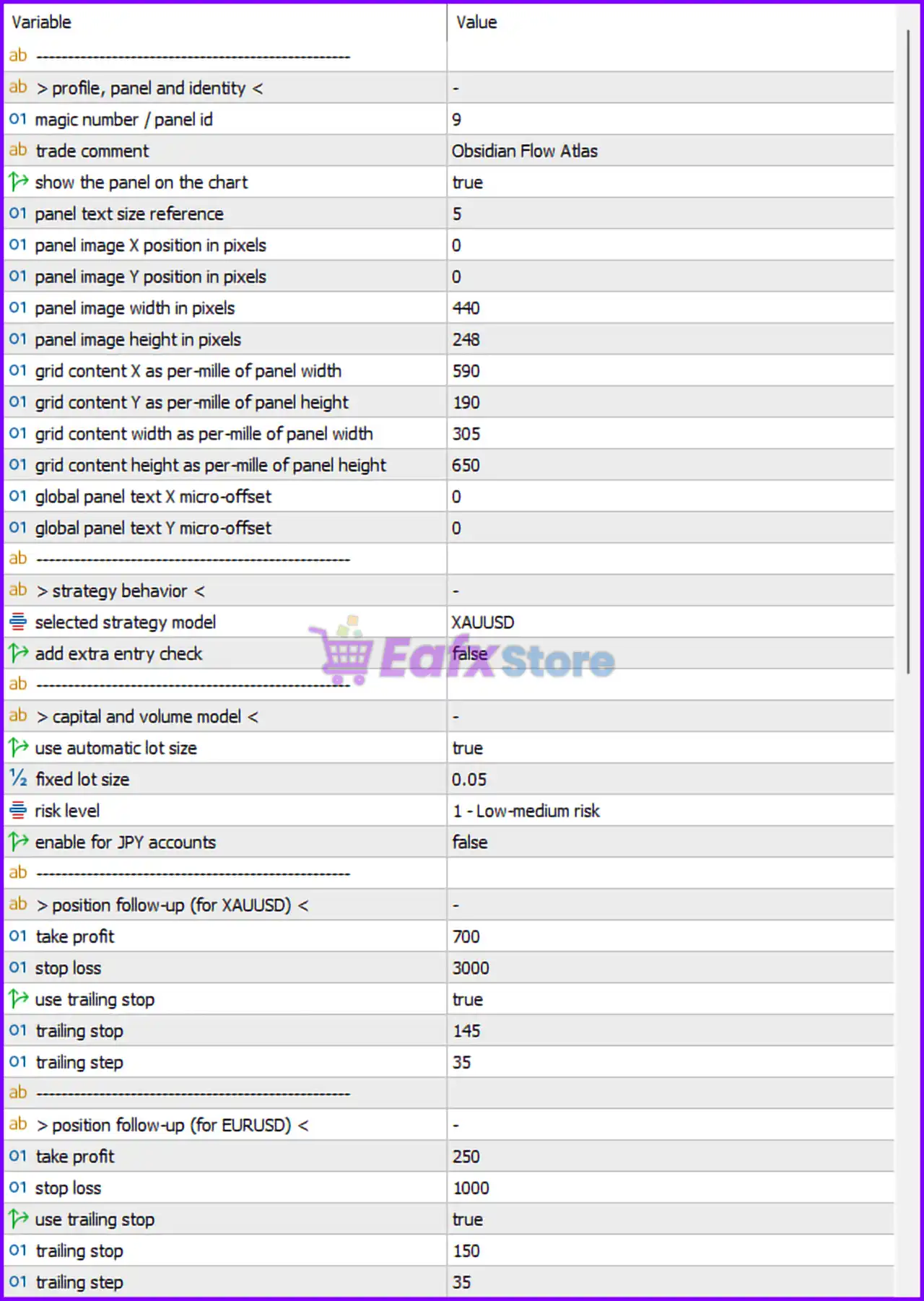
🔹 magic number / panel id = 9 – Unique identifier used by the EA to manage and track its own trades and chart panel.
🔹 trade comment = Obsidian Flow Atlas – Custom comment attached to all orders opened by the EA.
🔹 show the panel on the chart = true – Displays the EA’s information panel directly on the trading chart.
🔹 panel text size reference = 5 – Sets the base font scaling used by the dashboard panel.
🔹 panel image X position in pixels = 0 – Positions the panel image at the left edge of the chart.
🔹 panel image Y position in pixels = 0 – Positions the panel image at the top edge of the chart.
🔹 panel image width in pixels = 440 – Defines the panel width as 440 pixels.
🔹 panel image height in pixels = 248 – Defines the panel height as 248 pixels.
🔹 grid content X as per-mille of panel width = 590 – Controls the horizontal placement of grid content within the panel.
🔹 grid content Y as per-mille of panel height = 190 – Controls the vertical placement of grid content within the panel.
🔹 grid content width as per-mille of panel width = 305 – Defines the width allocated to grid content.
🔹 grid content height as per-mille of panel height = 650 – Defines the height allocated to grid content.
🔹 global panel text X micro-offset = 0 – No horizontal text offset is applied.
🔹 global panel text Y micro-offset = 0 – No vertical text offset is applied.
🔄 Strategy Behavior Settings
🔹 selected strategy model = XAUUSD – Activates the strategy profile optimized for Gold (XAUUSD).
🔹 add extra entry check = false – Additional trade confirmation filtering is disabled.
🔄 Capital and Volume Model Settings
🔹 use automatic lot size = true – Enables dynamic position sizing based on account parameters.
🔹 fixed lot size = 0.05 – Uses 0.05 lots when automatic lot sizing is disabled.
🔹 risk level = 1 - Low-medium risk – Applies the Low-Medium risk profile.
🔹 enable for JPY accounts = false – Special lot calculation adjustments for JPY-denominated accounts are disabled.
🔄 Position Follow-Up Settings (XAUUSD)
🔹 take profit = 700 – Sets the Take Profit target at 700 points for Gold trades.
🔹 stop loss = 3000 – Sets the Stop Loss distance at 3000 points for Gold trades.
🔹 use trailing stop = true – Enables trailing stop management for Gold positions.
🔹 trailing stop = 145 – Trailing Stop follows price at a distance of 145 points.
🔹 trailing step = 35 – Trailing Stop updates every 35 points of favorable movement.
🔄 Position Follow-Up Settings (EURUSD)
🔹 take profit = 250 – Sets the Take Profit target at 250 points for EURUSD trades.
🔹 stop loss = 1000 – Sets the Stop Loss distance at 1000 points for EURUSD trades.
🔹 use trailing stop = true – Enables trailing stop management for EURUSD positions.
🔹 trailing stop = 150 – Maintains a 150-point trailing distance.
🔹 trailing step = 35 – Adjusts the trailing stop every 35 points.
🔄 Market Access Rules
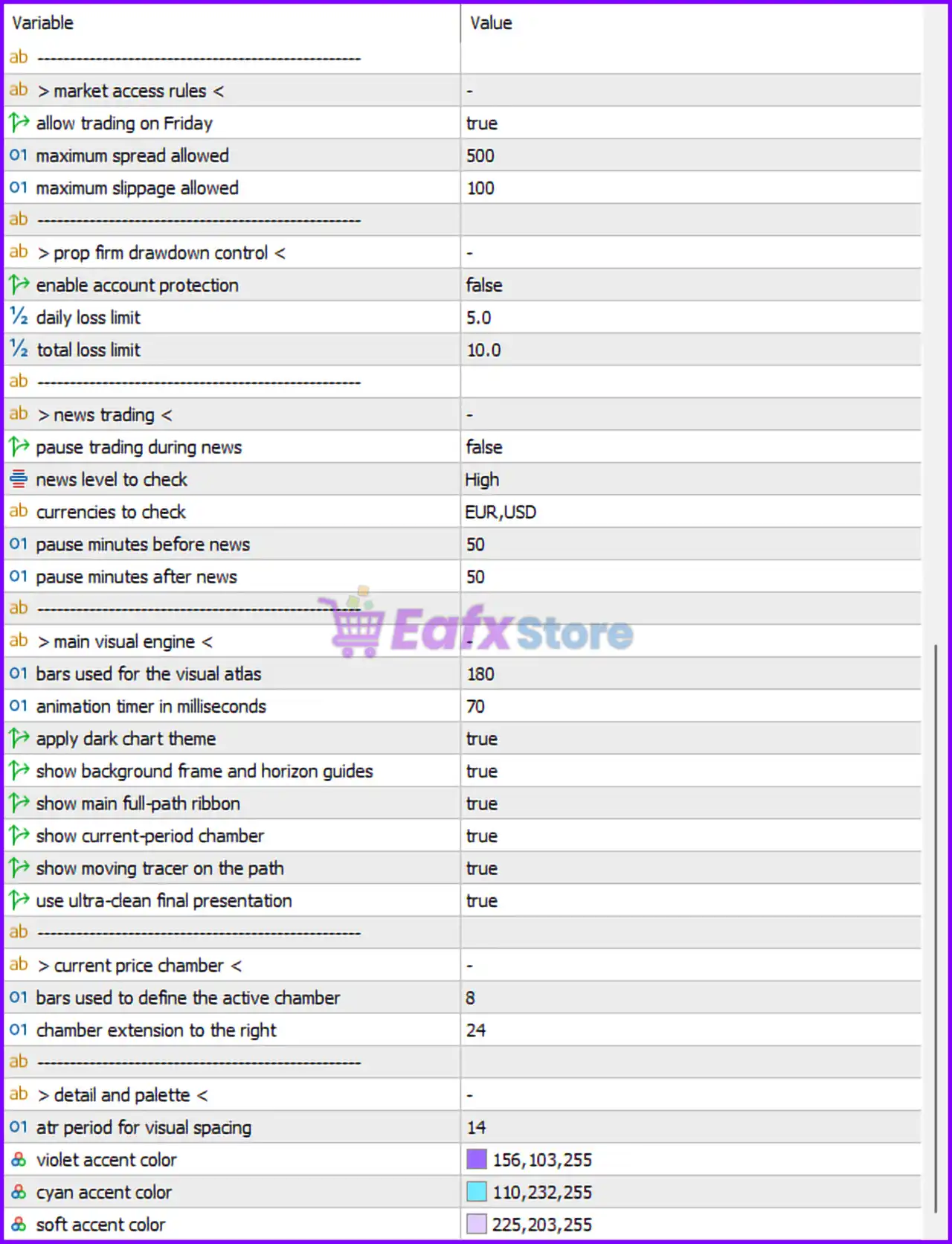
🔹 allow trading on Friday = true – Allows the EA to continue trading on Fridays.
🔹 maximum spread allowed = 500 – Prevents new entries when spread exceeds 500 points.
🔹 maximum slippage allowed = 100 – Allows order execution slippage up to 100 points.
🔄 Prop Firm Drawdown Control
🔹 enable account protection = false – Advanced account drawdown protection is disabled.
🔹 daily loss limit = 5.0 – Defines a daily loss threshold of 5.0%.
🔹 total loss limit = 10.0 – Defines a maximum account drawdown threshold of 10.0%.
🔄 News Trading Settings
🔹 pause trading during news = false – News-event trading suspension is disabled.
🔹 news level to check = High – Monitors only high-impact economic events.
🔹 currencies to check = EUR,USD – Tracks economic releases affecting EUR and USD.
🔹 pause minutes before news = 50 – Trading pause begins 50 minutes before scheduled news.
🔹 pause minutes after news = 50 – Trading resumes 50 minutes after the news event.
🔄 Main Visual Engine Settings
🔹 bars used for the visual atlas = 180 – Uses the last 180 bars for visual market mapping.
🔹 animation timer in milliseconds = 70 – Refreshes visual animations every 70 milliseconds.
🔹 apply dark chart theme = true – Enables dark-theme chart visualization.
🔹 show background frame and horizon guides = true – Displays chart framing and guide overlays.
🔹 show main full-path ribbon = true – Displays the primary trend path ribbon.
🔹 show current-period chamber = true – Highlights the active price chamber.
🔹 show moving tracer on the path = true – Displays a moving visual tracer on market paths.
🔹 use ultra-clean final presentation = true – Applies a simplified and optimized visual presentation.
🔄 Current Price Chamber Settings
🔹 bars used to define the active chamber = 8 – Uses the most recent 8 bars to define the current market chamber.
🔹 chamber extension to the right = 24 – Extends the chamber visualization 24 bars into the future.
🔄 Detail and Palette Settings
🔹 ATR period for visual spacing = 14 – Uses ATR period 14 to calculate chart spacing and visual scaling.
🔹 violet accent color = RGB(156,103,255) – Defines the primary violet interface color.
🔹 cyan accent color = RGB(110,232,255) – Defines the secondary cyan accent color.
🔹 soft accent color = RGB(225,203,255) – Defines the soft highlight color used throughout the interface.
🔢 Conclusion
Obsidian Flow Atlas EA MT5 is a highly sophisticated trading system that combines automated execution, adaptive risk management, advanced trade monitoring and unique visual market analysis tools.
With dedicated configurations for XAUUSD and EURUSD, automatic lot sizing, trailing stop management, spread protection, and customizable visualization modules, the EA provides traders with both operational flexibility and enhanced market awareness. Proper optimization of these settings can help align the system with individual trading goals and risk preferences.
🔢 FAQs
❓ What trading instruments does Obsidian Flow Atlas EA MT5 support?
The EA includes dedicated configurations for both XAUUSD (Gold) and EURUSD trading.
❓ Does Obsidian Flow Atlas EA MT5 support automatic lot sizing?
Yes, automatic lot calculation is enabled by default, while a fixed lot size of 0.05 lots can be used when auto-sizing is disabled.
❓ Can the EA manage trades with a trailing stop?
Yes, trailing stop functionality is enabled for both XAUUSD and EURUSD positions.
❓ Does Obsidian Flow Atlas EA MT5 include a news filter?
Yes, the EA can monitor high-impact EUR and USD news events, although news pausing is currently disabled.
❓ What is the purpose of the Visual Atlas Engine?
The Visual Atlas Engine provides advanced chart visualization, trend mapping, chamber analysis, and real-time market structure displays to help traders better understand market behavior.