






Buda MT5 (Latest version) – GroupBuy
Select a variant to see availability.
Quick Verdict
Best For
✅ Traders looking for a stable multi-currency MT5 Expert Advisor.
✅ Users who prefer AI-assisted market analysis with configurable technical filters.
✅ Traders seeking built-in news protection and advanced risk management.
✅ Medium- to long-term investors focused on disciplined automated Forex trading.
✅ Beginners and experienced traders who want a highly customizable trading system.
Overall Rating
⭐⭐⭐⭐⭐ 9.0/10
Buda MT5 is a feature-rich AI-assisted Forex Expert Advisor that combines intelligent market analysis, multi-pair trading, advanced indicator filtering and comprehensive risk management. With built-in news protection, dynamic stop-loss management, and extensive trading filters, it provides a flexible automated trading solution suitable for traders who prioritize consistency and capital protection.
 Vendor Website: View here
This is GroupBuy ==> How to Join
Buda MT5 Review
What is Buda MT5?
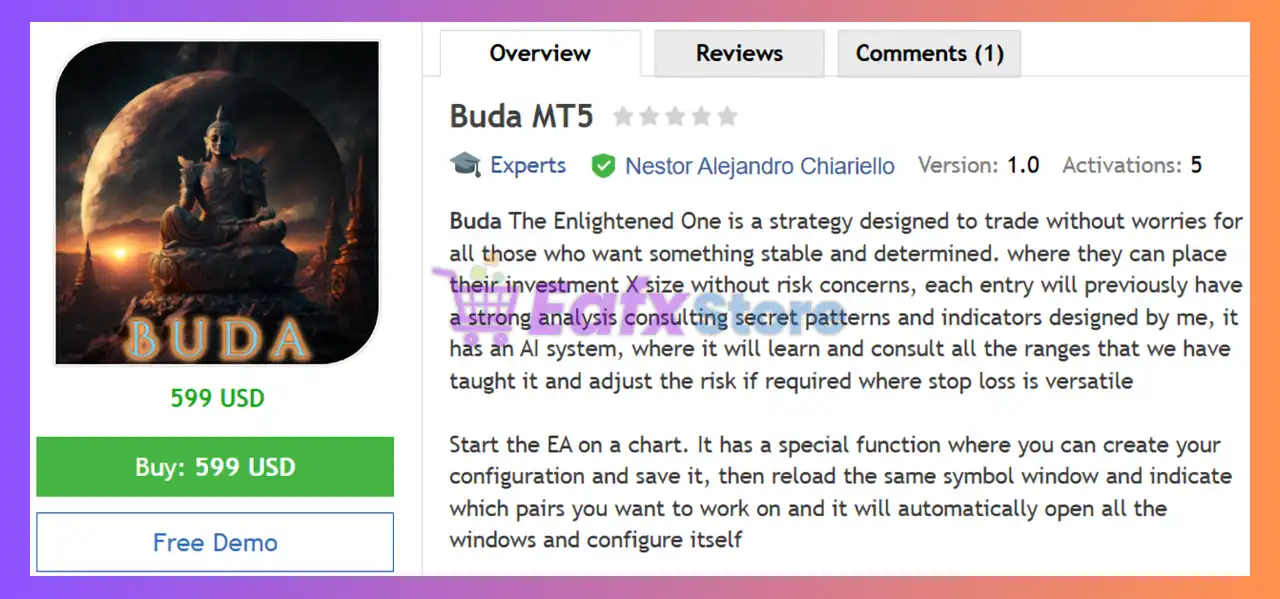
Buda MT5 is an intelligent multi-currency Expert Advisor (EA) developed for MetaTrader 5 that combines artificial intelligence, technical analysis, and advanced risk management into one fully automated trading system.
Unlike traditional Forex robots that rely on a single strategy, Buda MT5 evaluates multiple market conditions using proprietary AI analysis together with technical indicators, spread monitoring, slippage control, news filtering, and trading session management.
The EA supports multiple Forex pairs and can automatically configure trading charts using saved templates, making it suitable for traders managing diversified portfolios.
Main Objectives
🔹 Deliver stable long-term trading performance
🔹 Reduce unnecessary market exposure
🔹 Adapt risk dynamically using AI-assisted analysis
🔹 Protect capital through comprehensive safety filters
About the Developer
Buda MT5 is developed by Nestor Alejandro Chiariello (SenseTrading), an experienced MetaTrader developer known for building AI-assisted automated trading systems.
Some of the developer’s other Expert Advisors include:
🔹 Buda MT5
🔹 Gold Hunter AI MT5
The developer focuses on combining artificial intelligence, advanced market filters, and disciplined money management to create professional-grade automated trading systems.
How Does Buda MT5 Work?
Buda MT5 continuously scans multiple currency pairs using AI-assisted algorithms and technical filters before opening new trades.
AI Market Analysis
The built-in AI evaluates historical price behavior, market structure, spread conditions, volatility, and trading sessions before approving a trading opportunity.
Technical Confirmation
The system can combine several technical indicators including:
🔹 CCI
🔹 RSI
🔹 Fractals
🔹 ATR
🔹 Moving Averages
🔹 Bollinger Bands
🔹 Williams %R
These filters help eliminate lower-quality trading setups.
News & Time Protection
Economic news, trading sessions, holidays, weekends, and custom trading hours are all considered before new positions are opened.
Automatic Trade Management
Once a trade is active, Buda MT5 automatically manages:
🔹 RSI Dynamic Stop Loss (SL)
🔹 RSI Smart Take Profit (TP)
🔹 RSIHidden TP/SL options.
🔹 RSIRisk exposure.
🔹 RSITrading pauses after losses.
🔹 RSISpread and slippage monitoring.
Key Features of Buda MT5
AI-Assisted Multi-Currency Trading
Uses proprietary AI analysis together with technical indicators to identify high-quality trading opportunities across multiple Forex pairs.
Advanced Technical Filters
Supports CCI, Fractals, ATR, Moving Averages, Bollinger Bands, RSI, and Williams %R confirmations for more accurate entries.
Comprehensive News Protection
Built-in economic calendar, holiday filters, speech detection, and session controls help avoid trading during high-impact market events.
Dynamic Trade Management
Features smart Take Profit, versatile Stop Loss, hidden TP/SL options, and automatic pause functions after losing trades.
Automatic Chart & Template Management
Can automatically open recommended currency pairs and load saved trading templates for quick deployment.
Professional Risk Controls
Includes spread filtering, slippage protection, drawdown monitoring, Auto GMT synchronization, and configurable money management settings.
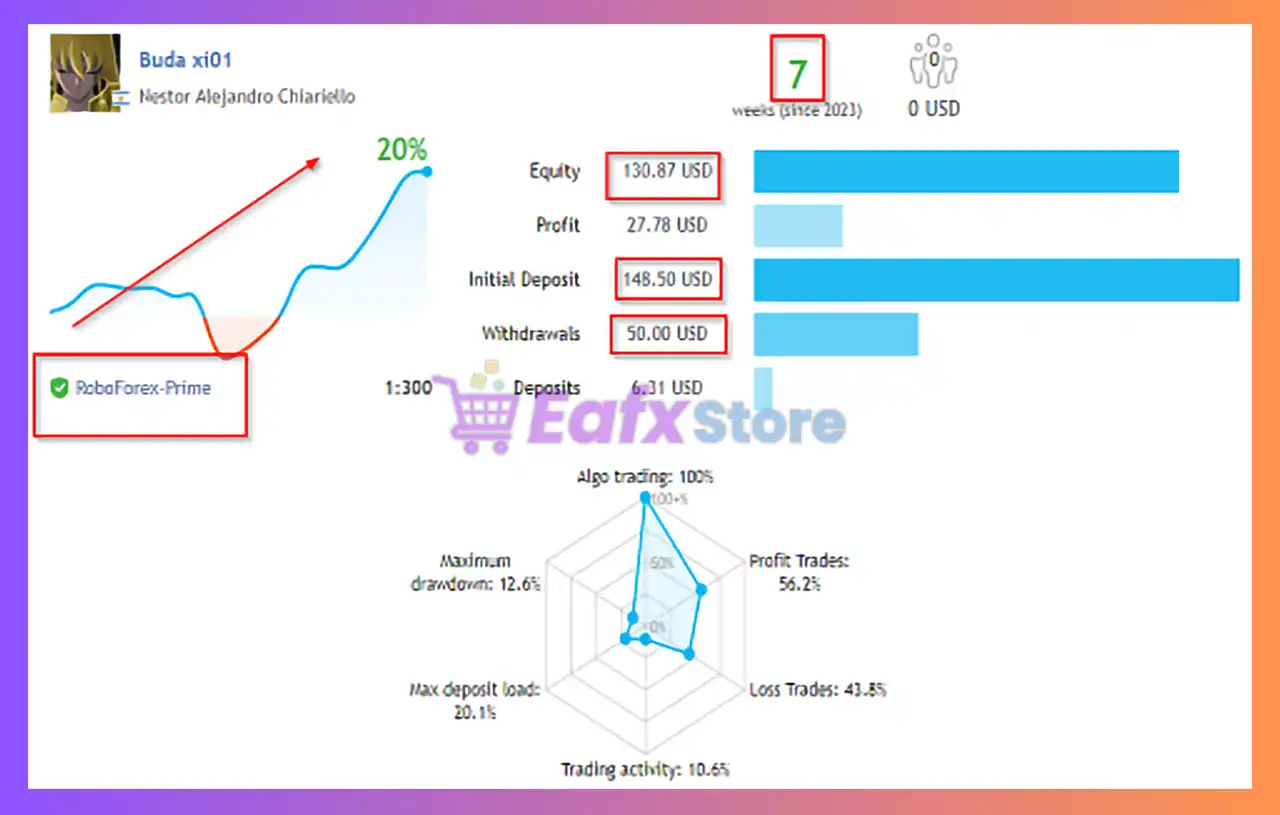
Verified Live Signal Performance
The developer provides a live trading signal demonstrating real-market performance.
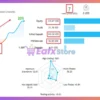
Buda MT5 Signal
| Metric | Live Signal |
|---|---|
| Signal Age | 7 Weeks |
| Growth | 20% |
| Initial Deposit | $148.50 |
| Current Equity | $130.87 |
| Profit | $27.78 |
| Maximum Drawdown | 12.6% |
| Winning Trades | 56.2% |
| Maximum Deposit Load | 20.1% |
Live Performance Summary
The available live signal shows steady account growth with moderate drawdown over a relatively short trading period. While the win rate is around 56%, the EA relies on disciplined trade management and controlled risk rather than aggressive trading frequency.
Historical Backtest Performance
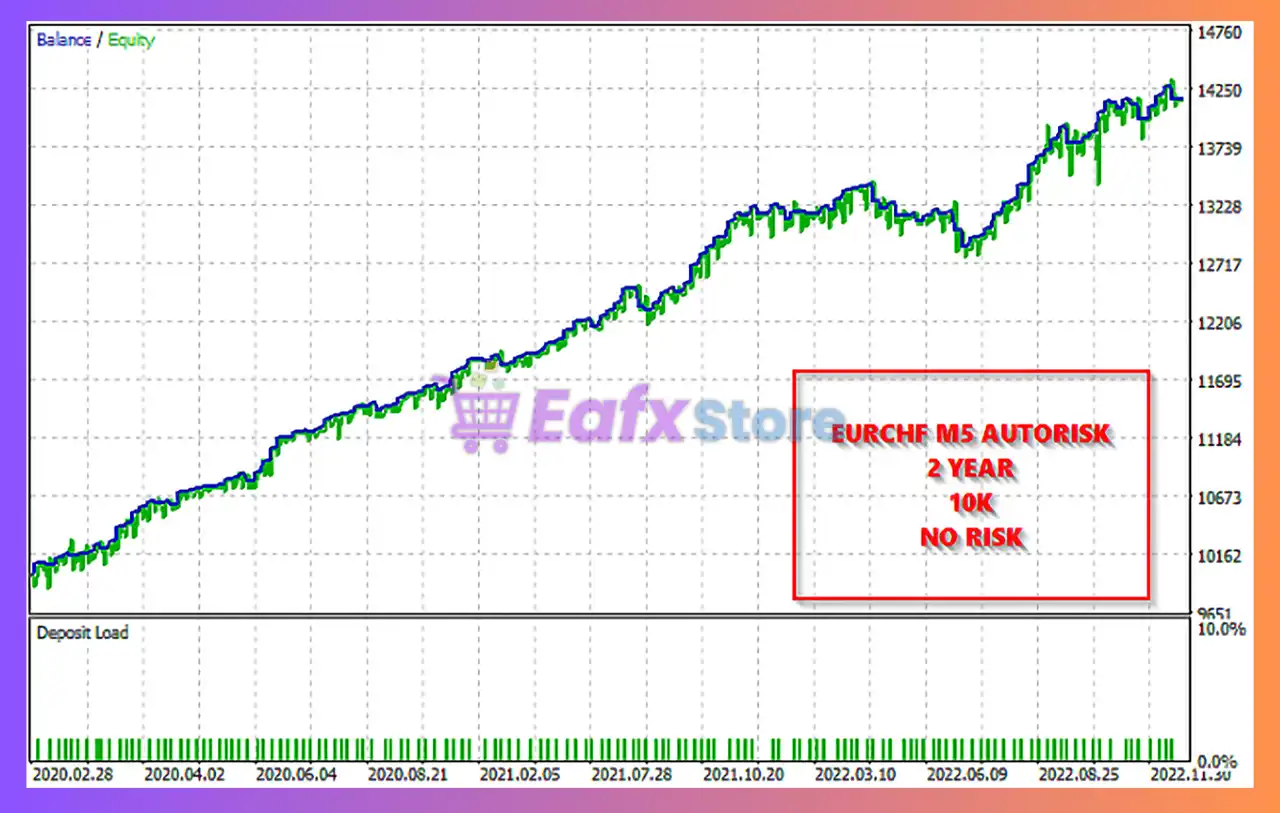
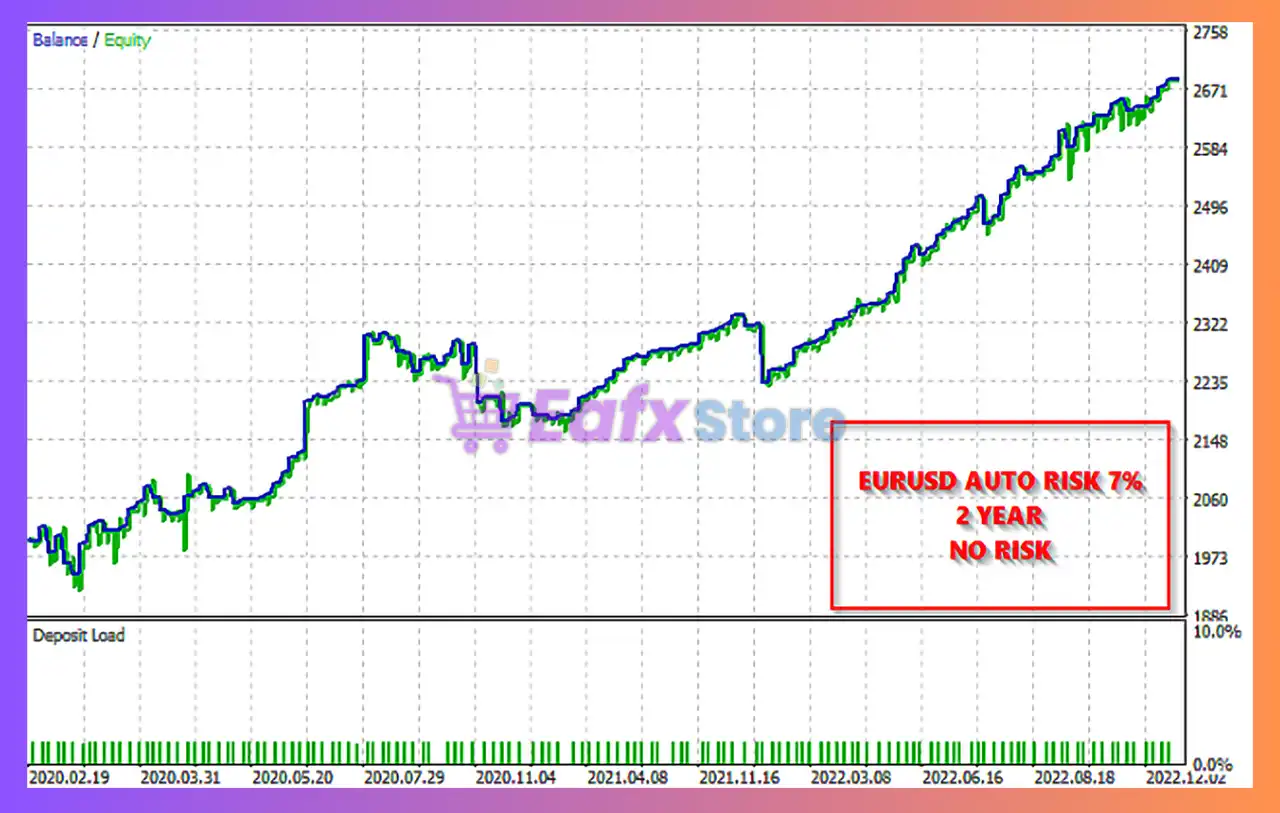
The developer also provides multiple historical backtests demonstrating the EA’s long-term stability.
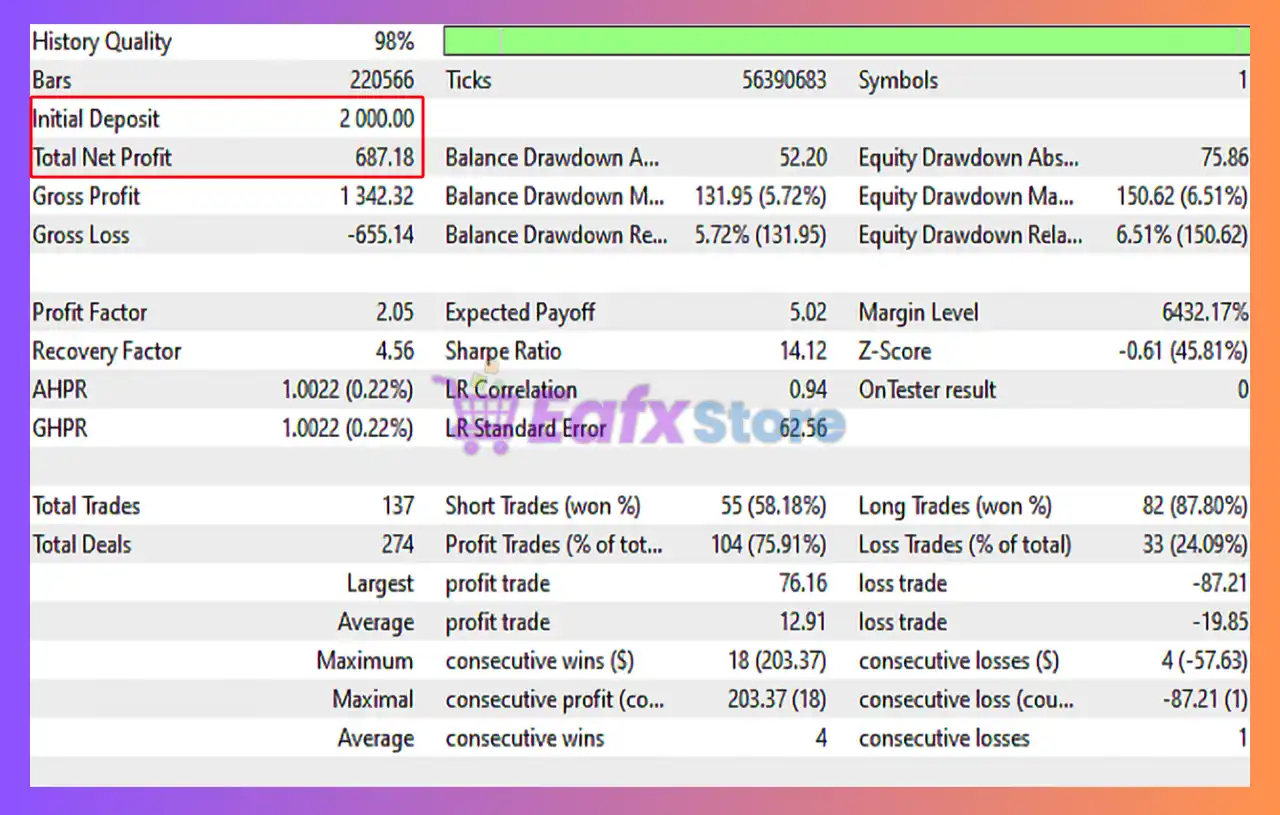
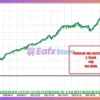
Backtest #1
Buda MT5 Backtest
| Metric | Result |
|---|---|
| Initial Deposit | $2,000 |
| Net Profit | $687.18 |
| Profit Factor | 2.05 |
| Total Trades | 137 |
| Winning Trades | 75.91% |
| Maximum Balance Drawdown | 5.72% |
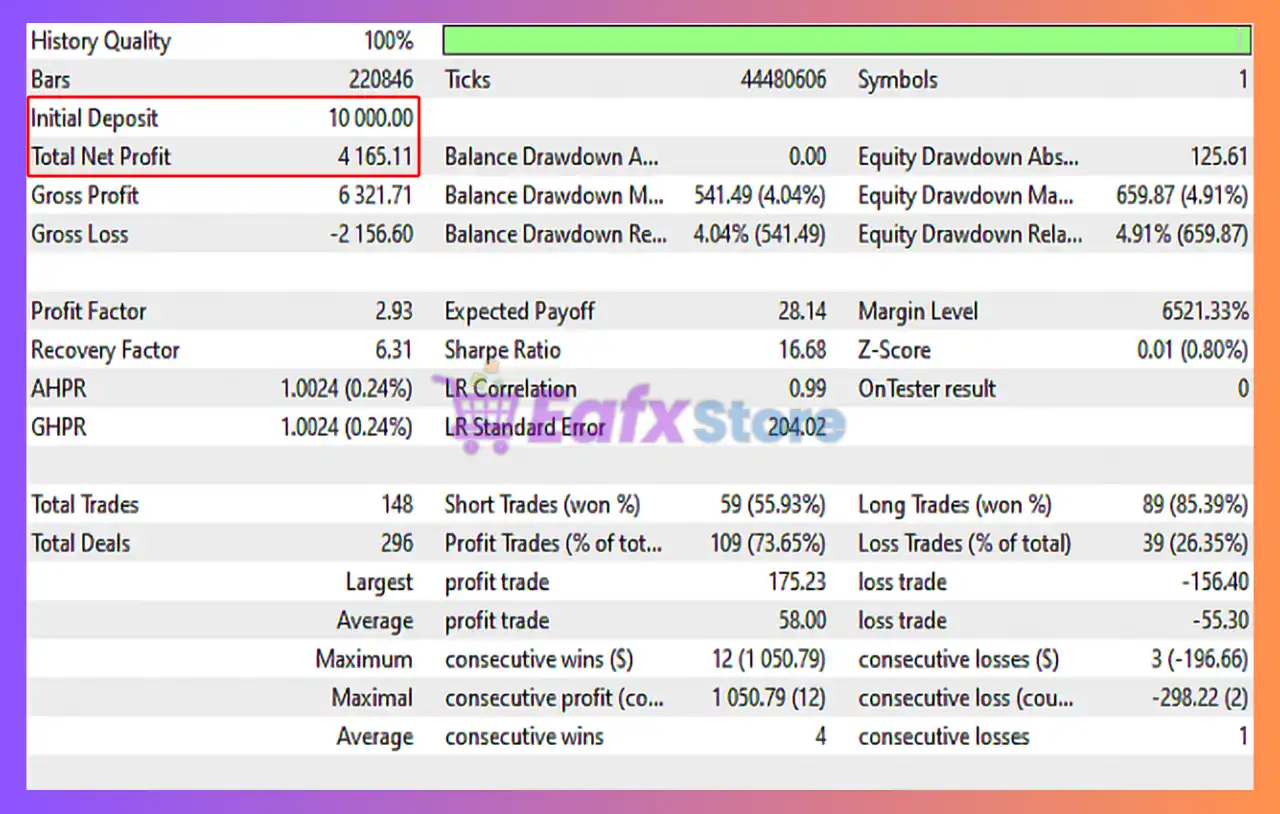
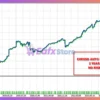
Backtest #2
Buda MT5 Backtests
| Metric | Result |
|---|---|
| Initial Deposit | $10,000 |
| Net Profit | $4,165.11 |
| Profit Factor | 2.93 |
| Total Trades | 148 |
| Winning Trades | 73.65% |
| Maximum Balance Drawdown | 4.04% |
Backtest Summary
The historical tests indicate a favorable balance between profitability and capital preservation. Profit Factors above 2.0, relatively low drawdowns, and win rates exceeding 73% suggest the strategy is designed for steady performance rather than aggressive high-risk growth.
Why Buda MT5 Stands Out
AI Combined with Traditional Analysis
Instead of relying solely on technical indicators, Buda MT5 combines AI-assisted market evaluation with proven indicator confirmations for better trade selection.
Extremely Flexible Configuration
Nearly every aspect of the EA can be customized, including risk levels, technical filters, trading sessions, news protection, GMT synchronization, and money management.
Multi-Currency Automation
The ability to automatically configure and trade multiple currency pairs makes the EA particularly attractive for traders managing diversified Forex portfolios.
Risk Management Features
Dynamic Stop Loss & Smart Take Profit
Automatically manages exits using configurable Stop Loss, Take Profit, and optional hidden protection levels.
Advanced Risk Controls
Includes drawdown limits, spread filters, slippage protection, and adjustable position sizing to help control overall account exposure.
News & Holiday Protection
Suspends trading around major economic events, speeches, holidays, and restricted trading sessions to reduce unnecessary market risk.
Trade Pause & Safety Filters
Can temporarily pause trading after losing positions while continuously monitoring market conditions before allowing new entries.
Recommended Trading Conditions
Recommended settings and parameters to pay attention to from developers and experts:
| Features | Type |
|---|---|
| Trading platform | MetaTrader 5 (MT5) |
| Time frames | M1, M5, M15 |
| Currency pairs | 28 currency pairs |
| Minimum / Recommended deposit | $100 |
| Minimum / Recommended leverage | 1:50+ |
| Product type | Original version |
| Additional services | Unlock and Decompile |
| Recommended brokers | Exness Broker, Icmarkets Broker |
| Recommended VPS | MyfxVPS.com ( Blue VPS, Golden VPS). Lowest Latency, 2 week Free Trial, 100% Free for 12-18 Months. |
Product Download Package?
The download package of the product suite includes:
 Setting (If Any).docx
Installation Guide.docx
 Reviewed by David Easton
Potential Risks
High Configuration Complexity
The EA offers numerous settings, which may require optimization before achieving the best performance.
Performance Depends on Market Conditions
Although AI assists decision-making, prolonged ranging or highly volatile markets may temporarily reduce performance.
Requires Proper Broker Conditions
Low spreads, stable execution, and accurate GMT synchronization help maximize the EA’s efficiency.
No System Can Eliminate Risk
Like any automated trading strategy, Buda MT5 can experience losing trades. Proper position sizing and realistic expectations remain essential.
Who Should Use Buda MT5?
Ideal For
✅ Traders wanting AI-assisted Forex automation.
✅ Multi-currency portfolio traders.
✅ Investors seeking stable long-term performance.
✅ MT5 users who appreciate extensive customization.
✅ Traders focused on disciplined risk management.
Less Suitable For
❌ Traders looking for extremely high-frequency scalping.
❌ Beginners unwilling to optimize settings.
❌ Investors expecting guaranteed profits.
Final Verdict
Buda MT5 is one of the most configurable AI-assisted Forex Expert Advisors available for MetaTrader 5. By combining artificial intelligence, multiple technical confirmations, comprehensive news protection, and advanced money management, it delivers a professional automated trading framework suitable for both retail and experienced traders.
Its strengths lie in flexibility, intelligent risk management, and multi-currency capability rather than aggressive trading. The combination of verified live trading results, solid historical backtests, and extensive safety controls makes Buda MT5 an attractive choice for traders seeking consistent automated Forex trading with a strong emphasis on capital preservation.
🔢 Buda MT5 – Complete Settings Guide and Parameter Explanation
Buda MT5 is an intelligent multi-currency Expert Advisor designed for MetaTrader 5, combining AI-assisted market analysis, customizable technical filters, advanced news protection, automatic time synchronization and flexible risk management.
With support for multiple recommended currency pairs, indicator-based confirmations, and extensive safety controls, Buda MT5 provides traders with a highly configurable environment for automated Forex trading.
Buda MT5 Settings
🔢 Buda MT5 Parameters Explained
Below are the details of the parameters in the advisor’s trading system settings table:
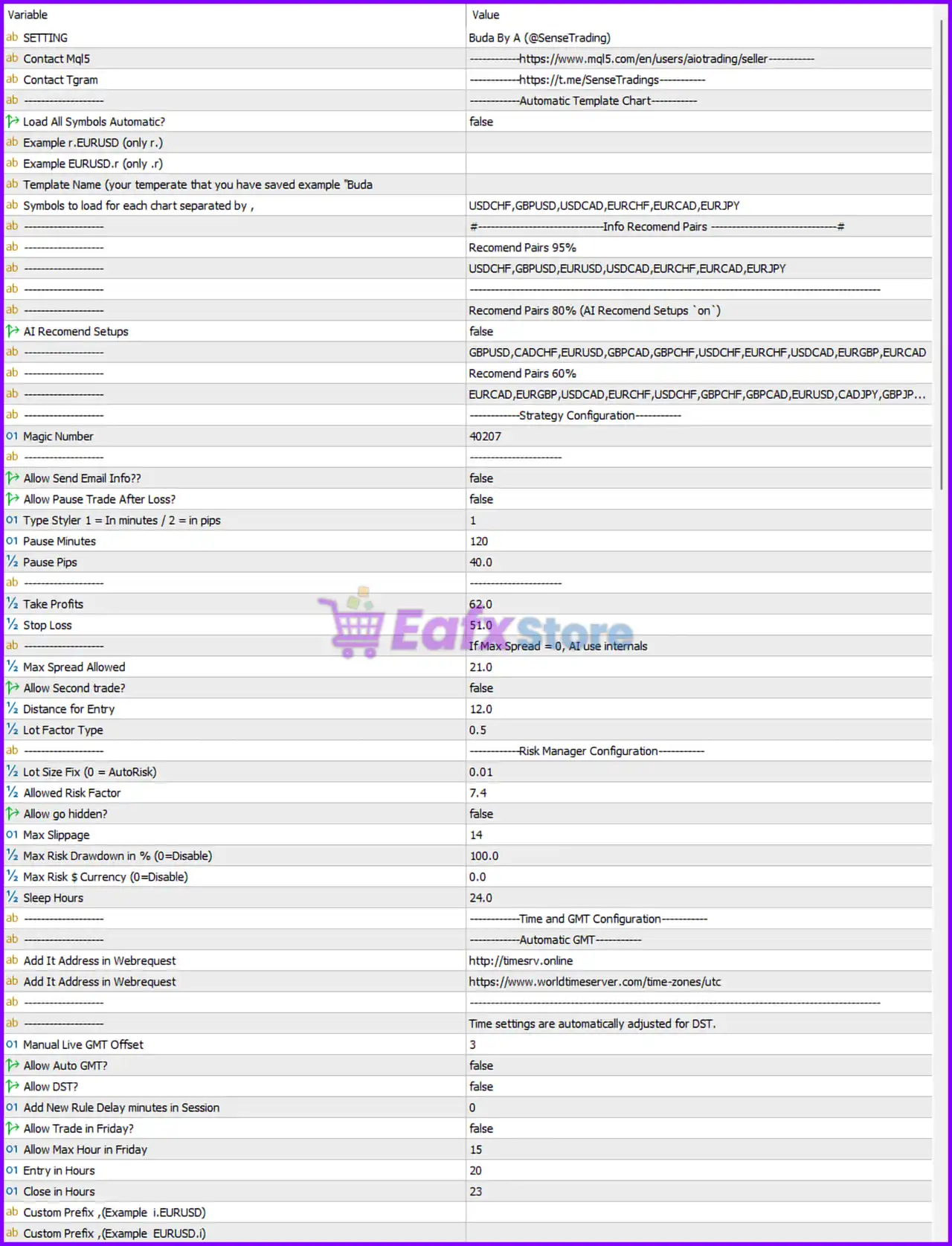
Buda MT5 Settings Panel
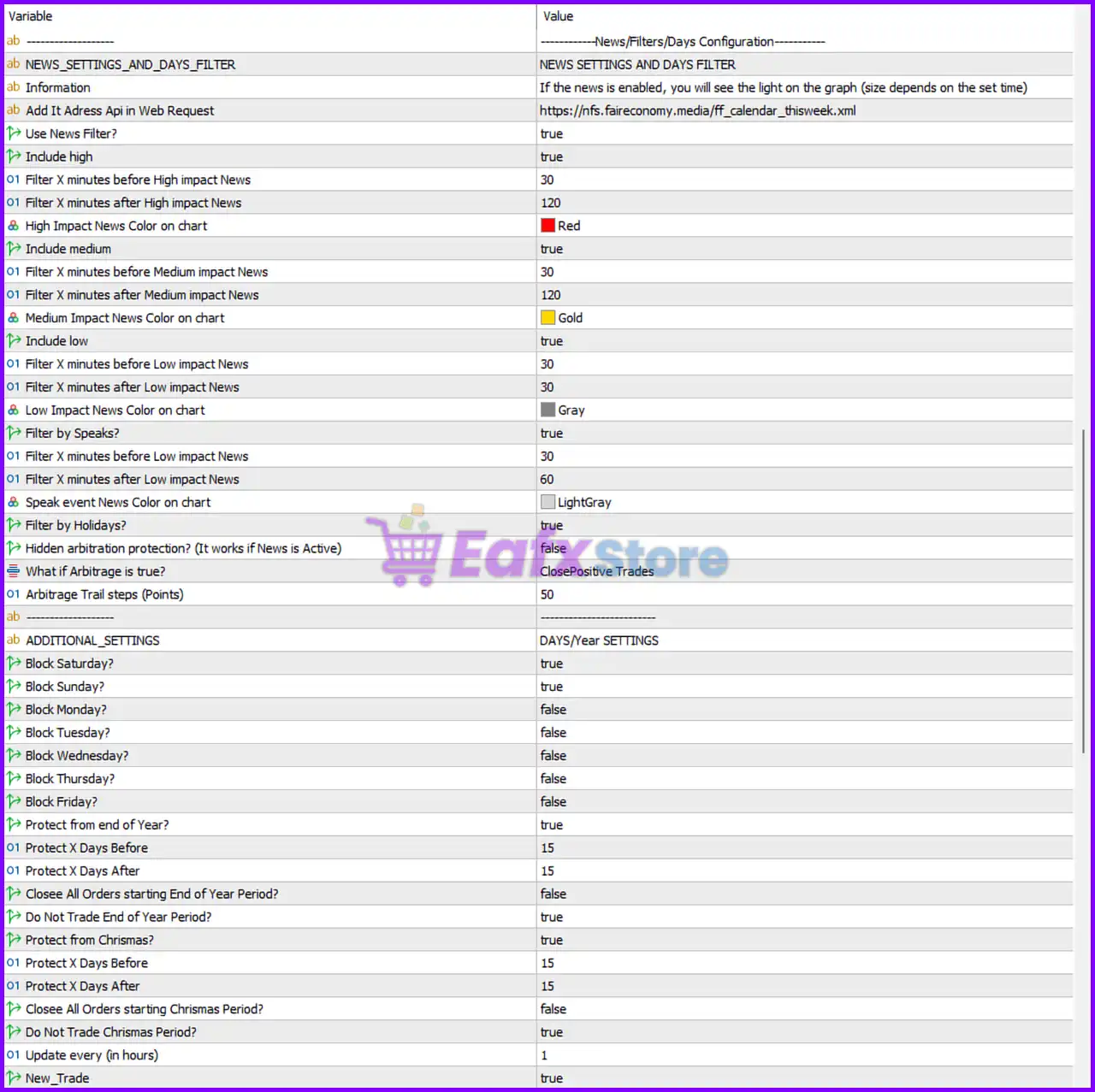
Buda MT5 Setting Panel
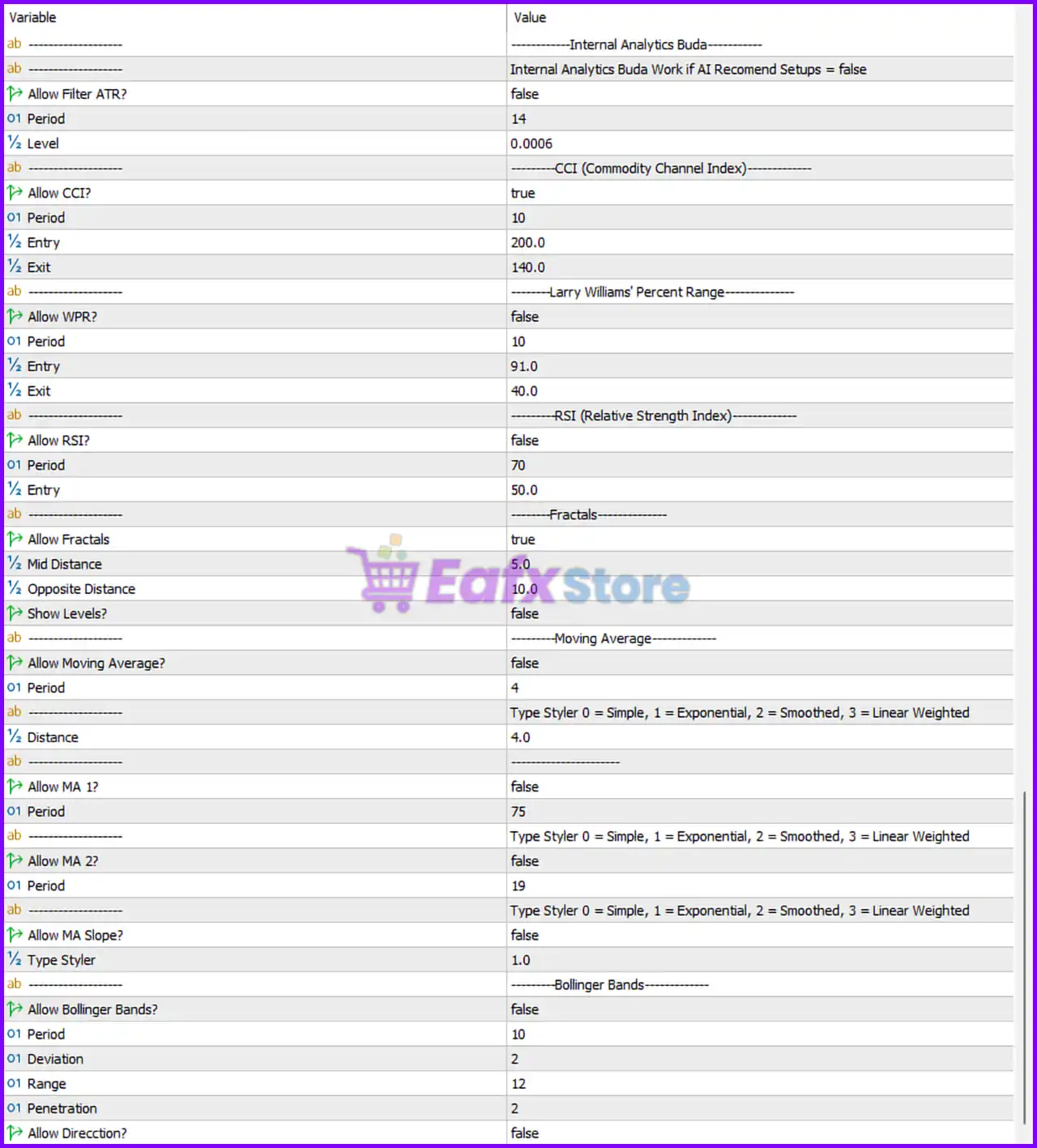
Buda MT5 EA Settings Panel
🔶 Automatic Template Chart
🔹 Load All Symbols Automatic? = false – Automatically loading trading charts is disabled.
🔹 Example r.EURUSD (only r.) – Example broker symbol prefix format.
🔹 Example EURUSD.r (only .r) – Example broker symbol suffix format.
🔹 Template Name (your template that you have saved example “Buda”) – Specifies the chart template name to load.
🔹 Symbols to load for each chart separated by , = USDCHF, GBPUSD, USDCAD, EURCHF, EURCAD, EURJPY – Currency pairs automatically loaded when templates are enabled.
🔶 Recommended Trading Pairs
🔹 Recommend Pairs 95% = USDCHF, GBPUSD, EURUSD, USDCAD, EURCHF, EURCAD, EURJPY – Highest confidence trading pairs recommended by the developer.
🔹 AI Recommend Setups = false – AI-based recommended setup selection is disabled.
🔹 Recommend Pairs 80% = GBPUSD, CADCHF, EURUSD, GBPCAD, GBPCHF, USDCHF, EURCHF, USDCAD, EURGBP, EURCAD – Medium-high confidence recommended symbols.
🔹 Recommend Pairs 60% = EURCAD, EURGBP, USDCAD, EURCHF, USDCHF, GBPCHF, GBPCAD, EURUSD, CADJPY, GBPJPY… – Additional tradable pairs with moderate confidence.
🔶 Strategy Configuration
🔹 Magic Number = 40207 – Unique identifier used by the EA to manage its own trades.
🔹 Allow Send Email Info?? = false – Email notifications are disabled.
🔹 Allow Pause Trade After Loss? = false – Trading continues after losing trades.
🔹 Type Styler 1 = In minutes / 2 = in pips = 1 – Pause logic operates in minutes.
🔹 Pause Minutes = 120 – Trading pauses for 120 minutes after activation.
🔹 Pause Pips = 40.0 – Alternative pause trigger based on 40.0 pips.
🔹 Take Profits = 62.0 – Default Take Profit target is 62.0.
🔹 Stop Loss = 51.0 – Default Stop Loss distance is 51.0.
🔹 Max Spread Allowed = 21.0 – Maximum permitted spread before new entries.
🔹 Allow Second trade? = false – Only one active trade per setup is allowed.
🔹 Distance for Entry = 12.0 – Minimum entry distance between signals.
🔹 Lot Factor Type = 0.5 – Multiplier used when calculating position size.
🔶 Risk Manager Configuration
🔹 Lot Size Fix (0 = AutoRisk) = 0.01 – Uses 0.01 lots when Auto Risk is disabled.
🔹 Allowed Risk Factor = 7.4 – Defines the EA’s overall risk exposure.
🔹 Allow go hidden? = false – Hidden order management is disabled.
🔹 Max Slippage = 14 – Maximum acceptable execution slippage.
🔹 Max Risk Drawdown in % (0=Disable) = 100.0 – Maximum drawdown protection threshold.
🔹 Max Risk $ Currency (0=Disable) = 0.0 – Currency-based loss protection is disabled.
🔹 Sleep Hours = 24.0 – Internal monitoring cycle runs every 24.0 hours.
🔶 Time & GMT Configuration
🔹 Add It Address in WebRequest = http://timesvr.online – External time synchronization server.
🔹 Add It Address in WebRequest = https://www.worldtimeserver.com/time-zones/utc – Backup GMT synchronization server.
🔹 Time settings are automatically adjusted for DST. – Supports daylight saving time adjustments.
🔹 Manual Live GMT Offset = 3 – Manual GMT offset is 3.
🔹 Allow Auto GMT? = false – Automatic GMT detection is disabled.
🔹 Allow DST? = false – Automatic daylight saving adjustment is disabled.
🔹 Add New Rule Delay minutes in Session = 0 – No additional delay before session rules apply.
🔹 Allow Trade in Friday? = false – Friday trading is disabled.
🔹 Allow Max Hour in Friday = 15 – Maximum trading hour on Friday is 15.
🔹 Entry in Hours = 20 – Trading entries begin at hour 20.
🔹 Close in Hours = 23 – Trading session closes at hour 23.
🔹 Custom Prefix (Example i.EURUSD) – Broker symbol prefix support.
🔹 Custom Prefix (Example EURUSD.i) – Broker symbol suffix support.
🔶 News, Filters & Trading Days
🔹 Use News Filter? = true – Enables automatic economic news protection.
🔹 Include High = true – Filters high-impact news events.
🔹 Filter X minutes before High impact News = 30 – Stops trading 30 minutes before high-impact news.
🔹 Filter X minutes after High impact News = 120 – Resumes trading 120 minutes afterward.
🔹 High Impact News Color = Red – High-impact news is displayed in Red.
🔹 Include Medium = true – Enables medium-impact news filtering.
🔹 Filter X minutes before Medium impact News = 30 – Stops trading 30 minutes before medium news.
🔹 Filter X minutes after Medium impact News = 120 – Resumes trading 120 minutes afterward.
🔹 Medium Impact News Color = Gold – Medium-impact events appear in Gold.
🔹 Include Low = true – Enables low-impact news filtering.
🔹 Filter X minutes before Low impact News = 30 – Stops trading 30 minutes before low-impact news.
🔹 Filter X minutes after Low impact News = 30 – Trading resumes 30 minutes afterward.
🔹 Low Impact News Color = Gray – Low-impact events are displayed in Gray.
🔹 Filter by Speaks? = true – Filters speeches by central bank officials.
🔹 Filter X minutes before Speeches = 30 – Stops trading 30 minutes before speeches.
🔹 Filter X minutes after Speeches = 60 – Waits 60 minutes after speeches.
🔹 Speak Event Color = LightGray – Speech events appear in LightGray.
🔹 Filter by Holidays? = true – Enables holiday trading protection.
🔹 Hidden Arbitration Protection = false – Arbitrage protection is disabled.
🔹 What if Arbitrage is true? = ClosePositiveTrades – Closes profitable positions if arbitrage is detected.
🔹 Arbitrage Trail Steps (Points) = 50 – Uses a 50-point trailing step.
🔶 Additional Trading Restrictions
🔹 Block Saturday? = true – No trading on Saturday.
🔹 Block Sunday? = true – No trading on Sunday.
🔹 Block Monday? = false – Monday trading allowed.
🔹 Block Tuesday? = false – Tuesday trading allowed.
🔹 Block Wednesday? = false – Wednesday trading allowed.
🔹 Block Thursday? = false – Thursday trading allowed.
🔹 Block Friday? = false – Friday trading allowed.
🔶 Holiday Protection
🔹 Protect from End of Year? = true – Activates year-end protection.
🔹 Protect X Days Before = 15 – Starts protection 15 days before year-end.
🔹 Protect X Days After = 15 – Ends protection 15 days afterward.
🔹 Close All Orders Starting End of Year Period? = false – Existing trades remain open.
🔹 Do Not Trade End of Year Period? = true – New trades are blocked.
🔹 Protect from Christmas? = true – Enables Christmas trading protection.
🔹 Protect X Days Before Christmas = 15 – Begins protection 15 days before Christmas.
🔹 Protect X Days After Christmas = 15 – Ends protection 15 days after Christmas.
🔹 Close All Orders Starting Christmas Period? = false – Existing trades stay open.
🔹 Do Not Trade Christmas Period? = true – Blocks new trades.
🔹 Update every (in hours) = 1 – Refreshes news every 1 hour.
🔹 New_Trade = true – Allows new trading after all conditions are satisfied.
🔶 Internal Analytics
🔹 Allow Filter ATR? = false – ATR filter is disabled.
🔹 ATR Period = 14 – ATR calculation period.
🔹 ATR Level = 0.0006 – ATR threshold used by the EA.
🔶 Commodity Channel Index (CCI)
🔹 Allow CCI? = true – Enables CCI confirmation.
🔹 CCI Period = 10 – CCI indicator period.
🔹 CCI Entry = 200.0 – Entry threshold.
🔹 CCI Exit = 140.0 – Exit threshold.
🔶 Williams Percent Range (WPR)
🔹 Allow WPR? = false – Williams %R filter is disabled.
🔹 WPR Period = 10 – Indicator period.
🔹 WPR Entry = 91.0 – Entry level.
🔹 WPR Exit = 40.0 – Exit level.
🔶 RSI (Relative Strength Index)
🔹 Allow RSI? = false – RSI confirmation is disabled.
🔹 RSI Period = 70 – RSI calculation period.
🔹 RSI Entry = 50.0 – RSI entry threshold.
🔶 Fractals
🔹 Allow Fractals = true – Enables fractal confirmation.
🔹 Mid Distance = 5.0 – Middle fractal distance.
🔹 Opposite Distance = 10.0 – Opposite fractal confirmation distance.
🔹 Show Levels? = false – Fractal levels are hidden.
🔶 Moving Average Filters
🔹 Allow Moving Average? = false – Main Moving Average filter is disabled.
🔹 Moving Average Period = 4 – Primary MA period.
🔹 Distance = 4.0 – Required MA distance.
🔹 Allow MA 1? = false – Secondary MA 1 is disabled.
🔹 MA 1 Period = 75 – MA1 calculation period.
🔹 Allow MA 2? = false – Secondary MA2 is disabled.
🔹 MA 2 Period = 19 – MA2 calculation period.
🔹 Allow MA Slope? = false – Moving Average slope filter is disabled.
🔹 Type Styler = 1.0 – Uses Exponential Moving Average (EMA) according to the style legend.
🔶 Bollinger Bands
🔹 Allow Bollinger Bands? = false – Bollinger Bands filter is disabled.
🔹 Bollinger Period = 10 – Indicator period.
🔹 Deviation = 2 – Standard deviation multiplier.
🔹 Range = 12 – Bollinger calculation range.
🔹 Penetration = 2 – Required breakout penetration level.
🔹 Allow Direction? = false – Directional Bollinger confirmation is disabled.
🔢 Conclusion
Buda MT5 is a feature-rich AI-assisted Expert Advisor that combines multi-pair trading, advanced risk management, automatic news protection, technical indicator filtering and holiday-aware trading controls.
With configurable ATR, CCI, Fractals, Moving Averages, Bollinger Bands, GMT synchronization, and extensive money management settings, the EA provides traders with exceptional flexibility for optimizing automated Forex trading strategies while maintaining robust risk control.
🔢 FAQs
❓ What is Buda MT5 designed for?
Buda MT5 is an automated multi-currency MetaTrader 5 Expert Advisor that combines AI-assisted market analysis with advanced technical filters and risk management.
❓ Does Buda MT5 support automatic news filtering?
Yes. The EA includes filters for high, medium, and low-impact news, speeches, holidays, Christmas, and year-end trading periods.
❓ Can I customize technical indicators?
Yes. Buda MT5 allows configuration of ATR, CCI, Williams %R, RSI, Fractals, Moving Averages, and Bollinger Bands.
❓ Is automatic risk management available?
Yes. The EA supports configurable lot sizing, drawdown protection, spread filtering, slippage control, and multiple money management options.
❓ Can Buda MT5 trade multiple Forex pairs?
Yes. The EA supports multi-symbol trading and includes several developer-recommended currency pair lists with different confidence levels.
User Reviews
Only logged in customers who have purchased this product may leave a review.
❓ What is Buda MT5 designed to do?
Buda MT5 is an AI-assisted multi-currency Expert Advisor that combines technical analysis, news filtering, and flexible risk management for automated trading.
❓ Which currency pairs are recommended for Buda MT5?
Buda MT5 is optimized for pairs such as EURUSD, GBPUSD, USDCHF, USDCAD, EURCHF, EURCAD, and EURJPY, with AI-supported pair recommendations.
❓ Does Buda MT5 include an economic news filter?
Yes. Buda MT5 features an advanced news filter that pauses trading before and after high, medium, and low-impact events to help reduce unnecessary market risk.
❓ Can Buda MT5 trade multiple currency pairs automatically?
Yes. Buda MT5 supports automatic multi-chart loading and multi-currency trading, allowing users to manage several recommended pairs simultaneously.
❓ How does Buda MT5 manage trading risk?
Buda MT5 offers adjustable risk factors, spread and slippage protection, dynamic Stop Loss and Take Profit, plus maximum drawdown controls for safer automation.
❓ Does Buda MT5 support AI-assisted trading decisions?
Yes. Buda MT5 uses AI-assisted market analysis to evaluate trading conditions, optimize risk, and improve trade selection based on predefined market patterns.
❓ Can I customize trading sessions in Buda MT5?
Yes. Buda MT5 allows you to define trading hours, weekdays, GMT settings, holiday protection, and session filters for greater control over automated trading.
❓ Which technical indicators are available in Buda MT5?
Buda MT5 supports CCI, Fractals, ATR, Moving Averages, RSI, Williams %R, and Bollinger Bands, allowing traders to customize confirmation filters.
❓ Does Buda MT5 pause trading after a losing trade?
Yes. Buda MT5 can pause trading after a Stop Loss for a user-defined period, helping the market stabilize before opening new positions.
❓ Is Buda MT5 suitable for beginners and advanced traders?
Yes. Buda MT5 provides simple default settings for beginners while offering extensive customization, AI tools, and risk controls for experienced traders.
-
 Price range: $89.00 through $599.00
 -
 Price range: $89.00 through $599.00
 -
 Price range: $89.00 through $599.00
 -
 Price range: $89.00 through $599.00
-
 2
2 -
 5Price range: $89.00 through $599.00
 -
 3Price range: $89.00 through $599.00
 -
 0
0
There are no reviews yet.