





Cetus EA MT5 (Latest version) - Unlimited

Subscriptions for Special Plan
- 30 EA package is more economical!
- Special package with 99%
- Download 1 EA/Day

Subscriptions for Premium Membership
- Download Unlimited in 1 Year
- Get 100% Discount
- Get free access to all

Subscriptions for Gold Membership
- 1 Year Membership
- Get 100% Discount
- Access EA+Indicator+Course
Frequently bought together 🎁
Add these products to enhance your purchase


What is Cetus EA?
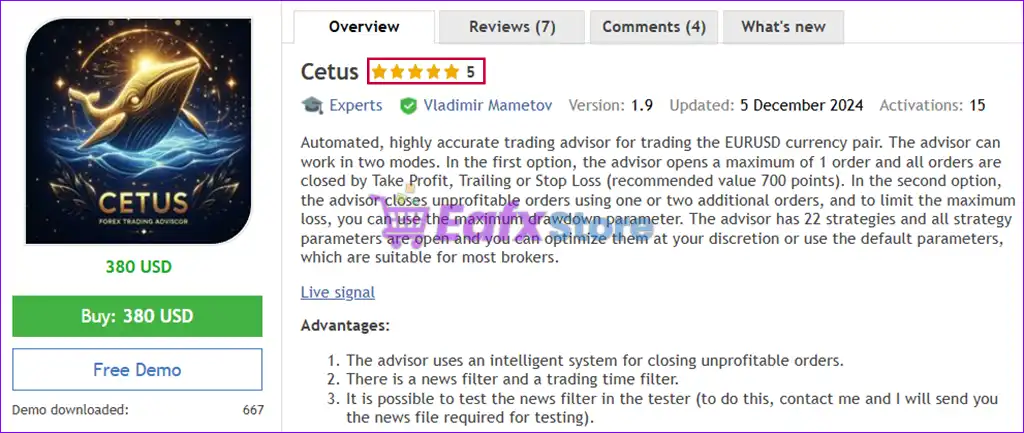
Cetus EA is a high-precision Expert Advisor (EA) designed for automated trading on EURUSD, combining multiple indicators with advanced execution logic. It emphasizes stability, adaptability, and disciplined risk management, using structured stop loss, trailing profit control and intelligent trade handling to ensure consistent performance.
 Vendor Website: View here
About the Author
This product is compiled by Vladimir Mametov. This author has more than +11 years of experience working on MQL5 with many famous products such as Cetus EA MT5, Cortex Aurex EA MT5, Quantum Index EA MT5, Gold System EA MT5, Nucleus EA MT5, Cetus EA MT4 and other advisors. Among them, Cetus EA is his best performing products.
Delivery time 24h-48h after payment.
Refund if not delivered.
You will receive the current version without any limitations (ID+Time).
Cetus EA MT5 Overview
Key Features of Cetus EA for MT5
🔹 Multi-Strategy Architecture: Integrates 21 strategies to diversify entries and reduce dependency on a single market condition.
🔹 Flexible Risk Control: Supports automatic or fixed lot sizing with a maximum drawdown limit to protect account equity.
🔹 Smart Loss Management: Uses controlled Hedging, optional Averaging or Stop Loss (SL) logic to manage adverse moves.
🔹 News & Time Filters: Avoids trading during high-impact events and allows precise control over trading sessions.
Why Choose & Use Cetus EA?
🔹 Stability-Oriented Design: Built for traders who prioritize controlled risk and long-term consistency.
🔹 Highly Customizable Logic: Open parameters allow optimization or safe use with default broker-tested settings.
🔹 Risk-Aware Automation: Reduces emotional decisions by enforcing structured trade and exposure rules.
🔹 Marketplace-Ready Solution: A professional EURUSD EA suitable for disciplined automated trading accounts.
Cetus EA MT5 Review
Cetus EA Live Signal Results
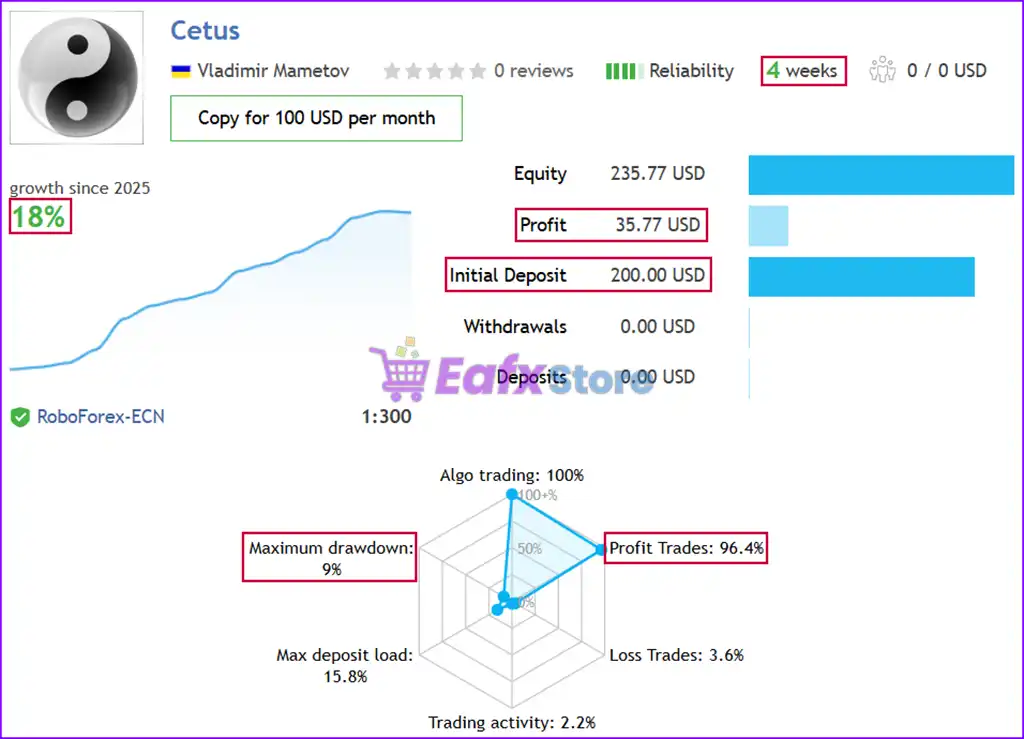
The Cetus EA achieved impressive profit performance when trading with EURUSD pair. Trading results on real account for 4 consecutive weeks of trading.
✅ Initial Deposit: $200
✅ Growth Rate: +18%
✅ Win Rate (% of total): 96.4%
✅ Maximum Drawdown: 9%
Cetus EA Live Signal
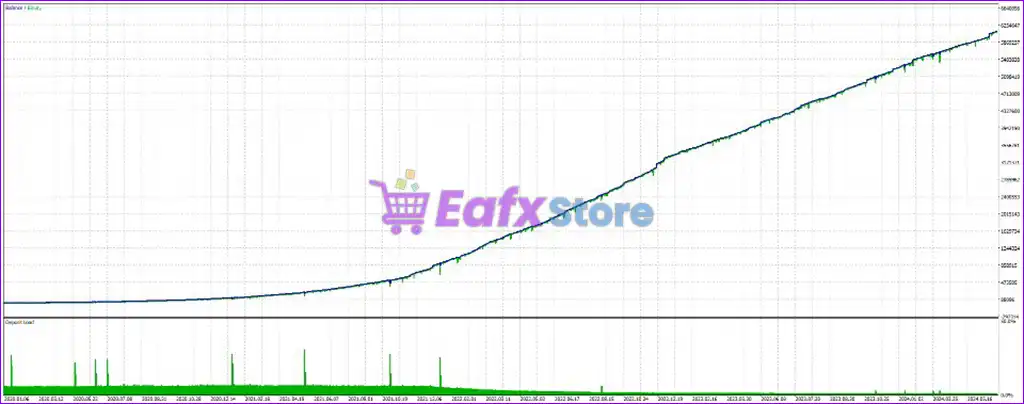
Cetus EA Backtest Results
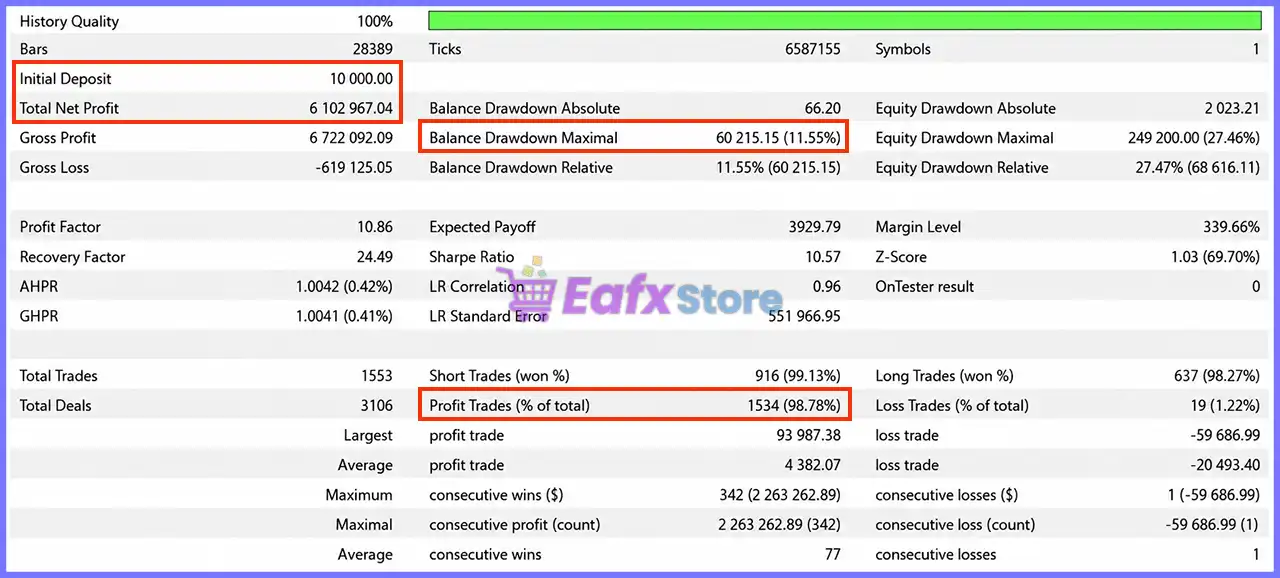
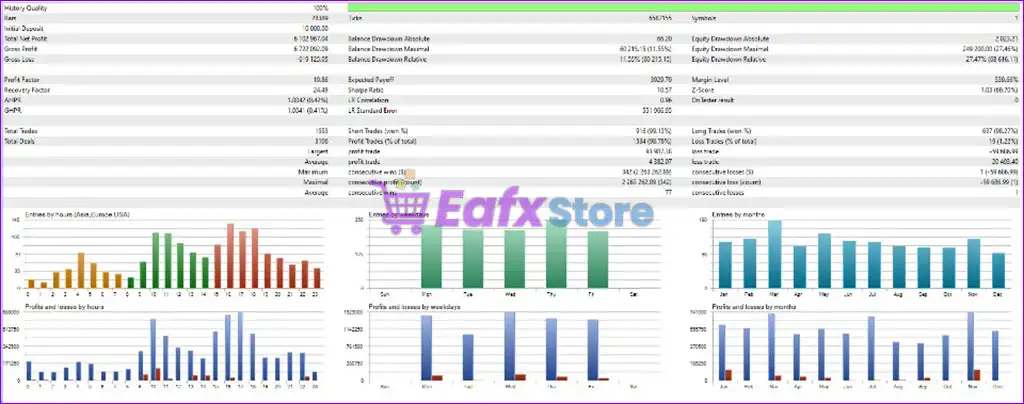
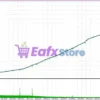
The Cetus EA has an impressive long-term profit performance in trades with EURUSD, the advisor shows impressive returns when backtesting.
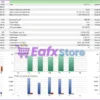
 Initial Deposit: $10,000
Total Net Profit: $6.1 million
Win Rate: 98.78%
Maximum Drawdown: 11.55%
Cetus EA Backtest Results
What is the Cetus EA Trading Strategy?
🔹 Multi-Strategy Signal Generation: Uses combined logic to identify high-probability entries.
🔹 Trailing Profit Capture System: Locks in gains while allowing trades to extend profits.
🔹 Breakeven Protection Mechanism: Attempts to close trades at zero loss when momentum fades.
🔹 Pullback-Based Loss Reduction: Closes losing trades during retracements to minimize drawdown.
🔹 Time-Filtered Market Execution: Trades only during optimal market conditions.
Is Cetus EA MT5 safe?
Cetus EA demonstrates remarkable potential in delivering stable and reliable profits, making it a reliable tool in the forex market. Cetus EA is highly regarded by the MQL5 community in many aspects and has gained the trust of its users.
⭐⭐⭐⭐⭐ Petr Tesnar (2024.12.05)
“One of the best strategies I’ve ever used. I highly recommend!!! Simple setup, accurate trades, no grid or martingale, live signal. Very professional EA.”
⭐⭐⭐⭐⭐ Natalja Moisejonok (2024.10.09)
“Its again super EA from Vlad, i use it 1 week with other EA Halcyon with using proparly money managment risk. Like As always Thank You Vlad for Great EA.”
⭐⭐⭐⭐⭐ Patcharamql4 (2024.08.01)
“As result of back-testing, it’s very good. the strategies of advisor is cover almost situation of trading market. DD value should be set as the risk you want.”
Trading Specifications
Recommended settings and parameters to pay attention to from developers and experts:
| Features | Type |
|---|---|
| Trading platform | MetaTrader 5 (MT5) |
| Time frames | H1 (60 minute chart) |
| Currency pairs | EURUSD |
| Minimum / Recommended deposit | $100+ |
| Minimum / Recommended leverage | 1:100+ |
| Product type | NoDLL / Unlimited |
| Additional services | Unlock and Decompile |
| Recommended brokers | Exness Broker, Icmarkets Broker |
| Recommended VPS | MyfxVPS.com ( Blue VPS, Golden VPS). Lowest Latency, 2 week Free Trial, 100% Free for 12-18 Months. |
Product Download Package?
The download package of the product suite includes:
✅ Experts: Cetus EA.ex5
➡️ Reviewed by David Easton
Conclusion
In short, Cetus EA MT5 stands out as a powerful and reliable trading tool designed for MetaTrader 5 users, offering exceptional accuracy and automation. Developed by expert MQL5 programmer Vladimir Mametov, this expert advisor (EA) integrates advanced risk management features, customizable strategies and dual trading modes to suit different trading styles.
🔢 Cetus EA MT5 – Complete Settings Guide and Parameter Explanation
Cetus EA is a fully automated MetaTrader 5 Expert Advisor designed to execute both Buy and Sell trades with built-in money management, trailing stop functionality, news filtering and customizable chart visualization.
The EA offers flexible risk controls, automatic lot sizing, trading session management, and visual dashboard features, making it suitable for traders seeking an adaptable and user-friendly automated trading solution.
Cetus EA MT5 Settings
🔢 Cetus EA MT5 Parameters Explained
Below are the details of the parameters in the advisor’s trading system settings table:
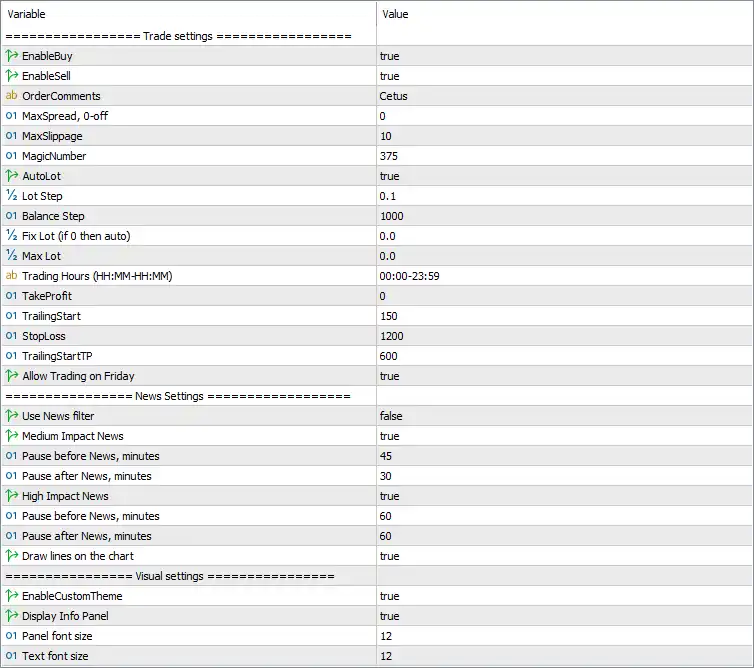
Cetus EA MT5 Settings Panel
🔄 Trade Settings
🔹 EnableBuy = true – Enables the EA to open Buy positions automatically.
🔹 EnableSell = true – Enables the EA to open Sell positions automatically.
🔹 OrderComments = Cetus – Adds the trade comment “Cetus” to every order placed by the EA.
🔹 MaxSpread, 0-off = 0 – Maximum spread filter is disabled because the value is 0.
🔹 MaxSlippage = 10 – Allows a maximum execution slippage of 10 points.
🔹 MagicNumber = 375 – Unique identifier (375) used by the EA to manage its own trades.
🔹 AutoLot = true – Enables automatic lot size calculation based on the account settings.
🔹 Lot Step = 0.1 – Increases the lot size by 0.1 for each balance step when Auto Lot is enabled.
🔹 Balance Step = 1000 – Every 1,000 units of account balance are used as the reference for automatic lot sizing.
🔹 Fix Lot (if 0 then auto) = 0.0 – Fixed lot size is disabled; the EA uses automatic lot sizing.
🔹 Max Lot = 0.0 – No maximum lot size limit is imposed because the value is 0.0.
🔹 Trading Hours (HH:MM-HH:MM) = 00:00-23:59 – The EA is allowed to trade continuously throughout the day.
🔹 TakeProfit = 0 – Fixed Take Profit is disabled.
🔹 TrailingStart = 150 – Trailing Stop begins after the trade gains 150 points.
🔹 StopLoss = 1200 – Sets a Stop Loss distance of 1,200 points.
🔹 TrailingStartTP = 600 – Trailing logic activates after the trade reaches 600 points of profit.
🔹 Allow Trading on Friday = true – Trading is permitted on Fridays.
🔄 News Settings
🔹 Use News filter = false – The economic news filter is disabled.
🔹 Medium Impact News = true – Medium-impact economic news events are recognized by the EA.
🔹 Pause before News, minutes = 45 – Stops opening new trades 45 minutes before medium-impact news.
🔹 Pause after News, minutes = 30 – Resumes trading 30 minutes after medium-impact news.
🔹 High Impact News = true – High-impact economic news events are recognized by the EA.
🔹 Pause before News, minutes = 60 – Stops opening new trades 60 minutes before high-impact news.
🔹 Pause after News, minutes = 60 – Resumes trading 60 minutes after high-impact news.
🔹 Draw lines on the chart = true – Displays news event markers directly on the trading chart.
🔄 Visual Settings
🔹 EnableCustomTheme = true – Enables the EA’s custom chart theme.
🔹 Display Info Panel = true – Displays the information panel on the chart.
🔹 Panel font size = 12 – Sets the information panel font size to 12.
🔹 Text font size = 12 – Sets the general chart text size to 12.
🔢 Conclusion
Cetus EA MT5 provides a streamlined yet powerful automated trading environment by combining automatic Buy and Sell execution, dynamic lot sizing, trailing stop management, configurable trading sessions and optional economic news handling.
With customizable visual settings and built-in money management features, the EA offers traders a flexible framework for adapting automated strategies while maintaining control over execution and risk.
🔢 FAQs
❓ What is Cetus EA MT5?
Cetus EA MT5 is a fully automated Expert Advisor for MetaTrader 5 that supports automatic Buy and Sell trading with built-in money management and trailing stop functionality.
❓ Does Cetus EA MT5 support automatic lot sizing?
Yes. The EA includes an Auto Lot feature that calculates position sizes based on the account balance and the configured Balance Step.
❓ Can I use a fixed lot size instead of Auto Lot?
Yes. You can specify a fixed lot size by changing the Fix Lot parameter from 0.0 to your preferred lot size.
❓ Does Cetus EA MT5 include an economic news filter?
Yes. The EA supports configurable filters for medium- and high-impact news events, including customizable pause times before and after each event.
❓ Can I customize the trading interface?
Yes. Cetus EA MT5 allows you to enable a custom chart theme, display an information panel, and adjust both panel and text font sizes for better visibility.
User Reviews
Only logged in customers who have purchased this product may leave a review.
1. What is Cetus EA, and how does it work?
Cetus EA is an automated trading advisor (Expert Advisor) designed for the EURUSD pair on MetaTrader 4. It uses advanced algorithms and customizable strategies to execute trades with high accuracy.
2. Is Cetus EA suitable for beginners?
Yes, Cetus EA is beginner-friendly. It comes with 22 pre-built strategies and customizable parameters, making it adaptable for traders of all experience levels.
3. What are the main trading modes available in Cetus EA?
Cetus EA offers two modes:
Single Order Mode: Trades one position at a time with strict risk management.
Martingale/Averaging Mode: Uses additional orders to recover losses, with a maximum drawdown limit for risk control.
4. What is the minimum deposit required to use Cetus EA?
The recommended minimum deposit is $100, but for better performance and stability, a higher amount is advised.
5. How does Cetus EA handle risk management?
Cetus EA includes several risk management features, such as a maximum drawdown setting, a news filter to avoid trading during high volatility, and trading time filters to operate in specific market sessions.
6. What is the expected profitability of Cetus EA?
Based on live trading results, Cetus EA achieved an 18% profit in 4 weeks with a 96.4% win rate and a maximum drawdown of 9%.
7. Can I backtest Cetus EA before using it on a live account?
Yes, Cetus EA allows comprehensive backtesting with historical data, helping traders optimize settings before live trading.
8. Which brokers and VPS services are recommended for Cetus EA?
Recommended brokers include Exness Broker and HTFX Broker. For VPS services, MyfxVPS.com is suggested due to its low latency and free trial options.
9. Does Cetus EA support other currency pairs besides EURUSD?
Cetus EA is specifically optimized for EURUSD and may not perform as effectively on other pairs.
-
 Original price was: $1,200.00.$249.00Current price is: $249.00.
 -
 Original price was: $1,000.00.$249.00Current price is: $249.00.
 -
 Original price was: $1,999.00.$249.00Current price is: $249.00.
 -
 Original price was: $999.00.$249.00Current price is: $249.00.
-
 0Original price was: $1,299.00.$249.00Current price is: $249.00.
 -
 0Original price was: $2,288.00.$249.00Current price is: $249.00.
 -
 0Original price was: $199.00.$179.00Current price is: $179.00.
 -
 1Original price was: $699.00.$249.00Current price is: $249.00.
There are no reviews yet.