


ClevrFX EA MT4 v3.0 with SetFiles (Unlimited)

Subscriptions for Special Plan
- 30 EA package is more economical!
- Special package with 99%
- Download 1 EA/Day

Subscriptions for Premium Membership
- Download Unlimited in 1 Year
- Get 100% Discount
- Get free access to all

Subscriptions for Gold Membership
- 1 Year Membership
- Get 100% Discount
- Access EA+Indicator+Course
Frequently bought together 🎁
Add these products to enhance your purchase



What is ClevrFX EA?
ClevrFX EA is a specialized trading expert advisor, packed with advanced features that make this tool used by many PropFirms traders to overcome challenges. At the same time EA’s profit performance has been verified by Myfxbook.
🔶 Vendor Website: View here
Key Features of ClevrFX EA
🔹 Protecting equity: Helps preserve investment capital, minimizing risk of loss due to market fluctuations.
🔹 Smart DD Recovery: Automatically adjust trading strategies to quickly recover from losses.
🔹 Compatible with Prop Firm: Works effectively with equity trading companies, helping Traders easily participate and take advantage of trading opportunities.
🔹 Automatic lot sizing: Calculate the optimal trading size based on acceptable risk level and available capital.
🔹 Spread control: Monitor and adjust the difference between the buying price and selling price, ensuring you always get the best price when trading.
Key Advantages of Using Clevrfx EA
🔹 Portfolio is 100% verified by myfxbook: Ensuring transparency and reliability of trading performance.
🔹 Beginner-friendly: Easy to use and suitable for even those new to trading.
🔹 Proven Performance: 3-year audited track record shows high returns with low risk.
🔹 Automatically update Market information: Continuously monitor the market to ensure trading strategies are always consistent with current market conditions.
🔹 Reliable trading methods: Uses proven mathematical and statistical methods, eliminating emotional factors and uncertain decisions.
CLEVRFX EA MT4 Review
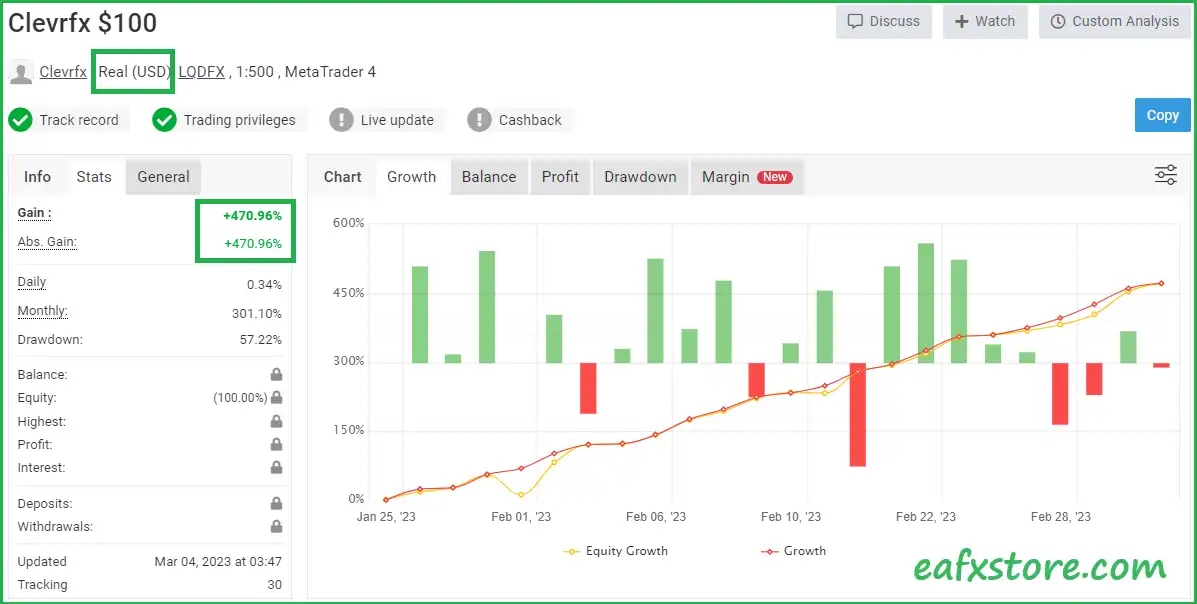
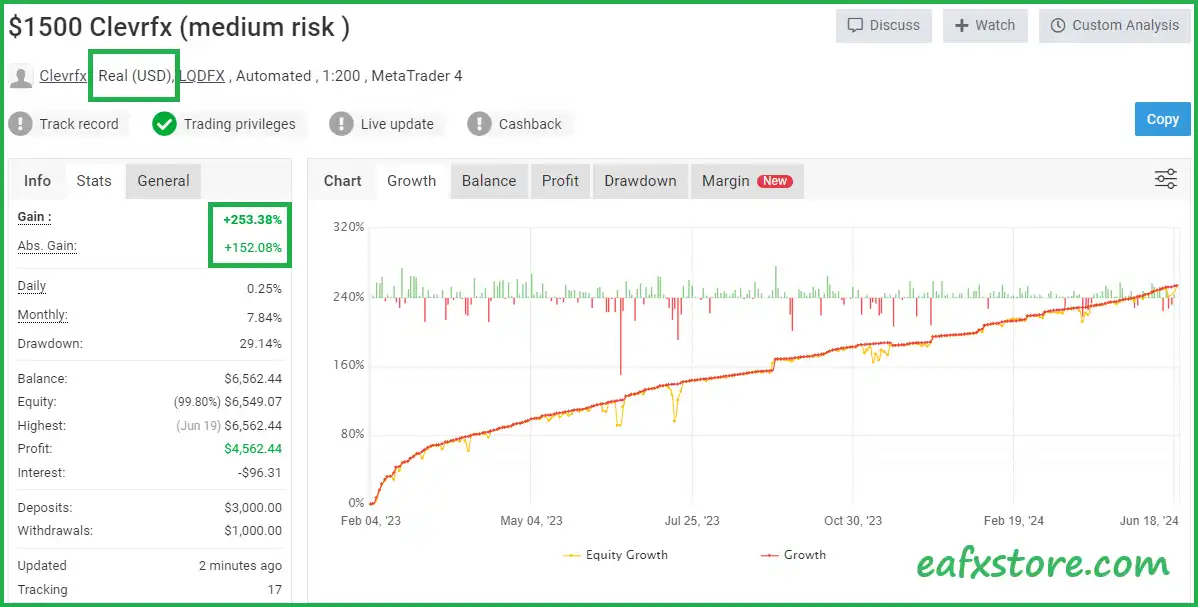
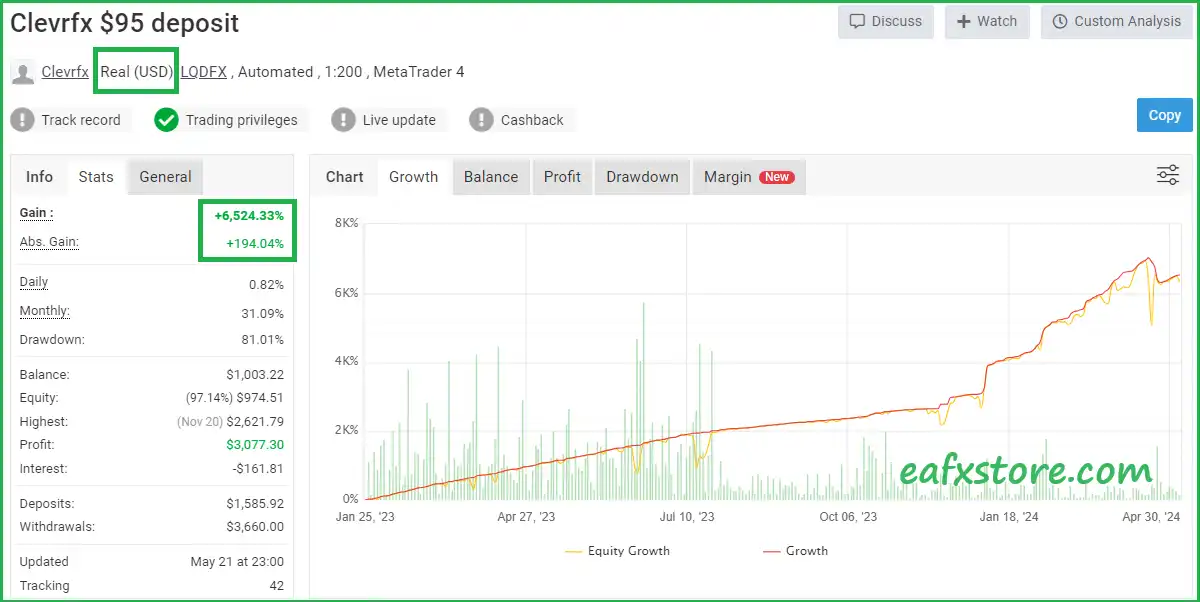
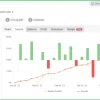
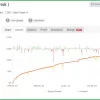
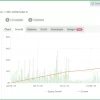
The real trading performance on real accounts of CLEVRFX EA is thoroughly verified by Myfxbook and achieves high profitability. The advisor executes trades with EURUSD and GBPUSD pairs and achieves fixed performance in changing market conditions.
✅ Live Myfxbook 1: Click here
✅ Live Myfxbook 2: Click here
✅ Live Myfxbook 3: Click here
CLEVRFX EA MT4 Review
CLEVRFX EA Reviews
CLEVRFX EA MT4 Reviews
Trading Specifications
Recommended settings and parameters to pay attention to from developers and experts:
| Features | Type |
|---|---|
| Trading platform | MetaTrader 4 (MT4) |
| Time frames | M5 to H1 |
| Currency pairs | EURUSD and GBPUSD |
| Minimum / Recommended deposit | $1,000 or use mini, micro or Cent Account. |
| Minimum / Recommended leverage | 1:30 |
| Setup files | Available |
| Product type | NoDLL / Fix |
| Additional services | Unlock and Decompile |
| Recommended brokers | Exness Broker, Icmarkets Broker |
| Recommended VPS | MyfxVPS.com ( Blue VPS, Golden VPS). Lowest Latency, 2 week Free Trial, 100% Free for 12-18 Months. |
What’s in the package?
The download package of the product suite includes:
Experts
✅ ClevrFX EA v3.0.ex4
SetFiles
✅ CleverFx_Low risk.set
✅ CleverFx_Semi auto.set
✅ CleverFx_Fully auto.set
➡️ Reviewed by David Easton
Conclusion: Secure Your Trading Future with CLEVRFX EA Automation
In short, CLEVRFX EA stands out as a beginner-friendly Expert Advisor (EA) that bridges the gap between complex math and simple execution. With automatic lot sizing and strict spread control, it optimizes every trade for maximum equity protection. Trust in a system with 3 years of proven performance and real-time market updates.
🔢 ClevrFX EA MT4 Settings Guide
ClevrFX EA MT4 is a flexible automated trading Expert Advisor built around configurable order management, risk controls, RSI and moving-average filters, drawdown recovery, trading schedules, and an integrated economic-news management system. The supplied configuration uses Medium Risk, manual lot sizing, progressive trade-distance controls, RSI confirmation, MA filtering, and a detailed news calendar covering AUD, CAD, EUR, GBP, NZD and USD.
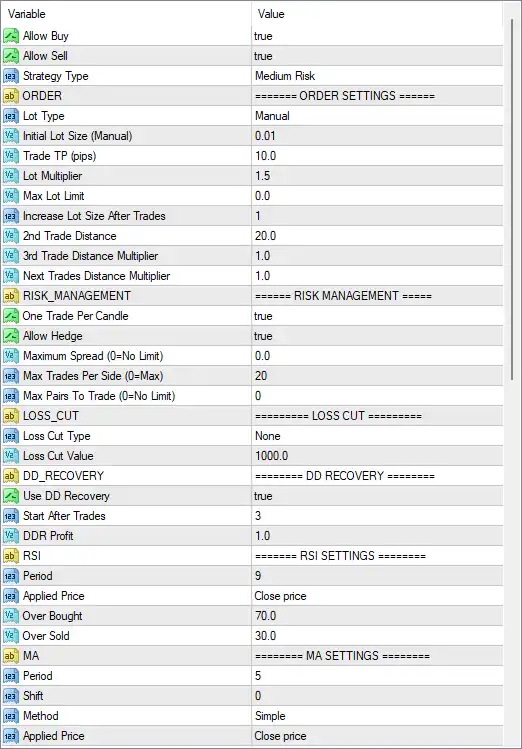
ClevrFX EA MT4 Settings Panel
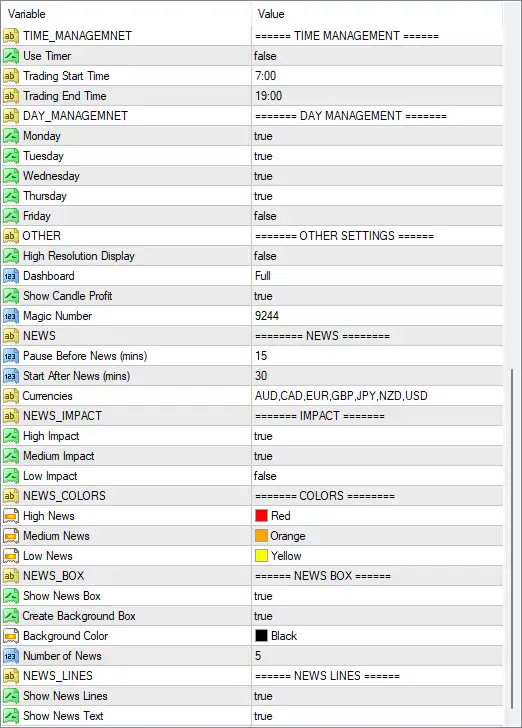
ClevrFX EA Settings Panel
Order Settings
🔹 Allow Buy: true — Enables the EA to open Buy trades.
🔹 Allow Sell: true — Enables the EA to open Sell trades.
🔹 Strategy Type: Medium Risk — Selects the EA’s Medium Risk strategy profile.
🔹 Lot Type: Manual — Uses manually specified lot sizing rather than automatic lot calculation.
🔹 Initial Lot Size (Manual): 0.01 — Sets the initial trade volume to 0.01 lots.
🔹 Trade TP (pips): 10.0 — Sets the configured Take Profit target to 10.0 pips.
🔹 Lot Multiplier: 1.5 — Applies a 1.5× multiplier when increasing lot size according to the EA’s trade-management logic.
🔹 Max Lot Limit: 0.0 — Sets the maximum lot limit to 0.0, which the panel indicates is used as the configured limit value.
🔹 Increase Lot Size After Trades: 1 — Sets the trade count threshold for increasing the lot size to 1.
🔹 2nd Trade Distance: 20.0 — Sets the distance for the second trade to 20.0 pips.
🔹 3rd Trade Distance Multiplier: 1.0 — Applies a 1.0× multiplier to the third-trade distance.
🔹 Next Trades Distance Multiplier: 1.0 — Applies a 1.0× multiplier to the distance used for subsequent trades.
Risk Management
🔹 One Trade Per Candle: true — Limits the EA to one trade per candle, helping prevent repeated entries within the same candle.
🔹 Allow Hedge: true — Allows Buy and Sell positions to coexist when the EA’s trading conditions permit hedging.
🔹 Maximum Spread (0=No Limit): 0.0 — Sets the maximum spread filter to 0.0; according to the parameter description, 0 means No Limit.
🔹 Max Trades Per Side (0=Max): 20 — Allows up to 20 trades per side.
🔹 Max Pairs To Trade (0=No Limit): 0 — Sets the pair limit to 0, meaning No Limit according to the parameter description.
Loss Cut
🔹 Loss Cut Type: None — Disables the specified loss-cut mechanism.
🔹 Loss Cut Value: 1000.0 — Sets the loss-cut value to 1000.0; it is not actively applied while Loss Cut Type is None.
DD Recovery
🔹 Use DD Recovery: true — Enables the drawdown recovery function.
🔹 Start After Trades: 3 — Activates DD recovery after 3 trades.
🔹 DDR Profit: 1.0 — Sets the DD Recovery profit parameter to 1.0.
RSI Settings
🔹 RSI Period: 9 — Uses an RSI calculation period of 9.
🔹 RSI Applied Price: Close price — Calculates RSI using the Close price.
🔹 RSI Over Bought: 70.0 — Defines 70.0 as the overbought threshold.
🔹 RSI Over Sold: 30.0 — Defines 30.0 as the oversold threshold.
MA Settings
🔹 MA Period: 5 — Uses a moving-average period of 5.
🔹 MA Shift: 0 — Applies an MA shift of 0, meaning no shift is applied.
🔹 MA Method: Simple — Uses the Simple Moving Average (SMA) calculation method.
🔹 MA Applied Price: Close price — Calculates the moving average using the Close price.
Time Management
🔹 Use Timer: false — Disables the EA’s time-based trading timer.
🔹 Trading Start Time: 7:00 — Defines 07:00 as the configured trading start time when timer-based management is used.
🔹 Trading End Time: 19:00 — Defines 19:00 as the configured trading end time when timer-based management is used.
Day Management
🔹 Monday: true — Enables trading on Monday.
🔹 Tuesday: true — Enables trading on Tuesday.
🔹 Wednesday: true — Enables trading on Wednesday.
🔹 Thursday: true — Enables trading on Thursday.
🔹 Friday: false — Disables trading on Friday.
Other Settings
🔹 High Resolution Display: false — Disables the high-resolution display option.
🔹 Dashboard: Full — Uses the Full dashboard display mode.
🔹 Show Candle Profit: true — Displays candle profit information on the chart or dashboard.
🔹 Magic Number: 9244 — Assigns 9244 as the EA’s unique trade identifier.
News Settings
🔹 Pause Before News (mins): 15 — Configures the EA to pause trading 15 minutes before a relevant news event.
🔹 Start After News (mins): 30 — Configures the EA to resume/start trading 30 minutes after a relevant news event.
🔹 Currencies: AUD,CAD,EUR,GBP,NZD,USD — Specifies AUD, CAD, EUR, GBP, NZD, and USD as the currencies monitored by the news system.
News Impact Settings
🔹 High Impact: true — Enables filtering for high-impact economic news.
🔹 Medium Impact: true — Enables filtering for medium-impact economic news.
🔹 Low Impact: false — Disables filtering for low-impact economic news.
News Colors
🔹 High News: Red — Uses Red to display high-impact news events.
🔹 Medium News: Orange — Uses Orange to display medium-impact news events.
🔹 Low News: Yellow — Uses Yellow to display low-impact news events.
News Box
🔹 Show News Box: true — Displays the news information box on the chart.
🔹 Create Background Box: true — Creates a background box behind the displayed news information.
🔹 Background Color: Black — Uses Black as the news-box background color.
🔹 Number of News: 5 — Displays up to 5 news events in the configured news box.
News Lines
🔹 Show News Lines: true — Displays visual news-event lines on the chart.
🔹 Show News Text: true — Displays text information associated with the news events.
🔢 Key Configuration Highlights
🔹 Trading Direction: Both Buy and Sell trading are enabled with Allow Buy = true and Allow Sell = true.
🔹 Risk Profile: The selected strategy is Medium Risk.
🔹 Initial Lot: The EA starts with 0.01 lots using Manual lot sizing.
🔹 Lot Multiplier: Subsequent lot progression uses a 1.5 multiplier.
🔹 Trade Frequency Control: One Trade Per Candle = true and Max Trades Per Side = 20.
🔹 Hedging: Allow Hedge = true, permitting hedged positions according to the EA’s logic.
🔹 DD Recovery: Enabled with Start After Trades = 3 and DDR Profit = 1.0.
🔹 RSI Filter Parameters: RSI Period = 9, Overbought 70.0, and Oversold 30.0.
🔹 MA Parameters: Simple MA with Period = 5, Shift = 0, and Close price applied.
🔹 Trading Days: Monday through Thursday are enabled, while Friday is disabled.
🔹 News Protection: High- and medium-impact news filtering is enabled, while low-impact filtering is disabled.
🔹 News Buffer: Trading is configured to pause 15 minutes before news and resume 30 minutes after news.
🔹 News Currencies: The calendar monitors AUD, CAD, EUR, GBP, NZD, and USD.
🔹 News Display: The EA displays a news box, news lines, and news text, with up to 5 news events.
🔢 Risk Considerations
🔹 Lot Multiplier 1.5: Increasing position size through a 1.5× multiplier can increase overall exposure as additional trades are opened.
🔹 Max Trades 20: The configuration permits up to 20 trades per side, so cumulative exposure should be evaluated carefully.
🔹 Hedging Enabled: Allow Hedge = true can result in simultaneous Buy and Sell exposure.
🔹 DD Recovery Enabled: The recovery system is active after 3 trades, so its behavior should be evaluated through backtesting under adverse market conditions.
🔹 Loss Cut Disabled: Loss Cut Type = None, despite Loss Cut Value = 1000.0, means the displayed loss-cut value does not currently activate a loss-cut mechanism.
🔹 News Protection: High and medium news filters are active, but low-impact news is ignored because Low Impact = false.
🔢 Conclusion
ClevrFX EA MT4 provides a broad set of configurable controls covering order execution, position sizing, hedging, drawdown recovery, RSI analysis, moving-average filtering, trading schedules, and economic-news protection.
The supplied configuration starts at 0.01 lots, uses a 1.5 lot multiplier, allows up to 20 trades per side, enables hedging and DD recovery, and uses RSI 9 with 70.0/30.0 overbought and oversold levels. The MA filter uses a 5-period Simple Moving Average based on the Close price.
Its news system is particularly detailed, monitoring AUD, CAD, EUR, GBP, NZD, and USD, pausing trading 15 minutes before news and resuming 30 minutes after, while filtering high and medium-impact events.
Before deploying these settings on a live account, traders should perform comprehensive backtests and forward tests, especially because the combination of 1.5 lot multiplication, 20 trades per side, hedging, and DD recovery can materially increase account exposure during prolonged adverse conditions.
🔢 FAQs
❓ What is the initial lot size of ClevrFX EA MT4?
The selected Lot Type is Manual, with an Initial Lot Size of 0.01.
❓ Does ClevrFX EA MT4 support hedging?
Yes. Allow Hedge = true, so the EA can maintain hedged positions when permitted by its trading logic and account configuration.
❓ What RSI settings are used?
The EA uses RSI Period = 9, Applied Price = Close price, Over Bought = 70.0, and Over Sold = 30.0.
❓ Which days is ClevrFX EA MT4 configured to trade?
Trading is enabled on Monday, Tuesday, Wednesday, and Thursday, while Friday = false.
❓ How does the news filter work?
The EA monitors AUD, CAD, EUR, GBP, NZD, and USD. High- and medium-impact news are enabled, low-impact news is disabled, trading pauses 15 minutes before news, and resumes 30 minutes after news.
User Reviews
Only logged in customers who have purchased this product may leave a review.
1. What is CLEVRFX EA and what does it do?
CLEVRFX EA is a trading software for MetaTrader 4 that automates your forex trading. It uses algorithms to analyze markets and execute trades on your behalf.
2. Is CLEVRFX EA safe to use?
CLEVRFX EA emphasizes features like protecting equity and smart DD recovery, suggesting it aims to minimize risk. However, all forex trading involves risk, so results are not guaranteed.
3. Is CLEVRFX EA easy to use for beginners?
CLEVRFX EA claims to be beginner-friendly with features like automatic updates and lot sizing. However, forex trading itself can be complex. It's recommended to research before investing.
4. What are the verified performance results of CLEVRFX EA?
CLEVRFX EA claims a 3-year audited track record with high returns and low risk, verified on Myfxbook (links provided). It's important to review these results carefully and understand past performance doesn't guarantee future success.
5. What currency pairs does CLEVRFX EA trade?
CLEVRFX EA focuses on EURUSD and GBPUSD pairs.
6. What is the minimum deposit required to use CLEVRFX EA?
The recommended minimum deposit is $1000, but you can use mini, micro, or cent accounts with lower balances.
7. What trading platform does CLEVRFX EA work with?
CLEVRFX EA is compatible with MetaTrader 4 (MT4).
8. What are the different settings available for CLEVRFX EA?
CLEVRFX EA comes with presets for low risk, semi-automatic, and fully automatic trading styles.
🔥 Get This EA for FREE with Our Membership! 🚀🚀
Unlock access to this EA, premium Indicators, and exclusive trading tools completely FREE with any of our Membership Plans! Thousands of traders already benefit from our VIP library—join them and level up your trading instantly. Choose Your Membership:
- SPECIAL – 1 Month Membership
- GOLD – 1 Year Membership
- PREMIUM – 1 Year Membership
-
 Price range: $60.00 through $599.00
 -
 Original price was: $329.00.$89.00Current price is: $89.00.
 -
 Original price was: $899.00.$89.00Current price is: $89.00.
 -
 Price range: $89.00 through $599.00
-
 1Original price was: $11,000.00.$89.00Current price is: $89.00.
 -
 1Original price was: $599.00.$59.00Current price is: $59.00.
 -
 0Original price was: $500.00.$69.00Current price is: $69.00.
 -
 3Original price was: $999.00.$69.00Current price is: $69.00.
There are no reviews yet.