






BruteForce EA MT5 with SetFiles (Latest version) – GroupBuy
Select a variant to see availability.
Quick Verdict
BruteForce EA MT5 is designed for traders seeking aggressive growth through selective, high reward-to-risk opportunities. Its predefined SL/TP, flexible risk controls, broad market support, and optional protection tools make it a versatile choice for automated Forex and Gold trading.
Best For
✅ Traders seeking high Reward-to-Risk opportunities.
✅ Forex and Gold trading enthusiasts.
✅ Users who prefer automated trading.
✅ Traders wanting flexible risk controls.
✅ Experienced traders targeting aggressive growth.
Overall Rating
8.9/10 ⭐⭐⭐⭐⭐
| Category | Rating |
|---|---|
| Trading Strategy | 9.2/10 |
| Historical Performance | 9.5/10 |
| Risk Management | 8.2/10 |
| Flexibility & Features | 9.0/10 |
| Ease of Use | 8.5/10 |
| Overall Rating | 8.9/10 |
What is BruteForce EA MT5?
BruteForce EA is a fully automated Expert Advisor (EA) built around the principle of quality over quantity. Instead of attempting to enter the market continuously, the system evaluates market conditions and searches for opportunities where the potential reward justifies the predefined risk.
The core concept is based on an attractive Reward-to-Risk Ratio (RRR). When a trade meets the EA’s entry requirements, a predefined Stop Loss and Take Profit are applied. This creates a structured trade setup where potential profit can substantially exceed the amount initially placed at risk.
BruteForce is designed for Forex currency pairs and Gold, making it suitable for traders who want to use one automated system across multiple markets.
🔶 Vendor Website: View here
🔶 This is GroupBuy ==> How to Join
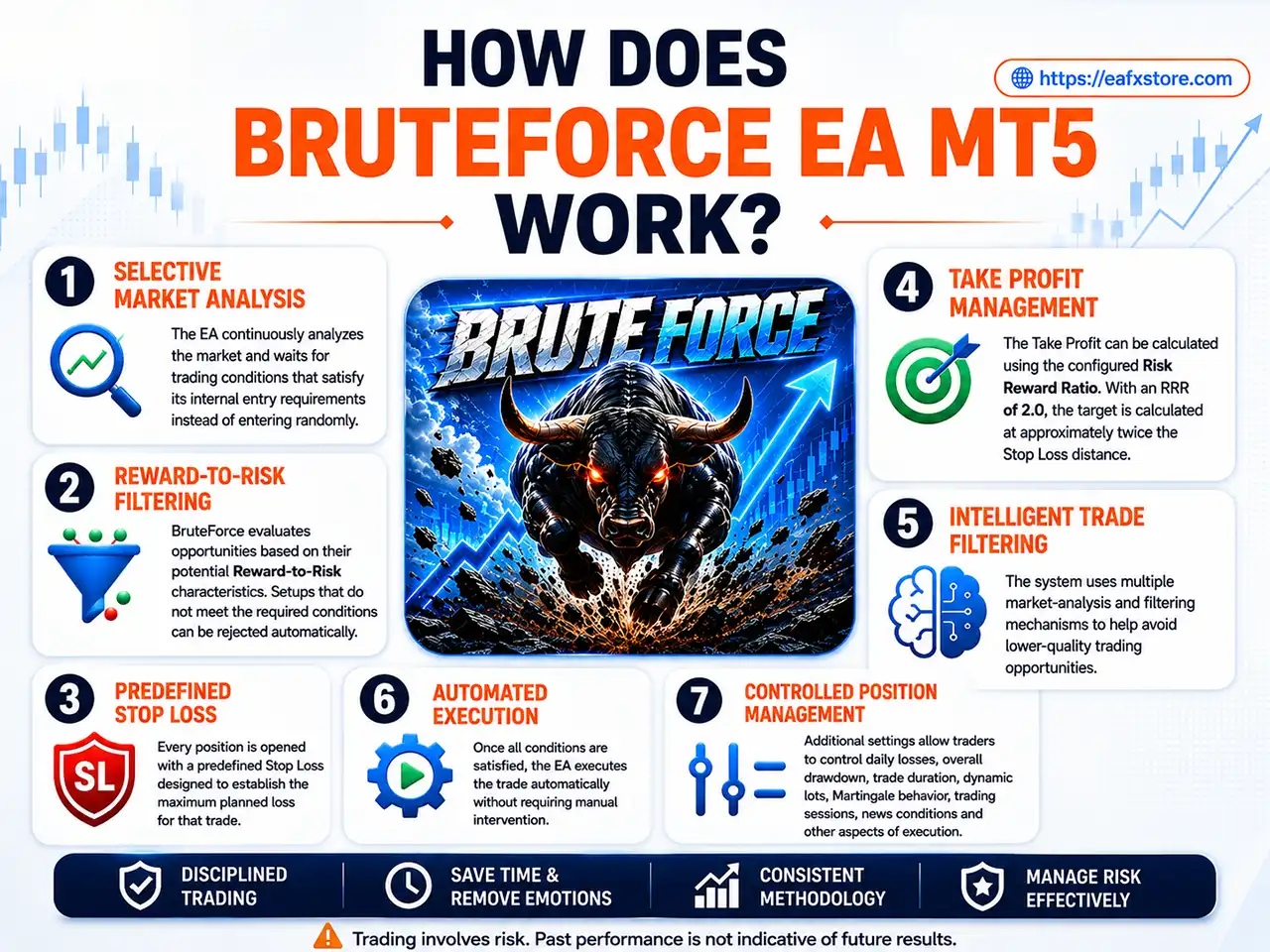
How Does BruteForce EA MT5 Work?
Selective Market Analysis
The EA continuously analyzes the market and waits for trading conditions that satisfy its internal entry requirements instead of entering randomly.
Reward-to-Risk Filtering
BruteForce evaluates opportunities based on their potential Reward-to-Risk characteristics. Setups that do not meet the required conditions can be rejected automatically.
Predefined Stop Loss
Every position is opened with a predefined Stop Loss designed to establish the maximum planned loss for that trade.
Take Profit Management
The Take Profit can be calculated using the configured Risk Reward Ratio. With an RRR of 2.0, the target is calculated at approximately twice the Stop Loss distance.
Intelligent Trade Filtering
The system uses multiple market-analysis and filtering mechanisms to help avoid lower-quality trading opportunities.
Automated Execution
Once all conditions are satisfied, the EA executes the trade automatically without requiring manual intervention.
Controlled Position Management
Additional settings allow traders to control daily losses, overall drawdown, trade duration, dynamic lots, Martingale behavior, trading sessions, news conditions and other aspects of execution.
How Does BruteForce EA MT5 Work
Key Features of BruteForce EA MT5
High Reward-to-Risk Strategy
The EA focuses on opportunities where the potential reward can significantly outweigh the predefined risk.
Advanced Market Analysis
BruteForce uses multiple intelligent filters and market projections to identify potentially higher-quality trading conditions.
Predefined SL and TP
Every trade receives predefined Stop Loss and Take Profit levels, creating a clear risk framework from the moment of entry.
Flexible Risk Management
Traders can choose between fixed-lot trading and dynamic lot sizing based on account balance and risk percentage.
Forex and Gold Support
The system is designed for Forex currency pairs and Gold, providing flexibility across different markets.
Hedging and Netting Compatibility
BruteForce supports both major MT5 account structures, making it more adaptable to different broker environments.
Optional Trading Protection
Daily loss limits, maximum drawdown protection, spread filtering, news filtering, break-even, and trailing-stop functions are available for additional control.
Clear On-Chart Dashboard
The EA provides an information dashboard directly on the chart, helping users monitor the system’s current status and configuration.
Historical Trading Results Performance
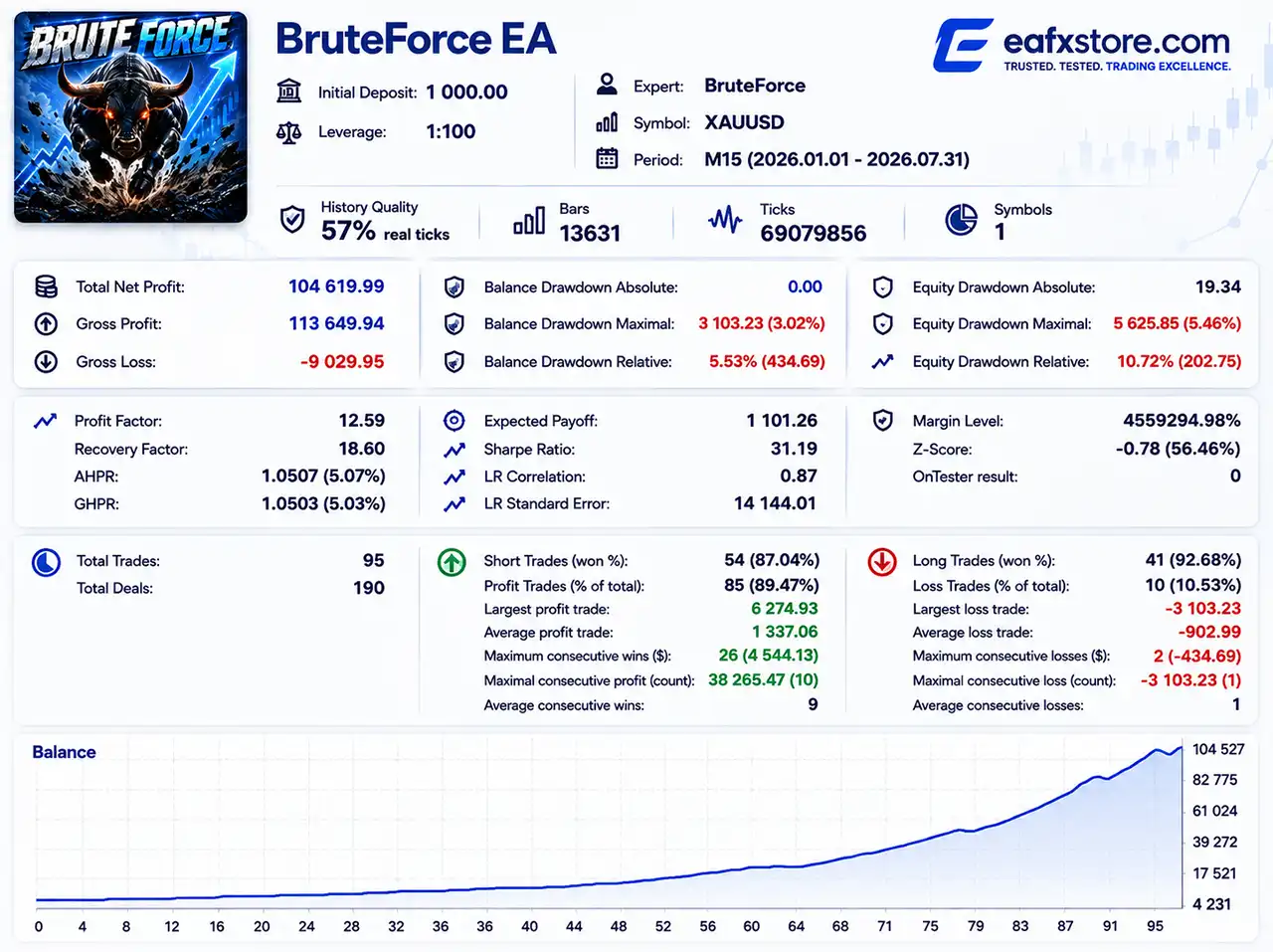
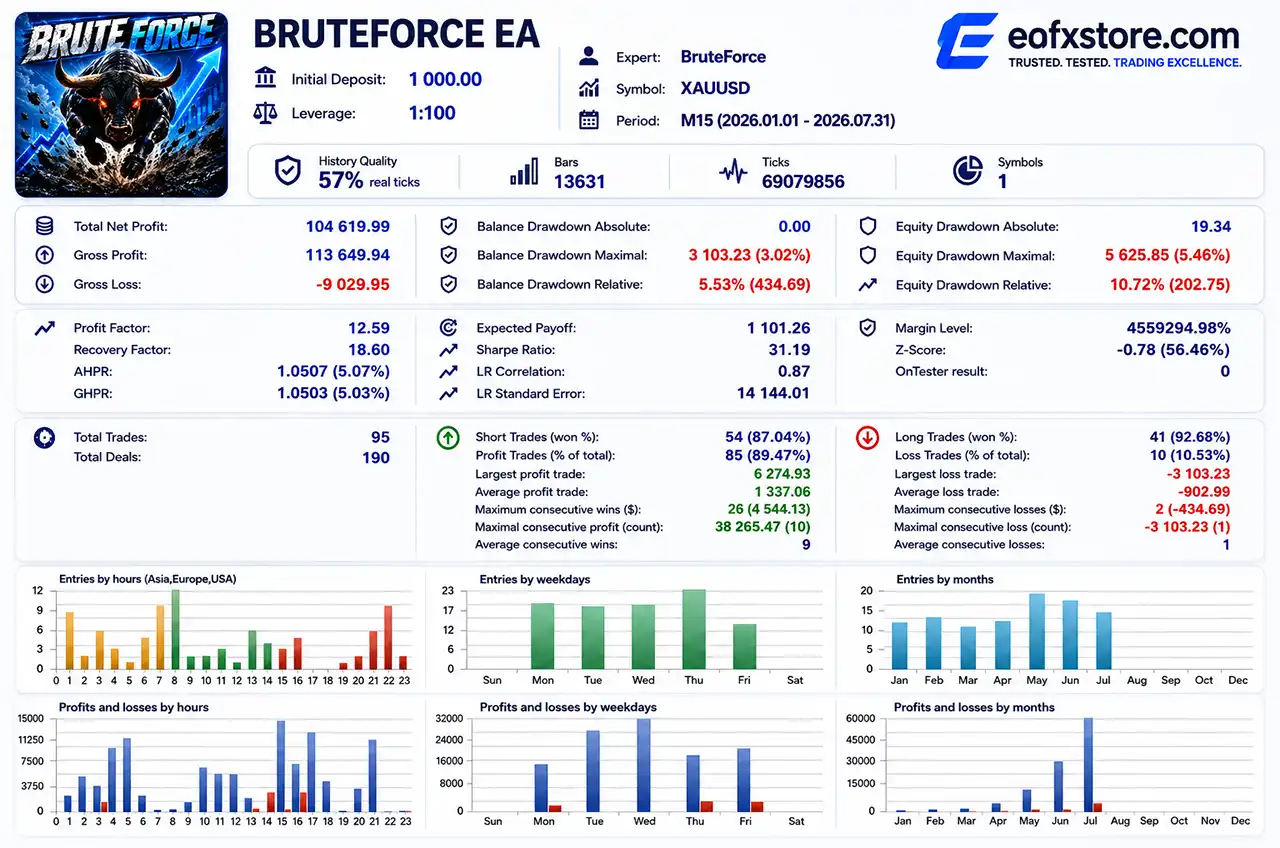
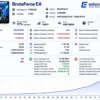
The supplied Strategy Tester report provides a useful performance reference for XAUUSD on M15 over the period from January 1, 2026 to July 31, 2026.
Backtest Results
BruteForce EA MT5 Backtest Results
| Metric | Result |
|---|---|
| Initial Deposit | $1,000 |
| Total Net Profit | $104,619.99 |
| Profit Factor | 12.59 |
| Recovery Factor | 18.60 |
| Sharpe Ratio | 31.19 |
| Total Trades | 95 |
| Profit Trades | 89.47% |
| Loss Trades | 10.53% |
| Equity Drawdown Relative | 10.72% |
| Largest Profit Trade | $6,274.93 |
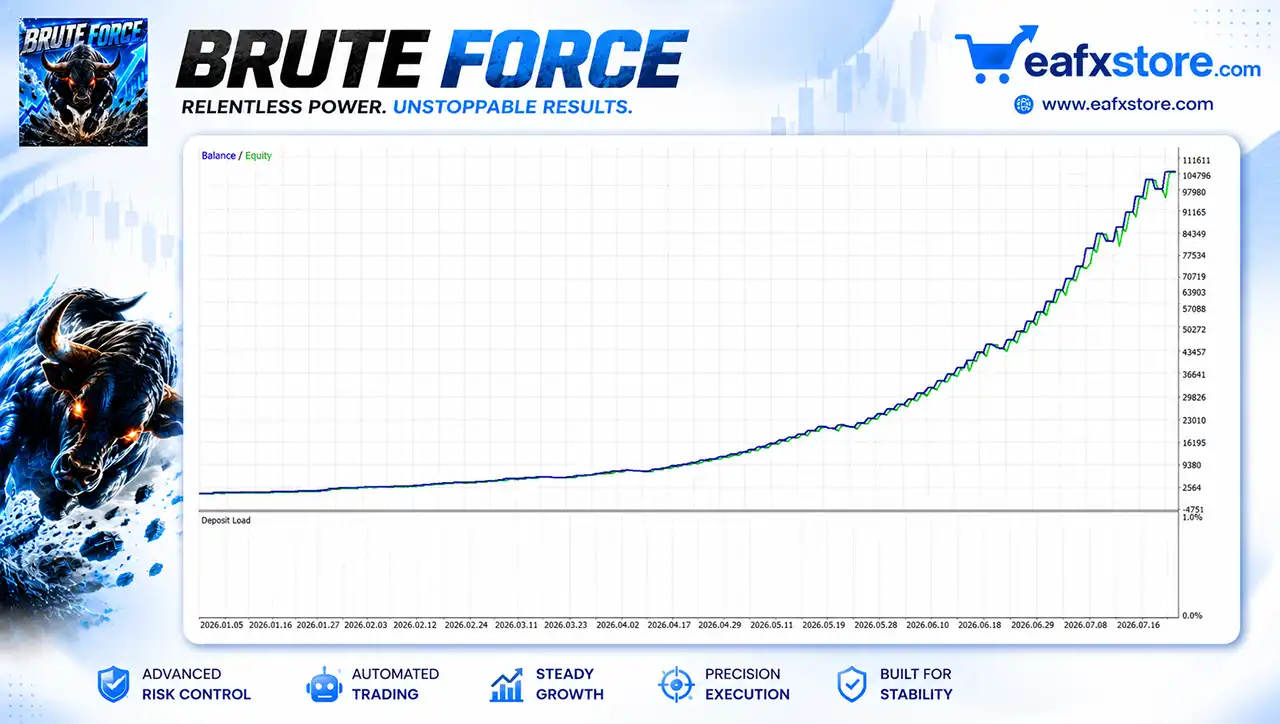
The report shows a strong upward balance curve throughout the tested period. The strategy generated $104,619.99 in net profit from a $1,000 initial deposit, with a reported Profit Factor of 12.59.
The system recorded 95 trades, of which 85 were profitable, producing an overall winning-trade percentage of 89.47%.
However, these results should be interpreted carefully. The displayed test uses 57% real ticks, rather than a complete 100% real-tick history. Backtest performance can also differ considerably from live execution because of spreads, slippage, liquidity, commissions and market conditions.
Drawdown and Recovery
BruteForce EA Backtests
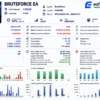
The report shows a maximum balance drawdown of 5.53% and an equity drawdown relative of 10.72%.
This difference is important because floating equity losses can be substantially different from closed-balance drawdowns.
The reported Recovery Factor of 18.60 indicates a strong historical relationship between generated profit and recorded drawdown in this particular test.
Why BruteForce EA MT5 Stands Out
Focus on Reward Rather Than Trade Frequency
BruteForce EA is not designed simply to maximize the number of trades.
Its philosophy is to wait for opportunities where the potential reward justifies the predefined risk.
Strong Historical Metrics
The supplied XAUUSD M15 test produced a 12.59 Profit Factor, 89.47% winning trades and a 31.19 Sharpe Ratio.
No Mandatory Martingale
The current configuration has Martingale disabled, helping avoid automatic lot multiplication after losing trades.
Flexible Position Sizing
Users can select a fixed lot or enable dynamic position sizing based on account balance and risk.
Broad Market Compatibility
BruteForce can be used across Forex pairs and Gold rather than being restricted to a single instrument.
Extensive Configuration
From trading schedules to drawdown controls and news filtering, the EA offers numerous parameters for experienced traders who want greater control.
Risk Management Features
Predefined Stop Loss and Take Profit
Each trade is opened with predefined protective levels, helping establish a clear risk and reward structure.
Risk Reward Ratio
The configured RRR of 2.0 allows Take Profit to be calculated as a multiple of the Stop Loss distance.
Daily Loss Protection
The EA includes a maximum daily-loss mechanism that can stop further trading once the configured threshold is reached.
Maximum Drawdown Protection
Users can configure a drawdown limit measured from the highest balance or equity level.
Dynamic Risk Management
Dynamic lot sizing can be enabled with a configurable risk percentage rather than relying on a fixed lot.
Martingale Control
Martingale is available as an optional feature but is disabled in the supplied configuration.
Additional Exit Protection
Break-even, trailing stop, opposite-signal closure, and maximum trade-holding-time controls are available but can be enabled or disabled according to the selected setup.
Recommended Trading Conditions
For the best performance, the following setup is recommended:
| Features | Type |
|---|---|
| Trading platform | MetaTrader 5 (MT5) |
| Time frames | M15, M30, H1 |
| Currency pairs | XAUUSD (Gold) & Forex currency pairs |
| Minimum / Recommended deposit | $200+ |
| Minimum / Recommended leverage | 1:100+ |
| Account type | Any |
| Product type | Original version |
| Additional services | Unlock and Decompile |
| Recommended brokers | Exness Broker, Icmarkets Broker |
| Recommended VPS | MyfxVPS.com (Blue VPS, Golden VPS). Lowest Latency, 2 week Free Trial, 100% Free for 12-18 Months. |
Product Download Package?
The download package of the product suite includes:
Experts
✅ Setting (If Any).docx
✅ Installation Guide.docx
SetFiles
✅ Gold_Auto_Very Low Risk.set
✅ Gold_Auto_Low Risk.set
✅ Gold_Auto_Medium Risk.set
✅ Gold_Auto_High Risk.set
➡️ Reviewed by David Easton
Weaknesses and Risk Warnings
High Historical Growth Does Not Guarantee Future Results
Exceptional backtest performance should not be interpreted as a promise of similar live returns.
Current Protection Settings Are Limited
The supplied configuration has Daily Loss, Maximum Drawdown, News Filter, Spread Filter, Break-Even, and Trailing Stop protection disabled.
Fixed Lot Exposure
The current setup uses a 0.1 fixed lot, so position exposure does not automatically adjust as the account balance changes.
Market Conditions Can Change
Forex and Gold markets can behave differently from the historical period used for testing, potentially affecting entry quality and drawdown.
Aggressive Growth Means Higher Risk
BruteForce is marketed toward aggressive account growth, so traders should use appropriate capital and carefully evaluate risk before live deployment.
Who Should Use BruteForce EA MT5?
BruteForce EA MT5 may be suitable for:
🔹 Traders who prefer automated Forex and Gold trading.
🔹 Users looking for high Reward-to-Risk trading opportunities.
🔹 Traders who understand and accept automated trading risks.
🔹 Experienced users who want extensive configuration options.
🔹 Traders who prefer fixed-lot or customizable dynamic-risk management.
🔹 Traders who want to operate the EA on M15, M30 or H1.
It may be less suitable for beginners who expect guaranteed profits or who are uncomfortable managing an EA with multiple configurable risk parameters.
Final Verdict
BruteForce EA MT5 presents an aggressive but structured approach to automated trading. Its central advantage is the focus on high-quality opportunities with favorable Reward-to-Risk characteristics, supported by predefined Stop Loss (SL) and Take Profit (TP) levels.
For traders seeking a flexible MT5 system for Forex and Gold, BruteForce offers a compelling combination of automated execution, Reward-to-Risk filtering, position-sizing controls and optional risk-management tools.
🔢 BruteForce EA MT5 Settings Guide
BruteForce EA is a highly configurable automated trading system built around flexible trade-direction control, risk/reward management, position sizing, optional martingale functionality, spread filtering, trading-session controls, break-even protection, trailing stops and economic-news filtering.
The settings shown provide extensive control over how the EA manages entries, position size, risk limits, trading schedules and market conditions.
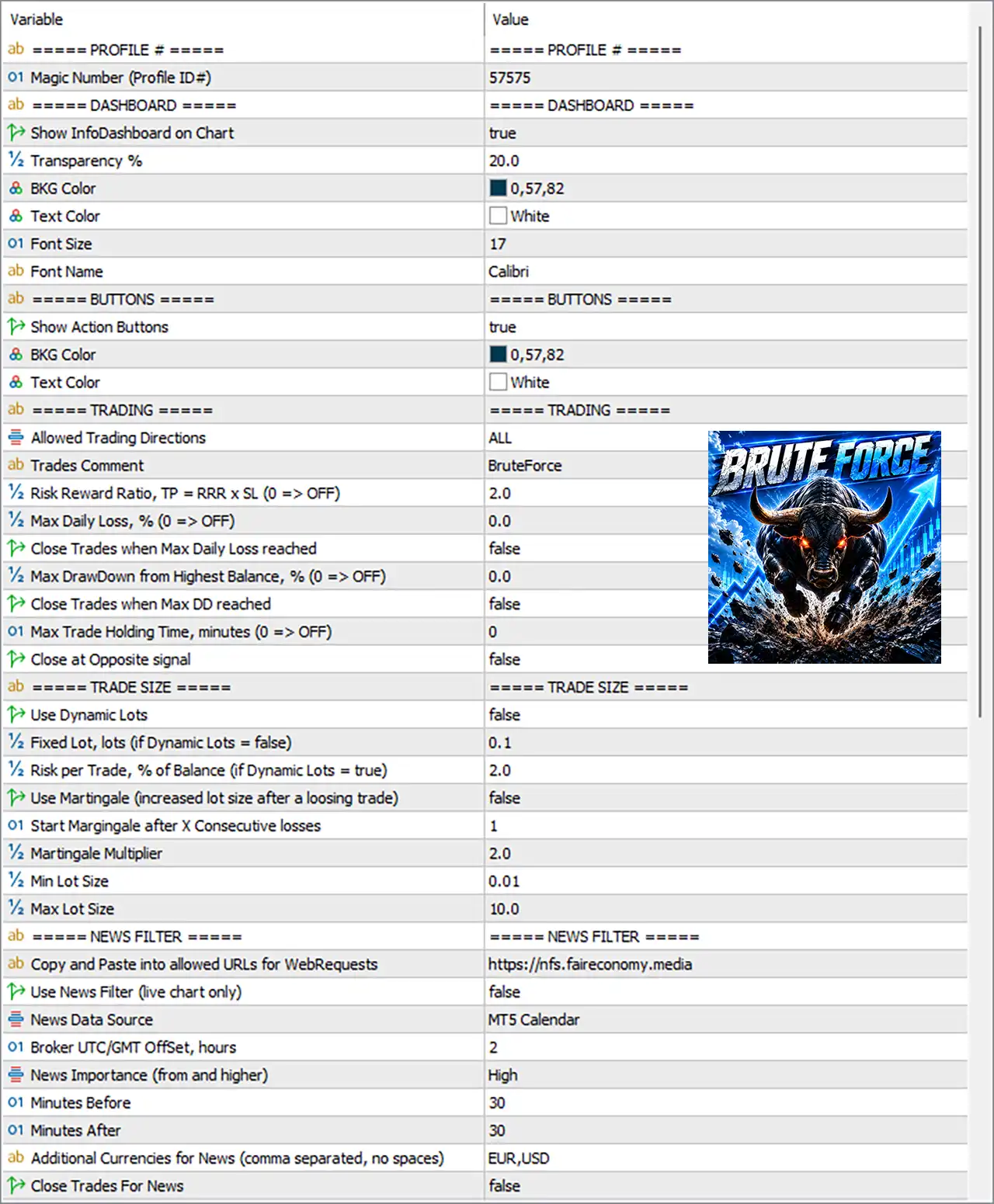
BruteForce EA MT5 Settings Panel
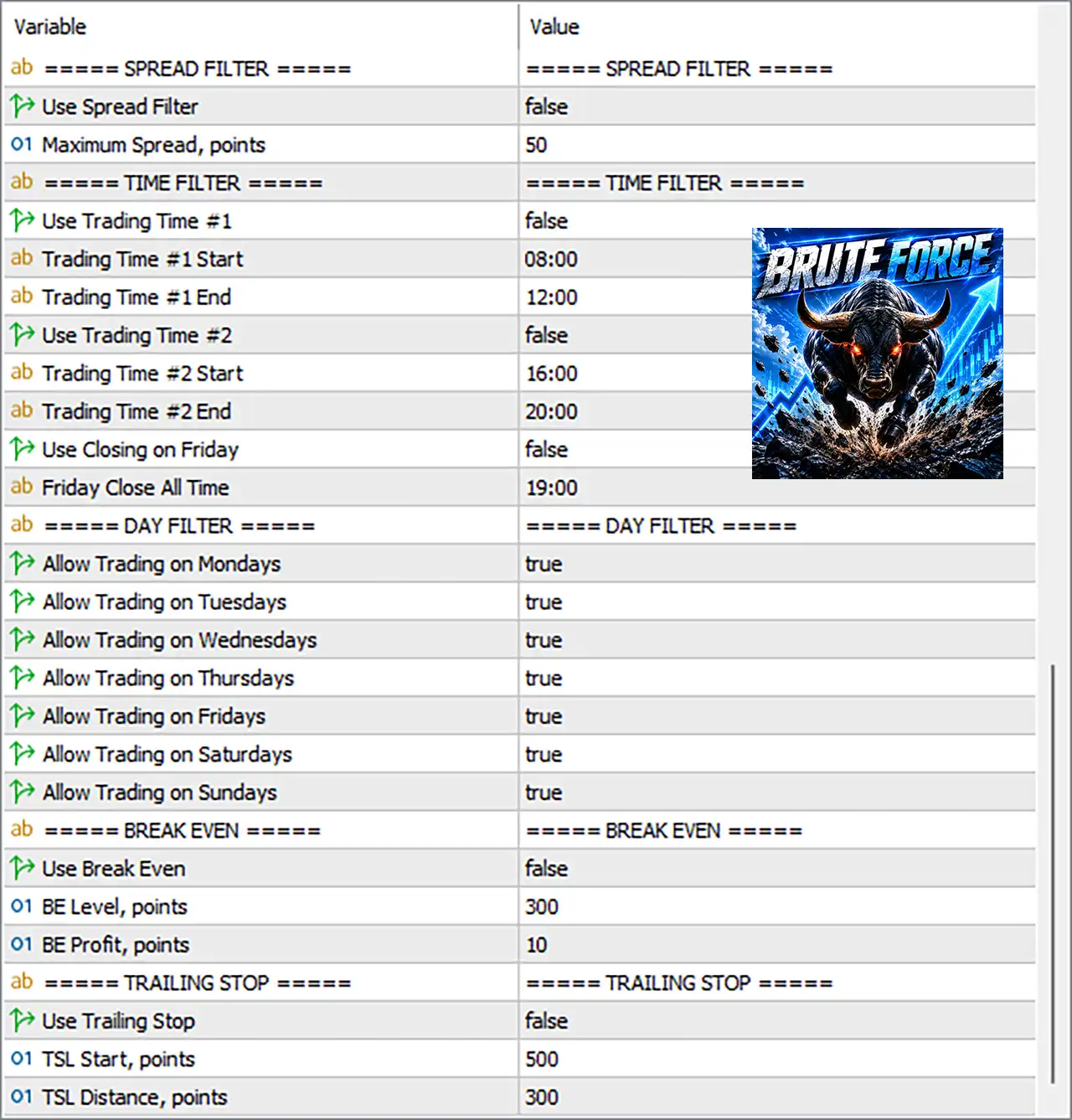
BruteForce EA Settings Panel
🔄 Profile Settings
🔹 Magic Number (Profile ID#): 57575 — Unique identifier used to distinguish BruteForce EA MT5 trades from trades belonging to other EAs.
🔄 Dashboard Settings
🔹 Show InfoDashboard on Chart: true — Displays the EA information dashboard directly on the trading chart.
🔹 Transparency %: 20.0 — Sets the dashboard transparency level to 20.0%.
🔹 BKG Color: 0,57,82 — Defines the dashboard background color using RGB values 0,57,82.
🔹 Text Color: White — Sets the dashboard text color to White.
🔹 Font Size: 17 — Sets the dashboard font size to 17.
🔹 Font Name: Calibri — Uses Calibri as the dashboard font.
🔄 Button Settings
🔹 Show Action Buttons: true — Enables the EA’s interactive action buttons on the chart.
🔹 BKG Color: 0,57,82 — Sets the action-button background color to RGB 0,57,82.
🔹 Text Color: White — Sets the action-button text color to White.
🔄 Trading Settings
🔹 Allowed Trading Directions: ALL — Allows the EA to trade in all supported directions, including Buy and Sell.
🔹 Trades Comment: BruteForce — Adds BruteForce as the trade comment for identifying EA-generated orders.
🔹 Risk Reward Ratio, TP = RRR × SL (0 => OFF): 2.0 — Configures the Take Profit calculation at a 2.0 risk/reward ratio relative to the Stop Loss.
🔹 Max Daily Loss, % (0 => OFF): 0.0 — Sets the maximum daily loss to 0.0%, meaning the daily-loss limit is disabled.
🔹 Close Trades when Max Daily Loss reached: false — Prevents the EA from automatically closing trades when the maximum daily-loss threshold is reached.
🔹 Max DrawDown from Highest Balance, % (0 => OFF): 0.0 — Sets the maximum drawdown threshold to 0.0%, effectively disabling this limit.
🔹 Close Trades when Max DD reached: false — Disables automatic trade closure when the configured maximum drawdown level is reached.
🔹 Max Trade Holding Time, minutes (0 => OFF): 0 — Sets maximum trade holding time to 0, meaning no holding-time limit is active.
🔹 Close at Opposite signal: false — Keeps positions open rather than automatically closing them when an opposite trading signal appears.
🔄 Trade Size Settings
🔹 Use Dynamic Lots: false — Disables dynamic lot calculation based on account risk.
🔹 Fixed Lot, lots (if Dynamic Lots = false): 0.1 — Uses a fixed position size of 0.1 lots when dynamic lot sizing is disabled.
🔹 Risk per Trade, % of Balance (if Dynamic Lots = true): 2.0 — If dynamic lots are enabled, the EA uses 2.0% of account balance as the risk parameter.
🔹 Use Martingale (increased lot size after a loosing trade): false — Martingale position-size increases are disabled.
🔹 Start Martingale after X Consecutive losses: 1 — If martingale is enabled, the configured starting point is after 1 consecutive loss.
🔹 Martingale Multiplier: 2.0 — If martingale is activated, the next position size can be multiplied by 2.0.
🔹 Min Lot Size: 0.01 — Defines the minimum permitted lot size as 0.01 lots.
🔹 Max Lot Size: 10.0 — Defines the maximum permitted lot size as 10.0 lots.
🔄 News Filter Settings
🔹 Copy and Paste into allowed URLs for WebRequests: https://nfs.faireconomy.media — Specifies the external URL configured for WebRequest-based economic-news access. Economic news data URL
🔹 Use News Filter (live chart only): false — Disables the live-chart news filter in the current configuration.
🔹 News Data Source: MT5 Calendar — Specifies the MT5 Calendar as the news-data source.
🔹 Broker UTC/GMT Offset, hours: 2 — Sets the broker time offset to UTC/GMT +2 hours.
🔹 News Importance (from and higher): High — When the news filter is active, it is configured to consider High-impact events and higher.
🔹 Minutes Before: 30 — Configures a 30-minute pre-news filtering period.
🔹 Minutes After: 30 — Configures a 30-minute post-news filtering period.
🔹 Additional Currencies for News (comma separated, no spaces): EUR,USD — Adds EUR and USD to the currencies monitored for news events.
🔹 Close Trades For News: false — Prevents automatic closure of existing positions because of news events.
🔄 Spread Filter Settings
🔹 Use Spread Filter: false — Disables the spread filter in the current configuration.
🔹 Maximum Spread, points: 50 — Sets the maximum spread threshold to 50 points if the spread filter is enabled.
🔄 Time Filter Settings
🔹 Use Trading Time #1: false — Disables the first custom trading-time window.
🔹 Trading Time #1 Start: 08:00 — Defines the first trading window start time as 08:00.
🔹 Trading Time #1 End: 12:00 — Defines the first trading window end time as 12:00.
🔹 Use Trading Time #2: false — Disables the second custom trading-time window.
🔹 Trading Time #2 Start: 16:00 — Defines the second trading window start time as 16:00.
🔹 Trading Time #2 End: 20:00 — Defines the second trading window end time as 20:00.
🔹 Use Closing on Friday: false — Disables the Friday automatic closing function.
🔹 Friday Close All Time: 19:00 — If Friday closing is enabled, the EA is configured to close all trades at 19:00.
🔄 Day Filter Settings
🔹 Allow Trading on Mondays: true — Trading is permitted on Monday.
🔹 Allow Trading on Tuesdays: true — Trading is permitted on Tuesday.
🔹 Allow Trading on Wednesdays: true — Trading is permitted on Wednesday.
🔹 Allow Trading on Thursdays: true — Trading is permitted on Thursday.
🔹 Allow Trading on Fridays: true — Trading is permitted on Friday.
🔹 Allow Trading on Saturdays: true — Trading is permitted on Saturday according to the EA’s day filter.
🔹 Allow Trading on Sundays: true — Trading is permitted on Sunday according to the EA’s day filter.
🔄 Break-Even Settings
🔹 Use Break Even: false — Disables automatic Break-Even functionality.
🔹 BE Level, points: 300 — When Break-Even is enabled, the configured trigger level is 300 points.
🔹 BE Profit, points: 10 — When Break-Even is activated, the configured protected profit is 10 points.
🔄 Trailing Stop Settings
🔹 Use Trailing Stop: false — Disables the trailing-stop system in the current configuration.
🔹 TSL Start, points: 500 — If trailing stop is enabled, trailing begins after 500 points of favorable movement.
🔹 TSL Distance, points: 300 — Maintains a trailing distance of 300 points from the current market price.
🔢 Configuration Snapshot
🔹 Profile ID: 57575 — Unique EA profile identifier.
🔹 Trading Direction: ALL — All supported trading directions are allowed.
🔹 Risk/Reward: 2.0 — Target TP is configured at 2.0 × SL when the RRR function is used.
🔹 Fixed Lot: 0.1 — Current trade sizing uses 0.1 lots because Dynamic Lots is disabled.
🔹 Dynamic Lots: false — Dynamic balance-based position sizing is currently off.
🔹 Risk Parameter: 2.0% — Used only when Dynamic Lots is enabled.
🔹 Martingale: false — Martingale is currently disabled.
🔹 Martingale Multiplier: 2.0 — Preset multiplier if martingale is manually enabled.
🔹 Lot Range: 0.01–10.0 — Configured minimum and maximum lot boundaries.
🔹 News Filter: false — News filtering is currently disabled.
🔹 News Source: MT5 Calendar — Configured economic-calendar source.
🔹 News Window: 30 minutes before / 30 minutes after — Protection window configured around relevant events.
🔹 News Currencies: EUR,USD — Additional currencies configured for news monitoring.
🔹 Spread Filter: false — Spread protection is currently disabled.
🔹 Maximum Spread: 50 points — Configured threshold if spread filtering is enabled.
🔹 Trading Window #1: 08:00–12:00 — Defined but currently disabled.
🔹 Trading Window #2: 16:00–20:00 — Defined but currently disabled.
🔹 Friday Close: 19:00 — Defined but currently disabled.
🔹 Trading Days: Monday–Sunday = true — All seven days are enabled in the day filter.
🔹 Break-Even: false — Currently disabled.
🔹 Break-Even Trigger: 300 points — Configured activation level.
🔹 Break-Even Profit: 10 points — Configured protected-profit level.
🔹 Trailing Stop: false — Currently disabled.
🔹 Trailing Start: 500 points — Configured activation level.
🔹 Trailing Distance: 300 points — Configured trailing distance.
🔢 Conclusion
The supplied BruteForce EA MT5 configuration emphasizes fixed-lot trading, broad trading-day availability, optional time filters, configurable risk/reward management, and multiple layers of optional protection.
The current setup uses a 0.1 fixed lot, permits both trading directions through ALL, targets a 2.0 risk/reward ratio, and keeps Martingale, Break-Even, Trailing Stop, Spread Filter, and News Filter disabled. Although the protection mechanisms are configured with numerical values, they will not actively operate while their respective switches remain false.
For traders considering this configuration, particular attention should be given to the 0.1 fixed lot size, the absence of active spread/news protection, and the fact that all days from Monday through Sunday are enabled. These settings should be tested carefully on the intended symbol, broker, account size, and trading environment before being used with real funds.
🔢 FAQs
❓ What is the Magic Number of BruteForce EA MT5?
The configured Magic Number (Profile ID#) is 57575.
❓ Does BruteForce EA MT5 currently use Martingale?
No. Use Martingale = false, so the Martingale mechanism is disabled. Its configured multiplier is 2.0 if the feature is later enabled.
❓ What lot size does BruteForce EA MT5 currently use?
The EA is configured for a fixed lot size of 0.1, because Use Dynamic Lots = false.
❓ Are the Break-Even and Trailing Stop features enabled?
No. Both Use Break Even = false and Use Trailing Stop = false. Their configured levels are 300/10 points for Break-Even and 500/300 points for Trailing Stop.
❓ Does the current configuration filter economic news and spread?
No. Both Use News Filter = false and Use Spread Filter = false. The configured thresholds are nevertheless 30 minutes before/after news and 50 points maximum spread, respectively.
User Reviews
Only logged in customers who have purchased this product may leave a review.
❓ What trading strategy does BruteForce EA MT5 use?
BruteForce EA MT5 focuses on high-quality market opportunities with strong Reward-to-Risk characteristics, using multiple entry filters and logical technical Stop Loss levels.
❓ What is the default Risk Reward Ratio in BruteForce EA MT5?
BruteForce EA MT5 uses a default Risk Reward Ratio of 2.0, meaning Take Profit is calculated at twice the Stop Loss distance when the RRR setting is active.
❓ Does BruteForce EA MT5 use Martingale?
Martingale is disabled in the supplied configuration. BruteForce EA MT5 includes the option, but Use Martingale is currently set to false.
❓ What lot size does BruteForce EA MT5 use by default?
BruteForce EA MT5 uses a fixed lot of 0.1 in the supplied settings because Dynamic Lots is disabled. The minimum and maximum lots are 0.01 and 10.0.
❓ Does BruteForce EA MT5 have daily loss protection?
The EA includes a Max Daily Loss feature, but the supplied configuration sets it to 0.0%, so the daily-loss limit is currently disabled.
❓ Does BruteForce EA MT5 provide maximum drawdown protection?
Yes, BruteForce EA MT5 includes drawdown protection based on the highest balance, but the supplied 0.0% setting means this protection is currently disabled.
❓ Which markets can BruteForce EA MT5 trade?
BruteForce EA MT5 is designed for all Forex currency pairs and Gold, giving traders broad flexibility when selecting suitable instruments.
❓ Which timeframes are recommended for BruteForce EA MT5?
The recommended timeframes are M15, M30, and H1. The EA is designed to wait for quality setups rather than trade continuously throughout the market.
❓ How many trades can I expect from BruteForce EA MT5?
BruteForce EA MT5 typically generates around 3–5 trades per instrument per week, depending on market volatility, selected instruments, and configuration.
❓ Does BruteForce EA MT5 support both Hedging and Netting accounts?
Yes. BruteForce EA MT5 is compatible with both Hedging and Netting account types, providing flexibility across different MetaTrader 5 account environments.
-
 Price range: $89.00 through $599.00
 -
 Price range: $89.00 through $599.00
 -
 Price range: $60.00 through $599.00
 -
 Price range: $89.00 through $599.00
-
 2
2 -
 3
3 -
 3Price range: $89.00 through $599.00
 -
 3Price range: $89.00 through $599.00
There are no reviews yet.