




Apex Trader MT4 v1.6 + Setfiles (Platform build 1476+)

Subscriptions for Special Plan
- 30 EA package is more economical!
- Special package with 99%
- Download 1 EA/Day

Subscriptions for Premium Membership
- Download Unlimited in 1 Year
- Get 100% Discount
- Get free access to all

Subscriptions for Gold Membership
- 1 Year Membership
- Get 100% Discount
- Access EA+Indicator+Course
Frequently bought together 🎁
Add these products to enhance your purchase



What is Apex Trader MT4?
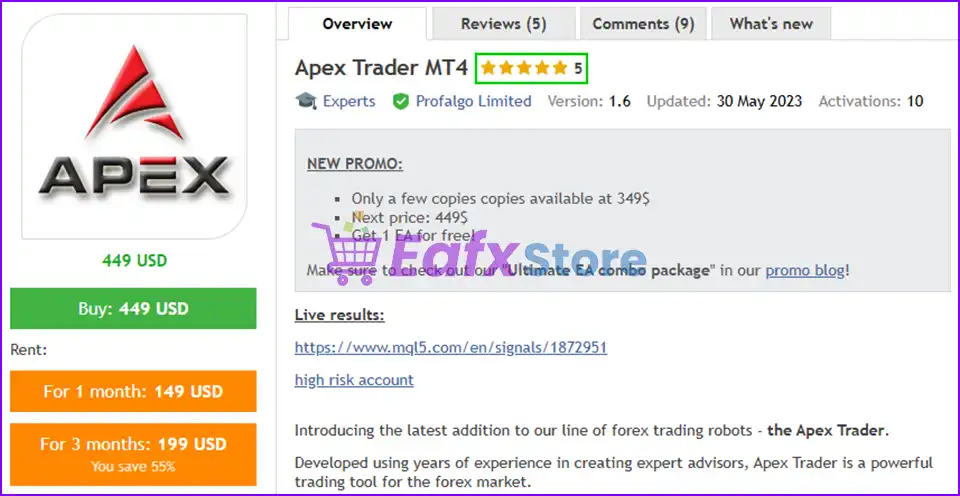
Apex Trader EA is a fully automated trading Expert advisor (EA), a major innovation in the automated forex trading market. Developed by seasoned professionals, this powerful trading robot utilizes advanced strategies such as mean reversion and Trend following to adapt to a variety of market conditions.
The expert advisor is optimized for AUDCAD, AUDNZD and NZDCAD pairs. The EA uses a Smart Grid system with dynamic take profit levels to maximize profit potential. Built-in safeguards protect against account overdrafts, making it suitable for traders of all experience levels.
🔶 Vendor Website: View here
About the Author
This product is compiled by Wim Schrynemakers. This author has more than +14 years of experience working on MQL5 with many famous products such as Apex Trader MT4, Indicement MT4, Gold Trade Pro, The Gold Reaper MT4, Daytrade Pro Algo and others. Among them, Apex Trader MT4 is his best performing products.
Apex Trader MT4 Overview
Key Features of Apex Trader for MT4
🔹 Smart grid system (Smart grid system): Open multiple positions to increase profit opportunities and manage uptime, adapt to market conditions.
🔹 Risk management: Safeguards to prevent account explosion, especially useful for system networks.
🔹 Chemical priority for currency pairs: Specially designed and optimized for profit performance for AUDCAD, AUDNZD and NZDCAD currency pairs.
🔹 Similar to multiple strategies: Both reversal and market trend strategies can be applied.
🔹 Adaptability to market conditions: Flexibly adjust to market fluctuations.
Additional features
🔹 Easy to use: Preset settings are available for users to easily master the market and make profits.
🔹 Optimizable system: Can check historical performance of reverse transactions, making it easy for investors to optimize performance.
🔹 Multi-currency support from one chart: Multiple currencies can be managed from a single chart.
Apex Trader MT4 Review
Apex Trader MT4 Live Results
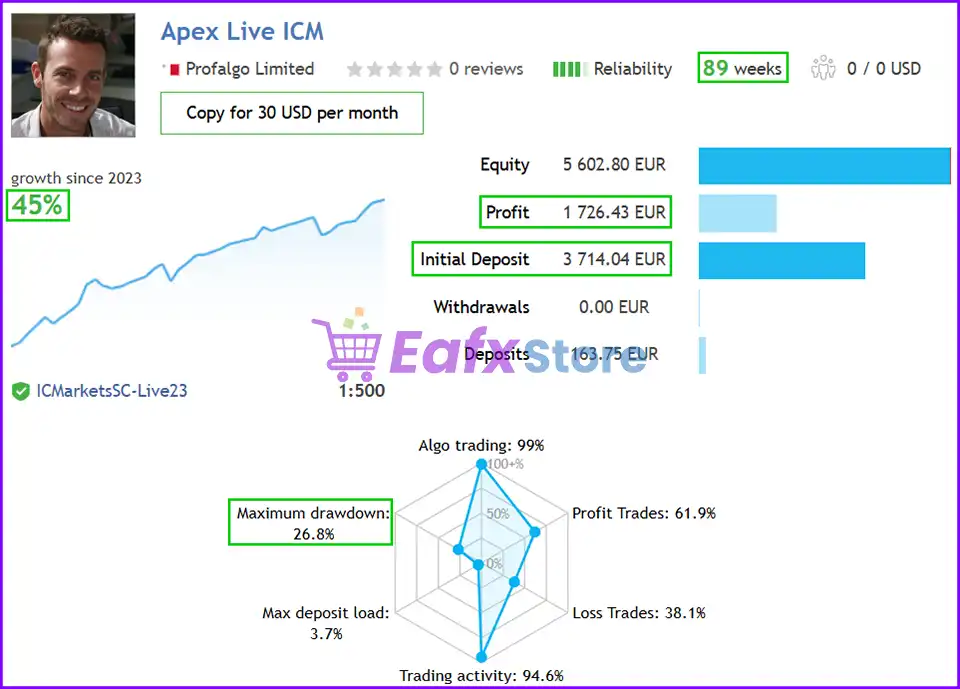
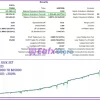
The trading results on the real account of Apex Trader EA reached a total profit of 45% in 89 consecutive trading weeks and the risk level remained only 26.8%.
The advisor has demonstrated impressive profit performance over a long period of time and still ensures safety over a long period of time.
Apex Trader EA Live results
Apex Trader MT4 Live results
Apex Trader EA Myfxbook Results
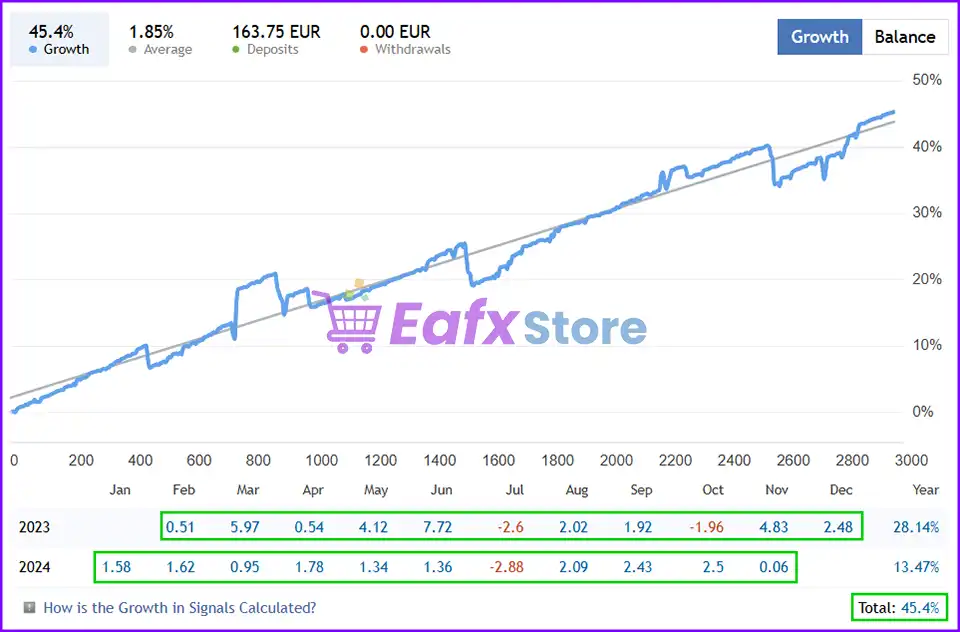
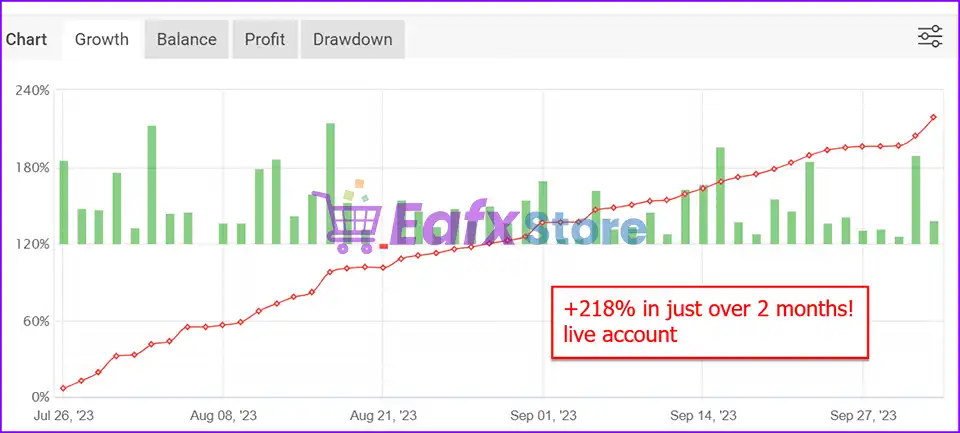
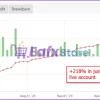
The real trading performance of Apex Trader EA is meticulously verified by MyFxBook and has achieved impressive performance.
The advisor achieved total profit Gain: +218% in 2 consecutive trading months.
Apex Trader MT4 Myfxbook
Apex Trader MT4 Backtest Results
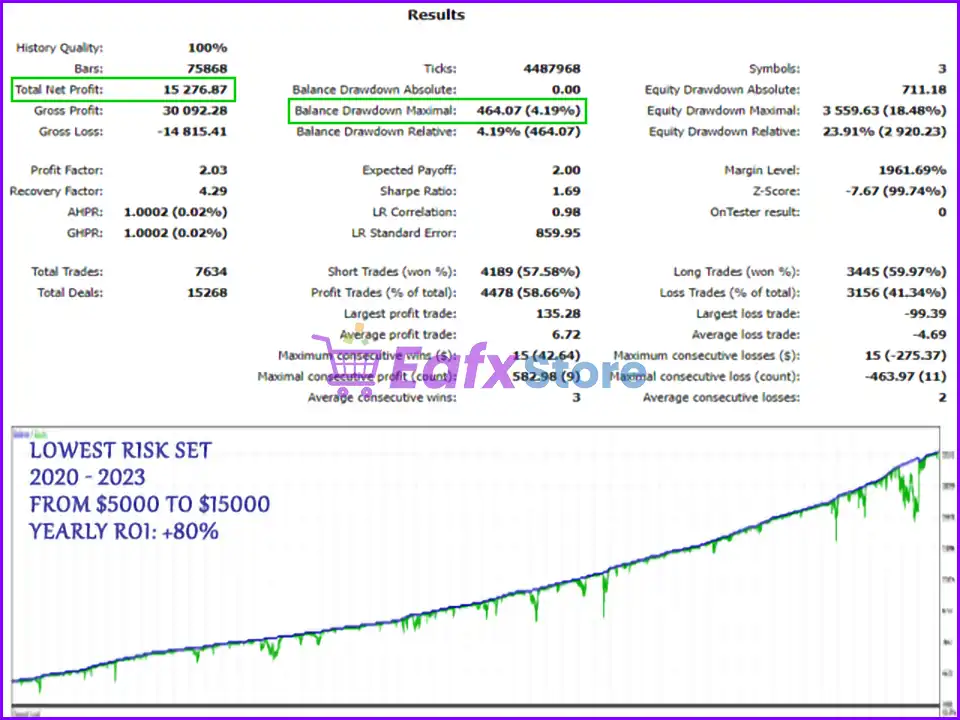
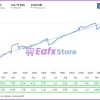
🔶 Apex Trader MT4 backtest results have achieved impressive profit performance over 3 years (2020 – 2023) with LOW-RISK settings.
This advisor has proven its ability to maintain safe stars on the 15-minute chart.
✅ Initial Deposit: $5,000
✅ Total Net Profit: $15,276.87
✅ Maximum Drawdown: 4.19%
Apex Trader MT4 Backtest
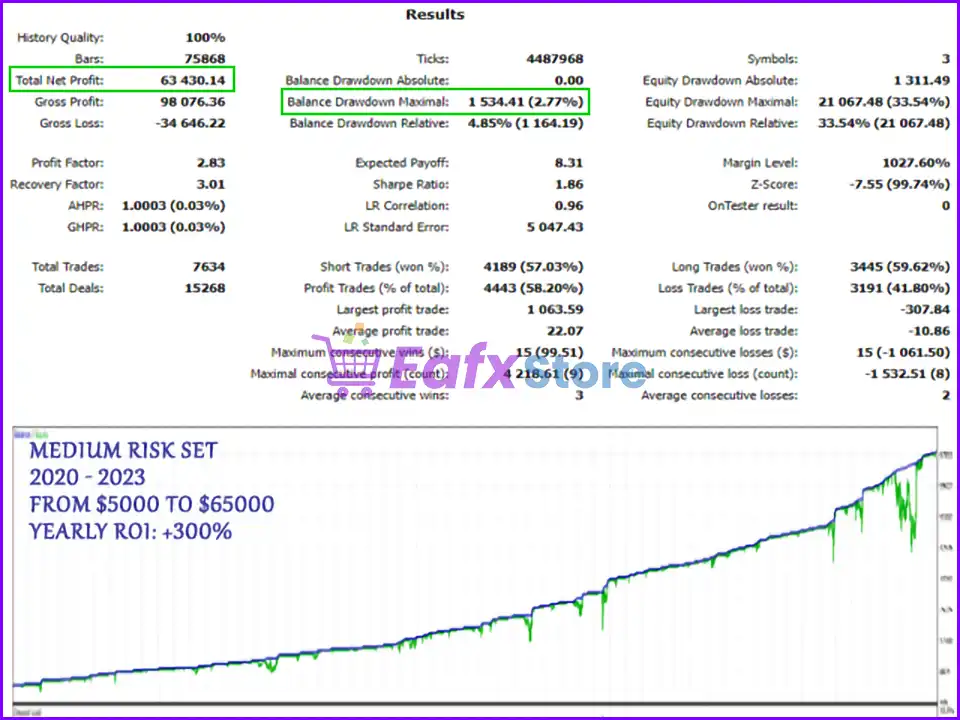
🔶 Apex Trader MT4 backtest results have achieved impressive profit performance over 3 years (2020 – 2023) with MEDIUM-RISK settings.
This advisor has proven its ability to maintain safe stars on the 15-minute chart.
✅ Initial Deposit: $5,000
✅ Total Net Profit: $63,430.14
✅ Maximum Drawdown: 2.77%
Apex Trader MT4 Backtests
Recommended settings
Recommended settings and parameters to pay attention to from developers and experts:
| Features | Type |
|---|---|
| Trading platform | MetaTrader 4 (MT4) |
| Minimum / Recommended deposit | $500+ |
| Minimum / Recommended leverage | 1:50+ |
| Time frames | M15 (15 minute chart) |
| Currency pairs | AUDCAD, AUDNZD, NZDCAD |
| Setup files | Available |
| Product type | NoDLL / Fix |
| Additional services | Unlock and Decompile |
| Recommended brokers | Exness Broker, Icmarkets Broker |
| Recommended VPS | MyfxVPS.com ( Blue VPS, Golden VPS). Lowest Latency, 2 week Free Trial, 100% Free for 12-18 Months. |
Product download package includes
The download package of the product suite includes:
Experts
✅ Apex Trader MT4 v1.6_fix.ex4
✅ Apex Trader_Manual.pdf
SetFiles
✅ Apex_extreme_risk.set
✅ Apex_OptimalGrid.set
✅ Apex_ElevatedGrid.set
✅ Apex_OptimalGrid__1.set
✅ Apex_extreme_risk__1.set
✅ Apex_ElevatedGrid__1.set
✅ Apex_ConservativeGrid.set
✅ Apex_ConservativeGrid__1.set
✅ Apex_Ultra_ConservativeGrid.set
➡️ Reviewed by David Easton
Conclusion
In short, Apex Trader EA is a powerful MT4 trading robot built for stable, long-term Forex automation. By combining mean reversion and trend-following logic with a smart grid system, it adapts smoothly to changing markets. Optimized for AUDCAD, AUDNZD, and NZDCAD, it delivers consistent growth while built-in risk protection keeps drawdown controlled for traders of all levels.
🔢 Apex Trader MT4 Settings Guide
Apex Trader MT4 is an automated trading Expert Advisor designed with configurable trade execution, pending-order management, grid controls, drawdown protection, lot-size calculation and GMT synchronization.
The EA provides separate controls for Buy and Sell trading, spread conditions, virtual Take Profit, grid lot-size increments, maximum drawdown protection, and account-balance-based position sizing.
With dedicated risk-management and execution parameters, Apex Trader MT4 allows traders to customize how positions are opened, managed, and protected according to their trading environment.
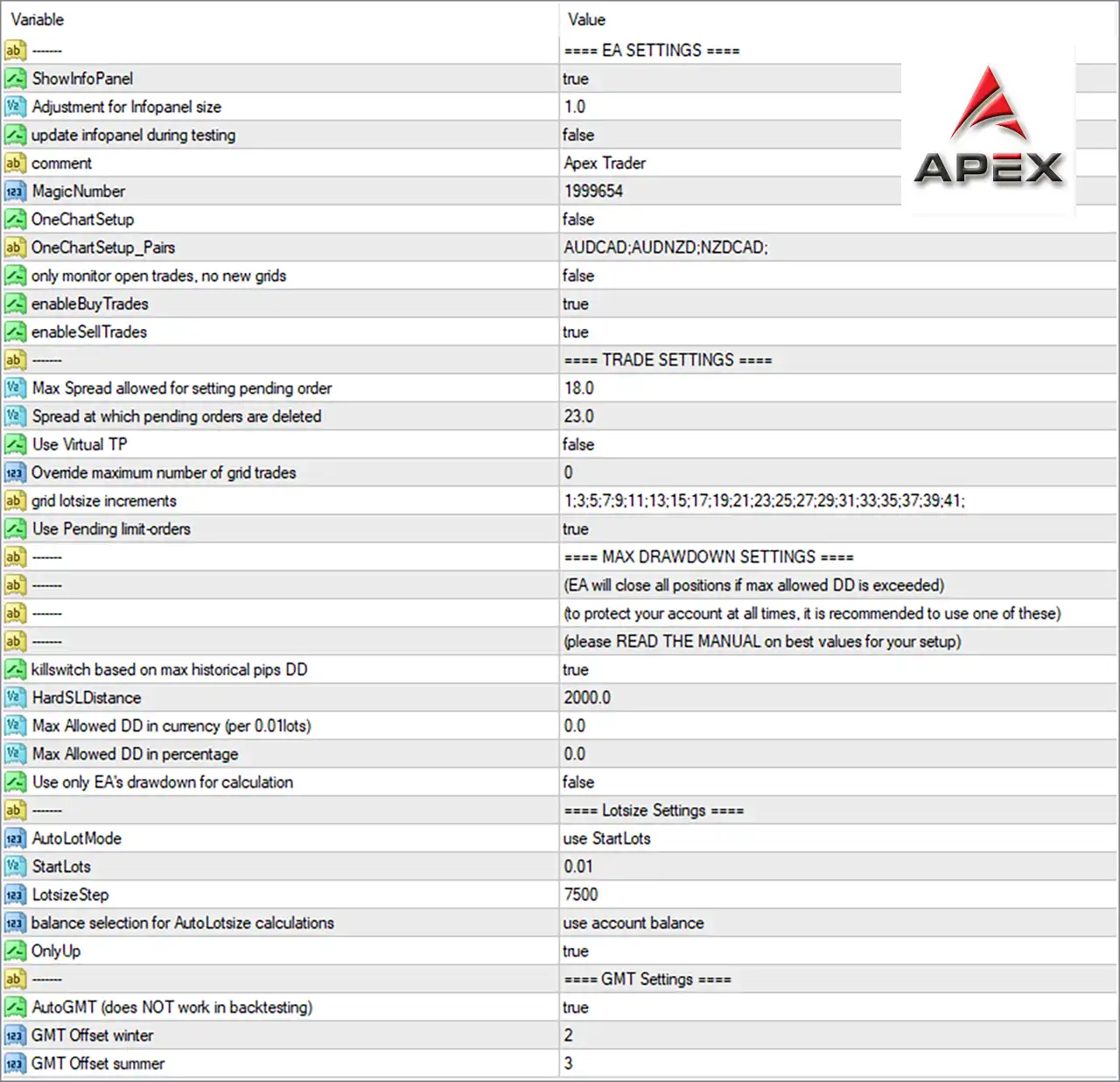
Apex Trader MT4 Settings Panel
🔢 Apex Trader MT4 Input Settings
⚙️ EA Settings
🔹 ShowInfoPanel = true — Enables the EA information panel on the MT4 chart to display relevant trading and operating information.
🔹 Adjustment for Infopanel size = 1.0 — Sets the information-panel size adjustment to 1.0, defining the configured display scale.
🔹 update infopanel during testing = false — Disables information-panel updates while Apex Trader MT4 is running during testing or backtesting.
🔹 comment = Apex Trader — Sets Apex Trader as the trade comment used to identify positions opened by the EA.
🔹 MagicNumber = 1999654 — Assigns the unique Magic Number 1999654, allowing the EA to identify and manage its own trades.
🔹 OneChartSetup = false — Disables the One Chart Setup mode in the displayed configuration.
🔹 OneChartSetup_Pairs = AUDCAD:AUDNZD:NZDCAD: — Defines the configured One Chart Setup pair list as AUDCAD, AUDNZD, and NZDCAD.
🔹 only monitor open trades, no new grids = false — Disables the mode that only monitors existing trades without creating new grid positions.
🔹 enableBuyTrades = true — Enables Buy trading, allowing the EA to open long positions when its trading conditions are satisfied.
🔹 enableSellTrades = true — Enables Sell trading, allowing the EA to open short positions when its trading conditions are satisfied.
⚙️ Trade Settings
🔹 Max Spread allowed for setting pending order = 18.0 — Sets the maximum spread allowed for placing pending orders to 18.0.
🔹 Spread at which pending orders are deleted = 23.0 — Configures pending orders to be deleted when the spread reaches 23.0, according to the EA’s spread-management logic.
🔹 Use Virtual TP = false — Disables the Virtual Take Profit function in the displayed configuration.
🔹 Ovemide maximum number of grid trades = 0 — Sets the override for the maximum number of grid trades to 0.
🔹 grid lotsize increments = 1:3:5:7:9:11:13:15:17:19:21:23:25:27:29:31:33:35:37:39:41: — Defines the configured grid lot-size increment sequence as 1, 3, 5, 7, 9, 11, 13, 15, 17, 19, 21, 23, 25, 27, 29, 31, 33, 35, 37, 39, and 41.
🔹 Use Pending limit-orders = true — Enables the use of pending Limit orders for trade entries.
⚙️ Maximum Drawdown Settings
The MAX DRAWDOWN SETTINGS section states that the EA can close all positions if the maximum allowed drawdown is exceeded. The panel also recommends using one of the available drawdown-protection methods to help protect the trading account and advises users to read the manual for appropriate values.
🔹 killswitch based on max historical pips DD = true — Enables the drawdown-based kill switch using the maximum historical pip drawdown as the trigger condition.
🔹 HardSLDistance = 2000.0 — Sets the hard Stop Loss distance to 2000.0.
🔹 Max Allowed DD in currency (per 0.01lots) = 0.0 — Sets the maximum allowed drawdown measured in currency per 0.01 lots to 0.0.
🔹 Max Allowed DD in percentage = 0.0 — Sets the maximum allowed drawdown percentage to 0.0.
🔹 Use only EA’s drawdown for calculation = false — Disables the option to calculate drawdown using only the EA’s own trades.
⚙️ Lotsize Settings
🔹 AutoLotMode = use StartLots — Selects use StartLots as the active lot-size calculation method.
🔹 StartLots = 0.01 — Sets the starting trading volume to 0.01 lots.
🔹 LotsizeStep = 7500 — Sets the balance/lot-size calculation step to 7500.
🔹 balance selection for AutoLotsize calculations = use account balance — Configures automatic lot-size calculations to use the account balance as the balance reference.
🔹 OnlyUp = true — Enables the OnlyUp option in the lot-size management system.
⚙️ GMT Settings
🔹 AutoGMT (does NOT work in backtesting) = true — Enables automatic GMT detection. The parameter explicitly states that AutoGMT does NOT work in backtesting.
🔹 GMT Offset winter = 2 — Sets the winter GMT offset to 2.
🔹 GMT Offset summer = 3 — Sets the summer GMT offset to 3.
⚙️ Apex Trader MT4 Trade Management Overview
Apex Trader MT4 provides a combination of automated trade execution and grid-based position-management controls. Both enableBuyTrades = true and enableSellTrades = true are active, allowing the EA to operate in both market directions.
The displayed configuration uses a Max Spread allowed for setting pending order = 18.0 and deletes pending orders when the spread reaches 23.0. Use Pending limit-orders = true enables Limit-order-based entries, while Use Virtual TP = false keeps the Virtual Take Profit feature disabled.
The grid configuration contains a detailed lot-size increment sequence ranging from 1 through 41 using odd-numbered increments. The Ovemide maximum number of grid trades = 0 parameter is also shown in the configuration.
⚙️ Apex Trader MT4 Drawdown Protection
The EA includes a dedicated maximum drawdown management section. killswitch based on max historical pips DD = true enables the historical pip drawdown-based kill switch, while HardSLDistance = 2000.0 defines the hard Stop Loss distance.
The displayed settings show Max Allowed DD in currency (per 0.01lots) = 0.0 and Max Allowed DD in percentage = 0.0. Meanwhile, Use only EA’s drawdown for calculation = false means the EA-only drawdown calculation option is disabled in this configuration.
These parameters should be reviewed carefully because drawdown and emergency-exit settings can significantly affect how positions are managed when adverse market movements occur.
⚙️ Apex Trader MT4 Lot Size Management
The displayed lot-size configuration uses AutoLotMode = use StartLots, with StartLots = 0.01. The LotsizeStep = 7500 parameter defines the configured step used by the lot-size calculation.
The EA uses account balance as the reference for AutoLotsize calculations, while OnlyUp = true enables the corresponding OnlyUp setting.
⚙️ Apex Trader MT4 Symbol Configuration
The screenshot includes the following symbols in the One Chart Setup list:
🔹 AUDCAD — Included in the configured OneChartSetup_Pairs list.
🔹 AUDNZD — Included in the configured OneChartSetup_Pairs list.
🔹 NZDCAD — Included in the configured OneChartSetup_Pairs list.
However, OneChartSetup = false, meaning the One Chart Setup mode itself is disabled in the displayed configuration.
🔢 Conclusion
Apex Trader MT4 offers a detailed configuration framework for automated trading, including Buy and Sell controls, pending Limit orders, spread filtering, grid management, drawdown protection, lot-size calculation, and automatic GMT synchronization.
Before using Apex Trader MT4 on a live account, traders should test the configuration under their specific broker conditions. Particular attention should be given to the grid increments, pending-order spread limits, hard Stop Loss distance, and drawdown-management settings, as these parameters directly influence trade execution and position management.
User Reviews
Only logged in customers who have purchased this product may leave a review.
1. What is Apex Trader EA and how does it work?
Apex Trader EA is an automated forex trading robot that uses advanced strategies like mean reversion and trend following to trade specific currency pairs. It operates on the MT4 platform and automatically executes trades based on predefined parameters.
2. What are the recommended currency pairs for Apex Trader EA?
The EA is specifically optimized for AUDCAD, AUDNZD, and NZDCAD pairs. These pairs have historically shown strong trends and volatility, making them suitable for the EA's trading strategies.
3. What is the minimum deposit required to use Apex Trader EA?
While a minimum deposit of $500 is recommended, it's important to note that the performance of the EA can vary based on factors like account size, leverage, and market conditions.
4. Is a VPS recommended for using Apex Trader EA?
A VPS (Virtual Private Server) is highly recommended to ensure uninterrupted operation of the EA, especially if you're trading on multiple pairs or using multiple instances of the EA.
5. What is the risk level associated with Apex Trader EA?
Like any automated trading system, there is inherent risk involved. The EA incorporates risk management features to minimize losses, but it's crucial to understand that forex trading carries inherent risks.
6. How can I optimize the settings of Apex Trader EA?
The EA comes with pre-configured settings, but you can also optimize them based on your risk tolerance and trading style. It's recommended to test different settings on a demo account before implementing them on a live account.
7. What kind of support is available for Apex Trader EA?
The vendor provides support through various channels, including a Telegram channel and potentially direct customer support. It's essential to check the specific support options offered by the vendor.
8. Is backtesting data available for Apex Trader EA?
Yes, backtesting data is available to assess the historical performance of the EA under different market conditions. This can help you make informed decisions about using the EA.
9. Are there any hidden fees or recurring costs associated with Apex Trader EA?
The initial purchase price of the EA is typically the only cost involved. However, it's important to check the vendor's terms and conditions to ensure there are no additional fees or subscription charges.
10. Can I use Apex Trader EA on multiple accounts simultaneously?
The vendor's terms and conditions will specify whether multiple licenses are required for using the EA on multiple accounts. It's crucial to adhere to the licensing terms to avoid any legal issues.
🔥 Get This EA for FREE with Our Membership! 🚀🚀
Unlock access to this EA, premium Indicators, and exclusive trading tools completely FREE with any of our Membership Plans! Thousands of traders already benefit from our VIP library—join them and level up your trading instantly. Choose Your Membership:
- SPECIAL – 1 Month Membership
- GOLD – 1 Year Membership
- PREMIUM – 1 Year Membership
-
 Original price was: $9,999.00.$249.00Current price is: $249.00.
 -
 Original price was: $30,000.00.$249.00Current price is: $249.00.
 -
 Original price was: $30,000.00.$249.00Current price is: $249.00.
 -
 Original price was: $5,000.00.$249.00Current price is: $249.00.
-
 0Original price was: $500.00.$69.00Current price is: $69.00.
 -
 3Original price was: $999.00.$69.00Current price is: $69.00.
 -
 2Original price was: $898.00.$59.00Current price is: $59.00.
 -
 1Original price was: $599.00.$69.00Current price is: $69.00.
There are no reviews yet.