


🔢 Dynamic Liquidity Intelligence EA MT5 Settings Guide
Dynamic Liquidity Intelligence EA is an advanced automated trading Expert Advisor designed around liquidity analysis, market structure, dynamic position sizing, session controls, spread management, and intelligent trade protection. Its configuration combines flexible lot sizing with liquidity-based visualization tools, daily trade limits, trailing-spread compensation, and market-structure monitoring. The settings below provide a complete breakdown of the parameters shown in the supplied configuration panel.
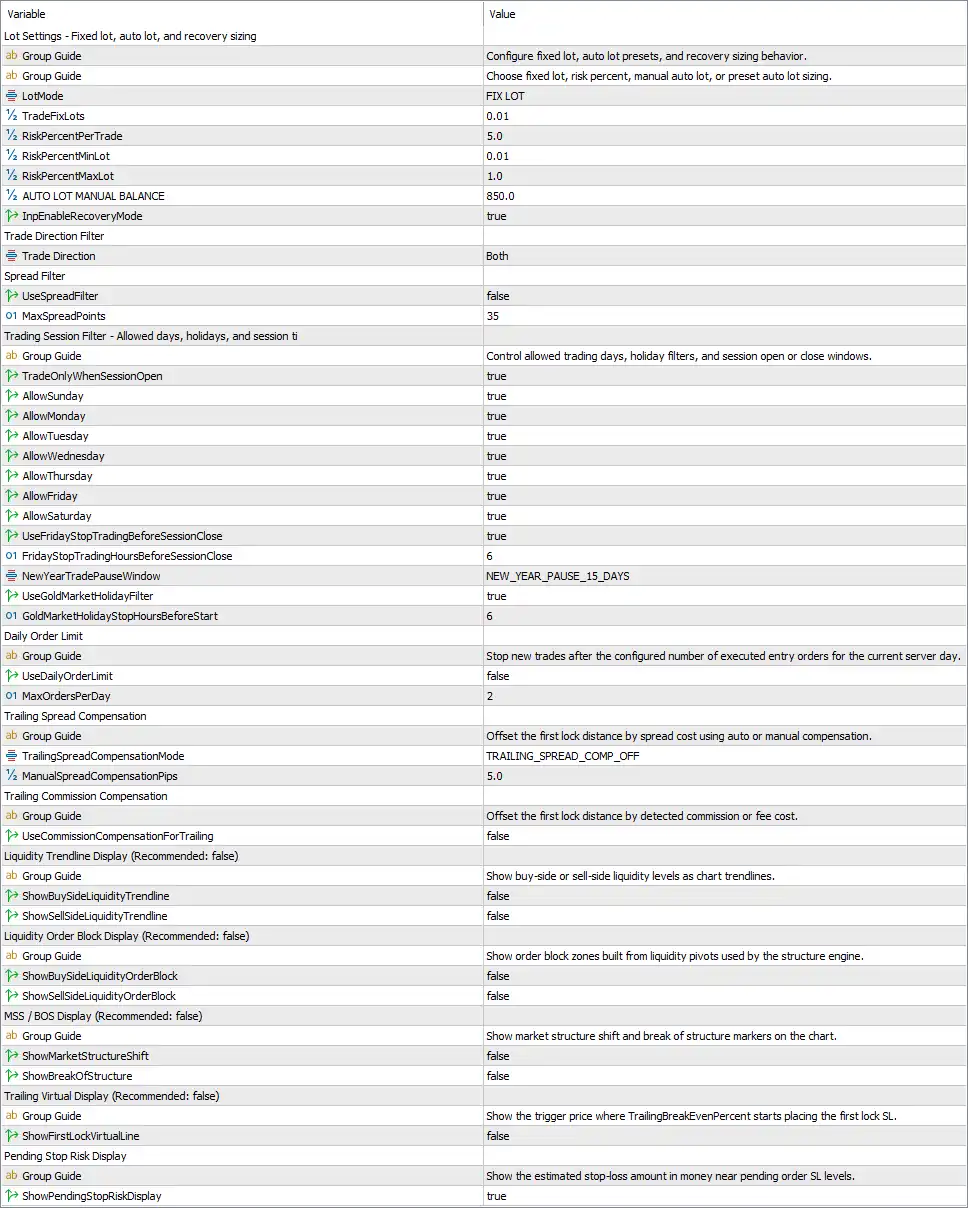
Lot Settings – Fixed Lot, Auto Lot & Recovery Sizing
🔹 LotMode = FIX LOT – Selects the fixed-lot position sizing method instead of percentage-based or automatic lot presets.
🔹 TradeFixLots = 0.01 – Sets the fixed trading volume to 0.01 lots when FIX LOT mode is active.
🔹 RiskPercentPerTrade = 5.0 – Defines the risk percentage per trade as 5.0% when percentage-based risk sizing is used.
🔹 RiskPercentMinLot = 0.01 – Sets the minimum lot size for percentage-based risk calculation to 0.01 lots.
🔹 RiskPercentMaxLot = 1.0 – Limits percentage-based position sizing to a maximum of 1.0 lot.
🔹 AUTO LOT MANUAL BALANCE = 850.0 – Sets the manual account-balance reference to 850.0 for automatic lot calculations.
🔹 InpEnableRecoveryMode = true – Enables the EA's recovery-mode functionality.
Trade Direction Filter
🔹 Trade Direction = Both – Allows the EA to trade in both Buy and Sell directions.
Spread Filter
🔹 UseSpreadFilter = false – Disables the spread filter, meaning the configured maximum spread is not actively used as a trading restriction.
🔹 MaxSpreadPoints = 35 – Defines the maximum spread threshold at 35 points when the spread filter is enabled.
Trading Session Filter
🔹 TradeOnlyWhenSessionOpen = true – Restricts trading according to the configured session-open conditions.
🔹 AllowSunday = true – Allows trading on Sunday.
🔹 AllowMonday = true – Allows trading on Monday.
🔹 AllowTuesday = true – Allows trading on Tuesday.
🔹 AllowWednesday = true – Allows trading on Wednesday.
🔹 AllowThursday = true – Allows trading on Thursday.
🔹 AllowFriday = true – Allows trading on Friday.
🔹 AllowSaturday = true – Allows trading on Saturday.
🔹 UseFridayStopTradingBeforeSessionClose = true – Enables the Friday pre-session-close trading restriction.
🔹 FridayStopTradingHoursBeforeSessionClose = 6 – Stops opening new trades 6 hours before the Friday session closes.
🔹 NewYearTradePauseWindow = NEW_YEAR_PAUSE_15_DAYS – Selects the NEW_YEAR_PAUSE_15_DAYS New Year trading-pause configuration.
🔹 UseGoldMarketHolidayFilter = true – Enables the Gold-market holiday filter.
🔹 GoldMarketHolidayStopHoursBeforeStart = 6 – Stops trading 6 hours before the configured Gold-market holiday period begins.
Daily Order Limit
🔹 UseDailyOrderLimit = false – Disables the daily order-limit restriction.
🔹 MaxOrdersPerDay = 2 – Sets the maximum daily entry-order limit to 2 orders per server day when the daily limit is enabled.
Trailing Spread Compensation
🔹 TrailingSpreadCompensationMode = TRAILING_SPREAD_COMP_OFF – Sets trailing spread compensation to OFF, so the EA does not currently apply the configured spread compensation to trailing calculations.
🔹 ManualSpreadCompensationPips = 5.0 – Defines a manual spread compensation value of 5.0 pips when the relevant compensation mode is used.
Trailing Commission Compensation
🔹 UseCommissionCompensationForTrailing = false – Disables commission or fee compensation when calculating trailing levels.
Liquidity Trendline Display
🔹 ShowBuySideLiquidityTrendline = false – Hides buy-side liquidity levels as chart trendlines.
🔹 ShowSellSideLiquidityTrendline = false – Hides sell-side liquidity levels as chart trendlines.
Liquidity Order Block Display
🔹 ShowBuySideLiquidityOrderBlock = false – Hides buy-side liquidity order-block zones on the chart.
🔹 ShowSellSideLiquidityOrderBlock = false – Hides sell-side liquidity order-block zones on the chart.
MSS / BOS Display
🔹 ShowMarketStructureShift = false – Hides Market Structure Shift (MSS) markers on the chart.
🔹 ShowBreakOfStructure = false – Hides Break of Structure (BOS) markers on the chart.
Trailing Virtual Display
🔹 ShowFirstLockVirtualLine = false – Hides the virtual trigger-price line associated with the first trailing lock Stop Loss.
Pending Stop Risk Display
🔹 ShowPendingStopRiskDisplay = true – Displays the estimated stop-loss risk amount in money near pending-order Stop Loss levels.
🔢 Dynamic Liquidity Intelligence EA MT5 – Key Configuration Summary
🔹 Lot Mode: FIX LOT
🔹 Fixed Lot Size: 0.01
🔹 Risk Per Trade: 5.0%
🔹 Minimum Risk Lot: 0.01
🔹 Maximum Risk Lot: 1.0
🔹 Manual Auto-Lot Balance: 850.0
🔹 Recovery Mode: Enabled
🔹 Trade Direction: Both
🔹 Spread Filter: Disabled
🔹 Maximum Spread: 35 points
🔹 Session Filter: Enabled
🔹 Sunday Trading: Enabled
🔹 Monday Trading: Enabled
🔹 Tuesday Trading: Enabled
🔹 Wednesday Trading: Enabled
🔹 Thursday Trading: Enabled
🔹 Friday Trading: Enabled
🔹 Saturday Trading: Enabled
🔹 Friday Stop Before Session Close: Enabled
🔹 Friday Stop Buffer: 6 hours
🔹 New Year Pause: NEW_YEAR_PAUSE_15_DAYS
🔹 Gold Market Holiday Filter: Enabled
🔹 Holiday Stop Buffer: 6 hours
🔹 Daily Order Limit: Disabled
🔹 Maximum Orders Per Day: 2
🔹 Trailing Spread Compensation: TRAILING_SPREAD_COMP_OFF
🔹 Manual Spread Compensation: 5.0 pips
🔹 Commission Compensation for Trailing: Disabled
🔹 Buy-Side Liquidity Trendline: Disabled
🔹 Sell-Side Liquidity Trendline: Disabled
🔹 Buy-Side Liquidity Order Block: Disabled
🔹 Sell-Side Liquidity Order Block: Disabled
🔹 Market Structure Shift Display: Disabled
🔹 Break of Structure Display: Disabled
🔹 First Lock Virtual Line: Disabled
🔹 Pending Stop Risk Display: Enabled
🔢 How the Dynamic Liquidity Intelligence EA MT5 Settings Work
The current configuration is based on FIX LOT sizing with a relatively small 0.01-lot fixed position size. Although the EA contains a 5.0% RiskPercentPerTrade setting, that parameter becomes relevant when a percentage-based risk-sizing method is selected rather than the currently selected FIX LOT mode.
The Recovery Mode is enabled, while trading is permitted in both directions. The spread filter itself is disabled, although its threshold remains configured at 35 points.
The session configuration is particularly broad: Sunday through Saturday are all enabled. At the same time, the EA applies a special 6-hour Friday stop before session close and a 6-hour Gold-market holiday protection window.
For visualization, most liquidity and market-structure displays are disabled. Buy-side and sell-side liquidity trendlines, liquidity order blocks, MSS, BOS, and the first virtual trailing-lock line are all hidden. The Pending Stop Risk Display, however, remains enabled, allowing estimated pending-order Stop Loss risk to be displayed on the chart.
🔢 Risk Management Considerations
The settings provide several independent risk-control mechanisms, but their behavior depends on which modes are enabled.
The most important distinction is that LotMode = FIX LOT, so the EA currently prioritizes the 0.01 fixed lot rather than the 5.0% RiskPercentPerTrade calculation.
The UseDailyOrderLimit = false setting means the configured MaxOrdersPerDay = 2 is not currently enforcing a daily restriction.
Likewise, UseSpreadFilter = false means the MaxSpreadPoints = 35 threshold is configured but not currently acting as a spread-based trading block.
These distinctions are important when optimizing the EA because changing a parent enable/disable parameter can immediately change whether the associated numerical setting is actually applied.
🔢 Conclusion
Dynamic Liquidity Intelligence EA MT5 offers a comprehensive configuration framework combining liquidity analysis, market-structure concepts, flexible position sizing, recovery functionality, session filtering, holiday protection, spread controls, and pending-order risk visualization.
The supplied setup is currently configured for 0.01 fixed lots, Both Buy & Sell trading, Recovery Mode enabled, and a broad Sunday-to-Saturday trading schedule. Several protective and analytical display features remain disabled, while Pending Stop Risk Display is enabled.
Traders should pay particular attention to the relationship between each numerical parameter and its corresponding enable/disable switch. For example, MaxSpreadPoints = 35 does not currently restrict trading because UseSpreadFilter = false, and MaxOrdersPerDay = 2 is not enforced because UseDailyOrderLimit = false.
Before applying these settings to a live account, forward testing and broker-specific validation are recommended, especially for lot sizing, spread conditions, session timing, Gold-market holidays, and recovery behavior.
🔢 FAQs
❓ What lot size is Dynamic Liquidity Intelligence EA MT5 currently using?
The current LotMode is FIX LOT, with TradeFixLots = 0.01, so the configured fixed position size is 0.01 lots.
❓ Is the spread filter enabled?
No. UseSpreadFilter = false. The maximum spread is configured at 35 points, but this limit is not currently being enforced by the spread filter.
❓ Does the EA support both Buy and Sell trades?
Yes. Trade Direction = Both, allowing both Buy and Sell trading directions.
❓ Is the daily order limit active?
No. UseDailyOrderLimit = false, so the configured MaxOrdersPerDay = 2 is currently inactive.
❓ What liquidity and market-structure displays are enabled?
Most visual liquidity and structure displays are disabled, including buy-side/sell-side liquidity trendlines, liquidity order blocks, MSS, BOS, and the first virtual lock line. ShowPendingStopRiskDisplay = true, so pending Stop Loss risk information remains visible.


