


🔢 EA Scalper FX Gold MT5 – Complete Settings Guide and Parameter Explanation
EA Scalper FX Gold MT5 is an automated gold trading Expert Advisor (EA) designed to combine grid trading, dynamic lot management, time-based execution and advanced exit controls.
The EA includes customizable position sizing, profit recovery mechanisms, spread filtering, and trading session management, making it suitable for traders seeking structured gold market automation.
🔢 EA Scalper FX Gold MT5 Parameters Explained
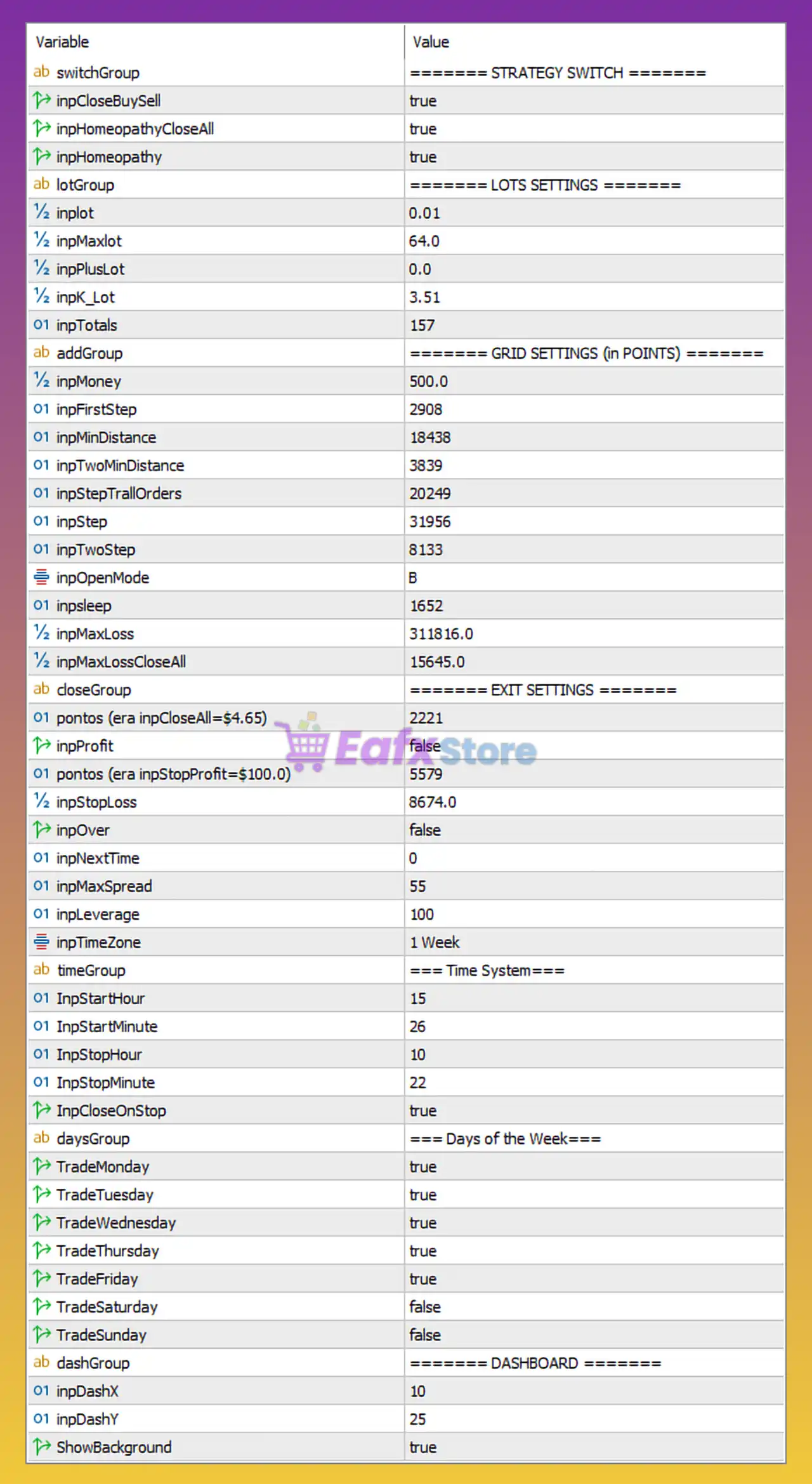
Below are the details of the parameters in the advisor’s trading system settings table:
🔶 Strategy Switch Settings
🔹 inpCloseBuySell = true – Enables automatic closure of both Buy and Sell positions according to the EA's trading logic.
🔹 inpHomeopathyCloseAll = true – Activates the global close-all function when predefined homeopathy conditions are met.
🔹 inpHomeopathy = true – Enables the Homeopathy trading strategy module used by the EA.
🔶 Lots Settings
🔹 inpLot = 0.01 – Sets the initial trading lot size to 0.01 lots.
🔹 inpMaxlot = 64.0 – Defines the maximum allowable lot size as 64.0 lots.
🔹 inpPlusLot = 0.0 – Additional lot increment value applied to position sizing calculations.
🔹 inpK_Lot = 3.51 – Lot multiplication coefficient used for progressive lot calculations.
🔹 inpTotals = 157 – Maximum total lot-related calculation parameter used by the strategy.
🔶 Grid Settings (in Points)
🔹 inpMoney = 500.0 – Base capital reference value used by the EA's grid management system.
🔹 inpFirstStep = 2908 – Distance in points before the first additional grid order is opened.
🔹 inpMinDistance = 18438 – Minimum distance between grid levels set to 18,438 points.
🔹 inpTwoMinDistance = 3839 – Secondary minimum grid distance parameter of 3,839 points.
🔹 inpStepTrailOrders = 20249 – Distance used for trailing and managing grid orders.
🔹 inpStep = 31956 – Main grid spacing value between positions.
🔹 inpTwoStep = 8133 – Secondary grid spacing parameter used by the strategy.
🔹 inpOpenMode = B – Trading mode configured to operate in mode "B".
🔹 inpsleep = 1652 – Internal delay parameter used by the EA’s execution engine.
🔹 inpMaxLoss = 311816.0 – Maximum floating loss threshold allowed before protection mechanisms activate.
🔹 inpMaxLossCloseAll = 15645.0 – Floating loss level that triggers closing all active positions.
🔶 Exit Settings
🔹 points (era inpCloseAll=$4.65) = 2221 – Point-based basket closure target equivalent to approximately $4.65 profit.
🔹 inpProfit = false – Disables fixed profit target closure mode.
🔹 points (era inpStopProfit=$100.0) = 5579 – Profit-stop target represented by 5,579 points.
🔹 inpStopLoss = 8674.0 – Stop-loss protection level set to 8,674 points.
🔹 inpOver = false – Disables the additional over-profit management function.
🔹 inpNextTime = 0 – No waiting time before the next trading cycle.
🔹 inpMaxSpread = 55 – Maximum spread allowed for opening new trades is 55 points.
🔹 inpleverage = 100 – Account leverage reference set to 1:100.
🔹 inpTimeZone = 1 Week – Timezone or operational period setting configured to one-week mode.
🔶 Time System Settings
🔹 InpStartHour = 15 – Trading session starts at 15:00.
🔹 InpStartMinute = 26 – Trading begins at minute 26.
🔹 InpStopHour = 10 – Trading session stop hour is 10.
🔹 InpStopMinute = 22 – Trading session stop minute is 22.
🔹 InpCloseOnStop = true – Automatically closes open trades when the trading session ends.
🔶 Days of the Week Settings
🔹 TradeMonday = true – Enables trading on Monday.
🔹 TradeTuesday = true – Enables trading on Tuesday.
🔹 TradeWednesday = true – Enables trading on Wednesday.
🔹 TradeThursday = true – Enables trading on Thursday.
🔹 TradeFriday = true – Enables trading on Friday.
🔹 TradeSaturday = false – Disables trading on Saturday.
🔹 TradeSunday = false – Disables trading on Sunday.
🔶 Dashboard Settings
🔹 inpDashX = 10 – Horizontal dashboard position set to X coordinate 10.
🔹 inpDashY = 25 – Vertical dashboard position set to Y coordinate 25.
🔹 ShowBackground = true – Displays the dashboard background on the chart.
🔢 Configuration Summary
🔹 Starting Lot Size: 0.01
🔹 Maximum Lot Size: 64.0
🔹 Lot Multiplier: 3.51
🔹 Maximum Spread: 55 points
🔹 Leverage Reference: 1:100
🔹 Grid First Step: 2,908 points
🔹 Grid Main Step: 31,956 points
🔹 Maximum Loss: 311,816.0
🔹 Close-All Loss Level: 15,645.0
🔹 Trading Days: Monday to Friday
🔹 Dashboard Position: X=10, Y=25
🔢 Conclusion
EA Scalper FX Gold MT5 is a powerful gold trading system that combines grid-based order management, dynamic lot progression, spread filtering, trading session controls and advanced basket exit management.
With configurable settings such as a 0.01 starting lot, 64.0 maximum lot size, 3.51 lot multiplier, 55-point spread filter, and automated close-all protection, the EA offers traders extensive flexibility for adapting the strategy to different account sizes and risk profiles.
🔢 FAQs
❓ What is the minimum lot size used by EA Scalper FX Gold MT5?
The default starting lot size is 0.01 lots.
❓ How many lots can the EA increase to?
The maximum configured lot size is 64.0 lots.
❓ Does the EA use a grid trading strategy?
Yes, the EA includes multiple grid distance settings such as inpFirstStep, inpStep, and inpTwoStep for grid order management.
❓ Can the EA automatically stop trading at specific times?
Yes, the built-in Time System allows traders to define start and stop trading hours and automatically close positions when the session ends.
❓ Does EA Scalper FX Gold MT5 include spread protection?
Yes, the EA prevents new entries when the spread exceeds 55 points using the inpMaxSpread filter.



