

Quantum King EA MT5 Settings Guide – Complete Parameter Explanation
Quantum King EA MT5 is a professional automated trading Expert Advisor designed to deliver stable and intelligent trade execution through adaptive money management, grid optimization, drawdown protection, spread filtering and trading schedule controls.
The EA offers flexible configuration for risk management, account currency adjustment, trading day selection, and execution quality, allowing traders to optimize performance across different brokers and account types. Below is a complete explanation of every parameter shown in the settings panel.
General Settings
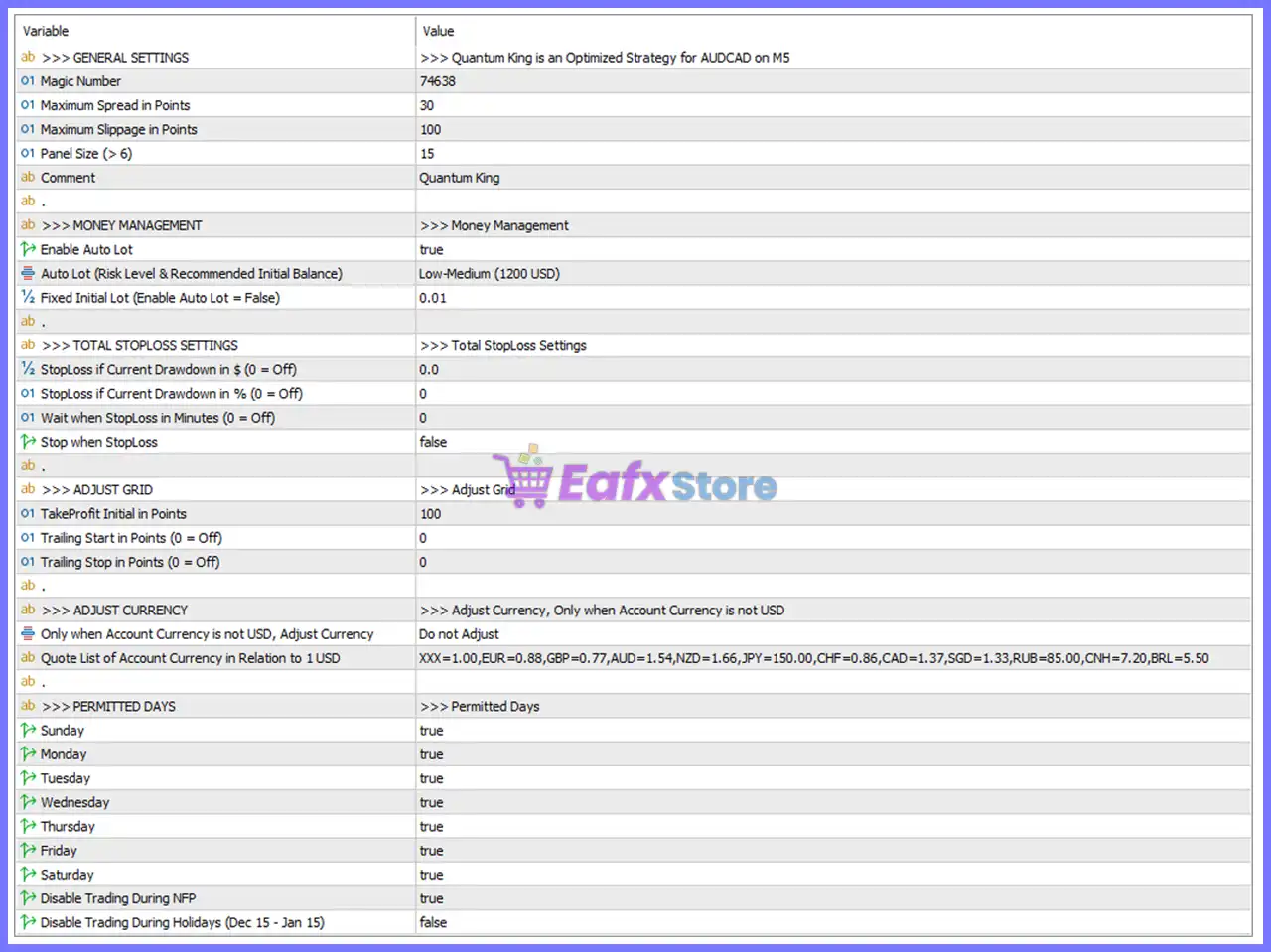
🔹 General Information = Quantum King is an Optimized Strategy for AUDCAD on M5 – Indicates that the EA is optimized for trading the AUDCAD currency pair on the M5 timeframe.
🔹 Magic Number = 74638 – Unique identifier assigned to all trades opened by Quantum King EA MT5, allowing independent trade management.
🔹 Maximum Spread in Points = 30 – Prevents the EA from opening new trades whenever the current spread exceeds 30 points.
🔹 Maximum Slippage in Points = 100 – Allows a maximum execution slippage of 100 points before an order is rejected.
🔹 Panel Size (> 6) = 15 – Sets the on-chart information panel size to 15. Values greater than 6 provide a larger display.
🔹 Comment = Quantum King – Adds the custom trade comment "Quantum King" to every order opened by the EA.
Money Management
🔹 Enable Auto Lot = true – Enables automatic lot size calculation based on the selected risk level.
🔹 Auto Lot (Risk Level & Recommended Initial Balance) = Low-Medium (1200 USD) – Uses the Low-Medium risk profile with a recommended starting balance of 1200 USD.
🔹 Fixed Initial Lot (Enable Auto Lot = False) = 0.01 – Uses a fixed position size of 0.01 lots when Auto Lot is disabled.
Total StopLoss Settings
🔹 StopLoss if Current Drawdown in $ (0 = Off) = 0.0 – Dollar-based maximum drawdown protection is disabled because the value is 0.0.
🔹 StopLoss if Current Drawdown in % (0 = Off) = 0 – Percentage-based drawdown protection is disabled because the value is 0.
🔹 Wait when StopLoss in Minutes (0 = Off) = 0 – No waiting period is applied after a StopLoss event because the value is 0.
🔹 Stop when StopLoss = false – The EA continues trading after a StopLoss event instead of stopping completely.
Adjust Grid
🔹 TakeProfit Initial in Points = 100 – Sets the initial Take Profit target to 100 points.
🔹 Trailing Start in Points (0 = Off) = 0 – Trailing Stop activation is disabled because the value is 0.
🔹 Trailing Stop in Points (0 = Off) = 0 – Trailing Stop distance is disabled because the value is 0.
Adjust Currency
🔹 Only when Account Currency is not USD, Adjust Currency = Do not Adjust – Currency conversion is disabled even when the trading account is denominated in a non-USD currency.
🔹 Quote List of Account Currency in Relation to 1 USD = XXX=1.00, EUR=0.88, GBP=0.77, AUD=1.54, NZD=1.66, JPY=150.00, CHF=0.86, CAD=1.37, SGD=1.33, RUB=85.00, CNH=7.20, BRL=5.50 – Provides predefined exchange-rate references for converting account currencies relative to 1 USD when currency adjustment is enabled.
Permitted Days
🔹 Sunday = true – Trading is permitted on Sunday.
🔹 Monday = true – Trading is permitted on Monday.
🔹 Tuesday = true – Trading is permitted on Tuesday.
🔹 Wednesday = true – Trading is permitted on Wednesday.
🔹 Thursday = true – Trading is permitted on Thursday.
🔹 Friday = true – Trading is permitted on Friday.
🔹 Saturday = true – Trading is permitted on Saturday.
🔹 Disable Trading During NFP = true – Prevents the EA from opening new trades during Non-Farm Payroll (NFP) events.
🔹 Disable Trading During Holidays (Dec 15 - Jan 15) = false – Holiday trading protection is disabled, allowing the EA to trade between December 15 and January 15.
Conclusion
Quantum King EA MT5 provides a balanced configuration focused on intelligent money management, execution quality, spread protection, drawdown monitoring, and flexible trading schedules. Its optimized settings for AUDCAD on the M5 timeframe, combined with automatic lot sizing, configurable grid behavior, and optional currency adjustment, make it suitable for traders seeking disciplined automated trading with straightforward customization. Understanding each parameter helps ensure the EA operates efficiently under different broker conditions and account types.
FAQs
❓ What is the recommended account size for Quantum King EA MT5?
The default Auto Lot profile recommends a Low-Medium risk level with an initial balance of 1200 USD.
❓ Can I use a fixed lot size instead of Auto Lot?
Yes. Disable Enable Auto Lot, and the EA will use the configured Fixed Initial Lot = 0.01.
❓ Why are the Trailing Start and Trailing Stop values set to 0?
A value of 0 disables the Trailing Stop feature, meaning trades will rely on the configured Take Profit and other internal exit logic.
❓ What is the purpose of the Magic Number?
The Magic Number = 74638 uniquely identifies all trades opened by Quantum King EA MT5, preventing conflicts with manual trades or other Expert Advisors.
❓ Should I enable trading during NFP and holiday periods?
The default settings disable trading during NFP events to reduce exposure to extreme volatility, while holiday trading remains enabled because Disable Trading During Holidays (Dec 15 - Jan 15) = false. You can adjust these options according to your trading preferences and market conditions.



