





Super EA Access MT5 v1.10 with SetFiles (Unlimited)

Subscriptions for Special Plan
- 30 EA package is more economical!
- Special package with 99%
- Download 1 EA/Day

Subscriptions for Premium Membership
- Download Unlimited in 1 Year
- Get 100% Discount
- Get free access to all

Subscriptions for Gold Membership
- 1 Year Membership
- Get 100% Discount
- Access EA+Indicator+Course
Frequently bought together 🎁
Add these products to enhance your purchase




 Super EA Access v1.10.ex5
 Reviewed by
 🔢 Super EA Access MT5 – Complete Settings Guide and Parameter Explanation
Super EA Access MT5 is an automated Forex trading robot designed to combine trend-following logic with dynamic profit management and trailing stop protection. The EA uses EMA trend analysis, configurable take-profit targets, and multi-trade management features to help traders capture market opportunities while maintaining risk control.
Super EA Access MT5 Settings
🔢 Super EA Access MT5 Parameters Explained
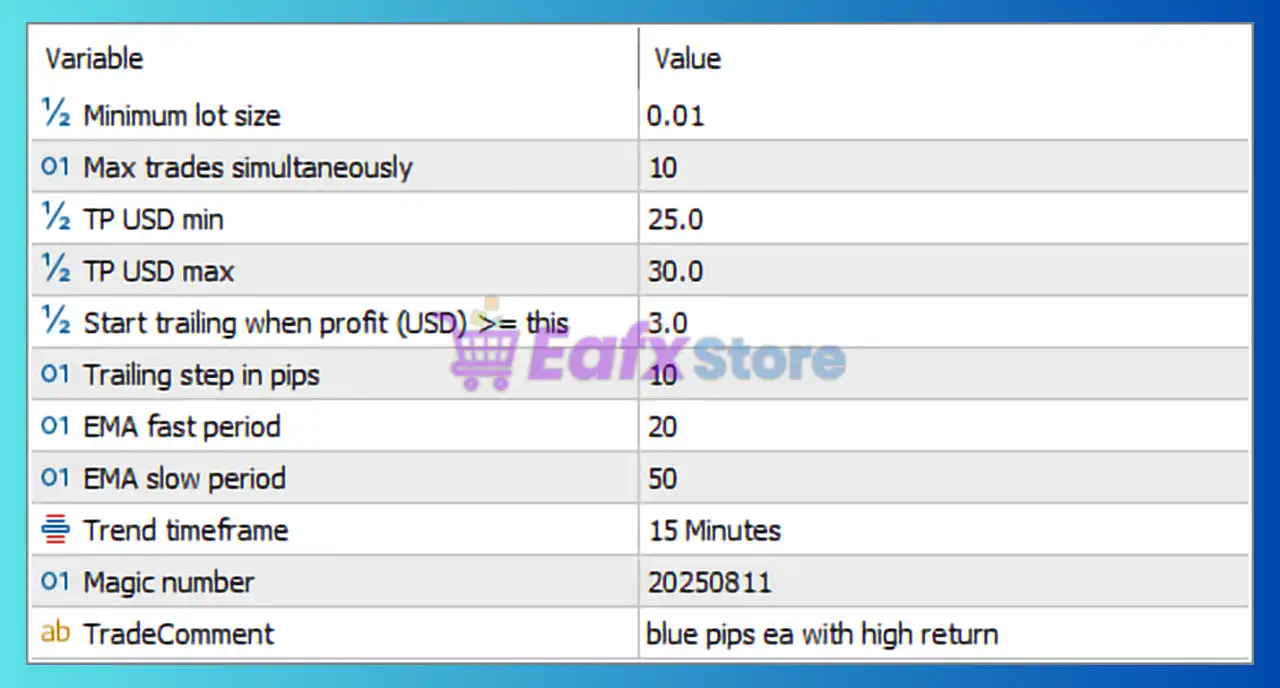
Below are the details of the parameters in the advisor’s trading system settings table:
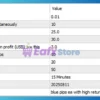
Super EA Access MT5 Settings Panel
🔶 Trade Management Settings
🔹 Minimum lot size = 0.01 – Defines the smallest lot size the EA can use when opening a new trade.
🔹 Max trades simultaneously = 10 – Limits the maximum number of open trades to 10 at the same time.
🔹 TP USD min = 25.0 – Sets the minimum basket or trade take-profit target at 25.0 USD.
🔹 TP USD max = 30.0 – Sets the maximum basket or trade take-profit target at 30.0 USD.
🔶 Trailing Stop Settings
🔹 Start trailing when profit (USD) >= this = 3.0 – Activates the trailing stop function once the trade reaches a profit of 3.0 USD.
🔹 Trailing step in pips = 10 – Adjusts the trailing stop every 10 pips as the trade moves in profit.
🔶 Trend Filter Settings
🔹 EMA fast period = 20 – Uses a 20-period Exponential Moving Average for short-term trend analysis.
🔹 EMA slow period = 50 – Uses a 50-period Exponential Moving Average for long-term trend confirmation.
🔹 Trend timeframe = 15 Minutes – The EA calculates trend direction using the 15-minute timeframe.
🔶 Identification Settings
🔹 Magic number = 20250811 – Unique identifier assigned to all positions opened by Super EA Access MT5.
🔹 TradeComment = blue pips ea with high return – Custom text comment attached to trades for identification and tracking purposes.
🔢 Configuration Summary
🔹 Minimum Lot Size: 0.01
🔹 Maximum Simultaneous Trades: 10
🔹 Minimum Take Profit Target: 25.0 USD
🔹 Maximum Take Profit Target: 30.0 USD
🔹 Trailing Activation Profit: 3.0 USD
🔹 Trailing Step: 10 pips
🔹 Fast EMA Period: 20
🔹 Slow EMA Period: 50
🔹 Trend Timeframe: 15 Minutes
🔹 Magic Number: 20250811
🔹 Trade Comment: blue pips ea with high return
🔢 Why These Settings Matter
🔹 The 20 EMA and 50 EMA combination helps filter trades in the direction of the dominant market trend.
🔹 The 15-minute trend timeframe provides a balance between responsiveness and signal reliability.
🔹 The 3.0 USD trailing activation level allows profits to develop before protection begins.
🔹 The 10-pip trailing step helps lock in gains while giving trades enough room to continue trending.
🔹 The 25.0–30.0 USD take-profit range provides a structured profit objective for trade management.
🔹 The 10-trade maximum limit prevents excessive exposure and helps maintain account stability.
🔢 Conclusion
Super EA Access MT5 is a trend-based trading system that combines EMA trend filtering, dynamic profit targets and automated trailing stop management.
With settings such as a 20-period fast EMA, 50-period slow EMA, 15-minute trend timeframe, 3.0 USD trailing activation, and up to 10 simultaneous trades, the EA aims to balance trade frequency, profitability and risk control. Proper optimization of these parameters can help traders adapt the system to different account sizes and market conditions.
🔢 FAQs
❓ What is the minimum lot size used by Super EA Access MT5?
The default minimum lot size is 0.01 lots.
❓ How many trades can the EA open at the same time?
The EA can manage up to 10 simultaneous trades.
❓ When does the trailing stop start working?
Trailing stop activates when profit reaches 3.0 USD.
❓ What EMA settings are used for trend detection?
The EA uses a 20-period EMA and a 50-period EMA on the 15-minute timeframe.
❓ What is the purpose of the Magic Number 20250811?
It uniquely identifies trades opened by Super EA Access MT5, allowing the EA to manage its own positions independently.
User Reviews
Only logged in customers who have purchased this product may leave a review.
❓ What trading strategy does Super EA Access MT5 use?
Super EA Access MT5 uses a trend-following approach based on EMA 20 and EMA 50 analysis to identify potential trading opportunities in market trends.
❓ How many positions can Super EA Access MT5 manage simultaneously?
Super EA Access MT5 can handle up to 10 open trades at the same time, helping traders diversify entries while maintaining exposure limits.
❓ What is the minimum lot size supported by Super EA Access MT5?
Super EA Access MT5 uses a minimum lot size of 0.01, making it suitable for traders who prefer conservative risk management and smaller accounts.
❓ When does the trailing stop activate in Super EA Access MT5?
Super EA Access MT5 activates its trailing stop once a trade reaches at least 3.0 USD profit, helping protect gains while allowing growth potential.
❓ Why does Super EA Access MT5 use EMA 20 and EMA 50?
Super EA Access MT5 combines EMA 20 and EMA 50 to filter trades in the direction of the prevailing trend and reduce lower-quality market entries.
❓ What is the take-profit target range in Super EA Access MT5?
Super EA Access MT5 uses a profit target range between 25.0 USD and 30.0 USD, creating structured and consistent exit objectives for trades.
❓ Which timeframe is used for trend analysis in Super EA Access MT5?
Super EA Access MT5 evaluates trend direction on the 15-minute timeframe, balancing faster signals with improved market stability.
❓ What is the purpose of the Magic Number in Super EA Access MT5?
Super EA Access MT5 uses Magic Number 20250811 to identify and manage its own positions independently from manual trades or other EAs.
❓ How does the trailing step work in Super EA Access MT5?
Super EA Access MT5 adjusts the trailing stop every 10 pips after activation, helping lock in profits while still allowing room for trends to continue.
❓ Who is Super EA Access MT5 best suited for?
Super EA Access MT5 is ideal for traders seeking automated trend trading with EMA filtering, dynamic profit targets, and built-in trailing protection.
🔥 Get This EA for FREE with Our Membership! 🚀🚀
Unlock access to this EA, premium Indicators, and exclusive trading tools completely FREE with any of our Membership Plans! Thousands of traders already benefit from our VIP library—join them and level up your trading instantly. Choose Your Membership:
- SPECIAL – 1 Month Membership
- GOLD – 1 Year Membership
- PREMIUM – 1 Year Membership
-
 Price range: $89.00 through $599.00
 -
 Price range: $89.00 through $599.00
 -
 Price range: $89.00 through $599.00
 -
 Price range: $70.00 through $599.00
-
 1Original price was: $599.00.$59.00Current price is: $59.00.
 -
 1Original price was: $950.00.$59.00Current price is: $59.00.
 -
 3Original price was: $999.00.$69.00Current price is: $69.00.
 -
 3Original price was: $499.00.$59.00Current price is: $59.00.
There are no reviews yet.