
🔢 EA Skynet MT4 – Complete Settings & Input Parameters Guide
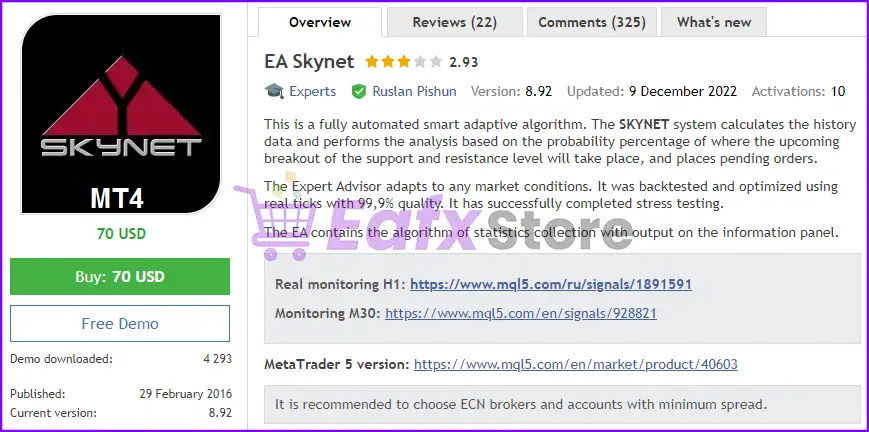
EA Skynet MT4 is a powerful automated Forex trading robot for MetaTrader 4 that combines breakout trading strategies, smart money management, trailing stop systems, breakeven protection, spread filters and news-based trading modules.
Designed for traders seeking automation with flexible risk control, EA Skynet MT4 supports multi-strategy execution, trading session management, and adaptive stop systems to optimize market entries and exits.
🔢 EA Skynet MT4 Settings Explained
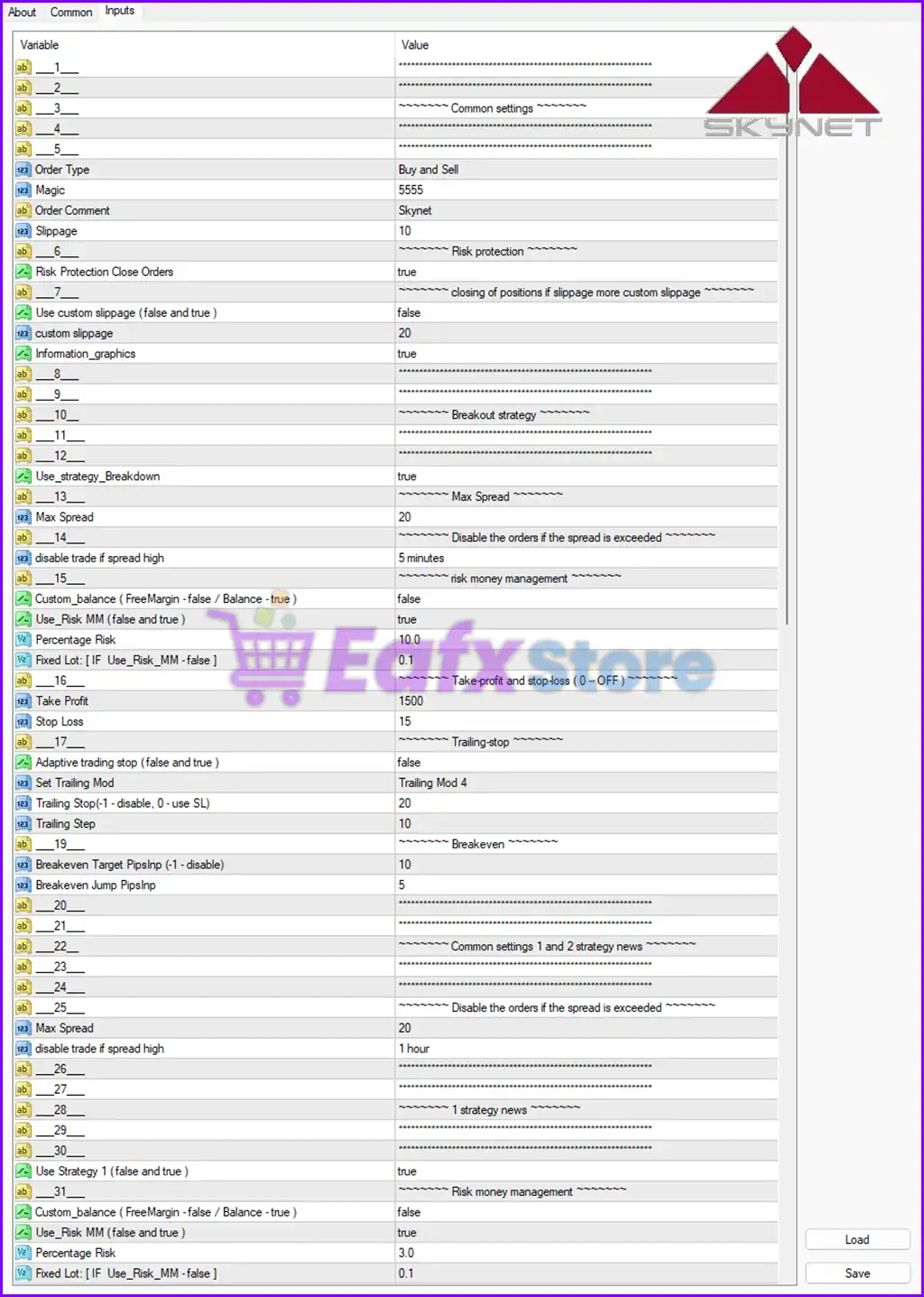
Below are the details of the parameters in the advisor’s trading system settings table:
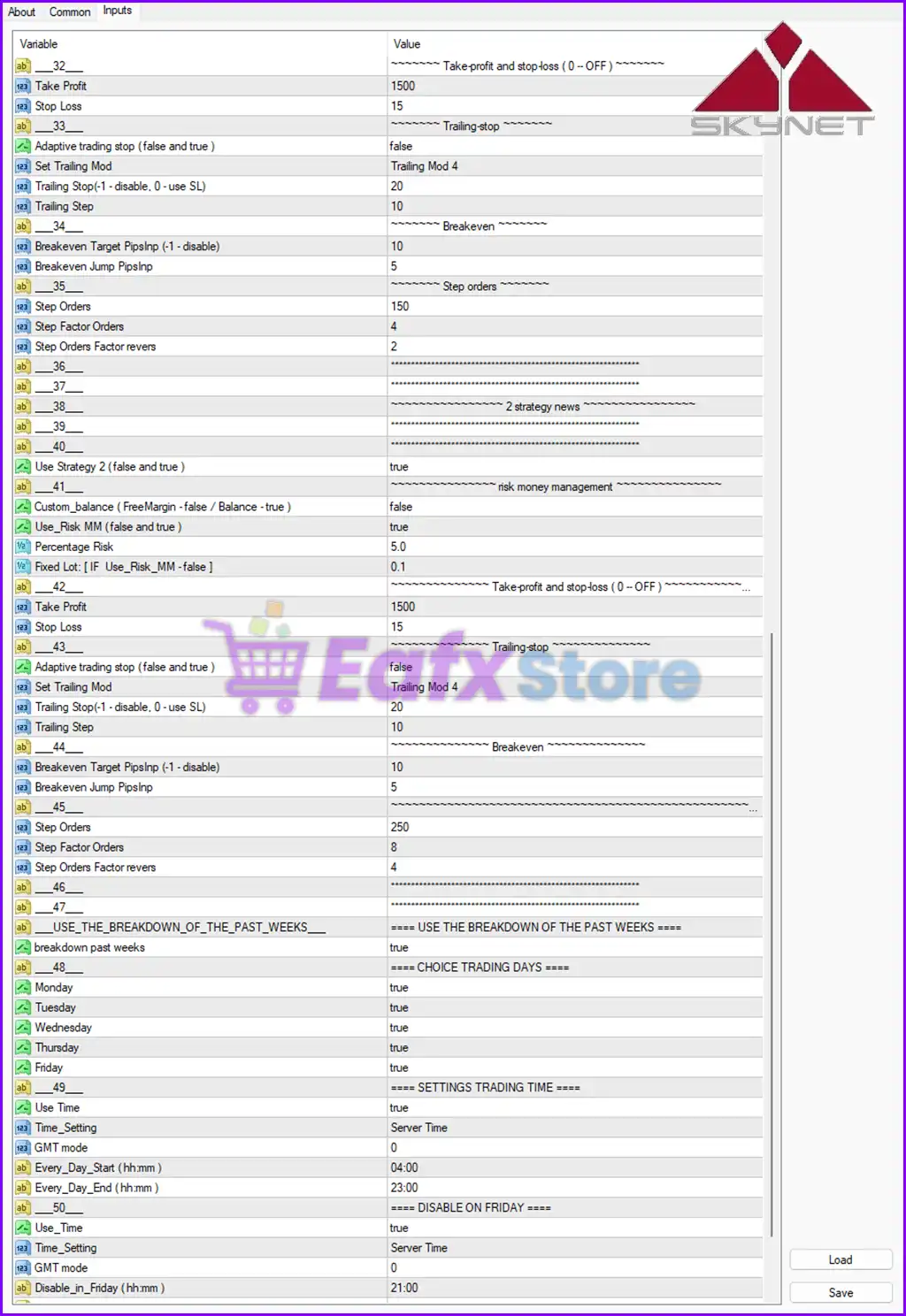
🔶 Common Settings
🔹 Order Type = Buy and Sell: EA is configured to open both Buy and Sell trades automatically.
🔹 Magic = 5555: Unique Magic Number 5555 used to identify EA trades.
🔹 Order Comment = Skynet: Trade comment label displayed as Skynet.
🔹 Slippage = 10: Maximum allowed slippage during order execution is 10.
🔶 Risk Protection Settings
🔹 Risk Protection Close Orders = true: Enables automatic protection and emergency order closing.
🔹 Use custom slippage (false and true) = false: Custom slippage control is disabled.
🔹 custom slippage = 20: Custom slippage value is set to 20 when enabled.
🔹 Information_graphics = true: Displays graphical information and trading statistics on chart.
🔶 Breakout Strategy Settings
🔹 Use_strategy_Breakdown = true: Enables breakout/breakdown trading strategy.
🔶 Spread Protection Settings
🔹 Max Spread = 20: Maximum spread allowed for opening trades is 20.
🔹 disable trade if spread high = 5 minutes: Trading pauses for 5 minutes if spread exceeds limit.
🔶 Risk Money Management Settings
🔹 Custom_balance (FreeMargin - false / Balance - true) = false: EA uses Free Margin instead of Balance for calculations.
🔹 Use_Risk_MM (false and true) = true: Risk-based money management is enabled.
🔹 Percentage Risk = 10.0: Risk per trade is configured at 10.0%.
🔹 Fixed Lot: [ IF Use_Risk_MM - false ] = 0.1: Fixed lot size is 0.1 if risk management is disabled.
🔶 Take Profit & Stop Loss Settings
🔹 Take Profit = 1500: Take Profit target is set to 1500 points.
🔹 Stop Loss = 15: Stop Loss level is configured at 15 points.
🔶 Trailing Stop Settings
🔹 Adaptive trading stop (false and true) = false: Adaptive trailing stop feature is disabled.
🔹 Set Trailing Mod = Trailing Mod 4: Trailing Stop mode selected is Trailing Mod 4.
🔹 Trailing Stop (-1 disable, 0 use SL) = 20: Trailing Stop distance is set to 20.
🔹 Trailing Step = 10: Trailing Stop updates every 10 points.
🔶 Breakeven Settings
🔹 Breakeven Target PipsInp (-1 disable) = 10: Breakeven activates after 10 pips profit.
🔹 Breakeven Jump PipsInp = 5: Breakeven offset jump value is 5 pips.
🔶 Common Strategy News Settings
🔹 Max Spread = 20: Spread filter for strategy news trading is set to 20.
🔹 disable trade if spread high = 1 hour: Trading pauses for 1 hour if spread becomes too high.
🔶 Strategy 1 Settings
🔹 Use Strategy 1 (false and true) = true: Strategy 1 is enabled.
🔹 Custom_balance (FreeMargin - false / Balance - true) = false: Uses Free Margin calculations for Strategy 1.
🔹 Use_Risk_MM (false and true) = true: Strategy 1 uses risk-based money management.
🔹 Percentage Risk = 3.0: Strategy 1 risk percentage is 3.0%.
🔹 Fixed Lot: [ IF Use_Risk_MM - false ] = 0.1: Fixed lot size for Strategy 1 is 0.1.
🔶 Strategy 2 Settings
🔹 Use Strategy 2 (false and true) = true: Strategy 2 is enabled.
🔹 Custom_balance (FreeMargin - false / Balance - true) = false: Uses Free Margin calculations for Strategy 2.
🔹 Use_Risk_MM (false and true) = true: Strategy 2 uses risk management.
🔹 Percentage Risk = 5.0: Strategy 2 risk percentage is 5.0%.
🔹 Fixed Lot: [ IF Use_Risk_MM - false ] = 0.1: Fixed lot size for Strategy 2 is 0.1.
🔶 Strategy 2 Take Profit & Stop Loss
🔹 Take Profit = 1500: Strategy 2 Take Profit is 1500.
🔹 Stop Loss = 15: Strategy 2 Stop Loss is 15.
🔶 Strategy 2 Trailing Stop
🔹 Adaptive trading stop (false and true) = false: Adaptive trailing stop is disabled for Strategy 2.
🔹 Set Trailing Mod = Trailing Mod 4: Strategy 2 uses Trailing Mod 4.
🔹 Trailing Stop (-1 disable, 0 use SL) = 20: Strategy 2 trailing stop distance is 20.
🔹 Trailing Step = 10: Strategy 2 trailing step is 10.
🔶 Strategy 2 Breakeven
🔹 Breakeven Target PipsInp (-1 disable) = 10: Strategy 2 breakeven trigger is 10.
🔹 Breakeven Jump PipsInp = 5: Strategy 2 breakeven jump is 5.
🔶 Step Orders Settings
🔹 Step Orders = 150: Primary step order distance is 150.
🔹 Step Factor Orders = 4: Step factor multiplier is 4.
🔹 Step Orders Factor revers = 2: Reverse step factor value is 2.
🔹 Step Orders = 250: Secondary step order distance is 250.
🔹 Step Factor Orders = 8: Secondary step factor multiplier is 8.
🔹 Step Orders Factor revers = 4: Secondary reverse factor is 4.
🔶 Breakdown of Past Weeks Settings
🔹 breakdown past weeks = true: Enables weekly market breakdown analysis.
🔶 Trading Days Settings
🔹 Monday = true: Trading is enabled on Monday.
🔹 Tuesday = true: Trading is enabled on Tuesday.
🔹 Wednesday = true: Trading is enabled on Wednesday.
🔹 Thursday = true: Trading is enabled on Thursday.
🔹 Friday = true: Trading is enabled on Friday.
🔶 Trading Time Settings
🔹 Use Time = true: Time filter is enabled.
🔹 Time_Setting = Server Time: EA uses broker server time.
🔹 GMT mode = 0: GMT offset mode is set to 0.
🔹 Every_Day_Start (hh:mm) = 04:00: Daily trading starts at 04:00.
🔹 Every_Day_End (hh:mm) = 23:00: Daily trading stops at 23:00.
🔶 Friday Disable Settings
🔹 Use_Time = true: Friday shutdown timer is enabled.
🔹 Time_Setting = Server Time: Friday filter uses server time.
🔹 GMT mode = 0: GMT mode remains 0.
🔹 Disable_in_Friday (hh:mm) = 21:00: Trading is disabled on Friday starting at 21:00.
🔢 Conclusion
EA Skynet MT4 is a feature-rich automated Forex trading Expert Advisor that combines breakout strategies, advanced trailing systems, spread protection, risk management, and scheduled trading filters. With support for multiple trading strategies, adaptive money management, and trading session controls, EA Skynet MT4 offers traders a flexible and structured solution for automated trading in MetaTrader 4.
🔢 FAQs
❓ What is EA Skynet MT4?
EA Skynet MT4 is an automated Forex trading robot designed for MetaTrader 4 with breakout and money management features.
❓ Does EA Skynet MT4 support multiple strategies?
Yes, the EA supports both Strategy 1 and Strategy 2 with separate risk settings.
❓ What timeframe is recommended for EA Skynet MT4?
The screenshot does not specify a fixed timeframe, but the EA is designed for flexible MT4 trading environments.
❓ Can EA Skynet MT4 automatically manage risk?
Yes, it includes percentage-based risk management and equity protection systems.
❓ Does EA Skynet MT4 include spread and time filters?
Yes, the EA includes maximum spread filters, trading schedules, and Friday shutdown controls.