


🔢 Nasdaq100 Trader EA MT4 – Complete Settings Guide
Nasdaq100 Trader EA MT4 is an automated trading Expert Advisor designed for the MetaTrader 4 platform, with configurable position sizing, trading volume multipliers, stop-loss modification parameters, and moving average settings. Its input configuration provides traders with several controls for adjusting trade execution, lot management, price-distance parameters, and trading direction.
Understanding each parameter is essential for configuring Nasdaq100 Trader EA MT4 properly, optimizing its trading behavior, and managing exposure when trading the NASDAQ 100 index.
⚙️ Lot Size and Position Management Settings
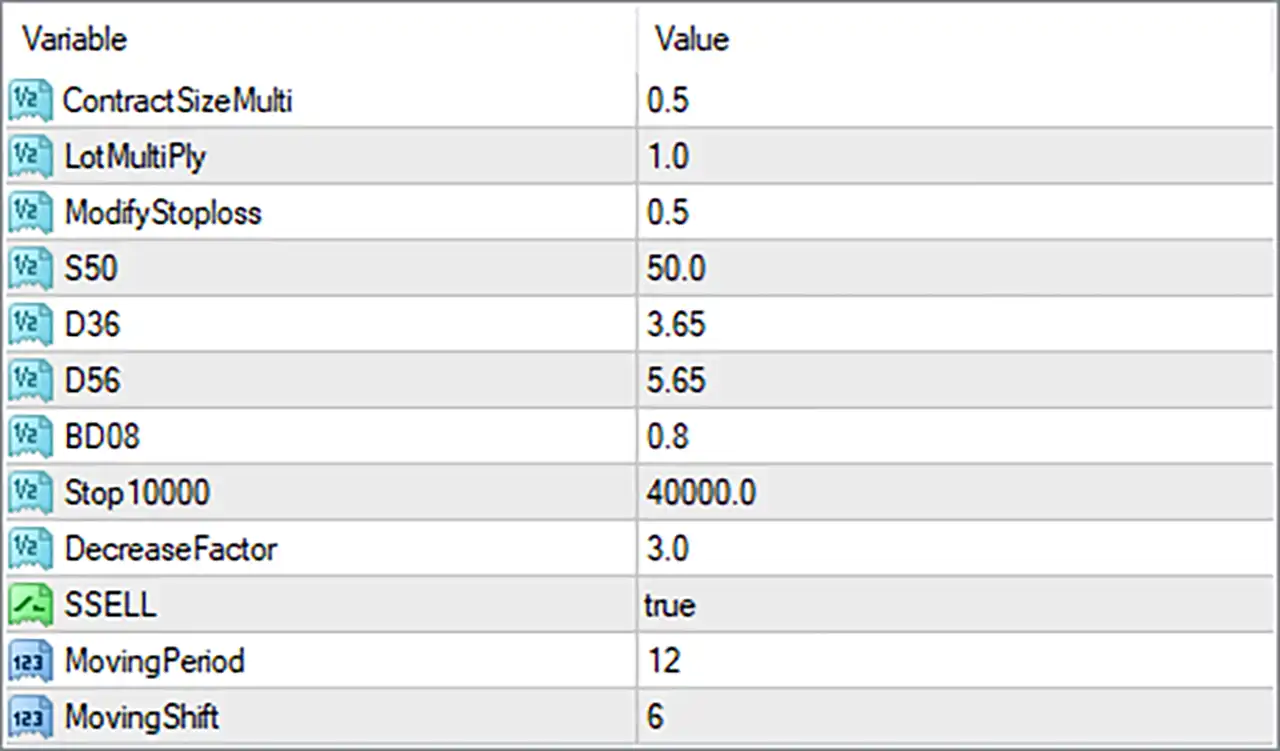
🔹 ContractSizeMulti = 0.5: Sets the contract size multiplier to 0.5, allowing the EA to adjust its contract-related calculations according to the configured scaling factor.
🔹 LotMultiPly = 1.0: Sets the lot multiplication factor to 1.0, meaning the configured trading volume is not increased or decreased by this multiplier.
⚙️ Stop Loss and Trade Management Settings
🔹 ModifyStoploss = 0.5: Sets the Stop Loss modification parameter to 0.5, controlling a scaling or adjustment factor used by the EA when modifying existing Stop Loss levels. Its exact calculation depends on the internal trading algorithm.
🔹 S50 = 50.0: Sets the S50 parameter to 50.0, representing a numerical threshold or distance used by the EA's trading logic. The exact function requires confirmation from the EA's source code.
🔹 D36 = 3.65: Sets the D36 parameter to 3.65, providing a configurable numerical value for one of the EA's internal trading calculations or price-distance conditions.
🔹 D56 = 5.65: Sets the D56 parameter to 5.65, defining another numerical threshold used by the EA's trading algorithm. Its precise relationship with trade entries or exits depends on the internal implementation.
🔹 BD08 = 0.8: Sets the BD08 parameter to 0.8, configuring a numerical factor used in the EA's internal trading calculations or execution conditions.
🔹 Stop10000 = 40000.0: Sets the Stop10000 parameter to 40000.0. This is a stop-related numerical setting that may control a price-distance or stopping threshold within the EA. Its exact operational meaning cannot be determined from the input name alone.
🔹 DecreaseFactor = 3.0: Sets the decrease factor to 3.0, configuring the EA's reduction-related calculation. This may influence how certain trading values are reduced or adjusted during trade management, depending on the programmed logic.
⚙️ Trading Direction Settings
🔹 SSELL = true: Enables the SSELL option, activating the corresponding sell-related functionality within the EA. This setting may allow the trading system to execute or manage sell-side signals according to its internal conditions.
⚙️ Moving Average Settings
🔹 MovingPeriod = 12: Sets the Moving Average calculation period to 12, meaning the indicator uses 12 price periods to calculate its average value. This parameter influences the sensitivity of the moving average to recent market movements.
🔹 MovingShift = 6: Sets the Moving Average shift to 6, applying a six-period displacement to the indicator. This changes the indicator's displayed or referenced position relative to the current chart bars, depending on the implementation.
🔢 Conclusion
The Nasdaq100 Trader EA MT4 configuration provides several adjustable parameters for position sizing, trade management, trading direction, and moving average calculations. The current setup uses a ContractSizeMulti of 0.5, a LotMultiPly of 1.0, and a DecreaseFactor of 3.0, alongside various stop-related and numerical trading parameters.
For technical analysis, the EA uses a MovingPeriod of 12 and a MovingShift of 6, while SSELL is enabled to activate its corresponding sell-side functionality.
Before running Nasdaq100 Trader EA MT4 on a live account, traders should carefully test the configuration on a demo account. Particular attention should be given to the coded parameters, including S50, D36, D56, BD08, and Stop10000, because their exact functions cannot be reliably established from their names alone.


