


✅ Ghost XAU MT5 Settings Guide – Complete Inputs Explained
Ghost XAU MT5 is an automated Expert Advisor designed specifically for XAUUSD / GOLD. The current MQL5 product description presents GHOST XAU as a broker-neutral system that evaluates entries through multiple models and market features, while avoiding grid and averaging logic. It also emphasizes selective trading, meaning the EA can remain inactive when the required entry quality is not present.
The supplied Inputs panel focuses on four major areas: Risk & Execution, Ghost / Live Mode, News Protection, and Interface & Chart. These settings control position sizing, ATR-based Stop Loss and Take Profit, Ghost-mode behavior, news blackout periods, broker GMT adjustment, and the visual presentation of the EA.
The explanations below preserve every visible parameter and numerical value from the supplied settings panel.
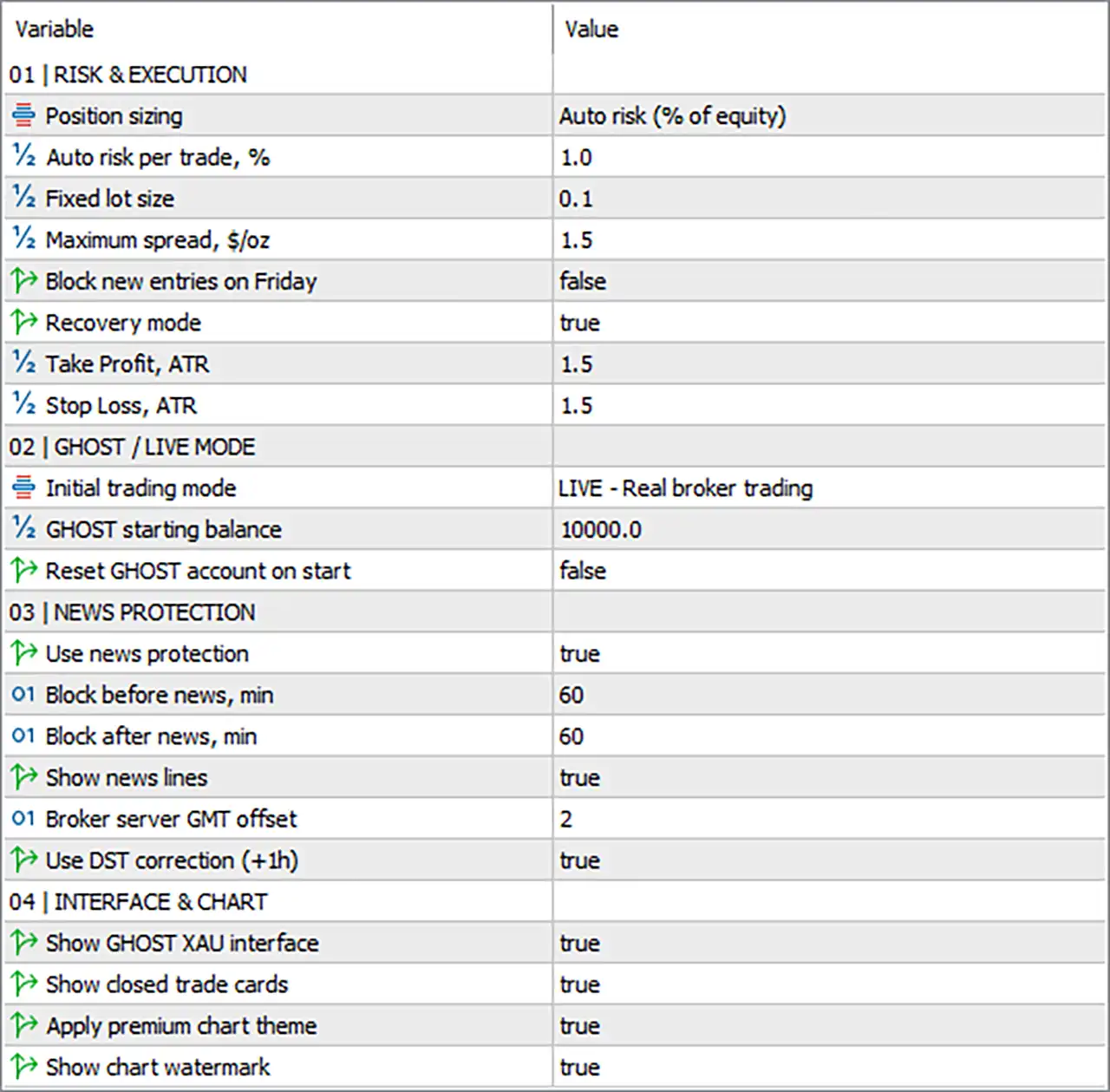
✅ RISK & EXECUTION
🔹 Position sizing = Auto risk (% of equity) — Selects the position-sizing method. The current configuration uses automatic risk calculation based on account equity.
🔹 Auto risk per trade, % = 1.0 — Sets the automatic risk allocation to 1.0% per trade when Auto Risk position sizing is active.
🔹 Fixed lot size = 0.1 — Defines the fixed trading volume as 0.1 lots when Fixed Lot sizing is selected instead of percentage-based risk.
🔹 Maximum spread, $/oz = 1.5 — Sets the maximum permitted spread at 1.5 $/oz. This parameter can prevent new entries when the XAUUSD spread exceeds the configured threshold.
🔹 Block new entries on Friday = false — Controls whether new trades are blocked on Friday. false means Friday entry blocking is disabled.
🔹 Recovery mode = true — Enables the EA's Recovery Mode. The exact recovery behavior is handled by the EA's internal logic rather than being defined by the visible input alone.
🔹 Take Profit, ATR = 1.5 — Sets the Take Profit calculation to 1.5 × ATR when ATR-based TP management is used.
🔹 Stop Loss, ATR = 1.5 — Sets the Stop Loss calculation to 1.5 × ATR when ATR-based SL management is used.
The current GHOST XAU product description states that the system is built around selective entries and explicitly describes TP = SL, representing a 1:1 relationship. The supplied settings therefore show 1.5 ATR for both TP and SL.
✅ GHOST / LIVE MODE
🔹 Initial trading mode = LIVE - Real broker trading — Sets the EA to LIVE - Real broker trading, meaning the selected operating mode is real-market execution rather than a virtual-only mode.
🔹 GHOST starting balance = 10000.0 — Sets the starting virtual/Ghost balance reference to 10000.0.
🔹 Reset GHOST account on start = false — Determines whether the internal Ghost account should be reset whenever the EA starts. false means the Ghost account is not automatically reset on startup.
GHOST XAU's current product description identifies GHOST MODE as a virtual-balance environment that runs the same trading logic without placing real orders. It also describes GHOST X-RAY and DECISION REPLAY as tools for examining the EA's decisions and rejected trades.
✅ NEWS PROTECTION
🔹 Use news protection = true — Enables the EA's economic-news protection system.
🔹 Block before news, min = 60 — Prevents or restricts new trading activity during the configured 60 minutes before a qualifying news event.
🔹 Block after news, min = 60 — Prevents or restricts new trading activity during the configured 60 minutes after a qualifying news event.
🔹 Show news lines = true — Displays economic-news reference lines on the MT5 chart.
🔹 Broker server GMT offset = 2 — Sets the broker server's GMT offset to 2 hours, allowing news-event timing to be interpreted relative to broker server time.
🔹 Use DST correction (+1h) = true — Enables a +1 hour Daylight Saving Time correction when applicable.
The supplied configuration therefore creates a 60-minute pre-news and 60-minute post-news protection window, while the current product description also emphasizes filtering and waiting for higher-quality market conditions before entering trades.
✅ INTERFACE & CHART
🔹 Show GHOST XAU interface = true — Enables the dedicated GHOST XAU on-chart interface.
🔹 Show closed trades cards = true — Displays cards or information panels for completed/closed trades.
🔹 Apply premium chart theme = true — Enables the EA's premium chart visual theme.
🔹 Show chart watermark = true — Displays the EA's watermark on the trading chart.
The current product description highlights full visualization of market state, model decisions, filters, and trades directly on the chart, making the interface settings an important part of the EA's monitoring environment.
✅ COMPLETE GHOST XAU MT5 CONFIGURATION SUMMARY
🔹 Position Sizing = Auto risk (% of equity) — The supplied setup uses percentage-based equity risk rather than Fixed Lot mode.
🔹 Auto Risk per Trade = 1.0% — Each trade uses the configured 1.0% automatic risk parameter.
🔹 Fixed Lot Size = 0.1 — The alternative fixed position size is 0.1 lots.
🔹 Maximum Spread = 1.5 $/oz — The configured spread threshold is 1.5 $/oz.
🔹 Friday Entry Blocking = false — New Friday entries are not blocked by this setting.
🔹 Recovery Mode = true — Recovery functionality is enabled.
🔹 Take Profit ATR = 1.5 — TP uses a 1.5 ATR multiplier.
🔹 Stop Loss ATR = 1.5 — SL uses a 1.5 ATR multiplier.
🔹 Initial Trading Mode = LIVE - Real broker trading — The EA is configured for real broker execution.
🔹 GHOST Starting Balance = 10000.0 — The virtual Ghost balance reference is 10000.0.
🔹 Reset GHOST Account on Start = false — Automatic Ghost-account reset is disabled.
🔹 News Protection = true — News protection is active.
🔹 Pre-News Block = 60 minutes — Trading protection begins 60 minutes before qualifying news.
🔹 Post-News Block = 60 minutes — Trading protection continues for 60 minutes after qualifying news.
🔹 Show News Lines = true — News lines are displayed on the chart.
🔹 Broker GMT Offset = 2 — Broker server time is configured at GMT +2.
🔹 DST Correction = true — The +1h daylight-saving correction is enabled.
🔹 GHOST XAU Interface = true — The dedicated interface is visible.
🔹 Closed Trades Cards = true — Closed-trade cards are displayed.
🔹 Premium Chart Theme = true — The premium chart theme is active.
🔹 Chart Watermark = true — The GHOST XAU watermark is displayed.
✅ Conclusion
Ghost XAU MT5 provides a compact but highly configurable framework for automated XAUUSD trading. The supplied configuration combines 1.0% equity-based risk, 1.5 $/oz maximum spread, ATR-based 1.5 TP and 1.5 SL multipliers, Recovery Mode, and dedicated news protection.
The current setup is particularly clear in its risk and volatility parameters: Auto Risk = 1.0%, while both Take Profit, ATR = 1.5 and Stop Loss, ATR = 1.5 use the same ATR multiplier. This corresponds with the current product description's stated TP = SL / 1:1 approach.
News protection is also active, with 60 minutes before and 60 minutes after the configured news events. The EA additionally uses Broker GMT Offset = 2 and DST Correction = true to help align news timing with broker-server time.
The selected LIVE - Real broker trading mode indicates that the supplied setup is configured for actual broker execution. At the same time, the GHOST starting balance = 10000.0 and Reset GHOST account on start = false provide the parameters used by the EA's virtual/Ghost analysis environment.
The visual configuration is fully enabled, with Show GHOST XAU interface = true, Show closed trades cards = true, Apply premium chart theme = true, and Show chart watermark = true. This fits the product's emphasis on visualizing market state, model decisions, filters, and completed trades directly on the chart.
For live deployment, the exact 1.0% risk setting, 0.1 fixed-lot fallback, 1.5 $/oz spread limit, and Recovery Mode should be evaluated against the broker's XAUUSD contract specifications, execution quality, spread, and account equity. The developer also recommends testing GHOST XAU with the intended broker before real-money deployment.


