
Edge Boost Pro EA MT5
Edge Boost Pro EAEdge Boost Pro EA Live SignalEdge Boost Pro EA Backtest ResultsEdge Boost Pro EA MT5 Backtest ResultsEdge Boost Pro EA MT5 SettingsUser reviews of Edge Boost Pro
MT5XAUUSD (Gold) & Forex currency pairs · AnyUpdated 22 Sept 2026

Edge Boost Pro EA MT5 v1.0 with SetFiles (Unlimited)

Edge Boost Pro EA is a robot built for trading with all Forex pairs and Gold. Real trading profit performance has been verified by real accounts.

Buy now — $599Add to cart
Download link right after paymentUnlimited accounts, no licence lockSet files includedFree updates to new versions
Pay with Visa · MastercardUSDT · BTC · ETHBinance Pay
Not sure it fits your broker or account?Ask a question
Check before you buy

Will it work for me?

Trading platform
Time frames
Any
Currency pairs
XAUUSD (Gold) & Forex currency pairs
Minimum / Recommended deposit
$500+
Minimum / Recommended leverage
1:30+
Account type
Hedging and Netting
Additional services
Recommended brokers
What you get

In the download

COMEdge Boost Pro EA MT5 by eafxstore.com
Optimize Settings

Recommended settings for Edge Boost Pro EA MT5 v1.0

🔢 Edge Boost Pro EA MT5 Settings Guide – Complete Inputs Explained

Edge Boost Pro EA is an automated trading Expert Advisor designed around Support and Resistance market levels. According to the developer, the EA continuously analyzes important market levels and can trade both breakouts and rebounds, while additional filters help control trading conditions. The settings panel provides detailed controls for trade direction, Risk/Reward, position sizing, drawdown protection, break-even, trailing stop, news filtering, spread filtering, trading sessions, trading days, and EA identification.

The guide below explains every parameter visible in the Edge Boost Pro EA MT5 settings panel, while keeping the original values and numerical details unchanged.
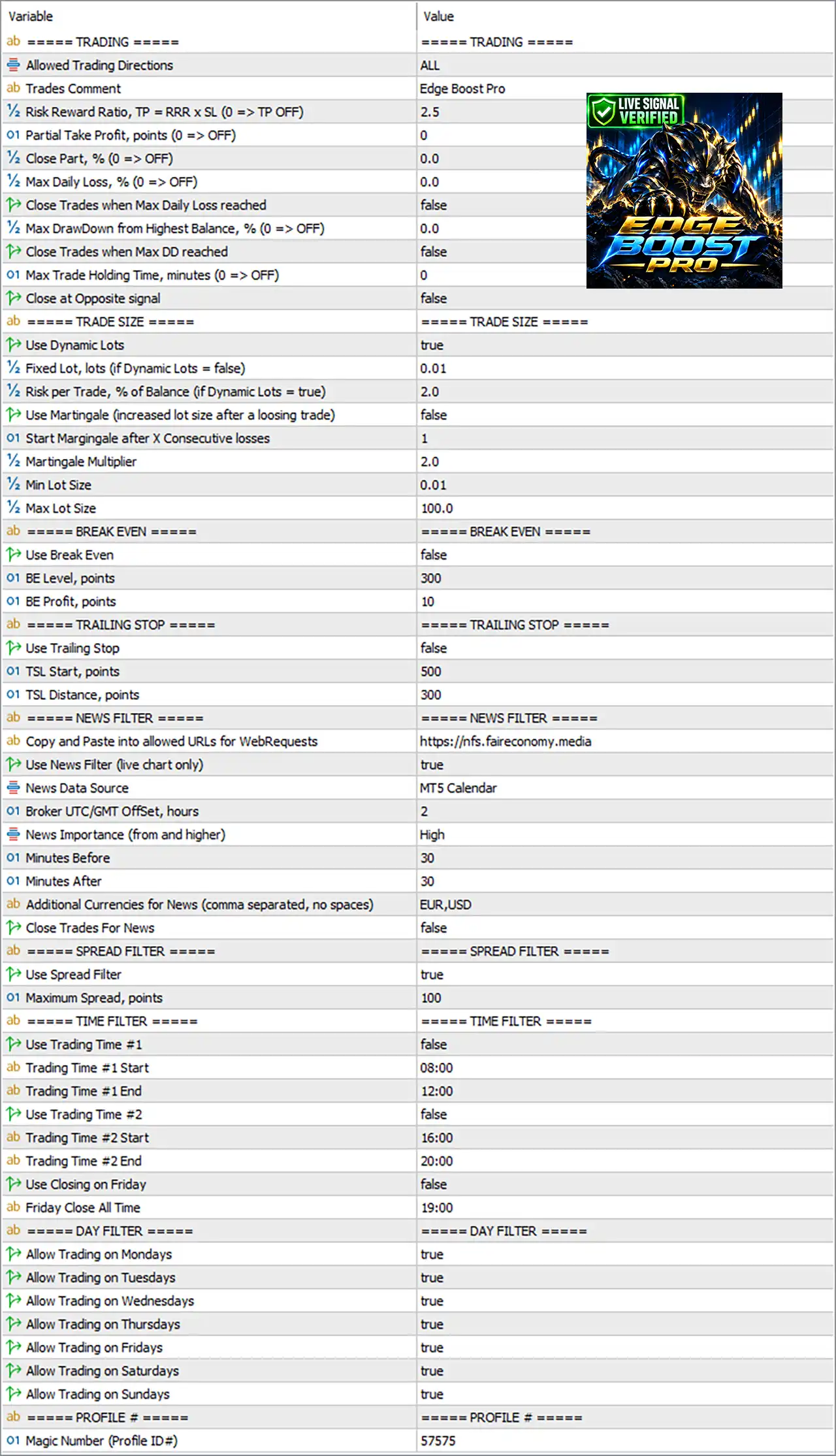
Edge Boost Pro EA MT5 Settings Panel

⚙️ TRADING Settings

🔹 Allowed Trading Directions = ALL — Allows the EA to trade in all available directions rather than restricting it to a specific direction.

🔹 Trades Comment = Edge Boost Pro — Sets the comment attached to trades opened by the EA, making them easier to identify in the MT5 terminal.

🔹 Risk Reward Ratio, TP = RRR x SL (0 => TP OFF) = 2.5 — Sets the Take Profit target according to the selected Stop Loss distance. With 2.5, the TP target is calculated at 2.5× the SL distance; 0 would disable TP.

🔹 Partial Take Profit, points (0 => OFF) = 0 — Controls the point distance used for partial Take Profit. A value of 0 disables this feature.

🔹 Close Part, % (0 => OFF) = 0.0 — Determines what percentage of a position should be closed when the partial Take Profit condition is reached. 0.0 disables partial closing.

🔹 Max Daily Loss, % (0 => OFF) = 0.0 — Sets the maximum permitted daily loss as a percentage. 0.0 means the daily-loss limit is disabled.

🔹 Close Trades when Max Daily Loss reached = false — Determines whether open trades should be closed when the configured maximum daily loss is reached. false means this action is disabled.

🔹 Max DrawDown from Highest Balance, % (0 => OFF) = 0.0 — Sets a maximum drawdown threshold measured from the highest balance. 0.0 disables this protection.

🔹 Close Trades when Max DD reached = false — Determines whether existing positions should be closed after the maximum drawdown condition is reached. false disables automatic closing.

🔹 Max Trade Holding Time, minutes (0 => OFF) = 0 — Sets the maximum time a trade can remain open. 0 disables the holding-time limit.

🔹 Close at Opposite signal = false — Determines whether an open trade should be closed when an opposite trading signal appears. false means the EA will not close trades based on this condition.


⚙️ TRADE SIZE Settings

🔹 Use Dynamic Lots = true — Enables dynamic position sizing so the EA can calculate lot size according to the configured risk-per-trade setting.

🔹 Fixed Lot, lots (if Dynamic Lots = false) = 0.01 — Defines the fixed trading volume when Dynamic Lots is disabled. The configured value is 0.01 lots.

🔹 Risk per Trade, % of Balance (if Dynamic Lots = true) = 2.0 — Sets the percentage of account balance used by the dynamic lot calculation. The current setting is 2.0%.

🔹 Use Martingale (increased lot size after a losing trade) = false — Controls the Martingale function. false means increased lot sizing after a losing trade is disabled.

🔹 Start Martingale after X Consecutive losses = 1 — Specifies how many consecutive losing trades would trigger the Martingale mechanism if it were enabled. The configured value is 1.

🔹 Martingale Multiplier = 2.0 — Defines the multiplier applied to the lot size when Martingale is enabled. The configured multiplier is 2.0.

🔹 Min Lot Size = 0.01 — Sets the minimum lot size allowed by the EA's position-sizing logic.

🔹 Max Lot Size = 100.0 — Sets the maximum lot size allowed by the EA's position-sizing logic.


⚙️ BREAK EVEN Settings

🔹 Use Break Even = false — Enables or disables automatic movement of the Stop Loss toward the entry price. false means Break Even is currently disabled.

🔹 BE Level, points = 300 — Defines the price-distance threshold in 300 points at which the Break Even mechanism can become active when enabled.

🔹 BE Profit, points = 10 — Defines the additional profit distance of 10 points used when positioning the Stop Loss beyond the entry price under the Break Even function.


⚙️ TRAILING STOP Settings

🔹 Use Trailing Stop = false — Controls whether the EA automatically follows profitable positions with a trailing Stop Loss. false means Trailing Stop is disabled.

🔹 TSL Start, points = 500 — Sets the profit distance of 500 points required before the trailing-stop mechanism starts, when enabled.

🔹 TSL Distance, points = 300 — Sets the trailing distance to 300 points, determining how far the Stop Loss remains from the relevant market price when trailing is active.


⚙️ NEWS FILTER Settings

🔹 Copy and Paste into allowed URLs for WebRequests = https://nfs.faireconomy.media — Specifies the external URL that should be permitted in MT5 WebRequest settings for the EA's news-data access.

🔹 Use News Filter (live chart only) = true — Enables the news filter during live chart operation. The panel specifically indicates that this function is for live chart only.

🔹 News Data Source = MT5 Calendar — Selects the MT5 Calendar as the economic-news data source.

🔹 Broker UTC/GMT Offset, hours = 2 — Sets the broker's time offset relative to UTC/GMT to 2 hours, allowing news-event timing to be interpreted correctly.

🔹 News Importance (from and higher) = High — Filters economic events according to the selected importance level, starting from High importance and higher.

🔹 Minutes Before = 30 — Defines a 30-minute news protection window before a qualifying economic event.

🔹 Minutes After = 30 — Defines a 30-minute protection window after a qualifying economic event.

🔹 Additional Currencies for News (comma separated, no spaces) = EUR,USD — Adds EUR and USD to the currencies monitored for relevant economic news events.

🔹 Close Trades For News = false — Determines whether existing trades should be closed because of an upcoming news event. false means existing positions are not automatically closed for news.

The official Edge Boost Pro description also lists a news filter among its trade-control features and states that important news can be displayed on the chart.


⚙️ SPREAD FILTER Settings

🔹 Use Spread Filter = true — Enables spread protection so the EA can prevent new trades when the current spread exceeds the configured limit.

🔹 Maximum Spread, points = 100 — Sets the maximum permitted spread at 100 points. When the spread exceeds this threshold, the spread filter can block new entries.

The developer describes the Spread Filter as a mechanism that prevents new trades when the spread exceeds the allowed value.


⚙️ TIME FILTER Settings

🔹 Use Trading Time #1 = false — Enables or disables the first custom trading session. false means Trading Time #1 is currently inactive.

🔹 Trading Time #1 Start = 08:00 — Defines the starting time of the first trading session as 08:00.

🔹 Trading Time #1 End = 12:00 — Defines the ending time of the first trading session as 12:00.

🔹 Use Trading Time #2 = false — Enables or disables the second custom trading session. false means Trading Time #2 is currently inactive.

🔹 Trading Time #2 Start = 16:00 — Defines the starting time of the second trading session as 16:00.

🔹 Trading Time #2 End = 20:00 — Defines the ending time of the second trading session as 20:00.

🔹 Use Closing on Friday = false — Controls whether the EA uses the Friday closing function. false means this function is disabled.

🔹 Friday Close All Time = 19:00 — Defines the configured Friday closing time as 19:00 when the Friday closing function is enabled.


⚙️ DAY FILTER Settings

🔹 Allow Trading on Mondays = true — Allows the EA to open trades on Monday.

🔹 Allow Trading on Tuesdays = true — Allows the EA to open trades on Tuesday.

🔹 Allow Trading on Wednesdays = true — Allows the EA to open trades on Wednesday.

🔹 Allow Trading on Thursdays = true — Allows the EA to open trades on Thursday.

🔹 Allow Trading on Fridays = true — Allows the EA to open trades on Friday.

🔹 Allow Trading on Saturdays = true — Allows the EA to trade on Saturday if the broker provides tradable market conditions.

🔹 Allow Trading on Sundays = true — Allows the EA to trade on Sunday if the broker provides tradable market conditions.


⚙️ PROFILE Settings

🔹 Magic Number (Profile ID#) = 57575 — Uses 57575 as the unique identifier for this EA instance. A distinct Magic Number helps separate Edge Boost Pro trades from other EA positions or manually opened trades.

The official product documentation also describes the Magic Number as a unique EA identifier and recommends using different Magic Numbers when running multiple instances on the same symbol.


🔢 Edge Boost Pro EA MT5 Risk Management Overview

🔹 Dynamic Lot Control = true — The current configuration uses dynamic lot sizing instead of relying on the 0.01 Fixed Lot setting.

🔹 Risk Per Trade = 2.0% — The dynamic sizing configuration is set to use 2.0% of Balance as the risk-per-trade input.

🔹 Martingale = false — The Martingale mechanism is disabled, so the configured 2.0 multiplier is not actively applied while this setting remains false.

🔹 Daily Loss Protection = 0.0% — The maximum daily loss threshold is disabled because the value is 0.0.

🔹 Maximum Drawdown Protection = 0.0% — The maximum drawdown threshold is also disabled because the value is 0.0.

🔹 Break Even = false — Break Even protection is currently inactive.

🔹 Trailing Stop = false — Trailing Stop protection is currently inactive.

🔹 News Filter = true — High-impact news filtering is active with a 30-minute window before and after qualifying events.

🔹 Spread Filter = true — Spread protection is active with a maximum configured spread of 100 points.

The official Edge Boost Pro product page describes the EA as using predefined exits, daily-loss and drawdown controls, news filtering, spread filtering, and maximum trade holding-time controls.


🔢 Conclusion

The Edge Boost Pro EA MT5 settings provide a broad control framework covering trading direction, Risk/Reward, position sizing, Martingale behavior, Break Even, Trailing Stop, economic news, spread conditions, trading sessions, trading days, and EA identification.

With the current configuration, Dynamic Lots = true, Risk per Trade = 2.0%, Martingale = false, Break Even = false, Trailing Stop = false, News Filter = true, and Spread Filter = true. The Risk/Reward setting is 2.5, while both daily-loss and maximum-drawdown percentage protections are set to 0.0, meaning those specific limits are disabled.

Traders should remember that changing EA inputs can materially change its trade frequency, position sizing, and risk characteristics. The developer specifically notes that changing the Risk/Reward configuration can also affect which setups qualify for trading.


Full review

Quick Verdict

Edge Boost Pro EA MT5 is a structured Support and Resistance trading system for Forex and Gold. It trades both breakouts and rebounds, uses market filters, predefined SL/TP, daily loss and drawdown protection, and avoids Grid and Martingale. Its live signal and supplied backtests provide useful performance data to evaluate.

Best For

✅ Support & Resistance Trading: Built for traders who prefer clear market levels.

✅ Gold & Forex Trading: Designed for major Forex pairs and XAUUSD.

✅ Prop Firm Trading: Includes practical daily loss and drawdown protection.

✅ Automated Trading: Handles entries, exits, filters, and trade monitoring automatically.

✅ Low-Risk Trading Styles: No Grid, no Martingale, and only one active trade at a time.

Overall Rating

8.9/10 ⭐⭐⭐⭐⭐


What is Edge Boost Pro EA MT5?

Edge Boost Pro EA is a professional automated trading Expert Advisor (EA) built around Support and Resistance analysis.

Instead of relying on a single indicator, the EA continuously identifies important market levels and looks for two primary opportunities: breakouts through Support or Resistance and rebounds from these levels.

The system is designed for Forex pairs and Gold, making it suitable for traders who want to apply structured market-level analysis across different instruments.

⭐ Vendor Website: View here

⭐ Join Our Channel Telegram


How Does Edge Boost Pro EA MT5 Work?

Support and Resistance Detection

The EA automatically analyzes the market and calculates important recent Support and Resistance levels.

These levels are displayed directly on the chart so traders can understand the areas being monitored.

Breakout Trading

When price moves decisively through an important Support or Resistance level and the required filters confirm the setup, Edge Boost Pro can enter a breakout trade.

Rebound Trading

The EA can also look for opportunities when price reacts from an important market level instead of breaking through it.

Market Filtering

Before opening a position, the system evaluates additional market conditions.

This filtering process is designed to reduce lower-quality setups and avoid unnecessary trades.

Automated Trade Management

Once a position is opened, the EA manages the trade automatically using the configured Stop Loss, Take Profit, holding-time rules, spread protection and other risk controls.


Key Features of Edge Boost Pro EA MT5

Support & Resistance Trading

Automatically identifies important market levels and trades both breakouts and rebounds.

Automatic SnR Detection

Continuously updates relevant Support and Resistance zones and displays them directly on the trading chart.

Advanced Market Filters

Additional market analysis helps filter weaker setups before a new position is opened.

Predefined SL and TP

Every trade is opened with defined Stop Loss (SL) and Take Profit (TP) levels for structured trade management.

No Grid or Martingale

The EA avoids Grid and Martingale methods, with only one active trade allowed at a time.

Prop Firm Risk Panel

Includes practical daily-loss and drawdown controls with visual warnings to help monitor account risk.

News and Spread Filters

Economic news and spread conditions can be checked before allowing new trades.

Automatic Trade Monitoring

The EA continuously monitors terminal connection and AutoTrading status for easier operation.

Maximum Holding-Time Control

Trades can automatically close when they remain open longer than the configured period.


Verified Live Signal Performance

The displayed live trading data shows an Edge Boost Pro account being closely monitored, demonstrating 373% growth since 2026.

The account shows an initial deposit of $100, a current net asset value of $541.34, and a profit of $381.97.

The maximum drawdown recorded is 4%, while profitable trades account for 83.3% of total trading results.

Edge Boost Pro EA Live Signal
Live Signal Metric Result
Growth Since 2026 373%
Equity $541.34
Profit $381.97
Initial Deposit $100.00
Maximum Drawdown 4%
Profit Trades 83.3%
Loss Trades 16.7%
Max Deposit Load 3.2%
Trading Activity 29.1%
Algo Trading 100%


Historical Trading Results Performance

Historical Backtest — Fixed Lot (0.01)

The first supplied backtest uses a $500 initial deposit with a fixed lot of 0.01. The test covers the period from January 2024 to the current test endpoint shown in the report.

The report shows $15,301.16 total net profit, a 20.16 profit factor, and 347 total trades. The maximum equity drawdown shown is 1.97%.

Edge Boost Pro EA MT5 Backtest Results

Edge Boost Pro EA MT5 Backtest Results
Performance Metric Result
Initial Deposit $500
Total Net Profit $15,301.16
Profit Factor 20.16
Recovery Factor 59.62
Maximum Balance Drawdown 0.50%
Maximum Equity Drawdown 1.97%
Total Trades 347
Profit Trades 301 (86.74%)
Loss Trades 46 (13.26%)
Sharpe Ratio 14.68

The report also shows 160 short trades with an 85.00% win rate and 187 long trades with an 88.24% win rate.

Historical Backtest — Dynamic Risk (Risk 3%)

The second supplied report uses the same starting capital but applies a dynamic lot configuration described in the image as 3% risk per trade.

This test reports $116,812,664.19 total net profit, with a 24.59 profit factor and 347 total trades. The maximum equity drawdown shown is 2.89%.

Edge Boost Pro EA Backtest Results

Edge Boost Pro EA Backtest Results
Performance Metric Result
Initial Deposit $500
Total Net Profit $116,812,664.19
Profit Factor 24.59
Recovery Factor 45.52
Maximum Balance Drawdown 0.73%
Maximum Equity Drawdown 2.89%
Total Trades 347
Profit Trades 301 (86.74%)
Loss Trades 46 (13.26%)
Sharpe Ratio 15.41


What Real Users Are Saying

Edge Boost Pro demonstrates significant potential for generating stable and reliable profits, establishing itself as a reputable tool in the Forex markets.

The EA has earned 5-star ratings from the MQL5 community and successfully gained the trust of users.

⭐⭐⭐⭐⭐ Jochen (2026.09.21)

"Huge thanks to the developer for putting out such great work in this EA. You can tell he really knows what he's doing. I think this EA has great potential to stay consistently profitable. It's remarkable that the EA remains profitable across multiple assets in backtesting, which opens up the possibility for broad diversification, and as far as I can see so far, the live results confirm this too."

⭐⭐⭐⭐⭐ Falu (2026.09.16)

"Very good backtest results on gold & forex and friendly and helpful developer."

⭐⭐⭐⭐⭐ Metaangel (2026.09.13)

"It`s looking very solid ea, with no complicated settings and with many years of experience coder."

⭐⭐⭐⭐⭐ Deepak MV (2026.09.15)

"Backtest result is crazy & live signal proves this EA has potential of making profits. Dev is so friendly and understanding :). Hats off for releasing such potential EA in the market. Looking forward to mint profits."

These comments represent individual user experiences and should be considered feedback rather than independent proof of future profitability.

User reviews of Edge Boost Pro

User reviews of Edge Boost Pro

Why Edge Boost Pro EA MT5 Stands Out

Structured Market-Level Approach

Edge Boost Pro focuses on Support and Resistance rather than simply generating trades from a single indicator. This gives the strategy a clear market-structure foundation.

Breakouts and Rebounds

The EA can work with both breakout and rebound opportunities, allowing its trading logic to respond to different reactions around important market levels.

Controlled Exposure

Unlike Grid or Martingale systems, Edge Boost Pro limits the strategy to one active trade at a time. This makes its exposure easier to monitor.

Prop Firm-Oriented Controls

The dedicated risk panel provides daily loss and total drawdown controls, making the EA suitable for traders who need greater awareness of account-level risk.

Flexible Market Coverage

The EA can be used with Forex pairs and Gold, allowing traders to apply the same Support and Resistance concept across multiple instruments.


Risk Management Features

Predefined Stop Loss and Take Profit

Every position is opened with defined exit levels to establish clear trade risk and profit objectives.

Maximum Daily Loss Protection

The EA can automatically stop opening new trades once the configured daily loss threshold is reached.

Total Drawdown Protection

Additional protection monitors drawdown from the account's highest balance or equity level.

No Grid or Martingale

The system avoids progressive loss-recovery methods that can rapidly increase market exposure.

Spread and Holding-Time Controls

The EA can reject trades during unfavorable spread conditions and close positions that remain open beyond the configured holding period.


Product Download Package?

The download package of the product suite includes:

Experts

✅ Edge Boost Pro_1.0_fix.ex5

SetFiles

✅ gold_fx pair_risk 1%.set

✅ gold_fx pair_risk 1%.set

✅ gold_fx pair_risk 1%.set

✅ gold_fx pair_risk 1%.set

✅ gold_fx pair_risk 1%.set

✅ gold_fx pair_fixed lot_0.01.set

➡️ Reviewed by David Easton


Weaknesses and Risk Warnings

Support and Resistance Can Fail

Even well-defined market levels can break unexpectedly, especially during strong market movements.

Market Conditions Change

A setup that performs well in one market environment may behave differently when volatility, liquidity or market structure changes.

Backtests Are Not Guarantees

Historical results are theoretical and cannot guarantee similar performance in live trading.

Broker Conditions Matter

Spreads, slippage, execution speed, and liquidity can affect real trading results.

Risk Controls Still Need Proper Settings

Daily loss and drawdown protection reduce exposure but cannot eliminate trading risk completely.

No EA Guarantees Profits

Losing trades are a normal part of automated trading. Users should test the system on a demo account before committing significant capital.


Who Should Use Edge Boost Pro EA MT5?

Support and Resistance Traders

Edge Boost Pro is suitable for traders who prefer market-level analysis and want automated execution around important Support and Resistance zones.

Forex and Gold Traders

The EA can be used across Forex pairs and Gold, making it useful for traders who want to diversify their automated trading instruments.

Prop Firm Traders

Traders participating in funded-account challenges may find the daily loss and total drawdown controls useful for maintaining stricter account-level risk management.

Traders Seeking Non-Martingale Automation

Edge Boost Pro may appeal to traders who specifically want to avoid Grid and Martingale approaches while maintaining automated trade execution.

Traders Who Prefer Simple Monitoring

The on-chart dashboard, status monitoring, market filters, and multi-language interface make the system easier to monitor without constantly managing trades manually.


Final Verdict

Edge Boost Pro EA offers a structured approach to automated trading based on Support and Resistance breakouts and rebounds. Its combination of automatic SnR detection, market filters, predefined trade protection, spread and news controls, and account-level drawdown management makes the system easy to understand and monitor.

The supplied live signal shows strong recent growth with controlled displayed drawdown, while the historical reports demonstrate high backtest profitability.

However, the dynamic-risk backtest in particular produces exceptionally large compounded results and should be viewed strictly as a theoretical scenario rather than a realistic return expectation.

Questions about Edge Boost Pro EA MT5 v1.0

❓ How does Edge Boost Pro EA MT5 identify trading opportunities?

Edge Boost Pro EA MT5 automatically identifies important Support and Resistance levels, then evaluates breakout and rebound opportunities around these market areas.

❓ Does Edge Boost Pro EA MT5 trade both breakouts and rebounds?

Yes. Edge Boost Pro EA MT5 is designed to trade both breakout movements through important levels and rebound opportunities from Support and Resistance zones.

❓ Does Edge Boost Pro EA MT5 use Grid or Martingale?

No. Edge Boost Pro EA MT5 does not use Grid or Martingale, and only one trade can remain active at a time to keep exposure controlled.

❓ How does Edge Boost Pro EA MT5 control trading risk?

Edge Boost Pro EA MT5 uses predefined Stop Loss and Take Profit levels, plus Max Daily Loss and Total Drawdown protection to control trading exposure.

❓ Does Edge Boost Pro EA MT5 have a news filter?

Yes. Edge Boost Pro EA MT5 uses two economic-calendar sources and displays important news directly on the chart to help filter trading conditions.

❓ Can Edge Boost Pro EA MT5 filter trades during high-spread conditions?

Yes. Edge Boost Pro EA MT5 includes a Spread Filter that prevents new trades when the current spread exceeds the configured allowable value.

❓ What markets can Edge Boost Pro EA MT5 trade?

Edge Boost Pro EA MT5 is designed for all Forex currency pairs and Gold, allowing traders to apply its Support and Resistance approach across multiple instruments.

❓ Is Edge Boost Pro EA MT5 compatible with different account types?

Yes. Edge Boost Pro EA MT5 supports both Hedging and Netting account types, providing flexibility across different MT5 trading environments.

❓ Does changing Stop Loss and Take Profit affect Edge Boost Pro EA MT5?

Yes. In Edge Boost Pro EA MT5, changing the Risk/Reward settings can affect the number of trades because setups that do not match market structure may be ignored.

❓ Can Edge Boost Pro EA MT5 be used with low leverage?

Yes. Edge Boost Pro EA MT5 can operate with leverage as low as 1:30, although the provided description recommends 1:100 or higher.

Other products traders compare

$599
Instant download
Buy now