


🔢 GoldOil EA MT5 Settings Guide
GoldOil EA MT5 is a multi-filter automated trading Expert Advisor designed for Gold, Oil, and selected US indices, with a strong emphasis on cross-market analysis, trend confirmation, liquidity behavior, volatility control, spread protection, and time-based risk management. Its Inputs provide a highly configurable framework covering symbol detection, core strategy conditions, money management, Stop Loss and Take Profit, Gold-specific pattern filters, advanced price-action filters, ATR protection, trading schedules, daily risk guards, correlation analysis, and an on-chart information panel.
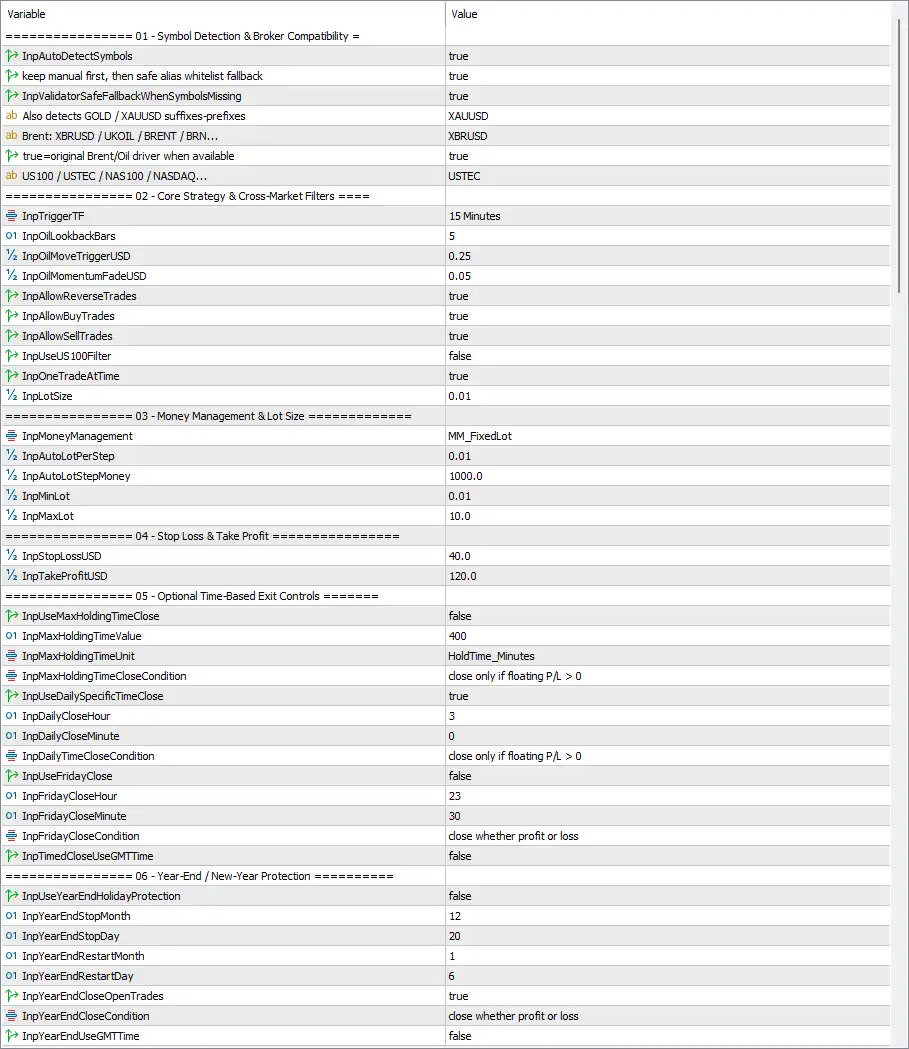
The displayed configuration uses XAUUSD for Gold, XBRUSD for Brent Oil, and USTEC for the US100/USTEC market. It operates primarily on a 15-minute trigger timeframe, uses 0.01 fixed lot sizing, applies $40.0 Stop Loss and $120.0 Take Profit, and includes multiple optional Gold-specific confirmation filters.
⚙️ Symbol Detection & Broker Compatibility
🔹 InpAutoDetectSymbols = true — Enables automatic symbol detection so the EA can identify compatible broker-specific symbols.
🔹 keep manual first, then safe alias whitelist fallback = true — Gives priority to manually detected symbols and then uses the EA's alias whitelist as a fallback when necessary.
🔹 InpValidatorSafeFallbackWhenSymbolsMissing = true — Enables the safety fallback mechanism when one or more expected symbols cannot be detected.
🔹 also detects GOLD / XAUUSD suffix-prefixes = XAUUSD — Sets XAUUSD as the Gold symbol reference while allowing the EA to account for broker suffixes or prefixes.
🔹 Brent: XBRUSD / UKOIL / BRENT / BRN... = XBRUSD — Sets XBRUSD as the Brent Oil reference symbol for broker compatibility and alias detection.
🔹 true=original Brent/Oil driver when available = true — Enables use of the original Brent/Oil driver whenever the corresponding instrument is available.
🔹 US100 / USTEC / NAS100 / NASDAQ... = USTEC — Sets USTEC as the US100/US100-equivalent reference symbol.
⚙️ Core Strategy & Cross-Market Filters
🔹 InpTriggerTF = 15 Minutes — Sets the main strategy trigger timeframe to 15 Minutes.
🔹 InpOilLookbackBars = 5 — Uses 5 bars as the Oil lookback period for the relevant cross-market analysis.
🔹 InpOilMoveTriggerUSD = 0.25 — Sets the Oil price-movement trigger threshold to 0.25 USD.
🔹 InpOilMomentumFadeUSD = 0.05 — Sets the Oil momentum-fade threshold to 0.05 USD, controlling when the EA considers an Oil move to be losing momentum.
🔹 InpAllowReverseTrades = true — Allows the EA to open reverse-direction trades when the corresponding strategy conditions are met.
🔹 InpAllowBuyTrades = true — Enables Buy trades.
🔹 InpAllowSellTrades = true — Enables Sell trades.
🔹 InpUseUS100Filter = false — Disables the US100/USTEC cross-market filter.
🔹 InpOneTradeAtATime = true — Restricts the EA to one trade at a time, preventing simultaneous positions under this control.
🔹 InpLotSize = 0.01 — Sets the configured lot size to 0.01.
⚙️ Money Management & Lot Size
🔹 InpMoneyManagement = MM_FixedLot — Selects MM_FixedLot as the active money-management method.
🔹 InpAutoLotPerStep = 0.01 — Sets the automatic lot increment per step to 0.01.
🔹 InpAutoLotStepMoney = 1000.0 — Sets the account-money threshold for the automatic lot-sizing step to 1000.0.
🔹 InpMinLot = 0.01 — Sets the minimum permitted lot size to 0.01.
🔹 InpMaxLot = 10.0 — Sets the maximum permitted lot size to 10.0.
⚙️ Stop Loss & Take Profit
🔹 InpStopLossUSD = 40.0 — Sets the configured Stop Loss value to 40.0 USD.
🔹 InpTakeProfitUSD = 120.0 — Sets the configured Take Profit value to 120.0 USD.
⚙️ Optional Time-Based Exit Controls
🔹 InpUseMaxHoldingTimeClose = false — Disables the maximum holding-time exit function.
🔹 InpMaxHoldingTimeValue = 400 — Sets the maximum holding-time value to 400 when the feature is enabled.
🔹 InpMaxHoldingTimeUnit = HoldTime_Minutes — Defines the holding-time unit as minutes.
🔹 InpMaxHoldingTimeCloseCondition = close only if floating P/L > 0 — If maximum holding-time closing is enabled, the EA is configured to close only when floating P/L is greater than 0.
🔹 InpUseDailySpecificClose = true — Enables the daily-specific closing function.
🔹 InpDailyCloseHour = 3 — Sets the daily closing hour to 3.
🔹 InpDailyCloseMinute = 0 — Sets the daily closing minute to 0, creating a configured daily close time of 03:00.
🔹 InpDailyTimeCloseCondition = close only if floating P/L > 0 — The daily close is configured to occur only when floating P/L is greater than 0.
🔹 InpUseFridayClose = false — Disables the dedicated Friday closing function.
🔹 InpFridayCloseHour = 23 — Sets the configured Friday closing hour to 23.
🔹 InpFridayCloseMinute = 30 — Sets the configured Friday closing minute to 30, creating a configured Friday close time of 23:30 if the feature is enabled.
🔹 InpFridayCloseCondition = close whether profit or loss — When Friday Close is enabled, the configured condition allows closing regardless of whether the position is profitable or losing.
🔹 InpTimedCloseUseGMTTime = false — Disables the use of GMT time for the timed-close functions.
⚙️ Year-End / New-Year Protection
🔹 InpUseYearEndHolidayProtection = false — Disables the special year-end/New-Year holiday protection.
🔹 InpYearEndStopMonth = 12 — Sets the year-end trading-stop month to 12, representing December.
🔹 InpYearEndStopDay = 20 — Sets the year-end trading-stop day to 20, creating a configured stop date of December 20.
🔹 InpYearEndRestartMonth = 1 — Sets the restart month to 1, representing January.
🔹 InpYearEndRestartDay = 6 — Sets the restart day to 6, creating a configured restart date of January 6.
🔹 InpYearEndCloseOpenTrades = true — Enables closing of open trades when the year-end protection becomes active.
🔹 InpYearEndCloseCondition = close whether profit or loss — Configures year-end closing to occur regardless of whether positions are profitable or losing.
🔹 InpYearEndUseGMTTime = false — Disables GMT time for the year-end/New-Year protection schedule.
⚙️ Strategy Filters: Gold Edge Confirmations
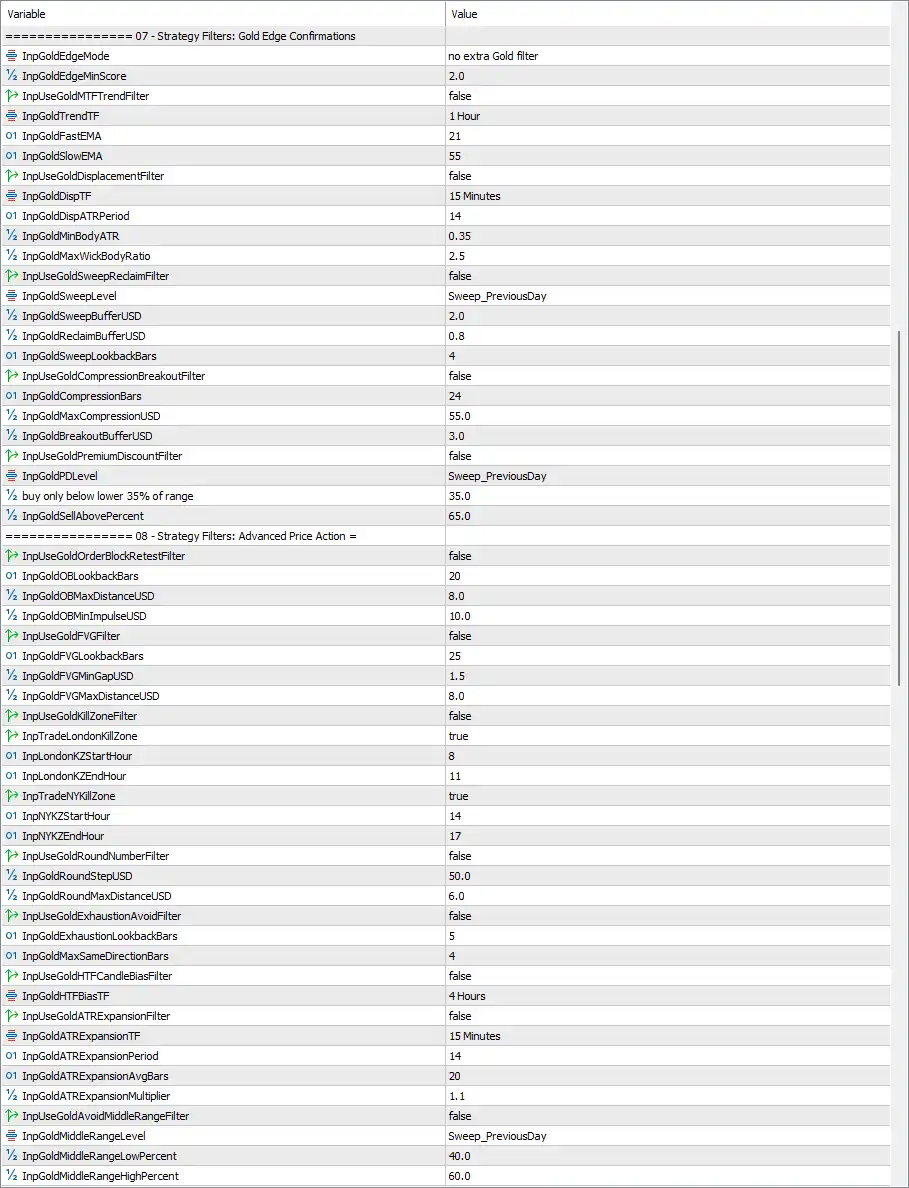
🔹 InpGoldEdgeMode = no extra Gold filter — Selects no extra Gold filter as the active Gold Edge confirmation mode.
🔹 InpGoldEdgeMinScore = 2.0 — Sets the minimum Gold Edge confirmation score to 2.0.
🔹 InpUseGoldMTFTrendFilter = false — Disables the Gold multi-timeframe trend filter.
🔹 InpGoldTrendTF = 1 Hour — Sets the Gold trend-analysis timeframe to 1 Hour.
🔹 InpGoldFastEMA = 21 — Sets the fast Gold EMA period to 21.
🔹 InpGoldSlowEMA = 55 — Sets the slow Gold EMA period to 55.
🔹 InpUseGoldDisplacementFilter = false — Disables the Gold displacement filter.
🔹 InpGoldDispTF = 15 Minutes — Sets the Gold displacement-analysis timeframe to 15 Minutes.
🔹 InpGoldDispATRPeriod = 14 — Sets the displacement ATR period to 14.
🔹 InpGoldMinBodyATR = 0.35 — Requires a minimum Gold candle-body relationship of 0.35 ATR when the displacement filter is enabled.
🔹 InpGoldMaxWickBodyRatio = 2.5 — Sets the maximum wick-to-body ratio to 2.5 for the displacement filter.
🔹 InpUseGoldSweepReclaimFilter = false — Disables the Gold sweep-and-reclaim filter.
🔹 InpGoldSweepLevel = Sweep_PreviousDay — Selects Sweep_PreviousDay as the reference level for the Gold liquidity sweep.
🔹 InpGoldSweepBufferUSD = 2.0 — Sets the Gold sweep buffer to 2.0 USD.
🔹 InpGoldReclaimBufferUSD = 0.8 — Sets the Gold reclaim buffer to 0.8 USD.
🔹 InpGoldSweepLookbackBars = 4 — Uses 4 bars for the Gold sweep lookback.
🔹 InpUseGoldCompressionBreakoutFilter = false — Disables the Gold compression-breakout filter.
🔹 InpGoldCompressionBars = 24 — Sets the compression-analysis window to 24 bars.
🔹 InpGoldMaxCompressionUSD = 55.0 — Sets the maximum Gold compression range to 55.0 USD.
🔹 InpGoldBreakoutBufferUSD = 3.0 — Sets the Gold breakout buffer to 3.0 USD.
🔹 InpUseGoldPremiumDiscountFilter = false — Disables the Gold premium/discount filter.
🔹 InpGoldPDLevel = Sweep_PreviousDay — Uses Sweep_PreviousDay as the reference level for the Gold premium/discount calculation.
🔹 buy only below lower 35% of range = 35.0 — Sets the lower range threshold to 35.0%, defining the displayed Buy-side premium/discount boundary.
🔹 InpGoldSellAbovePercent = 65.0 — Sets the Sell threshold to 65.0% of the relevant range.
⚙️ Strategy Filters: Advanced Price Action
🔹 InpUseGoldOrderBlockRetestFilter = false — Disables the Gold Order Block retest filter.
🔹 InpGoldOBLookbackBars = 20 — Uses 20 bars for Order Block lookback analysis.
🔹 InpGoldOBMaxDistanceUSD = 8.0 — Sets the maximum permitted distance from the Gold Order Block to 8.0 USD.
🔹 InpGoldOBMinImpulseUSD = 10.0 — Sets the minimum Gold impulse associated with the Order Block condition to 10.0 USD.
🔹 InpUseGoldFVGFilter = false — Disables the Gold Fair Value Gap (FVG) filter.
🔹 InpGoldFVGLookbackBars = 25 — Uses 25 bars for FVG lookback analysis.
🔹 InpGoldFVGMinGapUSD = 1.5 — Sets the minimum FVG gap size to 1.5 USD.
🔹 InpGoldFVGMaxDistanceUSD = 8.0 — Sets the maximum FVG distance to 8.0 USD.
🔹 InpUseGoldKillZoneFilter = false — Disables the Gold Kill Zone filter.
🔹 InpTradeLondonKillZone = true — Enables the London Kill Zone schedule when the Kill Zone filter is activated.
🔹 InpLondonKZStartHour = 8 — Sets the London Kill Zone start hour to 8.
🔹 InpLondonKZEndHour = 11 — Sets the London Kill Zone end hour to 11.
🔹 InpTradeNYKillZone = true — Enables the New York Kill Zone schedule when the Kill Zone filter is activated.
🔹 InpNYKZStartHour = 14 — Sets the New York Kill Zone start hour to 14.
🔹 InpNYKZEndHour = 17 — Sets the New York Kill Zone end hour to 17.
🔹 InpUseGoldRoundNumberFilter = false — Disables the Gold round-number filter.
🔹 InpGoldRoundStepUSD = 50.0 — Sets the Gold round-number spacing to 50.0 USD.
🔹 InpGoldRoundMaxDistanceUSD = 6.0 — Sets the maximum distance from the relevant Gold round number to 6.0 USD.
🔹 InpUseGoldExhaustionAvoidFilter = false — Disables the Gold exhaustion-avoidance filter.
🔹 InpGoldExhaustionLookbackBars = 5 — Uses 5 bars for Gold exhaustion analysis.
🔹 InpGoldMaxSameDirectionBars = 4 — Sets the maximum consecutive same-direction bars to 4 for the exhaustion-avoidance logic.
🔹 InpUseGoldHTFCandleBiasFilter = false — Disables the higher-timeframe candle-bias filter.
🔹 InpGoldHTFBiasTF = 4 Hours — Sets the higher-timeframe candle-bias timeframe to 4 Hours.
🔹 InpUseGoldATRExpansionFilter = false — Disables the Gold ATR expansion filter.
🔹 InpGoldATRExpansionTF = 15 Minutes — Sets the ATR expansion timeframe to 15 Minutes.
🔹 InpGoldATRExpansionPeriod = 14 — Sets the ATR expansion calculation period to 14.
🔹 InpGoldATRExpansionAvgBars = 20 — Uses 20 bars for the average ATR expansion comparison.
🔹 InpGoldATRExpansionMultiplier = 1.1 — Sets the ATR expansion multiplier to 1.1.
🔹 InpUseGoldAvoidMiddleRangeFilter = false — Disables the Gold middle-range avoidance filter.
🔹 InpGoldMiddleRangeLevel = Sweep_PreviousDay — Uses Sweep_PreviousDay as the reference level for determining the middle range.
🔹 InpGoldMiddleRangeLowPercent = 40.0 — Sets the lower boundary of the middle range to 40.0%.
🔹 InpGoldMiddleRangeHighPercent = 60.0 — Sets the upper boundary of the middle range to 60.0%.
⚙️ Strategy Filters: Patterns & Divergence
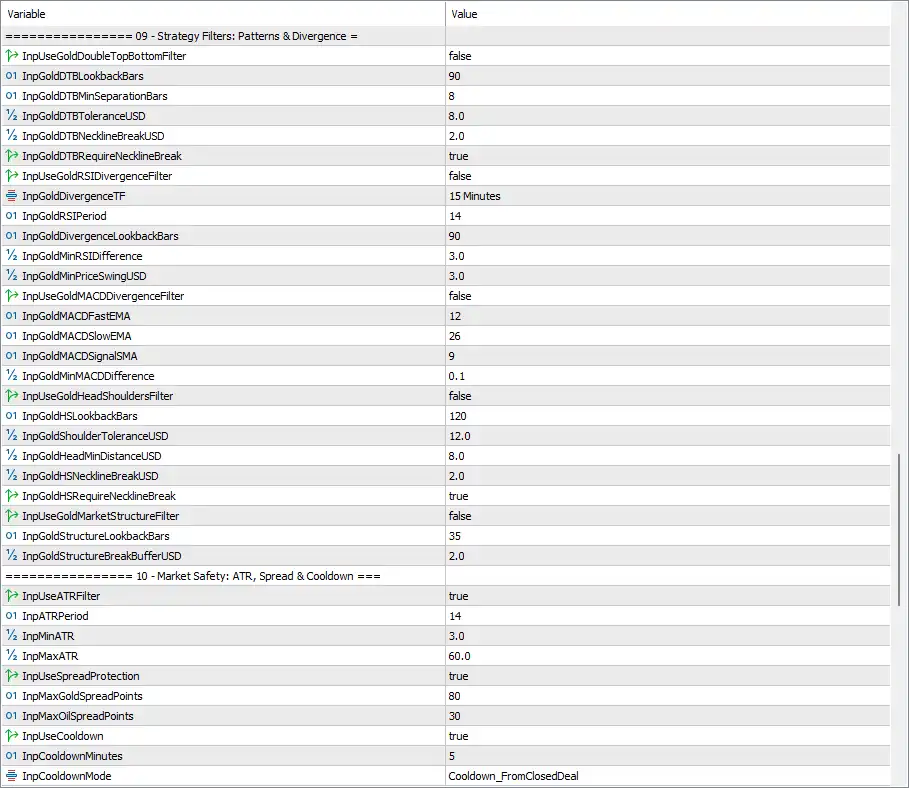
🔹 InpUseGoldDoubleTopBottomFilter = false — Disables the Gold Double Top/Bottom pattern filter.
🔹 InpGoldDTBLookbackBars = 90 — Uses 90 bars for Double Top/Bottom pattern detection.
🔹 InpGoldDTBMinSeparationBars = 8 — Requires a minimum separation of 8 bars between the relevant Double Top/Bottom points.
🔹 InpGoldDTBToleranceUSD = 8.0 — Sets the Double Top/Bottom price tolerance to 8.0 USD.
🔹 InpGoldDTBNecklineBreakUSD = 2.0 — Sets the required Double Top/Bottom neckline-break distance to 2.0 USD.
🔹 InpGoldDTBRequireNecklineBreak = true — Requires a neckline break before the Double Top/Bottom filter can confirm a pattern when the filter is enabled.
🔹 InpUseGoldRSIDivergenceFilter = false — Disables the Gold RSI divergence filter.
🔹 InpGoldDivergenceTF = 15 Minutes — Sets the RSI divergence analysis timeframe to 15 Minutes.
🔹 InpGoldRSIPeriod = 14 — Sets the RSI calculation period to 14.
🔹 InpGoldDivergenceLookbackBars = 90 — Uses 90 bars for RSI divergence analysis.
🔹 InpGoldMinRSIDifference = 3.0 — Sets the minimum RSI divergence difference to 3.0.
🔹 InpGoldMinPriceSwingUSD = 3.0 — Requires a minimum Gold price swing of 3.0 USD for the divergence condition.
🔹 InpUseGoldMACDDivergenceFilter = false — Disables the Gold MACD divergence filter.
🔹 InpGoldMACDFastEMA = 12 — Sets the MACD fast EMA period to 12.
🔹 InpGoldMACDSlowEMA = 26 — Sets the MACD slow EMA period to 26.
🔹 InpGoldMACDSignalSMA = 9 — Sets the MACD signal SMA period to 9.
🔹 InpGoldMinMACDDifference = 0.1 — Sets the minimum MACD divergence difference to 0.1.
🔹 InpUseGoldHeadShouldersFilter = false — Disables the Gold Head-and-Shoulders pattern filter.
🔹 InpGoldHSLookbackBars = 120 — Uses 120 bars for Head-and-Shoulders detection.
🔹 InpGoldShoulderToleranceUSD = 12.0 — Sets the permitted shoulder-price tolerance to 12.0 USD.
🔹 InpGoldHeadMinDistanceUSD = 8.0 — Sets the minimum Gold head-to-shoulder distance to 8.0 USD.
🔹 InpGoldHSNecklineBreakUSD = 2.0 — Sets the required Head-and-Shoulders neckline-break distance to 2.0 USD.
🔹 InpGoldHSRequireNecklineBreak = true — Requires a neckline break for Head-and-Shoulders confirmation when the filter is enabled.
🔹 InpUseGoldMarketStructureFilter = false — Disables the Gold market-structure filter.
🔹 InpGoldStructureLookbackBars = 35 — Uses 35 bars for market-structure analysis.
🔹 InpGoldStructureBreakBufferUSD = 2.0 — Sets the market-structure break buffer to 2.0 USD.
⚙️ Market Safety: ATR, Spread & Cooldown
🔹 InpUseATRFilter = true — Enables the ATR-based market-volatility filter.
🔹 InpATRPeriod = 14 — Sets the ATR calculation period to 14.
🔹 InpMinATR = 3.0 — Sets the minimum acceptable ATR level to 3.0.
🔹 InpMaxATR = 60.0 — Sets the maximum acceptable ATR level to 60.0.
🔹 InpUseSpreadProtection = true — Enables spread protection.
🔹 InpMaxGoldSpreadPoints = 80 — Sets the maximum permitted Gold spread to 80 points.
🔹 InpMaxOilSpreadPoints = 30 — Sets the maximum permitted Oil spread to 30 points.
🔹 InpUseCooldown = true — Enables the trade cooldown mechanism.
🔹 InpCooldownMinutes = 5 — Sets the cooldown period to 5 minutes.
🔹 InpCooldownMode = Cooldown_FromClosedDeal — Starts the cooldown calculation from the closing of the previous deal.
⚙️ Trading Time, GMT & Weekdays
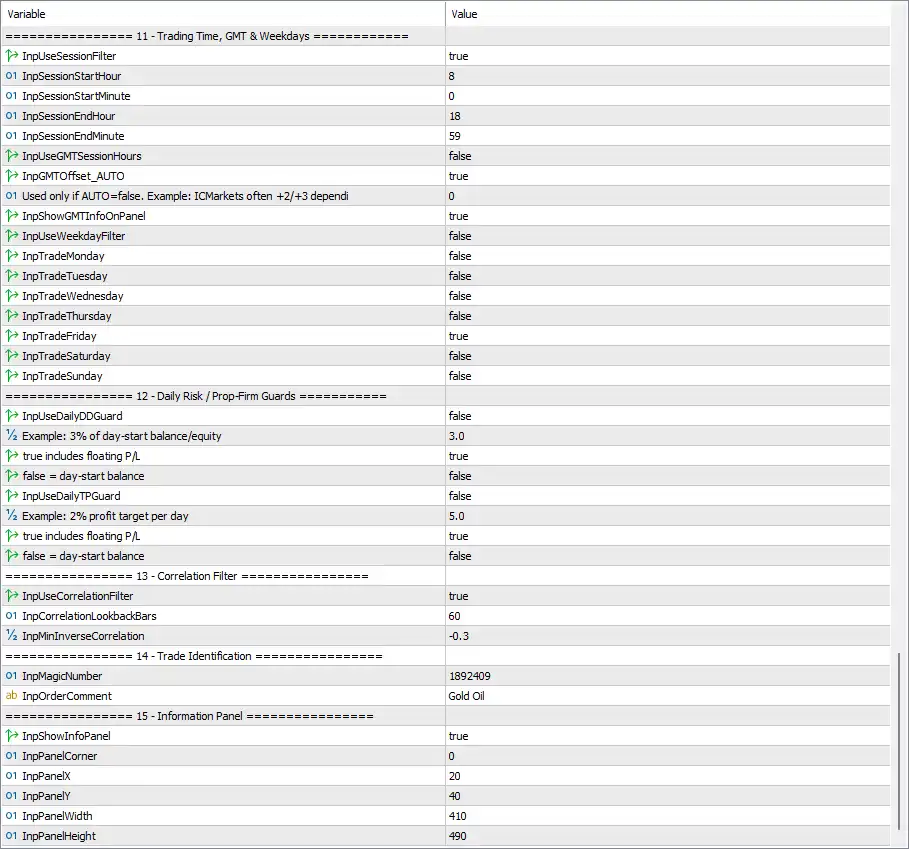
🔹 InpUseSessionFilter = true — Enables the trading-session filter.
🔹 InpSessionStartHour = 8 — Sets the trading session start hour to 8.
🔹 InpSessionStartMinute = 0 — Sets the session start minute to 0, creating a start time of 08:00.
🔹 InpSessionEndHour = 18 — Sets the trading session end hour to 18.
🔹 InpSessionEndMinute = 59 — Sets the session end minute to 59, creating an end time of 18:59.
🔹 InpUseGMTSessionHours = false — Disables GMT-based session-hour interpretation.
🔹 InpGMTOffset_AUTO = true — Enables automatic GMT-offset detection.
🔹 Used only if AUTO=false. Example: ICMarkets often +2/+3 depending = 0 — Sets the manual GMT offset value to 0, but this value is not active while automatic GMT-offset detection is enabled.
🔹 InpShowGMTInfoOnPanel = true — Displays GMT information on the EA's information panel.
🔹 InpUseWeekdayFilter = false — Disables the weekday filter.
🔹 InpTradeMonday = false — Monday trading is disabled in the weekday configuration.
🔹 InpTradeTuesday = false — Tuesday trading is disabled in the weekday configuration.
🔹 InpTradeWednesday = false — Wednesday trading is disabled in the weekday configuration.
🔹 InpTradeThursday = false — Thursday trading is disabled in the weekday configuration.
🔹 InpTradeFriday = true — Friday trading is enabled in the weekday configuration.
🔹 InpTradeSaturday = false — Saturday trading is disabled in the weekday configuration.
🔹 InpTradeSunday = false — Sunday trading is disabled in the weekday configuration.
⚙️ Daily Risk / Prop-Firm Guards
🔹 InpUseDailyDDGuard = false — Disables the daily drawdown guard.
🔹 Example: 3% of day-start balance/equity = 3.0 — Sets the example daily drawdown threshold to 3.0%.
🔹 true includes floating P/L = true — Includes floating Profit/Loss when calculating the daily drawdown condition.
🔹 false = day-start balance = false — Indicates that the alternative day-start balance-only calculation is disabled.
🔹 InpUseDailyTPGuard = false — Disables the daily Take Profit guard.
🔹 Example: 2% profit target per day = 5.0 — Sets the example daily profit-target parameter to 5.0%.
🔹 true includes floating P/L = true — Includes floating P/L in the daily Take Profit calculation.
🔹 false = day-start balance = false — Keeps the day-start-balance-only alternative disabled.
⚙️ Correlation Filter
🔹 InpUseCorrelationFilter = true — Enables the correlation filter.
🔹 InpCorrelationLookbackBars = 60 — Uses 60 bars to calculate the relevant correlation relationship.
🔹 InpMinInverseCorrelation = -0.3 — Sets the minimum inverse-correlation threshold to -0.3.
⚙️ Trade Identification
🔹 InpMagicNumber = 1892409 — Assigns 1892409 as the EA's unique Magic Number for identifying its trades.
🔹 InpOrderComment = Gold Oil — Sets Gold Oil as the order/trade comment.
⚙️ Information Panel
🔹 InpShowInfoPanel = true — Enables the on-chart information panel.
🔹 InpPanelCorner = 0 — Sets the panel corner identifier to 0, corresponding to the configured chart-corner position used by the EA.
🔹 InpPanelX = 20 — Sets the horizontal panel offset to 20.
🔹 InpPanelY = 40 — Sets the vertical panel offset to 40.
🔹 InpPanelWidth = 410 — Sets the information panel width to 410.
🔹 InpPanelHeight = 490 — Sets the information panel height to 490.
🔢 Conclusion
The displayed GoldOil EA MT5 configuration is a comprehensive multi-market trading framework centered on Gold and Oil, with additional US100 compatibility. It combines automatic symbol detection, cross-market filters, fixed-lot money management, USD-based SL/TP, Gold-specific technical filters, ATR protection, spread protection, cooldown logic, trading-session controls, correlation analysis, and an on-chart information panel.
The core setup uses 15 Minutes as the trigger timeframe, 0.01 lots, $40.0 Stop Loss, and $120.0 Take Profit. The EA also restricts trading to one trade at a time, while ATR protection operates between 3.0 and 60.0 and spread protection limits Gold to 80 points and Oil to 30 points.
Although the EA contains a large number of advanced Gold filters, many of them are currently disabled. For example, the Double Top/Bottom, RSI divergence, MACD divergence, Head-and-Shoulders, market-structure, FVG, Order Block, Kill Zone, displacement, compression-breakout, premium/discount, and several other filters are set to false. This means their parameters remain available for customization without currently acting as active entry restrictions.
The active safety framework includes ATR filtering, spread protection, a 5-minute cooldown, a defined 08:00–18:59 session, and an enabled correlation filter. Daily drawdown and daily profit guards are currently disabled, while Friday is the only enabled weekday in the displayed weekday settings.
Overall, the Inputs panel provides extensive customization for traders who want to adapt GoldOil EA MT5 to different broker symbols, market conditions, trading sessions, and risk-management requirements. The exact interpretation of points, USD thresholds, correlation values, and broker-time settings should be verified through testing because these can vary according to the traded instrument and broker specifications.


