




Exclusive Black Pro Max MT5 (Latest version) - Unlimited

Subscriptions for Special Plan
- 30 EA package is more economical!
- Special package with 99%
- Download 1 EA/Day

Subscriptions for Premium Membership
- Download Unlimited in 1 Year
- Get 100% Discount
- Get free access to all

Subscriptions for Gold Membership
- 1 Year Membership
- Get 100% Discount
- Access EA+Indicator+Course
Frequently bought together 🎁
Add these products to enhance your purchase


Quick Overview
Exclusive Black Pro Max MT5 is a fully automated MetaTrader 5 Expert Advisor (EA) using market-analysis algorithms, indicators, filters, adaptive Stop Loss and dynamic capital protection. Its primary operating environment is M15 on Raw Spread or ECN accounts, with individual optimization required for each selected pair.
Best For
✅ MT5 traders seeking a fully automated multi-pair EA.
✅ Users comfortable optimizing each trading pair individually.
✅ Traders using Raw Spread or ECN accounts.
✅ Users who prefer adaptive risk controls.
✅ Advanced users who understand broker-specific optimization.
Overall Rating
⭐⭐⭐⭐⭐ 8.2/10
| Category | Score |
| Strategy Clarity | 7.7/10 |
| Risk Management | 8.7/10 |
| Features | 8.4/10 |
| Transparency | 8.0/10 |
| Performance Evidence | 6.8/10 |
| Usability | 7.8/10 |
| Value | 7.9/10 |
What Is Exclusive Black Pro Max MT5?
Exclusive Black Pro Max MT5 is an automated MT5 Expert Advisor that combines market-analysis algorithms with indicator and filter combinations to identify trading opportunities. It is designed to adapt to changing volatility while using adaptive stop-loss and capital-protection mechanisms.
⭐ Vendor Website: View here
⭐ Delivery time 24h-48h after payment.
⭐ Refund if not delivered.
⭐ You will receive the current version without any limitations (ID+Time).
Exclusive Black Pro Max MT5 Review
How Does Exclusive Black Pro Max MT5 Work?
Market Analysis
A combination of indicators and filters is used to evaluate potential trading opportunities.
Volatility Adaptation
The system is designed to adjust to changing market conditions and volatility levels.
Execution
IOC, FOK, Return and BOC execution types are supported.
Pair Optimization
Each selected pair should be optimized separately because broker quotes, spreads and market behavior differ.
Automated Operation
After configuration, the EA can run automatically on the selected M15 setup.
Historical Trading Results Performance
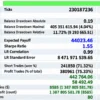
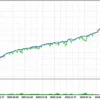
The backtest shows exceptionally strong historical profitability, generating over $22.26 billion in net profit from a $1,000 initial deposit across three symbols.
The system achieved a 3.21 Profit Factor and 75.33% profitable trades, while the reported equity drawdown reached 14.91%, indicating substantial return potential alongside significant risk.
| Performance Metric | Results |
|---|---|
| Test Period | 2014–2025 |
| Initial Deposit | $1,000 |
| Symbol | 3 Symbols |
| Net Profit | $22,264,512,342.32 |
| Equity Drawdown | 14.91% |
| Balance Drawdown | 4.04% |
Exclusive Black Pro Max MT5 Backtest Results
Exclusive Black Pro Max EA Backtest Results
Exclusive Black Pro Max MT5 Trading Strategy
Entry Logic
The exact proprietary formula is not fully exposed; the system relies on a combination of market-analysis indicators and filters.
Confirmation Conditions
Configured filters and volatility conditions determine whether a setup is suitable for execution.
Trade Execution
The primary documented timeframe is M15.
Exit Logic
Adaptive Stop Loss and capital-protection mechanisms form the main documented protection layer.
Position Management
Behavior depends on the optimized parameters selected for the broker, account and instrument.
Key Features
Adaptive Stop Loss
Stop-loss behavior can adjust to the trading environment.
Dynamic Capital Protection
The system includes capital-protection logic intended to limit exposure during unfavorable conditions.
Flexible Execution
Several modern MT5 execution modes are supported.
Broad Pair Coverage
A large selection of Forex pairs can be configured.
Exclusive Black Pro Max MT5 Risk Management
Risk Management
The system uses adaptive risk and capital-protection mechanisms.
Stop Loss
Adaptive Stop Loss is part of the documented protection framework.
Take Profit
Exact Take Profit behavior is configuration-dependent.
Drawdown Protection
Dynamic capital protection is included, but there is no single universal drawdown threshold.
Martingale / Grid
Neither is identified as the defining core strategy.
Recommended Trading Conditions
For the best performance, the developer recommends:
| Features | Type |
|---|---|
| Trading platform | MetaTrader 5 (MT5) |
| Time frames | M15 |
| Currency pairs | currency pairs |
| Minimum / Recommended deposit | $1,000+ |
| Minimum / Recommended leverage | 1:50+ |
| Account type | Raw Spread / ECN |
| Additional services | Unlock and Decompile |
| Recommended brokers | Exness Broker, Icmarkets Broker |
| Recommended VPS | MyfxVPS.com (Blue VPS, Golden VPS). Lowest Latency, 2 week Free Trial, 100% Free for 12-18 Months. |
Why Exclusive Black Pro Max MT5 Stands Out
Broker-Specific Optimization
Individual pair and broker optimization is a central part of the operating approach.
Adaptive Protection
Risk controls are designed to respond to changing volatility and capital conditions.
Execution Flexibility
Multiple MT5 execution types are available.
Multi-Pair Capability
The system is not restricted to one currency pair.
Strengths and Limitations
Strengths
🔹 Fully automated operation.
🔹 Adaptive risk and Stop Loss framework.
🔹 Wide currency-pair coverage.
🔹 Clear emphasis on broker-specific optimization.
Limitations
🔹 Requires more optimization work than a simple plug-and-play EA.
🔹 Performance can differ between brokers and pairs.
🔹 Public strategy details are relatively high level.
🔹 No universal live-performance benchmark.
Who Should Use Exclusive Black Pro Max MT5?
Suitable Users
Experienced MT5 users who are comfortable optimizing settings and validating results for their own broker and currency pairs.
Less Suitable Users
Users expecting one default configuration to perform identically across every broker and pair.
Product Download Package?
The download package of the product suite includes:
✅ Experts: Exclusive Black Pro Max MT5.ex5
Final Verdict
Exclusive Black Pro Max MT5 is better understood as an optimization-driven automated trading framework than a fixed-preset robot. Its strengths are adaptive protection, broad pair support and flexible execution, while its main consideration is the need for broker- and pair-specific validation.
🔢 Exclusive Black Pro Max MT5 – Complete Settings Guide
Exclusive Black Pro Max MT5 is an automated Expert Advisor for MetaTrader 5 designed around market-analysis algorithms, execution controls, adaptive risk management, and institutional-style trading filters. The supplied configuration reveals a highly structured system covering trading sessions, spread protection, symbol selection, order execution, capital allocation, adaptive risk scaling, signal calibration, deep market filtering, and visual interface controls.
The configuration is particularly detailed in its risk architecture. It includes a Risk factor of 3080.0, Position scaling factor of 3.2, Risk modulation by market volatility of 0.75, margin and capital controls, and an institutional market inactivity control set to Regulate. The EA is configured for M15, while the official MQL5 listing also identifies M15 as its technical timeframe and highlights advanced market analysis, adaptive risk management, and modern order execution.
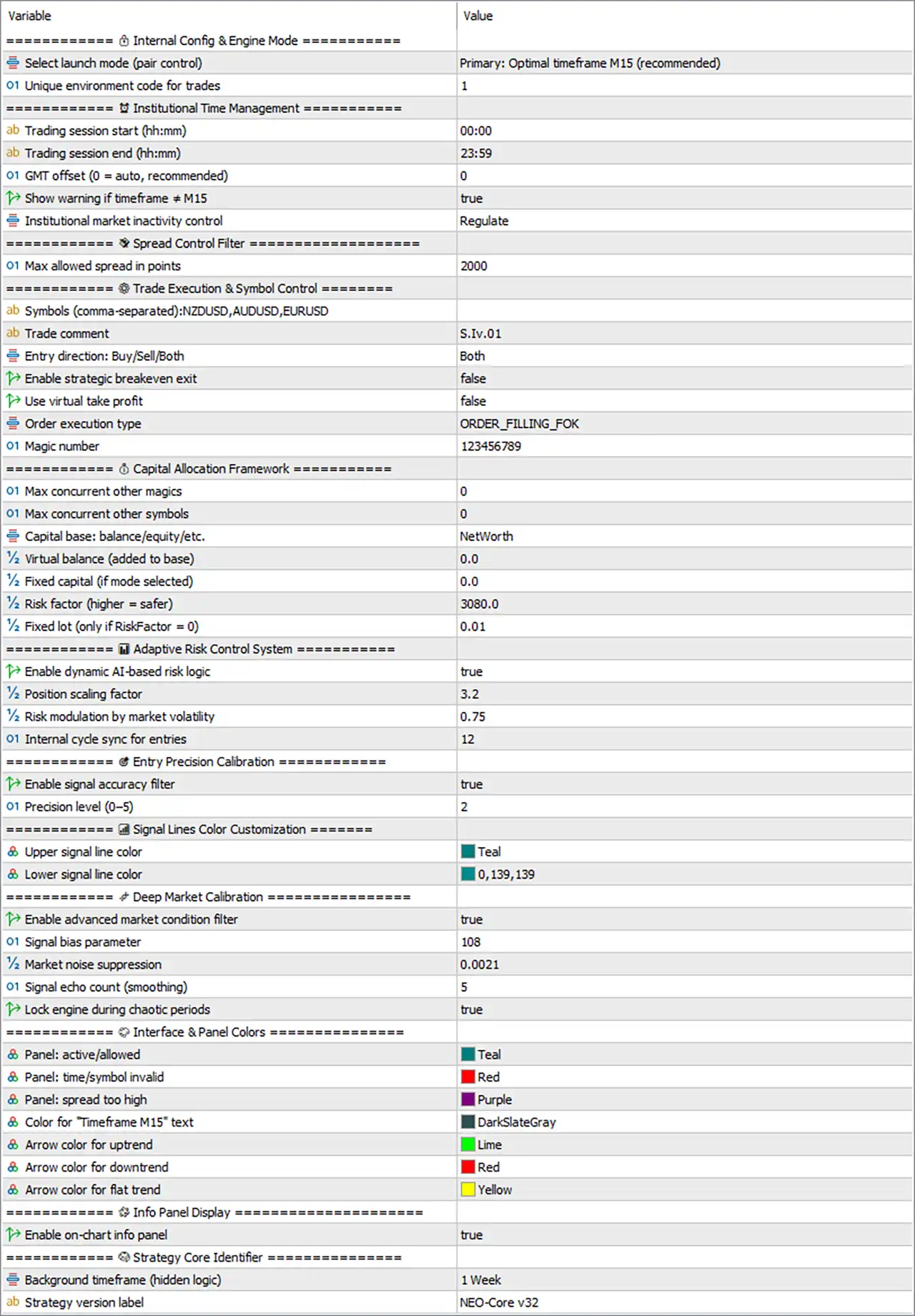
Exclusive black Pro Max MT5 Settings Panel
🔢 Internal Config & Engine Mode
🔹 Select launch mode (pair control) = Primary: Optimal timeframe M15 (recommended) — Selects the primary launch configuration and identifies M15 as the recommended optimal timeframe.
🔹 Unique environment code for trades = 1 — Assigns the environment code 1 to trades created under this EA configuration.
🔢 Institutional Time Management
🔹 Trading session start (hh) = 00:00 — Sets the daily trading-session start time to 00:00.
🔹 Trading session end (hh) = 23:59 — Sets the trading-session end time to 23:59, providing an almost full-day trading window.
🔹 GMT offset (0 = auto, recommended) = 0 — Uses 0 as the GMT offset, with the input indicating that 0 = automatic detection and is the recommended setting.
🔹 Show warning if timeframe ≠ M15 = true — Enables a warning whenever the EA is running on a timeframe other than M15.
🔹 Institutional market inactivity control = Regulate — Sets the market-inactivity handling mode to Regulate, allowing the EA to regulate its behavior during periods of reduced market activity.
🔢 Spread Control Filter
🔹 Max allowed spread in points = 2000 — Sets the maximum permitted spread threshold to 2000 points before spread protection can restrict trading.
🔢 Trade Execution & Symbol Control
🔹 Symbols (comma-separated) = NZDUSD,AUDUSD,EURUSD — Defines the trading symbols as NZDUSD, AUDUSD, and EURUSD.
🔹 Trade comment = S.Iv.01 — Sets S.Iv.01 as the comment attached to EA-generated trades.
🔹 Entry direction: Buy/Sell/Both = Both — Allows the EA to open both BUY and SELL positions.
🔹 Enable strategic breakeven exit = false — Disables the strategic breakeven exit mechanism.
🔹 Use virtual take profit = false — Disables virtual Take Profit management, meaning the virtual TP feature is not active in the current configuration.
🔹 Order execution type = ORDER_FILLING_FOK — Uses FOK (Fill or Kill) order execution, requiring the requested order volume to be filled according to the broker’s supported FOK rules or rejected.
🔹 Magic number = 123456789 — Assigns the unique Magic Number 123456789 to identify positions managed by this EA.
The official MQL5 product information specifically lists modern execution modes including IOC, FOK, Return, and BOC, making the displayed ORDER_FILLING_FOK configuration consistent with the EA’s supported execution framework.
🔢 Capital Allocation Framework
🔹 Max concurrent other magics = 0 — Sets the maximum number of concurrent positions belonging to other Magic Numbers to 0 under this control.
🔹 Max concurrent other symbols = 0 — Sets the maximum number of concurrent positions on other symbols to 0 under this allocation framework.
🔹 Capital base: balance/equity/etc. = NetWorth — Selects NetWorth as the capital base used by the allocation calculations.
🔹 Virtual balance (added to base) = 0.0 — Adds 0.0 to the selected capital base as virtual balance.
🔹 Fixed capital (if mode selected) = 0.0 — Sets the fixed capital value to 0.0 when the corresponding capital mode is selected.
🔹 Risk factor (higher = safer) = 3080.0 — Sets the risk factor to 3080.0; the input explicitly indicates that a higher value represents a safer configuration.
🔹 Fixed lot (only if riskFactor = 0) = 0.01 — Sets the fallback fixed lot size to 0.01 when the risk factor is configured at 0.
🔢 Adaptive Risk Control System
🔹 Enable dynamic AI-based risk logic = true — Enables the EA’s dynamic AI-based risk-management logic.
🔹 Position scaling factor = 3.2 — Sets the position-scaling factor to 3.2, controlling the configured scaling behavior for position sizing.
🔹 Risk modulation by market volatility = 0.75 — Sets volatility-based risk modulation to 0.75, allowing the EA’s risk logic to adjust according to market volatility.
🔹 Internal cycle sync for entries = 12 — Sets the internal entry-cycle synchronization parameter to 12.
🔢 Entry Precision Calibration
🔹 Enable signal accuracy filter = true — Enables the signal-accuracy filtering mechanism.
🔹 Precision level (0–5) = 2 — Sets the signal precision level to 2 on the available 0–5 scale.
🔢 Signal Lines Color Customization
🔹 Upper signal line color = Teal — Sets the upper signal-line display color to Teal.
🔹 Lower signal line color = 0,139,139 — Sets the lower signal-line color using RGB-style values 0,139,139.
🔢 Deep Market Calibration
🔹 Enable advanced market condition filter = true — Enables the advanced market-condition filtering system.
🔹 Signal bias parameter = 108 — Sets the signal-bias parameter to 108, controlling the configured signal-bias calculation.
🔹 Market noise suppression = 0.0021 — Sets the market-noise suppression parameter to 0.0021, controlling the configured noise-filtering sensitivity.
🔹 Signal echo count (smoothing) = 5 — Sets the signal-echo or smoothing count to 5, adding the configured level of signal smoothing.
🔹 Lock engine during chaotic periods = true — Enables engine locking during periods classified by the EA as chaotic market conditions.
🔢 Interface & Panel Colors
🔹 Panel: active/allowed = Teal — Uses Teal to display the panel state when the EA is active and trading is allowed.
🔹 Panel: time/symbol invalid = Red — Uses Red when the configured time or symbol conditions are invalid.
🔹 Panel: spread too high = Purple — Uses Purple when the detected spread exceeds the permitted level.
🔹 Color for ‘Timeframe M15’ text = DarkSlateGray — Sets the display color of the Timeframe M15 text to DarkSlateGray.
🔹 Arrow color for uptrend = Lime — Uses Lime for arrows representing an uptrend.
🔹 Arrow color for downtrend = Red — Uses Red for arrows representing a downtrend.
🔹 Arrow color for flat trend = Yellow — Uses Yellow for arrows representing a flat or neutral trend.
🔢 Info Panel Display
🔹 Enable on-chart info panel = true — Enables the EA’s on-chart information panel.
🔢 Strategy Core Identifier
🔹 Background timeframe (hidden logic) = 1 Week — Sets the background or hidden logical timeframe to 1 Week.
🔹 Strategy version label = NEO-Core v32 — Identifies the strategy core version as NEO-Core v32.
🔢 Current Exclusive Black Pro Max MT5 Configuration
🔹 Recommended Launch Mode = Primary: Optimal timeframe M15 (recommended) — The selected launch mode recommends M15.
🔹 Environment Code = 1 — The trade environment identifier is 1.
🔹 Trading Session = 00:00–23:59 — The EA is configured to operate across almost the entire day.
🔹 GMT Offset = 0 — Automatic GMT-offset mode is selected according to the input description.
🔹 M15 Warning = true — The EA warns when the chart timeframe differs from M15.
🔹 Market Inactivity Control = Regulate — Inactivity handling is configured to Regulate.
🔹 Maximum Spread = 2000 points — Spread protection is enabled at the configured 2000-point threshold.
🔹 Symbols = NZDUSD, AUDUSD, EURUSD — Three symbols are listed in the supplied configuration.
🔹 Entry Direction = Both — Both BUY and SELL directions are permitted.
🔹 Strategic Breakeven = false — Strategic breakeven is disabled.
🔹 Virtual Take Profit = false — Virtual TP is disabled.
🔹 Order Execution = ORDER_FILLING_FOK — FOK execution is selected.
🔹 Magic Number = 123456789 — The EA trade identifier is 123456789.
🔹 Capital Base = NetWorth — NetWorth is selected as the capital calculation base.
🔹 Virtual Balance = 0.0 — No virtual balance is added.
🔹 Fixed Capital = 0.0 — Fixed capital is configured at 0.0.
🔹 Risk Factor = 3080.0 — The risk factor is 3080.0, with the input indicating that higher values are safer.
🔹 Fixed Lot = 0.01 — The fallback fixed lot is 0.01.
🔹 Dynamic AI Risk Logic = true — Dynamic AI-based risk management is enabled.
🔹 Position Scaling Factor = 3.2 — Position scaling is configured at 3.2.
🔹 Volatility Risk Modulation = 0.75 — Volatility-based risk modulation is 0.75.
🔹 Internal Entry Cycle Sync = 12 — Entry synchronization is set to 12.
🔹 Signal Accuracy Filter = true — Signal accuracy filtering is enabled.
🔹 Precision Level = 2/5 — Signal precision is configured at level 2 on the 0–5 scale.
🔹 Advanced Market Condition Filter = true — Advanced market-condition filtering is enabled.
🔹 Signal Bias = 108 — The signal-bias parameter is 108.
🔹 Market Noise Suppression = 0.0021 — Noise suppression is 0.0021.
🔹 Signal Echo Count = 5 — Signal smoothing uses an echo count of 5.
🔹 Chaotic Period Lock = true — The engine can lock during chaotic market periods.
🔹 On-Chart Info Panel = true — The information panel is enabled.
🔹 Background Timeframe = 1 Week — The hidden background timeframe is 1 Week.
🔹 Strategy Version = NEO-Core v32 — The configured strategy core is NEO-Core v32.
🔢 How the Exclusive Black Pro Max MT5 Settings Work Together
🔹 M15 Core Operation — The configuration identifies M15 as the recommended optimal timeframe and enables a warning whenever a different timeframe is used.
🔹 Multi-Symbol Trading Structure — The supplied symbol list contains NZDUSD, AUDUSD, and EURUSD, while the entry direction is set to Both, allowing BUY and SELL logic.
🔹 Execution Protection — The maximum spread is set to 2000 points, while ORDER_FILLING_FOK is selected for order execution.
🔹 Dynamic Risk Architecture — Dynamic AI-based risk logic is enabled with a Position scaling factor of 3.2, Risk modulation by market volatility of 0.75, and Risk factor of 3080.0.
🔹 Capital Preservation — The system uses NetWorth as its capital base, reserves no additional virtual balance, and has a Fixed lot of 0.01 available when the risk factor is set to 0.
🔹 Signal Calibration — Signal accuracy filtering is enabled at Precision level 2, while deep market calibration uses Signal bias 108, Market noise suppression 0.0021, and Signal echo count 5.
🔹 Market Condition Protection — Advanced market-condition filtering is enabled, and Lock engine during chaotic periods = true provides an additional defensive layer during extreme conditions.
🔹 Time Management — The trading session runs from 00:00 to 23:59, while GMT offset = 0 is configured for automatic offset handling.
🔹 Strategic Exit Controls — Strategic breakeven and virtual Take Profit are both disabled in the supplied configuration.
🔹 Visual Monitoring — The on-chart information panel is enabled, with different colors assigned to active status, invalid conditions, high spread, M15 text, and trend directions.
🔹 Core Architecture — The visible NEO-Core v32 label identifies the configured strategy version, while the hidden background logic operates on the 1 Week timeframe.
User Reviews
Only logged in customers who have purchased this product may leave a review.
What timeframe does Exclusive Black Pro Max MT5 use?
The primary documented timeframe is M15.
What account type is recommended?
Raw Spread and ECN accounts are recommended.
What deposit is recommended?
A minimum recommended deposit of $1,000 is stated.
Does it use adaptive Stop Loss?
Yes. Adaptive Stop Loss is part of the risk framework.
Does it support multiple currency pairs?
Yes, but each pair should be optimized separately.
Does it use Martingale?
Martingale is not identified as the defining trading method.
Can one broker's results be assumed to apply to another?
No. Broker quotes, spreads and execution can materially affect results.
-
 Original price was: $2,000.00.$199.00Current price is: $199.00.
 -
 Original price was: $30,000.00.$599.00Current price is: $599.00.
 -
 Original price was: $3,750.00.$599.00Current price is: $599.00.
 -
 Original price was: $30,000.00.$599.00Current price is: $599.00.
-
 0Original price was: $778.00.$249.00Current price is: $249.00.
 -
 1Original price was: $699.00.$249.00Current price is: $249.00.
 -
 0Original price was: $430.00.$249.00Current price is: $249.00.
 -
 6Original price was: $1,000.00.$599.00Current price is: $599.00.
There are no reviews yet.