🔢 Gold Hitter EA MT4 – Complete Settings & Configuration Guide
Gold Hitter EA is an advanced automated Gold trading Expert Advisor (EA) for MetaTrader platforms, designed to trade XAUUSD using smart recovery systems, moving average filters, HILO indicators, trailing stop management and equity protection tools.
The EA combines aggressive recovery strategies with controlled risk management, making it suitable for traders looking for automated Gold trading with flexible money management and advanced filtering options.
🔢 Gold Hitter EA Settings Explained
Below are the details of the parameters in the advisor’s trading system settings table:
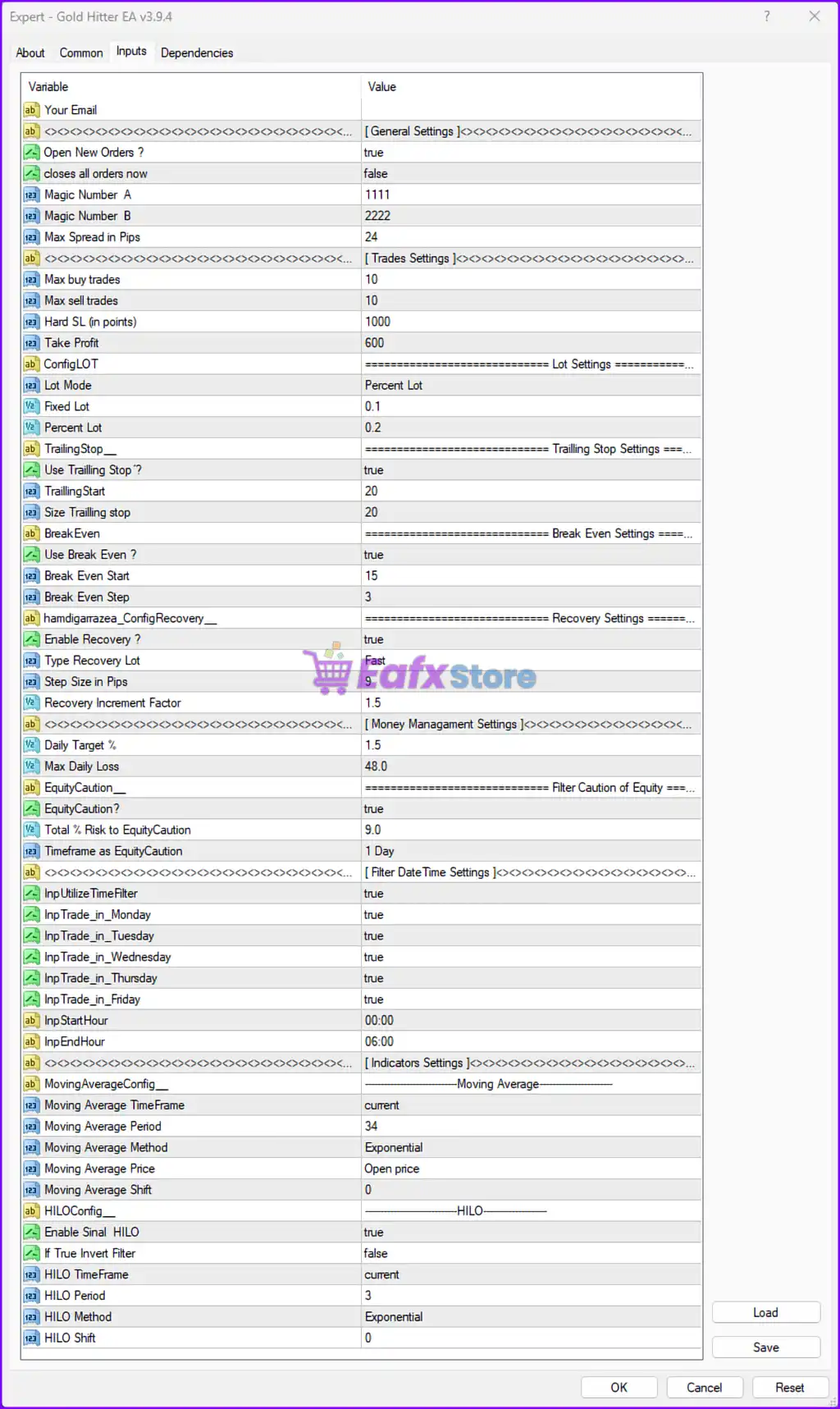
🔶 General Settings
🔹 Your Email = — Field used for entering the trader’s email address for notifications or licensing purposes.
🔹 Open New Orders ? = true — Allows the EA to open new trading positions automatically.
🔹 closes all orders now = false — Disables immediate closure of all active orders.
🔹 Magic Number A = 1111 — Unique identifier used for the first group of EA trades.
🔹 Magic Number B = 2222 — Unique identifier used for the second group of EA trades.
🔹 Max Spread in Pips = 24 — Prevents trading when the spread exceeds 24 pips.
🔶 Trades Settings
🔹 Max buy trades = 10 — Limits the maximum number of Buy trades to 10.
🔹 Max sell trades = 10 — Limits the maximum number of Sell trades to 10.
🔹 Hard SL (in points) = 1000 — Sets a hard Stop Loss distance of 1000 points.
🔹 Take Profit = 600 — Defines the Take Profit target at 600 points.
🔶 Lot Settings
🔹 ConfigLOT = ======================== Lot Settings ======================== — Section header for lot management configuration.
🔹 Lot Mode = Percent Lot — Activates percentage-based lot sizing.
🔹 Fixed Lot = 0.1 — Sets the fixed lot size to 0.1 when fixed lot mode is used.
🔹 Percent Lot = 0.2 — Uses 0.2% account-based risk calculation for automatic lot sizing.
🔶 Trailing Stop Settings
🔹 TrailingStop_ = ======================== Trailing Stop Settings ======================== — Section header for trailing stop parameters.
🔹 Use Trailling Stop ? = true — Enables the trailing stop feature.
🔹 TrailingStart = 20 — Starts trailing stop after 20 points of profit.
🔹 Size Trailling stop = 20 — Sets the trailing stop distance to 20 points.
🔶 Break Even Settings
🔹 BreakEven = ======================== Break Even Settings ======================== — Section header for break-even controls.
🔹 Use Break Even ? = true — Enables automatic break-even protection.
🔹 Break Even Start = 15 — Activates break-even after 15 points of profit.
🔹 Break Even Step = 3 — Moves stop loss in increments of 3 points during break-even management.
🔶 Recovery Settings
🔹 hamdigarzaea_ConfigRecovery__ = ======================== Recovery Settings ======================== — Section header for recovery trading settings.
🔹 Enable Recovery ? = true — Activates the recovery trading mechanism.
🔹 Type Recovery Lot = Fast — Uses Fast recovery lot progression mode.
🔹 Step Size in Pips = 5 — Defines recovery order spacing at 5 pips.
🔹 Recovery Increment Factor = 1.5 — Multiplies recovery lot sizes by a factor of 1.5.
🔶 Money Management Settings
🔹 Daily Target % = 1.5 — Sets a daily profit target of 1.5%.
🔹 Max Daily Loss = 48.0 — Limits maximum daily loss to 48.0.
🔶 Equity Protection Settings
🔹 EquityCaution__ = ======================== Filter Caution of Equity ======================== — Section header for equity protection.
🔹 EquityCaution ? = true — Enables equity caution and protection mode.
🔹 Total % Risk to EquityCaution = 9.0 — Activates equity protection when risk reaches 9.0%.
🔹 Timeframe as EquityCaution = 1 Day — Uses a 1-day period for equity monitoring.
🔶 Filter Date Time Settings
🔹 InpUtilizeTimeFilter = true — Enables trading session time filtering.
🔹 InpTrade_in_Monday = true — Allows trading on Monday.
🔹 InpTrade_in_Tuesday = true — Allows trading on Tuesday.
🔹 InpTrade_in_Wednesday = true — Allows trading on Wednesday.
🔹 InpTrade_in_Thursday = true — Allows trading on Thursday.
🔹 InpTrade_in_Friday = true — Allows trading on Friday.
🔹 InpStartHour = 00:00 — Trading session starts at 00:00.
🔹 InpEndHour = 06:00 — Trading session ends at 06:00.
🔶 Indicators Settings – Moving Average
🔹 MovingAverageConfig__ = --------------------Moving Average-------------------- — Section header for Moving Average settings.
🔹 Moving Average TimeFrame = current — Uses the current chart timeframe for Moving Average calculations.
🔹 Moving Average Period = 34 — Sets the Moving Average period to 34.
🔹 Moving Average Method = Exponential — Uses Exponential Moving Average (EMA).
🔹 Moving Average Price = Open price — Applies the Moving Average to the Open price.
🔹 Moving Average Shift = 0 — No shift is applied to the Moving Average.
🔶 Indicators Settings – HILO
🔹 HILOConfig__ = --------------------HILO-------------------- — Section header for HILO indicator settings.
🔹 Enable Sinal HILO = true — Enables HILO signal filtering.
🔹 If True Invert Filter = false — Disables inverted HILO signal logic.
🔹 HILO TimeFrame = current — Uses the current chart timeframe for HILO calculations.
🔹 HILO Period = 3 — Sets the HILO indicator period to 3.
🔹 HILO Method = Exponential — Uses Exponential calculation method for HILO.
🔹 HILO Shift = 0 — No shift is applied to the HILO indicator.
🔢 Conclusion
Gold Hitter EA is a feature-rich automated Gold trading robot designed for traders who want flexible recovery systems, intelligent money management, trailing stop protection, and advanced indicator-based filtering. With configurable Moving Average and HILO filters, recovery mechanisms, equity protection systems, and time-based trading filters, the EA offers a balanced approach for automated XAUUSD trading on MetaTrader platforms.
🔢 FAQs
❓ What is Gold Hitter EA?
Gold Hitter EA is an automated Gold trading Expert Advisor designed for MetaTrader platforms with advanced recovery and money management systems.
❓ Does Gold Hitter EA use recovery trading?
Yes, the EA includes a Fast recovery mode with adjustable recovery increment factors and pip spacing.
❓ Can Gold Hitter EA use trailing stop and break-even protection?
Yes, both trailing stop and break-even functions are enabled in the default configuration.
❓ What indicators does Gold Hitter EA use?
The EA uses Moving Average and HILO indicators for market filtering and trade confirmation.
❓ Can Gold Hitter EA restrict trading by time?
Yes, the EA includes a built-in time filter allowing trading only during specific hours and weekdays.