


🔢 Gold Nova EA MT5 – Complete Settings Guide & Parameter Explanation
Gold Nova EA is an automated trading robot designed for MetaTrader 5 that focuses on gold market opportunities through signal-based entries, position management and optional grid trading functionality.
The EA combines customizable buy/sell signal sensitivity, risk management controls, spread filtering, and trade execution parameters, allowing traders to optimize performance according to their trading style and market conditions.

🔢 Gold Nova EA MT5 Settings Explained
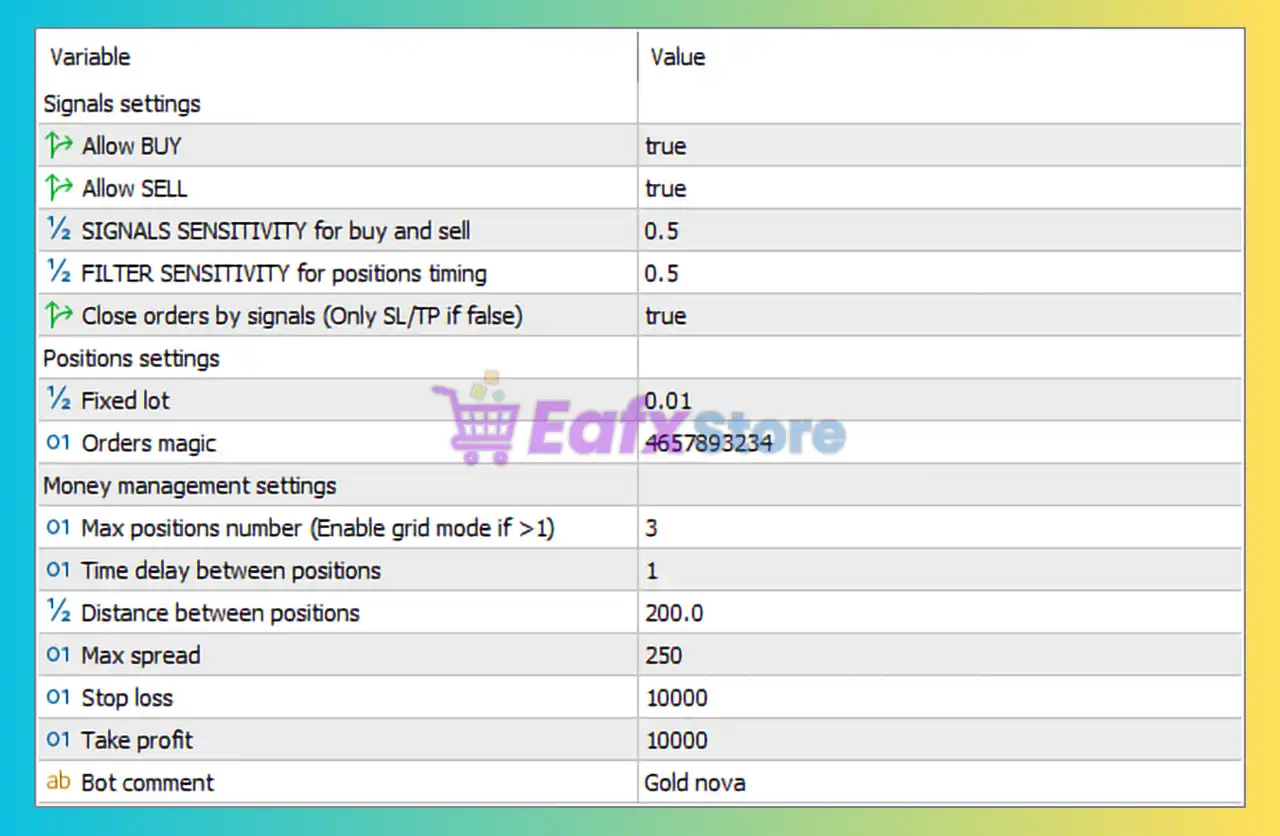
Below are the details of the parameters in the advisor’s trading system settings table:
🔶 Signal Settings
🔹 Allow BUY = true — Enables the EA to open Buy positions when trading conditions are met.
🔹 Allow SELL = true — Enables the EA to open Sell positions when trading conditions are met.
🔹 SIGNALS SENSITIVITY for buy and sell = 0.5 — Sets the sensitivity level of Buy and Sell signal generation to 0.5, balancing trade frequency and signal quality.
🔹 FILTER SENSITIVITY for positions timing = 0.5 — Defines the timing filter sensitivity at 0.5, controlling when positions are allowed to open.
🔹 Close orders by signals (Only SL/TP if false) = true — Allows the EA to close trades based on opposite or exit signals instead of relying solely on Stop Loss and Take Profit levels.
🔶 Position Settings
🔹 Fixed lot = 0.01 — Uses a fixed trade volume of 0.01 lots for each position opened.
🔹 Orders magic = 4657893234 — Unique Magic Number used by the EA to identify and manage its own trades.
🔶 Money Management Settings
🔹 Max positions number (Enable grid mode if >1) = 3 — Allows up to 3 simultaneous positions; values greater than 1 activate grid-style position management.
🔹 Time delay between positions = 1 — Sets a delay of 1 unit (broker-defined timing interval) before opening another position.
🔹 Distance between positions = 200.0 — Requires a minimum spacing of 200.0 points between grid positions.
🔹 Max spread = 250 — Prevents new trades when the market spread exceeds 250 points.
🔹 Stop loss = 10000 — Sets the Stop Loss distance at 10,000 points for each position.
🔹 Take profit = 10000 — Sets the Take Profit target at 10,000 points for each position.
🔶 Identification Settings
🔹 Bot comment = Gold nova — Trade comment attached to all positions opened by the EA for identification and tracking purposes.
🔶 Trading Logic Overview
🔹 Buy Trading Enabled = true — The EA can execute long (Buy) trades.
🔹 Sell Trading Enabled = true — The EA can execute short (Sell) trades.
🔹 Signal-Based Exit System = true — Trades may be closed automatically when new market signals indicate an exit condition.
🔹 Grid Trading Capability = Enabled when Max Positions > 1 — The current setting of 3 maximum positions activates grid functionality.
🔹 Fixed Lot Risk Model = 0.01 Lots — Position sizing remains constant regardless of account balance changes.
🔹 Spread Protection Active = 250 Points — Helps avoid entering trades during high-spread market conditions.
🔢 Conclusion
Gold Nova EA is a signal-driven Expert Advisor that combines Buy/Sell signal generation, flexible position management, and optional grid trading functionality.
With a fixed lot size of 0.01, a maximum of 3 positions, 200-point grid spacing, and 10,000-point Stop Loss and Take Profit levels, the EA offers a structured approach to automated gold trading while maintaining built-in spread and signal-based trade management controls.
🔢 FAQs
❓ What is the default lot size used by Gold Nova EA MT5?
Gold Nova EA MT5 uses a fixed lot size of 0.01 lots.
❓ Can Gold Nova EA MT5 trade both Buy and Sell positions?
Yes, both Allow BUY and Allow SELL are enabled by default.
❓ Does Gold Nova EA MT5 support grid trading?
Yes, grid mode becomes active when Max positions number is set greater than 1. The current setting is 3.
❓ What is the maximum spread allowed for opening trades?
The EA allows trading only when the spread is below 250 points.
❓ How does the EA close trades?
With Close orders by signals = true, positions can be closed by trading signals instead of relying only on Stop Loss or Take Profit levels.



