


🔢 Undefeated Triangle MT5 – Complete Settings Guide & Parameter Explanation
Undefeated Triangle MT5 is a professional grid-based Expert Advisor designed for MetaTrader 5. The EA focuses on trading selected currency pairs with advanced lot management, smart grid distance calculations, drawdown protection, spread filtering, RSI confirmation and news-related trade management.
It also includes sophisticated risk controls, position limitations, New Year trading filters, account allocation options, and customizable dashboard settings, making it suitable for traders seeking automated portfolio management with enhanced safety features.

🔢 Undefeated Triangle MT5 Settings Explained
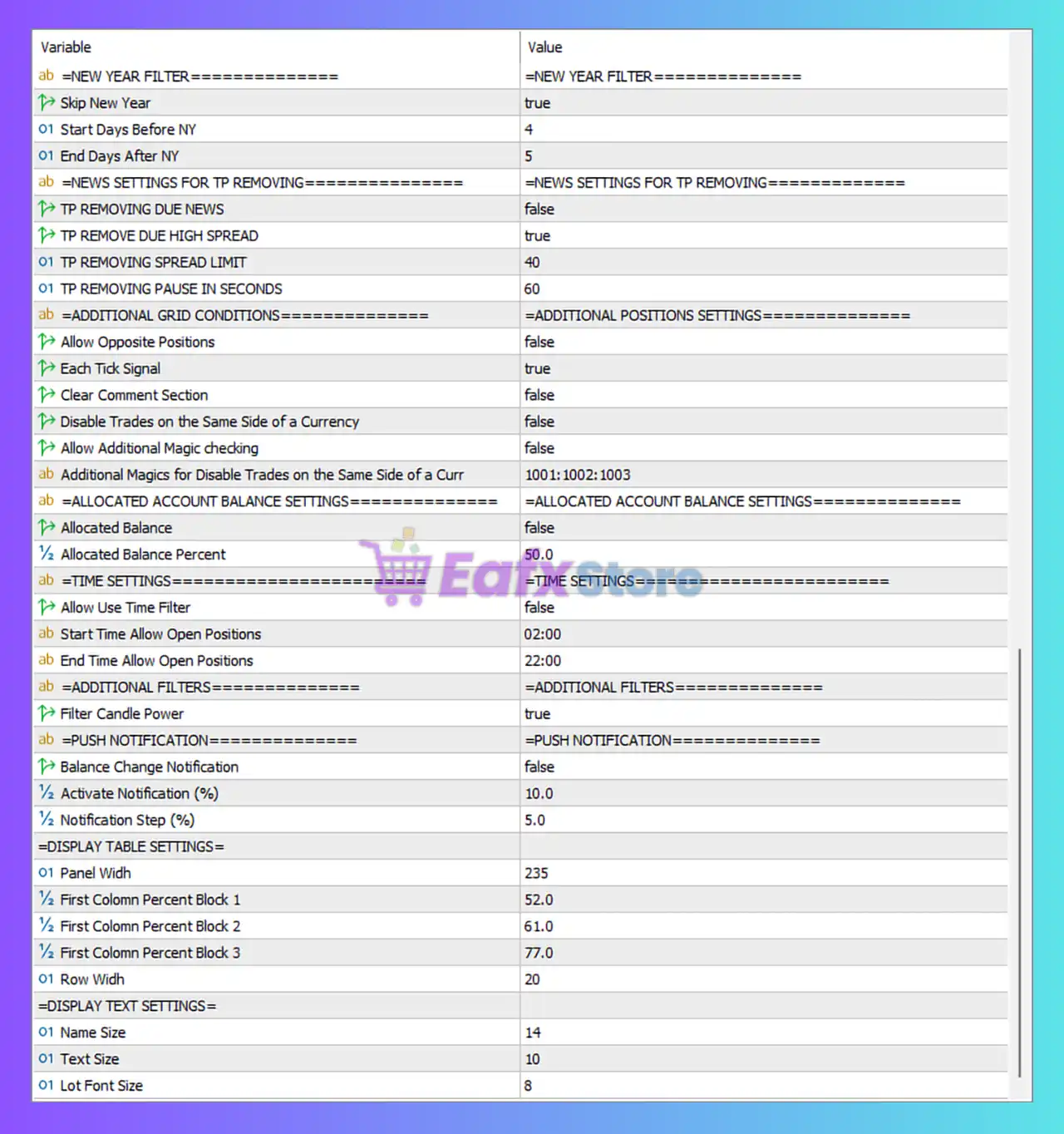
Below are the details of the parameters in the advisor’s trading system settings table:
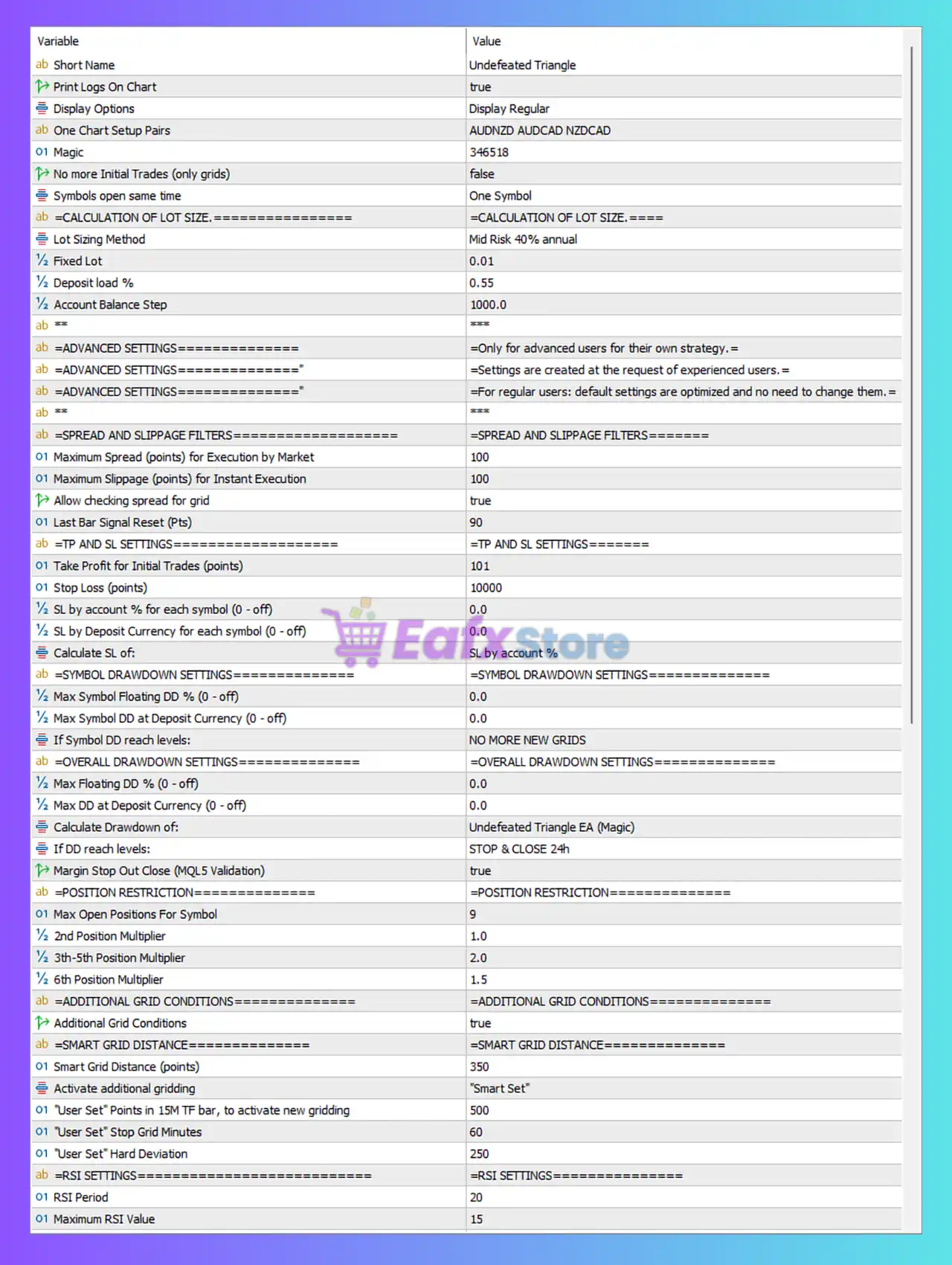
🔶 General Settings
🔹 Short Name = Undefeated Triangle — The displayed name of the Expert Advisor.
🔹 Print Logs On Chart = true — Displays EA activity logs directly on the chart.
🔹 Display Options = Display Regular — Uses the standard dashboard display mode.
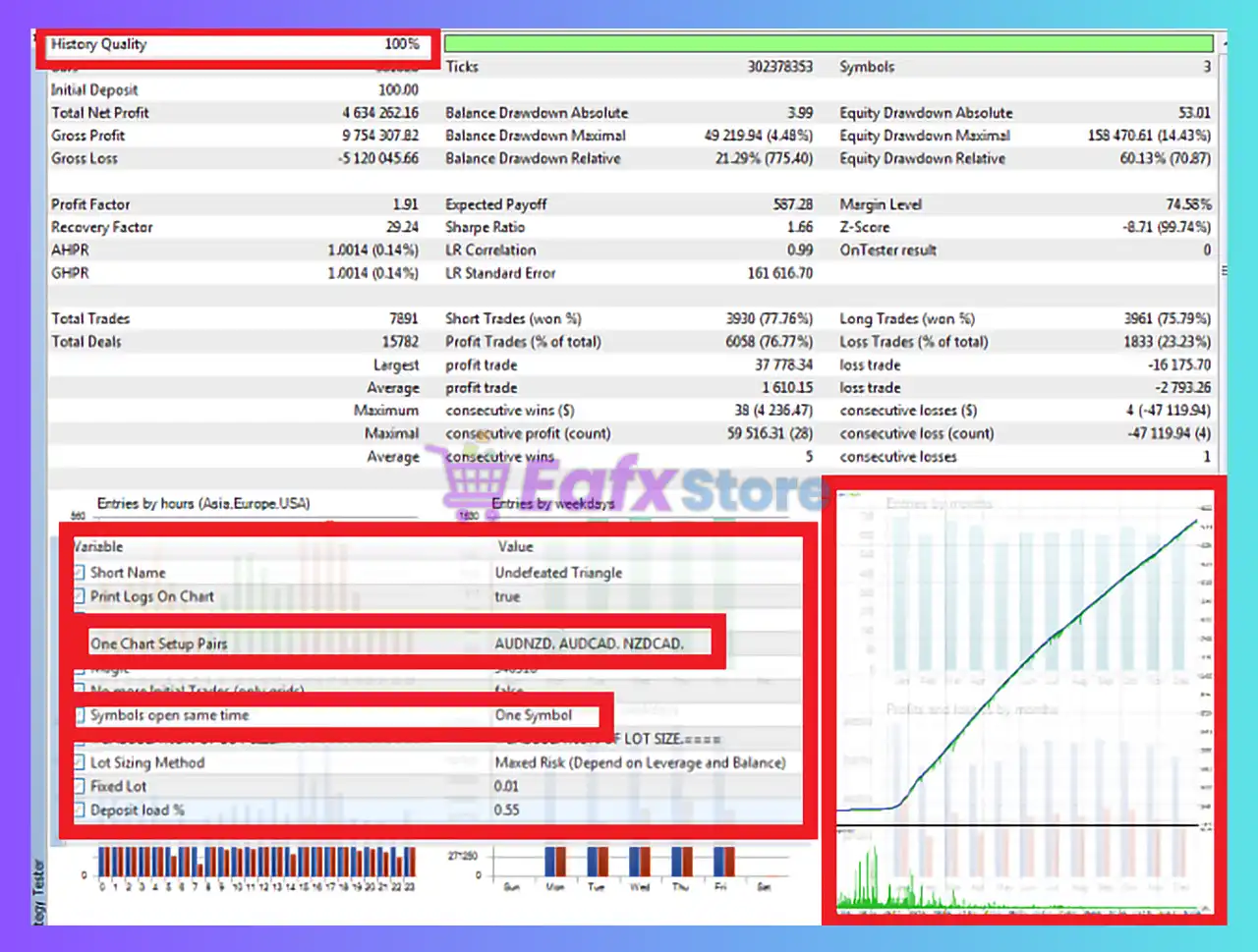
🔹 One Chart Setup Pairs = AUDNZD AUDCAD NZDCAD — Currency pairs configured for the one-chart trading setup.
🔹 Magic = 346518 — Unique Magic Number used to identify EA trades.
🔹 No more Initial Trades (only grids) = false — Allows opening of new initial trades.
🔹 Symbols open same time = One Symbol — Limits simultaneous trading to one symbol at a time.
🔶 Lot Size Calculation Settings
🔹 Lot Sizing Method = Mid Risk 40% annual — Uses the predefined Medium Risk model targeting approximately 40% annual growth.
🔹 Fixed Lot = 0.01 — Fixed trading volume per position.
🔹 Deposit load % = 0.55 — Uses 0.55% deposit allocation for lot sizing calculations.
🔹 Account Balance Step = 1000.0 — Lot size scaling is adjusted every $1,000 account balance increment.
🔶 Advanced Settings
🔹 Advanced Settings Notice = Only for advanced users for their own strategy — Warning that advanced parameters should only be modified by experienced users.
🔹 Advanced Settings Notice = Settings are created at the request of experienced users — Informational note from the developer.
🔹 Advanced Settings Notice = Default settings are optimized and no need to change them — Recommendation to keep default settings unchanged.
🔶 Spread and Slippage Filters
🔹 Maximum Spread (points) for Execution by Market = 100 — Maximum allowed spread for market execution.
🔹 Maximum Slippage (points) for Instant Execution = 100 — Maximum acceptable execution slippage.
🔹 Allow checking spread for grid = true — Enables spread verification before opening grid positions.
🔹 Last Bar Signal Reset (Pts) = 90 — Resets signal calculations after a 90-point movement.
🔶 Take Profit & Stop Loss Settings
🔹 Take Profit for Initial Trades (points) = 101 — Initial trade target profit is 101 points.
🔹 Stop Loss (points) = 10000 — Stop loss distance is 10,000 points.
🔹 SL by account % for each symbol (0 - off) = 0.0 — Symbol-level account percentage stop loss disabled.
🔹 SL by Deposit Currency for each symbol (0 - off) = 0.0 — Deposit currency stop loss disabled.
🔹 Calculate SL of = SL by account % — Stop-loss calculation method uses account percentage logic.
🔶 Symbol Drawdown Protection
🔹 Max Symbol Floating DD % (0 - off) = 0.0 — Floating drawdown limit per symbol disabled.
🔹 Max Symbol DD at Deposit Currency (0 - off) = 0.0 — Deposit currency drawdown protection disabled.
🔹 If Symbol DD reach levels = NO MORE NEW GRIDS — Stops opening new grid positions once drawdown limits are reached.
🔶 Overall Drawdown Protection
🔹 Max Floating DD % (0 - off) = 0.0 — Global floating drawdown protection disabled.
🔹 Max DD at Deposit Currency (0 - off) = 0.0 — Deposit currency drawdown limit disabled.
🔹 Calculate Drawdown of = Undefeated Triangle EA (Magic) — Drawdown calculation is based on trades with this Magic Number.
🔹 If DD reach levels = STOP & CLOSE 24h — Stops trading and closes positions for 24 hours when limits are reached.
🔹 Margin Stop Out Close (MQL5 Validation) = true — Automatically closes positions before margin stop-out occurs.
🔶 Position Restriction Settings
🔹 Max Open Positions For Symbol = 9 — Maximum of 9 open positions per symbol.
🔹 2nd Position Multiplier = 1.0 — Lot multiplier for the second trade.
🔹 3th-5th Position Multiplier = 2.0 — Multiplier applied to positions 3 through 5.
🔹 6th Position Multiplier = 1.5 — Multiplier applied to the sixth trade.
🔶 Additional Grid Conditions
🔹 Additional Grid Conditions = true — Activates extra filtering rules before grid expansion.
🔶 Smart Grid Distance Settings
🔹 Smart Grid Distance (points) = 350 — Base grid spacing between positions.
🔹 Activate additional gridding = "Smart Set" — Uses Smart Set mode for adaptive grid expansion.
🔹 "User Set" Points in 15M TF bar, to activate new gridding = 500 — Grid expansion trigger based on 500-point movement on M15.
🔹 "User Set" Stop Grid Minutes = 60 — Pauses additional grid entries for 60 minutes.
🔹 "User Set" Hard Deviation = 250 — Hard deviation threshold used by Smart Grid.
🔶 RSI Settings
🔹 RSI Period = 20 — RSI indicator calculation period.
🔹 Maximum RSI Value = 15 — Maximum RSI threshold used by the strategy filter.
🔶 New Year Filter
🔹 Skip New Year = true — Disables trading around the New Year period.
🔹 Start Days Before NY = 4 — Trading pause starts 4 days before New Year.
🔹 End Days After NY = 5 — Trading resumes 5 days after New Year.
🔶 News Settings for TP Management
🔹 TP REMOVING DUE NEWS = false — News events do not automatically remove take-profit targets.
🔹 TP REMOVE DUE HIGH SPREAD = true — Removes TP during extreme spread conditions.
🔹 TP REMOVING SPREAD LIMIT = 40 — Spread threshold for TP removal.
🔹 TP REMOVING PAUSE IN SECONDS = 60 — TP removal remains active for 60 seconds.
🔶 Additional Position Settings
🔹 Allow Opposite Positions = false — Prevents simultaneous opposite-direction trades.
🔹 Each Tick Signal = true — Signals are recalculated on every market tick.
🔹 Clear Comment Section = false — Keeps trade comments active.
🔹 Disable Trades on the Same Side of a Currency = false — Same-direction currency trades remain allowed.
🔹 Allow Additional Magic checking = false — Additional Magic Number validation disabled.
🔹 Additional Magics for Disable Trades on the Same Side of a Curr = 1001:1002:1003 — Extra Magic Numbers used for trade-side verification.
🔶 Allocated Account Balance Settings
🔹 Allocated Balance = false — Allocated balance management disabled.
🔹 Allocated Balance Percent = 50.0 — If enabled, 50% of account balance would be allocated.
🔶 Time Settings
🔹 Allow Use Time Filter = false — Time-based trade filtering disabled.
🔹 Start Time Allow Open Positions = 02:00 — Opening time if time filter is enabled.
🔹 End Time Allow Open Positions = 22:00 — Closing time if time filter is enabled.
🔶 Additional Filters
🔹 Filter Candle Power = true — Uses candle strength filtering before entering trades.
🔶 Push Notification Settings
🔹 Balance Change Notification = false — Balance change alerts disabled.
🔹 Activate Notification (%) = 10.0 — Notification trigger threshold set to 10%.
🔹 Notification Step (%) = 5.0 — Additional alerts generated every 5% increment.
🔶 Display Table Settings
🔹 Panel Width = 235 — Width of the dashboard panel.
🔹 First Column Percent Block 1 = 52.0 — First dashboard column size for Block 1.
🔹 First Column Percent Block 2 = 61.0 — First dashboard column size for Block 2.
🔹 First Column Percent Block 3 = 77.0 — First dashboard column size for Block 3.
🔹 Row Width = 20 — Height/width setting for dashboard rows.
🔶 Display Text Settings
🔹 Name Size = 14 — Font size for EA title.
🔹 Text Size = 10 — General dashboard text size.
🔹 Lot Font Size = 8 — Font size used for lot information.
🔢 Conclusion
Undefeated Triangle MT5 is a sophisticated multi-symbol grid trading Expert Advisor that combines smart lot sizing, adaptive grid management, RSI filtering, drawdown protection, spread control and advanced risk management features.
With built-in protections such as margin stop-out prevention, New Year filters, smart grid expansion, and flexible account allocation controls, the EA is designed to provide a structured and automated trading experience while helping traders manage risk efficiently.
🔢 FAQs
❓ What currency pairs are configured by default in Undefeated Triangle MT5?
The default one-chart setup includes AUDNZD, AUDCAD and NZDCAD.
❓ How many positions can the EA open per symbol?
The EA allows up to 9 open positions per symbol.
❓ Does Undefeated Triangle MT5 use a smart grid system?
Yes, it includes a Smart Grid Distance feature with a base distance of 350 points and adaptive expansion logic.
❓ Can the EA stop trading during New Year holidays?
Yes, the Skip New Year filter is enabled and pauses trading 4 days before and 5 days after New Year.
❓ What lot sizing method is used by default?
The EA uses Mid Risk 40% annual lot sizing with a Fixed Lot of 0.01 and a Deposit Load of 0.55%.



