






Superior Trader EA MT5 + SetFiles (Latest version) – GroupBuy
Select a variant to see availability.
What is Superior Trader EA?
Superior Trader EA is an advanced Expert Advisor (EA) designed for automated forex trading with adaptive indicators, intelligent risk management and dual strategy execution. The EA combines trend-following and reversal trading patterns, volatility analysis, and dynamic trade management to deliver stability, adaptability and consistent performance in changing market conditions.
 Vendor Website: View here
This is GroupBuy ==> How to Join
About the Author
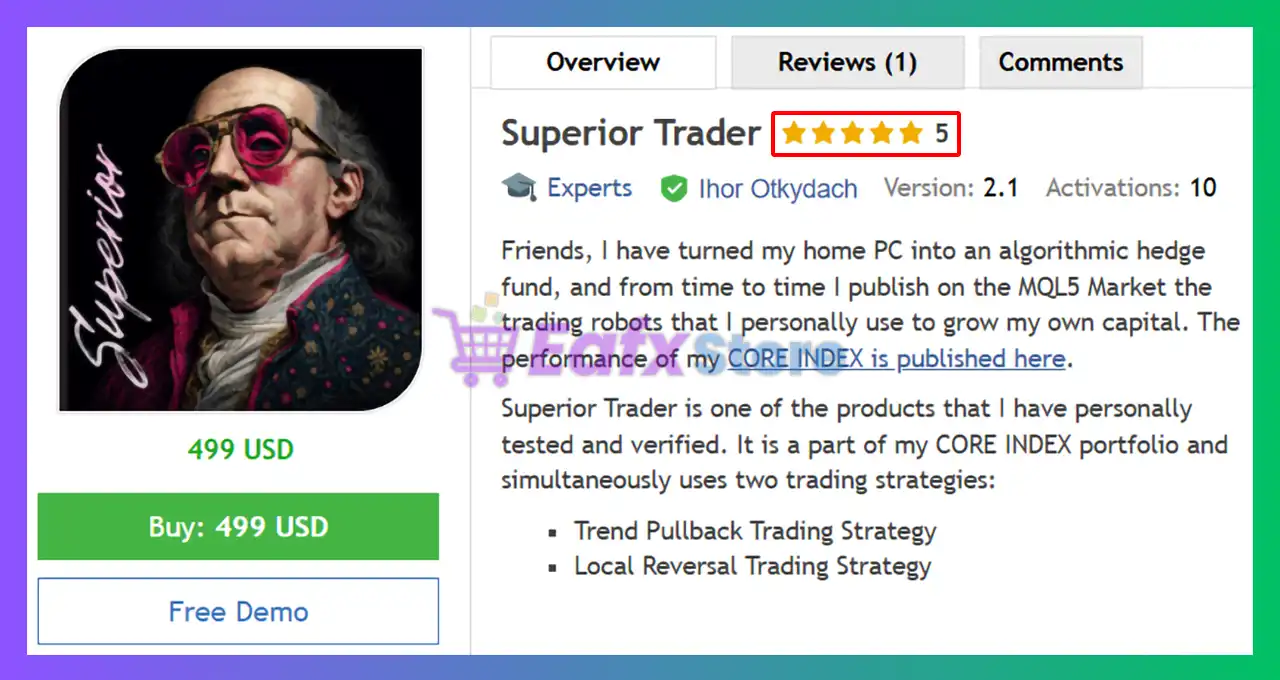
This product is compiled by Ihor Otkydach. This author has more than +11 years of experience working on MQL5 with many famous products such as Superior Trader EA MT5, One Man Army MT5, Swing Master EA MT5, Enslaver EA MT5, Scalper Investor EA and other advisors. Among them, Superior Trader EA is his best performing products.
Superior Trader EA MT5 Review
Key Features of Superior Trader EA MT5
🔹 Dual Trading Engine: Combines trend-following and reversal strategies within one system.
🔹 Advanced Risk Management: Every trade is protected by stop loss and structured controls.
🔹 Multi-Indicator Analysis: Uses ADX, ATR, MACD, Bollinger Bands, RSI and Moving Averages.
🔹 Adaptive Market Logic: Automatically adjusts key parameters to current market conditions.
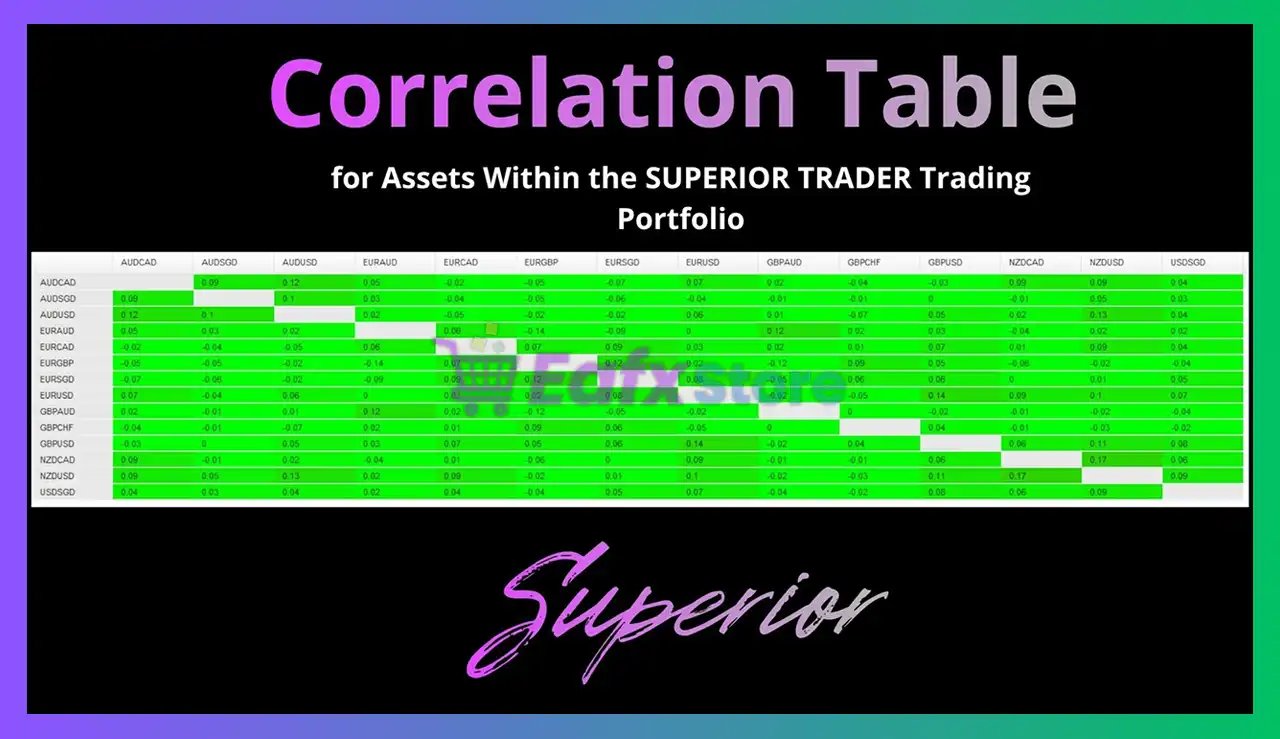
🔹 Multi-Pair Compatibility: Supports a diversified portfolio of major and cross-currency pairs
Why Choose & Use Superior Trader EA MT5?
🔹 Stable Automated Trading: Designed to perform across trending and ranging market phases.
🔹 Controlled Risk Exposure: Focuses on disciplined execution and capital preservation.
🔹 Balanced Strategy Diversification: Combines complementary trading approaches for resilience.
🔹 Long-Term Adaptability: Continuously optimized to remain effective in evolving markets.
🔹 Marketplace-Ready Solution: Suitable for traders seeking scalable and professional automation.
Superior Trader EA Review
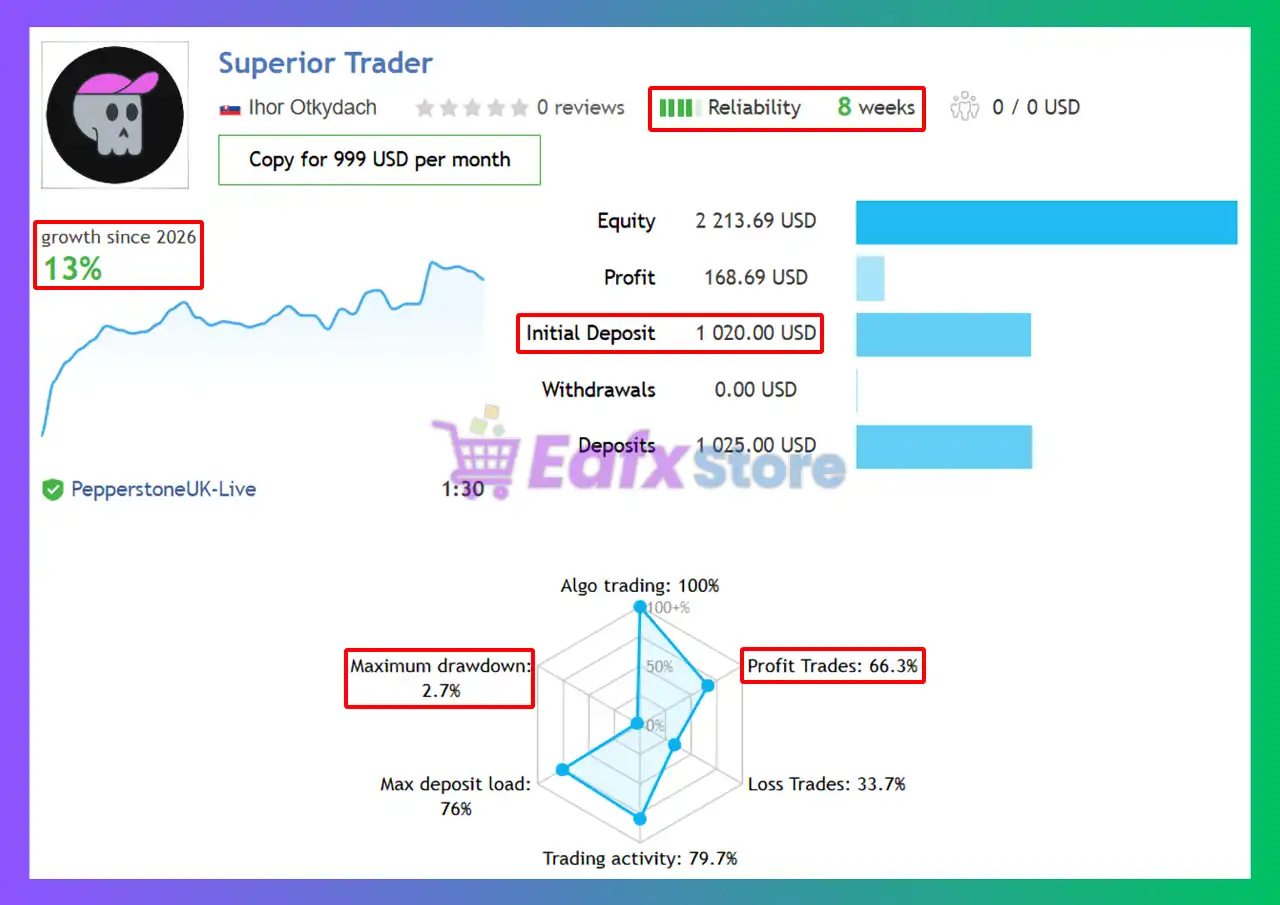
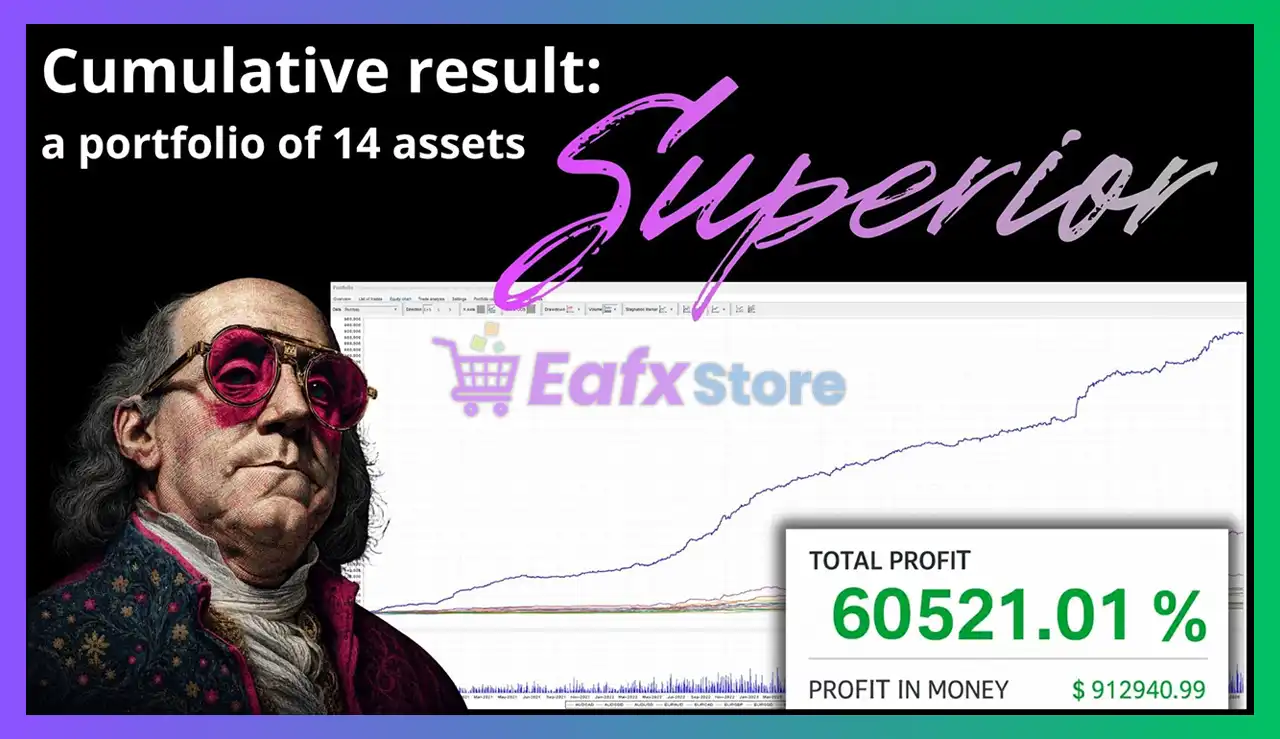
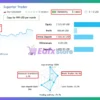
The Superior Trader EA achieved impressive profit performance when trading with 14 pairs. Trading results on real account for 8 consecutive weeks of trading.
✅ Initial Deposit: $1,020
✅ Growth Rate: +13%
✅ Win Rate (% of total): 66.3%
✅ Maximum Drawdown: 2.7%
Superior Trader EA MT5 Signal Results
What is the Superior Trader MT5 Trading Strategy?
🔹 Trend Pullback Trading: Enters after corrective retracements within established market trends.
🔹 Local Reversal Trading: Identifies short-term reversals and targets mean reversion moves.
🔹 Volatility-Based Execution: Uses ATR and Bollinger Bands to optimize entry and exit timing.
🔹 Trend Strength Filtering: Applies ADX and MACD confirmation to improve signal quality.
🔹 Adaptive Trade Management: Dynamically adjusts trade parameters as market behavior changes.
Recommended settings
Recommended settings and parameters to pay attention to from developers and experts:
| Features | Type |
|---|---|
| Trading platform | MetaTrader 5 (MT5) |
| Time frames | M15 (15 minute chart) |
| Currency pairs | EURUSD, EURAUD, EURCAD, EURSGD, NZDCAD, NZDUSD, AUDUSD, AUDCAD, AUDSGD, USDSGD, GBPCHF, GBPUSD, GBPAUD, EURGBP |
| Minimum / Recommended deposit | $200 |
| Minimum / Recommended leverage | From 1:30 and higher |
| Account type | RAW, ECN |
| Product type | Original version |
| Additional services | Unlock and Decompile |
| Recommended brokers | Exness Broker, Icmarkets Broker |
| Recommended VPS | MyfxVPS.com ( Blue VPS, Golden VPS). Lowest Latency, 2 week Free Trial, 100% Free for 12-18 Months. |
 Reviewed by David Easton
Product Download Package?
The download package of the product suite includes:
1. Experts:
 Setting (If Any).docx
Installation Guide.docx
2. SetFiles:
AUDCAD.set
AUDSGD.set
AUDUSD.set
EURAUD.set
EURCAD.set
EURGBP.set
EURSGD.set
EURUSD.set
GBPAUD.set
GBPCHF.set
GBPUSD.set
NZDCAD.set
NZDUSD.set
USDSGD.set
Conclusion
In short, Designed for traders seeking flexibility and consistency, Superior Trader EA integrates advanced technical indicators with intelligent trade management. Its ability to switch between trend and reversal market conditions helps improve stability while maintaining disciplined execution. With automatic lot sizing, dynamic stop-loss calculations, and regular optimization updates, Superior Trader provides a comprehensive framework for algorithmic trading success.
🔢 Superior Trader EA MT5 – Complete Settings Guide & Parameter Explanation
Superior Trader EA is a sophisticated MetaTrader 5 Expert Advisor that combines Trend Trading and Reverse Trading strategies into a single automated system. The EA utilizes multiple technical indicators including ADX, ATR, MACD, Bollinger Bands, Moving Averages, and RSI to identify market opportunities, manage entries and optimize exits.
With customizable trading sessions, volatility-based Stop Loss (SL) and Take Profit (TP) calculations, and separate parameter sets for trend and reversal modes, Superior Trader EA offers a flexible framework for advanced algorithmic trading.
Superior Trader EA MT5 Settings
🔢 Superior Trader EA MT5 Settings Explained
Below are the details of the parameters in the advisor’s trading system settings table:
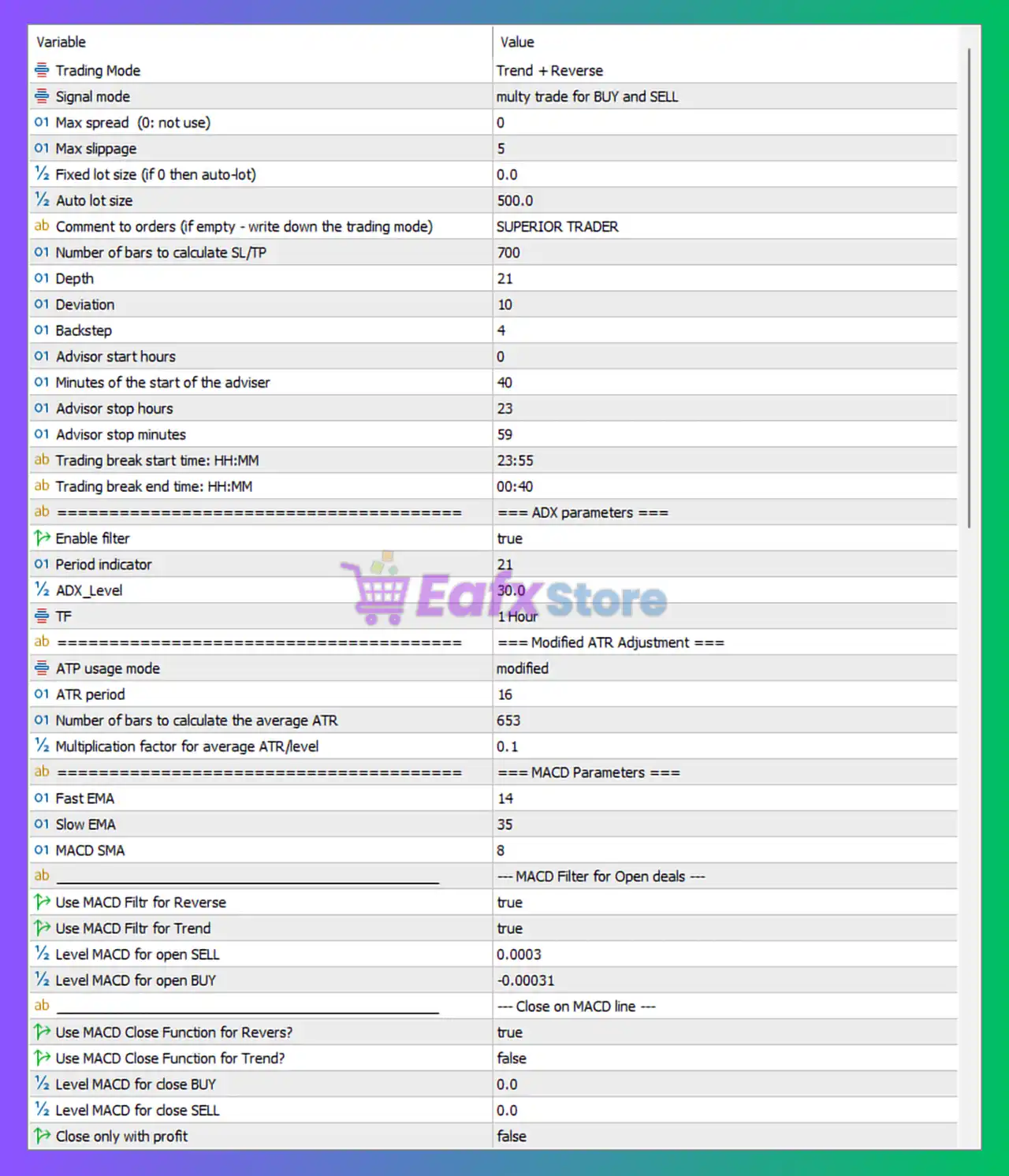
Superior Trader EA MT5 Settings Panel
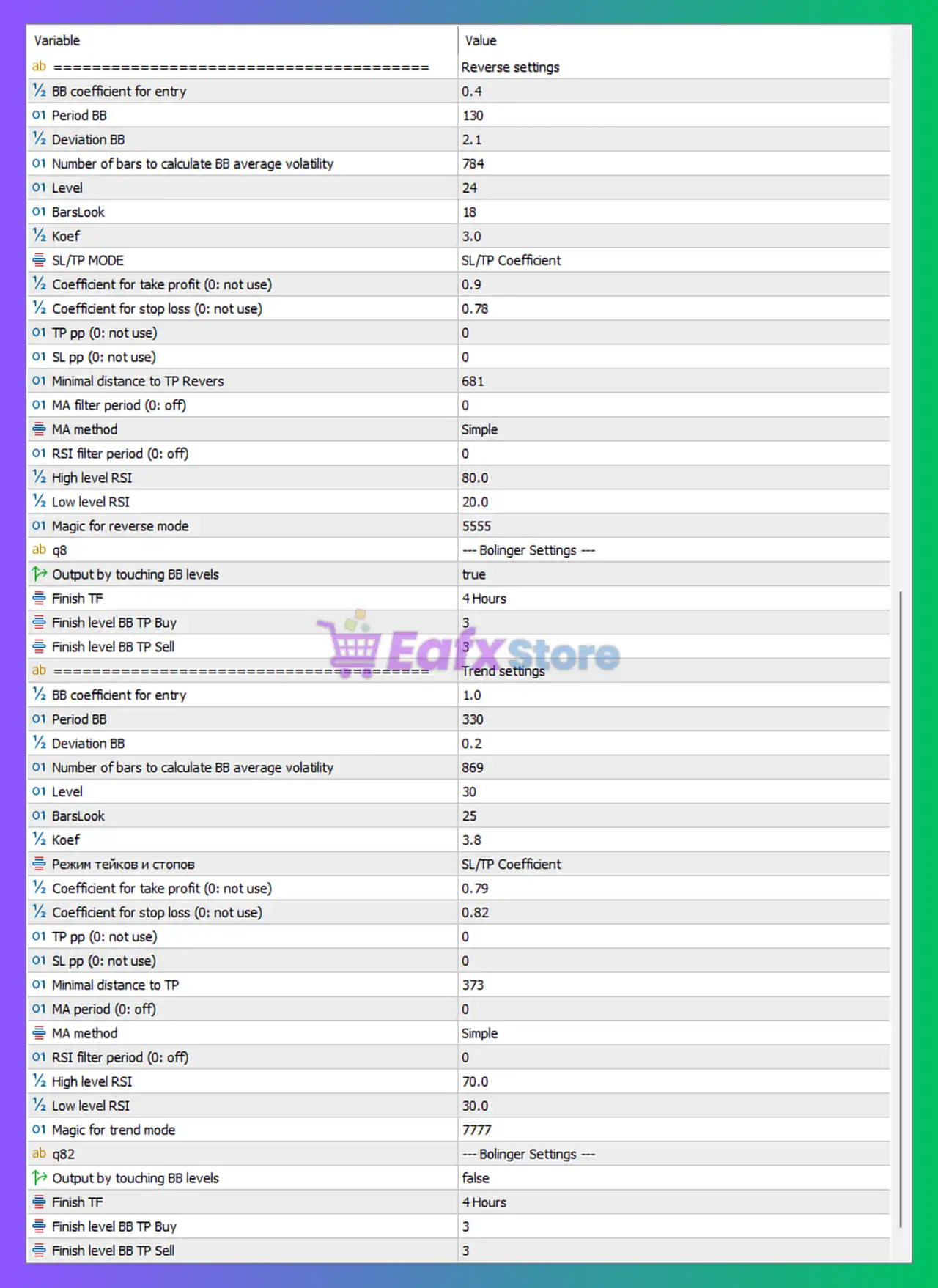
Superior Trader EA Settings Panel
🔶 General Trading Settings
🔹 Trading Mode = Trend + Reverse — Enables both trend-following and reversal trading strategies simultaneously.
🔹 Signal mode = multy trade for BUY and SELL — Allows multiple Buy and Sell positions to be opened based on trading signals.
🔹 Max spread (0: not use) = 0 — Spread filtering is disabled.
🔹 Max slippage = 5 — Maximum allowed execution slippage is 5 points.
🔹 Fixed lot size (if 0 then auto-lot) = 0.0 — Fixed lot sizing is disabled.
🔹 Auto lot size = 500.0 — Auto-lot calculation uses 500.0 as its balance reference parameter.
🔹 Comment to orders (if empty – write down the trading mode) = SUPERIOR TRADER — Custom comment attached to EA trades.
🔹 Number of bars to calculate SL/TP = 700 — Uses 700 bars for stop-loss and take-profit calculations.
🔹 Depth = 21 — ZigZag-style depth parameter used for market structure calculations.
🔹 Deviation = 10 — ZigZag deviation parameter controlling price sensitivity.
🔹 Backstep = 4 — Minimum distance between consecutive ZigZag swing points.
🔶 Trading Schedule Settings
🔹 Advisor start hours = 0 — EA starts trading at 00:00.
🔹 Minutes of the start of the adviser = 40 — Trading begins at 00:40.
🔹 Advisor stop hours = 23 — EA stops opening new trades at 23:00.
🔹 Advisor stop minutes = 59 — Trading session ends at 23:59.
🔹 Trading break start time (HH:MM) = 23:55 — Temporary trading pause begins at 23:55.
🔹 Trading break end time (HH:MM) = 00:40 — Trading resumes at 00:40.
🔶 ADX Filter Parameters
🔹 Enable filter = true — Activates the ADX trend-strength filter.
🔹 Period indicator = 21 — ADX calculation period is 21.
🔹 ADX_Level = 30.0 — Minimum ADX value required to validate market strength.
🔹 TF = 1 Hour — ADX is calculated on the H1 timeframe.
🔶 Modified ATR Adjustment Settings
🔹 ATR usage mode = modified — Uses a modified ATR calculation method.
🔹 ATR period = 16 — ATR indicator period is 16.
🔹 Number of bars to calculate the average ATR = 653 — ATR averaging uses 653 bars.
🔹 Multiplication factor for average ATR level = 0.1 — ATR values are scaled by 0.1.
🔶 MACD Parameters
🔹 Fast EMA = 14 — Fast EMA period for MACD calculation.
🔹 Slow EMA = 35 — Slow EMA period for MACD calculation.
🔹 MACD SMA = 8 — Signal line smoothing period.
🔶 MACD Entry Filters
🔹 Use MACD Filter for Reverse = true — Applies MACD confirmation to reversal trades.
🔹 Use MACD Filter for Trend = true — Applies MACD confirmation to trend trades.
🔹 Level MACD for open SELL = 0.0003 — Minimum MACD level required for Sell entries.
🔹 Level MACD for open BUY = -0.00031 — Minimum MACD level required for Buy entries.
🔶 MACD Exit Settings
🔹 Use MACD Close Function for Reverse? = true — Reversal trades may be closed using MACD signals.
🔹 Use MACD Close Function for Trend? = false — Trend trades are not closed using MACD signals.
🔹 Level MACD for close BUY = 0.0 — MACD threshold for closing Buy trades.
🔹 Level MACD for close SELL = 0.0 — MACD threshold for closing Sell trades.
🔹 Close only with profit = false — Trades can be closed regardless of profit status.
🔶 Reverse Strategy Settings
🔹 BB coefficient for entry = 0.4 — Bollinger Band coefficient used for reversal entries.
🔹 Period BB = 130 — Bollinger Bands period is 130.
🔹 Deviation BB = 2.1 — Standard deviation setting for Bollinger Bands.
🔹 Number of bars to calculate BB average volatility = 784 — Uses 784 bars for volatility calculations.
🔹 Level = 24 — Internal reversal signal sensitivity level.
🔹 BarsLook = 18 — Number of bars used for reversal analysis.
🔹 Koef = 3.0 — Additional signal-strength coefficient.
🔶 Reverse Strategy SL/TP Settings
🔹 SL/TP MODE = SL/TP Coefficient — Stop loss and take profit are calculated using coefficients.
🔹 Coefficient for take profit (0: not use) = 0.9 — Take-profit multiplier is 0.9.
🔹 Coefficient for stop loss (0: not use) = 0.78 — Stop-loss multiplier is 0.78.
🔹 TP pp (0: not use) = 0 — Fixed TP points disabled.
🔹 SL pp (0: not use) = 0 — Fixed SL points disabled.
🔹 Minimal distance to TP Revers = 681 — Minimum reversal TP distance is 681 points.
🔶 Reverse Strategy Additional Filters
🔹 MA filter period (0: off) = 0 — Moving Average filter disabled.
🔹 MA method = Simple — Uses Simple Moving Average if enabled.
🔹 RSI filter period (0: off) = 0 — RSI filter disabled.
🔹 High level RSI = 80.0 — RSI overbought threshold.
🔹 Low level RSI = 20.0 — RSI oversold threshold.
🔹 Magic for reverse mode = 5555 — Magic Number assigned to reversal trades.
🔶 Reverse Bollinger Exit Settings
🔹 Output by touching BB levels = true — Trades may close when Bollinger Band levels are touched.
🔹 Finish TF = 4 Hours — Exit confirmation timeframe is H4.
🔹 Finish level BB TP Buy = 3 — Buy TP exit Bollinger level.
🔹 Finish level BB TP Sell = 3 — Sell TP exit Bollinger level.
🔶 Trend Strategy Settings
🔹 BB coefficient for entry = 1.0 — Bollinger coefficient for trend entries.
🔹 Period BB = 330 — Bollinger Bands period is 330.
🔹 Deviation BB = 0.2 — Bollinger deviation setting for trend mode.
🔹 Number of bars to calculate BB average volatility = 869 — Uses 869 bars for volatility calculations.
🔹 Level = 30 — Trend signal sensitivity level.
🔹 BarsLook = 25 — Number of bars used for trend analysis.
🔹 Koef = 3.8 — Trend strength coefficient.
🔶 Trend Strategy SL/TP Settings
🔹 Mode = SL/TP Coefficient — Stop loss and take profit use coefficient calculations.
🔹 Coefficient for take profit (0: not use) = 0.79 — Trend TP multiplier.
🔹 Coefficient for stop loss (0: not use) = 0.82 — Trend SL multiplier.
🔹 TP pp (0: not use) = 0 — Fixed TP points disabled.
🔹 SL pp (0: not use) = 0 — Fixed SL points disabled.
🔹 Minimal distance to TP = 373 — Minimum trend TP distance is 373 points.
🔶 Trend Strategy Additional Filters
🔹 MA period (0: off) = 0 — MA filter disabled.
🔹 MA method = Simple — Uses Simple Moving Average when activated.
🔹 RSI filter period (0: off) = 0 — RSI filter disabled.
🔹 High level RSI = 70.0 — Trend RSI overbought threshold.
🔹 Low level RSI = 30.0 — Trend RSI oversold threshold.
🔹 Magic for trend mode = 7777 — Magic Number assigned to trend trades.
🔶 Trend Bollinger Exit Settings
🔹 Output by touching BB levels = false — Trend trades do not close when Bollinger Bands are touched.
🔹 Finish TF = 4 Hours — Exit confirmation timeframe is H4.
🔹 Finish level BB TP Buy = 3 — Buy TP Bollinger exit level.
🔹 Finish level BB TP Sell = 3 — Sell TP Bollinger exit level.
🔢 Conclusion
Superior Trader EA is a dual-strategy Expert Advisor that combines trend-following and reversal methodologies using a sophisticated blend of ADX, ATR, MACD, Bollinger Bands, RSI and Moving Average filters.
Its separate parameter sets for trend and reverse trading allow traders to fine-tune performance for different market conditions while maintaining robust risk management and automated trade execution. This flexibility makes Superior Trader EA MT5 suitable for traders seeking a diversified algorithmic trading approach.
🔢 FAQs
❓ What trading styles does Superior Trader EA MT5 support?
Superior Trader EA MT5 supports both Trend Following and Reversal Trading strategies simultaneously.
❓ Which indicators are used by Superior Trader EA MT5?
The EA uses ADX, ATR, MACD, Bollinger Bands, Moving Averages, and RSI for signal generation and trade management.
❓ What are the Magic Numbers used by the EA?
The EA uses 5555 for reversal trades and 7777 for trend trades.
❓ Can Superior Trader EA MT5 automatically calculate lot sizes?
Yes, fixed lot size is disabled (0.0) and the EA uses the configured Auto lot size = 500.0 parameter.
❓ What timeframe is used for trend-strength analysis?
The ADX filter operates on the 1 Hour (H1) timeframe with an ADX Level of 30.0 to validate trend strength.
User Reviews
Only logged in customers who have purchased this product may leave a review.
❓ What trading strategies are used in Superior Trader EA MT5?
Superior Trader EA MT5 combines trend-following and reversal trading strategies, allowing it to adapt to both trending and ranging markets.
❓ Which indicators power Superior Trader EA MT5?
Superior Trader EA MT5 uses ADX, ATR, MACD, Bollinger Bands, RSI, and Moving Averages to generate and manage trading signals.
❓ Can Superior Trader EA MT5 trade multiple positions at once?
Yes, Superior Trader EA MT5 supports multi-trade functionality, allowing several BUY and SELL positions to be opened simultaneously.
❓ Does Superior Trader EA MT5 use martingale or grid strategies?
No, Superior Trader EA MT5 does not use martingale or grid systems, and every trade is protected with a predefined Stop Loss.
❓ How does Superior Trader EA MT5 identify strong market trends?
Superior Trader EA MT5 uses an ADX filter on the H1 timeframe with a level of 30 to confirm trend strength before opening trades.
❓ What is the recommended timeframe for Superior Trader EA MT5?
Superior Trader EA MT5 is primarily optimized for the M15 timeframe, where both trend and reversal algorithms perform efficiently.
❓ Can Superior Trader EA MT5 calculate lot sizes automatically?
Yes, Superior Trader EA MT5 includes an auto-lot system that adjusts position sizes based on account balance and risk settings.
❓ Which currency pairs are suitable for Superior Trader EA MT5?
Superior Trader EA MT5 supports multiple pairs including EURUSD, GBPUSD, AUDUSD, EURGBP, NZDUSD, EURCAD, and several others.
❓ How does Superior Trader EA MT5 manage take profit and stop loss?
Superior Trader EA MT5 calculates SL and TP dynamically using ATR volatility, Bollinger Bands, and coefficient-based risk management.
❓ Why is Superior Trader EA MT5 suitable for changing market conditions?
Superior Trader EA MT5 uses adaptive algorithms and separate trend and reversal logic, helping maintain performance across market phases.
-
 Original price was: $299.00.$89.00Current price is: $89.00.
 -
 Price range: $89.00 through $599.00
 -
 Price range: $89.00 through $599.00
 -
 Price range: $89.00 through $599.00
-
 4
4 -
 2
2 -
 5Price range: $89.00 through $599.00
 -
 0Price range: $89.00 through $599.00
There are no reviews yet.