


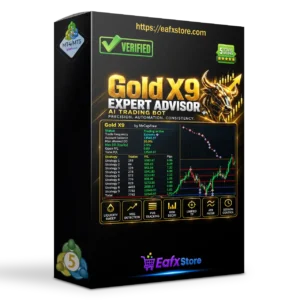
Gold X9 EA MT5 v6.2 with SetFiles (Unlimited)

Subscriptions for Special Plan
- 30 EA package is more economical!
- Special package with 99%
- Download 1 EA/Day

Subscriptions for Premium Membership
- Download Unlimited in 1 Year
- Get 100% Discount
- Get free access to all

Subscriptions for Gold Membership
- 1 Year Membership
- Get 100% Discount
- Access EA+Indicator+Course
Frequently bought together 🎁
Add these products to enhance your purchase




Quick Overview
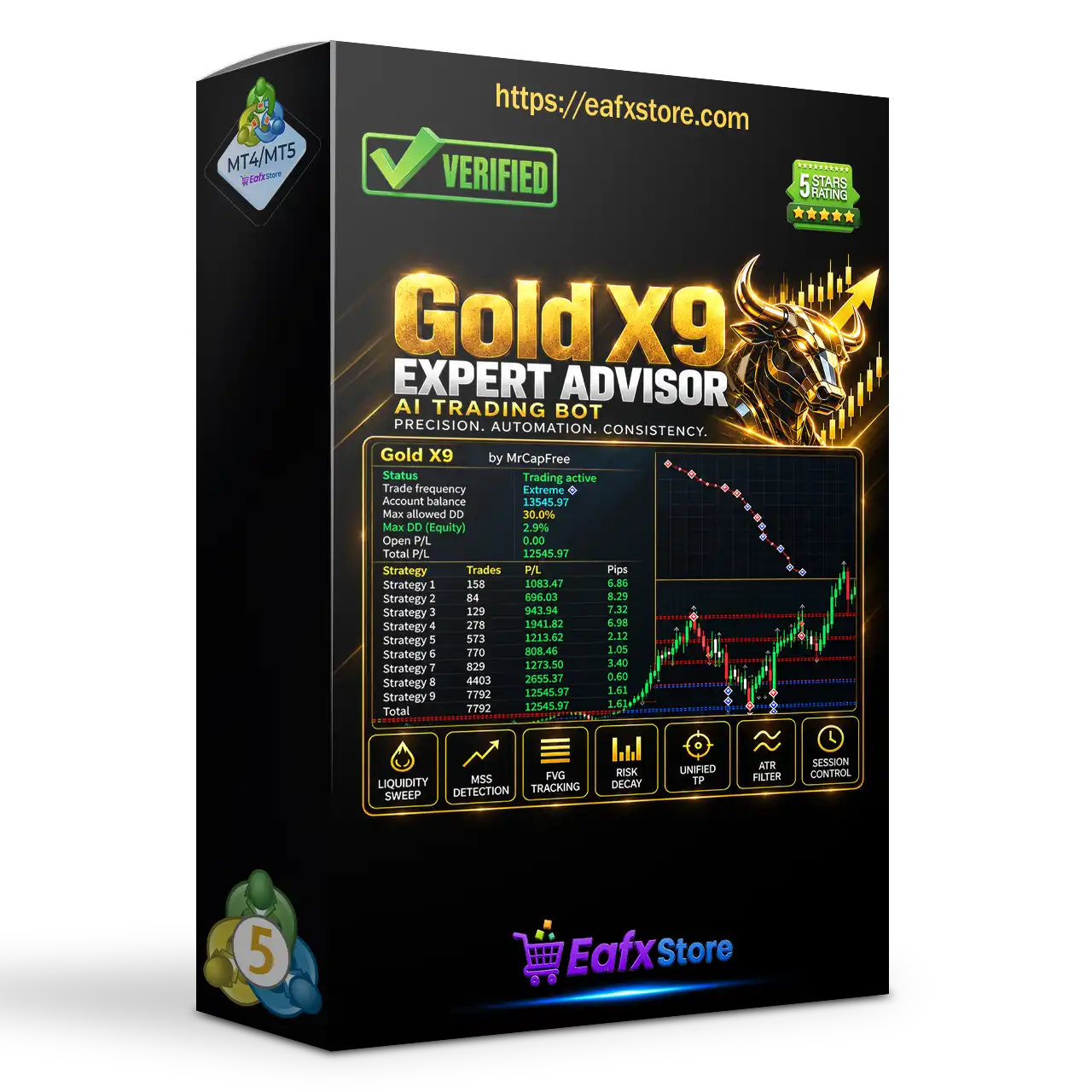
Gold X9 EA is an automated robot for gold that combines nine selectable strategies in one system. It offers a news filter, daily and total drawdown controls, a spread limit, several lot sizing methods and an on-chart information panel for monitoring. The product information covers settings only and gives no strategy details or results.
Best For:
✅ Gold traders who want nine strategies.
✅ Users who need drawdown controls.
✅ Traders who want a news filter option.
✅ Users who like a risk profile choice.
✅ Traders who like an on-chart panel.
What is Gold X9 EA MT5?
Gold X9 EA is an Expert Advisor (EA) for gold on MetaTrader 5. It offers nine selectable strategies, configurable money management, drawdown controls, news filtering and an information panel.
Traders can enable strategies one by one, choose how lot size is calculated, set daily and total drawdown limits and decide how the EA reacts to news and high spreads.
How Does Gold X9 EA MT5 Work?
Strategy Selection
Nine strategies each have a switch, so they can run together or be tested one at a time.
Money Management
Lot size follows a fixed lot, a risk scaling factor or the total drawdown allowance, with a risk profile setting.
Protection Rules
Drawdown limits on equity, a spread cap and an optional news filter control when the EA may open new trades.
Chart Panel
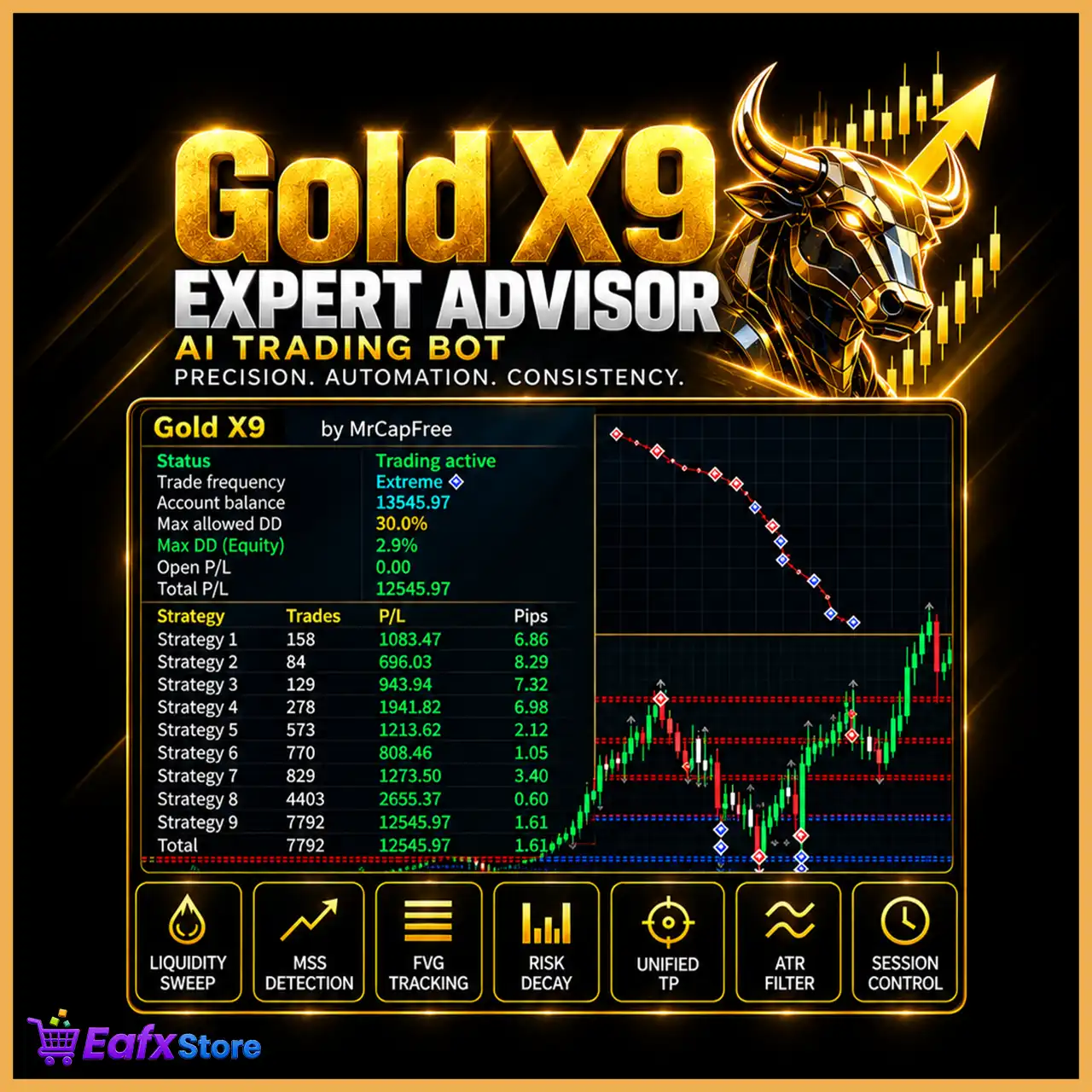
An information panel with a spread indicator and adjustable colors shows account and EA details on the chart.
Trading Strategy
Run Nine Strategies in One EA
Each of the nine strategies has its own switch, so traders can enable all of them or keep only the ones they want to test.
Size Trades by Drawdown Allowance
One lot method links position size to the total drawdown the account may accept, while fixed lots stay available as another option.
Choose a Risk Profile
A risk profile setting sets the general level of aggression, and the supplied setup uses the highest level offered by the EA.
Limit Drawdown on Equity
Daily and total drawdown limits can be measured on equity, in a dynamic or a static mode, and new trades stop when the limit is reached.
Avoid Selected News Events
An optional filter looks for chosen keywords in the calendar and blocks new trades for a set time before and after each event.
Profit Performance Verified by MyFxBook
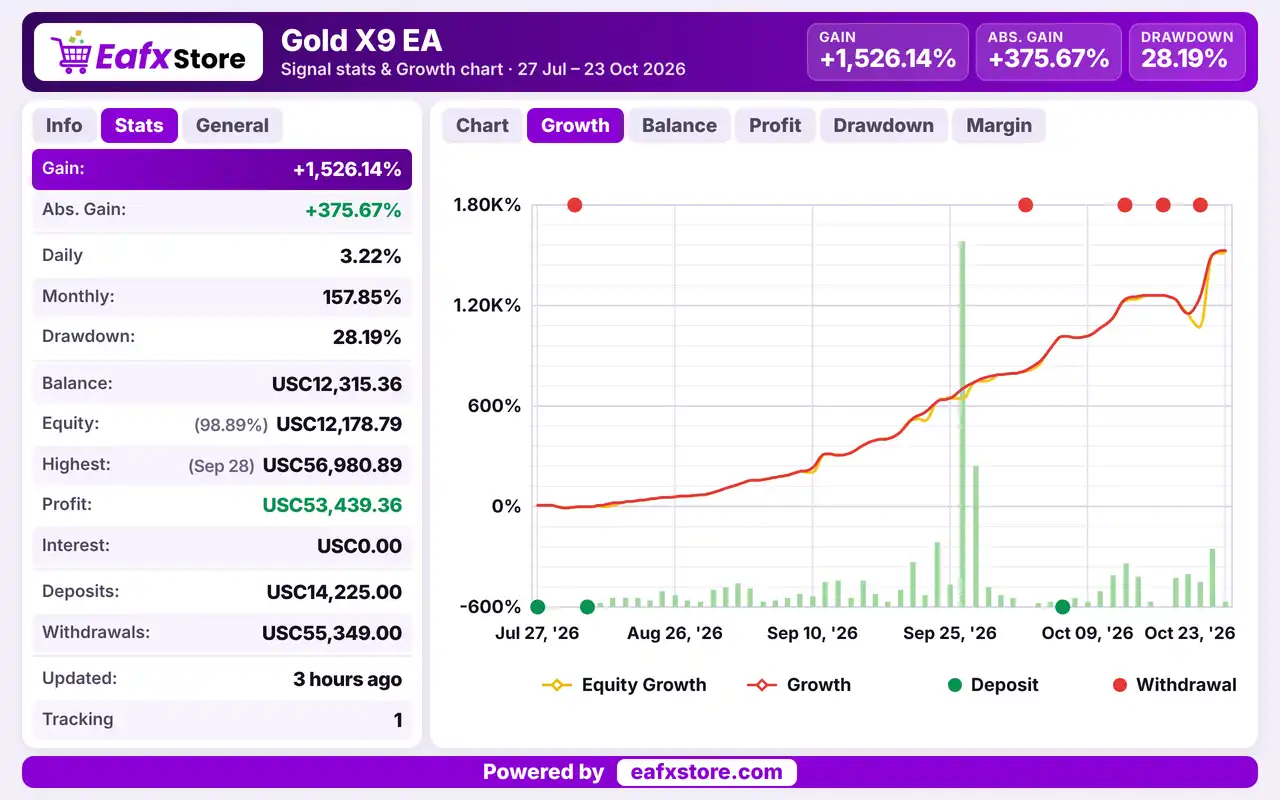
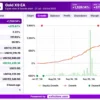
Gold X9 EA trades XAUUSD (Gold), with live results recorded from July 27 to October 23, 2026, covering nearly 3 months. The account shows USC$53,439.36 profit.
Gold X9 EA Myfxbook Results
| Parameter | Results |
|---|---|
| Trading Symbol | XAUUSD |
| Testing Period | Jul 27 – Oct 23, 2026 |
| Total Gain | +1,526.14% |
| Absolute Gain | +375.67% |
| Profit | USC $53,439.36 |
| Drawdown | 28.19% |
Historical Trading Results Performance
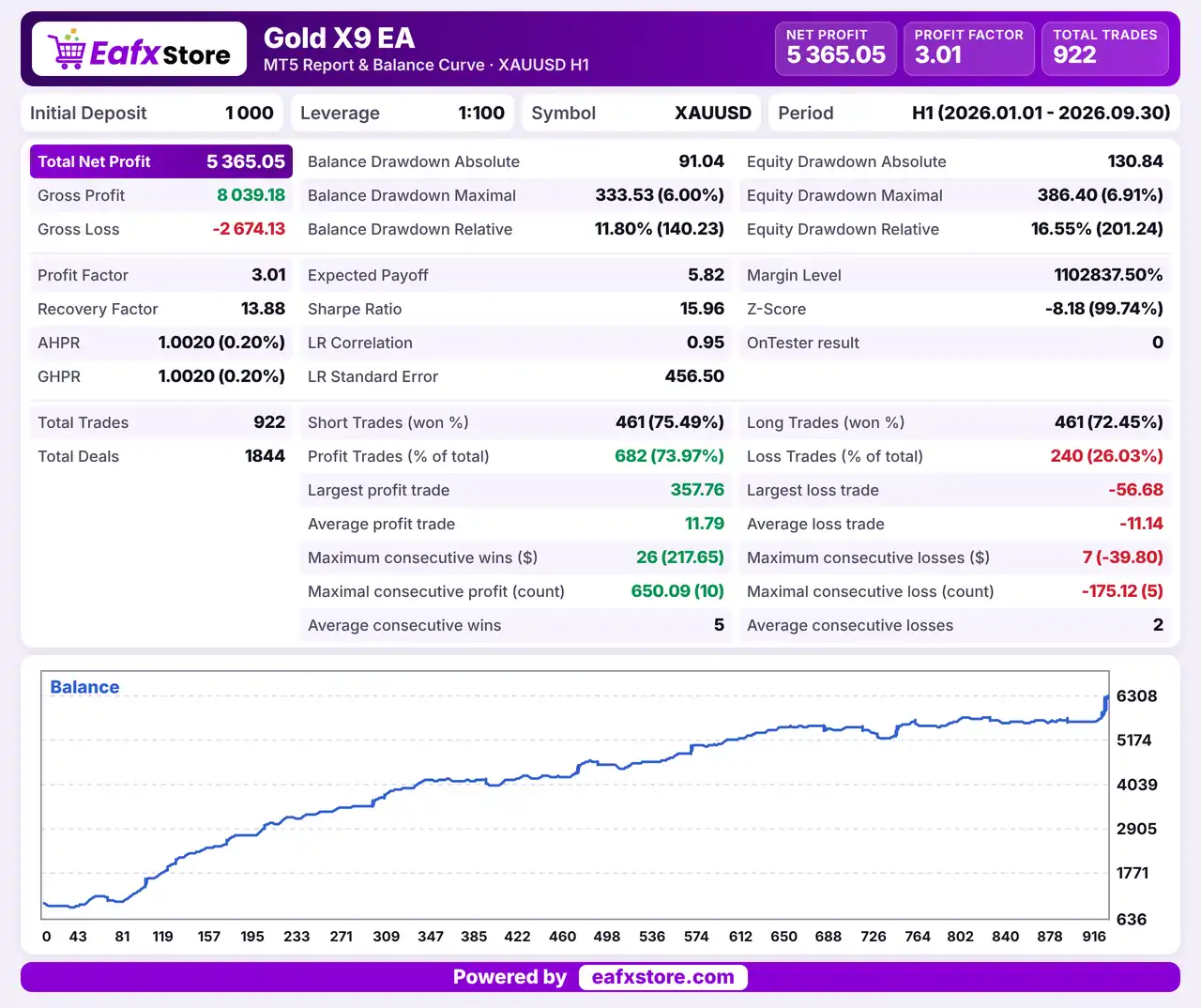
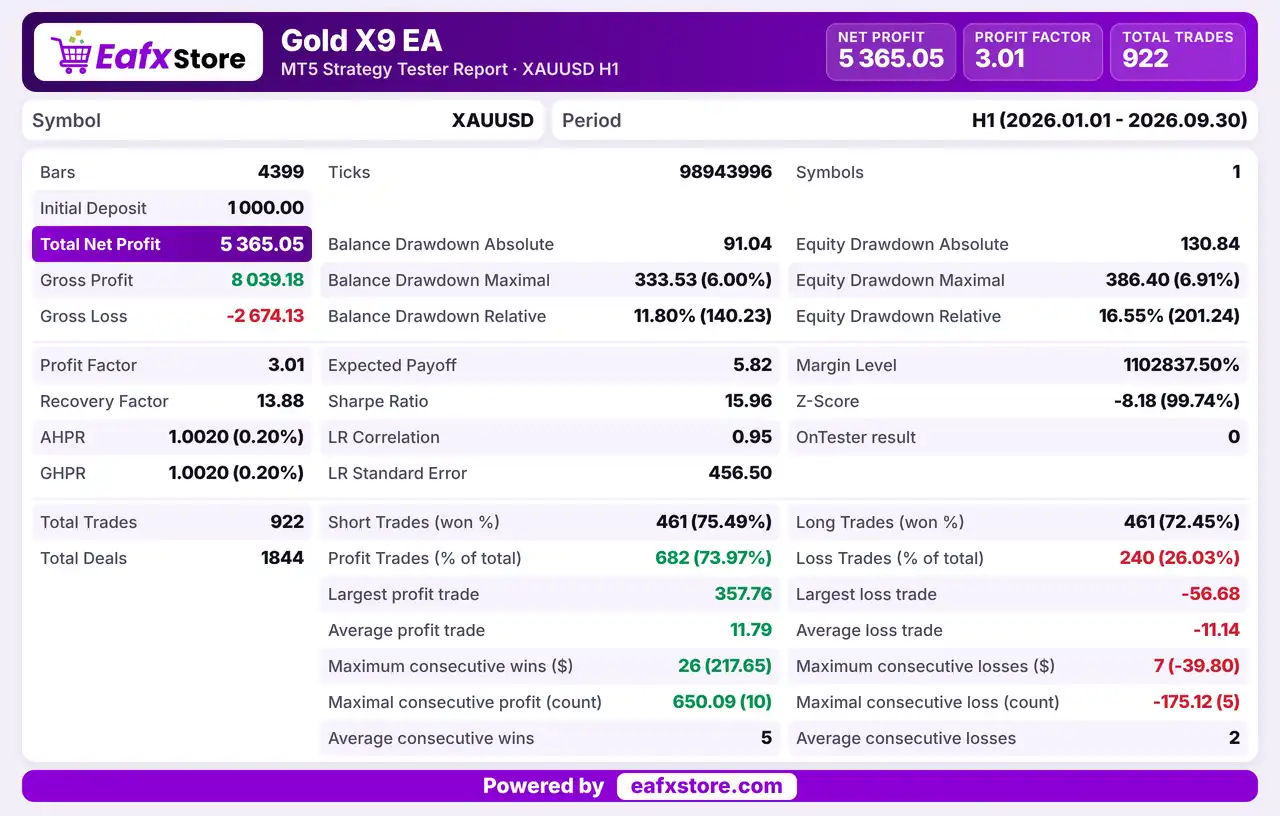
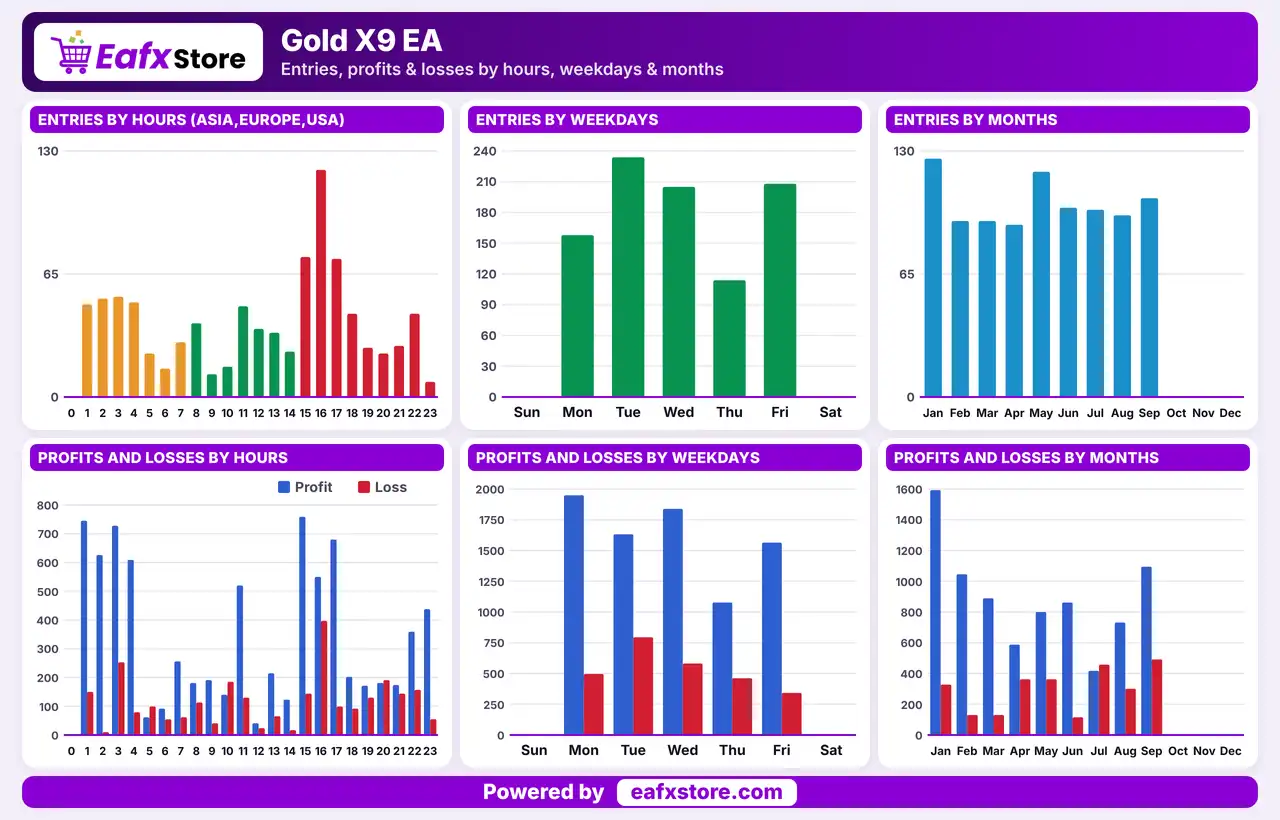
Gold X9 EA was backtested on XAUUSD (Gold) from January 1 to September 30, 2026, covering 9 months. The EA generated a net profit of $5,365.05 across 922 trades.
Gold X9 EA MT5 Backtest Results
| Parameter | Results |
|---|---|
| Trading Symbol | XAUUSD |
| Testing Period | Jan 1 – Sep 30, 2026 |
| Initial Deposit | $1,000 |
| Total Net Profit | $5,365.05 |
| Profit Factor | 3.01 |
| Total Trades | 922 |
Key Features of Gold X9 EA MT5
Nine Selectable Strategies
Every strategy has its own on and off switch, which makes it possible to test them one at a time or to run them together.
Drawdown Protection
Daily and total drawdown limits, an equity basis and a dynamic or static mode control what happens when losses reach the chosen level.
News Filter Option
A keyword list, a currency choice and waiting times before and after events let the EA stop opening new trades around major news.
Flexible Lot Sizing
Position size can follow a fixed lot, a risk scaling factor or the total drawdown allowance, with optional separate lots per strategy.
Spread Limit
A maximum spread setting blocks new entries when the cost is too high, which matters a lot for gold during fast markets.
Entry and Exit Adjustments
Small adjustments for entry, stop loss, take profit, trailing and breakeven let traders fine tune the levels used by the strategies.
Risk Management
The Highest Risk Profile Is Selected
The supplied setup uses the most aggressive profile, so a lower profile and a small lot should be tested first.
Several Strategies Can Trade Together
With all nine enabled, exposure can add up quickly, so the total open risk must be watched closely.
A Stop Loss Can Still Slip
Gaps and fast moves on gold can pass the stop-loss level, so the real loss can be larger than the planned one.
Targets Are Never Guaranteed
Price may turn before a take-profit is reached, so many trades can end at a loss or at breakeven.
Drawdown Limits Stop New Trades Only
When the limit is reached the EA stops opening trades, but open positions can still lose money.
What Sets It Apart
Nine Strategies Together
One EA carries nine separate strategies, which spreads the logic across several different approaches instead of just one.
Switch by Switch Control
Each strategy can be enabled alone, which makes testing and comparison easier than with one single mixed system.
Drawdown Based Sizing
A lot method tied to the total drawdown allowance links position size directly to the total loss the account may accept.
Built in Panel
The on-chart panel and spread indicator keep key information in view without any extra tools or add ons.
Who Should Use Gold X9 EA?
Gold Traders Who Test Widely
People who want to try nine strategies and keep only the ones that behave well on their own broker account.
Drawdown Conscious Users
Traders who value equity based limits and a clear response when losses reach a set level during live trading.
Careful Starters
Users who will lower the risk profile and test on a demo account for a while before using any real money.
Recommended Trading Conditions
For the best performance, the developer recommends:
| Features | Type |
|---|---|
| Trading platform | MetaTrader 5 (MT5) |
| Time frames | Any |
| Currency pairs | XAUUSD (Gold) |
| Minimum / Recommended deposit | $100+ |
| Minimum / Recommended leverage | Any |
| Account type | Any |
| Additional services | Unlock and Decompile |
| Recommended brokers | Exness Broker, Icmarkets Broker |
| Recommended VPS | MyfxVPS.com (Blue VPS, Golden VPS). Lowest Latency, 2 week Free Trial, 100% Free for 12-18 Months. |
Product Download Package?
The download package of the product suite includes:
Experts
✅ Gold X9 EA v6.2.ex5
SetFiles
✅ Gold_Low Risk.set
✅ Gold_Extreme Low Risk.set
✅ Gold_Medium Risk.set
✅ Gold_High Risk.set
✅ Gold_Very High Risk.set
✅ Gold_X9_Settings_Guide.pdf
Final Verdict
Gold X9 EA MT5 packs nine selectable strategies into one gold robot, with equity based daily and total drawdown limits, an optional news filter, a spread cap, several lot sizing methods and an on-chart panel. It suits gold traders who like to test each strategy on its own and who value clear loss limits. The strategies are not described, the setup uses the highest risk profile and no results are published, so a lower profile and a long demo test on a small lot should come before any live trading.
🔢 Gold X9 EA MT5 Settings: Complete Inputs Explained
Gold X9 EA is an automated trading Expert Advisor featuring multiple selectable trading strategies, configurable money management, drawdown controls, news filtering, and a customizable on-chart information panel. Its input settings allow traders to enable individual strategies, configure lot sizes, adjust entry and exit levels, manage spread restrictions, and define how the EA responds to daily and overall drawdown limits.
The EA also includes visual customization options and a choice of lot-size calculation methods. Understanding these parameters helps traders configure Gold X9 EA MT5 according to their trading objectives, account size, broker conditions, and tolerance for risk.
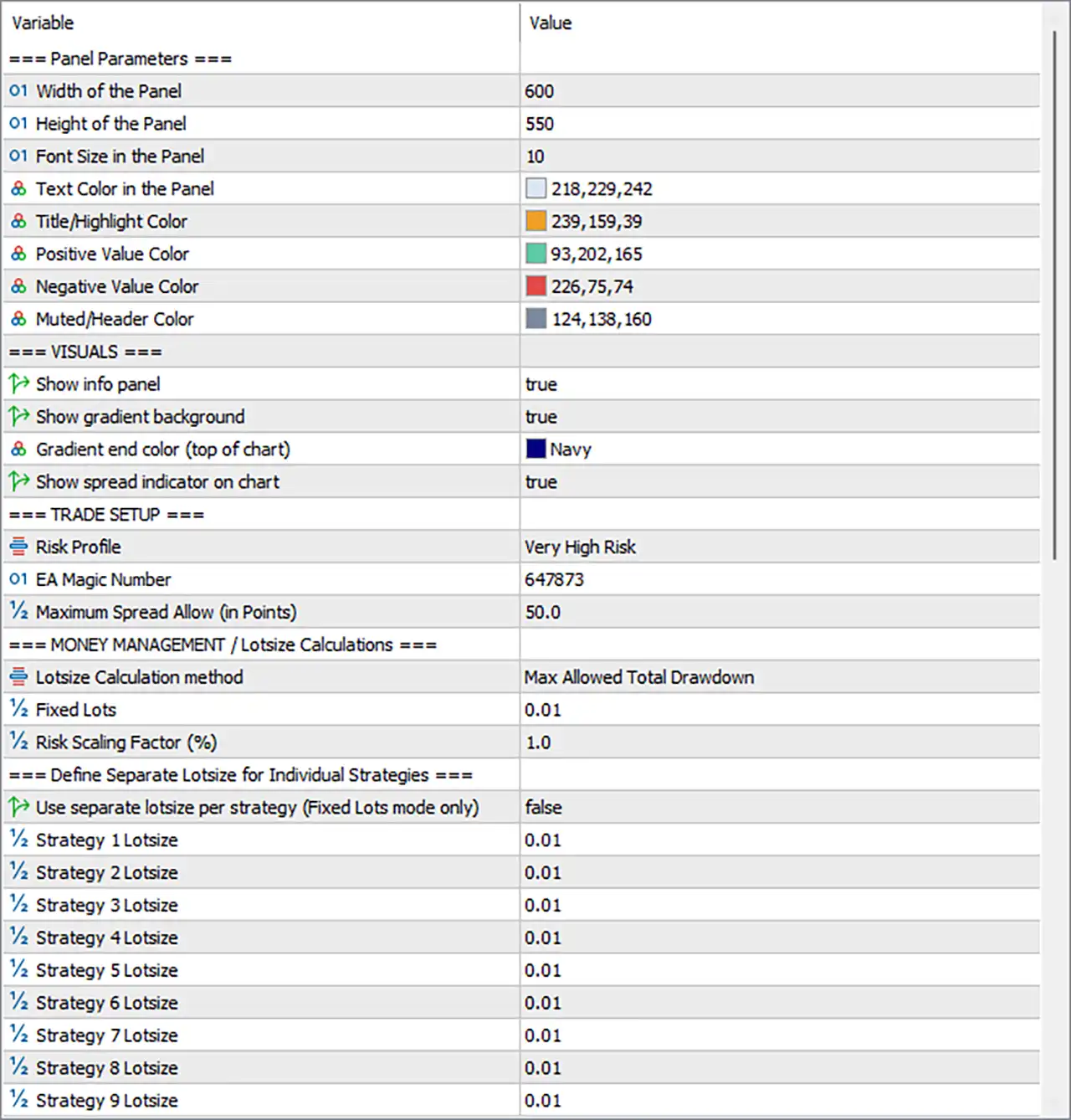
Gold X9 EA MT5 Settings Panel
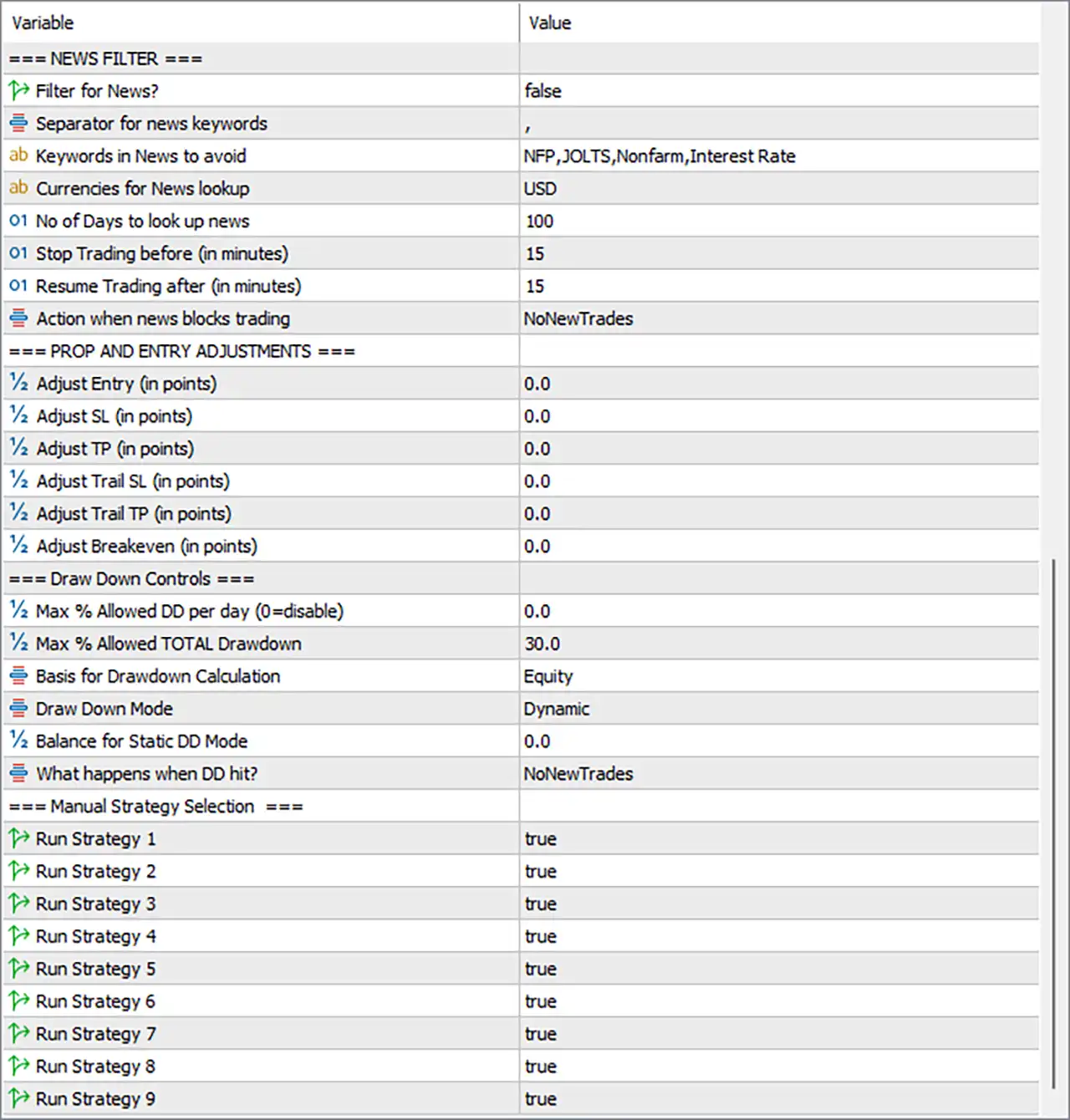
Gold X9 EA Settings Panel
⚙️ News Filter Settings
🔹 Filter for News? = false — Disables the news filter by default. When set to true, the EA can apply its configured economic-news restrictions to avoid opening trades around selected news events, depending on the implementation.
🔹 Separator for news keywords = , — Uses a comma (,) to separate multiple keywords in the news-filter list, allowing several event names to be entered in one parameter.
🔹 Keywords in News to avoid = NFP,JOLTS,Nonfarm,Interest Rate — Defines four news-related keywords: NFP, JOLTS, Nonfarm, and Interest Rate. These terms identify economic events that the EA may use to block trading when the news filter is enabled.
🔹 Currencies for News lookup = USD — Restricts the news lookup to the US dollar (USD), focusing the configured filter on USD-related economic announcements.
🔹 No of Days to look up news = 100 — Sets the news-calendar lookup period to 100 days, defining how far the EA searches for relevant events according to its calendar integration.
🔹 Stop Trading before (in minutes) = 15 — Configures a trading restriction beginning 15 minutes before a qualifying news event, provided the news filter is enabled and the event is detected.
🔹 Resume Trading after (in minutes) = 15 — Sets the configured post-news waiting period to 15 minutes before trading can resume after a qualifying event.
🔹 Action when news blocks trading = NoNewTrades — Selects NoNewTrades as the action when news restrictions apply, indicating that the EA should prevent new trades rather than automatically assuming that existing positions will be closed.
⚙️ Profit and Entry Adjustments
🔹 Adjust Entry (in points) = 0.0 — Sets the entry-price adjustment to 0.0 points, leaving the configured entry level unchanged by this adjustment parameter.
🔹 Adjust SL (in points) = 0.0 — Sets the stop-loss adjustment to 0.0 points, meaning no additional stop-loss offset is specified through this setting.
🔹 Adjust TP (in points) = 0.0 — Sets the take-profit adjustment to 0.0 points, leaving the configured take-profit level unchanged by this adjustment parameter.
🔹 Adjust Trail SL (in points) = 0.0 — Sets the trailing stop-loss adjustment to 0.0 points, so no additional offset is applied through this parameter.
🔹 Adjust Trail TP (in points) = 0.0 — Sets the trailing take-profit adjustment to 0.0 points, leaving the trailing take-profit adjustment inactive at the displayed value.
🔹 Adjust Breakeven (in points) = 0.0 — Sets the breakeven adjustment to 0.0 points, meaning no additional breakeven offset is configured through this input.
⚙️ Drawdown Control Settings
🔹 Max % Allowed DD per day (0=disable) = 0.0 — Sets the maximum daily drawdown limit to 0.0%. The parameter explicitly states that 0 disables this daily drawdown restriction.
🔹 Max % Allowed TOTAL Drawdown = 30.0 — Sets the maximum total drawdown threshold to 30.0%. This is the configured overall drawdown limit, although the precise response depends on the selected drawdown mode and the EA’s internal logic.
🔹 Basis for Drawdown Calculation = Equity — Uses account equity as the basis for drawdown calculations. Equity includes floating profit and loss, so the calculated drawdown can change while trades remain open.
🔹 Draw Down Mode = Dynamic — Selects Dynamic drawdown mode, indicating that the drawdown calculation or reference level can adjust over time according to the EA’s implementation.
🔹 Balance for Static DD Mode = 0.0 — Sets the reference balance for static drawdown mode to 0.0. This value is relevant when static mode is used; the exact fallback behavior should be confirmed from the EA’s implementation.
🔹 What happens when DD hit? = NoNewTrades — Selects NoNewTrades as the response when the configured drawdown limit is reached. This indicates that the EA should stop initiating new trades, but it does not by itself confirm that existing positions will be closed.
⚙️ Manual Strategy Selection
🔹 Run Strategy 1 = true — Enables Strategy 1, allowing this strategy to participate in trading when its entry conditions and other EA restrictions are satisfied.
🔹 Run Strategy 2 = true — Enables Strategy 2, permitting its configured trading logic to operate alongside other enabled strategies.
🔹 Run Strategy 3 = true — Enables Strategy 3, allowing the EA to evaluate and execute this strategy when its conditions are met.
🔹 Run Strategy 4 = true — Enables Strategy 4, keeping its trading logic active subject to the EA’s entry rules and risk controls.
🔹 Run Strategy 5 = true — Enables Strategy 5, allowing this strategy to participate in the EA’s overall trading process.
🔹 Run Strategy 6 = true — Enables Strategy 6, permitting its configured entry logic to operate when the necessary market conditions are satisfied.
🔹 Run Strategy 7 = true — Enables Strategy 7, allowing its trading signals to be considered by the EA.
🔹 Run Strategy 8 = true — Enables Strategy 8, keeping this strategy available for trading when its conditions and restrictions permit.
🔹 Run Strategy 9 = true — Enables Strategy 9, allowing the ninth strategy to participate in the trading system.
Note: All nine strategy switches are set to true. This does not establish that all nine strategies will open trades simultaneously; actual behavior depends on their individual rules and the EA’s trade-management logic.
⚙️ Panel Parameters
🔹 Width of the Panel = 600 — Sets the information panel width to 600 units, typically pixels in the chart interface, controlling the panel’s horizontal display area.
🔹 Height of the Panel = 550 — Sets the panel height to 550 units, typically pixels, determining the vertical space available for displaying account and trading information.
🔹 Font Size in the Panel = 10 — Sets the panel font size to 10, defining the approximate text scale used for displaying information on the chart.
🔹 Text Color in the Panel = 218,229,242 — Sets the panel text color using RGB values 218, 229, 242, producing a pale blue-white shade for readable interface text.
🔹 Title/Highlight Color = 239,159,39 — Sets the title and highlight color to RGB 239, 159, 39, creating an orange accent for emphasized labels and headings.
🔹 Positive Value Color = 93,202,165 — Sets the positive-value color to RGB 93, 202, 165, producing a greenish teal shade for positive trading or account values.
🔹 Negative Value Color = 226,75,74 — Sets the negative-value color to RGB 226, 75, 74, providing a red accent for negative values or loss-related information.
🔹 Muted/Header Color = 124,138,160 — Sets the muted text and header color to RGB 124, 138, 160, creating a subdued blue-gray appearance for secondary information.
⚙️ Visual Settings
🔹 Show info panel = true — Enables the on-chart information panel, allowing supported account statistics and EA status information to be displayed.
🔹 Show gradient background = true — Enables the gradient background for the chart interface or information panel, depending on the EA’s visual implementation.
🔹 Gradient end color (top of chart) = Navy — Sets the gradient’s upper-end color to Navy, establishing a dark blue accent for the chart’s visual background.
🔹 Show spread indicator on chart = true — Enables the spread indicator on the chart, helping traders monitor the current spread when the indicator is supported by the EA.
⚙️ Trade Setup Settings
🔹 Risk Profile = Very High Risk — Selects the Very High Risk profile. This identifies the configured risk category but does not specify an exact percentage risk per trade unless additional logic defines it.
🔹 EA Magic Number = 647873 — Assigns the identifier 647873 to trades associated with this EA, helping distinguish its orders and positions from those managed by other systems.
🔹 Maximum Spread Allow (in Points) = 50.0 — Sets the maximum permitted spread to 50.0 broker points. The EA can use this threshold to reject entries when transaction costs exceed the configured limit, subject to its execution logic.
⚙️ Money Management and Lot-Size Calculations
🔹 Lotsize Calculation method = Max Allowed Total Drawdown — Selects Max Allowed Total Drawdown as the lot-size calculation method. Position sizing is therefore associated with the configured total drawdown allowance rather than necessarily relying on a fixed lot alone.
🔹 Fixed Lots = 0.01 — Sets the fixed trading volume to 0.01 lots. This value is the configured fixed lot size, although its use depends on the selected calculation method and the EA’s implementation.
🔹 Risk Scaling Factor (%) = 1.0 — Sets the risk scaling factor to 1.0. The parameter label includes a percentage sign, but whether this represents 1.0%, a multiplier, or another scaling convention depends on the EA’s calculation logic.
⚙️ Separate Lot Sizes for Individual Strategies
🔹 Use separate lotsize per strategy (Fixed Lots mode only) = false — Disables individual strategy lot sizing under the fixed-lot mode. With this setting at false, the separate strategy lot values may not be used, depending on the EA’s implementation.
🔹 Strategy 1 Lotsize = 0.01 — Sets the individual lot-size parameter for Strategy 1 to 0.01 lots, available for use when separate strategy sizing is supported and enabled.
🔹 Strategy 2 Lotsize = 0.01 — Sets the individual lot-size parameter for Strategy 2 to 0.01 lots, providing the configured volume for this strategy when the separate-lot option applies.
🔹 Strategy 3 Lotsize = 0.01 — Sets the individual lot-size parameter for Strategy 3 to 0.01 lots, subject to the selected money-management method and strategy-specific sizing controls.
🔹 Strategy 4 Lotsize = 0.01 — Sets the individual lot-size parameter for Strategy 4 to 0.01 lots when separate lot sizing is supported and active.
🔹 Strategy 5 Lotsize = 0.01 — Sets the individual lot-size parameter for Strategy 5 to 0.01 lots, defining its configured trade volume under the applicable sizing mode.
🔹 Strategy 6 Lotsize = 0.01 — Sets the individual lot-size parameter for Strategy 6 to 0.01 lots, which may be applied when individual strategy sizing is enabled.
🔹 Strategy 7 Lotsize = 0.01 — Sets the individual lot-size parameter for Strategy 7 to 0.01 lots, subject to the EA’s lot calculation and risk-management rules.
🔹 Strategy 8 Lotsize = 0.01 — Sets the individual lot-size parameter for Strategy 8 to 0.01 lots for configurations that use separate lot sizes per strategy.
🔹 Strategy 9 Lotsize = 0.01 — Sets the individual lot-size parameter for Strategy 9 to 0.01 lots, completing the nine displayed strategy-specific volume settings.
🔢 Conclusion
The Gold X9 EA MT5 settings provide controls for nine selectable strategies, news-event restrictions, entry and exit adjustments, drawdown protection, spread limits, lot-size calculations, and chart-panel customization. In the displayed configuration, all nine strategies are enabled, the fixed lot is 0.01, the maximum total drawdown is 30.0%, and the maximum spread allowance is 50.0 points. The daily drawdown restriction is disabled because its value is 0.0, while the overall drawdown calculation uses equity and the Dynamic mode.
The selected Very High Risk profile deserves particular attention. Before live trading, the EA’s lot-sizing behavior should be tested carefully because the selected calculation method is Max Allowed Total Drawdown, while separate strategy sizing is disabled. The news filter is also disabled, and the displayed daily drawdown limit is inactive. These settings do not guarantee account protection or profitable trading. Testing on a demo account and verifying the EA’s response to drawdown limits, spread changes, and simultaneous strategy signals are sensible steps before live deployment.
User Reviews
Only logged in customers who have purchased this product may leave a review.
❓ What is Gold X9 EA MT5?
A gold Expert Advisor for MetaTrader 5 that combines nine selectable strategies with drawdown controls, a news filter and an information panel.
❓ How many strategies does Gold X9 EA MT5 have?
Nine. Each one has its own switch, and the supplied setup has all nine enabled.
❓ Does Gold X9 EA MT5 have a news filter?
Yes, as an option. It uses keywords and a currency choice to block new trades around major events, but it is off in the supplied setup.
❓ How does the drawdown control work in Gold X9 EA MT5?
Daily and total limits are measured on equity in a dynamic or static mode, and new trades stop when a limit is reached.
❓ How is lot size set in Gold X9 EA MT5?
It can use a fixed lot, a risk scaling factor or the total drawdown allowance, and strategies can have separate lots in fixed lot mode.
❓ What does the risk profile do in Gold X9 EA MT5?
It sets the general level of risk. The supplied setup uses the highest profile, so a lower one is worth testing first.
❓ Does Gold X9 EA MT5 limit the spread?
Yes. A maximum spread setting blocks new entries when the spread is above the allowed level.
❓ Does Gold X9 EA MT5 close trades when the drawdown limit is hit?
The supplied setup stops new trades only. It does not state that open positions are closed.
❓ Is Gold X9 EA MT5 a grid or martingale EA?
The product information describes no grid or martingale logic. A demo test helps confirm this before real money is used.
🔥 Get This EA for FREE with Our Membership! 🚀🚀
Unlock access to this EA, premium Indicators, and exclusive trading tools completely FREE with any of our Membership Plans! Thousands of traders already benefit from our VIP library—join them and level up your trading instantly. Choose Your Membership:
- SPECIAL – 1 Month Membership
- GOLD – 1 Year Membership
- PREMIUM – 1 Year Membership
-
 Original price was: $999.00.$89.00Current price is: $89.00.
 -
 Original price was: $999.00.$89.00Current price is: $89.00.
 -
 Original price was: $3,000.00.$89.00Current price is: $89.00.
 -
 Original price was: $1,400.00.$89.00Current price is: $89.00.
-
 1Original price was: $599.00.$59.00Current price is: $59.00.
 -
 1Original price was: $950.00.$59.00Current price is: $59.00.
 -
 10Original price was: $2,100.00.$69.00Current price is: $69.00.
 -
 3Original price was: $999.00.$69.00Current price is: $69.00.
There are no reviews yet.