




Tradivo Profit Shield EA MT5 with SetFiles (Unlimited)

Subscriptions for Special Plan
- 30 EA package is more economical!
- Special package with 99%
- Download 1 EA/Day

Subscriptions for Premium Membership
- Download Unlimited in 1 Year
- Get 100% Discount
- Get free access to all

Subscriptions for Gold Membership
- 1 Year Membership
- Get 100% Discount
- Access EA+Indicator+Course
Frequently bought together 🎁
Add these products to enhance your purchase




Quick Overview
Tradivo Profit Shield EA is an automated robot that places pending stop orders on both sides of a reference price. It manages open trades with an adaptive trailing stop that reacts to price speed, widens the trail in strong moves and stops trading after a daily profit limit. The product information covers settings only and gives no results.
Best For:
✅ Traders who like pending stop orders.
✅ Users who want an adaptive trailing stop.
✅ Traders who need a daily profit limit.
✅ Users who value retry and safety checks.
✅ Testers who prefer ATR based distances.
What is Tradivo Profit Shield EA MT5?
Tradivo Profit Shield EA is an Expert Advisor (EA) for MetaTrader 5. It combines pending stop orders, an adaptive trailing stop, momentum based trade management and daily profit protection.
Traders can switch buy and sell sides separately, choose ATR based or fixed distances, limit the number of orders and set execution safeguards such as retries and spread checks.
 Vendor Website: View here
How Does Tradivo Profit Shield EA MT5 Work?
Entry Setup
Buy stop and sell stop orders are placed on each side of a reference price, with distances set by ATR or by fixed values.
Adaptive Trailing
The stop trails from entry and its offset reacts to price speed, tightening in fast moves and widening in slow ones.
Momentum and Basket Options
Strong moves can widen the trail, and an experimental option can close positions at floating profit or loss levels.
Daily Protection and Execution
A daily realized result limit, an order cap, a spread check and retry attempts help control risk and order handling.
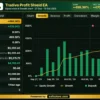
Profit Performance Verified by MyFxBook
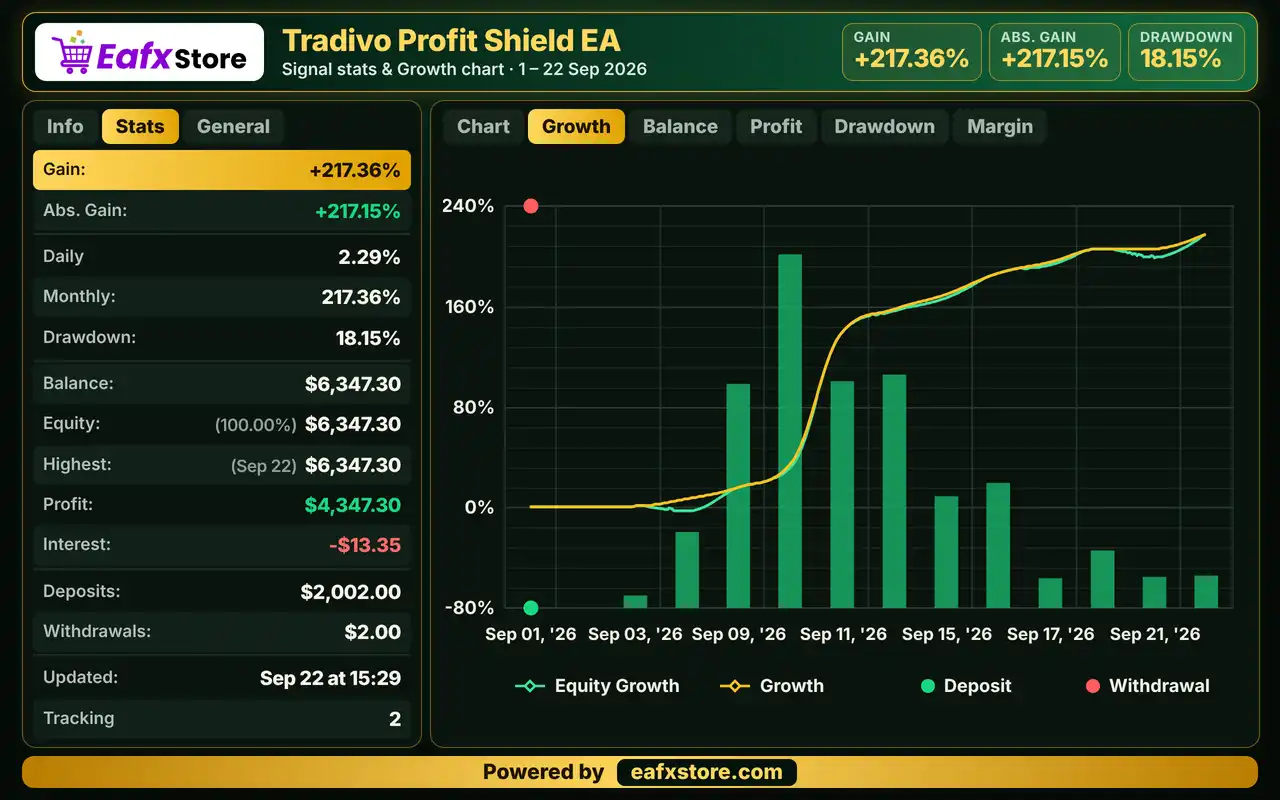
✅ The EA trades XAUUSD (Gold). The Myfxbook report covers September 1–22, 2026, showing a gain of 217.36%, net profit of $4,347.30, and maximum drawdown of 18.15% during the displayed period.
Tradivo Profit Shield EA Myfxbook Results
| Parameter | Results |
|---|---|
| Trading Symbol | XAUUSD |
| Testing Period | Sep 1–22, 2026 |
| Gain | +217.36% |
| Balance / Equity | $6,347.30 |
| Net Profit | $4,347.30 |
| Maximum Drawdown | 18.15% |
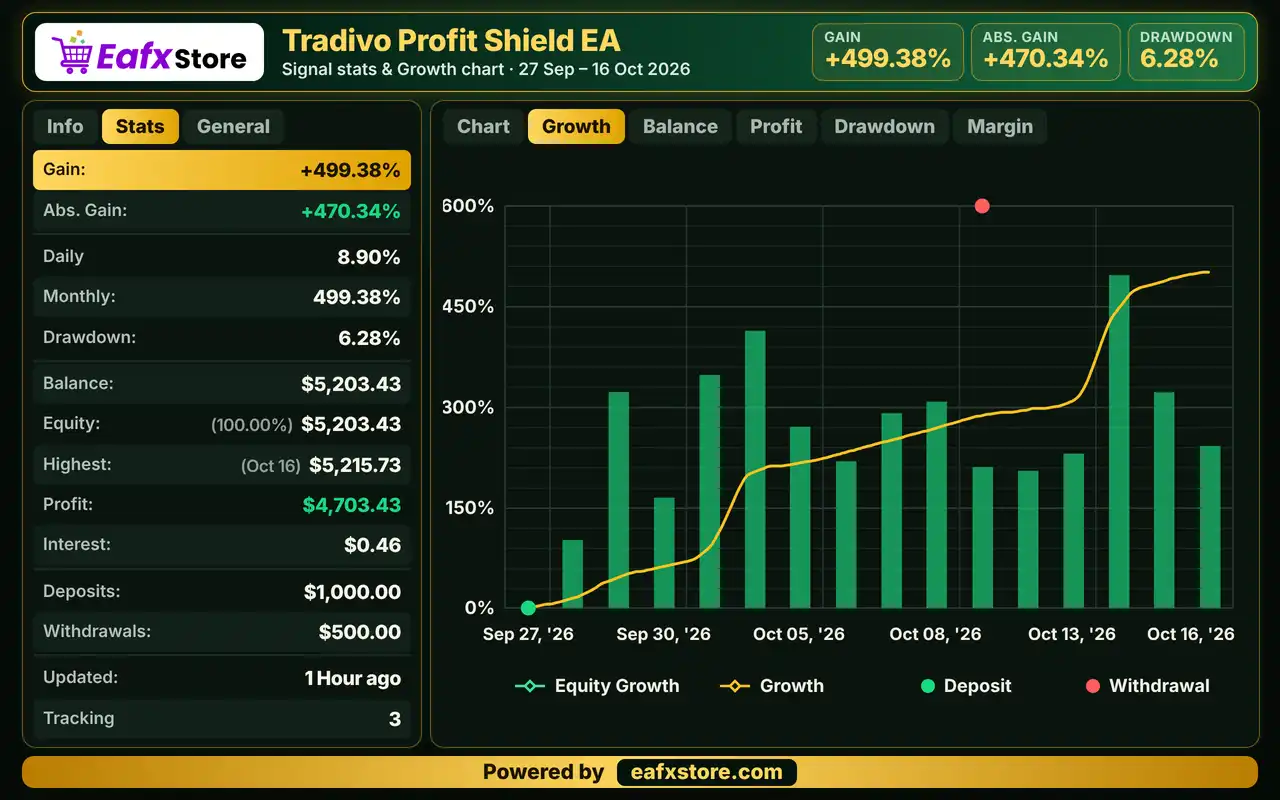
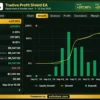
✅ The EA trades XAUUSD (Gold). The Myfxbook report covers September 27–October 16, 2026, recording a gain of 499.38%, net profit of $4,703.43, and maximum drawdown of 6.28%.
Tradivo Profit Shield EA MT5 Myfxbook Results
| Parameter | Results |
|---|---|
| Trading Symbol | XAUUSD |
| Testing Period | Sep 27 – Oct 16, 2026 |
| Gain | +499.38% |
| Balance / Equity | $5,203.43 |
| Net Profit | $4,703.43 |
| Maximum Drawdown | 6.28% |
Historical Trading Results Performance
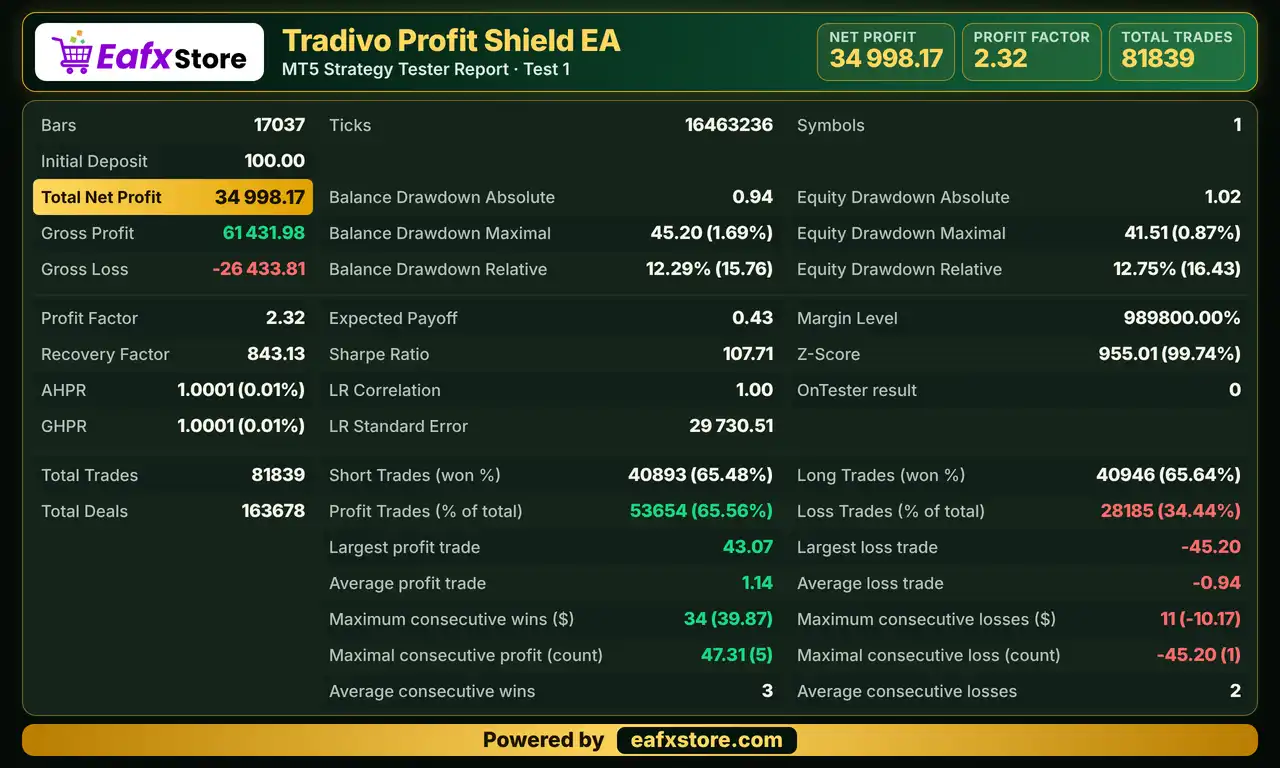
✅ Tradivo Profit Shield EA was backtested on XAUUSD (Gold). The report shows a net profit of $34,998.17 from an initial deposit of $100, across 81,839 trades.
Tradivo Profit Shield EA MT5 Backtest Results
| Parameter | Results |
|---|---|
| Trading Symbol | XAUUSD |
| Initial Deposit | $100 |
| Total Net Profit | $34,998.17 |
| Profit Factor | 2.32 |
| Maximum Equity Drawdown | 0.87% |
| Total Trades | 81,839 |
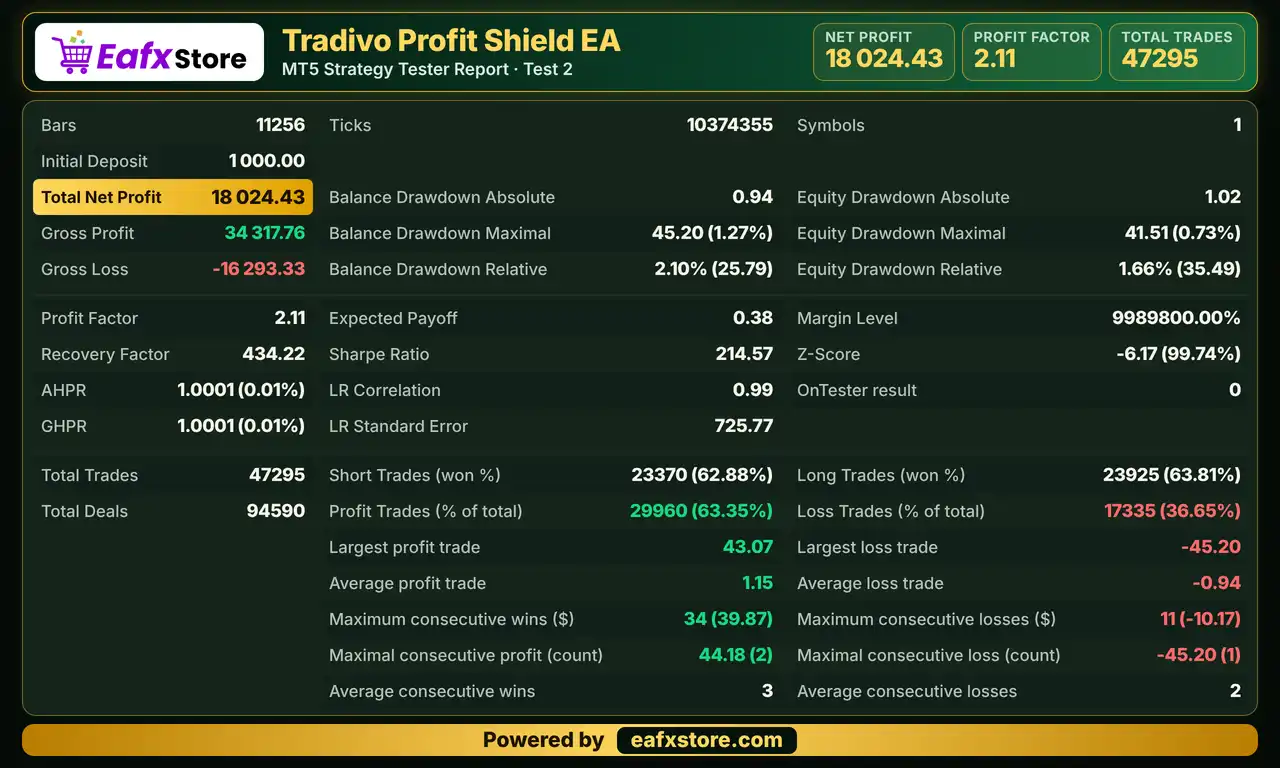
✅ Tradivo Profit Shield EA was backtested on XAUUSD (Gold), generating a net profit of $18,024.43 from a $1,000 initial deposit across 47,295 trades.
Tradivo Profit Shield EA Backtest Results
| Parameter | Results |
|---|---|
| Trading Symbol | XAUUSD |
| Initial Deposit | $1,000 |
| Total Net Profit | $18,024.43 |
| Profit Factor | 2.11 |
| Maximum Equity Drawdown | 0.73% |
| Total Trades | 47,295 |
Key Features of Tradivo Profit Shield EA MT5
Buy and Sell Switches
Buy side and sell side trading can be turned on or off separately, together with a master switch for all trading activity.
Order and Position Safety Cap
A combined limit on pending orders and open positions stops the EA from piling up too many orders at the same time.
ATR Adaptive Distances
Entry distance and stop reference can scale with ATR, with a hard ceiling that keeps the distances from growing past a safe level.
Adaptive Trailing Speed
The trailing offset reacts to price speed, tightening in fast moves and widening in slow or choppy conditions, with smoothing for noise.
Momentum Ride Option
During strong directional moves the trail can widen, which gives winning trades more room before the stop is reached.
Execution Safeguards
A spread check, a price deviation limit, a minimum change before stop updates and retry attempts help orders go through cleanly.
Risk Management
Pending Orders Can Trigger in Noise
Stop orders on both sides can be hit by quick spikes, so a trade may open and reverse soon after entry.
A Stop Loss Can Still Slip
Gaps and fast moves can pass the stop-loss level, so the real loss can be larger than the planned one.
A Wide Trail Gives Back Profit
Widening the trail in strong moves gives price room, but it can also return part of the gain when the move ends.
Basket Closing Can Cut a Trade Short
A fixed close at a floating level may act before the take-profit idea of a trade has time to play out.
The Daily Limit Only Counts Realized Results
Floating losses can grow before the limit acts, so the lot size and the order cap matter just as much.
What Sets It Apart
Speed Aware Trailing
The trailing offset follows price speed, which is less common than a trail with one fixed distance.
Momentum Widening
Strong moves can widen the trail instead of tightening it, which aims to avoid early exits in a good trend.
Daily Circuit Breaker
A limit on daily realized results gives a built in way to stop trading once the target is reached.
Careful Execution
Retries, a deviation limit and a spread check show attention to the practical side of sending orders.
Who Should Use Tradivo Profit Shield EA MT5?
Breakout Traders
People who like pending stop orders on both sides of a reference price and a trailing stop that adapts.
Careful Testers
Users who will check units, spread limits and the basket option on a demo account before using real money.
Daily Target Followers
Traders who want trading to pause after a daily profit limit and who value order count limits.
Not for Traders Who
Want a fully described strategy, a published track record or a guaranteed profit from an automated system.
Recommended Trading Conditions
For the best performance, the developer recommends:
| Features | Type |
|---|---|
| Trading platform | MetaTrader 5 (MT5) |
| Time frames | M1 |
| Currency pairs | XAUUSD (Gold) |
| Minimum / Recommended deposit | $500+ |
| Minimum / Recommended leverage | Any |
| Account type | Any |
| Additional services | Unlock and Decompile |
| Recommended brokers | Exness Broker, Icmarkets Broker |
| Recommended VPS | MyfxVPS.com (Blue VPS, Golden VPS). Lowest Latency, 2 week Free Trial, 100% Free for 12-18 Months. |
Product Download Package?
The download package of the product suite includes:
Experts
 Tradivo Profit Shield EA.ex5
SetFiles
Gold_Profit Shield.set
Gold_Profit Shield News.set
 Reviewed by David Easton
Final Verdict
Tradivo Profit Shield EA MT5 places pending stop orders on both sides of a reference price and manages open trades with an adaptive trailing stop that reacts to price speed and can widen in strong moves. A daily realized result limit, an order count cap, spread checks and retry logic add safety. The product information covers settings only, the symbol is not named, the basket close is experimental and no results are published, so a careful demo test on a small lot should come before any live trading.
🔢 Tradivo Profit Shield EA MT5 Settings: Complete Inputs Explained
Tradivo Profit Shield EA is an automated trading Expert Advisor designed with configurable buy and sell controls, pending-order management, adaptive trailing stops, momentum-based trade management, and daily profit protection. Its input parameters provide control over lot sizing, entry distances, stop-loss behavior, execution safety, and floating profit or loss thresholds.
The EA also includes an ATR-based reference framework, adaptive trailing speed adjustments, retry mechanisms for order execution, and license verification settings. Understanding these parameters helps traders configure the system according to their trading strategy, broker conditions, and risk-management requirements.
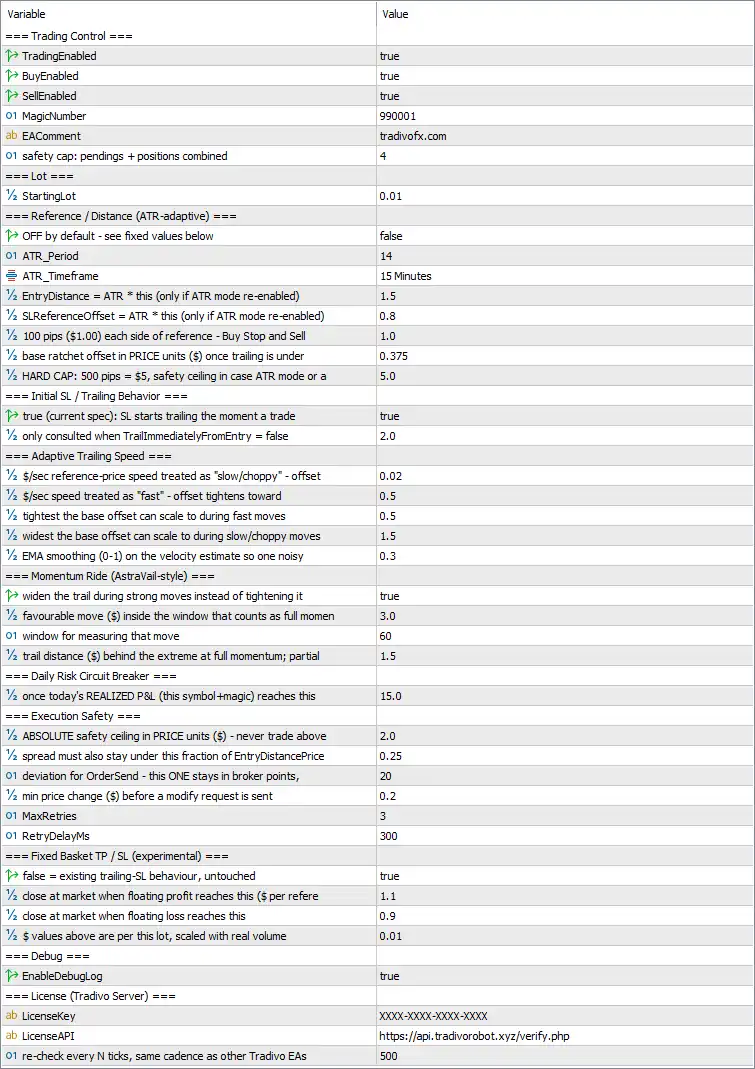
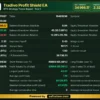
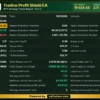
Tradivo Profit Shield EA MT5 Settings Panel
⚙️ Trading Control Settings
🔹 TradingEnabled = true — Enables the EA’s trading functionality. When set to true, the EA can execute its configured trading operations, subject to the remaining conditions and safety controls.
🔹 BuyEnabled = true — Enables buy-side trading, allowing the EA to place or manage buy orders when its entry conditions are satisfied.
🔹 SellEnabled = true — Enables sell-side trading, allowing the EA to place or manage sell orders when its entry conditions are satisfied.
🔹 MagicNumber = 990001 — Assigns the unique identifier 990001 to trades managed by the EA. This helps distinguish its positions from trades opened by other EAs or manual trading.
🔹 EAComment = tradivofx.com — Sets the comment associated with EA orders or positions to tradivofx.com, helping identify the source of trades in the trading terminal.
🔹 safety cap: pendings + positions combined = 4 — Limits the combined number of pending orders and open positions covered by this safety control to 4, helping prevent excessive order accumulation.
⚙️ Lot Size Settings
🔹 StartingLot = 0.01 — Sets the starting trade volume to 0.01 lots. The actual monetary exposure depends on the traded instrument, contract specifications, leverage, and broker conditions.
⚙️ Reference and Distance Settings (ATR-Adaptive)
🔹 OFF by default – see fixed values below = false — The setting is currently false, meaning the fixed-distance mode is not selected through this switch. The EA’s exact operating mode depends on how the remaining reference and distance parameters are implemented.
🔹 ATR_Period = 14 — Sets the Average True Range calculation period to 14 bars. ATR measures market volatility and can be used to adjust reference distances according to changing price movement.
🔹 ATR_Timeframe = 15 Minutes — Specifies the 15-minute timeframe for ATR calculations, even if trading or chart analysis takes place on another timeframe.
🔹 EntryDistance = ATR * this (only if ATR mode re-enabled) = 1.5 — Defines an ATR-based entry-distance multiplier of 1.5 when ATR mode is re-enabled. The resulting distance would depend on the ATR value and the EA’s price-unit conversion.
🔹 SLReferenceOffset = ATR * this (only if ATR mode re-enabled) = 0.8 — Sets the ATR-based stop-loss reference offset multiplier to 0.8 when ATR mode is re-enabled. This determines the reference offset relative to the calculated ATR value.
🔹 100 pips ($1.00) each side of reference – Buy Stop and Sell = 1.0 — Sets the fixed reference distance using the displayed price convention of 100 pips = $1.00. The configured value is 1.0, associated with the Buy Stop and Sell Stop reference distances as described by the parameter label.
🔹 base ratchet offset in PRICE units ($) once trailing is under = 0.375 — Sets the base trailing ratchet offset to 0.375 price units. This defines the baseline offset used by the trailing mechanism once its trailing conditions are active.
🔹 HARD CAP: 500 pips = $5, safety ceiling in case ATR mode = 5.0 — Establishes a hard distance ceiling of 5.0 price units, corresponding to the displayed convention of 500 pips = $5. It acts as a safety limit when ATR-based distance logic is used.
⚙️ Initial Stop-Loss and Trailing Behavior
🔹 true (current spec): SL starts trailing the moment a trade = true — Enables the configured behavior in which stop-loss trailing starts as soon as a trade is opened, rather than waiting for a separate profit threshold.
🔹 only consulted when TrailImmediatelyFromEntry = false = 2.0 — Sets a secondary trailing-related threshold to 2.0. According to the parameter label, this value is only consulted when TrailImmediatelyFromEntry is false; its precise operational meaning depends on the EA’s implementation.
⚙️ Adaptive Trailing Speed Settings
🔹 $ / sec reference-price speed treated as ‘slow/choppy’ – offset = 0.02 — Defines a reference price-speed threshold of 0.02 price units per second for identifying slow or choppy market movement. This threshold helps determine how the adaptive trailing logic should respond to slower price changes.
🔹 $ / sec speed treated as ‘fast’ – offset tightens toward = 0.5 — Sets the fast-movement reference speed to 0.5 price units per second. The trailing offset is designed to move toward the configured tighter offset when price velocity reaches the fast-movement region.
🔹 tightest the base offset can scale to during fast moves = 0.5 — Sets the minimum scaling factor for the base trailing offset during fast market movements to 0.5, allowing the offset to tighten relative to its base value.
🔹 widest the base offset can scale to during slow/choppy moves = 1.5 — Sets the maximum scaling factor to 1.5 during slow or choppy conditions, allowing a wider trailing offset when price movement is less decisive.
🔹 EMA smoothing (0-1) on the velocity estimate so one noisy = 0.3 — Sets the velocity-estimate smoothing factor to 0.3. This parameter controls the degree of smoothing applied to the estimated price speed, helping reduce the influence of short-lived fluctuations.
⚙️ Momentum Ride (AstraVail-Style) Settings
🔹 widen the trail during strong moves instead of tightening it = true — Enables the option to widen the trailing distance during strong directional price movements rather than automatically tightening it. This may allow trades more room to continue moving favorably before the stop is reached.
🔹 favourable move ($) inside the window that counts as full momentum = 3.0 — Sets the favorable price movement threshold to $3.0 for recognizing full momentum within the configured measurement window. The actual monetary effect depends on the traded instrument and position volume.
🔹 window for measuring that move = 60 — Sets the momentum measurement window to 60 units, likely representing seconds based on the surrounding speed-related settings. The exact unit should be confirmed against the EA’s implementation.
🔹 trail distance ($) behind the extreme at full momentum; partial = 1.5 — Sets the trailing distance behind the favorable price extreme to 1.5 price units when full momentum is detected, as described by the parameter label. The precise behavior during partial momentum depends on the EA’s internal logic.
⚙️ Daily Risk Circuit Breaker
🔹 once today’s REALIZED P&L (this symbol+magic) reaches this = 15.0 — Sets the daily realized profit-and-loss threshold to 15.0. The label indicates that the circuit breaker evaluates realized P&L for the current symbol and Magic Number; the exact action triggered at the threshold should be verified in the EA’s implementation.
⚙️ Execution Safety Settings
🔹 ABSOLUTE safety ceiling in PRICE units ($) – never trade above = 2.0 — Sets an absolute price-distance ceiling of 2.0 price units. The label describes this as a limit that the EA should not exceed when placing trades or calculating relevant distances.
🔹 spread must also stay under this fraction of EntryDistance = 0.25 — Requires the spread to remain below 25% of the configured EntryDistance for the relevant execution check to pass. This helps prevent entries when transaction costs are too large relative to the intended entry distance.
🔹 deviation for OrderSend – this ONE stays in broker points = 20 — Sets the permitted order-price deviation to 20 broker points. The actual price difference represented by these points depends on the symbol’s digits and broker specifications.
🔹 min price change ($) before a modify request is sent = 0.2 — Sets the minimum price change required before the EA sends a modification request to 0.2 price units. This can reduce unnecessary stop-loss modification requests.
🔹 MaxRetries = 3 — Allows up to 3 retry attempts for supported operations when an order request or modification encounters a recoverable execution issue.
🔹 RetryDelayMs = 300 — Sets the delay between retry attempts to 300 milliseconds, equivalent to 0.3 seconds.
⚙️ Fixed Basket TP/SL Settings (Experimental)
🔹 false = existing trailing-SL behaviour, untouched = true — The current value is true, despite the descriptive label associating false with preserving existing trailing-stop behavior. This appears to enable the experimental fixed basket TP/SL functionality, but the exact effect should be confirmed through testing because the label is phrased ambiguously.
🔹 close at market when floating profit reaches this ($ per reference) = 1.1 — Sets the floating-profit threshold to 1.1 per reference unit, as described by the parameter label. When the corresponding condition is satisfied, the EA may close positions at market if this feature is enabled.
🔹 close at market when floating loss reaches this = 0.9 — Sets the floating-loss threshold to 0.9. The label indicates a market-close condition when floating losses reach the configured level, subject to the EA’s basket management logic.
🔹 $ values above are per this lot, scaled with real volume = 0.01 — Defines the reference lot volume as 0.01 lots for scaling the floating-profit and floating-loss thresholds. The resulting thresholds may change with actual trade volume according to the EA’s implementation.
⚙️ Debug Settings
🔹 EnableDebugLog = true — Enables debug logging. This can help record diagnostic information about the EA’s decisions, trading operations, and potential execution problems, depending on the logging functionality provided.
🔢 Conclusion
The Tradivo Profit Shield EA MT5 inputs combine entry-distance controls, immediate stop-loss trailing, adaptive price-velocity management, momentum-based trailing adjustments, execution safeguards, and daily realized-P&L monitoring. Its default configuration enables both buy and sell trading, uses a starting lot of 0.01, caps the combined pending orders and positions at 4, and sets a daily realized-P&L threshold of 15.0.
Before live deployment, particular attention should be given to the experimental fixed basket TP/SL switch, the relationship between the fixed and ATR-based distance modes, and the units used for price-distance thresholds. The displayed labels alone cannot establish the exact implementation of every parameter. Testing in the MT5 Strategy Tester and on a demo account can help verify order behavior, trailing-stop updates, daily circuit-breaker actions, and broker-specific execution conditions. No configuration can guarantee profits or eliminate trading risk.
User Reviews
Only logged in customers who have purchased this product may leave a review.
❓ What is Tradivo Profit Shield EA MT5?
An Expert Advisor for MetaTrader 5 that uses pending stop orders, an adaptive trailing stop, a daily profit limit and execution safety checks.
❓ How does Tradivo Profit Shield EA MT5 enter trades?
It places buy stop and sell stop orders on each side of a reference price, using ATR based or fixed distances.
❓ How does the trailing stop work in Tradivo Profit Shield EA MT5?
The stop can trail from entry, and its offset tightens in fast moves and widens in slow or choppy conditions.
❓ What is the momentum option in Tradivo Profit Shield EA MT5?
It widens the trail during strong directional moves, which gives a trade more room instead of tightening the stop.
❓ Does Tradivo Profit Shield EA MT5 have a daily limit?
Yes. A circuit breaker watches the realized result of the day for the symbol, and the action at the limit should be verified in testing.
❓ Can Tradivo Profit Shield EA MT5 trade only one direction?
Yes. Buy side and sell side trading have separate switches, so either direction can be turned off.
❓ Does Tradivo Profit Shield EA MT5 limit the number of orders?
Yes. A safety cap limits the combined number of pending orders and open positions.
❓ Does Tradivo Profit Shield EA MT5 use ATR?
Yes, as an option. Entry distance and the stop reference can scale with ATR, or fixed distances can be used instead.
❓ Which symbol suits Tradivo Profit Shield EA MT5?
The product information does not name a symbol. Distances are given in price units, so the symbol should be tested on demo first.
❓ Is Tradivo Profit Shield EA MT5 a grid or martingale EA?
The product information describes no grid or martingale logic. A demo test helps confirm this before real money is used.
🔥 Get This EA for FREE with Our Membership! 🚀🚀
Unlock access to this EA, premium Indicators, and exclusive trading tools completely FREE with any of our Membership Plans! Thousands of traders already benefit from our VIP library—join them and level up your trading instantly. Choose Your Membership:
- SPECIAL – 1 Month Membership
- GOLD – 1 Year Membership
- PREMIUM – 1 Year Membership
-
 Original price was: $999.00.$89.00Current price is: $89.00.
 -
 Original price was: $3,000.00.$89.00Current price is: $89.00.
 -
 Original price was: $1,400.00.$89.00Current price is: $89.00.
 -
 Original price was: $1,300.00.$89.00Current price is: $89.00.
-
 1Original price was: $11,000.00.$89.00Current price is: $89.00.
 -
 1Original price was: $599.00.$59.00Current price is: $59.00.
 -
 10Original price was: $2,100.00.$69.00Current price is: $69.00.
 -
 3Original price was: $499.00.$59.00Current price is: $59.00.
There are no reviews yet.